Overview

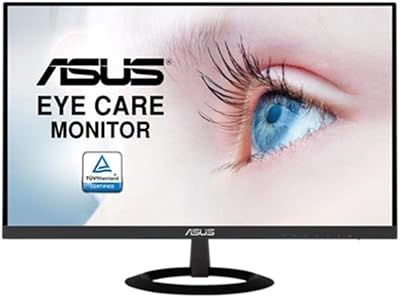
The ASUS VP229Q 21.5-inch IPS Monitor is a straightforward, no-nonsense display aimed squarely at home office workers and students who want decent image quality without breaking the bank. At 21.5 inches, it fits comfortably on most desks without dominating the workspace — a practical sweet spot for single-screen setups in tighter rooms. The frameless three-sided design is a genuine bonus at this price, making it easy to pair with a second screen if you ever expand. ASUS has a long track record in the monitor space, and this model carries that reliability forward. It's not flashy, but it delivers where everyday users actually need it.
Features & Benefits

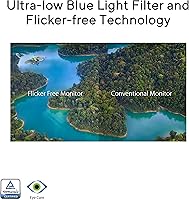
The IPS panel is the headline feature here. With 178-degree viewing angles, colors stay accurate whether you're sitting dead-center or glancing at the screen from a sharp angle — genuinely useful in shared workspaces. The 75Hz refresh rate, paired with FreeSync and Adaptive-Sync support, noticeably smooths out everyday scrolling and video playback; it also helps in casual gaming, though competitive players will want to look elsewhere. Port options are unusually generous for this tier: HDMI 1.4, DisplayPort 1.2, and VGA mean you can connect practically any device. The Eye Care suite, TÜV Rheinland-certified for both flicker-free operation and low blue light output, makes longer working sessions noticeably less taxing on the eyes.

Best For

This ASUS monitor is a natural fit for remote workers and students who spend long hours in front of a screen and need something dependable without a steep price tag. If you're coming from an older TN panel, the color reproduction improvement will be immediately noticeable. It's also a reasonable pick for casual gamers — think strategy games, RPGs, or any genre where split-second reaction time isn't life or death. The VESA mount support is a quiet but practical feature: wall-mounting this 21.5-inch IPS display frees up meaningful desk real estate. Anyone building a dual-monitor home office setup on a budget should also take a close look, thanks to that slim frameless border.

User Feedback

Across a wide pool of owner reviews, color accuracy and wide viewing angles consistently earn praise — particularly from users who previously owned budget TN monitors and were surprised by the difference. People who work long hours report that the eye care features hold up well in practice; fewer headaches and less end-of-day strain come up repeatedly. On the downside, the stand is a common sticking point: it adjusts for tilt only, with no height or swivel options, which matters if your desk setup requires more ergonomic flexibility. The built-in speakers cover the basics but won't replace even a modest pair of external speakers. Overall, minor ergonomic gripes aside, most buyers seem genuinely satisfied with what the VP229Q delivers.

Pros

  • IPS panel delivers accurate, consistent color that holds up even when viewing from a sharp angle.
  • TÜV Rheinland-certified flicker-free and low blue light operation makes long workdays noticeably less taxing on the eyes.
  • 75Hz refresh rate with FreeSync and Adaptive-Sync visibly reduces screen tearing during everyday use and casual gaming.
  • Three-port connectivity — HDMI, DisplayPort, and VGA — supports both legacy and modern devices without adapters.
  • Slim three-sided frameless design makes it easy to set up a tight, clean dual-monitor configuration.
  • VESA mount compatibility opens the door to full ergonomic control via a third-party arm at modest extra cost.
  • The 21.5-inch footprint is compact enough for small desks without feeling cramped for daily productivity tasks.
  • ASUS brand reliability means fewer concerns about longevity or dead-on-arrival panel issues compared to lesser-known alternatives.
  • At this price tier, the feature-to-cost ratio is difficult to beat for a genuine IPS display with adaptive sync.

Cons

  • The stand only tilts — no height adjustment or swivel means many users will need a separate monitor arm.
  • 1080p resolution starts to show its age for close-range design, photo editing, or fine detail work.
  • HDMI port is version 1.4 only, limiting bandwidth and reducing future-proofing compared to newer standards.
  • No USB ports or hub functionality on the monitor itself, which adds cable clutter to desk-heavy setups.
  • Built-in speakers are too thin and bass-free to serve as a real audio solution for media or music.
  • OSD navigation buttons are on the rear underside with no visible labeling, making menu access awkward in practice.
  • Maximum brightness can feel insufficient in rooms with strong ambient light or direct sunlight exposure.
  • No USB-C input means users with modern laptops will need a separate adapter or cable to connect cleanly.
  • The matte plastic stand base scuffs and shows wear relatively quickly with regular repositioning.

Ratings

The ASUS VP229Q 21.5-inch IPS Monitor has been evaluated using AI analysis of verified global user reviews, with spam, bot-submitted, and incentivized feedback actively filtered out to ensure the scores reflect genuine buyer experiences. This monitor earns strong marks in several key areas, though a few real-world shortcomings keep it from a perfect run — and both sides are reflected honestly in the categories below.
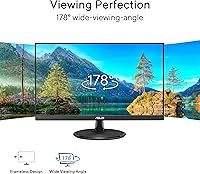
Image Quality
83%
Most owners coming from older TN panels are genuinely impressed by the color accuracy and consistency this IPS panel delivers. Whites look clean, and everyday content — documents, photos, web browsing — renders with a natural, pleasing tone that holds up well across varied lighting conditions.
At full HD on a 21.5-inch screen, pixel density is adequate but not sharp by modern standards. Users doing detailed photo editing or fine design work may find themselves wanting higher resolution, as the 1080p ceiling becomes noticeable at close viewing distances.
Viewing Angles
88%
The 178-degree IPS viewing angles are one of the most praised aspects in user feedback. Colors and brightness stay consistent even when viewing from a significant angle, which makes it genuinely practical for shared desks, side-by-side screen setups, or rooms where the monitor is not always directly in front of you.
While the wide angles are reliable, some users note a slight brightness shift when viewing from extreme off-angles in darker room conditions. It is a minor issue that only surfaces in specific setups, but it is worth noting for anyone planning unconventional monitor placement.
Eye Comfort & Fatigue Reduction
86%
The TÜV Rheinland-certified flicker-free backlight and low blue light filter are not just marketing labels — users who work eight or more hours daily consistently report reduced end-of-day eye strain compared to previous monitors. The difference is subtle at first but compounds positively over weeks of daily use.
The low blue light mode does introduce a mild warm color cast, which some users find bothersome during color-sensitive tasks. It is not severe, but buyers who need accurate color rendering throughout the day may need to toggle between modes more often than expected.
Refresh Rate & Smoothness
74%
26%
The step up from 60Hz to 75Hz is small on paper but perceptible in practice, especially during casual gaming and fast-scrolling web pages. FreeSync and Adaptive-Sync support both work reliably, eliminating the screen tearing that plagues standard 60Hz displays when paired with compatible graphics cards.
This is firmly a casual-use refresh rate. Competitive gamers or anyone who plays fast-paced shooters or racing titles will feel the ceiling quickly. The VP229Q was not built for high-frame-rate gaming, and users who expect otherwise tend to be disappointed.
Connectivity & Port Variety
87%
Having HDMI 1.4, DisplayPort 1.2, and VGA all on a monitor at this price tier is genuinely useful. It means users can connect a modern laptop via DisplayPort while keeping an older desktop plugged into VGA simultaneously — a real convenience in mixed-hardware home office setups.
HDMI is version 1.4 rather than 2.0, which caps bandwidth and limits options slightly for future-proofing. There are also no USB ports or pass-through hub features, which would have meaningfully improved the desk setup convenience for cable-heavy users.
Stand & Ergonomics
51%
49%
The stand is stable and the tilt adjustment works smoothly, which covers the most basic ergonomic need. For users whose desk height already puts the screen at roughly eye level, the fixed height is a non-issue and the overall footprint is compact enough not to crowd the workspace.
Tilt is the only adjustment available — there is no height raise, swivel, or pivot. This is the single most cited complaint across user reviews, and rightly so. Taller users or those with specific ergonomic needs will almost certainly need to buy a separate monitor arm, adding cost and complexity.
Build Quality & Design
79%
21%
The three-sided frameless design looks considerably more refined than the price tag suggests. Bezels are slim and consistent, and the overall construction feels solid without any noticeable flex or cheap plastic creaking. It presents well on a desk and holds up to daily handling without issues.
The rear of the monitor has a fairly utilitarian look with visible cable routing areas. The stand base, while stable, is made of plastic that scuffs somewhat easily. Nothing here is a dealbreaker, but the materials reveal the budget positioning on closer inspection.
Built-in Speakers
47%
53%
The 1.5-watt stereo speakers handle video calls and background music at low volumes without distortion. For a quick conference call or occasional YouTube clip when external speakers are not available, they do the job adequately and save desk space in minimal setups.
Audio quality is thin and lacks any meaningful bass response, which makes movies or music genuinely unpleasant at higher volumes. Most users treat them as a fallback option rather than a primary audio source — anyone serious about audio will be reaching for external speakers almost immediately.
Value for Money
89%
At its price point, the combination of an IPS panel, 75Hz refresh, adaptive sync, and eye care certification is difficult to match from competing brands. Buyers who do their research consistently acknowledge that the VP229Q punches above its weight in terms of the feature-to-cost ratio for home office use.
The value equation does soften slightly when you factor in the cost of a third-party monitor arm to compensate for the stand limitations. If that purchase becomes necessary, the effective cost rises, narrowing the gap between this and slightly pricier monitors that include better ergonomic stands from the box.
Setup & Installation
82%
18%
Assembly takes under ten minutes with no tools required, and the port labeling on the rear panel is clear enough that most users are up and running without consulting the manual. Display drivers are not required for basic use, making it genuinely plug-and-play across Windows and macOS systems.
The cable management options built into the stand are minimal, which can leave a tangle of cords visible at the rear of the desk. The included cables cover basic connections, but the documentation could be more thorough for users who want to configure the OSD for custom color profiles.
OSD & Menu Usability
63%
37%
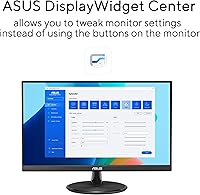
The on-screen display covers all the essential adjustments — brightness, contrast, color temperature, and blue light filter levels — and the Eye Care presets are easy to cycle through without diving deep into menus. For most users, a few minutes of initial calibration is all that is needed.
The physical OSD buttons are located on the underside rear of the monitor and are not labeled on the face, making blind navigation frustrating until you memorize the layout. Several users mention accidentally triggering the wrong setting while making simple adjustments in dim lighting.
Multi-Monitor Compatibility
81%
19%
The slim frameless borders on three sides make side-by-side dual-monitor configurations look noticeably cleaner than monitors with thicker bezels. The thin profile also helps minimize the visual gap between screens, which matters for productivity users who treat a dual setup as one continuous workspace.
The fixed-height stand makes aligning two VP229Q units at exactly the same height dependent on the desk surface being perfectly level. Without a monitor arm, achieving a flush dual-monitor arrangement can require improvised solutions like small risers, which undermines the otherwise clean aesthetic.
VESA Mount Compatibility
84%
VESA compatibility at this price is a real practical bonus. Users who wall-mount or use third-party arms gain full height, tilt, and swivel control that the stock stand lacks entirely, effectively turning the stand limitation into a non-issue for buyers who plan ahead.
The VESA adapter plate is not included in the box, meaning users need to source their own mounting hardware. The monitor also needs to be carefully supported during the stand removal process, as the hinge design is not the most intuitive to detach safely without a second pair of hands.
Brightness & Glare Handling
71%
29%
The flat matte screen surface handles overhead lighting and window glare reasonably well, reducing reflections that would be distracting on a glossy panel. In a typical home office environment with indirect lighting, the screen stays readable and comfortable throughout the day.
The maximum brightness level is adequate for indoor use but falls short in rooms with direct sunlight or very bright ambient lighting. Users working near large windows during peak daylight hours may need to reposition the monitor or use blinds to keep the image from washing out.

Suitable for:

The ASUS VP229Q 21.5-inch IPS Monitor is a strong fit for anyone who spends long hours at a desk and wants reliable, easy-on-the-eyes performance without a premium price tag. Remote workers and students are the most natural audience — the IPS panel delivers consistent, accurate color for document work, video calls, and research, while the TÜV Rheinland-certified eye care features help reduce fatigue during extended sessions. People upgrading from an older TN panel will notice an immediate improvement in color depth and off-angle readability, making the VP229Q feel like a meaningful step up. The compact 21.5-inch footprint and slim frameless borders also make it a smart pick for smaller desks or anyone building a clean dual-monitor setup on a budget. And if you plan to wall-mount or use a monitor arm, the VESA compatibility means you can bypass the stand limitations entirely and get full ergonomic flexibility for little additional cost.

Not suitable for:

The ASUS VP229Q 21.5-inch IPS Monitor is not the right call for buyers who have specific ergonomic requirements and expect the included stand to meet them — it only tilts, with no height adjustment or swivel, which is a real limitation for taller users or those with pre-existing neck and posture concerns. Competitive gamers who need 144Hz or higher refresh rates will find the 75Hz ceiling frustrating, and the 1080p resolution, while perfectly fine for general use, will feel limiting to anyone doing detailed photo retouching, vector design, or video grading at close range. Users who want a single-cable desktop audio solution should also temper expectations, as the built-in speakers are barely adequate for background use and fall well short for anything resembling an immersive media experience. If your workflow demands future-proof connectivity — USB-C input, built-in USB hub, or HDMI 2.0 for higher bandwidth — this monitor does not offer any of those, and you will likely feel those gaps within a year or two as hardware evolves.
Specifications

  • Screen Size: The display measures 21.5 inches diagonally, offering a practical workspace footprint without overwhelming a standard desk.
  • Panel Type: Uses an IPS (In-Plane Switching) panel, which provides consistent color accuracy and wide viewing angles compared to TN alternatives.
  • Resolution: Native resolution is 1920 x 1080 (Full HD), displayed at a 16:9 aspect ratio on a flat screen surface.
  • Refresh Rate: Supports a maximum refresh rate of 75Hz, a step above the standard 60Hz found on most entry-level displays.
  • Sync Technology: Compatible with both AMD FreeSync and NVIDIA Adaptive-Sync to reduce screen tearing during video playback and casual gaming.
  • Viewing Angles: IPS panel delivers 178-degree horizontal and vertical viewing angles, maintaining color fidelity across a wide range of positions.
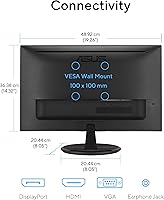
  • Connectivity: Rear ports include one HDMI 1.4, one DisplayPort 1.2, and one VGA input, covering both legacy and current-generation devices.
  • Built-in Audio: Integrated 1.5-watt stereo speakers are included for basic audio output without requiring external speakers in casual-use scenarios.
  • Eye Care: TÜV Rheinland-certified flicker-free backlight and low blue light filter are built in to reduce visual discomfort during extended screen time.
  • Design: Three-sided frameless construction minimizes border width on the top and both sides, supporting tighter multi-monitor arrangements.
  • VESA Support: The monitor is VESA wall-mountable, allowing users to attach a compatible third-party arm or wall bracket for flexible positioning.
  • Stand Adjustment: The included stand supports tilt adjustment only; height raise, swivel, and pivot adjustments are not available on the stock stand.
  • Dimensions: Physical dimensions with stand measure 14.29 x 21.5 x 7.83 inches (L x W x H), keeping the overall profile compact.
  • Weight: The monitor weighs 6.6 pounds with the stand attached, making it manageable for repositioning or mounting by a single person.
  • Screen Surface: The panel uses a flat matte surface finish that reduces glare and reflection under typical indoor lighting conditions.
  • Backlight Type: LED backlighting is used to power the display, contributing to the slim profile and energy-efficient operation.
  • NVIDIA Compatibility: Adaptive-Sync is confirmed compatible with NVIDIA GeForce GTX 10 series, GTX 16 series, RTX 20 series, and newer graphics cards.
  • Color Augmentation: ASUS Eye Care includes a Color Augmentation mode designed to improve color differentiation for users with color vision sensitivities.

Related Reviews
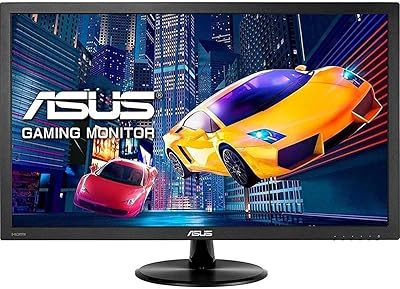
ASUS VP228HE 21.5-inch Gaming Monitor
84%
91%
Display Quality
89%
Gaming Performance
92%
Value for Money
85%
Build Quality
88%
Response Time
More
Acer SB220Q 21.5-inch IPS Monitor
72%
84%
Image & Color Quality
88%
Value for Money
83%
Viewing Angles
74%
Refresh Rate & Smoothness
67%
Response Time
More
Pisichen HD-215TS 21.5-inch Touchscreen Monitor
69%
74%
Touch Responsiveness
79%
Display Clarity
51%
Viewing Angle
88%
Setup & Plug-and-Play
62%
Build Quality
More
EPORMOT 21.5-inch 120Hz Portable Monitor
84%
87%
Display Quality
93%
Portability
89%
Setup and Ease of Use
91%
Gaming Performance (120Hz & FreeSync)
88%
Compatibility
More
Dell P2219H 21.5-inch FHD Monitor
87%
91%
Display Quality
88%
Ergonomics & Flexibility
85%
Value for Money
87%
Eye Comfort
90%
Build Quality
More
Lenovo D22e-20 21.5-inch FHD Monitor
84%
89%
Display Quality
91%
Value for Money
87%
Ergonomics
74%
Brightness
93%
Setup and Installation
More
Acer UT222Q 21.5″ Touch Monitor
73%
83%
Touch Responsiveness
76%
Display Quality
54%
Glare & Reflections
68%
Build Quality & Stand
77%
Refresh Rate & Motion Handling
More
VIEWMEI 5-inch IPS Small HDMI Monitor 1280x720
84%
94%
Portability
88%
Display Quality
91%
Setup & Usability
63%
Sound Quality
85%
Build Quality
More
UPERFECT 21.5-inch 120Hz Touchscreen Portable Monitor
75%
88%
Screen Size Impact
84%
Refresh Rate Performance
71%
Touchscreen Responsiveness
46%
Portability & Weight
79%
Image & Color Quality
More
ASUS VZ279HE 27-inch Full HD IPS Monitor
84%
92%
Value for Money
88%
Display Quality
91%
Eye Care Features
83%
Build Quality
89%
Design & Aesthetics
More

FAQ

Yes, you can connect a MacBook to the VP229Q using a USB-C to DisplayPort or USB-C to HDMI adapter, neither of which is included in the box. Once connected, it functions as a standard external display. FreeSync and Adaptive-Sync will not be active on macOS, but for everyday productivity use, the connection works reliably.

Yes, the stand detaches and the monitor has a standard VESA mount pattern on the rear, so you can attach a third-party monitor arm or wall bracket. This is actually a popular choice among buyers who want height and swivel adjustability that the stock stand does not provide. Just make sure to check that your arm is rated for the monitor weight before purchasing.

It depends on what you play. For slower-paced titles — strategy games, RPGs, simulation games — 75Hz with FreeSync makes a noticeable difference over a standard 60Hz display, and tearing is well controlled. If you play competitive first-person shooters or fast-paced racing games where high frame rates matter, this monitor will feel limiting. It was not designed with competitive gaming in mind.

Enabling the low blue light filter introduces a warm color shift, which can make whites appear slightly yellow or orange. For general office work and reading, most users find it easy to adjust to. For color-critical tasks like photo editing or graphic design, you may want to switch back to the standard color mode, since the warm cast can throw off accurate color judgment.

Yes, VGA is one of the three input options on this monitor, so connecting an older desktop or laptop with a VGA output is straightforward using a standard VGA cable. Keep in mind that VGA is an analog signal, so image quality may be slightly softer compared to a digital connection like HDMI or DisplayPort, but for general office use the difference is minor.

Assembly is quite simple — the stand attaches to the monitor base with a single connection and typically takes under ten minutes with no tools required. Plugging in a cable and powering it on is all that is needed to get the display running, as no display drivers are required for basic use on Windows or macOS. The OSD button layout takes a little getting used to since the buttons are on the underside rear of the monitor.

No, this monitor does not include a headphone jack or dedicated audio output port. Audio is routed only through the built-in 1.5-watt stereo speakers. If you prefer headphone audio, you will need to use your computer sound card output or a separate USB audio adapter rather than relying on the monitor itself.

Yes, and the frameless three-sided design makes dual-monitor configurations look particularly clean, since the gap between the two screens is kept minimal. The main challenge is achieving identical height alignment using the stock stands, since neither stand allows height adjustment. Using matching monitor arms for both screens is the most reliable way to get them perfectly level.

Some degree of backlight inconsistency is normal on IPS panels at this price range, and a small number of users have reported minor glow in the corners when displaying dark content in a dim room. It is generally not disruptive during normal use, but if you regularly work with dark interfaces or watch films in a darkened room, it is worth being aware of.

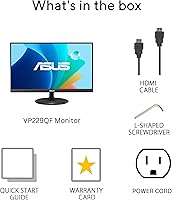
The box typically includes the monitor, the stand base and neck, a power adapter, a power cable, and a basic HDMI cable. A VGA or DisplayPort cable is usually not included, so if you plan to use one of those connections, budget for purchasing the appropriate cable separately. The documentation covers basic setup and warranty information.

Where to Buy