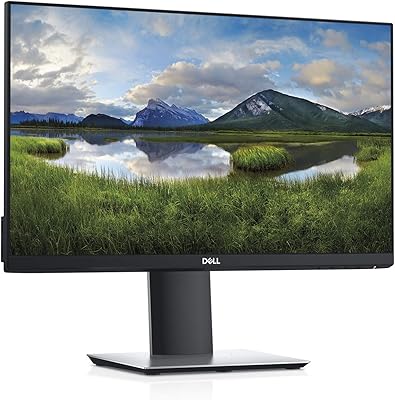
Acer SB220Q 21.5-inch IPS Monitor

Overview
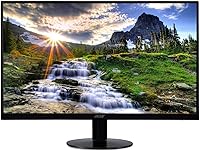
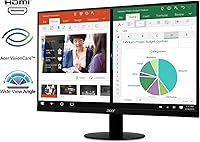
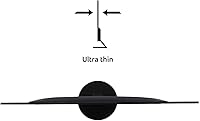
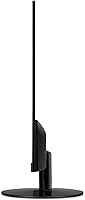
The Acer SB220Q 21.5-inch IPS Monitor sits firmly in the entry-level category, and that's not a knock — it's the point. For students, home office workers, or anyone building out a dual-monitor setup without breaking the bank, this 21.5-inch display delivers a surprisingly clean experience. IPS panels, unlike cheaper TN alternatives, reproduce colors more accurately and hold up well when viewed from an angle — genuinely useful if your desk setup isn't perfectly centered. The zero-frame chassis looks modern for the price tier. That said, go in with clear expectations: no VESA mounting, no height adjustment, and a stand that only tilts. Know what you're getting, and it's a solid pick.
Features & Benefits
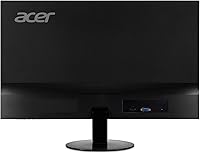
The Full HD IPS panel is the headline here, and it earns that status. At 1920x1080 across 21.5 inches, pixel density is sharp enough for text-heavy work, spreadsheets, and video streaming without noticeable softness. IPS technology means colors stay accurate from wide viewing angles — something a budget TN panel simply won't give you. Via HDMI, this slim Acer screen runs at 75Hz, a step up from the typical 60Hz that makes scrolling and window management feel noticeably smoother. AMD FreeSync helps reduce screen tearing if your GPU supports it. The 4ms response time handles everyday tasks fine, though competitive gamers should look elsewhere. One honest caveat: connectivity tops out at one HDMI and one legacy VGA port — no DisplayPort, no USB-C.
Best For
This 21.5-inch display fits a fairly specific buyer profile, and that's perfectly fine. Students furnishing a dorm room, remote workers who need a reliable secondary screen, or anyone upgrading from an older monitor will find real, immediate value here. It works particularly well as a second screen in a side-by-side arrangement — the zero-frame edge helps the overall setup feel cohesive rather than patched together. Casual gamers who prioritize color rendering over raw frame rates will get by with it, but treat that as a bonus, not the primary pitch. If you're shopping for a tight space on a tighter budget, this Acer IPS monitor is worth a serious look.
User Feedback
Buyer sentiment skews positive, especially among first-time monitor owners and students, who consistently highlight color vibrancy and brightness as standout strengths given the price point. Setup also draws frequent praise — unbox it, plug it in, done. Where opinions split is the stand: the tilt-only adjustment frustrates buyers who need ergonomic flexibility, and the lack of VESA support rules out wall-mounting entirely. The glossy screen surface draws complaints in sunlit rooms where glare becomes a genuine nuisance. A handful of reviewers flag the lightweight build as feeling a touch flimsy, though most treat it as an acceptable trade-off. Overall satisfaction remains notably strong among buyers whose expectations aligned with what this monitor actually is.
Pros
- IPS panel delivers accurate, vibrant colors that budget TN monitors at this price simply cannot match.
- The zero-frame design looks noticeably more modern and integrates cleanly into dual-monitor setups.
- 75Hz refresh rate over HDMI provides visibly smoother scrolling and window management than standard 60Hz screens.
- Wide 178-degree viewing angles mean no color distortion when colleagues or family view the screen from the side.
- Setup takes minutes — virtually no assembly, no tools, just attach and plug in.
- AMD FreeSync reduces screen tearing for users with compatible AMD graphics cards.
- Full HD 1080p resolution keeps text sharp and images clear across the full 21.5-inch surface.
- Lightweight and compact enough to fit comfortably on smaller desks without dominating the workspace.
- Both HDMI and VGA ports make it easy to connect to a wide range of older and newer devices without adapters.
- Strong overall satisfaction among first-time monitor buyers who prioritize value over premium features.
Cons
- No height adjustment on the stand — you get tilt only, which forces many users to improvise with risers.
- Zero VESA mounting support means a monitor arm is completely off the table as an ergonomic fix.
- Glossy screen surface creates persistent glare in bright or sunlit rooms, which genuinely disrupts extended use.
- At 250 nits, brightness falls behind comparable monitors in this price tier, limiting usability in well-lit spaces.
- Only HDMI and VGA ports — no DisplayPort, no USB-C, no USB hub for modern connectivity needs.
- The lightweight plastic chassis feels noticeably cost-optimized and wobbles with minor desk vibrations.
- 75Hz is locked to HDMI only — VGA users are capped at a lower, less smooth refresh rate.
- No low-blue-light mode or flicker-free certification, which matters for users sensitive to long screen sessions.
- Out-of-box color calibration skews slightly warm and benefits from manual adjustment for accurate whites.
- Inconsistent quality control has left a subset of buyers dealing with dead pixels or backlight bleed on arrival.
Ratings
The Acer SB220Q 21.5-inch IPS Monitor has been evaluated by our AI system after processing thousands of verified global buyer reviews, with spam, bot-generated, and incentivized feedback actively filtered out. Scores reflect the real-world consensus — what actual users praised, what frustrated them, and where this slim Acer screen genuinely earns its place in the market. Both strengths and recurring pain points are transparently reflected in every category below.
Image & Color Quality
Value for Money
Viewing Angles
Refresh Rate & Smoothness
Response Time
Design & Aesthetics
Build Quality & Durability
Stand & Ergonomics
Connectivity
AMD FreeSync Performance
Screen Surface & Glare Handling
Setup & Out-of-Box Experience
Brightness & Visibility
Eye Comfort for Extended Use
Suitability as a Secondary Monitor
Suitable for:
The Acer SB220Q 21.5-inch IPS Monitor is purpose-built for buyers who need a dependable, no-fuss screen without a premium price tag attached. Students furnishing a first desk setup will find it delivers a genuine visual upgrade over laptop screens — sharper text, richer colors, and a display size that makes multitasking actually comfortable. Remote workers handling documents, video calls, and spreadsheets all day get a productive IPS experience that a cheaper TN panel simply cannot match at comparable cost. It also shines as a secondary monitor in a dual-screen arrangement, where the near-borderless frame minimizes the visual gap between displays and keeps the overall setup looking intentional rather than patched together. Anyone upgrading from an older or smaller monitor — a 15-year-old square display, a tiny 17-inch screen — will notice an immediate and satisfying jump in screen real estate and color quality.
Not suitable for:
The Acer SB220Q 21.5-inch IPS Monitor has meaningful limitations that certain buyers should weigh carefully before committing. Competitive or serious gamers should look elsewhere — the 75Hz refresh rate and 4ms response time on an entry-level IPS panel are not built for fast-paced shooters or racing titles where motion clarity and low latency are non-negotiable. Ergonomics-focused users, particularly those who already deal with neck or back strain, will find the fixed-height, tilt-only stand a daily frustration that no amount of adjustment can fully resolve — and the lack of VESA compatibility means a monitor arm is not an option to compensate. Professionals doing color-critical work in design, photography, or video editing need a calibrated panel with higher brightness and color volume than this slim Acer screen provides. Users working in bright offices or near windows will also struggle with the glossy screen surface, which reflects overhead light and sunlight in ways that become genuinely distracting over long sessions. Finally, anyone with a modern laptop relying on USB-C for display output will need an adapter, as this display offers only HDMI and legacy VGA.
Specifications
- Screen Size: The display measures 21.5 inches diagonally, providing a comfortable viewing area suited to single and dual-monitor desk setups.
- Resolution: Native resolution is 1920x1080 Full HD, delivering sharp text and clear images across the entire panel surface.
- Panel Type: An IPS (In-Plane Switching) panel is used, offering superior color accuracy and wide viewing angles compared to TN alternatives at this price tier.
- Refresh Rate: The display runs at 75Hz when connected via HDMI, providing noticeably smoother motion than a standard 60Hz panel for everyday use.
- Response Time: Rated at 4ms (GTG), the response time is adequate for general computing and casual use, though not optimized for competitive gaming.
- Brightness: Peak brightness is rated at 250 nits, which is workable in controlled indoor lighting but may feel limiting in bright or sunlit environments.
- Viewing Angles: Horizontal and vertical viewing angles both reach 178 degrees, meaning color and brightness remain consistent when the screen is viewed from wide off-center positions.
- Color Support: The panel supports 16.7 million colors, covering the sRGB color space at a level appropriate for everyday content consumption and light productivity work.
- Aspect Ratio: The screen uses a standard 16:9 widescreen aspect ratio, compatible with all common video formats and operating system display configurations.
- Ports: Connectivity includes one HDMI port and one VGA port; there is no DisplayPort, USB-C, or integrated USB hub on this monitor.
- AMD FreeSync: AMD Radeon FreeSync is supported, reducing screen tearing and stuttering for users with compatible AMD discrete or integrated graphics hardware.
- Screen Surface: The panel uses a glossy screen surface, which enhances perceived color depth but increases reflectivity under direct or overhead lighting conditions.
- Stand Adjustment: The included stand supports tilt adjustment between -5 and +15 degrees only; height, swivel, and pivot adjustments are not available on this model.
- VESA Compatibility: This monitor does not include VESA mounting holes and cannot be mounted on a standard monitor arm or wall-mount bracket.
- Dimensions: The monitor measures 19.6 inches wide, 15.1 inches tall, and 8.3 inches deep with the stand attached.
- Weight: The unit weighs 5.6 pounds with the stand, making it lightweight and easy to reposition on a desk but contributing to a less rigid overall feel.
- Design Style: A zero-frame, ultra-thin bezel design is used on three sides of the panel, reducing visual borders and making the monitor well-suited for side-by-side multi-display arrangements.
- Power: The monitor uses an integrated power supply with a standard AC power cable — no external power brick is required.
- Manufacturer: This monitor is manufactured by Acer Computer and carries Acer's standard limited warranty coverage applicable in the buyer's region.
- First Available: This model was first listed for sale in July 2018 and remains an active, non-discontinued product in Acer's monitor lineup.
Related Reviews
Acer UT222Q 21.5″ Touch Monitor
Acer EZ321Q wi 31.5″ IPS Monitor
Pisichen HD-215TS 21.5-inch Touchscreen Monitor
ASUS VP229Q 21.5-inch IPS Monitor
ASUS VP228HE 21.5-inch Gaming Monitor
Acer SB272 27-inch FHD IPS Monitor
Acer K202Q bi 19.5-inch Monitor
Acer V196L Bb 19-inch IPS Monitor
EPORMOT 21.5-inch Portable Touchscreen Monitor