

Overview
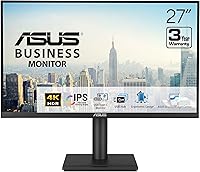
The ASUS VA27UCPS 27-inch 4K Business Monitor sits in a practical sweet spot for professionals who want a genuinely capable display without paying specialist-grade prices. ASUS has been building monitors long enough to know what office users actually need — sharp text, reliable color, and ports that keep a desk tidy. What makes this ASUS business monitor stand out from generic office displays is the combination of a proper IPS panel, a thoughtful ergonomic stand, and a USB-C single-cable setup that handles video, data, and laptop charging all at once. That last point tends to be the one that surprises people most when they first plug in.
Features & Benefits
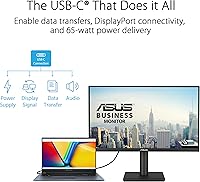
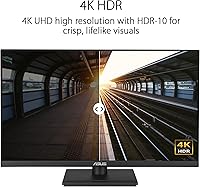
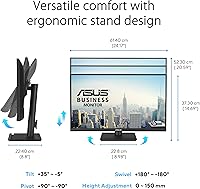
The 4K UHD IPS panel is the obvious headline, and it delivers where it counts — 99% sRGB coverage means colors look accurate rather than artificially saturated, which matters whether you are reviewing design assets or just reading text for long stretches. The single USB-C cable handles video, data, and 65W laptop charging simultaneously, effectively eliminating the need for a separate dock. A built-in USB hub adds practical ports directly on the display. The stand covers tilt, swivel, pivot, and height adjustment, so dialing in a comfortable viewing angle takes seconds. TÜV Rheinland-certified flicker-free and low blue light technology will not replace good screen habits, but it does take the edge off long sessions.
Best For
This 27-inch 4K display makes the most sense for remote or hybrid workers who plug in a laptop and want one cable to handle everything. The USB-C docking capability alone is worth serious consideration if your desk is already crowded. It also suits designers or content reviewers who need dependable color accuracy without spending on a specialist display. Anyone upgrading from a 1080p office monitor will notice the jump in text sharpness immediately — spreadsheets and long documents become noticeably easier to scan. The broad port selection covering HDMI, DisplayPort, and USB-C handles multi-device setups without adapters. One clear boundary: the 60Hz refresh rate marks this as a productivity-first display, not a gaming one.
User Feedback
With over 4,500 ratings averaging 4.5 stars, the VA27UCPS has clearly earned consistent approval from buyers. The most common praise centers on image clarity at 4K and how much easier the single USB-C cable makes the daily laptop connection — many reviewers specifically mention how painless the initial setup was. The ergonomic stand also draws positive comments for its sturdiness. On the downside, some users flag the 60Hz panel as a limitation if they expected broader versatility. The built-in speakers are adequate for an occasional video call but will not impress anyone listening to music. A few reviews mention that ASUS DisplayWidget Center has a small learning curve, though most found it manageable within a day or two.
Pros
- The 4K IPS panel delivers sharp, accurate visuals that hold up well for both detailed design work and all-day reading.
- USB-C single-cable connection handles video, data, and 65W laptop charging simultaneously — a genuine desk simplifier.
- The built-in USB hub reduces the need for a separate dock, keeping peripheral connections organized at the monitor itself.
- Full ergonomic adjustment — height, tilt, swivel, and pivot — makes it easy to dial in a comfortable long-session posture.
- TÜV Rheinland-certified flicker-free and low blue light technology takes some strain out of extended screen time.
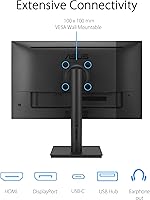
- VESA mount compatibility gives you flexibility to wall-mount or use a third-party arm if the stand does not suit your setup.
- A 4.5-star average across more than 4,500 ratings signals broad, consistent buyer satisfaction rather than a lucky outlier.
- The three-year warranty is above average for this monitor category and adds meaningful long-term purchase confidence.
- Matte screen finish handles reflections well in typical office and home office lighting conditions.
- Broad port selection covering USB-C, HDMI, and DisplayPort means connecting different laptops or desktops requires no adapters.
Cons
- The 60Hz refresh rate makes the VA27UCPS a poor choice for gaming, even at a casual level.
- Built-in speakers are thin and lack bass — functional for a quick video call but little else.
- No adaptive sync support limits compatibility with users who want smooth variable frame rate output from their GPU.
- The sRGB-focused color coverage leaves professional photographers or print designers wanting wider DCI-P3 gamut options.
- At 15.2 pounds, the monitor is on the heavier side, which can make repositioning or mounting more involved than expected.
- ASUS DisplayWidget Center software has a learning curve that a handful of buyers found frustrating in the first few days.
- HDR-10 support is present but the panel brightness may not produce the dramatic HDR contrast some users expect from the label.
- No ultrawide or curved option means multitaskers who prefer a panoramic layout will need to look elsewhere.
Ratings
Our AI-generated scores for the ASUS VA27UCPS 27-inch 4K Business Monitor are derived from analysis of thousands of verified global user reviews, with spam, bot activity, and incentivized feedback actively filtered out before scoring. Each category reflects the honest distribution of buyer sentiment — where this display genuinely excels and where real users have hit friction. Both strengths and legitimate pain points are factored transparently into every score below.
Image Clarity
Color Accuracy
USB-C Connectivity
Ergonomics
Eye Comfort
Build Quality
Setup Experience
Speaker Quality
Port Selection
Refresh Rate & Motion
Value for Money
Matte Finish & Glare Control
Warranty & Support
Eco & Sustainability
Suitable for:
The ASUS VA27UCPS 27-inch 4K Business Monitor is a strong match for professionals who spend the bulk of their day in front of a screen and want a display that earns its place without demanding a specialist budget. Remote and hybrid workers will get the most out of it — the USB-C single-cable setup effectively replaces a docking station, keeping desks clean and morning setups fast. Designers, marketers, and content reviewers who need trustworthy color reproduction will appreciate the 99% sRGB IPS panel, which handles photo editing and layout work without obvious color drift. Anyone upgrading from a 1080p office monitor will notice the difference in text sharpness almost immediately, making long stretches of reading or spreadsheet work noticeably more comfortable. The full ergonomic stand — covering height, tilt, swivel, and pivot — means it adapts to the user rather than the other way around, which matters for anyone with a fixed daily routine at their desk. The three-year warranty and ASUS brand reliability also make it a sensible long-term investment for home office setups where swapping hardware frequently is not practical.
Not suitable for:
The ASUS VA27UCPS 27-inch 4K Business Monitor was designed for productivity, and buyers who need anything beyond that should look carefully before committing. The 60Hz refresh rate is a firm boundary — anyone who plays fast-paced games, even casually after work hours, will find it falls short of what modern gaming monitors offer at comparable prices. Creative professionals with highly calibrated color workflows, such as photographers preparing images for professional print, may want a display with wider color gamut coverage like DCI-P3 rather than the sRGB-focused panel here. The built-in speakers are functional but thin — if audio quality matters at your desk, a separate speaker or headphones will be necessary. Those who need an ultrawide or curved panel for multitasking will not find what they are looking for here either, since this is a standard 16:9 flat display. Finally, buyers working with GPUs or consoles that benefit from adaptive sync technologies like G-Sync or FreeSync should note that the VA27UCPS does not prioritize those features.
Specifications
- Panel Type: The display uses an IPS (In-Plane Switching) panel, which provides consistent colors and wide 178-degree viewing angles both horizontally and vertically.
- Resolution: Native resolution is 3840 x 2160 pixels (4K UHD), delivering approximately 163 pixels per inch on the 27-inch screen for sharp text and detailed imagery.
- Screen Size: The visible display area measures 27 inches diagonally, a practical size for 4K content at typical desk viewing distances of 24 to 36 inches.
- Aspect Ratio: The panel uses a standard 16:9 widescreen aspect ratio, compatible with virtually all modern operating systems, video formats, and productivity applications.
- Color Coverage: The VA27UCPS covers 99% of the sRGB color space, making it suitable for web design, photo editing, and content work where accurate color rendering is important.
- HDR Support: The monitor supports HDR-10, allowing compatible content to display with improved contrast and highlight detail compared to standard dynamic range output.
- Refresh Rate: The panel runs at a fixed 60Hz refresh rate, appropriate for productivity and professional work but not designed for fast-paced gaming applications.
- USB-C Power: The USB-C port supports 65W Power Delivery, which is sufficient to charge most mainstream laptops while simultaneously transmitting video and data over one cable.
- Connectivity: Available ports include one USB-C (with PD 65W and DisplayPort Alt Mode), one HDMI, one DisplayPort, and a USB hub with downstream USB-A ports.
- Ergonomics: The included stand supports tilt, swivel, pivot (portrait mode rotation), and height adjustment, covering the full range of standard ergonomic positioning needs.
- Eye Care: The display carries TÜV Rheinland certification for both flicker-free backlight operation and low blue light output to reduce eye discomfort during extended use.
- Surface Finish: The screen uses a matte anti-glare coating that diffuses reflections in bright room environments without significantly softening image sharpness.
- VESA Mounting: The monitor is VESA mount compatible, allowing the stand to be removed and the display attached to a standard third-party wall mount or monitor arm.
- Built-in Audio: The VA27UCPS includes integrated speakers for basic audio output, suitable for video calls but not intended as a primary audio solution.
- Dimensions: With the stand attached, the monitor measures approximately 24.2 inches wide, 8.8 inches deep, and 20.6 inches tall at maximum height.
- Weight: The complete unit including stand weighs 15.2 pounds, which is typical for a 27-inch monitor with a full ergonomic stand assembly.
- Warranty: ASUS provides a three-year manufacturer warranty covering defects in materials and workmanship, which is above average for this monitor category.
- Software: ASUS DisplayWidget Center is the companion software for adjusting monitor settings such as brightness, color profiles, and input selection from the desktop.
- Packaging: The monitor ships in paper-based eco-friendly packaging, reducing plastic use in line with ASUS sustainability commitments for this product line.
- Energy Efficiency: The display is designed to meet current energy efficiency standards, with automatic power-saving modes that activate when no signal is detected.
Related Reviews
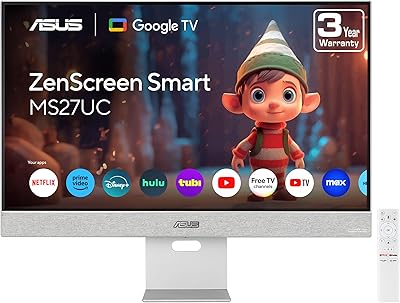
ASUS ZenScreen MS27UC 27-inch 4K Smart Monitor
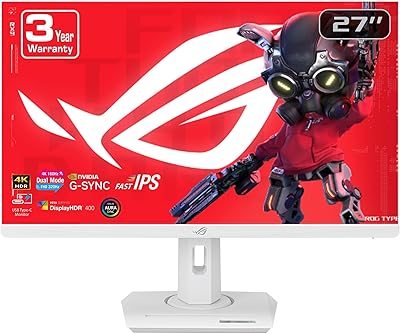
ASUS ROG Strix XG27UCG-W 27-inch Gaming Monitor

ASUS ROG Swift PG27UCDM 27-inch Gaming Monitor

ViewSonic VP2768a-4K 27-Inch 4K Monitor

ViewSonic VA2756-4K-MHD 27-inch 4K Monitor

ViewSonic VG2756-4K 27-Inch 4K Docking Monitor

ViewSonic VX2776-4K-MHDU 27-inch 4K IPS Monitor

Dell S2725QC 27-inch 4K USB-C Monitor
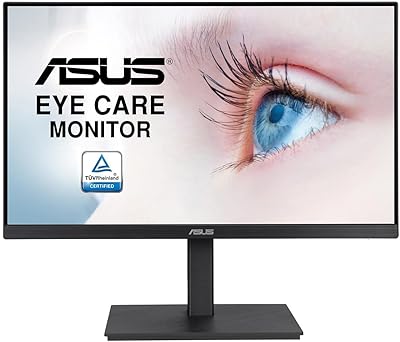
ASUS VA27EQSB 27-inch Monitor