ASUS VA27DQF 27-inch IPS Monitor


Overview
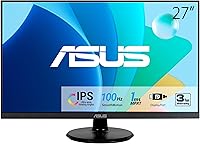
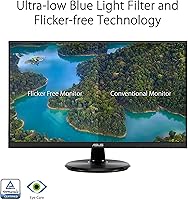
The ASUS VA27DQF 27-inch IPS Monitor sits in a comfortable spot for buyers who want a capable, no-fuss display without overspending. It pairs a frameless IPS panel with Full HD resolution — a combination that looks clean on a desk and handles everyday tasks without complaint. At 100Hz with a 1ms MPRT response time, it punches above what you might expect at this price tier. What separates it from generic office screens is ASUS's genuine commitment to eye comfort: the TÜV Rheinland certification for flicker-free operation and low blue light is not just a marketing badge. That said, if you need 1440p sharpness or serious gaming specs, this is not the right fit.
Features & Benefits
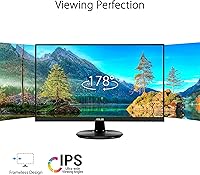
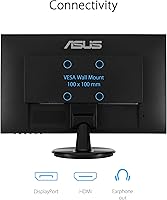
The IPS panel is the foundation everything else builds on — wide 178-degree viewing angles mean colors stay accurate whether you are sitting straight-on or glancing from across the room. The 100Hz refresh rate, combined with 1ms MPRT, keeps motion noticeably cleaner than a typical 60Hz office panel during fast-scrolling documents or casual gaming sessions. Adaptive-Sync handles variable frame rates without screen tearing, and it works across both AMD and NVIDIA setups. Ports include HDMI and DisplayPort alongside a headphone jack, covering most common connection needs. The three-sided frameless design is a practical bonus for dual-monitor arrangements, and VESA compatibility means the included stand does not have to stay if you want a cleaner setup.
Best For
This 27-inch IPS display makes the most sense for people who spend serious hours in front of a screen for work or study. Remote workers handling spreadsheets, video calls, and long reading sessions will appreciate that eye fatigue is something this monitor actively tries to prevent, not just minimize. Casual gamers will find 100Hz more than adequate for most titles — just do not expect it to compete with dedicated 144Hz or 165Hz gaming panels. It also suits streaming and general content consumption, where accurate, consistent color across viewing angles matters more than peak brightness. And if desk space is tight, the VESA-mountable design keeps options open without committing to a monitor arm immediately.
User Feedback
Most buyers come away impressed with out-of-box color accuracy and how little setup the VA27DQF actually requires — a common note is that the image looks solid right away without custom calibration. The stand draws the most consistent criticism: it offers tilt only, with no height or swivel adjustment, which frustrates users wanting ergonomic flexibility. Some also point out that 1080p across 27 inches shows its limits up close, with text looking slightly soft compared to higher-resolution panels. On the positive side, the Low Blue Light mode earns genuine praise — people report noticeably less eye strain during extended sessions, which goes a long way toward validating the TÜV claims in real-world use.
Pros
- IPS panel delivers consistent, accurate colors from wide angles — great for shared screens and side-by-side work setups.
- TÜV Rheinland-certified eye care features make a real difference during long work or study sessions.
- 100Hz refresh rate noticeably improves everyday scrolling and motion smoothness over standard 60Hz office displays.
- Adaptive-Sync works across both AMD and NVIDIA GPUs without compatibility headaches.
- Frameless three-sided design pairs cleanly in dual-monitor configurations without ugly bezel gaps.
- Both HDMI and DisplayPort are included, covering most desktop and laptop connection scenarios out of the box.
- VESA compatibility gives buyers a straightforward path to a monitor arm if the included stand does not suit their setup.
- Out-of-box calibration is solid — most users report the image looks good without touching the settings.
- The VA27DQF offers a strong feature set relative to competing 27-inch panels at this price tier.
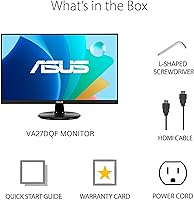
- Setup takes under ten minutes for most users, with no tools or complicated assembly required.
Cons
- The included stand only tilts — no height, swivel, or pivot adjustment, which is a real ergonomic shortcoming for taller users.
- At 27 inches, 1080p resolution shows softness in text and fine detail that a 1440p panel would not.
- Maximum brightness struggles in rooms with strong natural light or direct sunlight, requiring careful monitor placement.
- No USB hub on the monitor means peripheral management requires a separate hub for multi-device setups.
- The OSD control button placement under the panel is awkward to locate and navigate without looking.
- IPS glow is visible in dark rooms during dark scenes — a known panel trade-off, but one worth knowing before buying.
- The stand base footprint is wider than some competing designs, which can feel intrusive on a compact or cluttered desk.
- Serious competitive gamers will outgrow the 100Hz refresh rate faster than more casual buyers.
- Cable management on the stand is minimal, leaving exposed cords that undercut the clean frameless aesthetic.
- No formal G-Sync Compatible or FreeSync Premium certification, which may affect VRR performance at the edges of the refresh range.
Ratings
The ASUS VA27DQF 27-inch IPS Monitor has been evaluated using AI-driven analysis of verified global user reviews, with spam, bot-submitted, and incentivized feedback actively filtered out to reflect genuine buyer experiences. The scores below capture both what this display consistently gets right and where real-world users have run into genuine frustrations. Nothing has been softened — the strengths and the trade-offs are represented as honestly as the data allows.
Image Quality
Eye Comfort & Fatigue Reduction
Refresh Rate & Motion Handling
Ergonomics & Stand
Connectivity
Build Quality & Design
Brightness & Contrast
Value for Money
Gaming Performance
Color Accuracy
Setup & Out-of-Box Experience
Compatibility & Adaptive-Sync
Viewing Angles
Suitable for:
The ASUS VA27DQF 27-inch IPS Monitor was built for the kind of buyer who spends the majority of their day in front of a screen and wants a display that does not punish them for it. Remote workers managing spreadsheets, emails, and video calls will find the wide IPS viewing angles and certified eye comfort features genuinely useful over an eight-hour stretch. Students pulling long study sessions benefit from the same — the TÜV Rheinland-backed flicker-free and low blue light tech is not a spec-sheet checkbox here; real users report tangible differences in how their eyes feel by the end of the day. Casual gamers who play at a relaxed pace — RPGs, strategy titles, platformers, MOBAs — will get a smooth and responsive experience without needing to spend more on a dedicated gaming panel. The frameless design and VESA compatibility also make it a natural fit for anyone building a dual-monitor productivity setup or working with limited desk real estate.
Not suitable for:
The ASUS VA27DQF 27-inch IPS Monitor has clear limits that some buyers will hit quickly, and it is worth being upfront about them. If you are a competitive FPS gamer who depends on high frame rates to stay sharp in fast-paced multiplayer titles, the 100Hz ceiling will feel restrictive compared to 144Hz or 165Hz alternatives in a similar price range. Pixel density is the other honest conversation to have — at 27 inches, 1080p resolution means text and fine detail are noticeably softer than what a 1440p panel at the same size would deliver, and users who sit close or do detail-heavy work will feel it. Professional photographers, graphic designers, and anyone doing color-critical work should look elsewhere too, since this panel does not meet the calibration depth or gamut coverage that serious creative work demands. Finally, if you rely on an ergonomically adjustable stand for posture support, the tilt-only stand will force you to budget for a monitor arm or riser to avoid working at the wrong eye level all day.
Specifications
- Screen Size: The display measures 27 inches diagonally, providing a comfortable amount of screen real estate for both productivity and media consumption.
- Resolution: Native resolution is 1920x1080 Full HD, delivering a standard high-definition image across the full panel area.
- Panel Type: Uses an IPS (In-Plane Switching) panel, which provides consistent color reproduction and wide viewing angles compared to TN alternatives.
- Refresh Rate: The panel runs at a native 100Hz refresh rate, offering smoother motion than standard 60Hz displays for both work and casual gaming.
- Response Time: Rated at 1ms MPRT (Moving Picture Response Time), which measures how quickly pixels transition during motion sequences to reduce blur.
- Viewing Angle: Supports 178-degree horizontal and vertical viewing angles, meaning color and brightness remain stable even when viewed from well off-center.
- Adaptive-Sync: Compatible with Adaptive-Sync (VRR), which dynamically matches the display refresh rate to the GPU output to eliminate screen tearing.
- Eye Care: Certified by TÜV Rheinland for both Flicker-Free operation and Low Blue Light output, meeting independently tested standards for prolonged viewing comfort.
- Ports: Connectivity includes one HDMI port, one DisplayPort, and a 3.5mm headphone jack for audio output directly from the monitor.
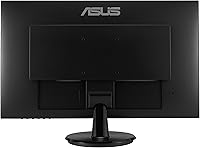
- VESA Mount: The monitor supports 100x100mm VESA mounting, allowing it to be attached to most standard third-party monitor arms or wall mounts.
- Design: Features a three-sided frameless design with slim bezels on the top and both sides, making it well suited for side-by-side multi-monitor configurations.
- Aspect Ratio: Standard 16:9 widescreen aspect ratio, compatible with the vast majority of video content, applications, and operating system layouts.
- Weight: The complete unit with stand weighs 10.14 pounds, which is typical for a monitor of this size and does not require reinforced desk support.
- Dimensions: Overall product dimensions are approximately 27 x 8 x 10 inches (L x W x H) when assembled with the included stand.
- Color: Available in black, with a matte finish on the panel surface and back housing that resists minor smudges and blends into most desk setups.
- Warranty: ASUS includes a 3-year manufacturer warranty with this monitor, covering defects in materials and workmanship from the date of purchase.
- Stand Adjustment: The included stand supports tilt adjustment only, with no built-in height, swivel, or pivot functionality provided out of the box.
- Bonus Inclusion: Purchase includes a complimentary one-month subscription to Adobe Creative Cloud, valid through August 31, 2026, redeemable via ASUS.
Related Reviews
ASUS VA27ECPSN 27-inch Docking Monitor
ASUS VZ279HE 27-inch IPS Monitor
ASUS VA27EQSB 27-inch Monitor

Gigastone LM-27FF51 27-Inch IPS Monitor

Dell P2714H 27-inch IPS Monitor
BenQ GW2791 27-inch FHD IPS Monitor
ASUS VA279HAE 27″ Full HD Monitor

ASUS VZ279QG1R 27-inch Gaming Monitor
CUNPU S027 27-inch QHD Gaming Monitor