Overview

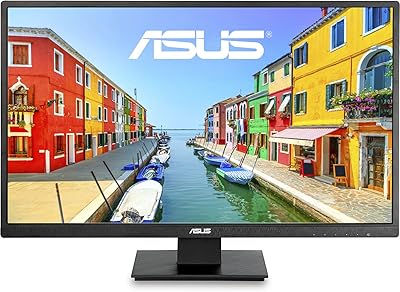
The ASUS VA27DQ 27-inch IPS Monitor sits in a comfortable spot for anyone who wants a large, capable everyday display without spending a lot. At this price tier, most competitors cut corners by using TN panels, which look washed out the moment you shift your viewing angle even slightly. This ASUS display avoids that problem entirely with a proper IPS panel that keeps colors consistent whether you are sitting straight on or glancing from the side. The frameless design also looks clean on a desk and pairs especially well in dual-monitor arrangements. ASUS has built a solid reputation for dependable consumer monitors, and this one fits that pattern well.

Features & Benefits

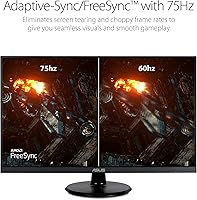
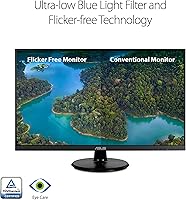
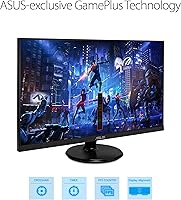
The IPS panel here delivers 178-degree viewing angles, which sounds like a spec-sheet number until you actually use it — pull up a photo, step to the side, and the colors hold. The 75Hz refresh rate with Adaptive-Sync/FreeSync won't satisfy serious gamers, but it makes everyday scrolling and casual gaming noticeably smoother than a standard 60Hz screen. For anyone logging long hours at the desk, the TÜV-certified eye care features — Flicker-Free and Low Blue Light — reduce fatigue in a way that's hard to notice until you switch back to an uncertified panel. Built-in speakers and broad port coverage round things out nicely.

Best For

This 27-inch IPS panel hits a sweet spot for remote workers and students who need real screen space without a premium price tag. If you're coming from a 21 or 24-inch monitor, the jump to 27 inches is immediately noticeable — spreadsheets, browser tabs, and documents all get breathing room. Casual gamers will appreciate the FreeSync smoothness for titles that don't demand ultra-high frame rates. The frameless bezel makes it a natural fit for side-by-side dual-monitor setups, and VESA mount support means you're not locked into the included stand. The VGA port is a small but practical touch for anyone still running older hardware alongside a newer machine.

User Feedback

Buyers consistently praise the color accuracy for the price, with many noting that this mid-range monitor holds up surprisingly well against panels they paid significantly more for in the past. Setup gets frequent mentions too — most people have it running within minutes, no driver headaches. That said, the stand draws real criticism. It only tilts, with no height adjustment, which is a genuine ergonomic issue for anyone sitting at an awkward angle all day. The speakers get a similar mixed reception — fine for video calls, not great for anything you actually want to listen to. A VESA arm fixes the stand problem, but that's an added cost worth factoring in.

Pros

  • IPS panel delivers accurate, consistent colors that hold up well even from an off-angle view
  • 75Hz with FreeSync noticeably smooths out everyday scrolling and casual gaming compared to 60Hz panels
  • TÜV-certified Flicker-Free and Low Blue Light reduces eye fatigue during long work sessions
  • Frameless three-sided bezel keeps multi-monitor setups looking clean and cohesive
  • VESA mount support lets you ditch the stand entirely and use a proper ergonomic arm
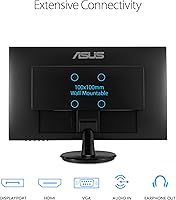
  • Broad port selection — HDMI, DisplayPort, and VGA — covers both modern and older devices
  • Built-in stereo speakers eliminate the need for external audio for basic video calls
  • Easy plug-and-play setup with no complicated driver installation required
  • Matte anti-glare surface keeps the screen usable in rooms with ambient light
  • ASUS brand reliability gives buyers confidence in long-term durability at this price tier

Cons

  • The stand only tilts — no height adjustment means many users will need a monitor arm or riser
  • At 27 inches, Full HD resolution looks noticeably soft compared to 1440p panels in the same size class
  • Built-in speakers are too weak for music or media — an external speaker or headset is essentially required
  • 75Hz is entry-level for gaming and will disappoint anyone used to 144Hz or higher refresh rates
  • No USB hub means no added port convenience for peripherals connected through the display
  • The stand base has a relatively wide footprint that can feel bulky on smaller desks
  • Backlight uniformity may vary slightly unit to unit, with some users reporting mild clouding in corners
  • Not suitable for color-critical professional work where accurate calibration and higher resolution matter

Ratings

The ASUS VA27DQ 27-inch IPS Monitor earns an overall positive reception from buyers worldwide, and the scores below reflect what real users actually experienced — generated by AI after analyzing thousands of verified purchase reviews while actively filtering out bot activity, incentivized feedback, and outlier spam. Strengths around color accuracy and everyday usability come through clearly, but so do the recurring frustrations around stand ergonomics and resolution limitations at this screen size.

Image Quality
83%
For the price tier, users are consistently impressed by how natural and balanced the colors look straight out of the box. The IPS panel keeps skin tones and gradients accurate whether you are editing a document or watching a movie, which is something buyers switching from TN panels immediately appreciate.
At 27 inches, 1080p resolution shows its limits — text and fine detail look slightly soft compared to 1440p panels in the same size range. Buyers doing close-up image work or reading small fonts for extended periods tend to notice the pixel density drop more than casual users would.
Viewing Angles
91%
This is where the IPS panel genuinely shines. Users in shared workspaces or family settings note that colors stay consistent and accurate even when glancing from well off to the side, making it a comfortable screen for collaborative viewing or presentations without everyone needing to crowd the center.
A small number of buyers reported minor color shift at the extreme edges of the stated 178-degree range, though this is unlikely to affect everyday use. IPS glow — a faint brightening in the corners during dark scenes — was also occasionally flagged but is a known characteristic of the panel type, not a defect.
Ergonomics & Stand
47%
53%
The stand assembles quickly and holds the display steady without wobble during normal desk use. Its compact footprint is appreciated by users with smaller desks who do not want a wide base dominating their workspace, and VESA compatibility means a third-party arm is always a viable upgrade path.
The tilt-only stand is the single most common complaint across user reviews — no height adjustment, no swivel, and no pivot means many users are stuck viewing the screen at a fixed angle that does not suit their chair or desk height. Buyers who work long hours frequently report needing to stack books or purchase a separate arm just to get a comfortable posture.
Refresh Rate & Gaming
71%
29%
The jump from 60Hz to 75Hz with Adaptive-Sync is noticeable during everyday use — scrolling feels crisper and casual gaming has a smoother, more responsive feel. For players who enjoy RPGs, strategy games, or story-driven titles, this display holds up well and the FreeSync support reduces screen tearing effectively.
Competitive gamers and anyone accustomed to 144Hz panels will find 75Hz underwhelming for fast-paced action. Input lag and response time, while adequate for casual play, are not optimized for serious multiplayer gaming, and the monitor makes no pretense of being a true gaming display at this spec level.
Eye Comfort
88%
The TÜV Rheinland certification for both Flicker-Free and Low Blue Light is not just a marketing label here — users who work eight-plus hour days consistently report less eye fatigue compared to their previous displays. The matte coating also cuts down on the ambient glare that makes glossy screens tiring in bright home offices.
The Low Blue Light mode does shift the white balance noticeably warmer, which some users find uncomfortable or distracting for color-sensitive tasks. Buyers who prefer a cooler, neutral white point often end up leaving the mode off and managing eye strain through other means like screen breaks.
Build Quality
78%
22%
The overall construction feels solid for the price, with a slim profile and clean matte black finish that holds up well over time. The three-sided frameless design looks noticeably more premium than the chunky-bezeled monitors it typically competes with in this budget range.
The plastic casing, while tidy in appearance, does not feel particularly robust under close inspection — it flexes slightly when pressed and does not have the reassuring rigidity of higher-end builds. The stand base in particular feels lightweight, and some users noted that cable management options behind the stand are limited.
Connectivity
86%
Having HDMI, DisplayPort, and VGA all on one budget monitor is genuinely useful and sets this display apart from competitors that drop VGA entirely. Users running a mix of a modern laptop via HDMI and an older desktop via VGA appreciate not needing a separate adapter just to make things work.
There is no USB hub built into the monitor, which means no added convenience for plugging in a keyboard, mouse, or flash drive through the display itself — something a few buyers expected at this price. Only one HDMI port is available, which can feel limiting for users who want to rapidly switch between two HDMI sources.
Built-in Speakers
53%
47%
For a monitor with no audio ambitions, the built-in 2W speakers do exactly what a basic pair of desk speakers should — they handle video call audio, system notification sounds, and background YouTube playback at a volume that is at least audible in a quiet room.
Anyone expecting usable music or movie sound will be disappointed almost immediately. The speakers lack meaningful bass, distort at higher volumes, and sound thin on anything with dynamic range. Most users treat them as a backup option only and pair the monitor with external audio for anything that actually matters.
Setup & Ease of Use
92%
Assembling the stand and getting a picture on screen takes less than ten minutes for virtually every buyer, with no tools required and no driver installation needed for basic use. The plug-and-play experience is one of the most frequently praised aspects in user reviews, especially for buyers who are not particularly tech-savvy.
The on-screen display menu navigation uses physical buttons on the back of the panel, which can be awkward to locate by feel and takes some getting used to. A small number of users also reported that switching between input sources requires more button presses than feels necessary, particularly when toggling between a laptop and desktop.
Value for Money
87%
Buyers repeatedly note that getting a 27-inch IPS panel with FreeSync, built-in speakers, and VESA support at this price point is difficult to beat. The display punches meaningfully above its weight class when compared to the cheaper TN alternatives filling the same budget bracket.
The value case weakens slightly if you factor in the cost of a proper monitor arm to compensate for the inadequate stand, which adds to the effective purchase price. Users who need 1440p resolution or a 144Hz refresh rate will also find that the next step up costs noticeably more, leaving a gap that this display cannot fill despite its overall appeal.
Color Accuracy Out of Box
79%
21%
Most users find the out-of-box calibration more than acceptable for general use — colors look natural, whites are clean without excessive blue push, and the display does not need immediate adjustment to feel correct. For productivity, media consumption, and light photo viewing, the default settings hold up well.
Buyers who need precise color work will want to calibrate properly, as the factory settings leave some room for improvement in color temperature consistency. Without a hardware calibrator, hitting specific sRGB targets is not straightforward, and this is not a monitor positioned for professional color-critical workflows regardless of tuning.
Matte Screen Coating
81%
19%
The anti-glare matte finish is a practical advantage in real-world home office conditions where overhead lighting is not always controllable. Users working near windows note a marked reduction in distracting reflections compared to glossy screens, which makes sustained work sessions more comfortable.
The matte coating does introduce a very slight graininess to the image that is most visible on white backgrounds or during dark cinematic scenes. Buyers coming from high-quality glossy panels may notice this immediately and find it slightly degrading to the perceived sharpness and punch of the image.
Resolution Adequacy
64%
36%
For users sitting at a standard viewing distance of 24 to 30 inches, 1080p on a 27-inch screen is workable for most daily tasks — web browsing, document work, video streaming, and casual gaming all look fine at normal distances without pixel structure becoming distracting.
Up close or for detail-heavy work, the pixel density of around 82 pixels per inch is genuinely low for a 27-inch panel, and users who previously owned a 1440p display at the same size tend to notice the downgrade acutely. This is arguably the monitor's most significant hardware compromise relative to screen size.

Suitable for:

The ASUS VA27DQ 27-inch IPS Monitor is a strong match for remote workers, students, and home office users who want a large, comfortable screen without stretching their budget. If you spend hours reading documents, jumping between browser tabs, or sitting through video calls, the IPS panel and certified eye-care features make a genuine difference over a long workday. It also works well for anyone upgrading from a smaller or lower-quality TN panel — the jump in color accuracy and viewing angle consistency is immediately obvious. Casual gamers who play at moderate frame rates will find the 75Hz refresh rate with FreeSync a noticeable improvement over standard 60Hz displays, even if it won't satisfy competitive players. The three-sided frameless design makes it a natural pick for dual-monitor setups, and VESA mount support gives ergonomic-minded users the flexibility to attach a third-party arm and reclaim desk space.

Not suitable for:

Buyers with more demanding needs will likely find this 27-inch IPS panel falls short in a few important areas. Competitive or fast-paced gamers who rely on high frame rates will want at least a 144Hz display — 75Hz is simply not fast enough for titles where reaction time depends on refresh speed. Professionals doing color-critical work such as photo editing or video grading should also look elsewhere, since Full HD resolution at 27 inches results in a pixel density that is noticeably softer than a 1440p or 4K display of the same size. Users who need precise ergonomic positioning will be frustrated by the tilt-only stand, which offers no height or swivel adjustment out of the box. And anyone expecting the built-in speakers to replace a dedicated audio setup will be disappointed — they cover basic call and notification duty, but little more.

Specifications

  • Screen Size: The display measures 27 inches diagonally, providing ample workspace for multitasking and side-by-side document viewing.
  • Panel Type: Uses an IPS (In-Plane Switching) panel that maintains consistent color accuracy across a 178-degree horizontal and vertical viewing angle.
  • Resolution: Native resolution is 1920x1080 Full HD, delivering a standard pixel density suitable for everyday productivity and general media consumption.
  • Refresh Rate: Supports a maximum refresh rate of 75Hz, which is an improvement over standard 60Hz panels for smoother motion during casual use.
  • Sync Technology: Compatible with both Adaptive-Sync and AMD FreeSync, and also works with NVIDIA GeForce GTX 10 series, GTX 16 series, RTX 20 series, and newer graphics cards.
  • Connectivity: Includes one HDMI port, one DisplayPort, and one VGA (D-Sub) port, allowing connection to a wide range of devices both modern and legacy.
  • Built-in Audio: Features two integrated 2W stereo speakers, providing basic audio output for calls and notifications without requiring external speakers.
  • Eye Care: Certified by TÜV Rheinland for both Flicker-Free backlight technology and Low Blue Light output, reducing eye strain during extended screen time.
  • Surface Finish: The screen uses a matte anti-glare coating that diffuses ambient light and reduces reflections in brightly lit environments.
  • Bezel Design: Three-sided frameless construction minimizes the visible border on the top and both sides, making it well-suited for multi-monitor configurations.
  • VESA Compatibility: Supports standard VESA wall or arm mounting, giving users the option to remove the included stand and attach a third-party ergonomic arm.
  • Stand Adjustment: The included stand supports tilt adjustment only, with no height, swivel, or pivot adjustments available without an aftermarket mount.
  • Aspect Ratio: Displays content in a standard 16:9 widescreen aspect ratio, compatible with the vast majority of modern video, gaming, and productivity content.
  • Dimensions: The monitor measures approximately 24.1″ wide, 14.4″ tall, and 2.1″ deep without the stand factored into depth at the base.
  • Weight: The full unit weighs approximately 10.8 pounds, making it manageable for a single person to position and reposition on a desk.
  • Power Input: Rated for up to 240 volts input, making it compatible with standard power supplies across multiple regions with an appropriate adapter.
  • Color: Available in a matte black finish that suits most desk setups and does not attract visible smudging or fingerprints on the casing.
  • Brand: Manufactured by ASUS, a well-established Taiwanese electronics company with a long track record in consumer and professional display products.

Related Reviews
ASUS VZ279HE 27-inch IPS Monitor
75%
91%
Value for Money
88%
Eye Comfort
74%
Build Quality
72%
Display Clarity
67%
Color Accuracy
More
ASUS VA27ECPSN 27-inch Docking Monitor
79%
91%
USB-C Docking Performance
93%
Connectivity Range
88%
Wired LAN Integration
61%
Display Sharpness
89%
Ergonomic Stand
More
ASUS VA27EQSB 27-inch Monitor
85%
85%
Overall Performance
90%
Display Quality
88%
Ergonomics & Comfort
83%
Connectivity Options
75%
Gaming Experience
More
Gigastone LM-27FF51 27-Inch IPS Monitor
74%
82%
Image Clarity
54%
Brightness & Glare
76%
Color Accuracy
78%
Refresh Rate & Motion
71%
Build Quality
More
Dell P2714H 27-inch IPS Monitor
70%
78%
Color Accuracy
47%
Text Sharpness
87%
Ergonomic Range
74%
Build Quality
83%
Viewing Angles
More
ASUS VZ279QG1R 27-inch Gaming Monitor
75%
83%
Color Accuracy
71%
Motion Performance
62%
Resolution & Sharpness
88%
Value for Money
79%
Build Quality
More
BenQ GW2791 27-inch FHD IPS Monitor
80%
83%
Image Quality
91%
Eye-Care Performance
88%
Value for Money
62%
Display Sharpness
47%
Stand & Ergonomics
More
CUNPU S027 27-inch QHD Gaming Monitor
74%
88%
Image Clarity
79%
Color Accuracy
76%
Gaming Performance
71%
Build Quality
52%
Stand & Ergonomics
More
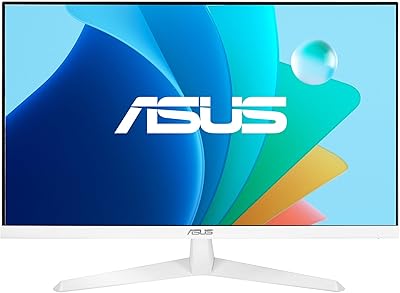
Acer SB272 27-inch FHD IPS Monitor
74%
91%
Value for Money
83%
Image Quality
54%
Brightness
78%
Refresh Rate & Smoothness
43%
Stand & Ergonomics
More
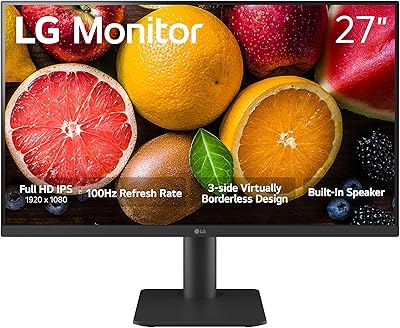
LG 27MS550-B 27-inch IPS Monitor
76%
83%
Display Clarity
79%
Color Accuracy
91%
Ergonomics & Stand
77%
Refresh Rate & Smoothness
72%
Response Time
More

FAQ

It works with both. This 27-inch IPS panel supports Adaptive-Sync broadly, and ASUS has confirmed compatibility with NVIDIA GeForce GTX 10 series, GTX 16 series, RTX 20 series, and newer cards. You may need to enable G-Sync Compatible mode in the NVIDIA control panel, but it is generally straightforward.

The included stand only tilts — there is no height, swivel, or pivot adjustment built in. For most people sitting at a standard desk, this is workable, but if you need the screen higher or at a specific angle, a VESA-compatible monitor arm is a smart investment since the display does support standard VESA mounting.

They are fine for video calls and the occasional YouTube clip, but do not expect much beyond that. The 2W drivers lack bass and volume for music or movie watching. Think of them as a convenience feature rather than a replacement for a proper speaker or headset.

At 27 inches, 1080p gives you a pixel density of roughly 82 pixels per inch, which is noticeably softer than a 1440p screen at the same size. For web browsing, documents, and video, most people find it perfectly acceptable. If you do a lot of reading at close range or work with fine detail, you may notice the softness more than the average user would.

Yes, setup is about as simple as it gets. The stand clicks into the base, you connect your cable of choice, and the display is ready within a few minutes. No drivers are required for basic use, and the on-screen menu is straightforward for adjusting brightness or input source.

Absolutely. This mid-range monitor is VESA-compatible, so you can remove the stand and attach it to any standard VESA arm or wall bracket. This is actually one of the best upgrades you can make if the fixed-height stand is not working for your posture.

It does shift the white balance slightly warmer, which some people find distracting at first. Most users adjust within a day or two, and you can dial in a level that feels comfortable without going too warm. If color accuracy matters for your work, you can toggle it off and manage screen time separately.

For casual gaming — think story-driven games, platformers, RPGs, or anything that does not demand ultra-fast reaction times — the 75Hz with FreeSync is genuinely pleasant and a real step up from a 60Hz panel. If you play competitive shooters or fast-paced multiplayer games where every millisecond counts, you will want to look at 144Hz or higher options instead.

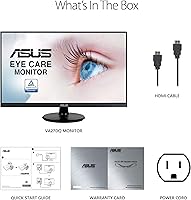
ASUS typically includes an HDMI cable and a power cable in the box, but it is worth checking at purchase since retail bundles can vary. A DisplayPort cable is generally not included, so if that is your preferred connection, plan to pick one up separately.

The anti-glare matte finish does a solid job of diffusing overhead lighting and window glare, making it much more comfortable to use in a well-lit room than a glossy panel would be. It is one of the practical features that makes this display a sensible choice for a home office where you cannot always control the lighting.

Where to Buy