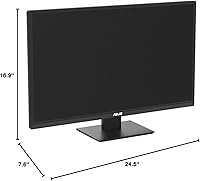
Overview

The ASUS VA279HAE 27″ Full HD Monitor sits comfortably in the budget monitor market — large enough to genuinely change how you work day-to-day, priced low enough that it doesn't demand much deliberation. Launched in early 2022, it has held its ground in a crowded segment largely because ASUS didn't cut corners on the basics. The thin-bezel design gives it a cleaner look than you'd expect at this price, and the understated black finish suits most desk setups without calling attention to itself. This is a screen built for everyday productivity users and students, not power users chasing high refresh rates or professional color-accurate workflows.

Features & Benefits

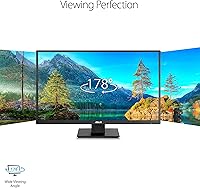
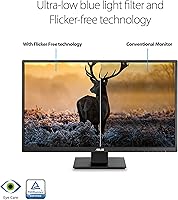
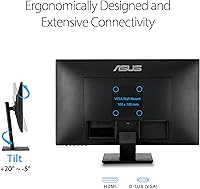
The VA panel inside this ASUS monitor delivers noticeably better contrast and deeper blacks than the TN panels common at this price — text looks sharper and dark backgrounds don't wash out into muddy grays. The 178-degree viewing angle holds up well in practice; colors stay consistent even when you're not sitting perfectly centered. Eye Care technology handles blue light filtering and flicker elimination at the hardware level, which genuinely helps during long work sessions. An anti-glare coating keeps reflections manageable in bright rooms, and the combination of HDMI and VGA ports means fewer adapter headaches. VESA mount support is a useful bonus for anyone wanting to free up desk space with a monitor arm.

Best For

The VA279HAE finds its ideal audience among people who spend most of their day reading, writing, or navigating spreadsheets — tasks where screen real estate matters more than refresh speed or pixel density. Students building their first proper desk setup will appreciate the jump from a smaller panel, and the broad connectivity makes it easy to plug into almost anything. It also pulls solid weight as a second screen in a dual-display workstation, where the 27-inch size adds genuine utility. If your PC still runs a VGA output, this 27-inch screen is one of the fewer modern options that accommodates older hardware without requiring a separate adapter.

User Feedback

With a 4.5-star average across over 200 ratings, owners are broadly satisfied — and the feedback is fairly consistent. Easy setup comes up repeatedly as a genuine strength, with buyers noting it's ready to use quickly without hassle. Color quality earns real praise relative to the asking price, especially for document work and everyday video. The most common frustration is the stand's limited adjustability — tilt only, with no height or pivot range — which can matter if ergonomics are a priority for you. A few reviewers flag 75Hz as a ceiling that rules it out for serious gaming. Long-term reliability reports are encouraging, with little mention of image issues over time.

Pros

  • VA panel delivers noticeably deeper blacks and stronger contrast than TN alternatives at the same price point.
  • Hardware-level blue light filtering and flicker-free backlight make long work sessions noticeably easier on the eyes.
  • The 178-degree viewing angle keeps colors consistent even when you're sitting off to the side.
  • Anti-glare coating handles bright room conditions well without washing out the image.
  • Dual HDMI and VGA ports cover both modern and older devices without needing adapters.
  • VESA mount compatibility gives buyers the option to use a monitor arm for a cleaner, more ergonomic setup.
  • Thin bezels and a clean black finish blend into most desk setups without looking cheap.
  • Setup is straightforward — most buyers report being up and running within minutes of unboxing.
  • Owners consistently report reliable, trouble-free performance over months of daily use.
  • Offers genuine value as a secondary screen in a dual-display workstation.

Cons

  • The included stand supports tilt only — no height adjustment, swivel, or pivot whatsoever.
  • At 27 inches, a 1080p resolution starts to show pixel density limitations up close.
  • 75Hz refresh rate rules this screen out for anyone serious about fast-paced or competitive gaming.
  • Color gamut coverage is limited for its price tier — not a viable option for color-critical creative work.
  • Backlight uniformity can be inconsistent, which becomes noticeable on dark backgrounds in dim lighting.
  • No USB hub or built-in speakers, which some buyers in this price range have come to expect.
  • The stand base has a relatively wide footprint, which can feel intrusive on smaller desks.
  • No DisplayPort input, limiting flexibility for users with higher-end graphics cards or multi-monitor configurations.

Ratings

The ASUS VA279HAE 27″ Full HD Monitor has been scored by our AI after analyzing verified buyer reviews from multiple global markets, with spam, bot-generated, and incentivized feedback actively filtered out. The scores below reflect the honest consensus of real owners — balancing what this screen genuinely does well against the trade-offs that frustrated some buyers. Strengths and weak points are weighted equally so you get a clear, unbiased picture before buying.

Value for Money
88%
Most owners feel this ASUS monitor punches above its price class, particularly given the VA panel, Eye Care features, and ASUS brand reliability all bundled together. Buyers upgrading from older or cheaper displays consistently describe it as a meaningful improvement without financial regret.
A small number of reviewers note that similarly priced competitors have started offering 1440p resolution, which makes the 1080p panel feel slightly less compelling as the budget segment evolves. For buyers who shop aggressively, the value case can waver depending on current sale pricing.
Eye Comfort
91%
The hardware-level flicker-free backlight and blue light reduction are consistently among the most praised aspects by users who spend 6–10 hours daily in front of a screen. Writers, coders, and students frequently single out noticeably reduced end-of-day eye fatigue compared to their previous monitors.
The blue light filter does introduce a slight warm color cast at higher intensity settings, which some users find mildly distracting during photo browsing or video watching. A few buyers also note the OSD menu for adjusting the filter is not the most intuitive to navigate.
Image Contrast & Blacks
83%
The VA panel's contrast advantage over TN alternatives at this price is clearly felt during everyday use — dark UI themes, video content with shadowy scenes, and even spreadsheet backgrounds with dark mode all look richer than budget IPS or TN alternatives.
Backlight uniformity is not perfectly consistent, and some units show slight clouding or blooming on very dark, full-screen backgrounds — a known characteristic of VA panels at this price tier. This is most noticeable in dim lighting and is unlikely to affect productivity users but may bother others.
Stand & Ergonomics
41%
59%
The stand is stable and holds the panel firmly without wobble during typing, which is a basic requirement it does meet reliably. For users who are comfortable with a fixed viewing height and just need a no-fuss physical setup, it functions adequately.
Tilt is the only adjustment available — no height, swivel, or pivot, which is a genuine frustration for users with ergonomic needs or multi-monitor setups that require precise alignment. This is the most commonly cited complaint across reviews and represents a real daily inconvenience for tall users or those with back and neck sensitivities.
Display Sharpness
67%
33%
At normal desk viewing distances, text and UI elements look clean and readable, making it a comfortable experience for document work, browsing, and spreadsheets. Buyers coming from smaller 1080p screens consistently report a satisfying sense of clarity and spaciousness.
Sitting close to a 27-inch 1080p panel reveals visible pixel structure, and users accustomed to higher-resolution displays will likely notice the softness. Pixel density at this screen size sits around 82 PPI, which is below what many consider ideal for sharp text rendering at close range.
Color Accuracy
62%
38%
For general productivity, casual photo browsing, and everyday video content, colors appear reasonably vivid and natural. Buyers who use this screen for word processing, presentations, and web browsing rarely raise color complaints in the context of typical daily tasks.
Color gamut coverage is limited at this price tier, and the VA279HAE is not suitable for color-critical work like photo editing or graphic design. Reviewers with professional creative needs have noted visible inaccuracies in saturated hues, and calibration tools show measurable deviation from sRGB targets.
Anti-Glare Performance
79%
21%
The matte anti-glare coating does a solid job in typical home and office environments with overhead lighting or nearby windows, reducing distracting hotspots that plague glossy panels. Users working in bright open-plan offices or near large windows specifically call this out as a practical advantage.
The coating can introduce a faint graininess or haze over the image that is most visible on bright white backgrounds, which some users find slightly fatiguing over time. In very dark rooms, the coating's diffusion can soften perceived sharpness more than expected.
Connectivity
74%
26%
Having both HDMI and VGA on a single monitor is genuinely useful — it covers nearly every common desktop and laptop output scenario without additional hardware, and buyers with older desktops appreciate not being forced into an adapter purchase.
The absence of a DisplayPort input is a real omission for users with higher-end graphics cards or those building a multi-monitor setup that relies on DP daisy-chaining. There is also no USB hub, which feels like a missed convenience at this screen size.
Refresh Rate
58%
42%
75Hz is a step above the 60Hz baseline still found on some competitors, and for document editing, streaming, and casual use, the difference in smoothness during window dragging and scrolling is mildly noticeable in a positive way.
75Hz is a hard ceiling that rules this screen out for anyone who plays fast or competitive games, and the panel lacks adaptive sync support to reduce tearing. Buyers who later discover a gaming use case will find themselves limited with no upgrade path short of replacing the monitor.
Build Quality
76%
24%
The chassis feels solid for its weight class, and the thin-bezel design gives it a more premium appearance than its price might suggest. Long-term owners rarely report physical degradation like cracking, warping, or port loosening under normal desk use conditions.
The plastic materials are clearly entry-level on close inspection, with a slightly hollow feel to the rear shell that undercuts the otherwise clean exterior. The stand base, while stable, lacks the heft or premium feel that makes mid-range monitors feel more durable.
Setup Experience
92%
Buyers consistently describe the unboxing and assembly process as fast and uncomplicated, with the stand attaching tool-free and the on-screen display becoming functional almost immediately after powering on. For first-time monitor buyers, this approachability is a genuine confidence booster.
The included documentation is minimal, and the OSD menu — while functional — is not particularly intuitive for users who want to fine-tune brightness, color temperature, or Eye Care settings without guessing. A more guided setup process would help less technical buyers optimize the display out of the box.
Viewing Angle
84%
The 178-degree rated viewing angle translates well to real-world use — a colleague glancing at your screen from the side, or a second person watching a video from an angle, will see a consistent image without the color inversion typical of TN panels. This makes it genuinely more versatile in shared spaces.
At extreme off-axis angles, slight contrast shift and a subtle gamma push are still visible, which is a normal VA panel trait rather than a defect. It is unlikely to affect solo users but is worth noting for anyone planning to use this as a shared reference display.
Dual-Monitor Suitability
81%
19%
The thin bezels on three sides minimize visual interruption when placing two of these screens side by side, and the wide viewing angle ensures the off-center panel remains readable without repositioning. Several buyers specifically purchased two units for a matched dual-monitor setup with satisfying results.
Without height adjustment on the stand, aligning two monitors to the same eye level requires shimming or purchasing VESA arms, which adds cost and effort. Buyers building a precise ergonomic dual setup should factor this in from the start.

Suitable for:

The ASUS VA279HAE 27″ Full HD Monitor is a strong fit for anyone who wants a noticeably larger workspace without committing to a high-end budget. Students writing papers, doing research, or attending virtual classes will find the 27-inch panel significantly more comfortable than a typical laptop display. Office workers who clock long hours on spreadsheets, documents, or email will appreciate the Eye Care features, which take real pressure off during extended sessions. Anyone pairing this screen with an older desktop that still uses a VGA output will find it one of the few newer monitors that accommodates that connection without a fuss. It also works well as a secondary display in a dual-monitor setup, where the wide viewing angle keeps the off-center panel readable without constant repositioning.

Not suitable for:

Buyers hoping to use the ASUS VA279HAE 27″ Full HD Monitor for competitive gaming should look elsewhere — 75Hz is a hard ceiling, and this panel was never designed with fast-paced gaming in mind. Creative professionals who need accurate, wide-gamut color reproduction for photo editing or graphic design will find the VA panel at this tier falls short of their standards. The stand is genuinely limited: tilt adjustment only, with no height, swivel, or pivot — if ergonomic positioning matters to you, budget for a VESA arm or reconsider the purchase. Those working in very dark environments may also notice the backlight uniformity limitations common to budget VA panels. And if you're upgrading from a 1440p or 4K display, stepping down to 1080p on a 27-inch screen will feel like a visible regression in pixel density.

Specifications

  • Panel Type: Uses a VA (Vertical Alignment) panel, which provides stronger contrast ratios and deeper blacks compared to TN panels at a similar price.
  • Screen Size: The viewable display area measures 27 inches diagonally, offering a substantial workspace upgrade over typical 21–24 inch budget monitors.
  • Resolution: Native resolution is 1920x1080 (Full HD), delivering clear and sharp visuals suited to everyday productivity and media consumption.
  • Aspect Ratio: Standard 16:9 widescreen aspect ratio, compatible with virtually all modern content formats and operating systems.
  • Refresh Rate: Maximum refresh rate is 75Hz, which is adequate for general office work and casual video viewing but not designed for fast-paced gaming.
  • Viewing Angle: Rated at 178 degrees both horizontally and vertically, meaning color and contrast remain consistent across a wide range of seating positions.
  • Connectivity: Includes one HDMI port and one D-Sub (VGA) port, supporting both current-generation and legacy devices without requiring additional adapters.
  • VESA Support: Compatible with standard VESA mounting patterns, allowing the monitor to be attached to a third-party monitor arm or wall mount.
  • Eye Care: ASUS Eye Care technology includes a hardware-level blue light filter and a flicker-free backlight to reduce eye fatigue during extended use.
  • Anti-Glare: The screen surface features an anti-glare coating that diffuses ambient light and reduces distracting reflections in well-lit environments.
  • Bezel Design: Ultra-thin bezels on three sides give the monitor a modern, minimal appearance and make it practical for side-by-side dual-monitor configurations.
  • Stand Adjustment: The included stand supports tilt adjustment only; height, swivel, and pivot adjustments are not available without a separate VESA mount solution.
  • Dimensions: Overall dimensions with stand are approximately 24.5 inches wide, 16.9 inches tall, and 7.6 inches deep.
  • Weight: The monitor weighs approximately 12 pounds with the stand attached, making it manageable for single-person setup and repositioning.
  • Color Finish: Available in a matte black finish that resists fingerprints reasonably well and suits most neutral desk aesthetics.
  • Power Input: Operates on 120V AC power, standard for North American outlets, with no external power brick required.
  • Screen Surface: The display surface is described as having an anti-glare matte coating, reducing specular reflections without significantly impacting image clarity.
  • Release Date: This model was first made available in April 2022 and continues to be sold as a relevant entry-level option in the budget monitor segment.

Related Reviews
ASUS VA27DQ 27-inch IPS Monitor
77%
83%
Image Quality
91%
Viewing Angles
47%
Ergonomics & Stand
71%
Refresh Rate & Gaming
88%
Eye Comfort
More
ASUS VZ279HE 27-inch IPS Monitor
75%
91%
Value for Money
88%
Eye Comfort
74%
Build Quality
72%
Display Clarity
67%
Color Accuracy
More
ASUS VA27ECPSN 27-inch Docking Monitor
79%
91%
USB-C Docking Performance
93%
Connectivity Range
88%
Wired LAN Integration
61%
Display Sharpness
89%
Ergonomic Stand
More
ASUS VG279Q 27″ Full HD IPS 144Hz Gaming Monitor
86%
93%
Display Quality
92%
Gaming Performance
88%
Ergonomics & Adjustability
89%
Eye Care Features
87%
Build Quality
More
HP 27h 27-inch Full HD Monitor
76%
83%
Image Quality
81%
Build Quality
88%
Ergonomics & Adjustability
74%
Refresh Rate & Smoothness
58%
Built-in Speakers
More
Acer SH272 27-inch IPS Full HD Monitor
74%
88%
Value for Money
71%
Image Quality
83%
Refresh Rate & Smoothness
62%
Response Time Accuracy
91%
Stand & Ergonomics
More
Dell S2721HS 27-inch Full HD IPS Monitor
87%
94%
Display Quality
91%
Color Accuracy
85%
Build Quality
89%
Gaming Performance
92%
Design & Aesthetics
More
Acer KB272 EBI 27-inch IPS Monitor
77%
83%
Image Quality
61%
Brightness & Contrast
84%
Refresh Rate & Smoothness
81%
AMD FreeSync Performance
76%
Response Time
More
ASUS VA24ECPSN 24-inch Docking Monitor
81%
93%
USB-C Docking Performance
91%
Connectivity & Port Selection
74%
Image Quality & Color Accuracy
67%
Resolution & Sharpness
88%
Eye Comfort & Flicker-Free Performance
More
MSI Optix MAG274R 27-inch Full HD 144Hz Gaming Monitor
84%
93%
Display Quality
89%
Gaming Performance
91%
Color Accuracy
77%
Build Quality
94%
Response Time
More

FAQ

Not directly — the VA279HAE has HDMI and VGA ports only, so you would need a USB-C to HDMI adapter to connect a modern MacBook or laptop. These adapters are widely available and inexpensive, and the connection works reliably once in place.

Yes, the ASUS VA279HAE 27″ Full HD Monitor supports VESA mounting. Before purchasing an arm, confirm the specific VESA hole pattern in the product documentation to make sure your arm is compatible. Most standard 75x75mm or 100x100mm arms will work.

It depends on what kind of gaming you have in mind. The 75Hz refresh rate is fine for casual or slower-paced games, but if you play competitive shooters or fast action titles, you'll notice the limitation. This screen was not designed with gaming performance as a priority.

The flicker-free backlight is always active at the hardware level, so there's nothing to switch on. The blue light filter can typically be toggled or adjusted through the monitor's on-screen display (OSD) menu, letting you dial in the level that feels comfortable for your environment.

It can, depending on how close you sit. At normal desk viewing distances of around 2–3 feet, most people find 1080p on 27 inches perfectly acceptable for everyday work. If you sit very close or you're used to a higher-resolution display, you may notice slightly softer text compared to a 1440p panel.

No — the included stand only tilts forward and back. There is no height, swivel, or pivot adjustment built in. If ergonomic positioning is important to you, pairing this monitor with a VESA-compatible arm is worth considering.

Absolutely — this 27-inch screen works well as a secondary display. The thin bezels keep the visual gap between monitors relatively small, and the wide viewing angle means it stays readable even when positioned off to the side of your primary screen.

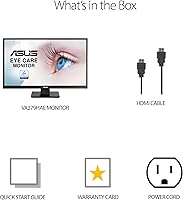
Typically, ASUS includes a power cable and may include one video cable, but the exact bundle can vary by retailer. It is worth checking what is included in your specific package before assuming you have everything you need out of the box.

For casual streaming and video watching, the VA panel does a solid job — colors are reasonably vivid and dark scenes look better than you would expect from a budget screen, thanks to the improved contrast over TN panels. It is not a cinema-grade experience, but it is genuinely enjoyable for everyday use.

Based on user feedback, the VA279HAE has a good track record for daily reliability. Most owners who have used it for several months report no significant image degradation or hardware issues. It is a straightforward panel without a lot of complex features that could fail, which works in its favor for longevity.