Overview

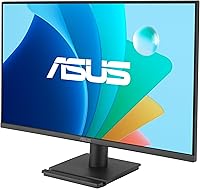
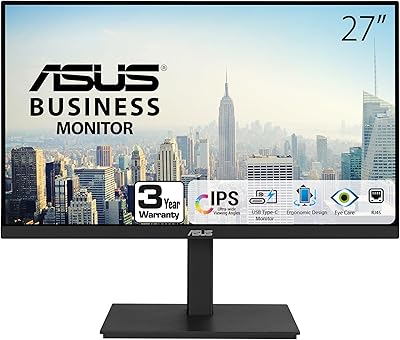
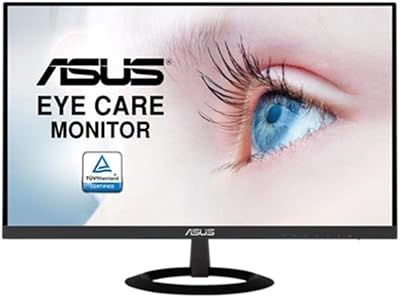
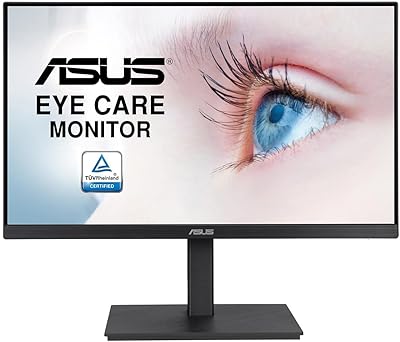
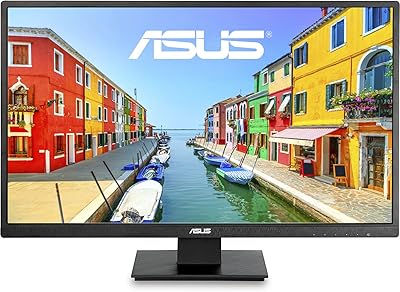
The ASUS VA279QG 27-inch IPS Monitor makes a strong case for itself in the crowded budget display market, combining a 120Hz refresh rate and 1ms MPRT response time at a price point where most competitors still cap out at 75Hz. The frameless design keeps things looking clean on any desk, and the TÜV Rheinland-certified Eye Care features are a genuine consideration if you log long hours in front of a screen. One honest caveat worth flagging: Full HD resolution spread across 27 inches produces a noticeably lower pixel density than QHD panels, so text and fine detail won't look quite as sharp. The 3-year warranty is a reassuring inclusion at this price tier.
Features & Benefits

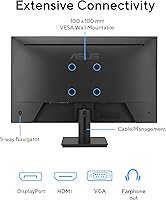
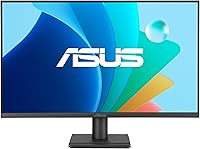
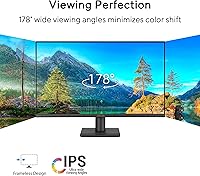
The IPS panel delivers wide viewing angles and 99% sRGB coverage, so colors stay consistent whether you're sitting straight-on or off to the side — useful for casual photo editing or simply sharing the screen. The 120Hz refresh rate pairs with Adaptive-Sync to handle variable frame rates smoothly, even on mid-range GPUs. Connectivity covers modern and legacy setups alike: HDMI, DisplayPort, and VGA are all present, which is increasingly rare at this price. The VESA mounting option is handy when desk space is tight, and ASUS's DisplayWidget Center software lets you tweak picture settings without wading through on-screen menu buttons. The built-in speakers work in a pinch but are a convenience feature, not a real audio solution.

Best For

This ASUS monitor is an easy recommendation for home office users who spend most of the day reading, writing, or video calling and want something easier on the eyes than a cramped laptop display. Students upgrading for the first time will find the size and feature set genuinely impressive at this tier. Casual gamers — think titles that aren't frame-rate-demanding — will benefit from the 120Hz and Adaptive-Sync without needing a high-end rig. It's also a practical pick for anyone with an older desktop still relying on a VGA output. Wall-mounting flexibility makes the VA279QG worth considering in tighter spaces where a bulky stand simply gets in the way.

User Feedback

Across well over a thousand ratings, this 27-inch display holds a solid 4.3-star average, with positive reviews consistently highlighting out-of-the-box color accuracy, a noticeably bright panel, and a straightforward setup experience — buyers appreciate getting a usable image without extensive calibration. The criticism that surfaces most often is the stand: it only tilts, with no height adjustment or swivel, which is a real ergonomic limitation. A monitor arm solves this, but it adds cost. Some buyers also find the 1080p resolution less crisp than expected at this screen size. That said, ASUS brand reliability and the three-year warranty are frequently cited as the reasons people pull the trigger despite those trade-offs.

Pros

  • 120Hz refresh rate with Adaptive-Sync delivers noticeably smoother visuals than most competing displays at this price tier.
  • Wide viewing angles mean colors stay consistent even when the screen is shared or viewed from the side.
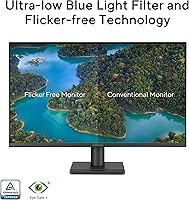
  • TÜV Rheinland-certified flicker-free and low blue light tech genuinely reduces eye fatigue during long work sessions.
  • Triple port connectivity — HDMI, DisplayPort, and VGA — covers modern and legacy devices without any adapters.
  • Colors are accurate and punchy out of the box, requiring little to no manual calibration for everyday use.
  • The frameless design looks significantly cleaner and more modern than older budget monitors with thick bezels.
  • VESA wall-mount support allows full stand removal, which is a real advantage in compact or minimalist desk setups.
  • A 3-year warranty provides meaningful long-term reassurance that is uncommon at this price point.
  • Setup is fast and tool-free, with an included HDMI cable so you can be up and running within minutes.
  • DisplayWidget Center software makes brightness and input adjustments far less painful than navigating physical OSD buttons.

Cons

  • The stand only tilts — no height adjustment, swivel, or pivot, which is a genuine ergonomic limitation for many users.
  • Full HD resolution on a 27-inch panel produces softer text and less fine detail than a QHD display of the same size.
  • Backlight glow in screen corners can be distracting on dark content, a known trade-off at this IPS price tier.
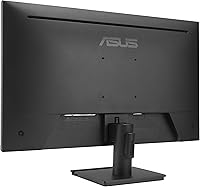
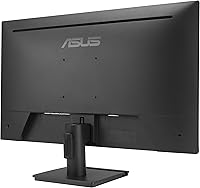
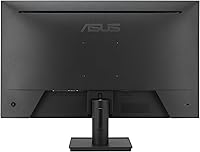
  • The physical OSD buttons on the rear edge are awkwardly placed and difficult to use without looking behind the panel.
  • DisplayWidget Center software can lose monitor detection after Windows updates, making settings adjustments temporarily unreliable.
  • The HDMI port is version 1.4 only, which limits bandwidth and rules out some higher-refresh or multi-signal use cases.
  • Built-in speakers distort at moderate volume and are not a viable substitute for even a basic external audio setup.
  • The stand base has a larger forward footprint than many users expect, which can crowd a compact desk.
  • Pixel response under genuinely fast motion conditions shows trailing that will disappoint users coming from dedicated gaming monitors.
  • Customer support response times are inconsistently rated across regions, which tempers some of the warranty confidence.

Ratings

The ASUS VA279QG 27-inch IPS Monitor has been evaluated by our AI rating system after analyzing thousands of verified global buyer reviews, with spam, bot-generated, and incentivized feedback actively filtered out. The scores below reflect a transparent picture of where this display genuinely delivers and where real-world limitations show up — strengths and frustrations weighted equally. Whether you are considering it for a home office setup, a first gaming monitor, or a laptop replacement, these ratings are designed to help you decide with confidence.
Value for Money
88%
At its price point, getting a 27-inch IPS panel with a 120Hz refresh rate and Adaptive-Sync is genuinely hard to beat. Most buyers feel they are getting noticeably more capability than comparably priced alternatives, and the included HDMI cable and 3-year warranty strengthen that perception considerably.
A small but vocal group of buyers feels the value equation shifts if you factor in the cost of a third-party monitor arm to compensate for the limited stand. At this price, basic height adjustment should arguably be included rather than treated as an upgrade.
Image Quality
79%
21%
Colors are accurate and punchy right out of the box — the IPS panel covers nearly the full sRGB spectrum, which means photos, videos, and everyday web content look natural without manual calibration. Brightness levels are frequently praised as strong for an entry-level panel, handling moderately lit rooms without washing out.
At 27 inches, the Full HD resolution produces a pixel density that starts to show its limits, especially when reading small text or working with fine detail. Users coming from a QHD or even a sharp laptop display will notice the softness, and this is the single most cited visual disappointment across reviews.
Refresh Rate & Smoothness
86%
The 120Hz refresh rate makes a tangible difference compared to the 60Hz and 75Hz displays this monitor competes against directly. Scrolling through documents, browsing, and playing mid-range games all feel noticeably more fluid, and Adaptive-Sync handles variable frame rates cleanly on mainstream GPUs.
The 1ms MPRT figure describes motion blur reduction rather than true pixel response time, which is a distinction that informed buyers pick up on. In practice, fast-motion ghosting is well-controlled but not completely absent, which matters if you are coming from a monitor marketed on native response times.
Eye Comfort & Fatigue
84%
The TÜV Rheinland certification for both flicker-free operation and low blue light output gives this display genuine credibility among users who work at a screen for six to ten hours a day. Multiple reviewers specifically mention reduced end-of-day eye strain compared to older monitors they replaced, which is a meaningful real-world outcome.
The low blue light mode visibly warms the color temperature, and users doing color-sensitive work often toggle it off, which negates some of the eye care benefit during those sessions. A more granular adjustment in the software would address this trade-off more elegantly.
Ergonomics & Stand
41%
59%
The stand footprint is compact, which helps on smaller desks, and the monitor does tilt forward and back to allow some basic viewing angle adjustment. For users who plan to wall-mount the display using the VESA compatibility, the stand limitation becomes irrelevant entirely.
This is the most consistently criticized aspect across the review base. The stand offers tilt only — no height adjustment, no swivel, and no pivot. For any user who needs to position the screen at eye level or share viewing angles with others, a separate monitor arm becomes a near-mandatory purchase, adding both cost and setup complexity.
Build Quality & Design
76%
24%
The frameless design on three sides looks noticeably cleaner and more modern than older budget monitors with thick bezels, and the matte black finish avoids showing fingerprints or dust in a distracting way. At 8.3 pounds the unit feels solid enough to handle routine repositioning without any flex or wobble.
The plastic construction does not feel premium when handled up close, and a few users have noted the rear panel finish feels slightly cheap compared to the front. Nothing feels structurally fragile, but the materials are clearly selected to hit a price target rather than to impress.
Connectivity
83%
Having HDMI, DisplayPort, and VGA on a single monitor at this price is increasingly uncommon and genuinely useful. It means this display can connect to a modern laptop via DisplayPort, a gaming console via HDMI, and an older desktop tower via VGA — all without an adapter.
The HDMI port is version 1.4, which caps bandwidth and limits some advanced use cases. The single port of each type also means any multi-source switching requires physically swapping cables rather than using a software or button-based input selector, which gets tedious quickly.
Setup & Installation
91%
Assembly takes under ten minutes and requires no tools — the stand attaches with a simple click mechanism, and the included HDMI cable means you can be up and running immediately. First-time monitor buyers consistently rate the unboxing and setup experience as one of the highlights of the purchase.
The physical OSD buttons on the back edge of the monitor are awkwardly placed and difficult to navigate by feel alone. ASUS DisplayWidget Center software resolves this for most adjustments, but the initial setup before software installation relies on those same frustrating buttons.
Gaming Performance
74%
26%
For casual and mid-tier gaming — strategy games, RPGs, slower-paced shooters — the 120Hz experience is a genuine upgrade over entry-level displays. Adaptive-Sync keeps the image tear-free on a wide range of GPUs, and the large screen size makes environments feel more immersive.
Competitive FPS gamers will find the motion clarity insufficient for high-stakes play. The effective pixel response at fast frame rates produces trailing on moving objects that players accustomed to dedicated gaming monitors will find frustrating. This display is built for casual play, not esports.
Color Accuracy
78%
22%
The 99% sRGB gamut coverage means colors are well-represented for everyday creative tasks like editing social media photos, designing basic graphics, or reviewing design mockups. Most buyers report that the default color profile is usable immediately without any significant tuning.
This is not a display for professional color grading or print-matching workflows. The lack of factory calibration data and the absence of wide-gamut coverage (DCI-P3 or Adobe RGB) limits its utility for anyone working in a professionally color-managed environment.
Built-in Speakers
47%
53%
The speakers cover the basics — system notification sounds, background music at low volume, and video calls where audio quality is not critical. Their presence means you can avoid a speaker purchase entirely if your audio needs are minimal.
Audio quality is thin and lacks any meaningful bass or stereo width. At moderate volume levels distortion becomes noticeable, and the overall sound profile reflects the cost-driven nature of the inclusion. Anyone who watches movies, plays games with audio immersion in mind, or takes calls seriously will want external speakers or headphones.
Software & Controls
69%
31%
ASUS DisplayWidget Center is a practical addition that allows brightness, contrast, and input switching to be handled from the desktop rather than through physical buttons. For users who frequently adjust picture modes based on task — reading versus video versus gaming — this is a real usability improvement.
The software is not always stable across Windows updates and has generated a cluster of complaints about it failing to detect the monitor after system restarts. The physical OSD controls it is meant to replace are genuinely poor, so when the software misbehaves, adjusting settings becomes a noticeably frustrating experience.
Warranty & Brand Support
87%
A 3-year warranty on a sub-150-dollar monitor is a meaningful differentiator, and ASUS has a well-established reputation for honoring it. Buyers who have gone through warranty claims describe the process as relatively smooth, which reduces the long-term risk of the purchase for first-time monitor buyers.
ASUS customer service response times have been described as slow during peak periods, and some users report difficulty reaching live support without extended wait times. The warranty coverage itself is solid, but the service experience surrounding it is inconsistently rated across regions.
Screen Uniformity
67%
33%
For most usage scenarios — browsing, document work, spreadsheets — backlight uniformity is consistent enough that variations go unnoticed. The matte surface coating also helps diffuse minor hotspots that would be more visible on a glossy panel.
Units displaying dark or solid-colored content sometimes reveal mild backlight glow in screen corners, which is a known characteristic of IPS panels at this price tier rather than a defect specific to this model. Users who frequently work with dark-themed interfaces or watch a lot of nighttime film content may find this distracting.
Desk Space Efficiency
72%
28%
The slim frameless profile and VESA wall-mount support make this display workable in tighter environments. Wall-mounting fully eliminates the stand footprint, which can meaningfully open up a small desk setup — a practical advantage that several buyers specifically mention in their reviews.
The stand base itself has a moderate footprint that extends further forward than some users expect, which can crowd a compact desk. Users without wall-mounting ability and limited desk depth may find the physical presence of the assembled unit larger than anticipated based on the product images.

Suitable for:

The ASUS VA279QG 27-inch IPS Monitor is a well-matched choice for home office workers who spend most of their day reading documents, attending video calls, or working across multiple browser tabs — the large screen real estate and certified eye care features make long sessions noticeably more comfortable than a typical laptop display. Students and first-time monitor buyers will find the size-to-feature ratio genuinely impressive at this price tier, especially those stepping up from a 1080p laptop screen who do not yet have a reference point for higher pixel densities. Casual gamers running mid-range GPUs will benefit from the 120Hz refresh rate and Adaptive-Sync combination without needing to spend significantly more to get smooth, tear-free visuals. Anyone with an older desktop PC that still relies on a VGA output will appreciate that this is one of the few current displays to include that port alongside modern connections. It is also a practical option for anyone working in a compact space who wants to reclaim desk surface by wall-mounting the display rather than living with a permanent stand footprint.

Not suitable for:

The ASUS VA279QG 27-inch IPS Monitor is a harder sell for buyers who prioritize sharp, detailed visuals, because Full HD resolution across 27 inches produces a pixel density that shows its limits when reading small text or working with fine graphic detail — anyone coming from a QHD laptop or a 24-inch 1080p panel will likely notice the drop in crispness. Professional photographers, video editors, and designers working in color-managed environments should look elsewhere, as this display lacks wide-gamut coverage and factory calibration data that those workflows demand. Competitive FPS and esports gamers who need the fastest possible motion clarity will find the effective response performance insufficient compared to purpose-built gaming monitors in a similar or slightly higher price range. Buyers who need full ergonomic flexibility — height adjustment, swivel, or portrait pivot — will be frustrated by the tilt-only stand and should factor in the added cost of a monitor arm before committing. Finally, anyone expecting usable audio from the built-in speakers for movies, music, or immersive gaming should plan on a separate audio solution, as the speakers are firmly in convenience-only territory.

Specifications

  • Screen Size: The display measures 27 inches diagonally, providing a large viewing area suited to multitasking, productivity work, and casual gaming.
  • Resolution: Native resolution is 1920x1080 (Full HD), delivering standard high-definition clarity across a 16:9 aspect ratio.
  • Panel Type: Uses an IPS (In-Plane Switching) panel, which provides consistent color reproduction and wide viewing angles compared to TN alternatives.
  • Refresh Rate: The panel operates at up to 120Hz, enabling smoother motion in both everyday desktop use and gaming compared to standard 60Hz displays.
  • Response Time: Rated at 1ms MPRT (Moving Picture Response Time), which reduces perceived motion blur during fast-moving content.
  • Color Gamut: Covers 99% of the sRGB color space, making it suitable for general creative work, photo viewing, and content consumption where accurate color is needed.
  • Viewing Angle: Supports 178° horizontal and vertical viewing angles, meaning color and contrast remain stable even when viewed well off-center.
  • Sync Technology: Compatible with Adaptive-Sync (VRR) over DisplayPort and HDMI, reducing screen tearing without requiring a specific GPU brand.
  • Connectivity: Includes one DisplayPort 1.2, one HDMI 1.4, one VGA port, and a 3.5mm earphone jack for broad device compatibility.
  • Eye Care: Certified by TÜV Rheinland for both Flicker-Free operation and Low Blue Light output, reducing visual fatigue during extended screen time.
  • Surface Finish: Features a matte anti-glare screen coating that diffuses ambient light and reduces reflections in normally lit environments.
  • Speakers: Integrates built-in stereo speakers suitable for basic system audio, notifications, and voice calls.
  • VESA Mount: VESA wall-mount compatible, allowing the stand to be removed entirely and the display mounted to a standard wall bracket or monitor arm.
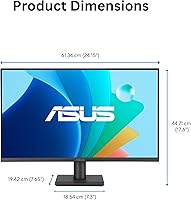
  • Dimensions: With stand attached, the monitor measures approximately 7.7 x 24.2 x 17.6 inches (D x W x H).
  • Weight: Complete unit with stand weighs 8.3 pounds, making it manageable for solo setup and repositioning.
  • Stand Adjustment: The included stand supports tilt adjustment only, with no height, swivel, or pivot functionality.
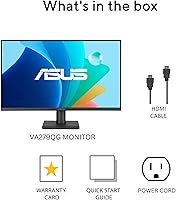
  • In the Box: Package includes the monitor, an HDMI cable, a power cord, a quick start guide, and a warranty card.
  • Warranty: Backed by a 3-year manufacturer warranty from ASUS, covering defects in materials and workmanship.
  • Software: Compatible with ASUS DisplayWidget Center, a desktop application for adjusting monitor settings without using physical OSD buttons.
  • Availability Date: This model was first made available in February 2025 and carries ASUS model designation VA279QG.

Related Reviews

ASUS VA27ECPSN 27-inch Full HD IPS Monitor
87%
92%
Display Quality
88%
Ergonomics & Adjustability
89%
Color Accuracy
91%
Eye Comfort (Low Blue Light, Flicker-Free)
84%
Build Quality
More
ASUS VZ279HE 27-inch Full HD IPS Monitor
84%
92%
Value for Money
88%
Display Quality
91%
Eye Care Features
83%
Build Quality
89%
Design & Aesthetics
More
Gigastone 27-inch IPS Monitor
84%
91%
Display Quality
88%
Ergonomics and Adjustability
92%
Value for Money
85%
Connectivity Options
89%
Setup and Installation
More
ASUS VA27EQSB 27-inch Monitor
85%
85%
Overall Performance
90%
Display Quality
88%
Ergonomics & Comfort
83%
Connectivity Options
75%
Gaming Experience
More
Dell P2714H 27-Inch IPS Monitor
84%
92%
Display Quality
88%
Color Accuracy
85%
Ergonomics/Adjustability
90%
Connectivity Options
80%
Build Quality
More
GIGABYTE GS27QA 27-inch QHD Gaming Monitor
78%
88%
Gaming Performance
91%
Image Clarity
79%
Color Accuracy
54%
HDR Experience
89%
Refresh Rate & Smoothness
More
ASUS VA279HAE 27-inch Full HD Monitor
87%
91%
Display Quality
94%
Eye Care Technology
85%
Design and Build Quality
89%
Viewing Angles
92%
Value for Money
More
Acer SB272 27-Inch FHD IPS Monitor
84%
92%
Value for Money
88%
Display Quality
86%
Gaming Performance (FreeSync)
84%
Ergonomics & Tilt Adjustability
85%
Design & Build Quality
More
LG 27MS550-B 27-inch IPS Monitor
85%
91%
Display Quality
87%
Ergonomics
92%
Value for Money
80%
Gaming Performance
85%
Build Quality
More
ASUS VZ279QG1R 27-inch 1080P Gaming Monitor
83%
88%
Gaming Performance
91%
Smooth Visuals (Motion Blur Reduction)
93%
Value for Money
80%
Build Quality
85%
Display Quality (Color Accuracy, Brightness)
More

FAQ

Yes, it connects to current-generation consoles via the HDMI port. Keep in mind the HDMI version is 1.4, so you will be running at 1080p — which is actually fine on this panel since that is its native resolution. The 120Hz refresh rate may not be accessible via HDMI 1.4 at full resolution depending on the console, so DisplayPort is the better path for PC gaming at 120Hz.

It is an honest trade-off worth thinking about before buying. At 27 inches, Full HD works out to around 82 pixels per inch, which is lower than what you would get from a 24-inch 1080p display or any 27-inch QHD panel. For general browsing, video, and spreadsheet work most users adapt quickly, but if you are coming from a sharp retina-style laptop display you will likely notice the difference, especially with small text.

Yes, the monitor is VESA compatible. The standard mounting pattern for this model is 100x100mm, which is one of the most common sizes — most affordable monitor arms and wall brackets support it. Removing the stand and wall-mounting is a great way to recover desk space and also gets around the stand ergonomic limitations.

Unfortunately no — the included stand only tilts. There is no height adjustment, swivel, or portrait rotation built in. If eye-level positioning matters to you, a monitor arm is the practical fix. They are widely available and the VESA mount support on this display makes installation straightforward.

Yes. Adaptive-Sync on this display is not locked to a specific GPU ecosystem. It works with compatible AMD Radeon cards through FreeSync support, and NVIDIA cards that support G-Sync Compatible mode will also function correctly. It is not a certified G-Sync display, but NVIDIA has been broadly enabling Adaptive-Sync compatibility across their driver updates for several years now.

They are functional, not impressive. For system sounds, the occasional YouTube video, or background music at low volume they work without issue. If you watch movies regularly, play games where audio is part of the experience, or take calls where your voice needs to sound clear, you will want a headset or external speakers. Treat them as a backup option rather than a feature.

It does shift the color temperature noticeably warmer, which some people find comfortable and others find distracting for design or photo work. You can toggle between different levels of the Low Blue Light mode or turn it off entirely when color accuracy matters more than eye comfort. The ASUS VA279QG 27-inch IPS Monitor also supports flicker-free operation independently of the blue light filter, so you keep some eye protection even with the warmth filter disabled.
An HDMI cable and a power cord are included. No DisplayPort cable is in the box, so if you plan to connect via DisplayPort — which is recommended for 120Hz on PC — you will need to source that cable separately. DisplayPort cables are inexpensive and widely available.

For most home office tasks it is a solid choice. The 27-inch size gives you comfortable room to work across multiple windows, the eye care certifications are genuine rather than marketing-only, and the matte screen surface handles window glare well in typical room lighting. The main ergonomic caveat is the stand — if you spend eight or more hours a day at your desk, investing in a monitor arm to achieve proper eye-level positioning will make a real difference to your comfort.

It is a free download from ASUS that runs in your system tray and lets you adjust brightness, contrast, color modes, and input source from your desktop rather than fumbling with the physical buttons on the back of the panel. You do not strictly need it — all settings are accessible through the physical OSD — but the rear buttons are awkwardly placed and slow to navigate, so most users find the software a worthwhile install. It does occasionally lose connection to the monitor after Windows updates, which requires a restart to resolve.