Overview

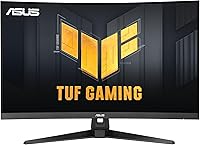
The ASUS VG32WQ3B 32-inch Curved Gaming Monitor arrived in late 2024 as a serious mid-range contender for PC gamers who want more than a basic flat 1080p panel without paying premium 4K prices. The 31.5-inch QHD panel wraps around you with a 1500R curvature, pulling the screen edges closer to your peripheral vision in a way that genuinely changes how immersive certain games feel. A matte surface keeps reflections under control during long sessions, which matters more than most spec sheets suggest. Toss in a 3-month Adobe Creative Cloud subscription and this curved gaming monitor offers a bit more than you might expect at its price point.
Features & Benefits

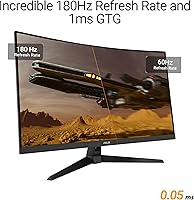
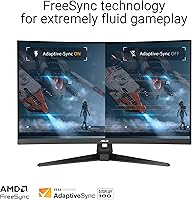
At 180Hz with a 0.5ms GTG response time, this 32-inch QHD screen handles fast-paced shooters and racing games without the smearing that slower panels produce. ASUS layers ELMB on top of FreeSync, so you get blur reduction and tear prevention working together — a combination that makes high-action sequences look noticeably cleaner. The 90% DCI-P3 color coverage punches above what you would expect at this price tier, giving games and videos rich, saturated tones that hold up under real scrutiny. Shadow Boost does quiet but useful work in darker scenes, lifting shadow detail without washing out bright areas. The desktop-based DisplayWidget app is a handy touch for adjusting settings without diving into on-screen menus.

Best For

The honest answer to who this curved gaming monitor suits best starts with the 1080p upgrader — someone who wants meaningfully sharper visuals without the GPU demands of 4K. The jump to 1440p at this screen size is real and noticeable, especially in open-world games where detail density actually matters. AMD GPU owners get the most direct technical benefit from native FreeSync support, though the fast refresh rate and matte panel make it a strong choice regardless of graphics card brand. Anyone who regularly games in dim rooms will appreciate Shadow Boost doing practical work quietly. It is not a niche monitor; it covers a wide range of use cases competently.

User Feedback

Across thousands of ratings, the ASUS TUF display earns consistent praise for its color vibrancy straight out of the box, with many buyers noting they needed minimal calibration to get great results. The curvature gets positive mentions for comfort during extended sessions, and the fast response feel in games is something multiple reviewers call out unprompted. That said, the stand draws repeated criticism — limited height adjustment frustrates users who want more ergonomic flexibility, and the absence of a USB hub is a common complaint. A few buyers note that HDR performance is modest compared to dedicated HDR displays. Overall, the satisfaction rate is high and most criticisms point to omissions rather than actual failures.

Pros

  • 180Hz refresh rate keeps fast-paced gameplay fluid and responsive without needing a flagship GPU to drive it.
  • Color accuracy is strong out of the box, with most buyers reporting little to no calibration needed.
  • The 1500R curve feels immersive in practice, especially in wider game environments and cinematic titles.
  • FreeSync works reliably with compatible AMD cards, making screen tearing a non-issue during normal gameplay.
  • Shadow Boost genuinely helps in dark-scene-heavy games, revealing detail without flattening bright areas.
  • The matte panel handles ambient light well, reducing eye strain during extended day or evening sessions.
  • A 3-year warranty from ASUS provides real long-term coverage that budget competitors rarely offer.
  • DisplayWidget lets you adjust monitor settings from your desktop, which is a small but appreciated convenience.
  • The bundled Adobe Creative Cloud trial adds unexpected value for users who dabble in creative software.
  • Build quality feels solid for the price tier, with no significant reports of early panel issues or backlight bleed.

Cons

  • Stand height adjustment is limited, which is frustrating for users who need a precise ergonomic setup.
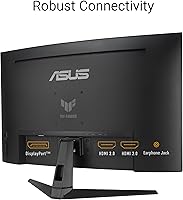
  • No USB hub means extra cable management hassle on desks that rely on monitor-side port access.
  • HDR performance is modest at best — do not expect it to compete with true HDR monitors in brightness or contrast.
  • The 180Hz ceiling will bottleneck users with high-end GPUs that can push significantly higher frame rates.
  • No HDMI 2.1 port limits next-gen console compatibility for buyers who want to dual-purpose the display.
  • Panel curvature can introduce mild geometric distortion for users doing precise design or spreadsheet work.
  • At 31.5 inches, the physical size may be too large for compact desk setups with limited depth.
  • Included accessories are minimal — no HDMI cable in the box despite HDMI being a common connection preference.

Ratings

The ASUS VG32WQ3B 32-inch Curved Gaming Monitor scores below are generated by our AI system after analyzing thousands of verified global buyer reviews, with spam, bot-submitted, and incentivized feedback actively filtered out before scoring. The results reflect a balanced picture — where this curved gaming monitor genuinely excels and where real buyers consistently ran into friction. Both sides are represented honestly so you can make a confident, informed decision.
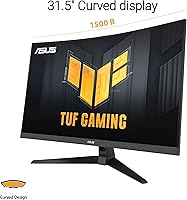
Image Clarity
88%
At 1440p on a 31.5-inch panel, sharpness is a genuine step above 1080p that users notice immediately — particularly in open-world games with dense foliage or distant architecture. Text rendering for productivity tasks also earns consistent praise from buyers who use this 32-inch QHD screen for mixed work-and-gaming setups.
Pixel density does not quite match what a 27-inch 1440p panel delivers at the same resolution, so users sitting very close may notice a slight softness compared to smaller alternatives. It is not a deal-breaker, but pixel-peepers upgrading from a sharp 27-inch display may need an adjustment period.
Refresh Rate Performance
91%
180Hz is fast enough that competitive players in shooters and battle royale games feel the difference immediately coming from a 60Hz or 144Hz display. Combined with the low response time, panning shots and rapid camera movements stay crisp during intense multiplayer matches without the smearing that slower panels produce.
For users running high-end GPUs capable of sustaining 240fps or beyond, the 180Hz ceiling becomes a bottleneck that limits the hardware investment. A small but vocal group of buyers specifically note they wish ASUS had pushed to 240Hz at this panel size and price tier.
Color Accuracy
86%
Out-of-the-box color quality earns strong marks from buyers who report needing minimal manual calibration to get results that look vivid and natural. The 90% DCI-P3 coverage translates to noticeably richer saturation in games with stylized color palettes, and even HDR-tagged streaming content looks appreciably better than on budget panels.
Professional colorists and serious photo editors will find the factory calibration acceptable but not print-accurate without hardware calibration tools. A few buyers note slight color shift toward warmer tones at factory defaults, which requires minor adjustments to hit neutral whites.
Motion Blur & Ghosting
89%
The combination of ELMB and FreeSync working together is something buyers who have used older 144Hz panels notice right away — fast-moving objects in racing games and first-person shooters stay defined rather than trailing into a blur. Multiple reviewers specifically call out how clean the image stays during rapid 180-degree camera rotations in action titles.
ELMB and FreeSync cannot be used simultaneously in all scenarios, which means users sometimes have to choose between blur reduction and tear elimination depending on the game. At frame rates below the FreeSync range, tearing can still appear, which frustrates buyers who expected a fully hands-off experience.
Shadow Boost Effectiveness
74%
26%
In genuinely dark-scene-heavy games like survival horror or tactical shooters with night maps, buyers report that Shadow Boost delivers a practical advantage — spotting enemies or environmental hazards in shadows that would otherwise be nearly invisible. It works without flooding the entire image with artificial brightness.
Shadow Boost is a software image processing effect, not a hardware improvement, so it introduces a subtle loss of shadow depth and contrast for users who prefer a more cinematic, true-to-developer image. Some buyers turn it off entirely after finding it makes certain games look artificially lifted rather than natural.
Curvature Comfort
83%
The 1500R curve is comfortable for extended gaming sessions, with buyers consistently noting reduced eye movement fatigue compared to flat panels of the same size. At 31.5 inches, the curve is pronounced enough to feel immersive without the exaggerated fish-eye distortion that tighter curves can produce.
For productivity tasks like spreadsheets, coding, or reading long documents, the curve introduces enough geometric distortion at the screen edges to bother some users. Buyers who intended to use this as a dual-purpose work and gaming monitor occasionally report the curve feels more limiting than helpful during office hours.
Stand & Ergonomics
51%
49%
The stand holds the panel stable without wobble during normal desk use, and the physical footprint is manageable for most desk sizes. Assembly is straightforward with the included L-shaped screwdriver, and the monitor ships without requiring any tools beyond what is in the box.
Height adjustment range is frustratingly limited for taller users or anyone with a non-standard desk height, and there is no pivot or portrait rotation option. The lack of a USB hub on the stand is a recurring pain point for buyers who expected at least basic port pass-through at this price level.
Matte Screen Coating
82%
18%
The anti-glare matte finish is genuinely effective in normally lit rooms and offices with windows, reducing the mirror-like reflections that glossy panels produce during daytime use. Buyers who game in the evening with overhead lighting particularly appreciate how much more comfortable extended sessions feel compared to their previous glossy displays.
The matte coating introduces a very faint crystalline texture that is noticeable on plain white backgrounds, which some buyers describe as a subtle graininess that took getting used to. Users migrating from high-quality glossy panels sometimes find the coating dulls perceived contrast slightly compared to what they were accustomed to.
HDR Performance
58%
42%
HDR support is present and does produce a visible improvement in supported content — highlights in bright outdoor game scenes and dramatic lighting in cinematic titles gain some additional punch compared to SDR mode. For casual users new to HDR, the difference registers as a pleasant upgrade.
Peak brightness falls well short of what genuine HDR experiences require, leaving the HDR mode feeling like a mild enhancement rather than the dramatic visual shift that OLED or high-brightness VA panels deliver. Buyers who have used proper HDR600 or HDR1000 displays find this implementation underwhelming and often revert to SDR.
FreeSync & VRR
87%
FreeSync is enabled by default and works reliably with compatible AMD GPUs, eliminating screen tearing across a wide frame rate range without requiring manual driver configuration. Buyers with mid-range AMD cards like the RX 6700 or RX 7800 XT report the experience feels polished and consistent across a variety of game engines.
NVIDIA users must manually enable G-Sync Compatible mode in their driver settings, which is a step some buyers are unaware of out of the box and mistake for a compatibility issue. The effective VRR range has a lower boundary, and dips below that threshold can still produce noticeable tearing in demanding titles.
Value for Money
84%
Buyers consistently position the ASUS TUF display favorably against competing monitors in the same size and refresh rate class, noting that the color quality and build feel justify the price without much argument. The 3-year warranty and bundled Adobe Creative Cloud subscription add tangible value that is not common at this price point.
A handful of buyers note that aggressive sales on competing 27-inch 1440p 165Hz monitors make the value equation slightly less clear-cut for users who do not specifically need 32 inches or the curvature. Those who stretch their budget from a lower tier occasionally feel the stand limitations undercut the premium positioning.
Build Quality
79%
21%
The chassis feels solid for a mid-range gaming monitor, with no significant flex in the panel or noticeable cheap-plastic feel that budget alternatives often have. Buyers report the physical fit and finish looks clean in person and holds up well after months of daily use.
The rear panel has a fairly utilitarian aesthetic that some buyers find underwhelming next to more aggressively styled competitors. A few buyers have reported minor backlight uniformity variation in corner areas under sustained bright-white content, though this appears to affect a minority of units.
Setup & Connectivity
72%
28%
Initial setup is quick and the included DisplayPort cable means buyers can plug in and start gaming without hunting for accessories. DisplayWidget software installs easily and genuinely simplifies adjusting brightness or picture modes without navigating physical OSD menus.
The absence of an HDMI cable in the box is a friction point since many buyers default to HDMI for their first connection. Input port selection is also limited compared to some competitors, with no USB-C or Thunderbolt option for users who want to connect a laptop without a separate adapter.
Warranty & Support
85%
Three years of manufacturer coverage from ASUS is meaningfully longer than the one-year warranty many competing brands offer at this price, and buyers report ASUS customer support handles legitimate defect claims without excessive friction. The peace of mind this provides is a factor several long-form reviewers specifically cite as a purchase tiebreaker.
Warranty service timelines can vary significantly by region, with some international buyers reporting slower RMA processing than domestic US customers experience. Dead pixel policies have also frustrated a small number of buyers who encountered minor pixel defects that fell just outside ASUS warranty replacement thresholds.

Suitable for:

The ASUS VG32WQ3B 32-inch Curved Gaming Monitor is a strong fit for PC gamers who have outgrown 1080p but are not yet ready to invest in a 4K setup — particularly those running mid-range AMD GPUs that can comfortably push 1440p at high frame rates. The 1500R curvature makes a real difference for anyone who spends long stretches in immersive single-player games or open-world titles where peripheral screen presence adds to the experience. Competitive players in shooters or MOBAs who rely on fast refresh rates and low latency will find the 180Hz panel responsive enough to compete seriously without paying flagship prices. The matte surface and solid color accuracy also make this curved gaming monitor a capable secondary display for light creative work, photo editing, or video consumption. AMD GPU owners in particular get full value from native FreeSync support, and the included 3-year warranty adds peace of mind that budget alternatives rarely match.
Not suitable for:

Buyers chasing the absolute pinnacle of visual fidelity should look elsewhere — the ASUS VG32WQ3B 32-inch Curved Gaming Monitor is not a 4K display, and its HDR implementation is functional rather than impressive compared to dedicated HDR panels with higher peak brightness. If you are running a high-end GPU capable of 240Hz or above at 1440p, this monitor will cap your hardware before your card breaks a sweat. The stand is a genuine limitation for ergonomics-focused buyers: height adjustment range is narrow, and there is no USB hub built in, which becomes a daily friction point on cluttered desks. Content creators who need factory-accurate color profiles or wide color volume for professional work will want a panel with more rigorous calibration options. Finally, flat-screen purists who find curved displays geometrically distracting for productivity tasks will not be comfortable using this as a primary work monitor.
Specifications

  • Panel Size: The panel measures 31.5 inches diagonally and is marketed as a 32-inch display.
  • Resolution: Native resolution is 2560 x 1440 pixels, commonly referred to as QHD or 1440p.
  • Refresh Rate: The panel supports a maximum refresh rate of 180Hz for smooth, high-frame-rate gameplay.
  • Response Time: Gray-to-gray response time is rated at 0.5ms, reducing motion blur in fast-moving scenes.
  • Panel Curvature: The screen uses a 1500R curvature radius, designed to wrap more naturally around the viewer's field of vision.
  • Color Gamut: The display covers 90% of the DCI-P3 color space, delivering rich and accurate color reproduction.
  • Screen Surface: The panel features a matte anti-glare coating to reduce reflections during extended use in varied lighting.
  • Adaptive Sync: FreeSync is enabled by default, supporting variable refresh rate to eliminate screen tearing with compatible GPUs.
  • HDR Support: The monitor includes HDR support, though peak brightness is modest compared to dedicated high-brightness HDR panels.
  • Aspect Ratio: Standard 16:9 widescreen aspect ratio is used, compatible with all modern gaming and productivity content.
  • Connectivity: Input options include DisplayPort; a DisplayPort cable is included in the box.
  • Motion Blur Tech: ASUS Extreme Low Motion Blur (ELMB) technology is built in to further suppress ghosting during fast gameplay.
  • Shadow Boost: Shadow Boost is a built-in image processing feature that brightens dark areas without overexposing bright regions.
  • Software: DisplayWidget desktop software allows users to adjust monitor settings directly from their operating system without using the OSD.
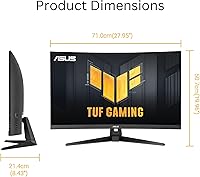
  • Dimensions: The monitor measures 8.4 x 27.9 x 19.9 inches (depth x width x height) with the stand attached.
  • Weight: The complete unit with stand weighs 7.1 pounds.
  • Warranty: ASUS provides a 3-year manufacturer warranty covering defects in materials and workmanship.
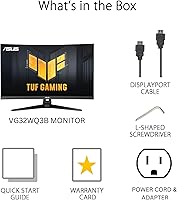
  • In the Box: Package contents include a DisplayPort cable, L-shaped screwdriver, power cord, quick start guide, and warranty card.
  • Bonus Included: Purchase includes a 3-month Adobe Creative Cloud subscription valid through August 31, 2026.
  • Availability: The monitor was first made available in December 2024, positioning it as a late-2024 product generation.

Related Reviews

KOORUI G3221SC 32″ Curved QHD Gaming Monitor

69%
83%
Picture Quality
81%
Gaming Performance
86%
Value for Money
41%
HDR Performance
67%
Color Accuracy
More
Gawfolk GF320C 32-Inch Curved Gaming Monitor

75%
88%
Refresh Rate Performance
83%
Image Quality
76%
Motion Clarity
86%
Curvature & Immersion
91%
Value for Money
More
Samsung 32-Inch S39C Curved Gaming Monitor
83%
88%
Display Quality
91%
Value for Money
86%
Eye Comfort
89%
Ease of Setup
85%
Build Quality
More
AOC C32G2 32″ Curved Gaming Monitor
76%
91%
Value for Money
84%
Gaming Performance
73%
Image Quality
88%
Refresh Rate & Smoothness
83%
Curvature & Immersion
More
KTC H32S17C 32-inch Curved Gaming Monitor

72%
91%
Value for Money
84%
Gaming Performance
76%
Picture Quality
52%
HDR Experience
67%
Color Accuracy
More
ASUS VG27VH1B 27-inch Curved Gaming Monitor
78%
93%
Refresh Rate Performance
88%
Motion Clarity & Response Time
91%
Adaptive Sync & Tear-Free Output
67%
Image Sharpness & Resolution
62%
Color Accuracy & Calibration
More
KTC H32S25E 32-inch Curved Gaming Monitor
73%
88%
Gaming Performance
84%
Image Clarity
86%
Curvature & Immersion
82%
Out-of-Box Color
53%
HDR Quality
More
KTC H32S17F 32-inch Curved Gaming Monitor
73%
91%
Refresh Rate Performance
88%
Value for Money
86%
Motion Clarity
74%
Color & Visual Quality
61%
Resolution & Sharpness
More
Z-Edge UG32 32-inch Curved Gaming Monitor
84%
91%
Gaming Performance
88%
Display Quality
85%
Design and Build Quality
84%
Ease of Setup
90%
Refresh Rate and Responsiveness
More
ASUS TUF Gaming VG32UQA1A 32-inch Gaming Monitor
74%
88%
Image Clarity
83%
Refresh Rate Performance
91%
Console Compatibility
54%
HDR Quality
84%
Motion Handling
More
ASUS TUF VG34VQL1B 34-inch Curved Gaming Monitor
78%
83%
Image Quality
89%
Refresh Rate & Smoothness
78%
Response Time & Motion Clarity
81%
Adaptive Sync Performance
54%
HDR Performance
More

FAQ

FreeSync is natively designed for AMD GPUs, but many NVIDIA cards from the RTX 20 series onward support FreeSync displays through NVIDIA's G-Sync Compatible mode. It is worth enabling G-Sync Compatible in the NVIDIA control panel to get the variable refresh rate benefits if you are running a green-team card.

You can connect a console via HDMI, but keep in mind that the monitor does not include HDMI 2.1, which limits 4K 120Hz console output — though that is not a concern at 1440p. For 1440p gaming on console, Xbox Series X supports 1440p natively, while PS5 does not officially support 1440p output, so Sony console users may see some resolution scaling.

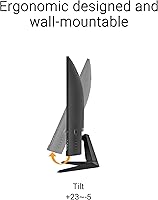
The stand offers limited ergonomic adjustment — tilt is supported but height adjustment range is quite narrow. If you need precise height positioning, picking up a third-party VESA monitor arm is a practical solution, as the display is VESA mount compatible.

At 31.5 inches, the 1500R curve is noticeable and adds a sense of depth in games without feeling extreme. For most gaming and media use it is comfortable, but some users doing precise line-based work like spreadsheets or architectural drawings may find the subtle edge distortion mildly distracting.

HDR is present but should be treated as a bonus feature rather than a headline selling point. The peak brightness is not high enough to produce the dramatic HDR contrast you would see on an OLED or a dedicated HDR600-rated display. It adds a mild improvement in supported content, but do not buy this monitor primarily for HDR performance.

Shadow Boost is essentially a gamma and brightness adjustment targeted at dark regions of the image, designed to make enemies or objects in shadowy areas more visible without washing out the rest of the screen. In practice, users of dark survival or tactical shooter games report it genuinely helps spot detail that would otherwise be lost, though it is a software processing effect rather than a hardware upgrade to panel brightness.

No — only a DisplayPort cable is included in the box. If you plan to connect via HDMI, you will need to supply your own cable, which is a minor but common inconvenience buyers mention.

The matte coating does a solid job reducing reflections and is a genuine comfort upgrade for gaming in lit rooms. It introduces a very slight haze compared to glossy panels, but with 90% DCI-P3 color coverage the image still looks vibrant and well-saturated in normal use — it is not a film that noticeably dulls colors.

Yes, that is exactly what the DisplayWidget software is for. Once installed on your PC, it lets you switch picture modes, adjust brightness, and tweak other OSD settings from a desktop interface, which is considerably more convenient than navigating physical button menus.

The primary difference is screen real estate and pixel density. A 27-inch 1440p panel has a slightly higher pixel density, meaning text and fine detail look marginally sharper up close. The 32-inch version gives you more physical viewing area and benefits more from the curvature at that size, which many users find more immersive for gaming. Sitting distance matters — at a typical desk setup of 60 to 80cm, 32 inches at 1440p is comfortable rather than pixelated.