Overview

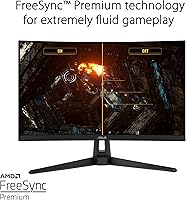
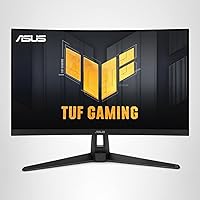
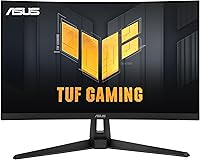
The ASUS VG27VH1B 27-inch Curved Gaming Monitor sits in a competitive corner of the market where buyers want real performance without spending heavily. Launched in 2020, it has held its ground well — a 1500R curved panel that wraps your field of view without demanding a flagship budget. The matte surface cuts down on reflections, which matters more than people expect during longer sessions. It works with both AMD and NVIDIA graphics cards through FreeSync Premium and Adaptive-Sync support, meaning most mid-range GPU owners can plug in and get smooth, tear-free output right away.
Features & Benefits

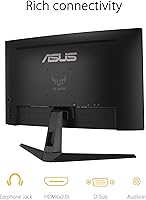
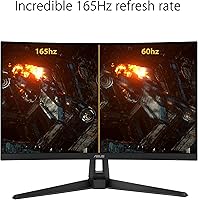
The headline spec is the 165Hz refresh rate, which translates directly into smoother animation during firefights and fast camera movement — you feel it within minutes of switching from a standard 60Hz display. ASUS pairs this with ELMB technology, keeping motion blur tight at 1ms MPRT so fast-moving objects stay sharp rather than trailing. Shadow Boost lifts detail out of dark corners in games without blowing out the brighter parts of the image, which is a genuinely useful addition. Connectivity is straightforward: HDMI 2.0 and a D-Sub port cover the majority of desktop and older hardware setups without requiring adapters.

Best For

This curved gaming monitor is a natural fit for players who care more about frame rate than pixel density. At 1080p, it runs smoothly even on mid-range graphics cards — you can push high frame counts in competitive titles without needing top-end hardware. FPS and esports players will get the most from it, since high refresh rate matters far more in those genres than extra resolution. Anyone upgrading from a 60Hz or 75Hz monitor will notice the difference immediately. The 27-inch curve also works well in tighter desk setups, filling your view without requiring you to sit far back.

User Feedback

Across a large pool of verified buyers, the ASUS TUF VG27VH1B earns strong marks — most praise centers on how noticeably smooth gameplay feels compared to lower-refresh displays. The stand does draw some complaints; it only tilts, so anyone wanting height or swivel adjustments will likely need a VESA arm. Color accuracy is worth being upfront about: this panel performs well for gaming, but creative professionals needing precise color reproduction will find it limited. A recurring positive is Shadow Boost, which buyers in dark-heavy games find genuinely useful. Most criticism at this price tier reflects expected compromises rather than actual quality shortfalls.

Pros

  • 165Hz refresh rate makes fast gameplay feel dramatically smoother compared to standard 60Hz monitors.
  • Adaptive sync works reliably with both AMD and NVIDIA graphics cards right out of the box.
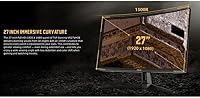
  • The 1500R curve adds genuine depth to wide game environments without feeling overdone at 27 inches.
  • Shadow Boost lifts dark in-game scenes without flattening highlights — practically useful, not just a checkbox feature.
  • Matte anti-glare coating keeps the screen readable in normally lit rooms during long sessions.
  • ELMB keeps motion sharp and ghost-free during rapid movement in fast-paced titles.
  • Broad GPU compatibility means most mid-range desktop users can get full adaptive sync benefits without extra configuration.
  • Setup is quick and the on-screen menu is straightforward to navigate for first-time users.
  • Strong value in its price tier — the combination of curve, high refresh rate, and adaptive sync is hard to match at this cost.

Cons

  • 1080p resolution at 27 inches shows visible softness in fine detail, especially coming from a sharper display.
  • ELMB and Adaptive-Sync cannot be used simultaneously, forcing a trade-off between the two technologies.
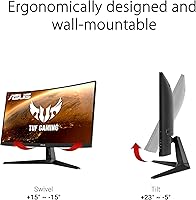
  • Stand adjustment is limited to tilt only — no height, swivel, or pivot options included.
  • No DisplayPort on the connection panel, which limits flexibility for users who prefer or depend on that interface.
  • Color shift from off-axis angles is noticeable, reducing consistency if you are not seated directly in front of the screen.
  • Out-of-box color calibration needs manual tweaking to get the most accurate image quality.
  • The blue light filter visibly warms the display tone, which some users find distracting during normal use.
  • OSD navigation buttons are rear-mounted and take some getting used to for blind adjustments.
  • Plastic stand and base show fingerprints and surface wear more readily than the panel itself.

Ratings

The ASUS VG27VH1B 27-inch Curved Gaming Monitor earns its strong reputation in a crowded mid-range field, and these scores reflect exactly that — generated by AI after systematically analyzing thousands of verified global buyer reviews, with spam, bot activity, and incentivized feedback actively filtered out. The result is an honest picture of where this curved panel genuinely delivers and where real-world buyers have run into friction. Both the highs and the legitimate frustrations are represented here without softening either side.
Refresh Rate Performance
93%
The jump to 165Hz is something buyers consistently describe as immediately noticeable, especially coming from 60Hz or 75Hz panels. In fast-paced shooters and racing titles, motion feels fluid and controlled rather than choppy, which is the core reason most people buy this monitor.
A small number of users found that hitting the full 165Hz required manual configuration in display settings — it did not always activate automatically after plugging in. Those with older GPUs are also capped at 144Hz, which is still excellent but not the headline spec.
Motion Clarity & Response Time
88%
ELMB-driven 1ms MPRT response makes fast-moving objects stay sharp during gameplay, and most users confirm that ghosting is minimal in normal gaming conditions. Switching between targets in FPS titles feels clean and immediate rather than trailing behind.
ELMB and Adaptive-Sync cannot run simultaneously on this panel, so you have to choose one or the other. Some users found this trade-off frustrating once they realized it, particularly those who expected both technologies to stack together.
Adaptive Sync & Tear-Free Output
91%
FreeSync Premium support is broad and reliable, and compatibility with NVIDIA Adaptive-Sync means the vast majority of GPU owners can use variable refresh rate without issues. Buyers report that screen tearing effectively disappears during matched frame rate ranges, making gameplay feel noticeably more polished.
The VRR range is not the widest in the segment, and at very low frame rates the benefits taper off. A handful of NVIDIA users reported needing to enable G-Sync Compatible mode manually in the driver panel before tearing was fully resolved.
Image Sharpness & Resolution
67%
33%
For competitive gaming at typical desk distances, 1080p on this panel is perfectly workable, and the matte coating keeps the image readable without glare interference. Text in menus and UI elements is clear enough for everyday gaming use without strain.
At 27 inches, 1080p pixel density is a genuine limitation — fine detail in open-world environments looks noticeably softer than on a 1440p panel of similar size. Buyers who game close to the screen or who came from a sharper display have flagged this as the single biggest trade-off.
Color Accuracy & Calibration
62%
38%
Out of the box, colors are vibrant and punchy enough for gaming, and most buyers find the default picture modes acceptable without any manual adjustment. Darker tones in particular come through with decent depth due to the VA-adjacent characteristics of the panel.
Anyone expecting accurate, consistent color reproduction for creative work will be disappointed — this is a gaming panel first. Several buyers noted visible color shift when viewing from angles, and out-of-box calibration leaves some room for improvement in white balance.
Curved Panel Immersion
84%
The 1500R curvature adds a genuine sense of depth in games with wide environments, and at 27 inches the curve is subtle enough to not feel gimmicky. Users in tighter desk setups particularly appreciated how the screen wraps naturally into their peripheral vision.
For dual-monitor configurations, the curvature makes panel-matching less than ideal. A minority of users who primarily use flat panels found the curve disorienting initially, though most adjusted within a few sessions.
Shadow Boost Utility
79%
21%
Buyers who play in dark in-game environments — horror titles, dungeon crawlers, nighttime maps — consistently highlight Shadow Boost as a practical feature that reveals hidden detail without washing out the rest of the image. It works better than expected for a setting that could easily feel like a cheap brightness boost.
Shadow Boost has limited granularity in its adjustment and can make some already-bright scenes feel slightly over-processed. A subset of users simply turned it off and preferred managing gamma through standard display settings instead.
Build Quality & Materials
74%
26%
The overall construction feels solid for the price tier — the panel has minimal flex and the rear casing does not creak under normal handling. Most buyers found setup straightforward and the monitor felt stable once assembled.
The plastic finish on the stand and base attracts fingerprints and shows wear over time more than the panel itself. A few users noted that the stand wobble was more pronounced than expected on uneven or soft desk surfaces.
Stand & Ergonomics
57%
43%
The included stand holds the panel steady at a fixed height, and tilt adjustment is smooth enough to find a comfortable angle for most seated positions. For buyers who keep their monitor position static, it is a non-issue day to day.
Tilt is the only adjustment on offer — no height, swivel, or pivot. This is a recurring frustration in user reviews, and anyone with a non-standard chair height or who shares the monitor between users will likely want a third-party VESA arm fairly quickly.
Connectivity & Port Selection
72%
28%
HDMI 2.0 handles the full 165Hz resolution without bandwidth issues, and the D-Sub port keeps the monitor accessible for users with older hardware or secondary machines. No adapter headaches for the majority of desktop setups.
There is no DisplayPort, which some users consider a notable omission at this price point. Those who prefer DisplayPort for daisy-chaining or simply habit will need to adapt their setup accordingly.
Eye Comfort Over Long Sessions
77%
23%
The matte anti-glare coating genuinely reduces fatigue during extended sessions in normally lit rooms, and ASUS includes flicker-reduction and blue light filter settings that several buyers mentioned using during late-night gaming.
The blue light filter noticeably warms the color temperature when enabled, which some users found off-putting. A few buyers also noted that the monitor lacks a high-end flicker-free certification, which may matter to those with particularly light-sensitive eyes.
Setup & Out-of-Box Experience
81%
19%
Assembly is quick and the included stand clicks into place without tools. The on-screen display menu is logical and navigating to refresh rate or sync settings takes only a minute or two for most buyers.
The OSD buttons are located on the rear underside of the panel, which makes blind adjustment a slight learning curve. Some users also wished the manual had clearer guidance on enabling the full 165Hz mode through OS display settings.
Value for Money
89%
At its market price, this curved gaming monitor is difficult to argue against for buyers who prioritize smooth gameplay above all else. The combination of a high refresh rate, adaptive sync support, and a curved 27-inch panel at this cost point is genuinely competitive.
If your needs stretch into color-accurate work, higher resolution, or premium ergonomics, the money is better spent elsewhere. The value equation is strong specifically for gaming-first buyers — those with broader expectations may feel the limitations more acutely.

Suitable for:

The ASUS VG27VH1B 27-inch Curved Gaming Monitor is built for gamers who want a meaningful performance upgrade without committing to a premium-tier budget. If you spend most of your gaming time in fast-paced titles — shooters, battle royales, racing games — the 165Hz refresh rate and adaptive sync support will make a tangible difference you notice every session. It also makes a strong case for anyone currently on a 60Hz or 75Hz display who wants to understand what the high-refresh-rate experience actually feels like before potentially spending more. Gamers running mid-range NVIDIA or AMD GPUs will find the panel pairs well with hardware that can realistically sustain high frame counts at 1080p. The 1500R curve and matte coating also suit compact desk setups where you sit relatively close to the screen and want the display to fill your field of view naturally.
Not suitable for:

The ASUS VG27VH1B 27-inch Curved Gaming Monitor is a harder sell if resolution is a priority for you. At 27 inches, 1080p pixel density is genuinely lower than what a same-sized 1440p panel delivers, and if you sit close to your screen or have used a sharper display before, that softness in fine detail is noticeable. Photographers, video editors, or anyone doing color-sensitive creative work should look elsewhere entirely — this panel was not designed with color accuracy in mind, and its out-of-box calibration reflects that. The stand offers tilt only, so if your workstation setup requires height adjustment or you share the monitor between users at different heights, you will either need to accept a fixed position or budget for a VESA arm. There is also no DisplayPort, which is a real limitation for users who rely on that connection for daisy-chaining or maximum bandwidth flexibility.
Specifications

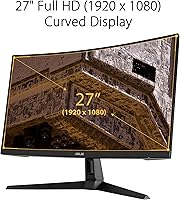
  • Screen Size: The panel measures 27 inches diagonally, providing a wide viewing area suited to both competitive and single-player gaming at typical desk distances.
  • Resolution: Native resolution is 1920x1080 (Full HD), delivering standard 1080p output across the full panel area.
  • Panel Curvature: The screen uses a 1500R curvature radius, designed to wrap the display naturally into the viewer's peripheral field of vision at close range.
  • Refresh Rate: The panel supports a maximum refresh rate of 165Hz, with backward compatibility at 144Hz for systems that do not output the full ceiling.
  • Response Time: Rated at 1ms MPRT (Moving Picture Response Time) when ASUS Extreme Low Motion Blur technology is active.
  • Adaptive Sync: Compatible with AMD FreeSync Premium and NVIDIA Adaptive-Sync, supporting variable refresh rate output to eliminate screen tearing across both GPU brands.
  • Ports: Connectivity includes one HDMI 2.0 port and one D-Sub (VGA) port; there is no DisplayPort on this model.
  • Panel Surface: The screen uses a matte anti-glare coating that reduces reflections from ambient light sources in typical indoor environments.
  • Aspect Ratio: Standard 16:9 widescreen aspect ratio, compatible with all common gaming and desktop resolutions without letterboxing.
  • ELMB Technology: ASUS Extreme Low Motion Blur (ELMB) reduces perceived blur and ghosting during fast motion, but cannot operate simultaneously with Adaptive-Sync.
  • Shadow Boost: Shadow Boost is an ASUS image-processing feature that selectively brightens dark areas of the image without overexposing highlights elsewhere on screen.
  • Dimensions: With the stand attached, the monitor measures approximately 24.03 inches wide, 18.71 inches tall, and 8.42 inches deep.
  • Weight: The complete unit including stand weighs approximately 11.79 pounds, which is standard for a 27-inch curved panel in this category.
  • Voltage: The power supply supports a universal input range of 100–240V, making it compatible with standard outlets in most countries without an external adapter.
  • VESA Compatibility: The monitor supports VESA wall or arm mounting, allowing the included stand to be replaced with a third-party arm for improved ergonomic adjustability.
  • Stand Adjustment: The included stand offers tilt adjustment only; height, swivel, and pivot adjustments are not available without a separate VESA mount solution.
  • Aspect Ratio: The display outputs in a native 16:9 aspect ratio, consistent with standard 1080p content, streaming, and game rendering pipelines.
  • Amazon Rating: The monitor holds a 4.6 out of 5 rating based on over 2,831 verified buyer ratings on Amazon as of available data.

Related Reviews
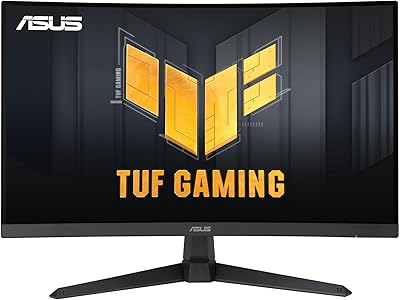
ASUS TUF Gaming VG27WQ3B 27-inch Gaming Monitor

80%
88%
Image Quality
93%
Refresh Rate & Smoothness
91%
Response Time & Motion Clarity
84%
Curved Panel Experience
82%
Color Accuracy & Vibrancy
More
Skytech Gaming Moonshadow 27-inch Curved Gaming Monitor

83%
88%
Image Quality
91%
Refresh Rate Performance
86%
Adaptive-Sync
83%
VA Panel Contrast
84%
Stand & Ergonomics
More
Sealan 27-inch Curved Gaming Monitor
82%
85%
Display Quality
90%
Ease of Setup
91%
Value for Money
87%
Performance in Gaming
83%
Color Accuracy
More
Gawfolk GF270C 27-Inch Curved Gaming Monitor
86%
91%
Performance
88%
Display Quality
92%
Value for Money
90%
Response Time
89%
Color Accuracy
More
GAMEPOWER T50 27-Inch Curved Gaming Monitor
66%
83%
Value for Money
79%
Gaming Performance
74%
Display Quality
61%
Pixel Density & Sharpness
62%
Build Quality
More
GreBear 27-Inch 180Hz Curved Gaming Monitor
86%
91%
Performance in Fast-Paced Games
95%
Refresh Rate and Smoothness
86%
Build Quality and Durability
67%
Color Accuracy
89%
Ease of Setup
More
ArcticPro 27-inch 240Hz Curved Gaming Monitor
87%
94%
Performance in Gaming
90%
Display Quality
85%
Setup and Installation
88%
Visual Comfort (Low Blue Light)
91%
Design and Aesthetics
More
Great Voell 27-Inch Curved Gaming Monitor
86%
91%
Value for Money
89%
Display Quality
87%
Gaming Performance
84%
Eye Comfort
80%
Build Quality
More
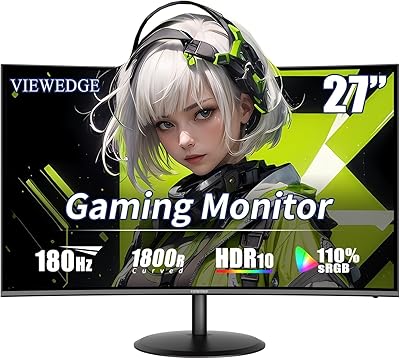
Viewedge 27-inch Curved Gaming Monitor CS27FHUS
84%
92%
Gaming Performance
89%
Display Quality
82%
Build Quality
91%
Ease of Setup
88%
Immersion & Comfort
More
CRUA CR270C 27″ Curved Gaming Monitor
71%
83%
Value for Money
78%
Image Quality
81%
Refresh Rate Performance
86%
Panel Contrast & Blacks
67%
Build Quality
More

FAQ

Yes — most systems will not automatically switch to 165Hz after you plug in. You need to go into your display settings (on Windows, right-click the desktop, go to Display Settings, then Advanced Display Settings) and manually select 165Hz from the refresh rate dropdown. If it does not appear, make sure you are using the HDMI 2.0 port and that your GPU supports that output rate.

Yes, the HDMI 2.0 port makes it compatible with current-generation consoles. Keep in mind that consoles typically output at 60Hz for most titles, so you will not be using the full 165Hz capability — but the monitor will work fine for console gaming all the same.

It works with both. The monitor supports AMD FreeSync Premium natively, and ASUS has confirmed compatibility with NVIDIA Adaptive-Sync on GTX 10 series, GTX 16 series, RTX 20 series, and newer cards. You may need to enable G-Sync Compatible mode manually through the NVIDIA control panel.

No, that is not possible on this panel. ELMB and Adaptive-Sync are mutually exclusive — you activate one or the other through the on-screen menu. Most buyers who game with a mid-range GPU tend to stick with FreeSync for the variable refresh rate benefits, while ELMB is better suited to situations where you are running well above the monitor's VRR range consistently.

Honestly, it depends on how close you sit and what you are used to. At arm's length during gaming, most people find it perfectly fine — especially in fast-paced titles where you are focused on motion rather than fine detail. If you have been using a 1440p monitor or sit very close to your screen, the pixel density difference is real and worth considering before you buy.

The stand only tilts — there is no height, swivel, or pivot adjustment built in. For many gaming setups this is fine, but if your chair height or desk puts the monitor at an uncomfortable angle, a VESA-compatible monitor arm is a practical solution and the monitor does support VESA mounting.

Shadow Boost selectively brightens darker regions of the image without cranking up the overall backlight or blowing out bright areas. In practice, it is most useful in games with dark environments — horror titles, dungeon-heavy RPGs, or nighttime maps in shooters — where shadow detail is often lost at standard settings. It is worth experimenting with; some users love it, others prefer to manage brightness and gamma manually.

No, this curved gaming monitor does not include built-in speakers. You will need external speakers or headphones for audio output.

Not really, if accuracy matters to you. The panel is optimized for gaming rather than color-critical work — out-of-box calibration is adequate for general use, but color consistency from off-axis angles is limited and the color gamut coverage is not at the level of a dedicated professional display. For occasional casual editing it is usable, but it should not be your primary reason to buy this monitor.

Setup is straightforward — the stand attaches to the panel with a simple click-and-lock mechanism and no tools are required. The on-screen display menu is navigated through buttons on the rear underside of the panel, which takes a few minutes to get used to. Most buyers report being up and running within fifteen to twenty minutes of opening the box.