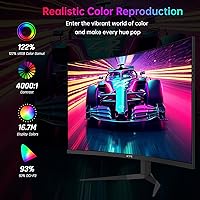
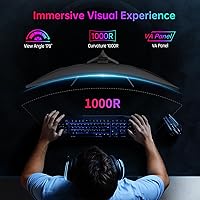
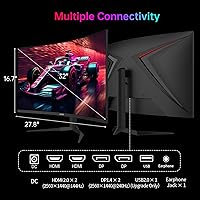
Overview

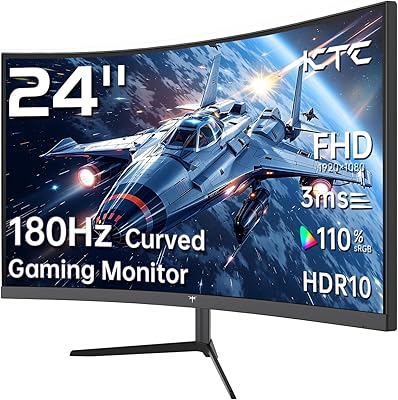
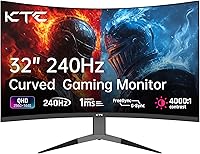
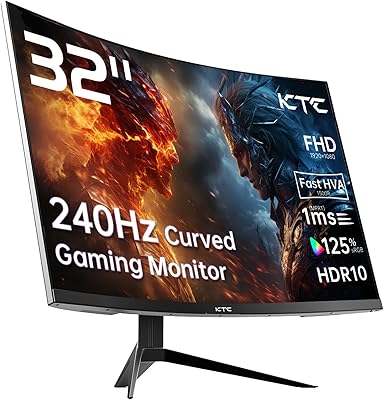
The KTC H32S25E 32-inch Curved Gaming Monitor arrived in mid-2024 as a budget-conscious push into the competitive 1440p space, going up against well-established names like Acer, LG, and Samsung. KTC is not widely recognized in Western markets, and that unfamiliarity is a legitimate hesitation for first-time buyers. Still, its top-200 monitor ranking on Amazon signals that real buyers have taken the chance and largely stuck with it. The panel's 1000R curvature is the most physically striking feature — tighter than the 1500R or 1800R curves common on most budget curved displays, and noticeably more immersive when you sit close to a screen this large.

Features & Benefits

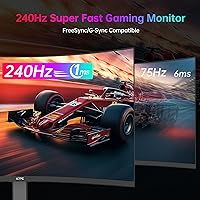
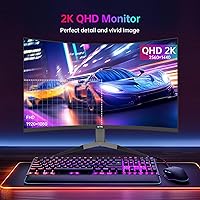
The 240Hz refresh rate and 1ms response time are not just spec sheet items — in fast-paced shooters or racing titles, the smoothness gap between 60Hz and 240Hz is something you feel in your reactions, not just see on screen. Adaptive Sync keeps tearing out of the picture for AMD users; Nvidia owners should verify compatibility before assuming full G-Sync support. At 32 inches, QHD resolution lands noticeably sharper than 1080p, and the 4000:1 contrast ratio helps pull detail out of dark environments. HDR is present but modest — useful, not transformative. Four total ports (two HDMI, two DisplayPort) make switching between a console and a gaming PC genuinely convenient, a practical edge many rivals skip.

Best For

This curved gaming monitor makes the most sense for someone upgrading from a 1080p or 60Hz display — the jump in both resolution and refresh rate will be obvious and immediately satisfying. Competitive PC gamers who want fluid, high-frame-rate gameplay at 1440p without spending flagship prices will find the value proposition hard to argue with. It also works well for console-and-PC hybrid setups given the dual HDMI inputs. Where it falls short: ergonomic flexibility. The stand tilts and that is about it — no height adjustment, no swivel, no pivot. If your desk setup requires precise positioning, you will need a VESA arm or a different monitor. Color professionals should look elsewhere.

User Feedback

Buyers consistently praise the out-of-box image quality — colors look vibrant from day one without requiring a calibration session, and motion performance in games draws steady positive comments. Build quality earns more credit than you might expect at this price tier. On the flip side, OSD navigation is a recurring complaint: the menu feels clunky compared to competitors, and adjusting settings mid-session can be genuinely frustrating. Some buyers raise the KTC brand question directly — it takes a leap of faith the first time. The limited stand adjustment surfaces repeatedly as a real-world annoyance, especially for users who share the monitor or sit at non-standard desk heights. Overall, satisfied buyers outnumber critics, but those ergonomic and OSD patterns are worth knowing upfront.

Pros

  • 240Hz refresh rate delivers genuinely smoother gameplay in fast-paced competitive titles, not just a paper spec.
  • QHD resolution at 32 inches looks noticeably crisper than 1080p — fine text and distant in-game detail both benefit.
  • The 1000R curvature is one of the tightest in this price range, adding real immersion on a single-monitor desk.
  • Out-of-box color accuracy is consistently praised by buyers — most users report no need for manual calibration.
  • Four input ports (two HDMI, two DisplayPort) make multi-device switching genuinely convenient.
  • Adaptive Sync performs reliably for AMD GPU users, keeping screen tearing out of the picture.
  • Build quality exceeds expectations for the price tier, with a solid chassis that does not feel cheap.
  • Matte anti-glare coating reduces reflections effectively in normally lit rooms.
  • Strong Amazon sales rank suggests a real and growing buyer base, offering some confidence for a lesser-known brand.
  • The 4000:1 contrast ratio helps shadow detail in dark game environments more than typical budget IPS panels.

Cons

  • The stand is tilt-only — no height, swivel, or pivot adjustment without purchasing a separate VESA arm.
  • HDR support is basic and unlikely to impress anyone coming from a higher-end display.
  • KTC has limited brand recognition and service infrastructure in Western markets, which raises long-term support concerns.
  • The OSD (on-screen display) menu is widely reported as clunky and unintuitive to navigate during use.
  • Nvidia G-Sync compatibility is unconfirmed, making this a riskier choice for Nvidia GPU owners.
  • No factory calibration report is included, so color accuracy figures are nominal rather than verified.
  • At nearly 20 pounds, the monitor is on the heavier side, which matters if you reposition your setup often.
  • Limited tilt range (-5° to 20°) may not suit users with non-standard desk heights or seating positions.

Ratings

The scores below reflect AI-driven analysis of verified global buyer reviews for the KTC H32S25E 32-inch Curved Gaming Monitor, with spam, bot-generated, and incentivized feedback actively filtered out before scoring. Each category is weighted against real-world usage patterns reported by buyers across multiple retail platforms, capturing both what works well and where the panel genuinely falls short. The ratings are transparent — strengths and frustrations carry equal weight in the final numbers.

Gaming Performance
88%
Buyers consistently report that 240Hz at 1440p transforms the feel of competitive shooters and racing games — the smoothness gap versus a 60Hz or even 144Hz display is immediately obvious. Adaptive Sync keeps frame pacing clean for AMD GPU users, and ghosting is rarely mentioned as an issue in fast scenes.
Nvidia GPU owners occasionally report inconsistent adaptive sync behavior since G-Sync certification is absent, which can introduce minor tearing at certain frame rate ranges. A small number of buyers also note that hitting 240fps at 1440p demands a high-end GPU that not everyone owns.
Image Clarity
84%
At 32 inches, QHD resolution produces noticeably sharper text, finer in-game details, and cleaner UI elements compared to a 1080p display of the same size. The jump is especially appreciated by buyers upgrading from older 1080p panels, who frequently describe the image as a meaningful visual upgrade.
The pixel density, while good, is not class-leading — some buyers who have used 4K displays at this size notice the difference in fine text and detailed textures. There is no mention of a factory calibration report, so sharpness and color uniformity can vary slightly between units.
Curvature & Immersion
86%
The 1000R curve is tighter than the 1500R or 1800R found on most budget curved monitors, and buyers in single-monitor setups consistently praise it for drawing them into open-world and racing titles. At a normal desktop viewing distance, it feels natural rather than gimmicky, with peripheral content staying in comfortable sightlines.
A handful of users find the curve slightly disorienting for productivity tasks like spreadsheets or long document editing sessions, particularly those transitioning from a flat screen. The 1000R radius is also less ideal if you plan to use the monitor as part of a multi-display configuration, where panel alignment becomes awkward.
Out-of-Box Color
82%
18%
A recurring theme across buyer feedback is that colors look vibrant and well-balanced right out of the box — many users report no need for any calibration adjustments before gaming or watching content. The 122% sRGB coverage delivers punchy, saturated tones that suit action games and media consumption well.
Color consistency across the panel is not perfect, and some buyers notice slight uniformity variations toward screen edges — common in curved VA-adjacent panels at this price tier. The display is not factory-calibrated, so results are not guaranteed to be consistent between units, and professional color work is not a reliable use case.
HDR Quality
53%
47%
HDR mode does provide a visible improvement in highlight brightness and shadow contrast in supported games and video content, giving scenes a bit more visual pop compared to SDR mode. For casual HDR content consumption it adds some value, and buyers who have not used high-end HDR displays tend to find it a welcome addition.
Buyers with experience on premium HDR monitors are largely unimpressed — the implementation lacks local dimming and peak brightness falls well short of true HDR standards, resulting in washed-out highlights in demanding HDR scenes. Most experienced users end up leaving HDR disabled and relying on the panel's native SDR performance instead.
Build Quality
79%
21%
For its price tier, the physical construction draws more praise than criticism — buyers frequently note that the chassis feels solid and does not flex or creak during normal use. The bezel is slim and the overall aesthetic is clean enough to fit most gaming desk setups without looking out of place.
The included stand feels slightly less robust than the chassis itself, with minor wobble reported when bumping the desk or adjusting cables. A few buyers note that the plastic finish shows fingerprints easily and can feel less premium than equivalent Acer or AOC panels at a similar price point.
Ergonomics & Adjustability
44%
56%
The tilt adjustment range covers the most common seated positions and gets most users to an acceptable viewing angle without requiring any accessories. For buyers who place their monitor on a standard-height desk and sit in a typical chair, the default stand height is workable enough for daily use.
The tilt-only stand is the single most consistent complaint in buyer feedback — no height adjustment, swivel, or portrait rotation is available, which is a meaningful limitation for shared setups or non-standard workspaces. Buyers who need proper ergonomic positioning almost universally end up purchasing a separate VESA arm, which adds cost and setup time.
Connectivity
87%
Two HDMI and two DisplayPort inputs is genuinely useful — buyers with both a gaming PC and a console leave all devices connected simultaneously and switch inputs without cable swapping. The port selection covers essentially all modern gaming hardware configurations without requiring adapters.
The HDMI ports may not support the full 240Hz refresh rate depending on the HDMI version of the source device, which catches some buyers off guard expecting full performance over HDMI. There is also no USB hub built into the display, which is a minor but noticeable omission for desk cable management.
OSD & Controls
51%
49%
The OSD covers all expected adjustment categories including brightness, contrast, color temperature, and input switching, giving buyers reasonable control over the display output. Once users learn the button layout through trial and error, basic adjustments become manageable.
The OSD navigation is among the most frequently criticized aspects of the display — buttons are poorly labeled, menu depth is unintuitive, and making adjustments mid-session is described as frustrating by a notable share of buyers. Compared to competitors at similar price points, the OSD usability lags meaningfully.
Motion Handling
83%
At 240Hz with 1ms response time, fast-moving objects in competitive games track cleanly with minimal ghosting or trailing — a clear step up from slower panels. Buyers transitioning from 144Hz displays notice the improvement in fluidity during high-action sequences, particularly in first-person shooters.
At lower frame rates without adaptive sync active, minor frame pacing irregularities are occasionally reported by more technically attentive users. Motion performance with the HDMI connection at sub-maximum refresh rates is also less consistent than via DisplayPort.
Value for Money
81%
19%
Buyers who weigh the spec sheet against the price point — 32 inches, 1440p, 240Hz, curved — consistently find the value proposition compelling relative to branded alternatives. For buyers prioritizing gaming features per dollar over brand prestige, this 1440p display punches meaningfully above its cost.
The value calculus shifts for buyers who need ergonomic flexibility or professional color accuracy, since those limitations effectively require additional spending on a monitor arm or a different display entirely. KTC's limited warranty and support infrastructure also reduces perceived long-term value compared to brands with established service networks.
Brand Trust & Support
58%
42%
KTC has demonstrated consistent enough product quality across multiple releases to build a growing base of repeat buyers, and its Amazon presence with verified reviews provides some purchasing confidence. The strong sales rank and volume of detailed positive feedback suggest this is not a fly-by-night brand releasing unreliable hardware.
KTC's limited recognition in Western markets and relatively thin support infrastructure remain genuine concerns for buyers who prioritize post-purchase peace of mind. Users who have needed warranty service or technical support report a less responsive experience than they would expect from established brands like LG or Acer.
Setup & Installation
76%
24%
Assembly is straightforward — the stand attaches without tools and the physical setup process is quick enough that most buyers have the monitor running within minutes of unboxing. Cable routing is reasonably clean given the port placement on the rear panel.
Display driver installation and achieving the full 240Hz refresh rate requires manual adjustment in Windows display settings, which trips up some less experienced buyers who assume it activates automatically. The included documentation is minimal and does not walk through the DisplayPort-for-high-refresh-rate requirement clearly.
Eye Comfort
72%
28%
The matte anti-glare coating effectively reduces reflections from overhead lighting and windows, making extended gaming sessions in normal room conditions comfortable. Buyers who use the monitor for multi-hour sessions generally do not raise eye fatigue as a notable concern.
There is no mention of a certified low blue light mode or flicker-free certification in the product documentation, which matters to buyers sensitive to eye strain during long daily use. A modest number of buyers report needing to reduce brightness significantly below default levels to reach a comfortable setting.

Suitable for:

The KTC H32S25E 32-inch Curved Gaming Monitor is a strong match for PC gamers who are ready to step up from a 1080p or 60Hz display but are not willing to spend flagship prices to do it. If your primary goal is smooth, high-frame-rate gameplay at a resolution that actually makes a 32-inch screen look sharp, this panel hits that target squarely. The tight 1000R curvature works best in single-monitor setups where you sit relatively close to the screen — it adds genuine immersion in open-world and racing titles without the distortion risk of ultrawide formats. Gamers running AMD GPUs will get the full benefit of Adaptive Sync out of the box. The four input ports also make this a practical pick for anyone juggling a gaming PC and a console on the same desk, since you can leave both connected without unplugging anything.

Not suitable for:

The KTC H32S25E 32-inch Curved Gaming Monitor is not a good fit for buyers who need ergonomic flexibility — the stand only tilts, so if you require height adjustment, swivel, or portrait rotation, you will need to budget for a VESA monitor arm on top of the purchase price. Designers, photo editors, or video professionals should steer clear as well; while the 122% sRGB coverage sounds appealing, this is not a factory-calibrated or wide-gamut panel built for color-critical work. Nvidia GPU users should double-check G-Sync compatibility before buying, since official certification is not confirmed and experience may vary. Anyone expecting a cinematic HDR experience will likely be underwhelmed — the HDR implementation here is entry-level at best, more of a checkbox feature than a meaningful visual upgrade. Finally, if brand reputation and long-term warranty support are priorities, the relative unfamiliarity of KTC in Western markets is a real consideration worth weighing.

Specifications

  • Screen Size: The panel measures 32 inches diagonally, offering substantially more screen real estate than a typical 27-inch gaming monitor.
  • Resolution: Native resolution is 2560x1440 (QHD), delivering roughly 92 pixels per inch — noticeably sharper than 1080p at this screen size.
  • Refresh Rate: The panel runs at up to 240Hz, enabling very smooth motion rendering in fast-paced games when paired with a capable GPU.
  • Response Time: Rated at 1ms response time, which minimizes ghosting and trailing on fast-moving objects during competitive gameplay.
  • Panel Curvature: Features a 1000R curvature radius, one of the tightest curves available in this category, designed to match the natural arc of human vision at close range.
  • Contrast Ratio: Static contrast ratio is rated at 4000:1, which helps reproduce deeper blacks and more visible shadow detail than standard IPS panels.
  • Color Gamut: Covers 122% of the sRGB color space, producing vivid, saturated colors that suit gaming and casual media consumption.
  • HDR Support: HDR is supported at an entry level, providing some improvement in highlight detail, though performance does not match dedicated HDR-certified displays.
  • Adaptive Sync: Compatible with AMD FreeSync; Nvidia G-Sync compatibility is not officially certified and should be verified by Nvidia GPU users before purchase.
  • Connectivity: Equipped with two HDMI ports and two DisplayPort inputs, allowing up to four devices to remain physically connected simultaneously.
  • Max DP Bandwidth: The DisplayPort inputs support the full 240Hz refresh rate, while HDMI ports may be limited to lower refresh rates depending on the HDMI version and source device.
  • Panel Surface: Matte anti-glare coating reduces reflections from ambient light sources, making the display more comfortable in normally lit rooms.
  • Aspect Ratio: Standard 16:9 widescreen aspect ratio, compatible with all mainstream gaming resolutions and content formats without cropping or letterboxing.
  • Tilt Adjustment: The stand supports tilt adjustment from -5° to 20° (±3° tolerance); no height, swivel, or pivot adjustment is available on the stock stand.
  • VESA Compatibility: The display supports VESA mounting, allowing users to replace the included stand with a third-party monitor arm for improved ergonomic positioning.
  • Dimensions: Assembled monitor measures 32.08 x 21.06 x 7.28 inches, providing a wide footprint that requires adequate desk depth for comfortable close viewing.
  • Weight: The assembled unit weighs 19.21 pounds, which is average for a 32-inch curved display with an attached stand.
  • Model Number: The official model identifier is H32S25E, used for warranty registration, driver lookup, and support requests with KTC.
  • Release Date: First made available in July 2024, making it a relatively recent release with active product support at time of review.
  • Brand: Manufactured and sold by KTC, a monitor-focused brand with growing presence in the value gaming display segment but limited retail footprint in Western markets.

Related Reviews

KTC H32S17C 32-inch Curved Gaming Monitor
72%
91%
Value for Money
84%
Gaming Performance
76%
Picture Quality
52%
HDR Experience
67%
Color Accuracy
More
KTC H32S17F 32-inch Curved Gaming Monitor

73%
91%
Refresh Rate Performance
88%
Value for Money
86%
Motion Clarity
74%
Color & Visual Quality
61%
Resolution & Sharpness
More
KOORUI G3221SC 32″ Curved QHD Gaming Monitor

69%
83%
Picture Quality
81%
Gaming Performance
86%
Value for Money
41%
HDR Performance
67%
Color Accuracy
More
KTC 24-inch 1500R Curved Gaming Monitor
86%
94%
Gaming Performance
89%
Display Quality
92%
Value for Money
87%
Build Quality
83%
Ergonomics
More
AOC C32G2 32″ Curved Gaming Monitor

76%
91%
Value for Money
84%
Gaming Performance
73%
Image Quality
88%
Refresh Rate & Smoothness
83%
Curvature & Immersion
More
Gawfolk GF320C 32-Inch Curved Gaming Monitor
75%
88%
Refresh Rate Performance
83%
Image Quality
76%
Motion Clarity
86%
Curvature & Immersion
91%
Value for Money
More
Samsung 32-Inch S39C Curved Gaming Monitor
83%
88%
Display Quality
91%
Value for Money
86%
Eye Comfort
89%
Ease of Setup
85%
Build Quality
More
Z-Edge UG32 32-inch Curved Gaming Monitor
84%
91%
Gaming Performance
88%
Display Quality
85%
Design and Build Quality
84%
Ease of Setup
90%
Refresh Rate and Responsiveness
More
Pixio PXC328 32-inch Curved Gaming Monitor
77%
88%
Image Quality
92%
Contrast & Black Levels
86%
Refresh Rate & Smoothness
78%
Response Time & Motion Clarity
87%
Curvature & Immersion
More
TITAN ARMY C32C1S 32-inch Curved Gaming Monitor
77%
88%
Gaming Performance
83%
Image Quality
91%
Refresh Rate & Smoothness
86%
Value for Money
67%
Build Quality
More

FAQ

The panel is officially FreeSync compatible, which is AMD's adaptive sync standard. Nvidia GPUs can still drive the display without any issues, and many Nvidia users report acceptable adaptive sync behavior, but official G-Sync certification has not been confirmed. If tear-free performance with an Nvidia card is critical for you, it is worth testing during your return window.

Yes, but you need to use a DisplayPort cable, not HDMI. The DisplayPort inputs on this curved gaming monitor support the full 240Hz at 1440p. HDMI connections may cap you at a lower refresh rate depending on the HDMI version your source device outputs, so always use DisplayPort for competitive gaming.

It depends on your viewing distance. At 2 to 3 feet from the screen, 1000R actually feels very natural and reduces the need to move your eyes to reach screen edges. Some users find it slightly exaggerated for productivity tasks like spreadsheets or document editing, but most people adapt quickly. If you are used to a flat monitor, give yourself a few days before making a judgment.

Honestly, the HDR implementation is entry-level. You will notice some improvement in bright highlights and a bit more pop in high-contrast scenes, but this is not a display that will transform your HDR movie or game experience. Think of it as a useful extra rather than a headline feature.

The included stand only tilts — there is no height adjustment, swivel, or rotation. For most desks and seated positions the tilt range gets you close enough, but if you share the monitor or have a non-standard chair height, you will likely want to pick up a VESA-compatible monitor arm. The display does support VESA mounting, so swapping the stand out is straightforward.

Most buyers report that colors look vibrant and well-balanced straight out of the box without touching the settings. It is not a factory-calibrated panel with an included report, so results can vary unit to unit, but the general consensus is that it looks good immediately. If you are gaming or watching content, you likely will not feel the need to calibrate. For creative work, it is a different story.

KTC is a legitimate manufacturer with a growing catalog, but it does not have the same track record or service infrastructure as Acer, LG, or Samsung in Western markets. The KTC H32S25E 32-inch Curved Gaming Monitor has accumulated a significant number of verified purchases with generally positive feedback, which is a reasonable trust signal. That said, if long-term warranty support and easy returns are important to you, factor that into your decision — and always buy from a seller with a clear return policy.

Yes. The monitor has two HDMI ports and two DisplayPort inputs, so you can leave your PC on DisplayPort and your PS5 on HDMI simultaneously. Switching between inputs is done through the OSD menu. Note that the OSD controls have a bit of a learning curve and are not as intuitive as some competing displays, but once you know the layout it becomes routine.

The matte anti-glare coating does a solid job of killing reflections without noticeably degrading color vibrancy or sharpness. Under normal indoor lighting conditions most users do not find it to be an issue. If you are extremely sensitive to the slight haze that matte coatings can introduce on bright white backgrounds, it is worth noting — but for gaming this is rarely a practical concern.

To consistently push 240 frames per second at 1440p you need a fairly powerful card — something in the range of an RTX 4070 or RX 7800 XT or better for demanding modern titles. In less demanding or older games, mid-range cards can hit those frame rates more easily. If your GPU is not quite there yet, you can still enjoy the monitor at lower frame rates with adaptive sync keeping things smooth — you do not need to max out refresh rate to get value out of the display.