Overview

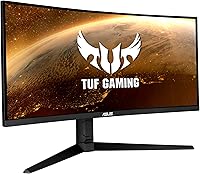
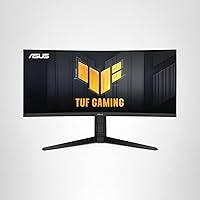
The ASUS TUF VG34VQL1B 34-inch Curved Gaming Monitor arrived in late 2020 as a mid-range option for gamers who wanted genuine ultrawide immersion without spending flagship money. The 34-inch 21:9 format combined with a tight 1500R curve gives it a distinct, wrap-around presence that a standard 27-inch flat panel simply cannot replicate. It sits squarely in ASUS's TUF Gaming line — built to be durable, practical, and packed with features that matter. This is not a display for professional color work or true HDR mastery, but as an all-rounder for serious gaming, it holds up remarkably well even by today's standards.
Features & Benefits

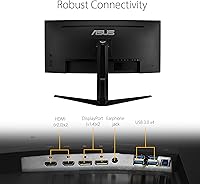
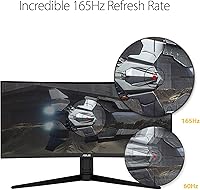
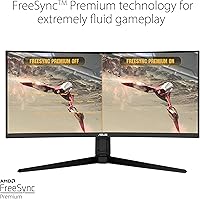
At 3440x1440 resolution, this ultrawide gaming monitor offers noticeably crisper detail than any 1080p ultrawide — the difference is most obvious in open-world titles where distant textures and horizon detail simply look better. The 165Hz refresh rate pushes motion clarity well beyond the 60Hz norm, and the 1ms MPRT response via ELMB keeps ghosting in check during hectic action sequences. One practical caveat: ELMB and FreeSync Premium cannot run at the same time, so you have to choose between motion blur reduction and adaptive sync. NVIDIA users get partial adaptive-sync support, and the dual DisplayPort 1.4 plus dual HDMI 2.0 inputs alongside a USB hub make juggling multiple devices straightforward.

Best For

This curved display makes the most sense for PC gamers drawn to immersive single-player experiences — RPGs, racing sims, and open-world titles all benefit considerably from the wider field of view. It is also a strong choice for anyone stepping up from a 1080p 60Hz monitor; the jump in both resolution and refresh rate is immediately obvious and hard to go back from. AMD GPU owners get the cleanest experience thanks to full FreeSync Premium support, but realistically, driving WQHD at high framerates calls for a mid-range GPU — something in the RTX 3070 or RX 6700 XT class. Productivity users who split time between work and gaming will appreciate the extra screen width.

User Feedback

Long-term owners are largely positive about the TUF VG34VQL1B, with the image quality and wrap-around curve drawing the most consistent praise. The stand build quality also earns repeated mentions — solid assembly, no wobble, and the height adjustment actually works, which is not a given at this price tier. On the downside, backlight bleed in dark scenes is a real complaint that surfaces often enough to take seriously. The HDR mode underwhelms most users who have experienced proper HDR; DisplayHDR 400 is better than nothing but sets a low bar. The ELMB-FreeSync trade-off also frustrates competitive players who want both features active simultaneously. Overall satisfaction remains genuinely high among long-term owners.

Pros

  • The 34-inch 21:9 curved screen creates a genuinely immersive wrap-around feel that flat panels cannot replicate.
  • WQHD resolution delivers noticeably sharper detail than 1080p ultrawides in visually rich games.
  • 165Hz refresh rate produces smooth, fluid motion well beyond the standard 60Hz experience.
  • FreeSync Premium works cleanly and consistently for AMD GPU owners right out of the box.
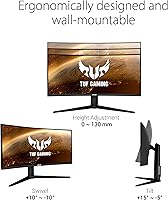
  • The height-adjustable stand is a practical ergonomic bonus that many rivals at this price skip entirely.
  • Dual DisplayPort 1.4 and dual HDMI 2.0 inputs make connecting a PC and console simultaneously straightforward.
  • The built-in USB 3.0 hub adds everyday convenience for peripherals without requiring a separate hub.
  • Assembly is quick and tool-free, with most owners up and running within minutes of unboxing.
  • Long-term owners consistently rate this ultrawide gaming monitor as strong value relative to its feature set.
  • The sturdy chassis and stable stand base hold up well over extended daily use with no wobble.

Cons

  • ELMB and FreeSync cannot run at the same time, forcing a frustrating choice between two key features.
  • DisplayHDR 400 delivers only marginal HDR improvement — buyers expecting vivid HDR contrast will be let down.
  • Backlight bleed in dark scenes is a recurring real-world complaint, especially along bottom and corner edges.
  • Factory color calibration varies between units, and some owners need manual OSD corrections out of the box.
  • There is no USB-C input, which is a notable gap for modern laptop users wanting a single-cable connection.
  • The OSD joystick feels cheap and imprecise compared to controls on competing monitors in this price range.
  • VA panel color shift at wider viewing angles limits comfortable shared viewing or off-axis desk setups.
  • Driving WQHD at consistently high framerates requires a capable mid-range GPU — budget cards will struggle.
  • No companion software for PC-side monitor control means all adjustments require navigating the physical OSD menu.
  • Newer competing monitors have since closed the gap on refresh rate and HDR, making this a less cutting-edge option.

Ratings

The ASUS TUF VG34VQL1B 34-inch Curved Gaming Monitor scores below are generated by AI after analyzing thousands of verified global user reviews, with spam, bot activity, and incentivized feedback actively filtered out. Ratings reflect the real-world consensus of long-term owners across gaming, productivity, and mixed-use scenarios. Both the genuine strengths and the recurring pain points are represented transparently — nothing is glossed over.
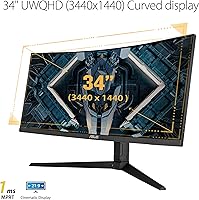
Image Quality
83%
The WQHD 3440x1440 resolution produces noticeably sharper, more detailed visuals than a typical 1080p ultrawide — particularly in open-world titles where distant terrain and environmental textures benefit from the extra pixel density. Colors are vibrant and the VA panel delivers punchy contrast in well-lit gaming scenes.
Color accuracy falls short of professional-grade IPS panels, and the VA panel's viewing angles mean colors shift noticeably if you're sitting off-center. Users doing any photo editing or content creation regularly flagged this as a limitation.
Refresh Rate & Smoothness
89%
At 165Hz, motion across this ultrawide gaming monitor feels genuinely fluid — scrolling through dense game environments or tracking fast-moving targets in shooters is a clear step above 60Hz or even 144Hz panels. Most owners upgrading from standard monitors describe the difference as immediately obvious and hard to reverse.
Reaching consistent high framerates at WQHD resolution demands a capable GPU, and owners with mid-range cards sometimes had to dial back settings to stay above 100fps. The 165Hz ceiling also means it is outpaced by newer 240Hz competitors in the ultra-competitive gaming segment.
Response Time & Motion Clarity
78%
22%
ELMB technology does a solid job of reducing ghosting in fast-paced sequences — in racing sims and action games, trailing artifacts are largely kept in check when ELMB is active. Users specifically praised this during high-speed gameplay where motion clarity visibly improved.
The core trade-off is frustrating: ELMB and FreeSync Premium cannot operate simultaneously, forcing users to choose between motion blur reduction and adaptive sync. Competitive players in particular found this compromise annoying, and a number of long-term owners simply left ELMB off to keep FreeSync active.
Adaptive Sync Performance
81%
19%
For AMD GPU owners, FreeSync Premium works cleanly and eliminates screen tearing across a wide range of framerates. The experience is smooth and consistent during gaming sessions, and setup requires no fiddling — it just works out of the box with compatible AMD cards.
NVIDIA users get partial adaptive-sync support, but it is not as reliable or consistent as a native G-Sync implementation. Some NVIDIA owners reported occasional tearing or flickering at the edges of the sync range, making this a stronger choice for AMD-based rigs.
HDR Performance
54%
46%
DisplayHDR 400 certification means the TUF VG34VQL1B does provide some measurable improvement in contrast and highlight rendering compared to a non-HDR display. In bright, colorful game scenes, HDR mode adds a modest sense of depth that flat SDR content lacks.
Buyers expecting meaningful HDR impact will be disappointed — DisplayHDR 400 is genuinely entry-level, and the panel lacks local dimming, so black levels in HDR mode are not dramatically better than SDR. Multiple long-term owners explicitly noted that they leave HDR mode off entirely after initial testing.
Build Quality & Durability
86%
The TUF Gaming lineup has a reputation for solid construction, and this curved display lives up to it. The chassis feels sturdy with no flex or creaking, and the stand base is heavy enough to keep things stable even during desk vibration from keyboard use.
The aesthetic leans heavily utilitarian — there is minimal RGB and the all-black plastic finish picks up dust and light scratches over time. A few users noted that the rear panel material feels slightly hollow compared to premium competitors at higher price points.
Stand & Ergonomics
82%
18%
Height adjustment is a meaningful differentiator here — many monitors at this price tier offer tilt only, so having genuine height range makes a real difference for users who spend long sessions at their desk. Assembly is straightforward, and the stand locks firmly with no wobble at any height.
Tilt and height are supported, but there is no pivot or rotation, which matters less for an ultrawide but can still be a minor inconvenience. The stand footprint is also fairly wide, and users with smaller desks found it consumed more surface space than expected.
Backlight Uniformity
62%
38%
In typical gaming and productivity use with a bright or moderately lit content, backlight uniformity is acceptable and most users would not notice any issues during normal daytime sessions.
Backlight bleed in dark or black scenes is one of the most consistently reported complaints across user reviews. Several owners flagged visible bright patches along the bottom and corner edges during dark loading screens or cinematic cutscenes, which is a known risk with VA panels at this size.
Connectivity & Ports
88%
Dual DisplayPort 1.4 and dual HDMI 2.0 inputs give this ultrawide gaming monitor genuine multi-device flexibility — users running a PC and a console simultaneously appreciated not having to swap cables. The built-in USB 3.0 hub adds everyday convenience for peripherals like headsets or flash drives.
There is no USB-C input, which is a real gap for users with modern laptops who prefer a single-cable setup. As workspaces increasingly include USB-C devices, the absence feels more noticeable than it might have at the time of the monitor's 2020 release.
Color Gamut & Accuracy
71%
29%
Out of the box, color reproduction is vibrant and punchy enough to satisfy most gamers — the wide color presentation works well for visually rich titles like open-world RPGs or racing sims where saturated environments look genuinely striking.
Factory calibration is inconsistent unit to unit, and users who care about color accuracy reported needing manual OSD adjustments to correct greenish or oversaturated tints. For any creative work requiring reliable color reproduction, this panel is not the right tool without a hardware calibrator.
OSD & Software Controls
69%
31%
The on-screen display covers all the expected controls — brightness, contrast, color temperature, ELMB toggle, refresh rate switching — and is organized logically enough that most users can navigate it without consulting the manual.
The physical joystick controlling the OSD feels cheap and imprecise compared to competitors, and several users noted that navigating sub-menus is slower than it should be. There is no companion software for PC-side control, which is a missed convenience given how feature-heavy the OSD is.
Value for Money
84%
Relative to its feature set — 165Hz, WQHD, FreeSync Premium, adjustable stand, and solid connectivity — this curved display sits at a price point that most long-term owners consider fair and well-justified. It consistently gets cited as one of the better mid-range ultrawide options available.
The HDR performance and backlight uniformity issues mean you are not getting perfection at this price, and there are newer competitors that have closed the gap. Buyers who stretch their budget expecting near-flagship results may feel the remaining gaps more keenly than those entering from a budget display.
Gaming Immersion
91%
The combination of the 34-inch panel, 1500R curvature, and 21:9 aspect ratio creates a genuinely enveloping experience that owners of standard flat monitors consistently describe as transformative on first use. Racing sims and story-driven RPGs in particular benefit enormously from the wider field of view.
The immersive format comes with a trade-off in competitive multiplayer — some fast-paced shooter players feel ultrawide aspect ratios can complicate crosshair placement and peripheral awareness compared to a 16:9 panel. Not a dealbreaker, but worth considering for players who prioritize competitive performance.
Productivity & Multitasking
79%
21%
The wide screen real estate makes side-by-side window layouts genuinely useful — having a browser, a document, and a reference app open simultaneously without any meaningful compromise is a practical daily benefit that office and hybrid workers regularly highlight.
The VA panel's color shift at wider viewing angles can be a minor irritant when sharing the screen with someone sitting beside you. Text rendering in some Windows scaling configurations at WQHD also requires manual DPI adjustments that catch first-time ultrawide users off guard.
Setup & Out-of-Box Experience
77%
23%
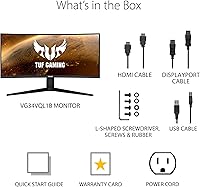
Physical assembly is clean and quick — the stand attaches without tools, the cable management is functional, and the monitor reaches a usable state within minutes of unboxing. The included cables cover the basics, and the monitor powers up with a reasonable default preset.
The default factory preset tends to run slightly high in brightness and contrast for most indoor environments, requiring immediate OSD calibration. A portion of users also noted that the documentation is minimal, leaving them to discover features like ELMB toggling through trial and error rather than clear guidance.

Suitable for:

The ASUS TUF VG34VQL1B 34-inch Curved Gaming Monitor is built for PC gamers who want a meaningful, all-around upgrade without stepping into flagship pricing territory. If your library leans toward open-world RPGs, racing sims, or narrative-driven titles, the 34-inch 21:9 format and 1500R curve deliver the kind of peripheral immersion that a standard flat 16:9 monitor simply cannot match. AMD GPU owners will get the cleanest experience, with FreeSync Premium running reliably out of the box — though NVIDIA users on GTX 10 series and newer also get functional adaptive-sync support. Anyone upgrading from a 1080p 60Hz display will feel the jump in both sharpness and motion fluidity immediately and dramatically. It also works well as a dual-purpose screen for people who split their time between gaming sessions and productivity tasks, since the wide canvas handles side-by-side app layouts with ease.
Not suitable for:

The ASUS TUF VG34VQL1B 34-inch Curved Gaming Monitor is not the right choice for buyers who expect a true HDR experience — DisplayHDR 400 is the entry rung of the HDR ladder, and without local dimming, dark scenes in HDR mode will not look dramatically different from SDR. Competitive multiplayer players who prioritize ultra-fast response and need both ELMB and FreeSync active simultaneously will find the forced trade-off between those two features genuinely limiting. Color-critical professionals — photographers, video editors, or graphic designers — should look elsewhere, as the VA panel's viewing angle shift and factory calibration inconsistencies make it unreliable for accurate color work. If backlight bleed in dark content is a dealbreaker for you, be aware this is a recurring complaint among owners, particularly during dark loading screens or cinematic cutscenes. Finally, users with compact desk setups may find the physical footprint of this curved display more demanding than anticipated.
Specifications

  • Screen Size: The panel measures 34 inches diagonally, formatted in a 21:9 ultrawide aspect ratio for an expansive field of view.
  • Resolution: Native resolution is 3440x1440 (WQHD), delivering significantly more pixel density than a standard 1080p ultrawide display.
  • Panel Type: Uses a VA (Vertical Alignment) panel, which provides strong contrast ratios and punchy colors suited to gaming environments.
  • Refresh Rate: Supports a maximum refresh rate of 165Hz, with backward compatibility at 144Hz for systems that target that output.
  • Response Time: Achieves 1ms MPRT (Moving Picture Response Time) when ASUS Extreme Low Motion Blur (ELMB) technology is enabled.
  • Curvature: The screen features a 1500R curvature radius, creating a wrap-around curve designed to match the natural field of human vision.
  • HDR Support: Carries DisplayHDR 400 certification, representing entry-level HDR capability with a peak brightness target of 400 nits.
  • Sync Technology: Supports AMD FreeSync Premium natively and is also compatible with NVIDIA Adaptive-Sync on GeForce GTX 10 series and newer cards.
  • Video Inputs: Connectivity includes two DisplayPort 1.4 ports and two HDMI 2.0 ports, allowing up to four simultaneous source connections.
  • USB Hub: An integrated USB 3.0 hub provides two downstream USB-A ports for connecting peripherals directly to the monitor.
  • Stand Adjustments: The included stand supports height adjustment, tilt, and swivel, offering meaningful ergonomic flexibility for long desktop sessions.
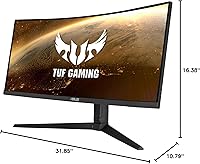
  • Dimensions: With the stand attached, the monitor measures approximately 31.85 inches wide, 16.38 inches deep, and 10.79 inches tall.
  • Weight: The full unit including stand weighs 19.86 pounds, which is typical for a 34-inch curved display of this build class.
  • VESA Compatibility: The monitor supports standard VESA wall-mount patterns, allowing the stand to be replaced with a third-party arm if preferred.
  • Power Input: Rated for 240-volt operation, and ships with the appropriate power adapter for the intended regional market.
  • Color Gamut: The VA panel covers a wide color gamut suitable for vivid gaming visuals, though it is not factory-calibrated for professional color work.
  • Release Date: The monitor was first made available in November 2020 and has maintained consistent availability and relevance since launch.
  • Model Identifier: The official ASUS model designation is VG34VQL1B, which identifies this specific 165Hz WQHD variant within the TUF Gaming monitor lineup.

Related Reviews

ASUS VG27VH1B 27-inch Curved Gaming Monitor
78%
93%
Refresh Rate Performance
88%
Motion Clarity & Response Time
91%
Adaptive Sync & Tear-Free Output
67%
Image Sharpness & Resolution
62%
Color Accuracy & Calibration
More
ASUS TUF Gaming VG24VQER 24-inch Curved Monitor
78%
91%
Motion Clarity
88%
Refresh Rate Value
83%
Panel Contrast & Blacks
67%
Color Accuracy
84%
Build Quality
More
ASUS TUF Gaming VG27WQ3B 27-inch Gaming Monitor
80%
88%
Image Quality
93%
Refresh Rate & Smoothness
91%
Response Time & Motion Clarity
84%
Curved Panel Experience
82%
Color Accuracy & Vibrancy
More
Alienware AW3425DWM 34-inch Curved Gaming Monitor
82%
91%
Image Clarity & Sharpness
89%
Refresh Rate & Motion Performance
93%
Ultrawide Immersion
84%
Color Accuracy & Vibrancy
62%
HDR Performance
More
Westinghouse 34-inch Curved Ultrawide Gaming Monitor
86%
87%
Display Quality
91%
Gaming Performance
92%
Value for Money
85%
Ease of Setup
78%
Built-in Speakers
More
Raywego Q34DB45-1 34-inch Curved Gaming Monitor
72%
88%
Value for Money
84%
Gaming Performance
74%
Image Quality
51%
HDR Performance
67%
Build Quality
More
Xiaomi 34-inch Curved Gaming Monitor G34WQi
84%
94%
Display Quality
91%
Gaming Performance
88%
Color Accuracy
82%
Build Quality
89%
Value for Money
More
Dell S3422DWG 34-inch Curved Gaming Monitor

83%
88%
Image Quality
84%
Refresh Rate & Smoothness
93%
Curvature & Immersion
54%
HDR Performance
91%
Build Quality & Design
More
Great Voell 34-Inch Curved Gaming Monitor
86%
92%
Visual Quality
89%
Gaming Performance
85%
Ergonomics & Adjustability
80%
Setup & Installation
91%
Value for Money
More
ASUS TUF Gaming VG277Q1A 27″ Gaming Monitor
78%
93%
Refresh Rate Performance
88%
Motion Clarity & Response Time
91%
Adaptive Sync & Tear-Free Gaming
74%
Out-of-Box Color Quality
82%
Shadow Boost & Dark Scene Visibility
More

FAQ

It works with NVIDIA cards too. While FreeSync Premium is the native sync technology and runs best with AMD GPUs, ASUS has confirmed compatibility with NVIDIA Adaptive-Sync on GeForce GTX 10 series and newer. Most users with RTX cards report it working reliably, though it does not carry an official G-Sync certification.

Unfortunately, no — this is one of the genuine trade-offs on this monitor. ELMB (the motion blur reduction feature) and FreeSync Premium are mutually exclusive and cannot be active simultaneously. You have to pick one or the other through the OSD menu depending on what matters more to you in a given session.

Honestly, it depends on your expectations. DisplayHDR 400 is the entry tier of HDR certification, and without local dimming, dark scenes will not look dramatically better than in SDR mode. Most long-term owners end up leaving HDR off after initial testing. If you are coming from a monitor with no HDR at all, you will notice a slight improvement in highlights, but do not expect the kind of HDR punch you would see on a higher-end display.

It varies unit to unit, as it does with most VA panels at this size. During normal gaming and productivity use with typical brightness levels, most people do not notice it. However, during dark loading screens or scenes with mostly black content, visible bright patches along the edges are a recurring complaint among owners. If you are very sensitive to backlight uniformity issues, it is worth factoring in.

To consistently hit 165Hz at the native 3440x1440 resolution in modern titles, you realistically need something in the RTX 3070 or RX 6700 XT class or better. Less powerful cards can still drive the monitor, but you may need to lower graphical settings to maintain high framerates. For older or less demanding games, mid-range cards handle it fine.

Yes, the monitor includes PiP (Picture-in-Picture) and PbP (Picture-by-Picture) modes accessible through the OSD menu. These let you display input from two different sources simultaneously, which is useful if you want to monitor a second device — like a console — while working on your PC.

The stand is genuinely solid for this price range — it offers height adjustment, tilt, and swivel, which is more than many competitors include. Most users find it sufficient for daily use without any wobble. If you prefer more range of motion or want to free up desk space, the monitor is VESA-compatible and mounts cleanly on a third-party arm.

It works very well for productivity tasks. The wide 21:9 canvas makes side-by-side window layouts genuinely useful, and text clarity at WQHD resolution is sharp enough for long reading and writing sessions. One thing to note is that Windows scaling at this resolution occasionally requires manual DPI adjustments, especially if you are mixing this monitor with a second standard display.

No, the TUF VG34VQL1B does not include built-in speakers. You will need external speakers or a headset for audio output. It does have a 3.5mm headphone jack on the rear panel, which is routed through the USB hub, so you can plug headphones directly into the monitor if convenient.

Assembly is straightforward and tool-free — the stand attaches to the panel with a click mechanism and takes only a few minutes. Most users are up and running within ten to fifteen minutes of opening the box. The default brightness and contrast settings run a little high for most indoor environments, so expect to spend a few minutes in the OSD dialing things in to your preference.

Where to Buy