Overview

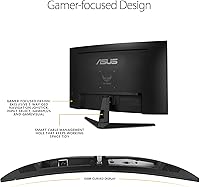
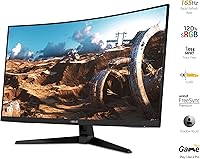
The ASUS TUF Gaming VG328H1B 32-inch Curved Monitor enters a crowded budget gaming space with a clear pitch: a large, curved screen at a price that does not demand serious financial sacrifice. The 1500R curve is genuinely noticeable compared to a flat panel — it adds a wrap-around sense of depth that makes open-world and racing titles feel more involving. That said, running 1080p across 31.5 inches is a trade-off worth being honest about; pixel density is lower than on smaller screens, and text can look soft at typical sitting distances. Build quality feels solid for the money, with a matte finish and sturdy TUF-series construction that holds up under daily use.
Features & Benefits

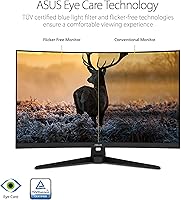
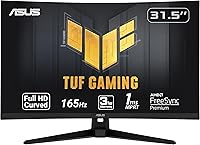
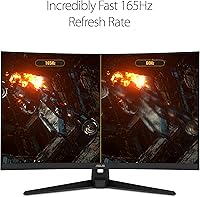
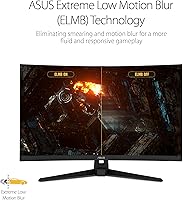
The VG328H1B leads with a 165Hz refresh rate, and it delivers where it counts — fast-paced games run noticeably smoother than on a standard 60Hz display. ASUS pairs this with ELMB technology, which brings response time down to 1ms MPRT and reduces ghosting during high-speed sequences. FreeSync Premium handles sync duties across AMD and compatible NVIDIA GPUs (GTX 10 series and newer), keeping frame pacing clean without screen tearing. The Shadow Boost feature earns its place in darker game environments, pulling out shadow detail without blowing out brighter areas. One real limitation worth flagging: connectivity is limited to HDMI and D-Sub — there is no DisplayPort, which matters to PC builders with modern GPUs.

Best For

This curved gaming monitor is a natural fit for anyone stepping up from a smaller 24-inch flat screen and wanting more visual real estate without moving into premium price territory. It suits FPS and action game players especially well — the high refresh rate and fast response time matter far more in those genres than pinpoint pixel sharpness. Console players outputting at 1080p on PS5 or Xbox will find it integrates cleanly. The matte coating makes it a reliable choice for mixed-lighting setups where glare on glossy panels becomes a constant distraction. If 1440p or 4K content is a priority, this is not the right screen — but for its target audience, it makes a strong case.

User Feedback

Across more than 2,400 ratings averaging 4.6 out of 5, this TUF Gaming screen earns its score through consistent praise for motion smoothness and size-to-value ratio — most buyers feel the refresh rate and screen size combination is difficult to match at this price point. Setup also gets positive mentions, with plug-and-play ease being a common theme among verified purchasers. The criticism is equally consistent: buyers arriving from a 24-inch 1080p panel or a higher-resolution display often notice the softer image quickly, and that concern shows up repeatedly. A smaller share of reviews flag backlight uniformity issues, and a handful mention the stand's limited tilt range as a minor but real ergonomic drawback.

Pros

  • 165Hz refresh rate delivers genuinely smooth motion in fast-paced games at an accessible price point.
  • FreeSync Premium works reliably on AMD systems and holds up well on compatible NVIDIA GPUs.
  • The 1500R curve adds real immersion for gaming — noticeably different from sitting in front of a flat panel.
  • 1ms MPRT response time keeps ghosting well controlled during rapid on-screen movement.
  • Matte anti-glare coating handles mixed room lighting without the constant reflections glossy panels suffer from.
  • Shadow Boost lifts detail in dark game environments without washing out brighter areas of the screen.
  • Plug-and-play setup is consistently praised by buyers — no driver headaches or complicated calibration needed.
  • At its price, the VG328H1B offers a screen size and refresh rate combination that is hard to match from competing brands.
  • Solid TUF-series build quality feels more durable than typical budget monitor plastics.

Cons

  • 1080p resolution across 31.5 inches results in soft pixel density — visible to anyone coming from a sharper display.
  • No DisplayPort connection is a genuine drawback for PC builders with current-generation graphics cards.
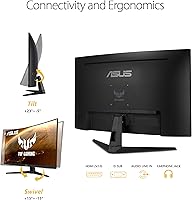
  • Stand adjustment is limited to basic tilt, with no height or swivel options included out of the box.
  • Some verified buyers have reported inconsistent backlight uniformity, particularly in dark-scene content.
  • The VG328H1B is not suited for color-accurate work — this is a gaming-tuned panel, not a content creation tool.
  • Text rendering at typical desk distances can look noticeably softer than on a smaller or higher-resolution screen.
  • D-Sub (VGA) port inclusion feels outdated and takes up space that a second HDMI port would serve better.
  • Panel lottery risk exists — a small but recurring portion of buyers report backlight bleed in corners.

Ratings

The ratings below for the ASUS TUF Gaming VG328H1B 32-inch Curved Monitor were generated by AI after analyzing thousands of verified global buyer reviews, with spam, bot-submitted, and incentivized feedback actively filtered out. Scores reflect the full picture — where this curved gaming monitor genuinely delivers and where real buyers have run into frustrations. Nothing has been smoothed over to make the product look better than it is.
Refresh Rate Performance
91%
The 165Hz ceiling is where this monitor earns its most consistent praise. Buyers playing fast shooters or racing games consistently report that movement feels fluid and responsive in a way a 60Hz panel simply cannot replicate. For the price tier, this level of refresh rate performance is genuinely difficult to beat.
A small number of users report that reaching the full 165Hz requires specific in-game and driver settings that are not immediately obvious, which trips up less experienced buyers at first. Those with mid-range GPUs may also struggle to sustain frame rates high enough to fully exploit the ceiling.
Motion Clarity
86%
ELMB combined with Adaptive-Sync keeps ghosting impressively controlled during high-speed sequences — a meaningful win for FPS players who track fast-moving targets across the screen. Buyers upgrading from budget 60Hz displays frequently describe the motion clarity difference as immediately noticeable.
ELMB works best above 100Hz; at lower frame rates, some trailing around fast-moving objects becomes visible. A portion of reviewers also note that enabling both ELMB and Adaptive-Sync simultaneously requires navigating the OSD carefully, which can frustrate users unfamiliar with monitor settings.
Image Sharpness
61%
39%
At typical gaming distances and for content rendered at native 1080p, the image is clean enough for action titles where you are not scrutinizing fine detail. Games with strong art direction hold up reasonably well, and the matte coating avoids adding visible grain on top of the softness.
This is the most contested aspect among buyers. Running 1080p across 31.5 inches produces a pixel density that reads as noticeably soft, especially for text, UI elements, and strategy game maps. Users arriving from any 1440p display or even a crisp 24-inch 1080p panel describe a visible step down in sharpness.
Curvature & Immersion
83%
The 1500R curve is one of the more pronounced options at this screen size, and buyers consistently describe it as adding genuine depth to wide environments — open-world games, flight simulators, and racing titles benefit the most. The wrap-around effect is perceptible even from a few feet back.
A small group of buyers find the curve slightly disorienting during productivity tasks or when using the monitor for web browsing at close range. Flat-panel converts occasionally need a few days before the curve stops drawing their attention.
Sync & Compatibility
88%
FreeSync Premium performs reliably on AMD hardware, with buyers reporting clean, tear-free gameplay across a wide frame rate range. NVIDIA compatibility stretches back to the GTX 10 series, which covers a large portion of the active PC gaming install base and earns repeated positive mentions in reviews.
Enabling G-Sync Compatible mode on NVIDIA systems is not automatic — it requires a manual step in the NVIDIA Control Panel that some buyers miss entirely, leading to confusion about why tearing persists. A handful of older NVIDIA cards outside the supported range do not benefit from variable refresh rate at all.
Value for Money
89%
Across the reviewer pool, value perception is one of the strongest positives. Buyers repeatedly describe the combination of screen size, refresh rate, and curve as a package that would cost significantly more from competing brands. For entry-level PC and console gamers, the price-to-feature ratio lands as one of the most compelling in the category.
Value satisfaction drops for buyers who discover post-purchase that they needed DisplayPort or a height-adjustable stand — those additions via third-party accessories add meaningful cost to what initially seemed like a clean budget-friendly purchase.
Setup & Ease of Use
87%
Assembly is a consistent highlight — the stand attaches without tools and the process takes most people under 10 minutes. Console users in particular appreciate the plug-and-play experience, with HDMI connections recognized immediately by PS5 and Xbox without any additional configuration.
The OSD (on-screen menu) navigation is functional but not intuitive, and unlocking the full performance potential — enabling ELMB, setting the correct refresh rate, activating sync — involves enough steps that first-time monitor buyers occasionally need to consult guides or forums.
Anti-Glare Coating
78%
22%
The matte coating earns practical appreciation from buyers in home office or living room setups where windows or overhead lights are not fully controllable. It handles ambient light far better than glossy alternatives and holds up without adding distracting grain at typical gaming distances.
Under direct sunlight or in very bright rooms, the coating reduces but does not eliminate reflections. A minority of buyers also note that the matte finish softens perceived contrast and color saturation compared to glossy or semi-glossy panels they have used previously.
Shadow Boost Feature
74%
26%
Buyers who play darker FPS titles or survival-horror games tend to genuinely appreciate Shadow Boost, finding it useful for spotting enemies or environmental cues in shadowed game areas without switching to an impractically bright overall picture setting.
The feature is not universally praised — some buyers find it introduces a slightly artificial look in naturally lit game environments and prefer to leave it off. It also cannot be fine-tuned granularly, so the adjustment range either does not go far enough or overshoots for certain game types.
Panel Uniformity
63%
37%
Many buyers receive units with acceptable panel uniformity for everyday gaming use — bright scenes and colorful game environments tend to mask minor inconsistencies effectively, and buyers who primarily game report no meaningful impact on their experience.
Backlight bleed in corners is a recurring complaint among verified purchasers, particularly visible on dark loading screens or during cinematic cutscenes. Panel quality consistency appears to vary between manufacturing batches, creating a notable lottery element that some buyers feel is unacceptable even at this price point.
Stand & Ergonomics
52%
48%
The stand is stable enough for daily use and does not wobble during typing or light desk movement. For buyers who sit at a fixed desk height where the default tilt range happens to suit their posture, the included stand is perfectly adequate.
Tilt-only adjustment is a significant ergonomic limitation for anyone spending long sessions at the monitor. No height, swivel, or pivot options are included, and buyers who need proper neck or eye-level alignment will need to invest in a VESA monitor arm — an extra cost that somewhat undermines the budget appeal.
Connectivity
58%
42%
HDMI covers the core use case for most buyers — console players and the majority of PC gamers connect via HDMI without any issues, and the port handles 1080p at 165Hz reliably. For its target audience, the available ports are functional.
The absence of DisplayPort is a genuine hardware limitation that affects a meaningful subset of PC builders. Modern discrete GPUs frequently prioritize DisplayPort for bandwidth and multi-monitor chaining, and the inclusion of D-Sub (VGA) instead of a second HDMI or a DisplayPort is a cost-driven choice that buyers with newer systems may find frustrating.
Build Quality
77%
23%
The TUF-series branding reflects a focus on durability over aesthetics, and buyers generally confirm that the chassis feels sturdier than typical budget monitor plastics. The matte black finish resists fingerprints reasonably well and does not attract dust visibly.
The rear panel has some flex when pressed firmly, and the build feels notably lighter and less premium than monitors even slightly above this price range. A small number of reviewers mention that bezel edges have minor sharp points that are mildly uncomfortable to handle during repositioning.
Color Accuracy
66%
34%
Out of the box, colors look vibrant and punchy enough for gaming — saturation levels suit action and adventure titles well, and casual buyers who do not compare against calibrated references tend to report satisfaction with how games look on this screen.
This is not a color-accurate panel by professional standards, and buyers who transition from content creation or photo editing work will notice the limitations quickly. Gamma and white balance out of the box are not always consistent across units, and the monitor lacks factory calibration data.

Suitable for:

The ASUS TUF Gaming VG328H1B 32-inch Curved Monitor is a strong pick for budget-conscious gamers who want a genuinely large, immersive screen without climbing into premium price territory. Console players on PS5 or Xbox who output at 1080p will find it a natural fit — the screen size and resolution align well with how those systems perform, and setup is refreshingly straightforward. PC gamers running mid-range AMD or NVIDIA hardware who play fast-paced FPS, racing, or action titles will get real value from the 165Hz refresh rate and FreeSync Premium support, which keeps things smooth even when frame rates fluctuate. The 1500R curve adds a noticeable sense of depth for gaming compared to a flat panel, making it a worthwhile step up for anyone upgrading from a 24-inch display. The matte anti-glare coating also makes it practical for rooms where natural light is not fully controllable.
Not suitable for:

Buyers who prioritize image sharpness should think carefully before committing to this screen. Running 1080p across 31.5 inches produces a noticeably lower pixel density than smaller monitors at the same resolution, and users coming from a 24-inch 1080p or any 1440p display are likely to feel the difference in text clarity and fine detail. The ASUS TUF Gaming VG328H1B 32-inch Curved Monitor is also not the right choice for PC builders with modern discrete GPUs who rely on DisplayPort for higher bandwidth or daisy-chaining — the panel only offers HDMI and D-Sub connections, which is a meaningful limitation in some setups. Content creators, photo editors, and anyone working with color-critical tasks should look elsewhere, as this screen is tuned for gaming performance rather than color accuracy. Those needing ergonomic flexibility beyond basic tilt will also find the stand limiting for longer work sessions.
Specifications

  • Panel Size: The physical panel measures 31.5 inches diagonally, though it is marketed and sold as a 32-inch monitor.
  • Resolution: Native resolution is 1920x1080 Full HD at a 16:9 aspect ratio.
  • Refresh Rate: The panel supports a maximum refresh rate of 165Hz, with 144Hz also officially supported for broader compatibility.
  • Response Time: Rated at 1ms MPRT (Moving Picture Response Time) when ELMB mode is active.
  • Curve Radius: The panel uses a 1500R curve, meaning the curvature radius is 1,500mm — one of the more pronounced curves in this screen size category.
  • Panel Surface: Matte anti-glare coating is applied to reduce reflections in ambient or mixed-light environments.
  • Sync Technology: Supports AMD FreeSync Premium and Adaptive-Sync, with confirmed compatibility for NVIDIA GeForce GTX 10, GTX 16, RTX 20 series and newer GPUs.
  • Connectivity: Ports include one HDMI and one D-Sub (VGA) input; there is no DisplayPort on this model.
  • ELMB Support: ASUS Extreme Low Motion Blur technology can be used alongside Adaptive-Sync to reduce ghosting at high frame rates.
  • Shadow Boost: Shadow Boost is an on-board image processing feature that brightens dark areas of the image without overexposing already-bright regions.
  • Dimensions: With the stand attached, the monitor measures approximately 27.94 x 19.97 x 8.42 inches (W x H x D).
  • Weight: Total weight with stand is 15.48 pounds, which is typical for a curved 32-inch panel in this class.
  • Stand Adjustment: The included stand supports tilt adjustment only; height, swivel, and pivot adjustments are not available without a third-party VESA mount.
  • VESA Compatibility: The monitor supports standard VESA wall-mount or arm compatibility, allowing users to replace the included stand with aftermarket solutions.
  • Color Gamut: The panel covers the sRGB color space at levels typical of a VA or TN gaming panel in this price tier, without wide-gamut or DCI-P3 certification.
  • User Rating: The monitor holds a 4.6 out of 5 star average across more than 2,400 verified ratings on Amazon as of the time of review.

Related Reviews
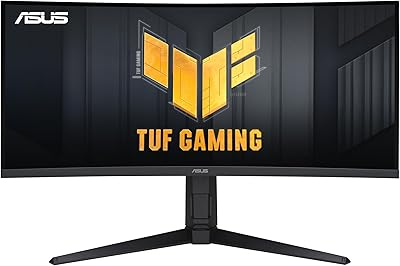
ASUS TUF VG34VQL1B 34-inch Curved Gaming Monitor
78%
83%
Image Quality
89%
Refresh Rate & Smoothness
78%
Response Time & Motion Clarity
81%
Adaptive Sync Performance
54%
HDR Performance
More
ASUS TUF Gaming VG32UQA1A 32-inch Gaming Monitor

74%
88%
Image Clarity
83%
Refresh Rate Performance
91%
Console Compatibility
54%
HDR Quality
84%
Motion Handling
More
ASUS VG27VH1B 27-inch Curved Gaming Monitor
78%
93%
Refresh Rate Performance
88%
Motion Clarity & Response Time
91%
Adaptive Sync & Tear-Free Output
67%
Image Sharpness & Resolution
62%
Color Accuracy & Calibration
More
ASUS TUF Gaming VG24VQER 24-inch Curved Monitor
78%
91%
Motion Clarity
88%
Refresh Rate Value
83%
Panel Contrast & Blacks
67%
Color Accuracy
84%
Build Quality
More
ASUS TUF Gaming VG27WQ3B 27-inch Gaming Monitor
80%
88%
Image Quality
93%
Refresh Rate & Smoothness
91%
Response Time & Motion Clarity
84%
Curved Panel Experience
82%
Color Accuracy & Vibrancy
More
ASUS TUF Gaming VG32VQ1B 32″ Gaming Monitor
79%
88%
Image Clarity & Sharpness
91%
Refresh Rate & Smoothness
83%
Response Time & Motion Clarity
86%
Curved Panel Immersion
89%
Adaptive Sync & Tear-Free Performance
More
KOORUI 32-inch Curved Gaming Monitor
84%
89%
Display Quality
92%
Gaming Performance
78%
Build Quality
85%
Color Accuracy
82%
Ergonomics & Comfort
More
KTC H32S17C 32-inch Curved Gaming Monitor
72%
91%
Value for Money
84%
Gaming Performance
76%
Picture Quality
52%
HDR Experience
67%
Color Accuracy
More
Samsung 32-Inch S39C Curved Gaming Monitor
83%
88%
Display Quality
91%
Value for Money
86%
Eye Comfort
89%
Ease of Setup
85%
Build Quality
More
Gawfolk GF320C 32-Inch Curved Gaming Monitor

75%
88%
Refresh Rate Performance
83%
Image Quality
76%
Motion Clarity
86%
Curvature & Immersion
91%
Value for Money
More

FAQ

It works with both. The VG328H1B supports Adaptive-Sync, which NVIDIA has adopted for G-Sync Compatible certification on GeForce GTX 10 series cards and newer. You may need to enable G-Sync Compatible mode in the NVIDIA Control Panel, but once set up, variable refresh rate works reliably on both AMD and NVIDIA hardware.

This is the most honest question to ask before buying. At 32 inches, 1080p produces a pixel density of around 70 PPI, which is noticeably softer than the same resolution on a 24-inch display. For gaming at normal desk distances — roughly 2 to 3 feet away — most people adjust quickly and find it perfectly acceptable. For reading small text or detailed productivity work, the softness is more apparent. If you are coming from a 1440p or higher-resolution display, the downgrade will likely feel obvious.

Yes, via HDMI. Both current-gen consoles output 1080p natively, which matches this panel perfectly. Keep in mind that consoles typically cap output at 120Hz even in Performance modes, so you will not hit the full 165Hz ceiling — but 120Hz over HDMI still looks great on this screen.

No, it does not include integrated speakers. You will need external speakers or a headset for audio. There is a headphone jack on the monitor for direct headset connection.

ASUS designed the VG328H1B to support both simultaneously — that is actually one of the selling points of the ELMB implementation on this panel. In practice, results vary slightly by game and GPU, but the combination works to reduce both tearing and blur without needing to choose one over the other.

The included stand only supports tilt adjustment, which is a real limitation if you need to raise or lower the screen for ergonomic comfort. If that matters to you, this monitor does support VESA mounting, so swapping to a monitor arm is a practical fix — though it is an added cost to factor in.

It varies by unit, which is true of most monitors in this price range. A portion of verified buyers report noticeable bleed in the corners, particularly visible on dark or black screens. Others receive panels with minimal bleed. It is worth inspecting the panel carefully when it arrives and contacting the seller promptly if bleed is severe enough to affect your experience.

It is genuinely useful in specific situations — particularly in darker FPS games or horror titles where enemies or environmental details hide in shadows. It effectively lifts the brightness floor in dark image regions without making the whole picture look washed out. Some users leave it on permanently; others prefer to toggle it per game. It is not transformative, but it is a legitimate feature.

That is a deliberate cost-cutting decision rather than an oversight, and it is a real trade-off. HDMI 1.4 is sufficient to drive 1080p at 165Hz, so the absence of DisplayPort does not affect core functionality for most users. Where it becomes a problem is for builders using DisplayPort daisy-chaining or those whose GPU outputs do not include HDMI — check your graphics card ports before purchasing.

Assembly is simple and takes most people under 10 minutes. The stand clicks into the monitor back without tools, and the on-screen menu is straightforward to navigate. Most buyers describe the initial setup process as one of the easier experiences with a monitor in this category. No proprietary software installation is required to use core features.

Where to Buy