Overview

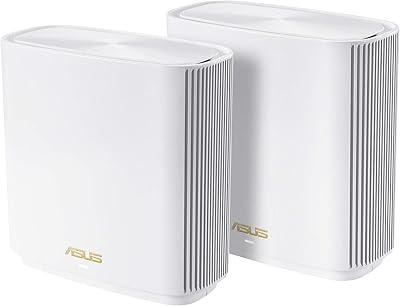
The ASUS ZenWiFi ET9 2-Pack Mesh WiFi System sits in the mid-to-premium tier of whole-home networking, built for houses where a single router simply can't cut it. Two nodes cover up to 5,500 sq.ft., making it a practical pick for multi-story layouts or sprawling open floor plans. ASUS has a long track record in networking hardware, and the ET9 represents their push into WiFi 6E territory — specifically, access to the 6GHz band, which is far less congested than the crowded 2.4GHz and 5GHz ranges most devices compete for. This ZenWiFi mesh kit performs well once dialed in, but how smoothly that setup process goes will shape your overall experience significantly.
Features & Benefits

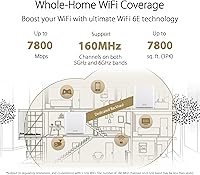
The ET9 system runs on three bands — 2.4GHz, 5GHz, and 6GHz — with combined theoretical speeds of 7,800 Mbps. In practical terms, that headroom means a 4K stream, a video call, and a gaming session can all run simultaneously without fighting over bandwidth. The 6GHz band serves as a dedicated backhaul channel between the two nodes, so your devices are not competing with inter-node traffic. Security is handled by Trend Micro at no ongoing cost — no subscription, ever — which is genuinely uncommon in this category. The ASUS app covers parental controls and a one-click VPN for safer browsing on public networks, both included without extra fees.

Best For

This ASUS mesh router makes the most sense for homeowners dealing with a house that genuinely challenges a single router — think 3,000 sq.ft. or more, multiple floors, or walls that swallow wireless signal. If your household runs 20 or more connected devices, from smart TVs and laptops to security cameras and thermostats, the tri-band architecture handles that load better than a standard dual-band system. Families with kids will appreciate built-in parental controls that work without a monthly fee. Existing ASUS router owners benefit from AiMesh compatibility, letting you fold the ET9 nodes into a larger network rather than starting from scratch. Remote workers and gamers who need consistent, low-latency connections throughout the home are also well-served.

User Feedback

With a 3.8 out of 5 rating across 130 reviews, this ZenWiFi mesh kit earns mixed but largely constructive feedback. Users who navigated the initial configuration consistently report strong whole-home coverage and noticeably faster speeds compared to older routers or single-node setups, and the app interface draws praise for being clean and readable. On the flip side, a recurring theme is that setup is not always smooth — some users hit firmware hiccups or brief connectivity drops during pairing. The nodes also run warm, so open placement on a shelf or countertop is smarter than tucking them inside an enclosed cabinet. Buyers upgrading from older mesh systems tend to rate their experience higher once everything is properly running.

Pros

  • Two nodes cover up to 5,500 sq.ft., handling multi-story homes and open floor plans without dead zones.
  • The dedicated 6GHz backhaul keeps device traffic and node-to-node communication on separate lanes, reducing congestion noticeably.
  • Lifetime Trend Micro security is included at no extra cost — a genuine differentiator against rivals that charge annually.
  • Built-in parental controls with content filtering and kid-safe presets work without any third-party subscription.
  • AiMesh support lets you expand coverage later by adding compatible ASUS nodes rather than replacing the whole system.
  • Users upgrading from older routers or basic mesh kits consistently report a clear improvement in speed and coverage.
  • The ASUS app interface is well-regarded for being clean and easy to navigate once the system is up and running.
  • Instant Guard VPN lets you share a secure connection with devices in one tap — handy for travel or public Wi-Fi use.
  • Alexa compatibility adds basic voice control for households already using Amazon smart home devices.

Cons

  • Initial setup can be finicky — some users report pairing issues and firmware hiccups that require extra patience.
  • The nodes run warm in normal use, so enclosed shelving or cabinet placement is not a good idea.
  • Occasional app connectivity issues have been reported, where the management interface loses touch with the nodes temporarily.
  • A 3.8 out of 5 average rating across 130 reviews suggests this ZenWiFi mesh kit does not land consistently well for all buyers.
  • Coverage figures are theoretical maximums — real-world results vary based on home construction, wall materials, and node placement.
  • The price point is hard to justify for smaller homes or households with modest device counts.
  • Firmware updates, while generally improving performance, have occasionally introduced new bugs according to user reports.
  • Users less familiar with networking concepts may find the app and settings options more complex than expected.

Ratings

The scores below reflect our AI-driven analysis of verified global user reviews for the ASUS ZenWiFi ET9 2-Pack Mesh WiFi System, with spam, bot submissions, and incentivized feedback actively filtered out before scoring. Each category is rated on real-world performance patterns drawn from buyers in a range of home sizes, technical skill levels, and use cases. Both the genuine strengths and the recurring frustrations are represented transparently — nothing is glossed over.

WiFi Coverage
83%
Most users in medium-to-large homes report that dead zones they had lived with for years disappeared after placing the two nodes strategically across floors. Multi-story households and open-plan layouts specifically benefit, with devices staying connected through walls that previously caused dropout issues.
Coverage numbers are theoretical maximums, and homes with dense concrete construction or unusual layouts see noticeably reduced effective range. A handful of users in larger properties found two nodes were not quite enough and needed a third to fill gaps near garage areas or detached offices.
Network Speed
86%
Once configured properly, users running bandwidth-intensive households — simultaneous 4K streams, cloud gaming, and video calls — report that the ET9 system handles the load without the slowdowns they experienced on older hardware. The dedicated 6GHz backhaul channel is a real-world differentiator, keeping device speeds stable even when the mesh nodes are under heavy inter-node traffic.
Speeds during the first day or two after setup can feel inconsistent as the network optimizes itself, which causes concern for some buyers who expect peak performance immediately. Users whose ISP plan tops out below 500 Mbps are unlikely to notice a tangible speed difference over a well-configured WiFi 5 system.
Setup Experience
57%
43%
The ASUS app provides a guided setup flow that most moderately tech-comfortable users can follow without consulting external guides. Buyers who have set up routers before generally report getting both nodes online within 20 to 30 minutes without major drama.
This is the most polarizing aspect of the ET9 system in user feedback. Firmware update prompts mid-setup, app-to-router connectivity drops during pairing, and occasional node recognition failures have frustrated a meaningful portion of buyers — particularly those less comfortable troubleshooting network hardware. The experience is inconsistent enough to be a genuine concern.
App & Management
72%
28%
The ASUS app layout is clean and logically organized, making day-to-day tasks like checking connected devices, adjusting parental controls, or running a security scan accessible without needing to dig through menus. Regular app updates have addressed some earlier stability complaints.
Some users report the app occasionally loses connection to the nodes, requiring a restart of the app or router to re-establish control. Advanced settings that power users want — like detailed traffic analysis or fine-grained QoS controls — are present but can feel buried compared to competing platforms.
Network Security
91%
Lifetime Trend Micro-powered security with no subscription attached is a standout feature that users consistently highlight as a reason they chose this system over rivals. The one-tap scan approach makes protection accessible even to non-technical household members, and the coverage extends to every device on the network automatically.
Advanced users who want granular control over firewall rules or intrusion detection settings may find the Trend Micro integration more consumer-simplified than they would prefer. There is no option to substitute a different security provider if you already subscribe to an alternative service.
Parental Controls
84%
Families consistently call out the no-subscription parental control suite as one of the best value aspects of the ZenWiFi mesh kit. Content filtering by category, safe browsing enforcement, and per-device scheduling work reliably through the app, covering both younger kids and teenagers with different preset levels.
The controls are solid for the majority of family use cases, but parents looking for highly granular reporting — like detailed browsing logs or time-on-app tracking per child — will find the feature set more basic than dedicated parental control services. Filtering accuracy on newer or niche content categories is occasionally inconsistent.
Hardware Build Quality
78%
22%
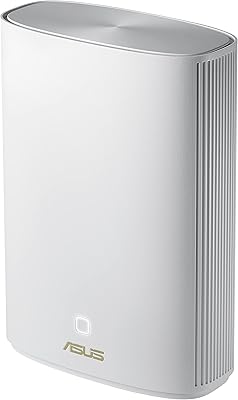
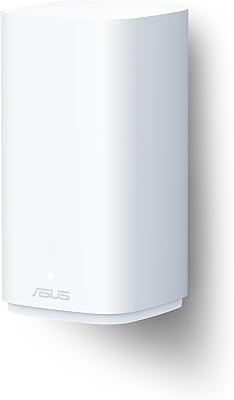
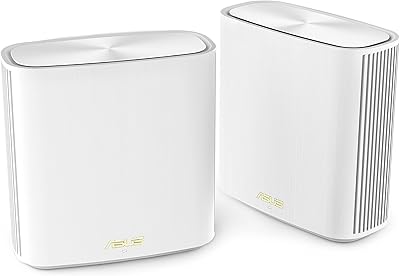
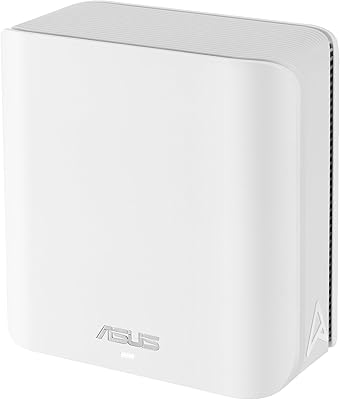
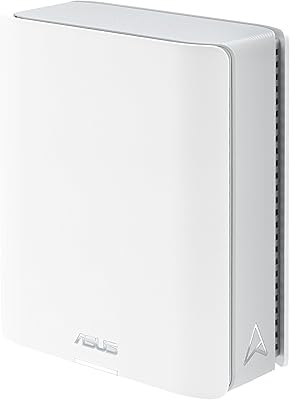
The nodes have a premium feel for networking hardware — the white cylindrical form factor is compact and unobtrusive, and the build materials feel solid rather than hollow or cheap. Users place them on bookshelves and open counters without them looking out of place in a living room.
The nodes run noticeably warm under load, which is a recurring observation in user feedback and a common reason buyers regret putting them in enclosed spaces. While not a safety concern under normal open placement, the heat output is higher than some competing mesh systems at a similar price point.
Value for Money
74%
26%
For buyers who fully utilize the feature set — especially the lifetime security, parental controls, AiMesh expandability, and WiFi 6E performance — the overall package represents fair value when compared against competing systems that charge separately for equivalent features. Long-term cost of ownership is genuinely lower than subscription-dependent rivals.
For households with simpler needs — smaller homes, fewer devices, or no interest in advanced security and parental features — the price is harder to justify when capable WiFi 6 mesh systems are available for less. Buyers in apartments or under 2,000 sq.ft. will feel they are overpaying for coverage they do not need.
Device Compatibility
88%
Backward compatibility with 802.11a through 802.11ac means every device in a typical home — older laptops, budget phones, smart home sensors — connects without issue. Users with mixed device ecosystems spanning several years of hardware generations report no compatibility surprises.
The 6GHz band benefits are only accessible to WiFi 6E-capable client devices, which are still a minority in most households as of mid-2024. Buyers expecting a universal speed upgrade across all their existing devices will find that older hardware still connects on the same bands it always did.
AiMesh Expandability
87%
Existing ASUS router owners find the AiMesh integration genuinely useful — folding an older compatible ASUS unit into the mesh network as a third node extends coverage without additional hardware cost. This future-proofing aspect is a real advantage for buyers who may need to scale coverage over time.
AiMesh compatibility is limited to the ASUS ecosystem, so buyers with non-ASUS hardware cannot mix nodes without replacing existing equipment. The performance of mixed-generation AiMesh networks can also vary, and older nodes may become a bottleneck if they lack the bandwidth to keep pace with the ET9 nodes.
VPN Performance
76%
24%
The Instant Guard VPN is a practical feature for users who frequently work from cafes or hotels, routing traffic securely through the home connection without needing a separate VPN subscription for basic protection. Sharing access via a link or QR code is straightforward and quick.
VPN speeds depend entirely on the user's home internet upload bandwidth, so users on slower broadband plans will find the VPN connection noticeably sluggish. The feature is more of a convenience addition than a full enterprise-grade VPN solution, and power users with specific privacy needs may prefer a dedicated service.
Firmware Reliability
63%
37%
When firmware is stable, users report that the ET9 system runs reliably for extended periods without needing reboots or manual interventions. ASUS does issue updates with reasonable regularity, and several app reviews note that specific firmware versions resolved earlier connectivity bugs.
Firmware updates have introduced new issues for a visible subset of users — connectivity drops, app sync failures, and in some cases requiring a full factory reset after an update. This inconsistency is a legitimate concern and a pattern present in enough reviews to be taken seriously rather than dismissed as isolated incidents.
Installation Flexibility
69%
31%
The compact node footprint and wireless backhaul between nodes give buyers real flexibility in where each unit is placed — no Ethernet cabling between floors is required, which simplifies placement in homes where running cables is impractical.
The nodes run warm enough that enclosed placement in media cabinets or tightly shelved entertainment units is not advisable, which limits options in living rooms where aesthetics matter. Users who want the nodes hidden away often find themselves compromising either on placement or on thermal management.
Alexa Integration
71%
29%
Alexa compatibility adds a layer of convenience for households already embedded in the Amazon smart home ecosystem, allowing basic network controls and status checks via voice without opening the app. It works reliably for the limited command set it supports.
The Alexa integration covers only a narrow range of commands and is unlikely to impress users looking for deep smart home automation of their network. Households not already using Alexa will find no practical reason to engage with this feature at all.

Suitable for:

The ASUS ZenWiFi ET9 2-Pack Mesh WiFi System is a strong fit for homeowners who have genuinely outgrown a single router — particularly those with 3,000 to 5,500 sq.ft. of living space, multiple floors, or thick walls that eat wireless signal for breakfast. If your household runs a dense mix of devices — smart TVs, laptops, phones, security cameras, thermostats — the tri-band architecture handles that kind of load without one device starving another for bandwidth. Families with kids will find real value in the built-in parental controls, which require no ongoing subscription to use. Existing ASUS router owners are especially well-positioned here, since the ET9 nodes slot into a broader AiMesh network rather than forcing a full hardware replacement. Remote workers and gamers who depend on a stable, low-latency connection throughout the home — not just near the router — will also appreciate what this system can deliver once it is properly configured.
Not suitable for:

The ASUS ZenWiFi ET9 2-Pack Mesh WiFi System is probably overkill for anyone living in a smaller apartment or a compact home under 2,000 sq.ft., where a single capable router would do the job for less money. Buyers who are not comfortable with a somewhat technical setup process should think carefully — the initial configuration and occasional firmware troubleshooting can frustrate users who expect a truly plug-and-play experience. If you have had no prior exposure to router management apps or network settings, the learning curve here is real. The nodes also run noticeably warm, so anyone planning to tuck them inside a cabinet or entertainment console may run into placement headaches. Finally, shoppers who prioritize a rock-solid, immediately trouble-free setup above all else may be better served by competing systems with a more polished out-of-box experience.
Specifications

  • WiFi Standard: The system uses the 802.11ax standard, commonly known as WiFi 6E, which supports operation across three frequency bands including the newer 6GHz spectrum.
  • Frequency Bands: Tri-band operation covers 2.4GHz, 5GHz, and 6GHz simultaneously, allowing devices and backhaul traffic to be distributed across separate channels.
  • Max Speed: Combined theoretical throughput across all three bands reaches up to 7,800 Mbps under ideal conditions.
  • Coverage Area: The 2-node kit is rated for coverage up to 5,500 sq.ft., though real-world results will vary depending on home layout and construction materials.
  • Node Dimensions: Each node measures 6.3 x 2.95 x 6.38 inches, making it compact enough for a shelf or countertop without dominating the space.
  • Node Weight: Each individual node weighs 1.57 lbs, keeping the overall physical footprint light and easy to reposition.
  • Backhaul Channel: The 6GHz band is dedicated to inter-node backhaul communication, leaving the 2.4GHz and 5GHz bands fully available for client devices.
  • Mesh Protocol: AiMesh support allows the ET9 nodes to integrate with other compatible ASUS routers, enabling a scalable whole-home network without full hardware replacement.
  • Network Security: Trend Micro-powered security scanning is included for the lifetime of the product at no additional subscription cost.
  • Parental Controls: The ASUS app provides parental control tools including content filtering, safe browsing, and kid-safe presets with no recurring fees required.
  • VPN Feature: Instant Guard provides a one-click shareable VPN that creates an encrypted connection between devices and the router for use on public networks.
  • Voice Assistant: The system is compatible with Amazon Alexa, allowing basic network controls through voice commands on Alexa-enabled devices.
  • Wireless Protocols: Backward compatibility covers 802.11a, 802.11b, 802.11g, 802.11ac, and 802.11ax, ensuring older devices connect without issue.
  • Compatible Devices: Designed to work with personal computers, smartphones, tablets, smart security cameras, and smart thermostats, among other connected devices.
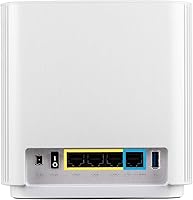
  • Color: Both nodes ship in white, with a compact cylindrical design intended to blend into typical home interiors.
  • In the Box: Each kit includes two ET9 nodes, two power adapters, one RJ45 Ethernet cable, a quick start guide, and a warranty card.
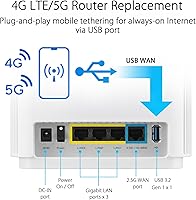
  • Connectivity: Devices connect via Wi-Fi; the included RJ45 cable supports wired connection between the primary node and a modem or gateway.
  • Release Date: The ET9 system was first made available in June 2024, placing it among the more recent additions to the ZenWiFi product lineup.

Related Reviews
ASUS ZenWiFi XD6 Mesh WiFi 6 System
86%
93%
Wi-Fi Coverage
85%
Ease of Setup
89%
Performance and Speed
80%
App Experience
91%
Parental Controls
More
Tenda Nova MW6 2-Pack Mesh WiFi System

76%
93%
Ease of Setup
78%
Coverage & Dead Zone Elimination
72%
Network Stability
69%
Wi-Fi Speed Performance
88%
Value for Money
More
TP-Link Deco S4 Mesh WiFi System (2-Pack)
87%
91%
Wi-Fi Coverage
88%
Performance Stability
94%
Ease of Setup
90%
Parental Controls
85%
Device Support
More
TP-Link Deco BE95 Wi-Fi 7 Mesh System 2-Pack
78%
88%
Wireless Performance
83%
Coverage & Range
93%
Wired Connectivity
86%
Setup & Installation
79%
App & Management Experience
More
ASUS ZenWiFi XP4 Mesh WiFi 6 System

77%
88%
Dead-Zone Elimination
74%
Powerline Backhaul Performance
79%
Setup & Installation
91%
Network Security & Parental Controls
82%
WiFi 6 Client Performance
More
ASUS ZenWiFi AC CT8 2-Pack
88%
88%
Overall Performance
91%
Coverage Range
95%
Setup & Installation
90%
Security Features
89%
App Experience
More
ASUS ZenWiFi BD5 Outdoor WiFi 7 Router
83%
88%
Wireless Performance
91%
Build Quality & Durability
93%
Weather Resistance
89%
Temperature Range & Climate Versatility
86%
Installation & Mounting
More
ASUS ZenWiFi XT9 2-Pack Mesh WiFi System
76%
78%
WiFi Coverage
84%
Network Speed
63%
Setup Experience
81%
App & Management
59%
Firmware Stability
More
ASUS ZenWiFi BT6 Tri-Band WiFi 7 Mesh Router
83%
91%
WiFi Performance
88%
Security Features (AiProtection Pro)
84%
Mesh Network Expansion
75%
Setup and Installation
89%
Build Quality
More
ASUS ZenWiFi BD4 Dual-Band WiFi 7 Mesh Router
86%
93%
Wi-Fi Performance
89%
Setup & Installation
91%
Security Features
88%
Gaming & Streaming Performance
84%
Value for Money
More

FAQ

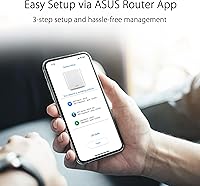
Setup is handled through the ASUS app, which walks you through the process step by step. That said, a meaningful number of users report that the initial pairing can be finicky — firmware updates during setup or app connectivity hiccups have tripped people up. If you are comfortable following instructions and willing to troubleshoot a potential snag, most buyers get through it fine. If you want a completely hands-off plug-and-play experience, temper your expectations slightly.

For many homes in that range, yes — but coverage figures are always best-case estimates. Thick concrete or brick walls, steel framing, and awkward floor plan shapes can all chip away at effective range. Node placement matters a lot here; putting them centrally on each floor rather than at opposite ends of the house makes a real difference. Most users in similarly sized homes report solid coverage, but it is not guaranteed for every layout.

No, and that is genuinely one of the better things about the ET9 system. The Trend Micro-powered security scanning is included for the lifetime of the product — no annual renewal. The parental controls and safe browsing features are also fully accessible through the ASUS app at no extra cost. Many competing mesh systems charge a subscription for equivalent features, so this is a real practical advantage.

Yes. The ET9 nodes support AiMesh, which is ASUS's protocol for linking compatible routers and nodes together into a single network. That means you can add more AiMesh-compatible ASUS hardware down the line without scrapping what you already have. It is a useful future-proofing option if your coverage needs grow.

The practical benefit is access to the 6GHz band, which is significantly less congested than the 2.4GHz and 5GHz bands that every older device in your neighborhood is also competing on. In dense living situations or device-heavy households, this translates to more consistent speeds and lower interference. For most people with fewer than 10 devices, the improvement is noticeable but not dramatic. For households with 20-plus connected devices, it makes a more meaningful difference.

Warm nodes are a commonly reported characteristic of the ASUS ZenWiFi ET9 2-Pack Mesh WiFi System, and within reason it is normal for networking hardware to run at elevated temperatures during operation. The key thing to avoid is placing them inside enclosed cabinets or tight shelving with no airflow, as that can push temperatures into a problematic range. An open shelf or countertop with room to breathe is the recommended approach.

In almost all cases, yes. The primary node connects to your existing modem or gateway via the included Ethernet cable, and it works with standard broadband connections from any ISP. There is no proprietary modem requirement. If you are using an ISP-provided gateway in router mode, you may want to put it into bridge or passthrough mode to avoid double-NAT issues, but that is a common step with any third-party mesh system.

The app is the primary and most convenient way to manage the ET9 nodes, covering setup, parental controls, security settings, and firmware updates. ASUS routers also support a web-based interface accessible via a browser on your local network, so you are not locked into the app entirely. That said, some features and the initial setup flow are optimized for the app experience.

The Instant Guard VPN is router-level, meaning you can enable it for specific devices or share it with others using a simple link or QR code. It is most useful when you are away from home and connecting to a public Wi-Fi network, routing your traffic back through your home router for a more secure connection. It does not automatically apply to every device all the time — you activate it selectively, which actually makes it more flexible for most users.

If your existing ASUS router supports AiMesh, then yes — you can fold it into the same network as the ET9 nodes. This is one of the more underrated aspects of the ASUS ecosystem; rather than replacing hardware entirely, compatible older units can serve as additional nodes to extend coverage. Check ASUS's AiMesh compatibility list to confirm whether your specific model qualifies before assuming it will work.