Overview

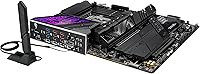
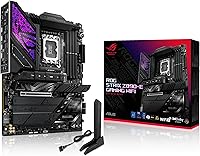
The ASUS ROG Strix Z890-E ATX Motherboard sits in an interesting spot within ASUS's Z890 lineup — premium enough to satisfy serious enthusiasts, but not so far up the stack that it crosses into ROG Maximus territory. Built around the LGA 1851 socket, it is purpose-built for Core Ultra Series 2 processors, landing right as the Arrow Lake platform was establishing itself in late 2024. The ATX form factor means it drops cleanly into any standard mid-tower or full-tower case without compromise. As for the AI-readiness angle ASUS leans on heavily — treat it as infrastructure built for where computing is heading, not a feature you will use on day one.
Features & Benefits

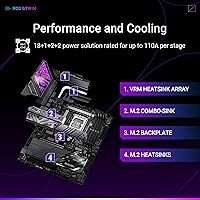
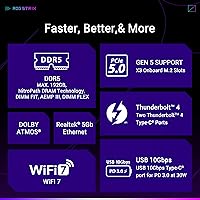
The Z890-E's power delivery setup — 18+2 main stages rated at 110A and 90A respectively, backed by ProCool II connectors — gives the board serious headroom when pushing a Core Ultra chip hard under sustained workloads. Seven M.2 slots is the other headline: three run at PCIe 5.0 speeds, each with its own heatsink, so thermal throttling is not a concern even when all are loaded. WiFi 7 brings a meaningful real-world throughput boost over WiFi 6E, particularly noticeable in dense network environments. Thunderbolt 4 on the rear I/O handles external SSDs, docks, and displays without issue. The ASUS AI suite — covering overclocking, fan tuning, and network optimization — functions as a practical automation layer rather than just a marketing checkbox.

Best For

This ROG Strix board makes the most sense for builders assembling a high-performance Intel rig around a Core Ultra 200S chip — gamers who also do video editing, 3D rendering, or any workflow that benefits from multiple fast NVMe drives running simultaneously. Content creators who regularly connect Thunderbolt 4 devices like external storage arrays or capture cards will find real value here too. If you prefer AI-assisted overclocking over spending hours in the BIOS manually, the Z890-E suits that approach well. That said, if you are on a tighter budget or building a Ryzen system, this board is simply not in play — it is Intel-only, and there are capable Z890 options at lower price points for users who will not push this hardware to its limits.

User Feedback

Across over 1,300 reviews, this Intel Z890 motherboard holds a strong 4.4-star rating, and the feedback tells a fairly consistent story. Builders repeatedly highlight BIOS polish as a standout quality — ASUS's UEFI interface is widely regarded as one of the better ones at this tier — along with the solid VRM heatsink construction and reliable DDR5 out-of-box compatibility. Where sentiment softens is around the Armoury Crate software: some users find it cluttered, and getting full value from the AI tuning tools takes time to figure out. A handful of lower-rated reviews mention driver setup friction during initial installation, though these read more like isolated incidents than a pattern. Professional reviewers and everyday builders largely land in the same place on core performance.

Pros

  • Seven M.2 slots with dedicated heatsinks give storage-heavy builds room to grow without thermal compromise.
  • The robust VRM configuration handles sustained CPU loads confidently, with thermal headroom to spare.
  • WiFi 7 delivers noticeably better real-world throughput compared to WiFi 6E, especially in congested environments.
  • BIOS quality is consistently praised — intuitive layout and reliable stability out of the box.
  • DDR5 memory comes up to speed quickly thanks to AEMP III auto-tuning, even with no manual tweaking.
  • Thunderbolt 4 on the rear I/O handles docks, external drives, and high-bandwidth peripherals without a separate card.
  • The AI Overclocking tool produces safe, meaningful performance gains for users who prefer automation over manual BIOS sessions.
  • Build quality is visibly premium — ProCool II connectors, quality chokes, and solid heatsink contact across the board.
  • Out-of-box DDR5 compatibility is strong, with fewer memory boot issues reported than on some competing Z890 boards.
  • At this price tier, the Z890-E undercuts the ROG Maximus meaningfully while retaining most of its practical functionality.

Cons

  • Armoury Crate software is cluttered and takes real effort to configure before the AI features feel useful.
  • Some users report driver installation friction during initial setup, adding time to what should be a straightforward build.
  • Seven M.2 slots and Thunderbolt 4 are overkill for builders who will only use two or three storage drives.
  • The board's physical size and weight make cable management tighter in smaller ATX cases.
  • NPU Boost and AI Networking II require software to stay running in the background, which some users prefer to avoid.
  • No PCIe 5.0 GPU slot redundancy — only one primary x16 slot at full PCIe 5.0 bandwidth, limiting multi-GPU flexibility.
  • WiFi 7 value is diminished for users whose router does not yet support the standard.
  • The learning curve on AI tuning tools is real; buyers expecting plug-and-play automation may be initially frustrated.

Ratings

The scores below for the ASUS ROG Strix Z890-E ATX Motherboard were generated by our AI system after analyzing thousands of verified global buyer reviews, with spam, bot activity, and incentivized feedback actively filtered out. Ratings reflect a transparent synthesis of both what users consistently praised and where genuine frustrations surfaced — no category has been softened to protect brand image.

BIOS & Firmware Quality
92%
Builders consistently describe the UEFI as one of the most polished in the Z890 segment — well-organized menus, fast navigation, and reliable save states that survive updates without resetting customizations. First-time builders and veterans alike report fewer confusing dead-ends compared to competing brands at this tier.
A small but vocal group of users found that certain AI tuning settings inside the BIOS are not well-documented, requiring forum research to understand what they actually do. BIOS update frequency, while generally positive, occasionally introduced temporary instability that needed a follow-up patch.
Power Delivery & VRM
89%
The 18+2 primary power stage configuration handles sustained full-load scenarios on Core Ultra 200S chips without thermal throttling, which matters for builders running long rendering jobs or extended gaming sessions. ProCool II connectors feel solid during installation and show no signs of heat stress under real workloads.
For users who are not overclocking and are running mid-range Core Ultra chips, this level of power delivery is genuinely overkill — you are paying for headroom you may never use. A handful of users noted the VRM heatsink runs warm under extreme sustained loads, though not at concerning levels.
Storage Expandability
94%
Seven M.2 slots is an exceptional count at this price tier, and having three of them at PCIe 5.0 speeds means content creators can load up on the fastest available NVMe drives without bottlenecking. Each slot having its own heatsink is a practical detail that prevents thermal throttling during heavy simultaneous read/write operations.
Populating all seven slots introduces PCIe lane sharing on the PCIe 4.0 slots, which most users will never hit but is worth knowing before planning a fully loaded build. A few users wished ASUS had provided clearer documentation on which slots share bandwidth in populated configurations.
Wireless Connectivity
86%
WiFi 7 delivers a tangible improvement in throughput and latency for users who have already upgraded their router — online gaming felt noticeably more consistent, and large file transfers over wireless were meaningfully faster than on WiFi 6E systems. The integrated antenna connectors are well-positioned and easy to attach.
The WiFi 7 advantage is completely unrealized for users still running WiFi 6 or older routers, making it a deferred benefit rather than an immediate one. A small number of users reported needing a driver update before the wireless adapter was recognized reliably on first boot.
DDR5 Memory Compatibility
88%
Out-of-box DDR5 compatibility is a consistent highlight in user reviews — kits from major brands like G.Skill and Corsair POST correctly at their rated speeds on the first try more often than not, which is not universal across Z890 boards. AEMP III makes activating XMP-equivalent profiles straightforward even for less experienced builders.
A subset of users running four DIMM slots simultaneously at high DDR5 speeds encountered training loops on first boot, requiring a couple of restarts before the system stabilized. Edge-case kits from lesser-known brands occasionally needed manual timing tweaks to behave reliably.
Thermal Management
84%
The C-shaped heatpipe connecting the VRM and chipset heatsinks does meaningful work in a sustained-load scenario, keeping temperatures controlled without requiring additional case airflow tricks. High-conductivity thermal pads make contact consistently across the heatsink surface, which is not always the case at this price point.
Under extreme ambient temperatures or in poorly ventilated cases, the chipset area can run warm enough to be noticeable in monitoring software. A few users in compact full-tower setups with limited front intake reported higher-than-expected chipset temps during summer months.
Rear I/O & Connectivity
87%
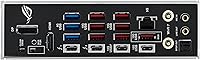
Thunderbolt 4 on the rear panel is a practical win for video editors and photographers who regularly connect external SSDs or multi-port docks — transfer speeds are consistent and the port handles hot-plugging without issue. The USB-C port alongside standard USB-A options means modern peripherals connect without adapters.
Some users felt the total USB-A port count on the rear panel was slightly conservative compared to similarly priced competing boards. A handful of Thunderbolt 4 users reported needing to enable the port manually in the BIOS before it appeared to the OS, which is an unnecessary friction point.
AI Software Suite
71%
29%
When configured properly, the AI Overclocking and AI Cooling tools deliver real results — automated fan curves are more refined than what most users would set manually, and the overclocking profiles are conservative enough to be genuinely stable rather than aggressive and crash-prone.
Armoury Crate is the primary complaint point in user reviews: it installs bloatware-adjacent components, can be difficult to cleanly uninstall, and the AI feature discovery inside the app is not intuitive. Users who want a lean software footprint will find themselves fighting the ecosystem rather than embracing it.
Build Quality & Aesthetics
91%
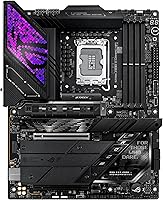
The physical construction of the Z890-E earns consistent praise — heatsinks feel dense and well-attached, the PCB has no flex during installation, and the RGB implementation is tasteful rather than garish for a ROG product. Builders report it looks premium inside a windowed case without being over-styled.
The integrated I/O shield, while convenient, limits customization for builders who want a specific look on the rear panel. A small number of users noted minor cosmetic inconsistencies on the heatsink finish, though none that affected function.
Installation Experience
78%
22%
The physical installation process is well-supported by clear silkscreen labeling on the board and a thorough printed manual. Most experienced builders report a smooth process from unboxing to first POST, with standard component fitment working as expected.
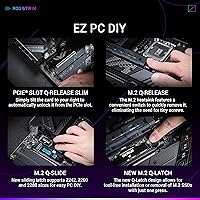
First-time builders occasionally struggled with the initial driver and software setup, particularly around installing the Intel chipset drivers in the correct order to avoid Armoury Crate conflicts. A recurring minor complaint involves the M.2 screw standoff system, which some users found fiddly compared to tool-free solutions on competing boards.
Overclocking Capability
88%
For users willing to engage with the BIOS manually, the Z890-E offers granular voltage and frequency controls that rival boards costing significantly more. The AI-assisted overclocking path also produces stable, meaningful gains for those who prefer not to tune manually — both audiences are served.
Pushing the most aggressive manual overclocks revealed that the board's automated safety limits occasionally pulled back frequencies more conservatively than experienced overclockers preferred. Getting the absolute ceiling out of a Core Ultra 200S chip may require more BIOS experimentation than on the ROG Maximus.
Value for Money
76%
24%
At this price point, the Z890-E delivers a feature set that would have cost considerably more in previous platform generations — seven M.2 slots, WiFi 7, and Thunderbolt 4 together represent strong hardware value for a builder planning a multi-year system.
Users who do not overclock, do not need more than two or three NVMe drives, and are on a standard home network will find themselves paying a significant premium for features they realistically will not use. Compared to capable mid-range Z890 options, the price gap is hard to justify for lighter workloads.
Long-Term Reliability
83%
Reviews from builders who have been running the Z890-E for several months post-launch report stable daily operation with no degradation in POST times or system responsiveness. ASUS's track record with BIOS support over the life of a platform gives users reasonable confidence in ongoing firmware updates.
As a platform that launched in late 2024, long-term reliability data beyond six to twelve months is still limited, and some early adopters experienced growing pains with BIOS revisions in the first few months. Arrow Lake platform-level quirks, not specific to ASUS, occasionally surfaced in early owner reviews.
Documentation & Support
74%
26%
The printed manual covers physical installation thoroughly and the ASUS support portal provides downloadable BIOS updates and driver packages that are reasonably current. The ROG community forum is an active resource for troubleshooting edge cases that the manual does not cover.
Software-side documentation — particularly around the AI features and what each setting actually controls — is thin and often requires third-party guides to fully understand. Some users reported slow response times from ASUS direct support when troubleshooting non-standard configurations.

Suitable for:

The ASUS ROG Strix Z890-E ATX Motherboard is built for enthusiast PC builders who are going all-in on Intel's Core Ultra Series 2 platform and want a board that can genuinely keep pace with a high-end processor over several years. If you are assembling a workstation that doubles as a gaming rig — one where you might have three or four NVMe drives running simultaneously alongside a GPU and a Thunderbolt 4 dock — this board has the physical slots and the power headroom to support that configuration without bottlenecks. Content creators who work with large video files and need fast external storage connections will find the rear I/O especially practical. Builders who want to push memory speeds without manually tuning every timing in the BIOS will appreciate the AEMP III and DIMM Flex support, which handles much of that work automatically. Anyone future-proofing a build with WiFi 7 and PCIe 5.0 storage in mind will also find this board ages well rather than becoming a limiting factor.
Not suitable for:

The ASUS ROG Strix Z890-E ATX Motherboard is a poor match for anyone building on AMD's Ryzen platform — it is strictly Intel LGA 1851, full stop. Budget-conscious builders should also look elsewhere; the feature set here is genuinely premium, but if your processor and GPU spending does not match the board tier, you are paying for capability you will never realistically use. Casual PC builders who just want a stable, no-fuss system for everyday tasks and light gaming will find this board more complex than necessary, particularly given that the ASUS AI software suite takes real time to configure properly. Those who already own a solid mid-range Z890 board have little practical reason to upgrade — the gains are meaningful only at the extreme end of workload intensity. If your goal is the absolute top of the Z890 hierarchy, the ROG Maximus line goes further, though at a considerably steeper price.
Specifications

  • Socket: Uses the Intel LGA 1851 socket, compatible exclusively with Intel Core Ultra Series 2 (Arrow Lake) processors.
  • Chipset: Built on the Intel Z890 chipset, enabling full overclocking support and high-bandwidth connectivity across PCIe lanes.
  • Form Factor: Standard ATX form factor measuring 14 x 11.3 inches, fitting any mid-tower or full-tower case with ATX support.
  • Memory Type: Supports DDR5 RAM only, with a maximum capacity of 192GB across its available DIMM slots.
  • Memory Tools: Includes AEMP III, DIMM Flex, and DIMM Fit technologies to simplify DDR5 speed optimization without manual timing adjustments.
  • M.2 Storage: Provides 7 M.2 slots in total — three running at PCIe 5.0 speeds and four at PCIe 4.0 — each equipped with an individual heatsink.
  • Power Delivery: Delivers 18 stages at 110A plus 2 at 90A, 1 at 90A, and 2 at 80A, using ProCool II reinforced power connectors throughout.
  • Wireless: Integrated WiFi 7 module provides multi-gigabit wireless connectivity with significantly improved throughput and lower latency versus WiFi 6E.
  • Bluetooth: Bluetooth support is included as part of the onboard WiFi 7 combo module, requiring no separate adapter.
  • Rear I/O: Rear panel includes Thunderbolt 4 and USB Type-C ports alongside standard USB-A, audio, and 2.5G LAN connectivity.
  • Thermal Design: Uses a C-shaped heatpipe connecting the VRM and chipset heatsinks, supplemented by high-conductivity thermal pads and an integrated I/O cover.
  • AI Features: Onboard AI capabilities include AI Overclocking, AI Cooling II, AI Networking II, and NPU Boost, all managed through ASUS Armoury Crate software.
  • Platform: Officially supported on Windows 11, which is required to access the full AI feature suite and latest chipset drivers.
  • Dimensions: Physical dimensions are 14 x 11.3 x 3.5 inches, with a shipping weight of approximately 6.42 pounds.
  • Color: Ships in a black colorway with ROG-branded heatsink accents and integrated RGB lighting zones.
  • Launch Date: Released in October 2024 alongside the broader Intel Z890 and Arrow Lake platform rollout.
  • CPU Compatibility: Designed specifically for Intel Core Ultra Processors Series 2; earlier Intel generations are not compatible due to the LGA 1851 socket change.
  • PCIe Slots: Primary PCIe x16 slot runs at full PCIe 5.0 bandwidth for the discrete GPU, with additional slots for expansion cards.

Related Reviews
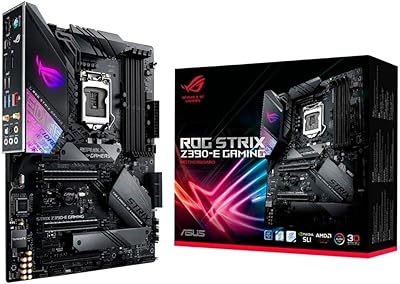
ASUS ROG Strix Z390-E Gaming Motherboard
81%
93%
Build Quality
91%
BIOS Maturity
87%
Overclocking Performance
88%
Connectivity & I/O
82%
Wi-Fi Reliability
More
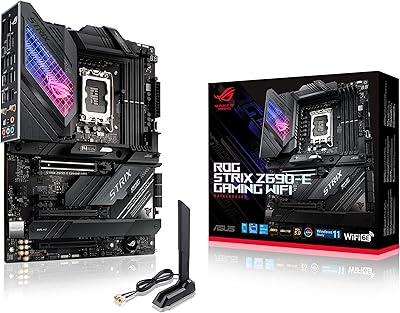
ASUS ROG Strix Z690-E Gaming WiFi Motherboard
84%
93%
Build Quality
88%
BIOS Experience
94%
Power Delivery
71%
DDR5 Compatibility
89%
Wireless Networking
More
ASUS ROG Strix B760-A ATX Motherboard
82%
88%
VRM & Power Delivery
83%
DDR5 Compatibility
91%
Build & Installation Experience
86%
BIOS & Firmware
89%
Networking Performance
More
ASUS ROG Strix X870E-E Gaming WiFi
88%
93%
Physical Build Quality
96%
Power Delivery Efficiency
94%
Storage Expansion Options
91%
Next-Gen Wireless Speed
92%
Tool-Free DIY Features
More
ASUS ROG Crosshair X870E Extreme AMD X870E AM5 E-ATX Gaming Motherboard
88%
94%
Performance
90%
Thermal Performance
88%
Ease of Setup
92%
AI Overclocking
89%
Connectivity
More
ASUS ROG STRIX Z890-A ATX Motherboard
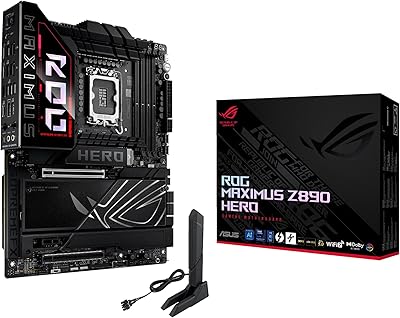
83%
91%
Build Quality
88%
VRM & Power Delivery
89%
BIOS Experience
86%
DDR5 Compatibility
93%
Connectivity & I/O
More
ASUS ROG Maximus Z890 Hero ATX Motherboard
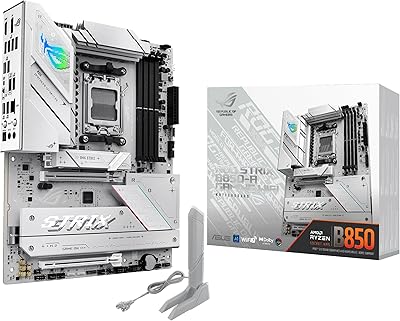
83%
93%
Build Quality
96%
VRM & Power Delivery
88%
BIOS Experience
79%
AI Overclocking
91%
Storage Versatility
More
ASUS ROG Strix B550-A Gaming ATX Motherboard
82%
91%
Build Quality
93%
Power Delivery & Stability
88%
BIOS Experience
89%
PCIe 4.0 & NVMe Performance
86%
Onboard Audio Quality
More
ASUS ROG Strix B850-I Mini-ITX Motherboard
82%
91%
Build Quality
88%
BIOS Usability
93%
Power Delivery
74%
Thermal Management
89%
Connectivity & I/O
More
ASUS ROG Strix B550-F AMD AM4 Motherboard
81%
91%
VRM & Power Delivery
88%
Build Quality
89%
BIOS Usability
84%
Ryzen Compatibility
86%
PCIe 4.0 & M.2 Performance
More

FAQ

No, it will not. The Z890 chipset uses the LGA 1851 socket, which is physically different from the LGA 1700 socket found on 12th, 13th, and 14th Gen Intel processors. You need a Core Ultra Series 2 chip to use this board.

Technically you can install a second card in a lower slot, but the Z890-E has a single primary PCIe 5.0 x16 slot for GPU use. Traditional multi-GPU configurations like SLI have largely been abandoned by game developers and GPU makers anyway, so this is rarely a practical concern for modern builds.

The board will connect fine to older routers — WiFi 7 is backward compatible. You just will not see WiFi 7 speeds until your router supports the standard. Think of the onboard WiFi 7 as an investment that pays off when you upgrade your router, rather than something with immediate day-one impact for everyone.

It is genuinely accessible for non-experts. You enable it through the BIOS or Armoury Crate, and the system analyzes your CPU and applies a tuned profile automatically. That said, getting the most from the broader AI software suite takes some familiarity — plan to spend an hour or two configuring things the first time around.

Not always at full advertised bandwidth simultaneously, since the Z890 chipset has a finite number of PCIe lanes to distribute. In most real-world configurations, running three or four M.2 drives concurrently works without significant lane-sharing compromise, but if you populate all seven slots you may see bandwidth shared on the PCIe 4.0 slots. Check the manual for the lane allocation map before planning a full build-out.

Intel's Core Ultra Series 2 platform does not officially support ECC memory in consumer configurations, so this is not a board you would choose for a server or professional workstation requiring error-correcting RAM. For creative workstation tasks like video editing or 3D rendering, the standard DDR5 support is more than capable.

Any cooler designed for Intel LGA 1851 will work. Many manufacturers have released updated mounting hardware or brackets for existing LGA 1700 coolers to also fit LGA 1851 — check your cooler manufacturer's compatibility page, as most major brands like Noctua, be quiet!, and Corsair have issued free upgrade kits.

You can absolutely skip it for basic use — the board works fine without Armoury Crate installed. However, if you want to use the AI tuning features, control RGB lighting, or get system health monitoring through a GUI, you will need it. Some users prefer to disable it entirely and manage settings through the BIOS directly.

The ROG Maximus sits above the Z890-E in ASUS's hierarchy, offering more extreme overclocking controls, additional power delivery headroom, and expanded tuning tools aimed at competitive overclockers. For the vast majority of enthusiast builders, the Z890-E delivers everything they will realistically use at a meaningfully lower cost. The Maximus makes sense mainly if you plan to push voltages and clocks to their absolute ceiling.

Yes, the standard ATX dimensions mean it is compatible with any case that supports ATX motherboards, which covers the large majority of mid-tower and full-tower cases on the market. Just double-check your case specs list ATX compatibility — some compact mid-towers support only Micro-ATX or Mini-ITX boards.

Where to Buy