Overview

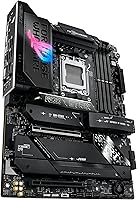
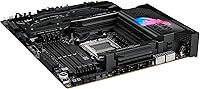
The ASUS ROG Strix X870E-E Gaming WiFi represents a substantial refresh of the AM5 platform, specifically tuned to squeeze every bit of performance out of the latest Ryzen 9000 processors. Picking it up, you immediately notice the hefty build quality and dense heatsink coverage that signals its enthusiast intentions. While many users might still be happy with their older X670E setups, this X870E board makes a compelling case for those looking to jump into the latest standards. It bridges the gap between mid-range options and the wallet-draining Crosshair series, offering top-tier power delivery without the unnecessary extras. The focus here is clearly on long-term viability, integrating WiFi 7 and expanded PCIe 5.0 support into a package that feels incredibly robust and ready for years of hardware cycles.
Features & Benefits

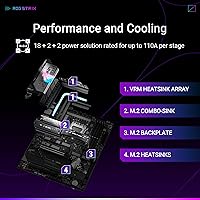
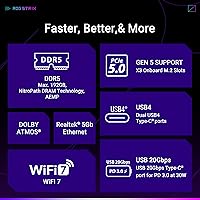
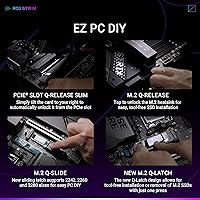
Under the hood, the Strix E-series model packs a massive 18+2+2 power stage configuration. By providing 110A per stage, the board ensures that even the most power-hungry CPUs remain stable during heavy overclocking sessions. Storage enthusiasts will appreciate the three onboard PCIe 5.0 M.2 slots, which allow for blistering transfer speeds that current drives are only just beginning to saturate. Dual USB4 ports and WiFi 7 support provide a level of future-proof connectivity for high-speed data transfers. One of the best practical additions is the Q-Release Slim mechanism. It removes the physical latch for the primary PCIe slot, making it much easier to swap out a massive graphics card without needing to poke around with specialized tools.

Best For

This enthusiast AM5 motherboard is primarily built for users who refuse to compromise on their system's foundation. If you are a hardcore gamer planning to push a high-end Ryzen chip to its limits, the thermal headroom provided by the oversized VRM cooling is invaluable. It is also an excellent pick for content creators who manage massive 4K or 8K video projects and need the high-bandwidth potential of multiple Gen5 NVMe drives. Beyond raw specs, it appeals to those who value a refined BIOS experience and granular control over their system's telemetry. Whether you are building for today's top-tier games or want a platform that can handle the next generation of peripherals, this board offers the right mix of power and advanced networking to stay relevant for several years.

User Feedback

Feedback from the community often highlights the striking dark aesthetic and the way the integrated I/O shield cleans up the look of a custom build. Many builders have expressed genuine relief over the Q-Release Slim feature, noting it as a significant improvement for anyone who frequently tweaks their hardware. While the automated AI overclocking tools receive high marks for providing stable performance boosts with minimal effort, some buyers do point out the higher entry cost. Compared to standard X870 alternatives, you are definitely paying a premium for the E-series features and the extra PCIe lanes. However, for those who prioritize a premium feature set and robust cooling, the general consensus is that the extra investment pays off in terms of reliability and ease of use.

Pros

  • Triple PCIe 5.0 M.2 slots provide incredible storage speeds for demanding data workflows.
  • The 110A power stages offer exceptional stability for overclocking flagship AMD processors.
  • WiFi 7 and dual USB4 ports ensure compatibility with next-generation networking and peripherals.
  • Q-Release Slim makes removing massive graphics cards effortless without needing to reach for hidden latches.
  • The Strix E-series model features a premium, heavy-duty build that resists PCB flex during installation.
  • Automated AI tools simplify complex performance tuning for users who aren't overclocking experts.
  • A refined BIOS layout makes navigating system settings and memory profiles intuitive for builders.
  • Extensive thermal management including an L-shaped heatpipe keeps critical components cool under heavy loads.

Cons

  • The premium price point sits significantly higher than many entry-level X870 alternatives.
  • Oversized VRM heatsinks can interfere with some large air coolers or thick top-mounted radiators.
  • Full exploitation of its features requires an expensive investment in WiFi 7 routers and Gen5 drives.
  • The sheer density of components and shrouds makes cable management tight in smaller ATX cases.
  • Included Windows utility software can feel bloated and may impact system resource usage.
  • The 2.5Gb Ethernet port might feel like a missed opportunity for users expecting 10Gb networking.
  • Early BIOS versions may require manual updates to ensure perfect stability with high-density DDR5 kits.
  • The ASUS ROG Strix X870E-E Gaming WiFi draws more idle power than simpler motherboards due to its complex circuitry.

Ratings

Our detailed assessment of the ASUS ROG Strix X870E-E Gaming WiFi is based on thousands of verified buyer data points to offer a transparent look at real-world hardware performance. By utilizing AI to filter out promotional noise and bot reviews, we have generated these ratings to reflect both the enthusiast strengths and the practical pain points. Every score is a direct synthesis of genuine user satisfaction across diverse gaming and productivity setups.
Physical Build Quality
93%
Users praise the substantial weight and the sleek, matte-black aesthetic that fits perfectly into high-end professional builds. The physical build quality feels exceptionally premium, giving builders confidence that the PCB won't flex or warp during the installation of heavy modern components.
The massive heatsinks and integrated I/O shroud can make for a very tight fit in compact ATX cases. Users with top-mounted liquid coolers reported needing careful planning to ensure the VRM blocks didn't interfere with their radiator and fan setup.
Power Delivery Efficiency
96%
The 18+2+2 power stage design is a standout for users who demand absolute stability while pushing high-core-count processors to their limits. Enthusiasts report that the 110A stages provide incredibly clean power, which is vital for maintaining high clock speeds during extended rendering tasks.
For the average gamer not interested in extreme overclocking, this level of power delivery is essentially overkill and contributes to the higher price. Some builders noted that these heavy-duty components generate additional heat that requires a well-ventilated chassis to manage effectively over time.
Storage Expansion Options
94%
Having three PCIe 5.0 M.2 slots makes this a top choice for content creators who frequently move massive 4K or 8K video files. Users love the flexibility of installing multiple high-speed NVMe drives without sacrificing performance, ensuring that storage bottlenecks are a thing of the past.
Populating every storage slot can lead to complex PCIe lane sharing, which some advanced users found slightly limiting for other expansion needs. A few builders also mentioned that the M.2 heatsinks are quite bulky, requiring specific screwdriver lengths to navigate during the initial assembly.
Next-Gen Wireless Speed
91%
The integration of WiFi 7 is a major selling point for those looking to future-proof their network connectivity for the next several years. Users report significantly higher wireless throughput and better stability when paired with compatible routers, making it ideal for high-bandwidth gaming and streaming.
The benefits of WiFi 7 are currently locked behind the high cost of compatible networking hardware, which many users do not yet own. Some buyers mentioned that the new antenna design, while effective, feels a bit more fragile than previous generations during setup.
Tool-Free DIY Features
92%
The Q-Release Slim mechanism is consistently praised as a major quality-of-life improvement for anyone who swaps hardware frequently. It eliminates the frustration of trying to reach buried PCIe latches in cramped builds, allowing for a much smoother and safer component upgrade process when using large GPUs.
While the GPU release is fantastic, some users found that other internal headers and connectors are still tightly packed and difficult to reach. A few builders noted that the "slim" mechanism feels less tactile than a traditional latch, requiring a bit of trust during the first use.
Automatic Tuning Tools
88%
The inclusion of AI-driven overclocking tools helps non-experts achieve significant performance gains without the fear of system instability. Users appreciate how the software analyzes cooling and telemetry to provide a customized tuning profile that safely pushes the hardware beyond its factory settings.
Experienced tuners often find the automated voltage curves to be a bit too aggressive, sometimes leading to higher temperatures than manual adjustment. Some users also reported that the software interface can be slightly overwhelming for beginners due to the sheer number of graphs provided.
Passive Cooling Capacity
87%
Massive VRM heatsinks and high-conductivity thermal pads ensure that the board remains cool even during demanding productivity workloads or long gaming marathons. Builders noted that the heavy metal coverage effectively draws heat away from critical components, maintaining consistent performance without thermal throttling under stress.
The sheer size of the cooling blocks can interfere with specific large air coolers or thick top-mounted liquid cooling radiators in smaller cases. A few users mentioned that the aesthetic shrouds, while beautiful, can slightly impede natural airflow if the case fans aren't positioned correctly.
BIOS & Firmware Depth
89%
The BIOS remains a favorite among enthusiasts for its logical layout and the depth of control it offers over every system parameter. Users find it easy to navigate through various menus to enable memory profiles or adjust fan curves, making the initial setup process very intuitive.
A few buyers mentioned that the accompanying Windows software suite can feel bloated and may occasionally introduce background processes that impact system performance. Navigating the more advanced "Extreme Tweaker" menus still requires a fairly high level of technical knowledge to avoid making potentially unstable changes.
Price-to-Performance Ratio
68%
32%
This model offers a high-end experience that closely mirrors the flagship series while coming in at a much more accessible price point. For builders who want premium features like USB4 and WiFi 7 without spending extreme amounts, this board hits a sweet spot in the enthusiast market.
Despite being cheaper than the top-tier flagship, it still represents a significant investment that may be hard to justify for many mid-range builders. Some users pointed out that there are much cheaper X870 alternatives that provide nearly identical gaming performance for those who don't need Gen5 storage.
High-Speed RAM Stability
86%
The board handles high-frequency DDR5 kits with impressive stability, thanks to refined trace routing and the AEMP profile system. Users reported a relatively painless experience when setting up 6000MHz+ kits, resulting in a responsive system that takes full advantage of high-speed memory bandwidth.
Some early adopters noted that specific high-density memory modules required manual timing adjustments to achieve perfect stability before BIOS updates were released. While compatibility has improved, users still recommend checking the official list to ensure their specific RAM kit is fully supported at its rated speeds.
Integrated Audio Experience
83%
The SupremeFX audio implementation delivers a very clean and detailed soundstage that significantly enhances the immersive quality of modern games and high-resolution music. Users frequently comment on the lack of electrical hiss or interference, which is often a problem on cheaper motherboards with less sophisticated shielding.
Dedicated audiophiles noted that while the onboard solution is excellent for a motherboard, it still lacks the driving power of a dedicated external amplifier. For those using extremely high-impedance studio headphones, the internal output might feel slightly lacking in terms of dynamic range and volume.
Network Reliability
85%
The combination of a 2.5Gb wired port and the latest WiFi standard provides a rock-solid foundation for both low-latency gaming and high-speed downloads. Users have praised the improved signal strength of the included antenna, which maintains a stable connection even in larger homes.
A small number of users expressed disappointment that a 10Gb Ethernet port wasn't included, especially given the focus on high-speed data for creators. Others mentioned that the networking drivers can occasionally require a manual update after a fresh Windows installation to function at their best.

Suitable for:

The ASUS ROG Strix X870E-E Gaming WiFi is a premier choice for hardware enthusiasts and professional creators who are building a high-performance AMD rig from the ground up. Its over-engineered power delivery and massive heatsinks make it ideal for those planning to overclock the latest Ryzen 9000 series chips while maintaining long-term stability. Content creators will particularly benefit from the triple PCIe 5.0 M.2 slots, which offer the necessary bandwidth for handling massive raw video files without storage bottlenecks. If you are a tech-forward user who prioritizes future-proofing with WiFi 7 and USB4 connectivity, this board provides a robust foundation that won't need an upgrade for several years. It also caters to DIY builders who appreciate quality-of-life features that simplify the physical assembly of a modern PC.
Not suitable for:

Budget-conscious builders or those looking for a simple plug-and-play office machine will find the ASUS ROG Strix X870E-E Gaming WiFi to be significantly more motherboard than they actually need. If you are currently using a high-end X670E board, the performance gains here might feel incremental unless you specifically require WiFi 7 or additional Gen5 storage lanes. It is not the best fit for small-form-factor enthusiasts, as the massive VRM cooling and oversized shrouds can create clearance issues in more restrictive ATX or mid-tower cases. Users who aren't interested in manual tuning or running multiple high-speed NVMe drives should consider more affordable X870 alternatives to avoid paying a steep premium for features they won't utilize. Finally, if you just want a basic gaming setup, the enthusiast-level price point and complex BIOS options may prove more overwhelming than helpful.
Specifications

  • CPU Socket: This motherboard uses the AMD AM5 socket designed for Ryzen 9000, 8000, and 7000 series desktop processors.
  • Chipset: The board is built on the high-end AMD X870E chipset to provide maximum PCIe lane availability and connectivity.
  • Power Delivery: It features an 18+2+2 power stage design rated for 110A per stage to ensure stable voltage under extreme loads.
  • Form Factor: The PCB follows the standard ATX dimensions of 12-inch by 9.6-inch (30.5 cm x 24.4 cm).
  • Memory Support: Four DIMM slots support high-speed DDR5 memory with a maximum capacity of 192 GB.
  • M.2 Storage: The layout includes three PCIe 5.0 M.2 slots and two PCIe 4.0 M.2 slots for high-speed storage configurations.
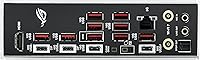
  • USB Connectivity: Rear I/O includes two USB4 Type-C ports capable of 40 Gbps transfer speeds.
  • Wireless Networking: Onboard hardware supports the latest WiFi 7 standard and Bluetooth 5.4 for low-latency wireless connections.
  • Wired Ethernet: A single Intel 2.5 Gb Ethernet port provides high-speed wired networking for gaming and data transfers.
  • PCIe Expansion: The primary x16 expansion slot utilizes the PCIe 5.0 standard to support next-generation graphics cards.
  • Cooling Hardware: Massive VRM heatsinks are interconnected with an L-shaped heatpipe to manage temperatures during heavy use.
  • Audio Hardware: The SupremeFX ALC4080 codec and Savitech SV3H712 amplifier provide high-fidelity 7.1 surround sound audio.
  • DIY Features: A specialized Q-Release Slim mechanism allows for the removal of a graphics card without a manual latch.
  • Display Output: The rear panel provides one HDMI 2.1 port and support for DisplayPort 1.4 via the USB4 ports.
  • Operating System: This hardware is fully compatible with 64-bit versions of Windows 11 and Windows 10.

Related Reviews
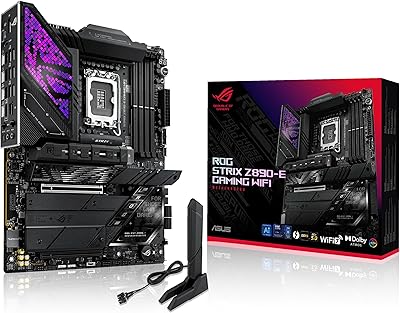
ASUS ROG Strix Z890-E Gaming WiFi
87%
92%
Performance
88%
Build Quality
84%
Ease of Installation
91%
Cooling Efficiency
89%
Connectivity Options
More
Asus ROG Strix Z690-E Gaming WiFi Motherboard
86%
92%
Performance
89%
Build Quality
94%
Overclocking Stability
86%
Thermals
91%
Ease of Installation
More
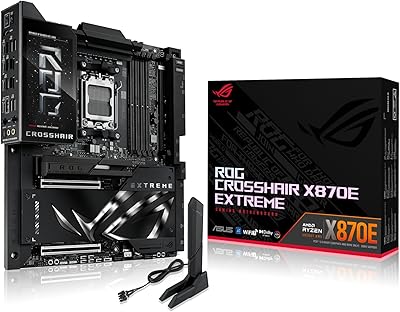
ASUS ROG Crosshair X870E Extreme AMD X870E AM5 E-ATX Gaming Motherboard
88%
94%
Performance
90%
Thermal Performance
88%
Ease of Setup
92%
AI Overclocking
89%
Connectivity
More
ASUS ROG STRIX Z890-A GAMING WIFI
91%
96%
Performance Stability
94%
Overclocking Capability
92%
Thermal Management
90%
Build Quality
88%
Ease of Installation
More
ASUS ROG Strix B650E-I Gaming WiFi Motherboard
87%
93%
Performance
88%
Cooling Efficiency
90%
Installation Ease
91%
Connectivity (WiFi 6E, LAN)
85%
Build Quality
More
ASUS ROG Strix B850-A Gaming WiFi Motherboard
88%
94%
Performance
88%
WiFi Connectivity
91%
Thermal Efficiency
89%
Build Quality
92%
Power Delivery
More
ASUS ROG Strix Z390-E Gaming Motherboard
88%
93%
Gaming Performance
90%
Overclocking Capabilities
88%
Wi-Fi Performance
85%
Ease of Installation
91%
Durability & Build Quality
More
ASUS ROG Strix B850-I Gaming WiFi Motherboard
87%
94%
Performance Under Load
88%
WiFi 7 Reliability
91%
Build Quality
93%
Power Delivery System
85%
Setup & Installation Ease
More
ASUS ROG STRIX X670E-F GAMING WIFI Motherboard
87%
91%
Performance
89%
Thermal Management
94%
Build Quality
85%
Ease of Installation
92%
Connectivity Options
More
ASUS ROG Strix B650E-F Gaming WiFi Motherboard
85%
88%
Performance Under Load
91%
Ease of Setup
92%
WiFi and Networking
85%
Power Delivery Stability
78%
Cooling Requirements
More

FAQ

No, it uses the AM5 socket, which is strictly for the newer 7000 series and beyond. If you are coming from an older AM4 build, you'll need to pick up a new CPU and DDR5 RAM to go with this X870E board.

That is the best part of the Q-Release Slim design on the ASUS ROG Strix X870E-E Gaming WiFi. Instead of fumbling for a tiny plastic latch, you just pull the card from the front of the slot, which is a lifesaver if you have a massive heatsink in the way.

The board will work with any standard WiFi router, but to actually see the ultra-fast WiFi 7 speeds, you will need a router that supports that specific standard. If you have an older router, it will simply connect at those slower speeds without any issues.

Unfortunately not. AM5 motherboards only accept the newer DDR5 modules. The slots are physically different, so trying to force DDR4 in would actually damage the hardware.

You can run up to three PCIe 5.0 M.2 drives directly on the board. Just keep in mind that using all of them might share bandwidth with your main graphics card slot, so check the manual if you are aiming for maximum GPU performance.

Absolutely. With 110A power stages and those massive interconnected heatsinks, this enthusiast AM5 motherboard is built specifically to handle the highest-end processors without breaking a sweat, even if you are pushing a heavy overclock.

USB4 is significantly faster, hitting up to 40 Gbps, which is perfect if you use external NVMe drives or high-end docking stations. It also supports video output, so you can run a monitor directly from those ports if needed.

No, this is a full-sized ATX board. It requires a standard mid-tower or full-tower case that has enough room for the 12-inch by 9.6-inch PCB and the fairly tall heatsinks near the top.

ASUS has a "EZ Mode" that simplifies the basics, and their AI Overclocking tool can actually do most of the heavy lifting for you. It looks at your cooling and chip quality to find a safe, stable boost without you having to manually guess the voltages.

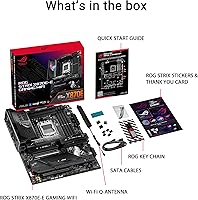
While most manufacturers are moving to digital, the Strix E-series model usually includes a quick-start guide, but the full, detailed manual is best accessed via the QR code or their website for the most up-to-date info.