Overview

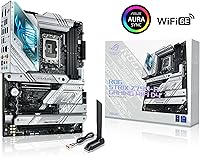
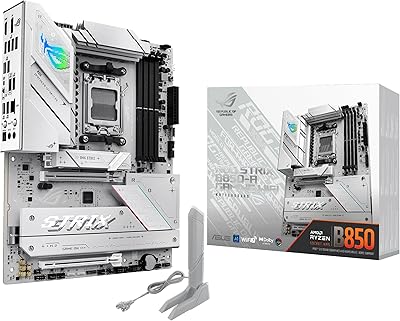
The ASUS ROG Strix Z790-A DDR4 Motherboard sits in an interesting position within the ROG lineup — capable enough to satisfy serious enthusiasts, yet not so extreme that it demands boutique-level expertise to operate. This ROG Strix board launched alongside 13th Gen Intel processors and carries forward compatibility through 14th Gen, which gives it a longer useful lifespan than its release date might suggest. The ATX form factor and predominantly white aesthetic are deliberate design choices, not afterthoughts — builders who care about a clean, cohesive look will appreciate that the board holds its own visually. Expect a premium price and a feature set to match; this is not a beginner's first build platform.
Features & Benefits

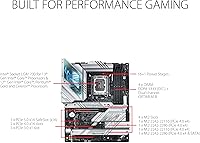
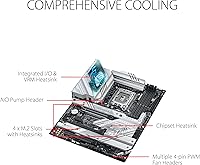
The Z790-A DDR4's VRM setup is one of its strongest selling points — 16+1 power stages rated at 70A each means the board can handle sustained load from high-core-count processors without throttling, which matters if you are pushing an i9 or planning to overclock. Four PCIe 4.0 M.2 slots, each with its own heatsink, keep NVMe drives cool under real workloads rather than just on paper. The PCIe 5.0 x16 slot is a genuine forward-looking addition for GPU upgrades down the line. Networking is well-covered with WiFi 6E and Intel 2.5Gb Ethernet onboard. The USB 3.2 Gen 2x2 Type-C port with 30W power delivery on both the rear panel and front header is a practical touch that builders actually notice. ASUS's AI tools for overclocking, cooling, and noise cancelation function as helpful starting points rather than hands-free automation.

Best For

This ASUS gaming motherboard makes the most sense for builders already invested in DDR4 who see no compelling reason to pay the DDR5 premium just yet — that is a rational position, and this board rewards it with strong memory clock support up to 5333 MHz. It is also a natural fit for anyone building a white or light-themed system; the board's visual design is one of the better executions of that aesthetic in the Z790 segment. Content creators and streamers will find the noise cancelation and front-panel USB-C with power delivery genuinely useful. If you want a flagship-level experience without stepping up to the ROG Maximus tier, this sits in a comfortable middle ground.

User Feedback

Across roughly 300 ratings, the Z790-A DDR4 holds a 4.3-star average — solid, and the praise is fairly consistent. Builders frequently highlight BIOS polish, VRM thermal performance, and onboard WiFi reliability as standout positives; the board feels well-made and the component quality shows. That said, a few recurring complaints are worth knowing before you buy: the BIOS has a learning curve for those coming from other brands, and some users run into DDR4 compatibility snags at high XMP speeds. Armoury Crate, ASUS's companion software, gets flagged regularly for bloat. The price premium over competing Z790 DDR4 boards divides opinion — most buyers feel it is earned, but not everyone agrees.

Pros

  • The VRM is genuinely overclocking-capable — 16+1 stages at 70A each handles sustained loads from high-core-count Intel CPUs without breaking a sweat.
  • All four M.2 slots include individual heatsinks, so NVMe drives stay cool even in heavily loaded storage configurations.
  • WiFi 6E and Intel 2.5Gb Ethernet together give you flexible, fast networking out of the box with no add-in cards needed.
  • The white aesthetic is one of the cleaner executions in the Z790 segment — it holds up visually without looking cheap.
  • PCIe 5.0 x16 support means the GPU slot will not become a bottleneck as next-gen graphics cards roll out.
  • Front-panel USB-C with 30W power delivery is a thoughtful addition that many competing boards still skip.
  • BIOS is well-organized and responsive once you learn the layout — experienced ASUS users will feel right at home.
  • Broad CPU compatibility across three Intel generations makes this a reasonable long-term platform investment.
  • Build quality feels premium — the board is heavy, solid, and the heatsink coverage on the VRM and M.2 slots is extensive.

Cons

  • DDR4 support is a limitation for builders starting fresh who want the most future-proof memory platform available today.
  • Armoury Crate software is bloated and can be a hassle to disable or uninstall cleanly on a fresh Windows install.
  • The BIOS has a steep learning curve for anyone coming from a different motherboard brand or building their first system.
  • High XMP speed DDR4 compatibility can be hit-or-miss without careful RAM selection and manual tuning.
  • At this price point, some competing Z790 DDR4 boards offer DDR5 variants for only marginally more money.
  • The AI automation tools are useful shortcuts but not substitutes for manual tuning if you are serious about squeezing out performance.
  • Larger ATX footprint means smaller or compact cases are simply off the table — there is no mATX equivalent in this lineup.
  • buyers who do not overclock or use M.2 storage heavily are essentially funding features they will never touch.

Ratings

The ASUS ROG Strix Z790-A DDR4 Motherboard scores below are generated by AI after analyzing verified buyer reviews from global markets, with spam, bot activity, and incentivized feedback actively filtered out. This board earns genuine enthusiasm in several areas, but real user pain points around software, memory compatibility, and value relative to DDR5 alternatives are reflected transparently in the scores. Both the highlights and the frustrations are represented exactly as buyers experienced them.
VRM & Overclocking Capability
92%
Builders running 13th Gen i7 and i9 processors under sustained all-core loads consistently report that the board holds stable without throttling, even during extended rendering sessions or overnight stress tests. The 16+1 configuration with 70A per stage gives experienced overclockers real tuning headroom without pushing into boutique-board territory.
A small number of users note that extracting the best overclocking results still requires manual BIOS tuning rather than relying on the AI profiles, which can be time-consuming for those less familiar with voltage and frequency adjustment on Intel platforms.
Build Quality & Materials
89%
The physical construction consistently draws praise — the board feels dense and well-braced, and the metal reinforcement on the PCIe slot and M.2 heatsink covers inspires confidence during installation and long-term use. Component fit and finish are described as clearly premium rather than just marketed as such.
A few users report that the heatsink screws on the M.2 covers can be fiddly to reinstall after initial removal, and the white plastic elements on the I/O shroud can show fingerprints and smudging fairly easily during a build.
Thermal Management
88%
VRM temperatures under sustained heavy loads remain well-controlled thanks to the large integrated heatsink design, which connects the VRM block to the I/O cover for broader heat dissipation. Users report that NVMe drives in all four slots also run noticeably cooler than on boards without per-slot heatsinks.
Airflow inside the case matters more than some users anticipate — in poorly ventilated builds, the VRM heatsink can still get quite warm during long gaming or encoding sessions, though it rarely reaches throttling territory.
Memory Compatibility
71%
29%
The board handles a wide range of DDR4 kits well at standard speeds, and users running matched kits from major brands like G.Skill and Corsair at XMP speeds up to 4800 MHz generally report smooth, stable operation after enabling XMP in BIOS.
High-speed kits above 5000 MHz show inconsistent compatibility depending on the specific ICs used, and some users report needing multiple BIOS updates or manual sub-timing adjustments before achieving stability at advertised XMP speeds. The QVL list is helpful but does not cover every kit on the market.
BIOS Experience
78%
22%
Longtime ASUS users consistently describe the BIOS as one of the more polished and logically organized in the Z790 segment, with granular fan curve controls, detailed per-core voltage options, and a well-designed quick-mode interface for basic adjustments.
Buyers coming from other motherboard brands frequently flag the learning curve as steeper than expected, particularly around memory tuning menus and fan header assignment. First-time builders may find the depth overwhelming rather than helpful during initial setup.
Connectivity & I/O
91%
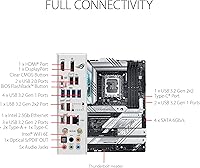
The rear I/O layout covers practical everyday needs comprehensively — the USB 3.2 Gen 2x2 Type-C with 30W charging is a standout, and the dual front-panel USB-C support is something users actively appreciate when their case supports it. Having both WiFi 6E and 2.5Gb Ethernet onboard removes the need for any add-in cards.
Some users would have preferred an additional Thunderbolt 4 header at this price point, and the USB 2.0 port count, while adequate, feels like a generational carryover rather than a deliberate design choice for a board targeting modern enthusiasts.
Wireless Performance
87%
The onboard WiFi 6E module receives consistent praise for range and connection stability, with users reporting reliable performance even through multiple walls or in crowded wireless environments. Gamers note low and consistent latency compared to cheaper onboard solutions they have used previously.
A small number of users report occasional driver hiccups on fresh Windows installs, requiring a manual driver update before WiFi operates at full rated speeds. The included antenna is functional but not particularly adjustable for awkward case placements.
Software & Armoury Crate
53%
47%
When it works cleanly, Armoury Crate provides a convenient single dashboard for RGB lighting synchronization, fan monitoring, and AI tuning profile activation, which some users find genuinely useful for managing their system without diving into BIOS.
Armoury Crate is one of the most consistently criticized aspects across reviews — bloat, background processes, aggressive auto-install behavior during Windows setup, and occasional crashes are recurring themes. Many users recommend uninstalling it entirely and managing the board through BIOS alone.
Aesthetic & Visual Design
86%
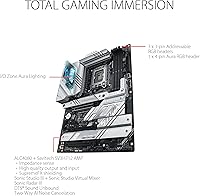
The white and silver color scheme is one of the cleaner board aesthetics available in the Z790 segment, and builders specifically select this board to anchor white or light-themed builds. The Aura Sync ARGB integration allows the lighting to coordinate well with other components when set up properly.
The white finish on the I/O shroud can show dust and smudges more readily than darker alternatives, and users in dark-themed builds find the board visually incongruous. The RGB zones are somewhat limited compared to more visually elaborate boards at a similar price.
Storage Flexibility
89%
Four M.2 slots with individual heatsinks is a strong offering that allows builders to run a full NVMe-only storage setup without relying on SATA at all, which is increasingly the preference for high-performance workstation and gaming rigs. Users appreciate that all four slots operate at PCIe 4.0 rather than dropping to PCIe 3.0 for lower slots.
SATA port count is adequate but not generous at six ports, which may feel limiting for users transitioning from older systems with many 2.5-inch or 3.5-inch drives. No PCIe 5.0 M.2 slot is included, which some buyers at this price tier consider a missed opportunity.
Value for Money
67%
33%
For buyers with an existing DDR4 investment, the board delivers a strong feature set that justifies its positioning — the VRM, M.2 coverage, and connectivity are comparable to boards that cost meaningfully more. Long-term usability across three Intel generations also softens the price concern for system builders thinking ahead.
The DDR4-only limitation is the central value tension: at this price, buyers starting fresh can find DDR5-capable Z790 boards at comparable or only slightly higher cost, making the decision harder to justify unless DDR4 reuse is a specific priority. Some buyers feel the premium is partly paying for the brand and aesthetic rather than purely for performance.
Ease of Installation
82%
18%
The board layout is well-considered for a full ATX build — power connectors are positioned logically, M.2 heatsinks are secured with clear screws rather than push-pins, and the rear I/O shield is pre-installed, which saves time and frustration during assembly.
The M.2 heatsink retention system, while functional, is a bit fiddly compared to tool-free designs from competitors, and some users note the proximity of certain fan headers to installed coolers makes cable management tighter than expected.
CPU Compatibility & Longevity
84%
Supporting three Intel generations from a single board is a genuine longevity advantage — buyers who built with a 12th Gen chip and have since upgraded to 13th or 14th Gen report the board handling the transition with a BIOS update and no other changes required. This extends the useful life of the platform meaningfully.
Intel's LGA 1700 socket is a closed platform with no announced future generation support beyond 14th Gen, so this board's upgrade path is finite regardless of how well it performs today. Buyers should go in knowing it is a Z790 endpoint rather than a stepping stone to something newer.
Audio Performance
74%
26%
The onboard audio implementation is capable enough for gaming headsets and desktop speakers, and the Two-Way AI Noise Cancelation feature receives genuine appreciation from streamers and video call users who find it meaningfully reduces background noise without a dedicated external solution.
Dedicated audiophiles and music producers who route audio through the board's onboard codec rather than an external DAC or dedicated sound card may find the output falls short of their expectations, particularly at higher monitoring volumes where background hiss can become noticeable.

Suitable for:

The ASUS ROG Strix Z790-A DDR4 Motherboard is a strong match for enthusiast builders who are sticking with DDR4 and want a board that does not require compromise on features to do so. If you are pairing a 13th or 14th Gen Intel processor with existing DDR4 memory kits and plan to push XMP profiles or do some overclocking, the robust VRM gives you real headroom without needing to step up to a boutique board. Builders who prioritize a white or neutral-toned system aesthetic will find this one of the few Z790 options that genuinely looks the part without relying on gaudy RGB to compensate. Content creators and streamers benefit from the front-panel USB-C with power delivery and the onboard noise cancelation, which are useful in day-to-day workflows rather than just spec-sheet fodder. Experienced builders who want a well-rounded, high-quality platform for a long-term Intel system will get solid value here.
Not suitable for:

If you are building fresh with no existing DDR4 investment, paying a premium price for a DDR4 board when DDR5 is increasingly accessible at competitive pricing is a harder case to make, and the ASUS ROG Strix Z790-A DDR4 Motherboard will feel like a trade-off rather than a value. First-time builders may find the BIOS depth and ASUS ecosystem intimidating — the software and firmware are polished for those who know what they are doing, but the learning curve is real for newcomers. Anyone who finds Armoury Crate frustrating on other ASUS products should know that frustration carries over here; the software is optional but not exactly frictionless to remove. Budget-conscious builders who only need a stable platform without overclocking ambitions are paying for capabilities they will likely never use. And if your case, cooler, and components are built around a dark or all-black theme, the board's white design language will simply clash.
Specifications

  • CPU Socket: Uses the Intel LGA 1700 socket, supporting 12th, 13th, and 14th Gen Intel Core, Pentium Gold, and Celeron processors.
  • Chipset: Built on the Intel Z790 chipset, which enables PCIe 5.0 support, high-bandwidth M.2 connectivity, and full overclocking capability.
  • Form Factor: Standard ATX form factor measuring 13.3 x 10.9 x 2.9 inches, compatible with full-size and mid-tower ATX cases.
  • Memory Type: Supports DDR4 memory exclusively, with speeds up to 5333 MHz via XMP and four DIMM slots for dual-channel configuration.
  • VRM Design: Features a 16+1 power stage layout rated at 70A per stage, with dual ProCool II connectors and high-quality alloy chokes for stable overclocking.
  • M.2 Storage: Includes four PCIe 4.0 M.2 slots, each equipped with an individual heatsink to manage thermal output during sustained NVMe workloads.
  • GPU Slot: Primary x16 slot runs PCIe 5.0 and uses ASUS SafeSlot reinforcement to support heavy graphics cards without flex or damage risk.
  • Wireless: Onboard WiFi 6E (802.11ax) covers the 2.4 GHz, 5 GHz, and 6 GHz bands for low-latency wireless connectivity.
  • Wired LAN: Intel 2.5 Gigabit Ethernet with ASUS LANGuard surge protection provides fast and stable wired network performance.
  • Rear USB: Rear I/O includes a USB 3.2 Gen 2x2 Type-C port with PD 3.0 delivering up to 30W of power output alongside multiple USB 3.2 Gen 2 and Gen 1 Type-A ports.
  • Front Panel USB: An additional USB 3.2 Gen 2x2 Type-C front-panel header also supports PD 3.0 at up to 30W, enabling fast charging and high-speed data from the front of the chassis.
  • Display Output: Integrated graphics output includes HDMI 2.1 and DisplayPort 1.4 for use with compatible Intel CPUs that have integrated graphics.
  • USB 2.0 Ports: Provides six USB 2.0 ports for legacy peripherals such as mice, keyboards, and audio dongles.
  • Audio: Equipped with onboard audio via the ROG SupremeFX audio stack, designed for clean output with reduced signal interference from surrounding components.
  • AI Features: Includes ASUS AI Overclocking, AI Cooling II, and Two-Way AI Noise Cancelation as software-assisted tools for system tuning and audio cleanup.
  • Weight: The board weighs 4.65 pounds, reflecting its full ATX size and the substantial metal heatsink coverage across VRM and M.2 zones.
  • BIOS: Ships with ASUS UEFI BIOS featuring AI overclocking profiles, detailed fan control, and XMP/DOCP memory configuration support.
  • RGB & Lighting: Features onboard ARGB headers and integrated lighting zones compatible with ASUS Aura Sync for coordinated system lighting.
  • Power Connectors: Requires a standard 24-pin ATX connector plus dual 8-pin EPS CPU power connectors to support the full VRM capacity.
  • Warranty: Covered by ASUS's standard limited warranty; duration varies by region, so buyers should confirm local terms at the time of purchase.

Related Reviews
ASUS ROG Strix Z790-F Gaming Motherboard
81%
93%
VRM & Power Delivery
89%
BIOS Experience
91%
Build Quality & Component Grade
88%
M.2 Storage Expandability
86%
Networking Performance
More
ASUS ROG Strix B650E-I Mini-ITX Motherboard
81%
91%
VRM & Power Delivery
94%
Feature Set for Form Factor
83%
BIOS & Software Experience
74%
DDR5 Memory Compatibility
88%
Wireless Connectivity
More
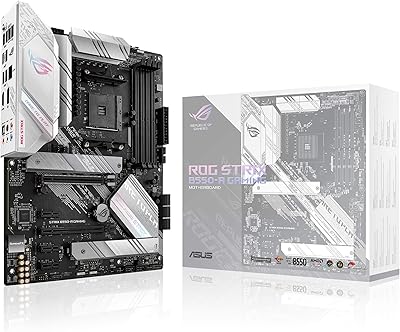
ASUS ROG Strix B550-A Gaming ATX Motherboard
82%
91%
Build Quality
93%
Power Delivery & Stability
88%
BIOS Experience
89%
PCIe 4.0 & NVMe Performance
86%
Onboard Audio Quality
More
ASUS ROG Strix Z390-E Gaming Motherboard
81%
93%
Build Quality
91%
BIOS Maturity
87%
Overclocking Performance
88%
Connectivity & I/O
82%
Wi-Fi Reliability
More
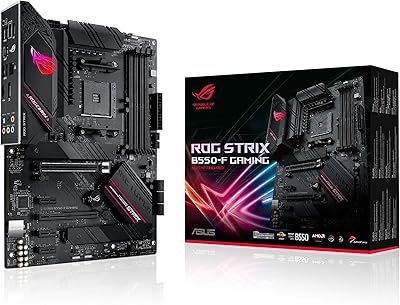
ASUS ROG Strix B550-F AMD AM4 Motherboard
81%
91%
VRM & Power Delivery
88%
Build Quality
89%
BIOS Usability
84%
Ryzen Compatibility
86%
PCIe 4.0 & M.2 Performance
More
ASUS ROG Strix B850-A ATX Motherboard
83%
93%
Power Delivery
88%
BIOS Experience
86%
Storage Throughput
91%
Wireless Connectivity
89%
Build & Aesthetics
More
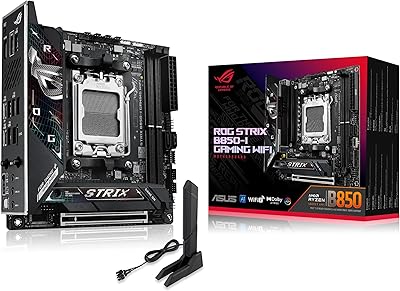
ASUS ROG Strix B850-I Mini-ITX Motherboard
82%
91%
Build Quality
88%
BIOS Usability
93%
Power Delivery
74%
Thermal Management
89%
Connectivity & I/O
More
ASUS ROG Strix B760-A ATX Motherboard
82%
88%
VRM & Power Delivery
83%
DDR5 Compatibility
91%
Build & Installation Experience
86%
BIOS & Firmware
89%
Networking Performance
More
ASUS ROG Strix B650E-F Gaming WiFi Motherboard
85%
88%
Performance Under Load
91%
Ease of Setup
92%
WiFi and Networking
85%
Power Delivery Stability
78%
Cooling Requirements
More
ASUS ROG STRIX X670E-F ATX Motherboard
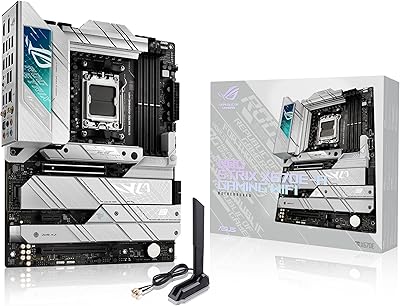
82%
92%
VRM & Power Delivery
88%
BIOS Experience
86%
M.2 Storage Performance
71%
CPU Compatibility & Setup
89%
Thermal Design
More

FAQ

It should, though you may need to update the BIOS first depending on which firmware version came pre-installed. ASUS has released BIOS updates that add full 14th Gen support, so it is worth flashing to the latest version before dropping in a Raptor Lake Refresh processor. Most recent units shipping now come with a compatible BIOS already loaded.

Yes, that is one of the main reasons people choose this board. It supports DDR4 in dual-channel configuration with speeds up to 5333 MHz via XMP. That said, not every DDR4 kit plays nicely at its rated XMP speed on Z790 — if you run into instability at high speeds, try enabling XMP manually in the BIOS rather than relying on automatic detection, and check the ASUS QVL list for your specific kit.

It is well-suited for it. The VRM is rated at 70A per stage across 16+1 stages, which gives the board enough headroom to sustain the kind of sustained all-core loads an i9-13900K generates under heavy overclocking. You will want good case airflow and a capable CPU cooler, but the board itself is not the bottleneck.

There is a learning curve. ASUS's UEFI BIOS is feature-rich and well-organized once you know where things are, but if you are coming from a different brand like MSI or Gigabyte, expect to spend some time finding your way around. The AI Overclocking profile is a reasonable starting point if you do not want to tune manually right away.

No, the board will function perfectly without it. Armoury Crate is optional software for controlling RGB lighting and monitoring system stats, but it does tend to install itself aggressively during Windows setup. If you prefer a clean install, decline the prompts during driver installation and only install the chipset and LAN drivers you actually need.

You can fit up to four NVMe M.2 drives simultaneously. All four slots run at PCIe 4.0 speeds. The Z790 chipset does not require you to sacrifice SATA ports or bandwidth for the lower slots the way older chipsets sometimes did, though it is still worth checking the manual to confirm any bandwidth sharing conditions for your specific configuration.

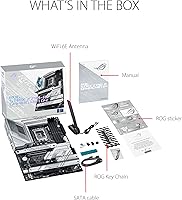
WiFi 6E is built right onto the board — no adapter needed. An antenna is included in the box that attaches to the rear I/O panel connectors. The onboard wireless has received consistently positive feedback from users, particularly for reliability at range.

The white elements on this board are primarily the heatsink shrouds and PCB accents, not painted plastic, so yellowing is not a concern the way it might be on older white peripherals. Surface scratches are possible during installation if you are not careful, but under normal use the board holds up well. The finish is consistent with what you would expect from a premium ASUS product.

Almost certainly yes, as long as your case supports ATX motherboards, which the vast majority of mid-towers do. The board is a standard ATX size at 13.3 x 10.9 inches. Just double-check that your case has enough clearance above the top M.2 slot if you are using a large CPU cooler, as some cooler bases can sit close to the upper edge of the board.

Yes, ASUS makes a DDR5 variant of the ROG Strix Z790-A as a separate product. The two boards are distinct SKUs, so you would need to purchase that version specifically — you cannot convert the DDR4 version. If you are on the fence about DDR4 versus DDR5, it is worth deciding before purchasing, since there is no upgrade path between them on the same board.

Where to Buy