Overview

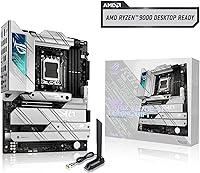
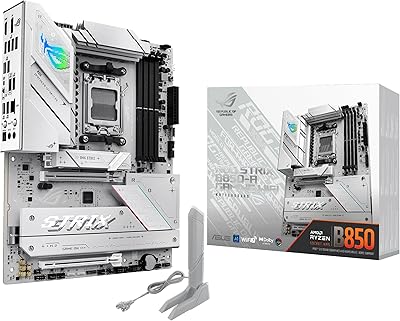
The ASUS ROG Strix X670E-A Motherboard launched alongside AMD's Ryzen 7000 lineup in late 2022 and has held its ground as one of the more compelling mid-to-high-end AM5 options since. It sits below the ROG Maximus in ASUS's own hierarchy — worth being upfront about, because you're not getting the absolute peak of power delivery or premium extras. What you do get is a well-rounded X670E board with an aggressive black ATX design, strong Strix branding, and enough feature density to satisfy serious builders who don't want to spend flagship money but still expect a genuinely capable platform.
Features & Benefits

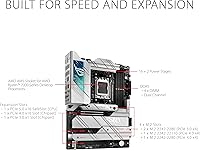
The X670E-A packs a 16+2 teamed power stage configuration with dual 8-pin ProCool II connectors, which in practice means the board can comfortably feed even a 16-core 7950X under sustained load. PCIe 5.0 is available on both the primary GPU slot and the top M.2, so your investment won't feel dated when next-generation storage becomes mainstream. Four M.2 slots — each covered by its own heatsink — make building a dense NVMe array straightforward. WiFi 6E and 2.5GbE LAN round out the connectivity, and the BIOS is approachable enough for exploring PBO Enhancement without needing to dig through documentation first.

Best For

This mid-to-high-end AM5 motherboard is a natural fit for builders pairing it with a Ryzen 7700X, 7900X, or 7950X who want robust power delivery and DDR5 headroom up to 6400 MHz without paying for features they'll never touch. Content creators running multiple NVMe drives will appreciate four covered M.2 slots from day one. The USB 3.2 Gen 2x2 port is a real advantage if you use high-speed external storage, and WiFi 6E is a genuine upgrade in congested wireless environments. That said, hardcore manual overclockers who need maximum voltage control might find the ROG Maximus or the MSI MEG X670E Ace a stronger match.

User Feedback

With over 1,400 ratings averaging 4.2 stars, the ROG Strix board has earned a solid but not untouchable reputation. Most praise focuses on BIOS polish and build quality — the firmware has improved meaningfully through updates, and thermal performance with high-core-count chips gets consistently positive marks. Where things get nuanced: early DDR5 training times frustrated some buyers, though later BIOS revisions resolved the worst of it. A handful of reviewers flagged the WiFi antenna placement and rear I/O density as slightly awkward in tighter cases. Neither issue is a dealbreaker, but both are worth considering depending on your case and workspace layout.

Pros

  • Four M.2 slots, each with its own heatsink, make multi-drive NVMe builds clean and practical.
  • PCIe 5.0 on both the primary GPU slot and top M.2 provides genuine long-term platform value.
  • The 16+2 teamed power stages handle high-core-count Ryzen CPUs under sustained load without complaint.
  • WiFi 6E and 2.5GbE LAN together offer a meaningful networking upgrade over older board standards.
  • BIOS is well-organized and receives consistent firmware updates that have resolved early DDR5 issues.
  • PBO Enhancement and Dynamic OC Switcher give accessible overclocking options without requiring expert-level tuning.
  • Bundled AIDA64 Extreme trial adds immediate diagnostic value right after your first boot.
  • Build quality is consistently praised across a large review base — over 1,400 ratings and counting.
  • The black ATX design integrates cleanly into a wide range of mid-tower and full-tower case builds.
  • DDR5 support up to 6400 MHz leaves plenty of headroom for memory performance tuning as kits mature.

Cons

  • Early DDR5 memory training times frustrated a number of buyers at launch, even if firmware has since improved.
  • WiFi antenna placement can feel awkward depending on case layout and rear clearance.
  • The rear I/O is dense, which some users found tricky to navigate in tight builds.
  • Power delivery, while capable, falls short of what dedicated extreme overclockers need for all-out manual tuning.
  • USB 2.0 is limited to just two ports, which can be a pinch if you use older peripherals or devices.
  • At its price point, there is no included Thunderbolt support, which competing boards in adjacent tiers sometimes offer.
  • The ROG Strix aesthetic, while clean, is not easily customizable for builders going for non-standard color themes.
  • Some users have noted that DDR5 kit compatibility can still vary; testing your specific sticks remains advisable.

Ratings

The ASUS ROG Strix X670E-A Motherboard has been scored by our AI system after analyzing thousands of verified global buyer reviews, with spam, bot activity, and incentivized feedback actively filtered out before any score was calculated. Across every category below, both genuine strengths and recurring frustrations are reflected as honestly as the data allows — no category has been inflated to flatter the product. The result is a balanced, real-world picture of what this board actually delivers for the builders who own it.
Build Quality
91%
Users consistently describe the X670E-A as feeling genuinely premium in hand — dense, solid, and well-finished. The integrated I/O cover and thick VRM heatsink assemblies reinforce the impression that ASUS engineered this for long-term reliability, not just looks. Builders running it in always-on workstation rigs report no flex, creaking, or quality regression over time.
A small number of buyers noted that some of the M.2 heatsink retention screws felt slightly under-torqued from the factory, requiring re-tightening on first installation. It is a minor gripe, but worth flagging for a board at this price point where fit-and-finish expectations are high.
Power Delivery
88%
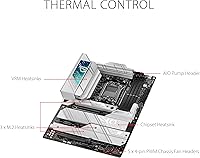
The 16+2 teamed power stage design handles even the 16-core Ryzen 9 7950X under heavy all-core workloads without measurable VRM throttling in well-ventilated cases. Users doing long Blender renders and multi-threaded compilation tasks report stable voltage readings throughout, which is exactly what you want from a board in this tier.
Enthusiasts who push manual overclocking beyond PBO — dialing in aggressive per-core voltages and extreme clocks — have noted that the X670E-A starts to show its limits compared to the ROG Maximus series. It handles everyday overclocking confidently, but it is not designed to be the last word in extreme voltage headroom.
DDR5 Compatibility
74%
26%
After several BIOS revisions, the X670E-A handles a wide range of DDR5 kits reliably, including many running at or near their XMP and EXPO rated speeds. Users who bought popular kits from G.Skill and Corsair report stable operation at 6000 to 6400 MHz without significant tuning effort on current firmware.
Early buyers dealt with lengthy and unpredictable DDR5 training times on first boot, which caused real anxiety for first-time AM5 builders. Some less-common DDR5 kits still require manual BIOS tweaks to train reliably, and ASUS's compatibility list does not cover every kit on the market, leaving some buyers to troubleshoot on their own.
BIOS & Firmware
86%
The UEFI BIOS on this board is widely praised as one of the more approachable implementations in the enthusiast segment — clear layout, responsive navigation, and an EZ Mode that actually communicates useful information. ASUS has pushed regular firmware updates since launch, addressing DDR5 training, adding new CPU support, and refining overclocking tool behavior over time.
A handful of users have reported occasional BIOS update instability, where flashing to a new version temporarily disrupted their memory training profile and required a CMOS reset to recover. The update process itself is straightforward, but the lack of a dual-BIOS chip means there is no fallback if something goes wrong mid-flash.
Thermal Performance
83%
VRM temperatures under sustained load on high-core-count CPUs stay within safe operating ranges in cases with reasonable airflow, according to user-reported sensor data. The four M.2 heatsinks do meaningful work — NVMe drives running intensive sequential transfers stay notably cooler than on boards with bare slots or thin covers.
In passively cooled or very compact ATX cases with limited airflow across the VRM area, temperatures climb faster than some users expected under extended all-core workloads. The board benefits noticeably from at least one case fan directed toward the rear or top exhaust, which is not always obvious to builders focused on aesthetics.
Connectivity & I/O
82%
18%
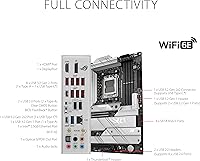
The combination of WiFi 6E, 2.5GbE LAN, four M.2 slots, and a USB 3.2 Gen 2x2 Type-C port gives this board an unusually complete connectivity profile for its tier. Builders who want to attach fast external SSDs, run a wired multi-gig connection, and still have wireless as a fallback get all of that from a single board without add-in cards.
The rear I/O panel is genuinely crowded, and plugging in multiple cables in a finished build — especially in a mid-tower with limited rear clearance — requires patience. The two USB 2.0 ports also feel sparse for users with several legacy peripherals like audio interfaces, older input devices, or hardware dongles.
WiFi Performance
79%
21%
WiFi 6E provides a meaningful real-world step up in congested wireless environments — users in dense apartment buildings specifically note lower ping variance and fewer dropped connections compared to their previous WiFi 5 boards. The 6 GHz band support is the key differentiator for anyone who can use it.
The antenna placement at the rear I/O can be awkward depending on case positioning and desk layout, with some users reporting weaker signal when the system is tucked under a desk or inside a cabinet. Reception quality is noticeably more placement-sensitive than on boards with front-routed or magnetic antenna options.
Overclocking Capability
77%
23%
PBO Enhancement and the Dynamic OC Switcher make meaningful performance gains accessible to builders who are not BIOS veterans — enabling PBO with curve optimizer in just a few BIOS clicks produces tangible real-world speed improvements on Ryzen 7000 chips. For moderate enthusiasts, this is the right level of tooling.
Hardcore manual overclockers looking for granular control over individual core voltages and ring frequencies will find the toolset limiting compared to flagships like the ROG Maximus X670E. The X670E-A is designed for accessible overclocking, not competition-grade tuning, and that boundary becomes apparent once you push beyond EXPO and PBO.
PCIe 5.0 Implementation
85%
Having PCIe 5.0 on both the primary GPU slot and the top M.2 is a genuine differentiator over X670 (non-E) boards, which typically reserve PCIe 5.0 only for the GPU. Users planning to adopt Gen 5 NVMe storage as it becomes mainstream will not need to upgrade their board to do so.
Gen 5 NVMe drives still carry a significant premium and run hot enough that additional cooling beyond the M.2 heatsink is sometimes recommended. Buyers who have no near-term plans for Gen 5 storage may feel the X670E chipset premium is partially wasted on their current build configuration.
Ease of Installation
84%
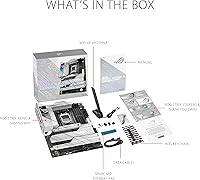
The integrated I/O shield removes one of the most irritating steps in any motherboard installation, and the BIOS Q-LED indicators make diagnosing early boot issues straightforward without needing a speaker or display. Most builders report a clean, frustration-free installation experience on their first attempt.
Routing cables around the four M.2 heatsinks and the dense rear I/O in a tightly packed build adds meaningful complexity. Users building into smaller ATX cases note that accessing the lower M.2 slots after the GPU is installed can require partial disassembly.
Value for Money
72%
28%
For buyers who will actually use the PCIe 5.0 M.2 slot, four NVMe drives, WiFi 6E, and 2.5GbE simultaneously, the X670E-A packs a lot of capability into a single purchase compared to assembling similar connectivity through add-in cards on a cheaper board.
Builders whose workloads do not stress the X670E chipset advantages — those using one GPU, one or two NVMe drives, and standard wireless — may find the price hard to fully justify against capable X670 alternatives like the Gigabyte X670E Aorus Elite, which covers many common use cases at a lower entry point.
Aesthetic Design
81%
19%
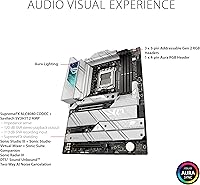
The all-black ATX design with restrained ROG Strix branding integrates cleanly into a wide range of build themes — it works equally well in a blacked-out stealth build or as a backdrop for RGB components without competing visually. The heatsink finish and I/O cover give the board a cohesive, premium look that holds up well in windowed-panel builds.
There is no on-board RGB lighting on the board itself, which may disappoint builders who want the motherboard to contribute actively to a lit interior. Those expecting the same visual flair as higher-end ROG boards may find the Strix aesthetic more understated than anticipated.
Software & Ecosystem
76%
24%
The bundled 60-day AIDA64 Extreme trial offers real diagnostic value during the critical first weeks of a new build, covering thermal validation, memory stability testing, and hardware identification in one tool. ASUS Armoury Crate provides fan curve control and system monitoring without requiring deep manual BIOS dives for everyday tuning.
Armoury Crate has a long-standing reputation for bloat and occasional update conflicts, and a portion of experienced builders disable or remove it entirely in favor of manual BIOS fan control. The software ecosystem feels like an afterthought compared to the hardware quality, and ASUS has been slow to address Armoury Crate stability complaints over multiple release cycles.
Long-Term Reliability
83%
Boards that have been in service since the 2022 launch are still reporting stable, issue-free operation across the review base, with no notable patterns of component failure emerging at scale. ASUS's use of high-quality alloy chokes and durable capacitors in the VRM section appears to be holding up well in real-world continuous-use environments.
The platform's relative youth means long-term reliability data beyond two to three years is still limited, which is worth acknowledging for buyers building a system they intend to run for five or more years. A small number of DOA reports exist in the review pool, though the rate does not appear meaningfully elevated versus industry norms for boards in this class.

Suitable for:

The ASUS ROG Strix X670E-A Motherboard is a strong match for builders who are serious about the AMD AM5 platform but aren't chasing the absolute top of the market. If you're pairing a Ryzen 7700X, 7900X, or 7950X with a high-speed DDR5 kit and want a board that can handle sustained loads without thermal or power delivery concerns, this one delivers. Content creators who rely on multiple NVMe drives will find four heatsink-covered M.2 slots genuinely useful rather than a paper spec. Gamers who want PCIe 5.0 headroom for future GPU upgrades, plus fast wireless and a 2.5GbE wired connection, will get real day-to-day value from the X670E-A's connectivity suite. It also suits builders who want BIOS tools like PBO Enhancement without needing an engineering degree to use them.
Not suitable for:

The ASUS ROG Strix X670E-A Motherboard is not the right call for extreme manual overclockers who push voltage and power limits to their edge — the ROG Maximus or even the MSI MEG X670E Ace offers more headroom for that crowd. Budget-conscious builders should also look elsewhere; this is a premium-tier board, and paying for features like PCIe 5.0 M.2 or WiFi 6E makes little sense if your workload won't touch them. Compact build enthusiasts are ruled out immediately since the board is full ATX only. Early DDR5 adopters who experienced long memory training times may have moved on, but anyone still running older or less-tested DDR5 kits should verify compatibility before committing. If your priority is raw overclocking control over connectivity breadth, the X670E-A's feature balance may not align with what you actually need.
Specifications

  • CPU Socket: Uses the AM5 (LGA 1718) socket, compatible exclusively with AMD Ryzen 7000 series desktop processors.
  • Chipset: Built on the AMD X670E chipset, the top-tier variant offering full PCIe 5.0 lane allocation across GPU and storage.
  • Form Factor: Standard ATX form factor measuring 10.8 x 13.3 inches, fitting the vast majority of mid-tower and full-tower cases.
  • Power Delivery: Features a 16+2 teamed power stage design fed by dual 8-pin ProCool II connectors for stable power under sustained CPU loads.
  • Memory Support: Supports DDR5 memory up to 6400 MHz across four DIMM slots, with a maximum total capacity of 64 GB.
  • PCIe Version: Provides PCIe 5.0 on the primary x16 GPU slot and the top M.2 slot, with additional PCIe 4.0 slots for secondary devices.
  • M.2 Slots: Includes four M.2 slots, each equipped with an individual heatsink; the primary M.2_1 slot also features a backplate for additional cooling.
  • Wireless: Onboard WiFi 6E (802.11a/b/g/n/ac/ax) supports the 6 GHz band for reduced congestion and higher throughput in compatible environments.
  • Wired LAN: Intel 2.5 Gigabit Ethernet provides wired network speeds up to 2.5 Gb/s, paired with ASUS LANGuard surge protection circuitry.
  • USB Connectivity: Rear I/O includes a USB 3.2 Gen 2x2 Type-C port capable of 20 Gb/s transfers, along with two USB 2.0 ports for legacy devices.
  • VRM Cooling: Massive aluminum VRM heatsinks combined with an integrated I/O cover and high-conductivity thermal pads manage heat across the power delivery area.
  • Overclocking Tools: Includes Dynamic OC Switcher, Ryzen Core Flex, and PBO Enhancement to allow performance tuning directly through the UEFI BIOS dashboard.
  • BIOS Interface: Ships with an intuitive UEFI BIOS featuring both beginner-friendly EZ Mode and a full Advanced Mode for detailed manual configuration.
  • Bundled Software: Comes with a 60-day free trial of AIDA64 Extreme, a professional-grade system diagnostics and benchmarking tool.
  • Weight: The board weighs approximately 4.9 pounds, which is typical for a fully featured ATX motherboard with substantial heatsink coverage.
  • Color & Finish: Finished in all-black with ROG Strix aesthetic accents, designed to integrate cleanly into dark-themed or RGB-accented builds.
  • Voltage Input: Operates at 12 volts, drawing power directly from the system PSU via the standard ATX 24-pin connector and dual CPU power headers.
  • Release Date: First made available in September 2022, launched in alignment with AMD's Ryzen 7000 series and AM5 platform debut.

Related Reviews
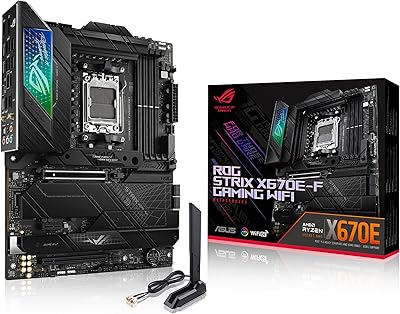
ASUS ROG STRIX X670E-F ATX Motherboard
82%
92%
VRM & Power Delivery
88%
BIOS Experience
86%
M.2 Storage Performance
71%
CPU Compatibility & Setup
89%
Thermal Design
More
ASUS ROG Strix Z390-E Gaming Motherboard
81%
93%
Build Quality
91%
BIOS Maturity
87%
Overclocking Performance
88%
Connectivity & I/O
82%
Wi-Fi Reliability
More
ASUS ROG Strix B650E-I Mini-ITX Motherboard
81%
91%
VRM & Power Delivery
94%
Feature Set for Form Factor
83%
BIOS & Software Experience
74%
DDR5 Memory Compatibility
88%
Wireless Connectivity
More
ASUS ROG Strix B550-A Gaming ATX Motherboard
82%
91%
Build Quality
93%
Power Delivery & Stability
88%
BIOS Experience
89%
PCIe 4.0 & NVMe Performance
86%
Onboard Audio Quality
More
ASUS ROG Strix B850-A ATX Motherboard
83%
93%
Power Delivery
88%
BIOS Experience
86%
Storage Throughput
91%
Wireless Connectivity
89%
Build & Aesthetics
More
ASUS ROG Strix B850-I Mini-ITX Motherboard
82%
91%
Build Quality
88%
BIOS Usability
93%
Power Delivery
74%
Thermal Management
89%
Connectivity & I/O
More
ASUS ROG Strix B550-F AMD AM4 Motherboard

81%
91%
VRM & Power Delivery
88%
Build Quality
89%
BIOS Usability
84%
Ryzen Compatibility
86%
PCIe 4.0 & M.2 Performance
More
ASUS ROG Strix Z690-E Gaming WiFi Motherboard
84%
93%
Build Quality
88%
BIOS Experience
94%
Power Delivery
71%
DDR5 Compatibility
89%
Wireless Networking
More
ASUS ROG Strix Z790-A DDR4 Motherboard
81%
92%
VRM & Overclocking Capability
89%
Build Quality & Materials
88%
Thermal Management
71%
Memory Compatibility
78%
BIOS Experience
More
ASUS ROG Strix B650E-F Gaming WiFi Motherboard
85%
88%
Performance Under Load
91%
Ease of Setup
92%
WiFi and Networking
85%
Power Delivery Stability
78%
Cooling Requirements
More

FAQ

Yes, the X670E-A supports the full Ryzen 7000 desktop lineup on the AM5 socket, including the 7800X3D and 7950X3D. Just make sure your BIOS is updated to the latest version if you're installing a newer CPU that launched after the board shipped, as ASUS releases ongoing BIOS updates to add support for new processors.

Early firmware had some noticeable first-boot training delays when initializing DDR5 kits, which frustrated a portion of early buyers. ASUS has addressed the worst of this through BIOS updates, and most users on current firmware report normal boot times. That said, if you're using an unusual or lightly tested DDR5 kit, it's still worth checking ASUS's memory compatibility list before purchasing.

In real-world use, the 16+2 teamed power stages handle the 7950X without significant throttling under sustained multi-threaded workloads, provided your case has decent airflow. It's not quite at the level of the ROG Maximus, but the difference matters mainly for extreme all-core overclocking rather than stock or PBO-tuned operation.

Both, actually. The primary x16 slot runs at PCIe 5.0 for your GPU, and the top M.2 slot also supports PCIe 5.0 NVMe drives. The remaining M.2 slots run at PCIe 4.0, which is still very fast for current-generation storage.

For most gaming scenarios, latency differences between WiFi 5 and 6E are marginal if you have a clear signal path. The bigger advantages of WiFi 6E show up in congested environments — apartments with many competing networks, for instance — where the 6 GHz band reduces interference noticeably. If you can run Ethernet, do it; if you can't, WiFi 6E is genuinely a step up.

Both are high-caliber X670E boards targeting a similar buyer, but the MEG X670E Ace edges ahead in raw power delivery and is often chosen by more aggressive manual overclockers. The ASUS board counters with arguably better BIOS usability and the four-M.2-with-heatsinks setup. Your choice likely comes down to whether overclocking depth or all-around connectivity is your priority.

Yes, but with a caveat — depending on which M.2 slots you populate, some bandwidth may be shared with SATA ports, not with the GPU. The top M.2 slot is independent and shares no lanes with the GPU x16 slot. For the exact bandwidth sharing table, ASUS's official spec sheet lists all slot dependencies clearly.

It's dense rather than difficult. The integrated I/O shield is built onto the board, which simplifies installation, but the number of ports packed into the ATX rear panel means plugging in cables in a finished build can feel tight. It's not a dealbreaker, but if you're working inside a smaller ATX case, a bit of patience helps.

AMD's Ryzen 7000 platform does support ECC unbuffered memory at the CPU level, and the X670E-A can work with it if your specific DDR5 ECC kit is compatible. However, ASUS does not officially validate or market ECC support on this board, so it's a use-at-your-own-risk scenario rather than a guaranteed feature.

AIDA64 Extreme is a comprehensive hardware diagnostic tool that covers system stability testing, sensor monitoring, and detailed hardware information — genuinely useful during initial setup to verify thermals and confirm your DDR5 is running at its rated speed. The 60-day trial is long enough to get real value from it, and it saves you from needing a separate paid tool during the critical early phase of a new build.

Where to Buy