Overview

The ASUS ROG Strix B550-A Gaming ATX Motherboard landed in mid-2020 squarely aimed at enthusiast builders who wanted a capable AMD platform without paying X570 prices. It sits in the middle of the ROG Strix hierarchy — serious enough for a high-end Ryzen build, but not trying to be the top dog. The full ATX layout gives you proper room to work with, and the board's compatibility with both 3rd Gen and Ryzen 5000 series CPUs made it age well. With nearly 2,900 ratings and a 4.6-star average, the community response has been consistently strong since launch.
Features & Benefits

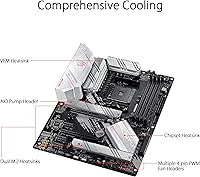
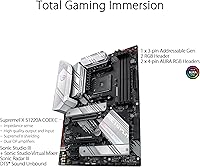
The B550-A's PCIe 4.0 support is where it earns its keep — one of the dual M.2 slots runs at PCIe 4.0 x4, so a fast NVMe drive will actually hit its rated speeds rather than being bottlenecked. The 12+2 DrMOS power stages keep even a 16-core Ryzen CPU fed cleanly under sustained load, which matters if you push your chip hard. Wired networking runs at 2.5Gb with ASUS LANGuard protection baked in. The SupremeFX S1220A codec delivers noticeably better audio than what most boards at this tier offer, and the AI noise-cancelling mic feature is genuinely useful for anyone on voice chat.

Best For

This AMD gaming motherboard is the right call for builders pairing a Ryzen 5000 series CPU who want PCIe 4.0 access without jumping to a pricier X570 platform. If you rely on wired networking and care about onboard audio quality, it checks both boxes without compromise. Content creators running heavily threaded Ryzen workloads will appreciate the stable power delivery under extended CPU stress. The six SATA ports and dual M.2 slots also make it practical for storage-heavy builds. One honest note: if Wi-Fi is a must-have for your setup, this ROG Strix board intentionally omits it — that’s a deliberate SKU choice, not an oversight.

User Feedback

Owners consistently highlight BIOS ease of use as a standout — even less experienced builders report getting up and running without much friction. Overclocking stability gets frequent praise, with the board holding steady through extended sessions. The most common frustration is the lack of built-in Wi-Fi at this price point, though ASUS addresses that gap with the B550-F variant. A few users flag that Zen 3 compatibility may require a BIOS update before the CPU is recognized, which can catch first-time builders off guard. Long-term reliability feedback is broadly positive, with very few reports of hardware failure showing up even in older purchases.

Pros

  • PCIe 4.0 x4 M.2 slot lets a Gen 4 NVMe SSD run at its actual rated speeds without bottlenecking.
  • The 12+2 DrMOS power stages keep high-core-count Ryzen CPUs stable even during extended all-core workloads.
  • SupremeFX S1220A audio codec delivers cleaner headphone output than most competing boards in this class.
  • 2.5Gb wired LAN with LANGuard protection gives gamers and home network users a real bandwidth upgrade.
  • BIOS is consistently praised for being approachable, with visual fan controls and reliable XMP profile loading.
  • Dual M.2 slots plus six SATA ports give builders genuine storage flexibility without needing expansion cards.
  • Long-term reliability feedback from owners since 2020 is broadly positive with few reported hardware failures.
  • USB 3.2 Gen 2 Type-C on the rear I/O keeps the board relevant for modern peripherals without adapters.
  • Full ATX layout provides a clean, well-spaced build experience with no cramped connector placement.

Cons

  • No built-in Wi-Fi means an extra purchase or PCIe card is required for wireless connectivity.
  • Zen 3 CPUs may not POST on older firmware, creating a frustrating barrier without a spare compatible CPU.
  • Onboard RGB is minimal compared to other ROG Strix boards, disappointing buyers expecting a light show.
  • The second M.2 slot is PCIe 3.0 only, which limits users planning to run two Gen 4 SSDs simultaneously.
  • No USB 3.2 Gen 2x2 (20Gbps) port means the fastest external SSDs cannot reach their peak transfer speeds.
  • VRM heatsink runs noticeably warm in cases with poor airflow during sustained all-core CPU loads.
  • DTS Sound Unbound software has mixed reception — some users find it intrusive and disable it entirely.
  • ASUS customer support response times have drawn criticism from users navigating warranty or DOA claims.
  • High-frequency RAM kits beyond 3600MHz often require manual BIOS tuning to run stably with all four slots filled.

Ratings

The ASUS ROG Strix B550-A Gaming ATX Motherboard has accumulated nearly 2,900 verified ratings worldwide, and our AI-driven scoring system has processed that feedback while actively filtering out incentivized, duplicate, and bot-generated submissions. What remains is a clear-eyed picture of where this board genuinely excels and where real builders have run into friction. Both the strengths and the sticking points are reflected honestly in the scores below.

Build Quality
91%
Builders consistently describe the physical construction as confidence-inspiring — the PCB feels dense and well-layered, the heatsinks sit flush without wobble, and the capacitors show no signs of cheap substitution. For a board that has been in systems running 24/7 since 2020, long-term reports of hardware failure are notably rare.
A handful of users have noted that the M.2 heatsink screws can feel fiddly during installation, and the retention clips on the DIMM slots require firm pressure that occasionally makes first-timers nervous about applying too much force.
Power Delivery & Stability
93%
The 12+2 DrMOS power stage design genuinely holds up under sustained loads — builders running a Ryzen 9 5900X or 5950X through long rendering sessions report stable voltages without throttling. The alloy chokes and high-grade capacitors are not just marketing copy; the thermal performance of the VRM area under stress backs it up.
At very aggressive overclocks pushing voltage well beyond stock, a small number of users report the VRM area running warmer than expected in cases with poor airflow. It is not a dealbreaker, but case ventilation matters more here than on boards with active VRM cooling.
BIOS Experience
88%
This is one of the most consistently praised aspects across the entire review pool. The UEFI is logically organized, fan curves are easy to configure visually, and XMP memory profiles load reliably on the first attempt for most users. Even builders setting up their first AMD system report getting through POST and into Windows without confusion.
Zen 3 CPUs sometimes arrive needing a BIOS update before they are recognized, which creates a catch-22 for builders without a spare older CPU on hand. ASUS does not always make it obvious in the box that this step may be necessary.
PCIe 4.0 & NVMe Performance
89%
Having a true PCIe 4.0 x4 M.2 slot means a Gen 4 SSD like a Samsung 980 Pro or WD Black SN850 runs at its rated sequential speeds without artificial lane restrictions. For anyone building a fast workstation or gaming rig where load times and file transfer speeds matter, this slot delivers exactly what it promises.
The second M.2 slot is limited to PCIe 3.0, which is fine for a secondary drive but worth knowing if you planned to run two Gen 4 SSDs at full speed simultaneously. The physical slot spacing also means longer GPU coolers can partially obscure access to the lower slot during installation.
Onboard Audio Quality
86%
The SupremeFX S1220A codec is a legitimate step above the audio hardware found on competing boards at this tier. Headphone output is clean with no audible interference at normal listening volumes, and the AI noise-cancelling microphone feature works well enough during voice calls to reduce keyboard noise and ambient room sound noticeably.
Audiophiles running high-impedance headphones may still prefer a discrete DAC, and the DTS Sound Unbound software has drawn mixed reactions — some users find the presets useful, others feel it colors the sound in ways they would rather avoid and simply disable it.
Wired Networking
87%
The 2.5Gb Intel-based LAN with ASUS LANGuard protection handles sustained transfers and low-latency gaming sessions without hiccups. Builders who moved from a 1Gb board noticed real-world improvements when transferring large files across a 2.5Gb-capable switch or NAS.
The 2.5Gb controller requires a compatible router or switch to take full advantage of the bandwidth, which is an additional cost some buyers do not factor in. Driver installation on fresh Windows builds has caused minor headaches for a small number of users.
Wi-Fi Connectivity
47%
53%
An 802.11ac adapter is listed as compatible for users who need wireless, and the board does include a header for add-in wireless cards. For builders who already planned to run an Ethernet cable, the omission is completely irrelevant.
At this price point, the absence of built-in Wi-Fi genuinely frustrates buyers who did not read the spec sheet carefully before purchasing. It is a deliberate ASUS SKU decision — the B550-F variant includes Wi-Fi — but many buyers feel it should be standard here, and that sentiment shows up repeatedly in negative reviews.
Memory Compatibility & Overclocking
82%
18%
The board handles DDR4 kits up to 4400MHz with manual tuning, and XMP 3600MHz kits from major brands like G.Skill and Corsair load without issue in most configurations. Four DIMM slots with support for up to 128GB is practical for content creators who want headroom for the future.
Tight sub-timings on high-frequency kits can require manual intervention in the BIOS, and not all four slots populated simultaneously will hit the same frequencies as a two-stick configuration. Some lesser-known RAM brands have reported compatibility gaps that required manual voltage adjustments.
Connectivity & Port Selection
84%
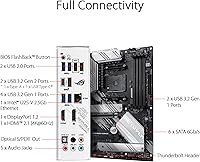
The rear I/O is well-stocked for its class — USB 3.2 Gen 2 Type-C, multiple USB-A ports, and a Thunderbolt 3 header provide enough flexibility for modern peripherals without requiring a PCIe expansion card. The six SATA ports are a practical bonus for builds with a mix of SSDs and HDDs.
There is no USB 3.2 Gen 2x2 (20Gbps) port, which is a minor omission that faster external SSDs will outpace. The rear USB-A Gen 1 ports feel like a concession given the otherwise modern I/O lineup.
RGB & Aesthetics
68%
32%
The board has a clean, understated look with silver and black tones that fit well in builds with tempered glass side panels. The onboard RGB headers support Addressable Gen 2 strips, and ASUS Aura Sync integration works reliably once drivers are properly installed.
Compared to other boards in the ROG Strix family, the B550-A is restrained on RGB — there is no built-in lighting zone across the PCH heatsink that some buyers expect at this price tier. Builders who want a light show out of the box will find the default illumination underwhelming.
Thermal Management
81%
19%
The PCH and VRM heatsinks do their job adequately under typical loads, keeping the chipset from becoming a thermal bottleneck during gaming or moderate content creation. Fan headers are plentiful and the BIOS fan control is genuinely usable for custom curves.
In smaller or poorly ventilated cases, the VRM heatsink can run warm under sustained all-core loads — not dangerously so, but noticeably. Builders in hot climates or compact cases should ensure active airflow across the top of the board.
Installation & Setup Experience
83%
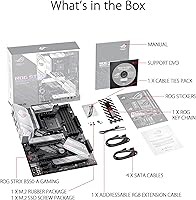
The ATX layout is logically organized with no awkward connector placements, and the color-coded rear I/O shield installs easily. Most builders report a clean first-boot experience with Zen 2 CPUs, and the included documentation is clearer than average for a board of this complexity.
Zen 3 users who need a BIOS update before their CPU is detected face a real barrier if they lack a compatible older Ryzen chip. ASUS could do more to flag this in the retail packaging rather than leaving it to forum searches.
Value for Money
79%
21%
For builders who wanted PCIe 4.0 access, strong power delivery, and premium audio without paying X570 prices, the B550-A hit a practical sweet spot at launch and remains competitive on the used and refurbished market. The feature density for the asking price is hard to argue with.
The lack of Wi-Fi stings more at this price point than it would on a budget board, and some buyers feel the RGB shortfall and missing Gen 2x2 USB leave room for improvement. Competing boards at similar prices have closed the gap since launch.
Long-Term Reliability
88%
Units from the 2020 launch batch are still reported as functioning without issue in a meaningful portion of the review pool, which is a genuine signal of component quality and not just early-ownership enthusiasm. ASUS firmware updates have continued to arrive, keeping the board compatible with newer Ryzen SKUs.
A small number of users have reported sudden POST failures after extended use, though it is difficult to isolate whether the board itself or connected components were at fault. ASUS customer support response times have drawn criticism when warranty claims were needed.

Suitable for:

The ASUS ROG Strix B550-A Gaming ATX Motherboard is built for PC enthusiasts who want a serious AMD platform without the premium cost of an X570 board. It is an especially strong fit for builders pairing a Ryzen 5000 series CPU — the PCIe 4.0 support means a fast Gen 4 NVMe drive will run at full speed, and the robust 12+2 DrMOS power delivery keeps even a high-core-count chip like the Ryzen 9 5900X stable under sustained workloads. Content creators who spend hours in video editing or 3D rendering applications will appreciate that the VRM does not become the weak link in the system. Gamers who run wired Ethernet and use a headset directly plugged into the motherboard will get noticeably better audio and lower-latency networking than most competing boards at this tier offer. Builders who need storage flexibility — dual M.2 drives plus six SATA ports — will find the layout genuinely practical rather than just adequate.
Not suitable for:

The ASUS ROG Strix B550-A Gaming ATX Motherboard is not the right pick for every builder, and a few scenarios make that clear quickly. If wireless connectivity is essential and you do not want to add a separate adapter or PCIe Wi-Fi card, this board will frustrate you — ASUS deliberately excluded built-in Wi-Fi on this SKU, reserving it for the B550-F variant. Builders chasing a visually dramatic RGB setup may also feel shortchanged, as the onboard lighting is restrained compared to what other ROG boards offer at similar price points. Anyone planning to install a Ryzen 5000 series CPU as their very first boot without access to an older compatible Ryzen chip needs to research the BIOS update process in advance, since Zen 3 support is not guaranteed out of the box on older firmware. Finally, buyers on a tight budget who only need basic functionality for a modest Ryzen 3 or entry-level Ryzen 5 build are paying for power delivery and audio hardware they will never use — a more affordable B450 or entry B550 board would serve them just as well.
Specifications

  • Socket: Uses the AMD AM4 socket, compatible with 3rd Gen Ryzen (Zen 2) out of the box and Ryzen 5000 series (Zen 3) with a BIOS update.
  • Chipset: Built on the AMD B550 chipset, which enables PCIe 4.0 on the primary CPU lanes while keeping costs below the X570 tier.
  • Form Factor: Standard ATX format measuring 9.6 x 12 inches, fitting any full-tower or mid-tower case with ATX motherboard support.
  • Memory Support: Four DIMM slots support DDR4 RAM up to a maximum capacity of 128 GB, with official base speed at 2666 MHz and overclocked profiles reaching beyond 4000 MHz.
  • PCIe Version: Supports PCIe 4.0 on the primary x16 slot and the top M.2 slot, enabling full-bandwidth operation for compatible GPUs and NVMe SSDs.
  • M.2 Slots: Includes two M.2 slots — the first runs PCIe 4.0 x4 for top-tier NVMe SSDs, and the second runs PCIe 3.0 x4 for additional storage.
  • SATA Ports: Provides six SATA III (6 Gb/s) ports for connecting traditional HDDs, SSDs, or optical drives alongside the M.2 slots.
  • LAN: Equipped with a 2.5 Gigabit Ethernet port backed by ASUS LANGuard surge protection for reliable, low-latency wired networking.
  • Audio Codec: Features the SupremeFX S1220A codec supporting up to 32-bit/192kHz playback, paired with DTS Sound Unbound and ASUS AI Noise Cancelling Mic technology.
  • USB Ports: Rear I/O includes a USB 3.2 Gen 2 Type-C port and multiple USB-A ports; a Thunderbolt 3 header is available for internal expansion.
  • Video Output: Supports HDMI 2.1 output at up to 4K 60Hz and DisplayPort 1.2 for use with AMD integrated graphics on compatible APUs.
  • Wi-Fi: No Wi-Fi module is built in; an 802.11ac adapter is listed as a compatible add-on, or a PCIe wireless card can be installed separately.
  • Power Design: Uses a 12+2 DrMOS power stage configuration with high-quality alloy chokes and durable capacitors for stable VRM operation under high CPU loads.
  • Power Connectors: Requires a standard 24-pin ATX motherboard connector and a 8-pin EPS CPU power connector for proper operation.
  • Fan Headers: Includes multiple 4-pin PWM fan headers distributed across the board, with BIOS-based fan curve control for each header individually.
  • RGB Headers: Provides both standard RGB (12V) and Addressable Gen 2 ARGB (5V) headers for LED strip and peripheral integration via ASUS Aura Sync.
  • Weight: The board weighs 2.2 pounds without a cooler or RAM installed, which is typical for a feature-rich ATX motherboard.
  • OS Support: Officially supported on Windows 10; Windows 11 compatibility is achievable on supported Ryzen CPUs meeting Microsoft TPM 2.0 requirements via firmware TPM (fTPM).

Related Reviews
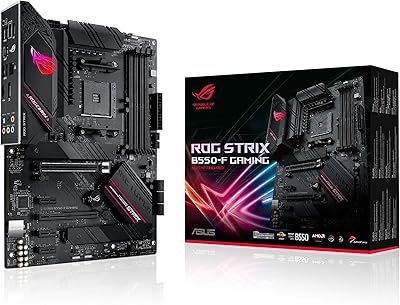
ASUS ROG Strix B550-F AMD AM4 Motherboard
81%
91%
VRM & Power Delivery
88%
Build Quality
89%
BIOS Usability
84%
Ryzen Compatibility
86%
PCIe 4.0 & M.2 Performance
More
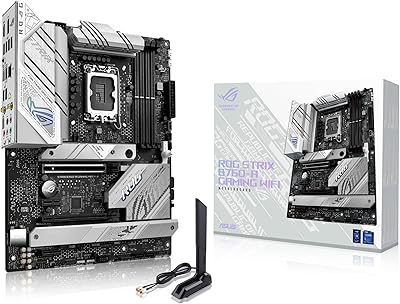
ASUS ROG Strix B760-A ATX Motherboard

82%
88%
VRM & Power Delivery
83%
DDR5 Compatibility
91%
Build & Installation Experience
86%
BIOS & Firmware
89%
Networking Performance
More
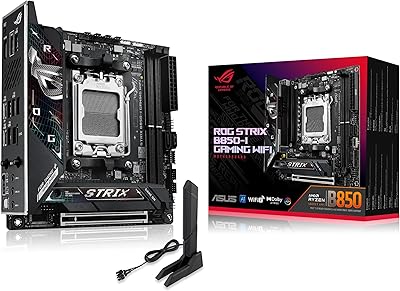
ASUS ROG Strix B850-I Mini-ITX Motherboard
82%
91%
Build Quality
88%
BIOS Usability
93%
Power Delivery
74%
Thermal Management
89%
Connectivity & I/O
More
ASUS ROG Strix B850-A ATX Motherboard
83%
93%
Power Delivery
88%
BIOS Experience
86%
Storage Throughput
91%
Wireless Connectivity
89%
Build & Aesthetics
More
ASUS ROG Strix Z390-E Gaming Motherboard
88%
93%
Gaming Performance
90%
Overclocking Capabilities
88%
Wi-Fi Performance
85%
Ease of Installation
91%
Durability & Build Quality
More
ASUS ROG Strix B650E-I Gaming WiFi Motherboard
87%
93%
Performance
88%
Cooling Efficiency
90%
Installation Ease
91%
Connectivity (WiFi 6E, LAN)
85%
Build Quality
More
ASUS ROG Strix Z690-E Gaming WiFi Motherboard
84%
93%
Build Quality
88%
BIOS Experience
94%
Power Delivery
71%
DDR5 Compatibility
89%
Wireless Networking
More
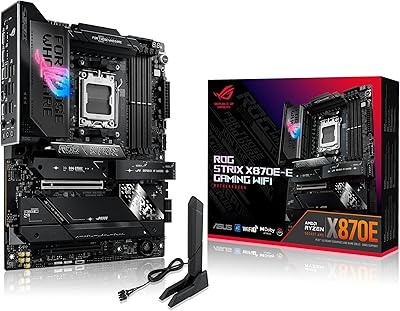
ASUS ROG Strix X870E-E Gaming WiFi
88%
93%
Physical Build Quality
96%
Power Delivery Efficiency
94%
Storage Expansion Options
91%
Next-Gen Wireless Speed
92%
Tool-Free DIY Features
More
ASUS ROG Strix B650E-F Gaming WiFi Motherboard
85%
88%
Performance Under Load
91%
Ease of Setup
92%
WiFi and Networking
85%
Power Delivery Stability
78%
Cooling Requirements
More
ASUS ROG Strix Z790-A Gaming WiFi D4 Motherboard
84%
94%
Performance Under Load
89%
Thermal Management
75%
Ease of Installation
91%
Overclocking Capabilities
90%
Networking Speed & Reliability
More

FAQ

This is the most important thing to know before you buy. If your board ships with older firmware, a Ryzen 5000 series CPU will not POST until the BIOS is updated. You will need either a compatible 3rd Gen Ryzen CPU to boot into the BIOS and perform the update, or you can check with the retailer whether the unit has already been updated. ASUS does not always flag this clearly in the box, so check the sticker on the board or the BIOS version label before assuming you are ready to go.

No, the B550-A does not include built-in Wi-Fi — that is a deliberate difference between this board and the B550-F variant, which does include wireless. If you need Wi-Fi, your options are adding a PCIe Wi-Fi card or using a USB wireless adapter. For most desktop gaming setups running Ethernet, this is a non-issue, but it is worth knowing before you buy.

Not quite. The top M.2 slot supports PCIe 4.0 x4, so a Gen 4 drive there will run at full rated speeds. The second M.2 slot is PCIe 3.0 x4, which caps out at roughly 3500 MB/s sequential read — fast by any practical standard, but not Gen 4 territory. For most users, that combination is more than sufficient.

Yes, it handles the 5900X well. The 12+2 DrMOS power stages provide clean, stable voltage under sustained all-core loads, which is exactly what a 12-core CPU needs during extended overclocking sessions. Just make sure your case has decent airflow directed over the VRM area, as the heatsink can run warm without it.

You have two M.2 slots plus six SATA III ports, so in theory you could connect up to eight drives simultaneously. In practice, some M.2 and SATA lane combinations share bandwidth depending on what is installed, so check the manual for any bandwidth-sharing notes before planning a very dense storage configuration.

The board officially supports DDR4 at 2666 MHz at standard JEDEC speeds, but XMP profiles up to 4400MHz and beyond are achievable with manual tuning. A 3600MHz CL16 or CL18 kit from a major brand like G.Skill Trident Z or Corsair Vengeance will typically load its XMP profile on the first boot without any manual intervention.

Technically yes, provided your Ryzen CPU supports AMD firmware TPM (fTPM), which you enable in the BIOS under the security settings. Most Ryzen 3000 and 5000 series CPUs qualify. Once fTPM is enabled, the board passes Windows 11 compatibility checks without needing a discrete TPM module.

Noticeably better. The SupremeFX S1220A codec is a real step up from the Realtek ALC887 or ALC892 chips you find on cheaper boards — the headphone output is cleaner and there is far less electrical interference audible at higher volumes. For gaming headsets or mid-range headphones plugged directly into the rear jack, it is genuinely good. Audiophiles with high-impedance headphones may still want a discrete DAC, but the average gamer will not feel the need for one.

Yes, the board uses the standard AMD AM4 mounting bracket, so any cooler designed for AM4 will install without modification. That includes most Noctua, be quiet!, Cooler Master, and Corsair AM4-compatible coolers. If your cooler is older and came with AM3 brackets only, you will need the AM4 kit, which most cooler manufacturers offer for free or at low cost.

It is one of the better BIOS experiences on an AMD platform at this price tier. The EZ Mode gives you a simple overview of installed hardware, fan speeds, and basic settings, while Advanced Mode has full access to overclocking and voltage controls. Fan curve setup is visual and intuitive, and XMP memory profiles load with a single click. First-time builders routinely describe getting into Windows without needing to touch anything beyond enabling XMP.

Where to Buy