Overview

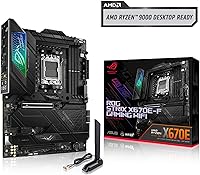
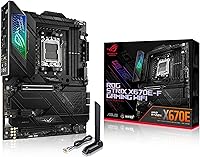
The ASUS ROG STRIX X670E-F ATX Motherboard landed in late 2022 as a compelling upper-mid-range option in the AMD X670E lineup — not quite flagship territory, but well above entry level. It supports the full AM5 socket roster, from Ryzen 7000 through the newer 8000 and 9000 series, giving it real longevity as a platform. The ATX form factor fits comfortably in most mid- and full-tower cases, making it accessible for a wide range of builds. What you get here is ROG-tier build quality, a strong connectivity suite, and a power delivery system that punches above its price bracket — without asking you to pay for features you may never use.
Features & Benefits

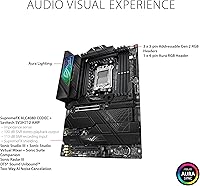
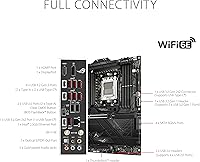
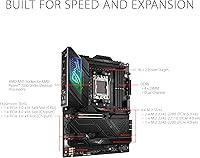
The power delivery deserves attention: 18+2 teamed power stages fed by dual 8-pin ProCool II connectors give even the most demanding Ryzen CPUs plenty of headroom for sustained loads or aggressive overclocking. All four M.2 slots ship with heatsinks — the primary PCIe 5.0 slot even gets a combo-sink and backplate, which makes a real difference in keeping fast NVMe drives from throttling under pressure. PCIe 5.0 covers both the primary GPU slot and M.2, setting you up for next-gen hardware. DDR5 up to 6400 MHz, built-in WiFi 6E, and USB 3.2 Gen 2x2 on the rear I/O round out a connectivity package that genuinely reduces the need for add-in cards.

Best For

This X670E motherboard is a strong fit for enthusiast PC builders who want serious overclocking capability without stepping into flagship pricing. If you are pairing it with a Ryzen 7000 or 9000 series processor and want room to push memory speeds or experiment with PBO tuning, the platform handles that well. Content creators running multiple fast NVMe drives will appreciate having four heatsink-equipped M.2 slots on hand. Gamers who prioritize thermal headroom and long-term upgrade potential will find it hard to fault. WiFi 6E on-board means one fewer card to slot in, and the rear I/O layout stays clean. First-time AMD builders may face a brief learning curve, but experienced hands will feel right at home.

User Feedback

Across 735 ratings, the ROG STRIX X670E-F holds a 4.1 out of 5 — solid, but worth unpacking. Buyers consistently praise BIOS usability, noting it is approachable even for tuning newcomers, and VRM thermal performance holds up well under extended workloads. M.2 heatsink effectiveness also draws consistent compliments, with users reporting noticeably cooler NVMe temperatures compared to bare-slot boards. The sticking points are real though: the requirement to flash a BIOS update before running Ryzen 9000 or 8000 series CPUs catches first-time buyers off guard more often than it should. The AI Cooling II feature gets mixed reception — it functions, but real-world impact is modest. Longer-term ownership reports trend positive overall.

Pros

  • 18+2 power stages provide genuine overclocking headroom for demanding Ryzen CPUs under sustained workloads.
  • All four M.2 slots include heatsinks, keeping NVMe drives cooler and performing more consistently over time.
  • PCIe 5.0 support on both the primary GPU and M.2 slots means this board is ready for next-gen hardware.
  • Built-in WiFi 6E delivers fast, reliable wireless without requiring an add-in card.
  • BIOS interface is well-regarded by experienced builders for being approachable and feature-complete.
  • USB 3.2 Gen 2x2 on the rear I/O provides fast wired peripheral and storage connectivity out of the box.
  • VRM thermal design holds up well under extended heavy loads, not just short benchmark bursts.
  • Compatible with Ryzen 7000, 8000, and 9000 series processors, giving the platform strong long-term CPU upgrade options.
  • DDR5 support up to 6400 MHz with Dynamic OC Switcher and PBO Enhancement tools for memory-sensitive workloads.
  • Build quality and component selection reflect ROG standards without pushing into ultra-premium pricing.

Cons

  • A mandatory BIOS update is required for Ryzen 9000 and 8000 series CPUs — no workaround if you lack a compatible older processor.
  • AI Cooling II software feature delivers modest real-world impact and has drawn mixed reactions from buyers.
  • The price is hard to justify for users who only need basic storage, standard connectivity, or no overclocking.
  • Initial setup complexity can frustrate first-time AMD platform builders unfamiliar with BIOS flashing procedures.
  • ATX form factor locks you into mid-tower or full-tower cases, ruling out compact build options entirely.
  • Only two USB 2.0 ports are available, which can feel limiting for users with older peripherals or fan hubs.
  • The X670E segment is competitive, and some newer boards at similar prices have caught up on features since this board launched in 2022.
  • No included Thunderbolt support, which may matter for creators using high-bandwidth external devices.

Ratings

The scores below reflect our AI-driven analysis of verified global buyer reviews for the ASUS ROG STRIX X670E-F ATX Motherboard, with spam, bot-generated, and incentivized feedback actively filtered out to surface what real builders actually experienced. Across more than 735 ratings, we identified consistent patterns in both praise and frustration — and both are represented here without sugarcoating.

VRM & Power Delivery
92%
Builders running extended rendering sessions or all-core Cinebench loops consistently report stable voltages and cool VRM temperatures, even without aggressive case airflow. The 18+2 stage configuration gives demanding Ryzen CPUs room to breathe without throttling under sustained loads.
A small number of users in passive or restricted airflow cases noted slightly elevated VRM temps during prolonged stress tests, though thermal throttling was rarely reported even then.
BIOS Experience
88%
The UEFI BIOS is consistently praised for being one of the more navigable interfaces in the X670E segment, with clearly laid-out overclocking and PBO tuning options that experienced builders can work through quickly. Novice users also report that EZ Mode covers the essentials without feeling overwhelming.
Several users found the sheer number of sub-menus and options intimidating during first-time setup, and a few reported that certain fan curve adjustments did not persist correctly across BIOS updates without re-entry.
M.2 Storage Performance
86%
Content creators and NVMe power users appreciate having four heatsink-covered M.2 slots, with the primary PCIe 5.0 slot keeping even the fastest Gen 5 drives from thermal throttling during large file transfers. The combo-sink and backplate combination on that primary slot is a genuine engineering improvement over bare-slot designs.
Some users reported that accessing lower M.2 slots for installation requires removing the GPU, which is a layout inconvenience on a board at this price. Lane sharing on the chipset-connected slots can also become a consideration when all four are populated simultaneously.
CPU Compatibility & Setup
71%
29%
Once properly configured, the board handles Ryzen 7000, 8000, and 9000 series processors reliably, and long-term users report no degradation in stability over months of continuous use with high-core-count CPUs.
The mandatory BIOS update required before a Ryzen 9000 or 8000 series CPU will POST is the single most common complaint across reviews, and buyers without a compatible loaner CPU are genuinely stuck. This is a platform limitation, but the lack of clear pre-sale communication about it has frustrated a notable portion of buyers.
Thermal Design
89%
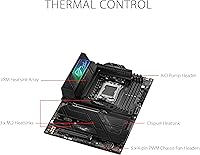
The L-shaped heatpipe connecting the VRM heatsinks and the aluminum I/O cover contribute measurably to keeping the board cool during heavy workloads, not just during the brief benchmark windows where inferior thermal designs still look adequate. Users running the board in warm ambient conditions have generally reported it holding up well.
The heatsink mass does add to installation complexity slightly, and a few users found that the M.2 heatsink screws were fiddly to reinstall after drive swaps, particularly on the primary slot with the backplate attached.
Wireless Connectivity
84%
The integrated WiFi 6E adapter performs reliably in real-world use for both gaming and large file transfers, and buyers appreciate not having to slot in a separate wireless card. Users with WiFi 6E-capable routers report noticeably lower latency and more consistent throughput compared to older WiFi 5 setups.
On WiFi 5 or WiFi 6 routers — which most homes still run — the 6E capability is completely unused, making it a nice future investment rather than an immediate performance gain. The included antenna is functional but basic for a board at this price tier.
Overclocking Capability
87%
Dynamic OC Switcher, Core Flex, and PBO Enhancement give experienced tuners meaningful levers to pull without requiring third-party software, and several users report hitting stable all-core overclocks that would be constrained on boards with weaker power delivery. Memory overclocking to DDR5-6000 and beyond is also reported as achievable with good kits.
Casual builders who never intend to overclock are paying for overhead they will not use, and the tuning options can create a rabbit hole that first-time overclockers may find more overwhelming than empowering without dedicated research.
Rear I/O & USB
78%
22%
USB 3.2 Gen 2x2 on the rear panel is a practical inclusion for users with fast external SSDs or high-bandwidth peripherals, and the overall rear I/O layout is clean and logically organized. Having WiFi and 2.5G LAN both built in means the panel stays uncluttered.
Only two USB 2.0 ports are present on the rear, which is limiting for builders with older peripherals, USB hubs, or RGB controllers that occupy those ports. A few users noted they would have preferred a dedicated USB-A 3.2 Gen 2 port in place of one of the USB 2.0 positions.
Build Quality & Components
91%
The physical construction inspires confidence — the PCB feels dense and well-reinforced, heatsink retention is solid, and the ProCool II power connectors seat firmly without the wobble found on cheaper boards. Long-term users report no capacitor bulging, contact corrosion, or structural fatigue after extended operation.
The board is heavy for its class at 5.14 pounds, which can make single-person installation into a case awkward, particularly when aligning the rear I/O shield simultaneously.
Value for Money
74%
26%
For builders who actually use the overclocking headroom, four M.2 slots, PCIe 5.0, and WiFi 6E, the price is defensible against competitors that charge more for similar capability. The platform longevity across three Ryzen generations also spreads the cost effectively over time.
In a more competitive X670E market that has matured since the board launched in 2022, some newer alternatives offer comparable specs at lower prices, making the value equation less clear-cut for buyers on a strict budget. Those using only basic features will feel the price gap acutely.
Software & Utilities
67%
33%
ASUS Armoury Crate provides a centralized hub for fan control, lighting, and system monitoring, and the core functionality works reliably for most users who stick to basic configuration rather than advanced automation.
AI Cooling II specifically draws mixed feedback — users find its real-world impact modest at best and occasionally disruptive to manually configured fan curves. Armoury Crate itself has a history of update-related bugs that require reinstallation to resolve, a recurring complaint across ASUS ROG products generally.
Installation Experience
73%
27%
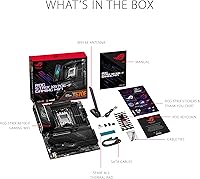
Experienced builders find the layout intuitive, with well-labeled headers and sufficient spacing around the CPU socket area for large cooler installations. The included manual is more detailed than average for this product category.
First-time AMD platform builders frequently report that the combination of BIOS flashing requirements, DDR5 DOCP setup, and PBO configuration creates a steeper-than-expected initial learning curve. The process is manageable with research but is not plug-and-play by any measure.
PCIe 5.0 Readiness
83%
Having PCIe 5.0 on both the primary GPU slot and the lead M.2 slot means this board will not become the bottleneck as next-generation storage and GPU hardware matures, a meaningful argument for builders who plan to keep a platform for several years.
At the time of writing, the practical benefit is limited since consumer PCIe 5.0 GPUs are still emerging and Gen 5 NVMe drives carry a significant price premium, so buyers today are largely paying for future headroom rather than current performance gain.
Long-Term Stability
88%
Users who have run this X670E motherboard for a year or more consistently report stable daily operation with no unexpected crashes, memory training regressions, or hardware failures outside of initial setup issues. BIOS updates over time have also improved compatibility and refined overclocking behavior.
A minority of users reported intermittent memory retraining on cold boots in the first few months, particularly with aggressive DDR5 overclocking profiles, though subsequent BIOS updates appear to have addressed the most common instances of this behavior.

Suitable for:

The ASUS ROG STRIX X670E-F ATX Motherboard is built for enthusiast-level builders who want a platform that can grow with them without paying flagship prices. If you are dropping in a Ryzen 7000 or 9000 series processor and plan to push DDR5 memory speeds or experiment with PBO tuning, this board gives you the headroom to do it properly. Content creators juggling multiple fast NVMe drives will appreciate four heatsink-equipped M.2 slots that help keep storage performance consistent under sustained read and write loads. Gamers who think long-term — prioritizing clean thermals, PCIe 5.0 readiness, and a rear I/O that does not need supplementing — will find this X670E motherboard a sensible foundation. It also suits experienced builders who value a well-designed BIOS and do not want to fight their hardware to get a stable, tuned system up and running.
Not suitable for:

Budget-conscious builders or anyone assembling a basic productivity PC should look elsewhere — the price tier on the ASUS ROG STRIX X670E-F ATX Motherboard only makes sense if you are genuinely using the overclocking headroom, multiple M.2 slots, or advanced connectivity it offers. If you are pairing a Ryzen 9000 or 8000 series CPU with this board out of the box, be aware that a BIOS update is required before the system will POST, which can be a real obstacle if you do not have an older compatible CPU on hand. First-time AMD builders or users who prefer a plug-and-play experience may find the initial setup more involved than expected. Those who only need basic wireless or are happy with a PCIe 4.0 ecosystem will be paying for capabilities they will never touch. Compact build enthusiasts are also out of luck — the ATX form factor rules out smaller ITX or mATX cases entirely.
Specifications

  • CPU Socket: Uses the AM5 (LGA1718) socket, compatible with AMD Ryzen 7000, 8000, and 9000 series desktop processors.
  • Chipset: Built on the AMD X670E chipset, which enables PCIe 5.0 on both the primary GPU and M.2 storage slots.
  • Form Factor: Standard ATX form factor measuring 10.75 x 13.31 inches, fitting most mid-tower and full-tower cases.
  • Power Delivery: 18+2 teamed power stages supplied by dual 8-pin ProCool II connectors with high-quality alloy chokes and durable capacitors.
  • Memory Support: Supports DDR5 memory with speeds up to 6400 MHz across four DIMM slots via the ASUS DOCP profile system.
  • Storage Slots: Offers four M.2 slots, all equipped with heatsinks; the primary PCIe 5.0 M.2 slot includes a combo-sink and backplate for enhanced thermal management.
  • PCIe Standard: Supports PCIe 5.0 on the primary x16 GPU slot and the first M.2 slot, with PCIe 4.0 on remaining expansion and storage slots.
  • Wireless: Integrated WiFi 6E (802.11a/b/g/n/ac/ax) adapter provides tri-band wireless connectivity up to 6 GHz spectrum access.
  • USB Connectivity: Rear I/O includes USB 3.2 Gen 2x2 (20Gbps) Type-C, multiple USB 3.2 Gen 2 ports, and two USB 2.0 ports for legacy peripherals.
  • Thermal Design: Features large VRM heatsinks connected by an L-shaped heatpipe, an aluminum I/O cover, and high-conductivity thermal pads for sustained load cooling.
  • OC Features: Includes Dynamic OC Switcher, Core Flex, Asynchronous Clock control, and AMD Precision Boost Overdrive (PBO) Enhancement for CPU tuning.
  • Networking: Includes a 2.5Gb Intel LAN port alongside the built-in WiFi 6E for wired high-speed networking without an add-in card.
  • Weight: The board weighs 5.14 pounds, which is typical for a full-featured ATX motherboard with substantial heatsink hardware.
  • Color: Ships in an all-black PCB and heatsink finish consistent with the ROG STRIX aesthetic.
  • OS Support: Officially supports Windows 10 and Windows 11, with Linux compatibility varying by distribution and driver availability.
  • Audio: Onboard audio is handled by a dedicated codec with noise-filtering capacitors and a separated PCB layer to reduce electrical interference.
  • Fan Headers: Multiple 4-pin PWM and DC fan and pump headers are distributed across the board to support comprehensive cooling setups.
  • BIOS: Ships with ASUS UEFI BIOS featuring an AI Cooling II profile system, Flashback button support, and an accessible interface for both novice and advanced users.

Related Reviews
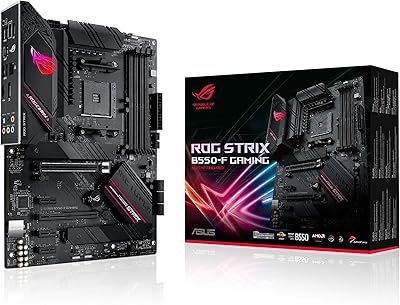
ASUS ROG Strix B550-F Gaming Motherboard
87%
91%
Performance in Gaming
87%
Ease of Setup
92%
Thermal Management
88%
Overclocking Capability
89%
Build Quality
More
ASUS ROG Strix X670E-A Gaming WiFi 6E Motherboard
88%
94%
Performance
91%
Cooling Efficiency
88%
Overclocking Capability
93%
Build Quality
90%
WiFi & Networking Speed
More
ASUS ROG Strix B650E-F Gaming WiFi Motherboard
85%
88%
Performance Under Load
91%
Ease of Setup
92%
WiFi and Networking
85%
Power Delivery Stability
78%
Cooling Requirements
More
ASUS ROG Strix B760-A Gaming WiFi ATX Motherboard
87%
91%
Build Quality
88%
Performance Under Load
86%
Thermal Management
90%
Networking Speed (Wi-Fi & Ethernet)
85%
Installation & Setup
More
ASUS ROG Strix Z790-F Gaming Motherboard
81%
93%
VRM & Power Delivery
89%
BIOS Experience
91%
Build Quality & Component Grade
88%
M.2 Storage Expandability
86%
Networking Performance
More
ASUS ROG Strix Z390-E Gaming Motherboard

88%
93%
Gaming Performance
90%
Overclocking Capabilities
88%
Wi-Fi Performance
85%
Ease of Installation
91%
Durability & Build Quality
More
ASUS ROG Strix B550-A Gaming ATX Motherboard
82%
91%
Build Quality
93%
Power Delivery & Stability
88%
BIOS Experience
89%
PCIe 4.0 & NVMe Performance
86%
Onboard Audio Quality
More
ASUS ROG Maximus Z690 Formula ATX Motherboard
79%
93%
Build Quality
91%
VRM Performance
89%
Cooling Integration
88%
Overclocking Capability
67%
BIOS Experience
More
ASUS ROG Strix B650E-I Gaming WiFi Motherboard
87%
93%
Performance
88%
Cooling Efficiency
90%
Installation Ease
91%
Connectivity (WiFi 6E, LAN)
85%
Build Quality
More
ASUS ROG Strix B850-I Mini-ITX Motherboard
82%
91%
Build Quality
88%
BIOS Usability
93%
Power Delivery
74%
Thermal Management
89%
Connectivity & I/O
More

FAQ

Yes, and this is worth knowing before you buy. The board ships with a BIOS version that may not support Ryzen 9000 or 8000 series processors out of the box, so if that is the CPU you are pairing with it, you will need an older compatible Ryzen 7000 series processor on hand to perform the update first — or use the BIOS Flashback feature if your board supports it without a CPU installed. Missing this step is the most common source of frustration buyers report, so plan ahead.

It should, as long as your case supports ATX motherboards, which the vast majority of mid-towers do. The board dimensions are 10.75 x 13.31 inches, so just double-check your case specs if you are working with a smaller or boutique enclosure.

Yes. The ROG STRIX X670E-F supports DDR5 speeds up to 6400 MHz through ASUS DOCP profiles, which is the AMD-compatible equivalent of XMP. You will need to enable the profile in the BIOS, but the process is straightforward and well-documented.

Yes, the primary x16 slot is PCIe 5.0, so it is ready for next-gen graphics cards as they become widely available. Your current PCIe 4.0 GPU will also work fine in that slot — backward compatibility is maintained.

For most users with a WiFi 5 or WiFi 6 router, the 6E capability will not make a practical difference today since you need a WiFi 6E router to access the 6 GHz band. That said, having it built in means you are ready when you upgrade your router, and you avoid the cost and slot use of an add-in card. If you are on wired ethernet anyway, it is simply a bonus.

This X670E motherboard has four M.2 slots, and all four come with heatsinks. Bandwidth sharing is possible depending on which slots are populated and what else is running through the chipset lanes, but in typical configurations with one or two drives, you will not notice any meaningful impact. Refer to the manual for the specific lane allocation table if you are filling all four slots.

Relatively speaking, yes. The ASUS UEFI BIOS has an EZ Mode for beginners and an Advanced Mode for those who want granular control. Buyers consistently highlight it as one of the stronger BIOS experiences in this price tier. That said, any X670E board has a learning curve if you are new to AMD overclocking — just expect to spend some time reading through the options.

Very well, according to sustained workload testing and user reports. The 18+2 power stage configuration with the L-shaped heatpipe and large VRM heatsinks keeps temperatures in check even during extended CPU-heavy tasks. This is one of the areas where this ROG STRIX board genuinely earns its price over cheaper X670E options.

AI Cooling II is an ASUS feature that attempts to auto-tune fan curves based on system temperature profiles. It works, but user reception is mixed — some find it adequate for casual use, while others prefer to set manual fan curves for better control and lower noise. It is a useful starting point, not a replacement for dialing in your own thermal profile if you care about acoustics.

It can be, but it is not the most forgiving entry point. The feature set and BIOS are solid, but the potential BIOS update requirement for newer CPUs and the overall complexity of an X670E platform means first-timers need to do a bit of homework before jumping in. If you go in prepared and are willing to follow setup guides carefully, the experience is manageable — but if you want the simplest possible build, a more straightforward B650 board might be a better fit.

Where to Buy