Overview

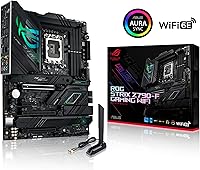
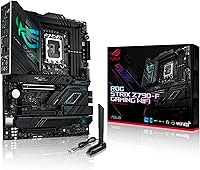
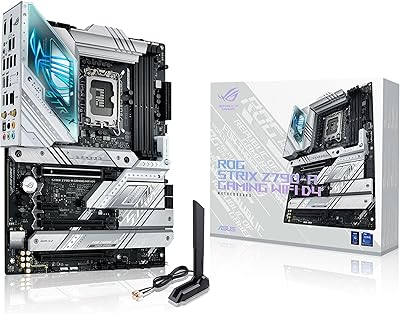
The ASUS ROG Strix Z790-F Gaming Motherboard sits in a comfortable spot within the ROG Strix family — serious enough for enthusiast builders, without the extreme price premium of the top-tier Extreme variant. It launched in late 2022 alongside Intel's 12th Gen platform and has aged well, since the LGA 1700 socket covers 12th, 13th, and 14th Gen Intel CPUs. That multi-generation compatibility is genuinely useful if you plan to upgrade your processor without replacing the board. It fits any standard ATX mid-tower or full-tower case, and in a crowded Z790 market, it still holds its own on power delivery and connectivity.
Features & Benefits

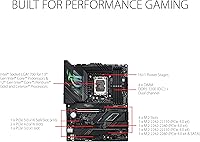
The 16+1 power stage setup, rated at 90A per stage, gives this ROG Strix board enough headroom to run a Core i9 under sustained all-core load without thermal throttling — something cheaper boards genuinely struggle with. Four M.2 slots, each with its own heatsink, make storage expansion practical rather than an afterthought. The PCIe 5.0 x16 slot means you won't need to swap the board when next-gen GPUs become mainstream. WiFi 6E and Intel 2.5Gb Ethernet together handle both wired and wireless without compromise. The USB Type-C port with 30W charging on both rear I/O and the front panel header is a small but welcome touch most competing boards skip.

Best For

This Intel gaming motherboard makes the most sense for builders pairing it with a high-end 13th or 14th Gen CPU, particularly anyone eyeing an i7 or i9 who wants genuine overclocking support without stepping into workstation territory. Content creators who rely on multiple NVMe drives will appreciate having four populated M.2 slots right out of the box. If you want a board that can handle a current flagship GPU and won't feel outdated when PCIe 5.0 cards arrive, the Z790-F covers that. It is not the right fit for mid-range builds — pairing it with an i5 and a modest GPU means paying for headroom you will never actually use.

User Feedback

Across roughly 276 ratings, the Z790-F holds a 4.3-star average, which reflects genuine satisfaction rather than hype. Builders consistently praise the BIOS polish and the VRM's ability to stay cool under heavy workloads. That said, recurring criticism points to Armoury Crate software, which many users find bloated and intrusive — a fair complaint ASUS has been slow to fully resolve. A handful of buyers reported initial RAM compatibility hiccups requiring a BIOS update before XMP profiles ran stable. At rank 215 in Computer Motherboards, the competitive context is real: some users feel rival brands offer comparable specs at lower prices, so the premium here rests largely on ASUS's ecosystem and long-term BIOS support.

Pros

  • The 16+1 power stage setup handles sustained all-core loads on flagship Intel CPUs without breaking a sweat.
  • Four M.2 slots — each with its own heatsink — give content creators and storage enthusiasts real flexibility.
  • LGA 1700 support across three Intel generations protects your investment if you plan to upgrade CPUs later.
  • The PCIe 5.0 x16 SafeSlot keeps the Z790-F relevant as next-gen GPUs begin entering the market.
  • WiFi 6E and Intel 2.5Gb Ethernet together cover both wired and wireless setups without compromise.
  • AI Overclocking makes CPU tuning approachable for builders who do not want to spend hours in the BIOS.
  • USB Type-C with 30W Power Delivery on both rear I/O and the front panel header is a genuinely rare convenience.
  • The BIOS is consistently praised for its polish, depth, and stability once initial setup is complete.
  • Build quality feels premium — reinforced slots, quality chokes, and a solid heatsink layout that holds up under repeated thermal cycling.

Cons

  • Armoury Crate software is widely criticized for bloat, slow loading, and unnecessary background processes.
  • Some DDR5 kits require a BIOS update before XMP profiles post reliably — plan for a possible flash on first boot.
  • Value-for-money sentiment is divided; rival brands offer comparable Z790 feature sets at lower prices.
  • All four M.2 slots are PCIe 4.0, meaning next-gen NVMe drives will not hit their theoretical maximum throughput.
  • WiFi 6E only benefits buyers who already own a compatible router — otherwise it is a feature you are paying for but not using.
  • The dual 8-pin CPU power requirement means older or budget PSUs may need an upgrade to keep up.
  • Rear USB Type-A port count is adequate but not generous — heavy peripheral users may find themselves reaching for a hub.
  • Onboard RGB cannot be fully disabled without using Armoury Crate, creating a software dependency for RGB-free builders.
  • The Z790 platform is capped at 14th Gen Intel, so long-term upgraders will eventually face a socket dead end.

Ratings

The ASUS ROG Strix Z790-F Gaming Motherboard has been evaluated by our AI system after analyzing verified global buyer reviews, actively filtering out incentivized and bot-generated feedback to surface what real builders actually experience. The scores below reflect a balanced picture — where this board genuinely delivers and where it falls short — so you can make a well-informed decision before committing to a premium-tier purchase.
VRM & Power Delivery
93%
Builders running sustained all-core workloads on a Core i9-13900K or 14900K report stable voltage delivery without thermal throttling, even during extended rendering sessions or overnight stress tests. The 16+1 stage design gives real overclocking headroom that cheaper boards simply cannot match.
For builders pairing this board with a mid-range CPU like an i5, the power delivery is overkill and adds unnecessary cost. A small number of users noted the dual 8-pin connectors require a higher-end PSU, which adds to total build expense.
BIOS Experience
89%
The UEFI BIOS is consistently praised for its clean layout and the AI Overclocking feature, which automatically profiles your CPU and applies a stable overclock without requiring manual tuning knowledge. Builders new to overclocking find it approachable without sacrificing depth for veterans.
Some users report that early BIOS versions shipped with XMP stability issues requiring an update before DDR5 kits would post correctly. A handful of reviewers found BIOS update navigation less intuitive than expected when troubleshooting RAM compatibility.
Build Quality & Component Grade
91%
The board feels substantial in hand, with reinforced PCIe and M.2 slots, ProCool II power connectors, and alloy chokes that hold up well under repeated thermal cycling. Installers working inside tight mid-tower cases note the heatsink layout avoids common cable routing conflicts.
A few users pointed out minor cosmetic inconsistencies on the I/O shroud finish out of the box. The board is also on the heavier side for an ATX form factor, which can matter when stress-testing mounting during a build.
M.2 Storage Expandability
88%
Having four M.2 slots — each covered by its own heatsink — is a genuine differentiator for content creators and heavy NVMe users who want to run OS, scratch disk, and media storage separately without risking thermal throttling on adjacent drives.
All four slots are PCIe 4.0, not PCIe 5.0, which means early adopters of next-gen NVMe drives will not get maximum throughput. This is an acceptable trade-off today but worth noting for buyers planning a long-term build.
Networking Performance
86%
The combination of WiFi 6E and Intel 2.5Gb Ethernet covers both wired and wireless use cases well. Competitive gamers using wired connections report consistently low latency, while those on wireless benefit from reduced interference in congested WiFi environments.
WiFi 6E is genuinely useful only if you own a compatible router, which limits its value for many buyers today. A small number of users also reported the bundled antenna placement being awkward in certain case configurations.
USB Connectivity
84%
The rear I/O USB Type-C port with 30W Power Delivery is a practical feature that lets you charge a laptop or high-drain peripheral directly from the board, reducing cable clutter on the desk. The front panel USB Type-C header with the same charging spec is rare at this price tier.
Some users wanted more USB 3.2 Gen 2 Type-A ports on the rear I/O for legacy peripherals and external SSDs. The overall rear port count is competitive but not exceptional compared to some rival boards in the same segment.
Thermal Management
87%
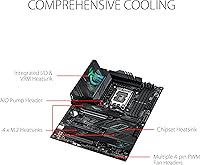
The L-shaped heatpipe connecting the VRM heatsinks and the I/O cover does a solid job dispersing heat during prolonged gaming or encoding sessions. Users with adequate case airflow report VRM temperatures staying within safe margins even under i9 load.
In cases with poor airflow, a small portion of users noted VRM heatsinks running noticeably warm during extended stress tests. The AI Cooling II feature helps, but it cannot fully compensate for an undersized case or a single-fan setup.
DDR5 Memory Compatibility
74%
26%
When XMP profiles load correctly, the board handles DDR5 kits up to 7000 MHz well, and tuned memory makes a visible difference in latency-sensitive games and productivity workloads. The AI Overclocking tool also factors in memory timings when generating its profile.
This is one of the more commonly flagged pain points — several users needed a BIOS update before their DDR5 kits would post reliably, and a minority of kits from less common brands showed persistent instability. It is not a dealbreaker, but plan for a possible BIOS flash on first boot.
PCIe 5.0 Readiness
82%
18%
The PCIe 5.0 x16 SafeSlot ensures the board will accommodate next-generation discrete GPUs without needing an adapter or riser. For builders thinking two to three years ahead, this is a meaningful advantage over Z690 boards still in circulation.
PCIe 5.0 GPUs are still limited in availability and carry steep price premiums, so this feature offers deferred rather than immediate value. Buyers building today will not notice a real-world difference compared to PCIe 4.0 for current GPU generations.
Software Ecosystem
58%
42%
ASUS Armoury Crate does centralize RGB, fan control, and AI tuning in one place, which some users appreciate for not juggling multiple utilities. The underlying features — particularly AI Overclocking — work reliably once the software is configured.
This is the most consistently criticized aspect of the Z790-F ownership experience. Many users describe Armoury Crate as bloated, slow to load, and prone to unnecessary background processes. Several builders uninstall it entirely and manage settings through BIOS instead.
Initial Setup Experience
76%
24%
For experienced builders, the physical installation process is straightforward, with well-labeled headers, a pre-installed I/O shield, and sufficient clearance around the socket area for large CPU coolers. The quick-start guide covers the essentials clearly.
First-time builders occasionally report confusion around the BIOS initial configuration, particularly when DDR5 kits do not auto-detect correctly. The sheer number of BIOS options can feel overwhelming without prior Z-series motherboard experience.
Value for Money
67%
33%
For a builder specifically targeting a high-end i9 overclock with multi-drive NVMe storage and a PCIe 5.0 GPU, the feature density justifies the price relative to what you would spend assembling equivalent capabilities from a cheaper base board plus add-ons.
This is where sentiment splits most clearly. Builders using mid-range CPUs or skipping advanced features feel they are paying a brand premium over functionally similar boards from competing manufacturers that offer Z790 chipsets at meaningfully lower prices.
Aesthetics & RGB Implementation
79%
21%
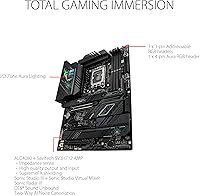
The ROG Strix visual identity is clean and well-executed — understated enough for windowed builds that favor a dark aesthetic, with ARGB headers available for those who want to coordinate lighting across components. The I/O shroud integrates RGB without looking overdone.
Users who prefer RGB-free builds note the onboard lighting cannot be fully disabled without Armoury Crate, which creates a dependency on software many want to avoid. The RGB output is also less vibrant than some competing boards in direct side-by-side comparisons.
Long-Term Platform Longevity
85%
LGA 1700 support across three Intel generations means this board has a longer useful lifespan than a platform-locked purchase. Buyers who started on a 12th Gen i5 can upgrade to a 13th or 14th Gen i9 without touching the board, protecting their initial investment.
Intel has since moved to LGA 1851 with the Core Ultra 200 series, so the Z790 platform represents a ceiling. Builders who upgrade CPUs frequently may eventually outgrow the socket, though the current generation support window remains relevant for several more years.

Suitable for:

The ASUS ROG Strix Z790-F Gaming Motherboard is built for builders who are serious about squeezing real performance out of a high-end Intel CPU — particularly anyone running a Core i7 or i9 from the 13th or 14th Gen lineup who wants overclocking headroom without buying into a workstation-class platform. If you plan to run multiple NVMe drives simultaneously — say, a fast OS drive, a dedicated scratch disk for video editing, and a media archive — the four independent M.2 slots with heatsinks mean you can do that without improvising. Competitive gamers and streamers who rely on both wired and wireless connections will get practical value from the WiFi 6E and 2.5Gb Ethernet pairing. Builders who want a platform that will still feel relevant two to three years from now will appreciate the multi-generation CPU socket support and the PCIe 5.0 slot for future GPU upgrades. It also suits builders who want AI-assisted BIOS tuning rather than spending hours dialing in manual overclocking profiles.
Not suitable for:

If your build centers on a mid-range CPU like an i5 paired with a mainstream GPU, the ASUS ROG Strix Z790-F Gaming Motherboard is more board than your components will ever justify — and you will pay a premium for capabilities that sit idle. Budget-conscious builders will find competing Z790 options from other brands that cover the core bases at a meaningfully lower price point, making this a hard sell unless the full feature set is genuinely in play. Anyone with a strong aversion to companion software should also think carefully: Armoury Crate is deeply integrated into the RGB and fan control experience, and while you can bypass it through the BIOS, you lose convenient access to some AI tuning features. Builders on the LGA 1851 platform looking for Intel Core Ultra 200 series support will need to look elsewhere entirely, as this board does not extend beyond 14th Gen. Finally, if your case airflow is limited or your PSU lacks dual 8-pin CPU connectors, you may not be able to unlock the board's full potential without additional upgrades.
Specifications

  • CPU Socket: Uses the Intel LGA 1700 socket, compatible with 12th, 13th, and 14th Gen Intel Core, Pentium Gold, and Celeron processors.
  • Chipset: Built on the Intel Z790 chipset, enabling PCIe 5.0 support, enhanced memory overclocking, and expanded I/O bandwidth over Z690.
  • Form Factor: Standard ATX form factor measuring 13.3 x 10.8 inches, fitting full-tower and mid-tower cases with ATX motherboard support.
  • Memory Type: Supports DDR5 memory modules only, with XMP profiles validated up to 7000 MHz across four DIMM slots.
  • Power Delivery: Features a 16+1 power stage design rated at 90A per stage, fed by dual ProCool II 8-pin CPU power connectors.
  • M.2 Slots: Includes four M.2 slots, all operating at PCIe 4.0 speeds, each fitted with an individual heatsink to manage NVMe drive thermals.
  • Primary PCIe Slot: Provides one PCIe 5.0 x16 SafeSlot for the primary GPU, reinforced to handle the weight and retention demands of modern graphics cards.
  • Wireless: Integrated WiFi 6E (802.11a/b/g/n/ac/ax) supports the 6 GHz band for reduced interference and lower latency on compatible routers.
  • Ethernet: Onboard Intel 2.5 Gigabit Ethernet with ASUS LANGuard surge protection for stable, high-throughput wired network connections.
  • Rear USB: Rear I/O includes a USB 3.2 Gen 2x2 Type-C port with PD 3.0 delivering up to 30W charging, alongside USB 3.2 Gen 2 and Gen 1 Type-A ports.
  • Front Panel USB: Includes a front-panel USB 3.2 Gen 2x2 Type-C header also supporting PD 3.0 up to 30W, enabling fast charging from the case front.
  • Display Output: Provides HDMI 2.1 and DisplayPort 1.4 outputs on the rear I/O for use with integrated Intel graphics when no discrete GPU is installed.
  • VRM Cooling: Cooling is handled by massive alloy heatsinks connected via an L-shaped heatpipe, with high-conductivity thermal pads covering the VRM stages.
  • AI Features: Ships with ASUS AI Overclocking, AI Cooling II, AI Networking, and Two-Way AI Noise Cancelation accessible through the BIOS and Armoury Crate software.
  • Dimensions: Physical dimensions are 13.3 x 10.8 x 2.9 inches (L x W x H), consistent with standard ATX specification.
  • Weight: The board weighs 4.45 pounds, reflecting the substantial heatsink and power delivery hardware included at this tier.
  • Platform: Officially supported on Windows 11, with driver and software packages provided through ASUS support for that operating system.
  • Release Date: First made available on October 20, 2022, launching alongside Intel's 12th and 13th Gen platform refresh.

Related Reviews
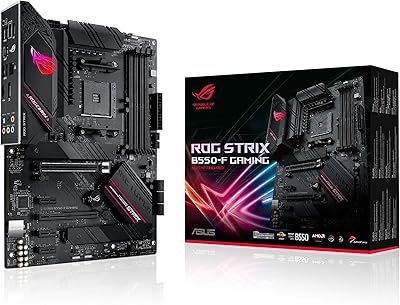
ASUS ROG Strix B550-F AMD AM4 Motherboard
81%
91%
VRM & Power Delivery
88%
Build Quality
89%
BIOS Usability
84%
Ryzen Compatibility
86%
PCIe 4.0 & M.2 Performance
More
ASUS ROG STRIX X670E-F ATX Motherboard
82%
92%
VRM & Power Delivery
88%
BIOS Experience
86%
M.2 Storage Performance
71%
CPU Compatibility & Setup
89%
Thermal Design
More
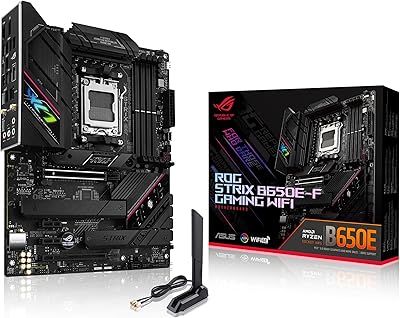
ASUS ROG Strix B650E-F Gaming WiFi Motherboard
85%
88%
Performance Under Load
91%
Ease of Setup
92%
WiFi and Networking
85%
Power Delivery Stability
78%
Cooling Requirements
More
ASUS ROG Strix Z790-A Gaming WiFi D4 Motherboard
84%
94%
Performance Under Load
89%
Thermal Management
75%
Ease of Installation
91%
Overclocking Capabilities
90%
Networking Speed & Reliability
More
ASUS ROG Strix B850-A ATX Motherboard
83%
93%
Power Delivery
88%
BIOS Experience
86%
Storage Throughput
91%
Wireless Connectivity
89%
Build & Aesthetics
More
ASUS ROG Strix B650E-I Gaming WiFi Motherboard
87%
93%
Performance
88%
Cooling Efficiency
90%
Installation Ease
91%
Connectivity (WiFi 6E, LAN)
85%
Build Quality
More
ASUS ROG Strix B850-I Mini-ITX Motherboard
82%
91%
Build Quality
88%
BIOS Usability
93%
Power Delivery
74%
Thermal Management
89%
Connectivity & I/O
More
ASUS ROG Strix B550-A Gaming ATX Motherboard

82%
91%
Build Quality
93%
Power Delivery & Stability
88%
BIOS Experience
89%
PCIe 4.0 & NVMe Performance
86%
Onboard Audio Quality
More
ASUS ROG Strix Z390-E Gaming Motherboard
88%
93%
Gaming Performance
90%
Overclocking Capabilities
88%
Wi-Fi Performance
85%
Ease of Installation
91%
Durability & Build Quality
More
ASUS ROG Strix B760-A ATX Motherboard
82%
88%
VRM & Power Delivery
83%
DDR5 Compatibility
91%
Build & Installation Experience
86%
BIOS & Firmware
89%
Networking Performance
More

FAQ

It should, but there is an important caveat: some units may ship with an older BIOS that does not fully support 14th Gen CPUs. If you are building with a 14th Gen processor, it is worth checking the ASUS support page for the latest BIOS version and flashing it before your first boot if needed. ASUS provides a BIOS FlashBack feature on this board, so you can update without needing a CPU installed first.

No, this board is DDR5 only. There is no DDR4 compatibility — the memory slots are physically keyed for DDR5 exclusively. If you are upgrading from a DDR4 system, you will need to budget for new memory alongside this board.

This is one of the more commonly reported first-boot issues with the Z790-F. The first step is to make sure you are running the latest BIOS version, as earlier releases had XMP stability problems with certain DDR5 kits. After updating, enter the BIOS, enable the XMP profile manually, and save. If issues persist, try seating the sticks in slots A2 and B2 rather than A1 and B1, which is the recommended dual-channel configuration.

Not strictly. The board will function perfectly well without it — you can control fan curves, overclocking, and most settings directly through the BIOS. What you lose without Armoury Crate is the convenient desktop interface for AI Overclocking profiles and RGB lighting control. Many experienced builders skip the software entirely and manage everything through the BIOS, which is a valid approach if you want a cleaner Windows install.

Yes, all four M.2 slots are active and can be populated at the same time. Each slot runs at PCIe 4.0 x4 speeds and has its own heatsink, so thermal management across all four drives is handled reasonably well. Just keep in mind that heavy simultaneous read/write activity across all four drives under a constrained airflow case could still push temperatures on the lower slots, so good case ventilation helps.

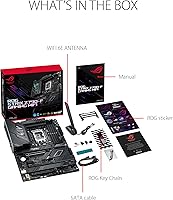
Yes, ASUS includes a magnetic-base WiFi antenna in the box. It connects to the two SMA antenna ports on the rear I/O panel — just screw them on finger-tight. Placement matters for signal quality: positioning the antenna away from the case metal and toward an open area or window will give you noticeably better WiFi 6E performance than leaving it tucked behind the tower.

The Z790-F uses dual 8-pin CPU power connectors for the VRM. Most mid-to-high-end power supplies include two EPS 8-pin cables, but budget PSUs sometimes only ship with one. If your PSU only has a single 8-pin connector, you can technically run the board, but you will likely limit overclocking headroom on power-hungry CPUs like the i9-13900K or i9-14900K. For a build targeting full performance, a PSU with dual CPU power cables is the right choice.

When you enable AI Overclocking in the BIOS, the board runs a brief profiling sequence that analyzes your specific CPU's characteristics and automatically applies a stable overclock tailored to it. It is not magic — results vary by CPU silicon quality — but it removes the trial-and-error process for builders who are not comfortable manually tuning voltages and frequencies. You can also use it as a starting point and then fine-tune manually from there.

If your case supports standard ATX motherboards, the Z790-F will fit. The board measures 13.3 x 10.8 inches, which is within standard ATX dimensions. The one thing to check is CPU cooler clearance near the VRM heatsinks — large air coolers with wide bases or offset mounting arms can occasionally interfere with the heatsink on the upper-left portion of the board. Checking your cooler's listed clearance against your case specs before buying is a good habit regardless of which Z790 board you choose.

It is actually one of the stronger fits for that dual-use scenario. Four M.2 slots let you separate your OS, active project files, and media storage across independent drives without thermal competition. The robust VRM handles sustained all-core loads during long exports without throttling. Add the 2.5Gb Ethernet for fast NAS transfers and solid USB connectivity for external drives and capture devices, and the Z790-F covers the content creation side of the build just as well as the gaming side.

Where to Buy