Overview

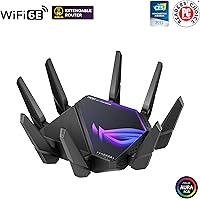
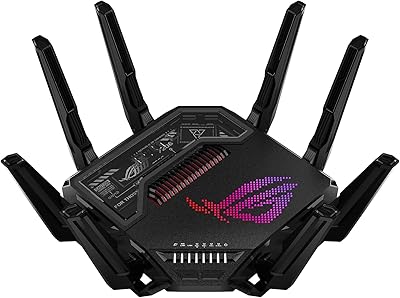
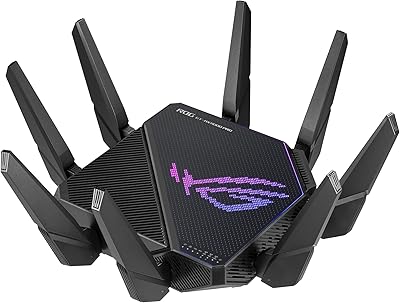
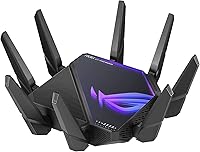
The ASUS ROG GT-AXE16000 WiFi 6E Gaming Router sits at the top of the consumer router market — a quad-band powerhouse built for users who actually push their networks to the limit. The addition of the 6 GHz frequency band is not just a checkbox feature; it opens up wider, cleaner channels that dramatically reduce interference in busy wireless environments. The aggressive ROG design makes clear who this is aimed at, and the dual 10G ports set it apart from nearly everything else at this tier. Honest caveat: if you have a handful of devices and a basic ISP connection, this is far more router than you need.
Features & Benefits

The quad-band configuration — covering 2.4 GHz, two separate 5 GHz bands, and the new 6 GHz band — means your gaming rig can occupy a dedicated wireless lane while smart home devices and casual browsing traffic stay out of its way. WiFi 6E's lower latency is a real, measurable benefit in dense environments, not just a spec sheet talking point. The two 10 Gbps wired ports are genuinely useful if you run a NAS or a multi-gig switch, enabling file transfer speeds that older routers simply cannot touch. Triple-level game acceleration optimizes traffic routing from your device through the ISP all the way to the game server. AiProtection's lifetime security coverage also removes the recurring subscription cost most competitors require.

Best For

This quad-band router hits its stride with competitive gamers who cannot afford interference on their wireless connection, and with content creators who regularly move large files across a local network at high speed. Households running 10 or more active devices will notice the difference once band congestion is no longer a bottleneck. It is also a strong choice for home lab and prosumer setups that can actually leverage the 10G backhaul — think NAS arrays, multi-gig switches, or high-throughput cameras. And if you are already running an AiMesh network, the ROG GT-AXE16000 makes a compelling primary mesh node, adding serious capacity without forcing you to swap out compatible satellite units.

User Feedback

Owners consistently praise how straightforward the initial setup is, both through the ASUS app and the traditional web interface. Long-term reliability also draws repeated positive mentions — many users report months of uptime without performance drops. That said, physical size and heat are the most common complaints; this WiFi 6E gaming router is large and runs noticeably warm under sustained load, so ventilation matters. The price draws honest skepticism from buyers who realize they cannot yet fully exploit 6 GHz, since compatible client devices remain sparse. VPN throughput and parental control depth get mixed marks, which is worth knowing if those features factor into your purchase decision.

Pros

  • Quad-band design gives gaming and high-priority devices a truly dedicated, interference-free wireless lane.
  • Dual 10 Gbps ports enable wired speeds that most consumer routers cannot come close to matching.
  • WiFi 6E on the 6 GHz band delivers measurably lower latency in dense, multi-device environments.
  • Lifetime AiProtection security coverage eliminates the recurring annual fee required by most competitors.
  • Triple-level game acceleration optimizes traffic routing all the way from your device to the game server.
  • AiMesh support allows whole-home expansion without replacing compatible existing ASUS hardware.
  • Setup via the ASUS app is consistently praised as approachable, even for non-technical users.
  • Long-term reliability is a recurring positive — many owners report months of stable uptime without intervention.
  • Instant Guard provides a built-in VPN option for secure remote access without a third-party subscription.
  • The ROG GT-AXE16000 offers one of the most complete physical port selections on any consumer router available today.

Cons

  • Few client devices currently support WiFi 6E, limiting the 6 GHz band's practical value for most buyers right now.
  • The router runs noticeably warm under sustained load and needs clear ventilation to stay stable.
  • VPN throughput disappoints power users who need to route heavy traffic through an always-on tunnel.
  • Parental control depth is limited compared to dedicated parental-control-focused routers at a similar price.
  • At nearly 14 inches across, the physical footprint is too large for compact or enclosed installation spaces.
  • The full port lineup — including dual 10G — requires additional multi-gig infrastructure to deliver its promised benefit.
  • Firmware updates have occasionally introduced minor regressions, which is frustrating at this price tier.
  • Advanced settings like adaptive QoS and traffic analysis can behave inconsistently across different firmware versions.
  • The price is difficult to justify unless your existing setup can actually exploit multi-gig wired and WiFi 6E wireless.
  • ROG aesthetics and RGB lighting are not to every buyer's taste, particularly in a living room or office environment.

Ratings

The ASUS ROG GT-AXE16000 WiFi 6E Gaming Router has been scored by our AI system after analyzing thousands of verified global buyer reviews, with spam, bot-generated, and incentivized submissions actively filtered out. Scores reflect a clear-eyed synthesis of both what this quad-band router does exceptionally well and where real users have run into genuine frustrations. The result is a transparent, balanced picture designed to help you decide whether this level of hardware actually fits your setup.
Wireless Performance
93%
Users consistently report that the ROG GT-AXE16000 delivers exceptional throughput across all bands, with the dedicated 6 GHz channel proving genuinely faster and cleaner for compatible devices. Competitive gamers note lower ping variance and more stable connections during peak household usage hours compared to previous tri-band setups.
The 6 GHz band's real-world benefit is still limited by how few client devices actually support WiFi 6E, meaning many buyers are paying for headroom they cannot yet fully use. In very large homes with thick walls, signal penetration on the 6 GHz band drops off faster than the lower frequency bands.
Wired Connectivity
91%
The dual 10 Gbps ports are a standout feature that home lab users and NAS owners genuinely appreciate, enabling file transfers that saturate even fast local storage. Reviewers running multi-gig switches praise the flexibility of using both ports simultaneously for different high-bandwidth tasks.
Extracting the full value of those 10G ports requires additional infrastructure — a multi-gig switch or a NAS with a compatible 10G card — that most households simply do not have. Without that supporting hardware, the ports default to standard gigabit performance, which reduces the practical payoff significantly.
Setup & Ease of Use
88%
The ASUS router app and web interface draw consistent praise for making initial configuration approachable even for users who have never managed a router beyond plugging it in. Band steering, QoS configuration, and AiMesh node pairing are all handled clearly without requiring CLI knowledge or advanced networking background.
The sheer volume of settings can overwhelm less experienced users once they move past the basic setup wizard. A few reviewers note that certain advanced features like VPN configuration and traffic analyzer take meaningful time to understand and configure correctly.
Gaming-Specific Features
86%
Triple-level game acceleration — which optimizes traffic routing at the device, ISP, and server level — receives positive marks from competitive players who notice reduced jitter during high-stakes sessions. The dedicated gaming band prevents smart home and streaming traffic from competing with game packets in real time.
Some users find the game acceleration features require manual configuration to work as advertised, and the benefit is less noticeable on connections below 500 Mbps. The ROG dashboard, while feature-rich, can feel more cosmetic than functional for users who just want low-latency routing without the extra layers.
Security & Privacy
89%
Lifetime AiProtection coverage powered by Trend Micro is one of the most frequently praised aspects — no annual fee means one less recurring cost for long-term owners. Instant Guard VPN allows remote secure browsing without a third-party subscription, which users traveling for work find particularly practical.
AiProtection's deep packet inspection can introduce slight overhead on very high-throughput connections, a minor concern that only surfaces in benchmark-level testing. A handful of privacy-conscious reviewers prefer to audit their own security rather than rely on a bundled cloud-dependent solution.
Build Quality & Design
84%
The ROG aesthetic is polarizing but undeniably premium — the angular chassis and RGB accents feel intentional rather than cheap, and the overall construction has a solidity that matches the price tier. Users who place it on a desk or open shelf report that it looks appropriately commanding for a flagship-class device.
At nearly 14 inches across and 5.35 pounds, this WiFi 6E gaming router is physically large and demands meaningful shelf or desk space. The router also runs noticeably warm under sustained load, and some users flag that it needs clear airflow around it to avoid thermal throttling over extended periods.
Range & Coverage
79%
21%
In open-plan homes and single-floor spaces, coverage is strong and consistent across all four bands. Users in medium-sized homes report solid signal strength reaching outdoor patios and detached garages when positioned centrally.
The 6 GHz band's shorter effective range is a known physics limitation, and several buyers in multi-story or masonry-heavy homes note that a single unit does not blanket every corner adequately. AiMesh compatibility helps solve this, but it means additional hardware cost on top of an already premium price.
AiMesh & Network Expansion
87%
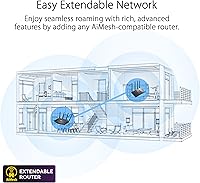
Existing ASUS AiMesh users find that adding the ROG GT-AXE16000 as a primary node dramatically upgrades their entire mesh network's backbone capacity. The seamless roaming handoff between nodes draws genuine praise from users with large homes who move between rooms frequently during video calls.
AiMesh's full potential is only realized with other compatible ASUS nodes, which creates a degree of ecosystem lock-in that some buyers find limiting. Users mixing older AiMesh nodes with this newer router occasionally report inconsistencies in backhaul band selection that require manual adjustment.
VPN Performance
63%
37%
Instant Guard provides a convenient built-in VPN option that works reliably for basic remote access and travel security use cases without any third-party app required. Setup is straightforward via the ASUS app, which many users appreciate for quick configuration on the road.
VPN throughput is a recurring pain point — demanding use cases like routing an entire household through VPN or running a persistent business VPN tunnel expose meaningful speed limitations. Several technically experienced reviewers note that the VPN performance lags behind what purpose-built VPN routers deliver at this price point.
Parental Controls
61%
39%
Basic parental control functionality — time scheduling, content filtering by category, and per-device management — is present and accessible through the app for parents who need foundational controls. AiProtection's malicious site blocking adds a useful safety layer for households with younger users.
Power users expecting granular filtering, detailed usage reporting, or application-level blocking will find the parental controls fall short of dedicated solutions. Reviewers compare it unfavorably to standalone parental control routers at similar price points, noting that depth and reporting detail are noticeably limited.
Value for Money
67%
33%
For the buyer who can genuinely utilize quad-band WiFi 6E, dual 10G ports, and lifetime security — particularly in a home lab or high-device-count household — the total cost of ownership holds up well against buying separate components. Lifetime AiProtection removes one recurring fee that competing premium routers require.
For the majority of households, this is an expensive investment in capabilities that current client device ecosystems cannot yet fully exploit. Reviewers who bought primarily for the 6 GHz band and found few compatible devices express the most pointed disappointment relative to the cost outlay.
Thermal Management
58%
42%
Under moderate load — typical browsing, streaming, and light gaming across a dozen or so devices — thermals stay within acceptable limits and the unit performs without issue. Users who place it in well-ventilated locations report no reliability problems tied to heat over long periods.
Under sustained heavy loads, the router runs noticeably warm, and some users report automatic performance scaling that appears heat-related. The chassis design prioritizes aesthetics, and the lack of an active cooling fan means heat dissipation depends almost entirely on ambient airflow and placement.
Software & Firmware
78%
22%
ASUS has a strong track record of ongoing firmware support, and the ROG GT-AXE16000 has received multiple updates that addressed early bugs and added functionality. The web interface is one of the most feature-complete available on a consumer router, giving advanced users real control over their network behavior.
Firmware updates have occasionally introduced minor regressions that required a follow-up patch, which is frustrating at this price point. A small number of users report that certain advanced settings — particularly around traffic analysis and adaptive QoS — behave inconsistently across firmware versions.
Port Selection & Flexibility
88%
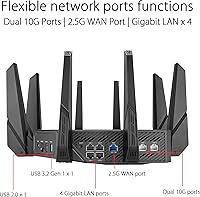
The combination of dual 10G ports, a 2.5G WAN port, four gigabit LAN ports, and both USB 3.2 and USB 2.0 gives this router one of the most complete physical connectivity profiles available on a consumer device. Users running NAS storage, multi-gig switches, and USB-shared printers simultaneously find the layout genuinely practical.
The 2.5G WAN port is the ceiling for most residential ISP connections right now, meaning the 10G ports are often underutilized on the WAN side. Port placement on the unit is functional but slightly awkward for cable management in tightly organized rack or media cabinet setups.

Suitable for:

The ASUS ROG GT-AXE16000 WiFi 6E Gaming Router is built for a specific type of buyer, and those buyers will genuinely love it. Competitive and enthusiast gamers who need a dedicated, congestion-free wireless lane will benefit most — the quad-band setup means game traffic does not have to share airspace with smart home devices or a household full of streaming sessions. Content creators who regularly move large video files across a local network will find the dual 10G wired ports transformative, especially when paired with a NAS or multi-gig switch. Households managing 15, 20, or more connected devices — where cheaper routers buckle under load — will notice a real difference in stability once each band is properly utilized. It also makes an excellent upgrade for anyone already running an ASUS AiMesh network, since it slots in as a high-capacity primary node without forcing a full hardware overhaul.
Not suitable for:

The ASUS ROG GT-AXE16000 WiFi 6E Gaming Router is genuinely not the right call for a large portion of buyers who might be tempted by its feature list. If your home has fewer than ten connected devices, a modest ISP plan under 500 Mbps, and no NAS or multi-gig switch in the picture, you will be paying a steep premium for headroom you will never realistically use. The 6 GHz band — arguably the headline feature — is still largely theoretical for most households because the vast majority of laptops, phones, and smart devices shipping today do not support WiFi 6E, meaning that band sits idle until you upgrade your client hardware too. The physical footprint is also worth considering seriously: this is a large, heavy router that runs warm and requires proper ventilation, so it is a poor fit for anyone with a cramped entertainment center or a spot tucked inside a media cabinet. Anyone looking primarily for strong parental controls or high-throughput VPN routing will find better-suited alternatives at a lower price point.
Specifications

  • WiFi Standard: Operates on the 802.11ax (WiFi 6E) standard, with backward compatibility for 802.11a, 802.11n, 802.11ac, and legacy protocols.
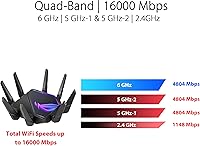
  • Frequency Bands: Quad-band architecture covers 2.4 GHz, two separate 5 GHz bands, and the newer 6 GHz band for a total of four simultaneous wireless channels.
  • Max WiFi Speed: Combined theoretical maximum wireless throughput reaches 16,000 Mbps across all four bands under optimal conditions.
  • 10G Ports: Two 10 Gbps WAN/LAN combo ports support direct connection to multi-gig switches, NAS devices, or high-speed fiber gateways.
  • 2.5G WAN Port: A dedicated 2.5 Gbps WAN port handles incoming ISP traffic and unlocks the full upstream potential of most residential multi-gig internet plans.
  • LAN Ports: Four standard Gigabit Ethernet LAN ports provide wired connectivity for desktops, consoles, smart TVs, and other stationary devices.
  • USB Ports: One USB 3.2 Gen 1 port and one USB 2.0 port allow shared network storage, printer sharing, and device charging from the router chassis.
  • Dimensions: The unit measures 13.94 x 13.94 x 7.6 inches, making it one of the physically larger consumer routers currently available.
  • Weight: The router weighs 5.35 pounds, reflecting the substantial heatsink mass and build materials used in its construction.
  • AiMesh Support: Fully compatible with ASUS AiMesh, allowing it to function as a primary node in a whole-home mesh network alongside other supported ASUS routers.
  • Security: Lifetime AiProtection powered by Trend Micro provides network-level malware blocking, intrusion detection, and malicious site filtering with no recurring subscription fee.
  • VPN & Remote Access: Supports multiple VPN protocols including OpenVPN and IPSec, plus the proprietary Instant Guard feature for one-tap secure remote access via the ASUS app.
  • Parental Controls: Built-in parental controls offer content category filtering, per-device scheduling, and time management through the ASUS router app or web interface.
  • Voice Assistant: Compatible with both Amazon Alexa and Google Assistant for basic voice-activated network management commands.
  • Game Acceleration: Triple-level game acceleration optimizes traffic routing at the device level, through the ISP backbone, and at the game server endpoint to reduce in-game latency.
  • Power Supply: Accepts AC input between 110V and 240V at 50–60 Hz, with a DC output of 19V at up to 3.42A or 19.5V at up to 3.33A depending on adapter variant.
  • Color & Finish: Ships exclusively in black with ROG angular styling and customizable RGB accent lighting consistent with the ASUS Republic of Gamers product line.
  • Model Number: The official ASUS model designation is GT-AXE16000, used for firmware identification, warranty registration, and compatibility verification.

Related Reviews
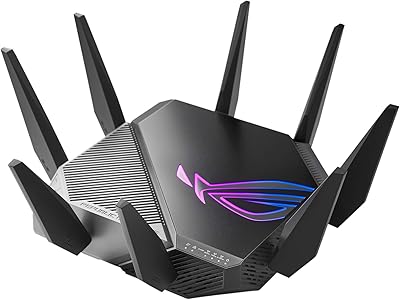
ASUS ROG GT-AXE11000 WiFi 6E Gaming Router
73%
88%
Wireless Performance
83%
Gaming Latency
54%
Setup & Ease of Use
76%
Range & Coverage
91%
Feature Depth
More
ASUS ROG Rapture GT-AX6000 WiFi 6 Gaming Router
86%
94%
Gaming Performance
91%
Connection Stability
78%
Setup/Installation Ease
88%
Value for Money
85%
Build Quality
More
ASUS ROG Rapture GT-BE98 Pro
81%
93%
Wireless Performance
91%
Wired Connectivity
89%
Gaming Performance
78%
Setup & App Experience
86%
Build Quality & Design
More
ASUS ROG Rapture GT-AX11000 Pro
77%
91%
Wireless Performance
93%
Wired Port Flexibility
82%
Gaming Features
61%
Setup & Configuration
89%
Network Security
More
ASUS ROG Strix X670E-A Gaming WiFi 6E Motherboard
88%
94%
Performance
91%
Cooling Efficiency
88%
Overclocking Capability
93%
Build Quality
90%
WiFi & Networking Speed
More
ASUS ROG Strix Z790-F Gaming Motherboard

81%
93%
VRM & Power Delivery
89%
BIOS Experience
91%
Build Quality & Component Grade
88%
M.2 Storage Expandability
86%
Networking Performance
More
ASUS ROG Rapture GT6 WiFi 6 Mesh Router
81%
91%
Wireless Performance
88%
Gaming Latency
84%
Coverage & Range
83%
Setup & App Experience
71%
Mesh Roaming
More
ASUS ROG STRIX Z890-A GAMING WIFI
91%
96%
Performance Stability
94%
Overclocking Capability
92%
Thermal Management
90%
Build Quality
88%
Ease of Installation
More
ASUS RT-AXE7800 Tri-Band WiFi 6E Router

79%
88%
Wireless Performance
83%
Setup & Installation
79%
Signal Range & Coverage
91%
Network Security
84%
Parental Controls
More
ASUS ROG Strix Z890-E Gaming WiFi
87%
92%
Performance
88%
Build Quality
84%
Ease of Installation
91%
Cooling Efficiency
89%
Connectivity Options
More

FAQ

For the majority of households right now, WiFi 6 is genuinely sufficient. The 6 GHz band that WiFi 6E adds is faster and cleaner, but very few client devices — phones, laptops, tablets — currently support it. If you are buying the ROG GT-AXE16000 purely for the 6 GHz band, understand that you may not be able to use it fully until you also upgrade your client hardware.

Yes, and this is actually one of the scenarios where the quad-band design earns its keep. With four independent wireless bands, you can segregate high-demand devices like gaming rigs and streaming boxes from lighter-traffic devices like smart bulbs and thermostats. Band congestion, which is what causes slowdowns on cheaper routers, becomes much less of a problem at this level of hardware.

Easier than you might expect for a router this complex. The ASUS app walks you through the initial setup in a guided flow that most users complete without needing to touch the web interface at all. That said, if you want to configure advanced features like VPN, custom QoS rules, or AiMesh backhaul settings, those areas do have a learning curve worth accounting for.

It is genuinely large. At just under 14 inches across and over 7 inches tall, it needs meaningful open shelf or desk space with airflow around it. It is not a router you can tuck into a cabinet or cramped entertainment center — heat dissipation depends heavily on having clear space around the chassis.

For competitive players, yes — particularly the reduction in jitter and more consistent routing through the ISP leg of the connection. The improvement is most noticeable during peak evening hours when internet traffic is heavy. If your connection is already very clean and low-latency, the gains are more marginal, but the feature adds meaningful value in less-than-ideal network conditions.

As long as your existing router appears on ASUS's AiMesh compatibility list, yes. This quad-band router works as either the primary node or a secondary node within an AiMesh system. Using it as the primary node is the most common and recommended configuration since it provides the most bandwidth for the mesh backhaul.

No, and that is genuinely one of the better value aspects of this router. AiProtection, which handles network security and malicious site blocking, is included for the lifetime of the product at no extra charge. Instant Guard VPN is also included without a recurring fee, which stands out compared to competing routers that charge annually for equivalent features.

On the WAN side, yes — your internet speed is still capped by what your ISP delivers, and a gigabit plan will not saturate even a single 10G port. Where those ports shine is on the local network: connecting a NAS, a multi-gig switch, or another high-bandwidth device internally allows extremely fast local file transfers that have nothing to do with your ISP plan.

It runs warm under sustained heavy load, which is worth taking seriously in terms of placement. Users who give it open ventilation report no heat-related reliability issues over long periods. Problems tend to surface when it is placed in enclosed spaces with restricted airflow, so position it somewhere with room to breathe and you are unlikely to experience heat-related problems.

Honestly, a well-regarded tri-band WiFi 6 router at a lower price will serve casual gamers just as well in most real-world conditions. The advantages of this WiFi 6E gaming router — particularly the 6 GHz band and dual 10G ports — only pay off when your setup genuinely needs them. If you game a few hours a week on a mid-range ISP plan with a modest number of devices, the performance gap over a good tri-band router will be hard to notice in practice.

Where to Buy