Overview

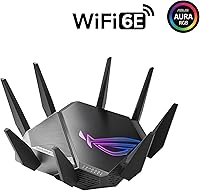
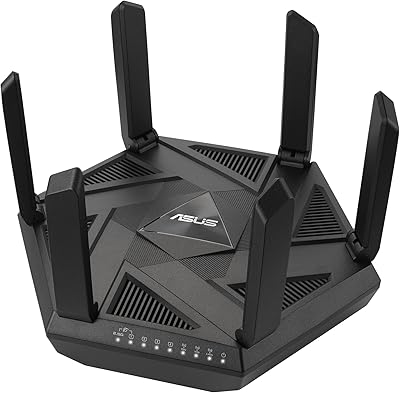
The ASUS ROG GT-AXE11000 WiFi 6E Gaming Router arrived as one of the first consumer routers to open up the 6GHz band — a meaningful step forward rather than just a spec bump. This is a premium machine built for enthusiasts who want the best available wireless technology, not casual users looking for something to plug in and forget. Physically, it commands attention: the aggressive ROG aesthetic, large footprint, and fixed antenna array make clear this is not subtle hardware. Since its 2021 debut, the Wi-Fi 6E market has matured, but the GT-AXE11000 still holds its ground as a capable flagship for demanding home networks — provided you can actually use what it offers.
Features & Benefits

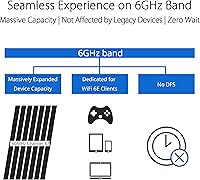
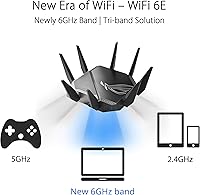
The addition of a dedicated 6GHz band is the headline here, and it matters for a specific reason: in apartments or neighborhoods packed with routers, the 5GHz and 2.4GHz channels are often congested. The 6GHz spectrum is largely clear of interference, which translates to lower, more consistent latency — something competitive gamers feel rather than just read about in benchmarks. The 2.5G WAN port is equally practical for anyone on a multi-gig internet plan, removing the bottleneck a standard gigabit connection would create. Triple-level Game Acceleration routes packets more efficiently from device to server, and the quad-core processor keeps performance stable even when a dozen devices are connected simultaneously. VPN Fusion and subscription-free AiProtection add real long-term value.

Best For

This Wi-Fi 6E gaming router makes the most sense for households where multiple people are competing for bandwidth at the same time — think simultaneous 4K streams, video calls, and online gaming on a single connection. Competitive gamers who are genuinely sensitive to ping spikes will appreciate the built-in traffic prioritization. If you have a multi-gig ISP plan or a NAS on your network, the 2.5G port finally gives you a path to actually use that speed. That said, you will get the most out of this router if you are comfortable in ASUSWRT — the firmware rewards patience but can frustrate plug-and-play buyers. It also serves as a strong AiMesh primary node for anyone expanding whole-home coverage.

User Feedback

Across roughly 110 ratings, the GT-AXE11000 lands at 4.1 out of 5 — solid, but the breakdown reveals a more nuanced picture. Strong wireless range and noticeably reduced gaming latency are the most frequently praised highlights, along with appreciation for the depth of configuration options available. On the other side, a meaningful portion of buyers found the setup process unintuitive, and some reported firmware instability in the router's early release window. Several users also discovered that the 6GHz band's full benefits required compatible client devices with updated drivers — a real-world limitation that caught some buyers off guard. A small number mentioned warmth and occasional fan noise under heavy loads as minor but genuine annoyances.

Pros

  • The dedicated 6GHz band delivers noticeably lower latency in congested wireless environments where 5GHz channels are crowded.
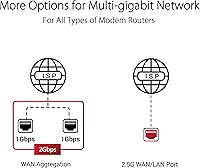
  • A 2.5G WAN port future-proofs the connection for multi-gig ISP plans that standard gigabit ports cannot fully utilize.
  • Triple-level Game Acceleration provides meaningful, real-world ping reductions for competitive online gaming sessions.
  • The quad-core processor handles a large number of simultaneous connected devices without obvious performance degradation.
  • VPN Fusion lets different devices run VPN and standard traffic at the same time — a genuinely rare and useful feature.
  • AiProtection network security is included without an ongoing subscription, which adds long-term value most rival routers charge extra for.
  • AiMesh compatibility makes this ROG router a strong foundation for expanding whole-home coverage without switching ecosystems.
  • Wireless range earns consistent praise from real buyers, covering larger homes without needing a separate access point.
  • The breadth of configuration options in ASUSWRT rewards advanced users who want granular control over their network.

Cons

  • Getting full value from the 6GHz band requires client devices with Wi-Fi 6E support and up-to-date drivers — many current devices still lack both.
  • The setup process is not beginner-friendly; users unfamiliar with router firmware have reported genuine frustration during initial configuration.
  • Early firmware versions shipped with stability issues that required updates to resolve, a poor first impression for a premium-tier product.
  • The 6GHz band has a shorter effective range than 5GHz, limiting its real-world utility to devices in closer proximity to the router.
  • The router runs warm under sustained heavy load, and the fan noise, while minor, is noticeable in quiet environments.
  • The large physical footprint and aggressive styling make it awkward to place discreetly in living spaces.
  • Buyers without a multi-gig internet plan or Wi-Fi 6E client devices will not access many of the features that justify the premium price tier.
  • Value perception among casual users is low; the hardware delivers most of its advantages only in specific, high-demand network scenarios.

Ratings

The scores below reflect an AI-driven analysis of verified global user reviews for the ASUS ROG GT-AXE11000 WiFi 6E Gaming Router, with spam, incentivized, and bot-generated feedback actively filtered out to preserve accuracy. Both the standout strengths and the recurring frustrations that real buyers encountered are factored into every category — nothing has been softened to protect the product's image. The result is an honest, data-grounded picture of where this ROG router genuinely excels and where it falls short of its premium positioning.

Wireless Performance
88%
Users consistently report that the GT-AXE11000 delivers strong, stable throughput across multiple devices simultaneously — a meaningful real-world benefit in households running 4K streams, cloud gaming, and video calls at the same time. The addition of the 6GHz band gives compatible devices a noticeably cleaner connection in apartment buildings and dense neighborhoods where 5GHz congestion is a persistent problem.
The 6GHz band's shorter physical range means devices more than a room or two away from the router rarely benefit from it, which limits its practical impact in larger homes. Users with older Wi-Fi 5 hardware see performance gains that are real but more modest than the headline specifications suggest.
Gaming Latency
83%
Competitive gamers report genuine, measurable ping reductions when Triple-level Game Acceleration is properly configured, with several buyers noting that mid-game lag spikes became less frequent after switching to this router. The device-to-server traffic prioritization makes a tangible difference during peak household usage hours when multiple users are active.
The latency improvements are most pronounced for users whose previous router was a budget or mid-range model — those upgrading from another premium gaming router may notice a smaller jump. If high ping originates from the ISP or game server side rather than local Wi-Fi, no amount of Game Acceleration will resolve it.
Setup & Ease of Use
54%
46%
The ASUSWRT interface gives technically confident users an exceptional level of control over traffic management, VPN routing, and network segmentation — more granular options than most competing gaming routers offer at any price. Once configured correctly, the system runs reliably without needing frequent intervention.
A recurring theme among buyers is that initial setup is genuinely difficult for users without prior router configuration experience, with several reporting hours spent troubleshooting before achieving a stable connection. The 6GHz network in particular caused confusion when it failed to appear on devices lacking updated Wi-Fi 6E drivers, a problem that was not clearly communicated during setup.
Range & Coverage
76%
24%
On the 2.4GHz and 5GHz bands, the GT-AXE11000 covers large single-family homes reliably, with buyers in two-story houses reporting solid signal on both floors without needing a separate access point. The fixed antenna array, while not adjustable, is well-engineered for broad coverage across the two legacy bands.
The 6GHz band's coverage is noticeably limited compared to 5GHz — walls and distance attenuate the signal quickly, which is a physics constraint rather than a design flaw but still disappoints buyers who expected uniform tri-band performance throughout their home. Buyers with very large or irregularly shaped homes will likely still need an AiMesh node to fill dead zones.
Feature Depth
91%
VPN Fusion is a standout capability that few routers at any price point offer — the ability to route specific devices through a VPN tunnel while others use a direct connection eliminates the usual all-or-nothing compromise. AiProtection, AiMesh compatibility, and the 2.5G port together form a feature set that remains competitive well beyond the router's launch date.
Many of the most powerful features require deliberate configuration within ASUSWRT, meaning casual users who never explore the firmware may effectively own a very expensive basic router. Some advanced features, like adaptive QoS and Game Acceleration, also require testing and tuning to deliver optimal results rather than working perfectly out of the box.
Build Quality
79%
21%
The physical construction feels appropriately premium for the price tier — the chassis is solid, connectors are tight, and the overall fit and finish matches the aggressive ROG aesthetic without feeling cheap or plasticky. Buyers who have owned multiple routers tend to note that it feels more substantial and purposefully engineered than most consumer alternatives.
The unit runs warm under sustained heavy load, and a subset of users in quiet office or bedroom environments found the fan audible enough to be distracting. The large footprint and bold styling are intentional design choices but make it awkward to place discreetly in living rooms or entertainment centers.
2.5G Port Utility
72%
28%
For users with multi-gigabit ISP plans or a NAS device on their local network, the 2.5G port removes a bottleneck that every standard gigabit router imposes, and buyers who can leverage it describe it as one of the most practically impactful hardware inclusions on the device. It is also configurable for LAN use, giving it additional flexibility beyond just WAN connectivity.
The majority of buyers currently cannot take advantage of this port because their ISP delivers standard gigabit speeds or below, making it a feature that justifies future-proofing the purchase rather than delivering immediate value. Only one 2.5G port is included, so users with both a multi-gig modem and a high-speed NAS must choose which device benefits.
Value for Money
61%
39%
For enthusiast buyers who check every box — Wi-Fi 6E client devices, a multi-gig ISP plan, competitive gaming habits, and comfort with advanced firmware — the GT-AXE11000 delivers a cohesive high-performance package that justifies its premium positioning. The absence of subscription fees for AiProtection also improves the long-term value calculation compared to routers that charge ongoing security fees.
Casual users or those without Wi-Fi 6E devices frequently report that they are paying a significant premium for features they simply cannot access, making the value proposition feel weak in retrospect. As the Wi-Fi 6E router market has matured since the product's 2021 launch, newer competitors now offer comparable or stronger specs at lower price points.
Software Stability
58%
42%
After several firmware update cycles, the ASUSWRT software on the GT-AXE11000 has improved considerably from its early release state, and buyers who purchased well after launch generally report a more stable experience than day-one adopters encountered. ASUS has a reasonable track record of pushing meaningful firmware updates for its ROG router line.
Early buyers documented real firmware instability — dropped connections, 6GHz band disappearances, and interface bugs — that eroded confidence in the platform during the critical post-purchase period. Even current owners occasionally report that specific features behave inconsistently after firmware updates, requiring a reset or reconfiguration to resolve.
Client Device Compatibility
63%
37%
The router handles a wide mix of legacy and modern devices across its three bands without meaningful conflict, and most users with a typical mix of phones, laptops, and smart home devices find that everything connects reliably on 2.4GHz or 5GHz without manual intervention.
The 6GHz band requires clients with both Wi-Fi 6E hardware support and fully updated drivers — a combination that excluded a large share of buyers' existing devices at launch and still excludes many today. Several users discovered this limitation only after purchase, and the setup process did not surface the compatibility requirement clearly enough to prevent the disappointment.
Thermal Management
67%
33%
The internal cooling system does its job adequately under typical mixed-use loads, and the router does not throttle performance during sustained gaming or streaming sessions the way undercooled budget routers sometimes do. Buyers who give it open shelf space with adequate airflow report no thermal-related issues over extended periods.
Under heavy sustained load — particularly when VPN tunnels and AiProtection are both active simultaneously — the chassis gets noticeably warm, and the fan ramps up audibly. A small but vocal group of buyers flagged this as unexpected behavior for a device meant to run continuously in a home environment.
Mesh Networking
82%
18%
As an AiMesh primary node, the GT-AXE11000 performs confidently, providing enough wireless capacity to support multiple satellite nodes without the backhaul link becoming a bottleneck. Users building out a whole-home ASUS mesh system consistently identify it as a capable and reliable anchor device.
AiMesh performance depends heavily on the quality of the secondary nodes chosen, and the configuration process for multi-node setups adds another layer of complexity on top of an already demanding firmware. Users who switch to AiMesh from a simpler mesh system like Eero frequently describe the experience as significantly more involved.

Suitable for:

The ASUS ROG GT-AXE11000 WiFi 6E Gaming Router is genuinely well-matched for households where network demand is high and unrelenting — multiple people streaming in 4K, jumping on video calls, and gaming online at the same time without wanting to negotiate for bandwidth. Competitive and enthusiast gamers who actually notice the difference between a 20ms and 40ms ping will find the built-in traffic prioritization and Game Acceleration features worth having baked into the hardware rather than fiddled with manually. If your ISP delivers multi-gigabit speeds, the 2.5G port is one of the few consumer router connections that won't immediately become your bottleneck. Power users comfortable spending time in the ASUSWRT firmware interface will unlock a deep feature set — VPN Fusion alone is a standout for anyone who needs to split VPN and regular traffic across different devices. It also makes a strong anchor node for anyone building out an AiMesh whole-home network who wants the primary router to be capable enough to never be the weak link.
Not suitable for:

For buyers who just want reliable whole-home Wi-Fi without any technical involvement, this Wi-Fi 6E gaming router is probably more router than the situation calls for. The ASUSWRT firmware is powerful but not intuitive for first-time router owners, and the initial setup has frustrated a notable share of buyers who expected a plug-and-play experience. The 6GHz band — the product's most distinctive feature — requires that your devices actually support Wi-Fi 6E with current drivers, and many laptops, phones, and game consoles still do not, which means the headline specification goes unused for a large portion of a typical home device lineup. The physical size is also worth considering; this is a large, angular piece of hardware that does not blend into a living room shelf. Renters in small apartments, users with basic gigabit-or-under internet plans, or anyone on a tighter budget who does not game competitively will find more practical value elsewhere.

Specifications

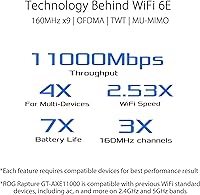
  • Wi-Fi Standard: This router operates on the 802.11ax (Wi-Fi 6E) standard, the first generation to include the 6GHz frequency band alongside the established 2.4GHz and 5GHz bands.
  • Frequency Bands: Tri-band configuration covers 2.4GHz, 5GHz, and 6GHz simultaneously, allowing devices to be distributed across three separate wireless channels.
  • Max Combined Speed: Aggregate theoretical throughput reaches up to 11000 Mbps across all three bands combined under ideal conditions.
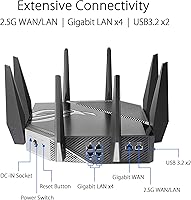
  • WAN/LAN Port: A 2.5G multi-gig port serves as both WAN and LAN, supporting internet connections and local network transfers well beyond the 1Gbps ceiling of standard gigabit ports.
  • Processor: A quad-core CPU handles routing, security, and traffic management tasks, maintaining stable performance across a large number of simultaneously connected devices.
  • Antennas: The router uses a fixed external antenna array; antennas are not detachable or repositionable, so physical placement of the unit itself determines signal directionality.
  • Dimensions: The unit measures 12.9 x 12.9 x 7.1 inches, making it a large-footprint device that requires dedicated shelf or desk space.
  • Weight: At 3.9 pounds, the GT-AXE11000 is heavier than typical consumer routers, which is consistent with its larger chassis and internal cooling system.
  • Security: AiProtection network security is included without any recurring subscription fee, covering malicious site blocking, intrusion detection, and vulnerability protection.
  • VPN Support: VPN Fusion allows the router to run a VPN tunnel and standard unencrypted traffic simultaneously, so different devices on the same network can operate under different connection rules.
  • Mesh Compatibility: The router is fully compatible with ASUS AiMesh, functioning as a primary node in a multi-unit whole-home mesh network alongside other AiMesh-capable ASUS routers.
  • Game Acceleration: Triple-level Game Acceleration optimizes traffic routing at the device, router, and server level to reduce latency and packet loss during online gaming sessions.
  • Power Input: The unit accepts AC input of 110V to 240V at 50 to 60Hz, making it compatible with standard power outlets across most regions worldwide.
  • Color: Available in black, consistent with the aggressive ROG gaming aesthetic that defines the physical design language of the product line.
  • Model Number: The official model designation is GT-AXE11000, which identifies this specific SKU within the ASUS ROG Rapture router family.

Related Reviews
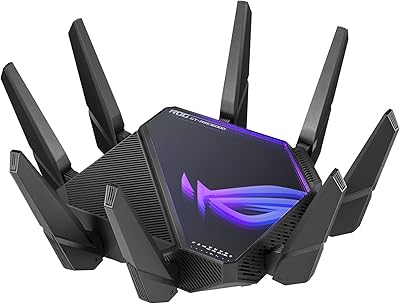
ASUS ROG GT-AXE16000 WiFi 6E Gaming Router
79%
93%
Wireless Performance
91%
Wired Connectivity
88%
Setup & Ease of Use
86%
Gaming-Specific Features
89%
Security & Privacy
More
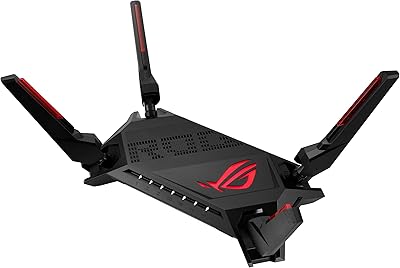
ASUS ROG Rapture GT-AX6000 WiFi 6 Gaming Router
86%
94%
Gaming Performance
91%
Connection Stability
78%
Setup/Installation Ease
88%
Value for Money
85%
Build Quality
More
ASUS ROG Rapture GT-BE98 Pro
81%
93%
Wireless Performance
91%
Wired Connectivity
89%
Gaming Performance
78%
Setup & App Experience
86%
Build Quality & Design
More
ASUS ROG Rapture GT-AX11000 Pro
77%
91%
Wireless Performance
93%
Wired Port Flexibility
82%
Gaming Features
61%
Setup & Configuration
89%
Network Security
More
ASUS ROG Strix X670E-A Gaming WiFi 6E Motherboard
88%
94%
Performance
91%
Cooling Efficiency
88%
Overclocking Capability
93%
Build Quality
90%
WiFi & Networking Speed
More
ASUS ROG Strix Z790-F Gaming Motherboard

81%
93%
VRM & Power Delivery
89%
BIOS Experience
91%
Build Quality & Component Grade
88%
M.2 Storage Expandability
86%
Networking Performance
More
ASUS ROG Rapture GT6 WiFi 6 Mesh Router
81%
91%
Wireless Performance
88%
Gaming Latency
84%
Coverage & Range
83%
Setup & App Experience
71%
Mesh Roaming
More
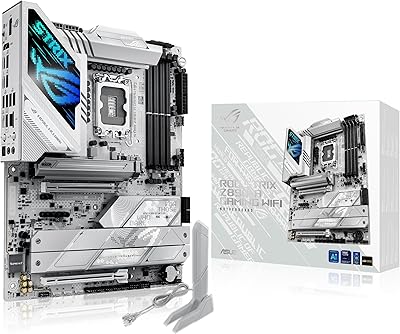
ASUS ROG STRIX Z890-A GAMING WIFI
91%
96%
Performance Stability
94%
Overclocking Capability
92%
Thermal Management
90%
Build Quality
88%
Ease of Installation
More
ASUS RT-AXE7800 Tri-Band WiFi 6E Router
79%
88%
Wireless Performance
83%
Setup & Installation
79%
Signal Range & Coverage
91%
Network Security
84%
Parental Controls
More
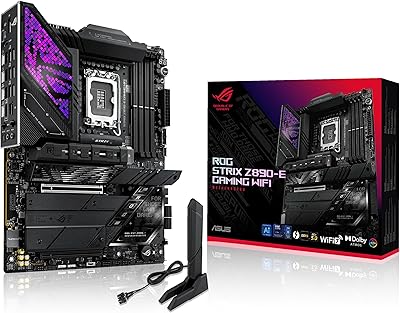
ASUS ROG Strix Z890-E Gaming WiFi
87%
92%
Performance
88%
Build Quality
84%
Ease of Installation
91%
Cooling Efficiency
89%
Connectivity Options
More

FAQ

Not entirely, but you do need Wi-Fi 6E compatible devices to use the 6GHz band specifically. Your older Wi-Fi 5 and Wi-Fi 6 devices will still connect on the 2.4GHz and 5GHz bands as normal. The practical upside is that if you have even a few newer 6E-capable devices, they can offload onto the cleaner 6GHz band while everything else uses the traditional channels without fighting for the same airspace.

It depends on your comfort level. The ASUSWRT firmware is one of the most feature-rich interfaces available on a consumer router, but that depth comes with a steeper initial learning curve than something like a Google Nest or Eero. Basic setup — plugging it in and getting online — is straightforward enough. Where it gets more involved is configuring Game Acceleration, VPN Fusion, or AiMesh, which rewards patience and a willingness to read through settings menus.

Probably not as well as 5GHz would. The 6GHz band trades range for speed and cleanliness — higher frequency signals lose strength through walls and over distance more quickly. If your goal is coverage for a device right next to or in the same room as the router, 6GHz is excellent. For devices on the other side of a multi-story home, the 5GHz band will serve you better.

Yes, and it is well-suited for that role. The GT-AXE11000 works as a primary AiMesh node with compatible ASUS routers acting as satellite nodes throughout your home. Because it has the processing power and wireless capacity to handle the backhaul and client traffic simultaneously, it makes a solid anchor for a larger mesh setup without becoming a bottleneck.

For many users, yes — but the source of your latency matters. If your ping problems come from network congestion on your local Wi-Fi, the combination of the 6GHz band and Game Acceleration can make a real, noticeable difference. If your latency issues are on the ISP or server side, no router will fix that. The built-in traffic prioritization helps ensure game packets get preferential treatment over other household traffic, which smooths things out during peak household usage.

VPN Fusion lets the router run a VPN connection and a regular internet connection at the same time, routing specific devices through the VPN while others connect normally. Most people do not need it, but it is genuinely useful if, for example, you want your work laptop on a VPN while your gaming PC uses a direct connection for lower latency. It is one of those features that sounds niche but becomes hard to live without once you have used it.

It does run warm under sustained load, which is not unusual for a router with this level of processing capability. A small number of users have noted the fan noise in very quiet environments, though most describe it as a minor annoyance rather than a serious problem. Giving the router adequate clearance and keeping it out of enclosed spaces helps manage heat effectively.

The 2.5G port is configurable for both WAN and LAN use. As a WAN port it connects to your modem or ISP gateway for faster-than-gigabit internet throughput. As a LAN port it is useful for connecting a NAS or a desktop PC that can actually push or pull data at multi-gig speeds. Most users run it as WAN, but the flexibility to use it on the LAN side is a practical bonus.

This is a common issue and usually comes down to your device's Wi-Fi adapter and driver support. Wi-Fi 6E on Windows, in particular, required driver updates that rolled out gradually through 2022 and into 2023. Check with your laptop or wireless adapter manufacturer for the latest Wi-Fi 6E driver. Some older hardware simply does not support 6GHz regardless of driver updates, in which case your device will continue connecting on 5GHz or 2.4GHz without any issue.

It is a legitimate feature backed by Trend Micro technology. AiProtection covers malicious site blocking, two-way intrusion prevention, and infected device quarantine — the kind of protection that would cost a recurring fee on many competing routers. It is not a replacement for endpoint security software on your individual devices, but as a network-level layer of defense with no ongoing cost, it adds real value over the life of the router.

Where to Buy