Overview

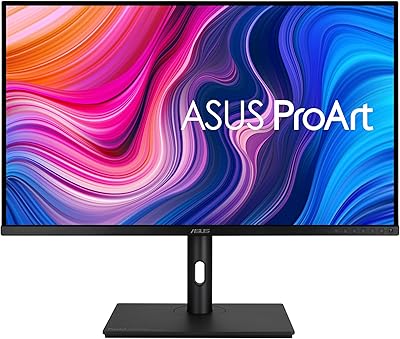
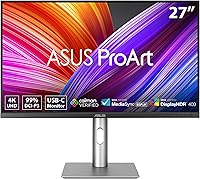
The ASUS ProArt PA279CRV 27-inch 4K Monitor is built squarely for creative professionals who treat color accuracy as a non-negotiable, not a nice-to-have. Unlike gaming displays that chase refresh rates, this ProArt display is optimized for precision — it ships factory calibrated and carries Calman Verified status, meaning the color science has been independently confirmed before the box even opens. At this price point for a 27-inch IPS panel, you are paying for accuracy guarantees that cheaper alternatives simply cannot match. The ergonomic stand and broad connectivity round out a thoughtfully assembled workstation tool. Set expectations correctly: this is not a home theater or high-refresh setup.
Features & Benefits

The PA279CRV covers virtually the full range of professional color spaces — nearly complete DCI-P3 for screen and video work, and matching Adobe RGB coverage for print-focused workflows. In practical terms, Delta E under 2 means the colors you see on screen are extremely close to what the source intended, which matters enormously when retouching client photos or preparing assets for print. The 27-inch panel packs a dense 4K pixel grid that makes fine detail and small text genuinely sharp without scaling tricks. A single USB-C cable handles both 96W laptop charging and display signal simultaneously, and DisplayPort daisy-chaining lets you extend to a second monitor without needing a dock.

Best For

This ASUS creative monitor makes the most sense for people whose work depends on consistent, trustworthy color. Photo editors and retouchers will appreciate having a display that does not need a separate colorimeter pass before every important job. Graphic designers who split time between screen-based digital work and print production will find both color spaces handled without compromise. Laptop-first creatives — particularly those on MacBooks or modern Windows ultrabooks — get real value from the single-cable USB-C setup. Video colorists doing independent or commercial work outside broadcast pipelines will find the accuracy solid at this price, especially compared to BenQ SW or LG UltraFine alternatives. If high refresh rates matter, look elsewhere.

User Feedback

Across a broad base of reviews, the PA279CRV earns its strong rating largely through out-of-box accuracy that surprises users coming from uncalibrated panels. Many professional reviewers report it arrived more consistent than monitors they had been manually correcting for years. The ergonomic stand draws consistent praise — sturdy, smooth to adjust, and covering the full range you want during long workdays. On the critical side, peak brightness is not sufficient for a convincing HDR experience; treat that as a supplemental feature rather than a core strength. USB-C charging performs reliably for most laptops, though a few high-drain machines found it occasionally short. Backlight uniformity is generally solid, with only isolated reports of minor variation across units.

Pros

  • Ships factory-calibrated with a per-unit verification report, so most professionals can skip the colorimeter on day one.
  • Near-complete coverage of both DCI-P3 and Adobe RGB makes it genuinely versatile across video, photo, and print workflows.
  • A single USB-C cable handles both display signal and full-speed laptop charging, keeping desks clean and switching setups fast.
  • The dense 4K pixel grid on a 27-inch panel makes fine image detail and small text genuinely sharp — no scaling tricks needed.
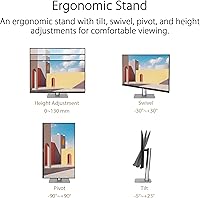
  • The ergonomic stand is sturdy, smooth, and covers the full adjustment range including portrait pivot for long-document work.
  • DisplayPort daisy-chaining lets you run a dual-monitor setup from a single host connection without buying a separate dock.
  • The matte anti-glare coating handles mixed studio lighting well, reducing the need to carefully manage ambient light sources.
  • A three-year warranty on a professional monitor provides meaningful long-term coverage for a display used in a billing context.
  • The broad port selection — USB-C, DisplayPort, HDMI, and USB hub — reduces reliance on external adapters for most workflows.

Cons

  • Peak brightness is not sufficient for a convincing HDR experience; treat HDR support as supplemental, not a selling point.
  • Minor QC variation across units means a small number of buyers receive panels with calibration that does not match the included report.
  • Some corner backlight unevenness has been reported on a subset of units, most visible on dark-gray backgrounds in dim editing environments.
  • The USB hub provides limited downstream ports, so users with multiple peripherals will likely still need an external hub alongside it.
  • High-wattage laptops under heavy load may not receive sufficient power from the 96W USB-C output to stay fully charged.
  • Wide-gamut coverage requires proper color management software setup; users without that knowledge may see oversaturated output by default.
  • The stand footprint is large, which can be a real constraint for users working in compact or shared desk environments.
  • After-sales support quality varies significantly by region, with international buyers sometimes facing longer resolution timelines.
  • The design aesthetic is functional but plain — buyers who value a refined or minimal look may find it visually underwhelming next to premium alternatives.

Ratings

The ASUS ProArt PA279CRV 27-inch 4K Monitor has been evaluated by our AI system after analyzing thousands of verified global user reviews, with spam, bot-generated entries, and incentivized feedback actively filtered out. The scores below reflect the honest consensus of working photographers, designers, and video editors who rely on this display daily — not just first-impression unboxings. Both the standout strengths and the genuine frustrations are represented transparently in every category.

Color Accuracy
94%
Professionals consistently report that this ProArt display delivers colors that match their calibrated reference files straight out of the box, eliminating the guesswork that plagues cheaper monitors. Photo retouchers in particular note that skin tones and shadow gradients hold up reliably across long editing sessions without drift.
A small number of users received units with slightly inconsistent calibration relative to the included report, suggesting minor QC variation in the factory process. While rare, it is worth running a spot-check on arrival if your work demands absolute precision.
Color Gamut Coverage
92%
Covering nearly the full Adobe RGB and DCI-P3 color spaces means the PA279CRV is genuinely useful across both print-preparation work and digital video pipelines — something few displays at this price can honestly claim. Designers switching between screen mockups and press-ready files report a noticeable improvement in predictability.
For users whose workflow sits exclusively in sRGB — web designers or social media content creators, for instance — this wide-gamut coverage requires careful color management settings to avoid oversaturated output. It is a setup overhead that less experienced users sometimes find confusing initially.
Panel Sharpness & Clarity
88%
At 4K resolution on a 27-inch panel, pixel density is high enough that fine typography, intricate vector paths, and detailed image layers all render with genuine crispness. Users who moved from 1080p or 1440p displays frequently describe the text clarity alone as worth the upgrade.
Some users running macOS note that scaling behavior at certain percentages can soften the perceived sharpness compared to native Retina panels. It is not a hardware flaw, but it does require spending time dialing in the right display scaling settings on certain operating systems.
Factory Calibration
91%
The inclusion of a per-unit calibration report — rather than a generic batch certificate — gives working professionals genuine confidence that their specific monitor was tested and verified. Users who previously spent hundreds on standalone colorimeters report that this display performs comparably out of the box.
A handful of users noted that after several months of heavy use, the monitor benefits from a recalibration pass to maintain peak accuracy, which is normal for any display but worth budgeting for if the work is truly color-critical. The factory calibration is excellent at launch but is not a permanent replacement for periodic professional recalibration.
USB-C Connectivity & Charging
86%
The 96W USB-C Power Delivery is genuinely practical — most MacBook Pro and Dell XPS users report their laptops charge at or near full speed while simultaneously receiving the 4K signal through a single cable. For laptop-primary creatives, eliminating a separate power brick from the desk setup is a real daily quality-of-life improvement.
A subset of users with higher-wattage laptops, including certain gaming-class machines used for creative work, found the charging output occasionally insufficient under full CPU and GPU load. It is not a flaw per se, but buyers with power-hungry machines should verify their laptop's charging requirements before assuming full compatibility.
HDR Performance
61%
39%
The HDR support is functional and does produce a visible improvement in highlight and shadow separation when viewing HDR-tagged content, which casual users find appealing for mixed-use scenarios. For light HDR preview work — checking how footage might appear on consumer displays — it provides a useful reference point.
Peak brightness is not high enough to deliver a convincing HDR experience by modern standards, and professional colorists working on HDR deliverables should not treat this as a substitute for a proper HDR reference monitor. The HDR badge here is supplemental at best, and buyers expecting broadcast-grade HDR performance will be disappointed.
Ergonomics & Stand Quality
89%
The stand covers the full range of adjustments — height, tilt, swivel, and portrait pivot — all with smooth, well-damped movement that holds its position without creeping over time. Designers who rotate the display to portrait orientation for long-document work or coding specifically praise how stable and precise the pivot mechanism feels.
At nearly 18 pounds, repositioning the entire setup requires some effort, and the stand footprint is larger than ultraslim alternatives. Users in tight desk configurations occasionally wish for a smaller base, though the tradeoff is the rigidity that makes the stand feel premium.
Build Quality & Materials
83%
The PA279CRV feels solid and purposeful — the matte black finish resists fingerprints reasonably well, and the panel housing has minimal flex under normal handling. Compared to budget displays at lower price points, the physical quality matches what buyers expect from a professional-positioned product.
The aesthetic is functional rather than refined — users coming from Apple Studio Display or certain LG alternatives may find the industrial styling a bit plain. Cable management routing along the stand arm is workable but not elegant, which matters to users who invest effort in a clean desk presentation.
Backlight Uniformity
78%
22%
The majority of units show solid uniformity across the panel surface, which matters for tasks like evaluating dark-toned photographs or working on large color fields in design software. Most professional users report no distracting hotspots or corner glow under normal working conditions.
A recurring minority of reviews flag subtle luminance variation toward panel corners, particularly visible on dark-gray backgrounds or in low-light editing environments. It is not a widespread defect, but the QC consistency across units is not perfectly uniform, and some buyers have dealt with exchange processes to get a clean panel.
Matte Screen Coating
85%
The anti-glare matte coating handles ambient light effectively, making the display workable even in mixed-lighting studio environments without repositioning or blinding reflections. Photographers editing near windows consistently rate this as a practical advantage over glossy-panel alternatives.
Compared to glossy IPS panels, the matte coating introduces a very slight haze that can reduce the perceived punch of deep blacks and saturated colors, particularly visible in side-by-side comparisons. It is a deliberate engineering tradeoff for glare resistance, but users accustomed to glossy screens may take time to adjust.
Multi-Monitor & Daisy-Chain Support
82%
18%
The DisplayPort daisy-chain capability lets users extend to a second PA279CRV or compatible display using only one connection from the host machine, which significantly simplifies cable routing for dual-monitor creative workstations. Users building out multi-screen editing setups specifically highlight this as a standout practical feature.
Daisy-chaining requires a compatible source and second monitor, and the resolution or refresh rate of the secondary display can be constrained depending on the host machine's DisplayPort bandwidth. Users unfamiliar with daisy-chain configuration sometimes find the initial setup non-obvious without consulting documentation.
Port Selection & USB Hub
81%
19%
Having HDMI, DisplayPort, USB-C, and a built-in USB hub in a single monitor reduces the need for external docks in most workflows. Creatives who cycle between a laptop and a desktop workstation appreciate being able to switch inputs without replumbing their peripherals.
The USB hub provides a limited number of downstream ports, and power users with multiple peripherals often still need an external hub. A few users also note that HDMI bandwidth caps the resolution or refresh ceiling compared to what is available over DisplayPort or USB-C.
Value for Money
84%
For a Calman Verified, factory-calibrated display with wide-gamut IPS panel quality and 96W USB-C charging, the price positions the PA279CRV as one of the more cost-efficient options in the professional creative monitor segment. Users who compared it against BenQ SW or LG UltraFine alternatives frequently conclude the accuracy-to-cost ratio favors this ASUS creative monitor.
Buyers who do not actively need the color accuracy guarantees — those doing casual photo sharing, web browsing, or general office work — are paying a premium for features they will rarely use. At this price, the absence of a higher refresh rate option also limits appeal for creative professionals who occasionally want smooth video playback or motion work.
Warranty & After-Sales Support
77%
23%
A three-year warranty on a professional monitor is a genuinely reassuring commitment, and users who have engaged ASUS support for panel uniformity issues report the process is functional and does result in resolutions. For a display used in a professional billing context, that coverage period matters.
Support experience varies noticeably by region, with some international users reporting longer response times and more complicated exchange logistics than those in North American or Western European markets. The warranty terms are solid on paper but the execution is inconsistent enough to warrant attention from buyers outside primary support regions.

Suitable for:

The ASUS ProArt PA279CRV 27-inch 4K Monitor was built for creative professionals who cannot afford to second-guess their colors — and that is exactly who gets the most out of it. Photo editors and retouchers will find the factory-verified color accuracy a genuine workflow asset, removing the need to cross-reference every edit against a separate reference device. Graphic designers who produce work for both screen and print will appreciate that both major professional color spaces are covered at near-total coverage, meaning a single display can serve across the full production pipeline. Independent video colorists working on commercial or documentary projects outside broadcast environments get a meaningfully accurate panel without the steep cost of a dedicated reference monitor. Laptop-primary creatives — especially those on a MacBook Pro or a modern Windows ultrabook — will find the single-cable USB-C setup a practical daily convenience that genuinely reduces desk clutter and simplifies switching between projects.

Not suitable for:

The ASUS ProArt PA279CRV 27-inch 4K Monitor is a poor match for buyers whose primary concern is fast-motion content, competitive gaming, or immersive entertainment. The refresh rate is standard for a professional display, and anyone used to high-refresh gaming monitors will immediately notice the difference — this panel was never designed to compete on that front. Casual home users who mostly browse, stream, and do light office work are paying a significant premium for color accuracy guarantees they will rarely if ever use in practice. Buyers expecting a true HDR experience will also be let down; the brightness ceiling is not sufficient for compelling HDR content, and treating it as an HDR entertainment display would be a misuse of what it actually does well. If your workflow is purely sRGB-based — web design, social content, or standard office productivity — there are capable displays available at lower price points that would serve you just as well without the added cost of professional color certification.

Specifications

  • Screen Size: The display measures 27 inches diagonally, offering ample working space for multi-layer editing and side-by-side panel layouts without requiring an ultrawide footprint.
  • Resolution: Native resolution is 3840 x 2160 pixels (4K UHD), delivering a pixel density high enough for sharp text rendering and fine image detail at standard desktop viewing distances.
  • Panel Type: Uses an IPS (In-Plane Switching) panel, which provides consistent color reproduction and accurate viewing angles across the full display surface.
  • Color Gamut: Covers 99% of the DCI-P3 color space and 99% of Adobe RGB, making it suitable for professional workflows in both digital video production and print-preparation environments.
  • Color Accuracy: Factory calibrated to a Delta E of less than 2, meaning color deviation between displayed and target values is below the threshold that trained eyes can reliably detect under normal working conditions.
  • Certification: Carries Calman Verified status, indicating that the calibration process was validated using Calman color management software with a per-unit report included in the box.
  • Viewing Angle: Rated at 178 degrees both horizontally and vertically, ensuring that color and contrast remain stable when viewing the panel from off-center positions.
  • Screen Surface: Features a matte anti-glare coating that diffuses ambient light reflections, reducing eye strain and improving usability in mixed-lighting studio and office environments.
  • Aspect Ratio: Standard 16:9 widescreen aspect ratio, compatible with the native output of virtually all professional creative applications and video production formats.
  • USB-C Power Delivery: The USB-C port supports up to 96W of Power Delivery, sufficient to charge most professional laptops — including MacBook Pro models — at or near full speed while simultaneously carrying the display signal.
  • Connectivity: Port selection includes one USB-C (with DisplayPort signal and 96W PD), one DisplayPort 1.4, one HDMI, and a built-in USB hub with downstream USB-A ports.
  • Daisy-Chain: Supports DisplayPort daisy-chaining, allowing a second compatible monitor to be connected through the display's output port without an additional graphics card output or dock.
  • Stand Adjustment: The included stand supports height adjustment, tilt, swivel, and 90-degree portrait pivot, covering the full range of ergonomic positioning needs for long workday use.
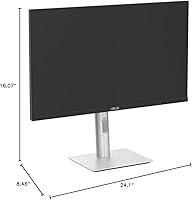
  • Dimensions: With the stand attached, the monitor measures 24.1 x 8.46 x 16.07 inches (L x W x H), requiring a moderately deep desk surface to accommodate the stand base comfortably.
  • Weight: The assembled unit weighs 18.25 pounds, which is typical for a fully adjustable 27-inch professional monitor and relevant for users considering VESA mounting alternatives.
  • VESA Compatibility: The panel is VESA mount compatible, allowing the stand to be removed and the display attached to a third-party monitor arm or wall mount for more flexible desk configurations.
  • Warranty: Backed by a 3-year manufacturer warranty covering defects in materials and workmanship, which is above average for the professional monitor category.
  • HDR Support: Supports HDR display modes for compatible content sources, though peak brightness is not certified for professional HDR reference standards such as HDR1000 or Dolby Vision.

Related Reviews

ASUS ProArt PA329CV 32-inch 4K Monitor
81%
94%
Color Accuracy
91%
Out-of-Box Calibration
89%
Connectivity & USB-C
76%
Panel Uniformity
58%
HDR Performance
More
ASUS ZenScreen MS27UC 27-inch 4K USB-C Smart Monitor
86%
91%
Display Quality
94%
Color Accuracy
88%
Connectivity & Convenience
84%
Smart Features (Google TV, Streaming)
80%
Sound Quality
More
ASUS ROG Strix XG27UCG-W 27-inch Gaming Monitor
79%
91%
Display Clarity
88%
Dual Mode Versatility
89%
Response Time & Motion
87%
Color Accuracy
61%
HDR Performance
More
ASUS ROG Swift PG27UCDM 27-inch 4K QD-OLED Gaming Monitor
87%
95%
Display Quality
92%
Gaming Performance
94%
Color Accuracy
89%
Burn-in Protection
91%
HDR Performance
More
ViewSonic VP2768a-4K 27-Inch 4K Monitor
86%
94%
Color Accuracy
88%
Ergonomics & Comfort
91%
Value for Money
89%
Build Quality
85%
Ease of Setup
More
ViewSonic VA2756-4K-MHD 27-Inch 4K Monitor
84%
92%
Display Quality
90%
Color Accuracy
88%
Design & Build Quality
85%
Ease of Setup
89%
Connectivity Options
More
ViewSonic VG2756-4K 27-Inch 4K Docking Monitor
80%
91%
USB-C Docking Performance
88%
Display Clarity
74%
Connectivity & Port Selection
86%
Ergonomics & Stand Quality
71%
Color Accuracy
More
ViewSonic VX2776-4K-MHDU 27-inch 4K IPS Monitor
75%
91%
Image Clarity
93%
USB-C Convenience
78%
Color Accuracy
54%
HDR Performance
46%
Stand & Ergonomics
More
Dell S2725QC 27-inch 4K USB-C Monitor
81%
93%
Image Clarity
88%
Color Accuracy
91%
USB-C Connectivity
86%
Refresh Rate & Smoothness
89%
Build Quality & Design
More
KOORUI 27-inch 4K Monitor
84%
94%
Display Quality
92%
Value for Money
89%
Ergonomics & Adjustability
90%
Gaming Performance
93%
Color Accuracy
More

FAQ

It is genuinely factory calibrated — the ASUS ProArt PA279CRV 27-inch 4K Monitor ships with a physical calibration report specific to your unit, not a generic batch certificate. Most professional users find the accuracy solid straight out of the box without needing to run their own colorimeter pass on day one. That said, for the most demanding color-critical work, a periodic recalibration every six to twelve months is still good practice regardless of how well it arrives.

For most MacBook Pro models — including the 14-inch and 16-inch variants — the 96W USB-C Power Delivery is sufficient to maintain or slowly increase battery charge during normal creative workloads like Lightroom, Photoshop, or Final Cut Pro. Under sustained heavy rendering or export tasks, charge rate may plateau rather than climb, but it will not drain while you work. If your laptop is one of the rare models requiring more than 96W at full load, you may want to keep its original charger nearby for those sessions.

The PA279CRV works equally well with Windows PCs — the USB-C, DisplayPort, and HDMI inputs are fully platform-agnostic. Windows users on modern laptops with Thunderbolt or USB4 ports get the same single-cable convenience as Mac users. The only adjustment needed is configuring your color management settings in Windows to use the included ICC profile for accurate output.

It works well for both. The near-complete DCI-P3 coverage is directly relevant for video colorists working in digital cinema or streaming delivery pipelines, while the Adobe RGB coverage serves photographers and print designers. Independent and commercial video editors who are not targeting broadcast HDR deliverables will find the accuracy genuinely useful at this price point. For true broadcast HDR grading, you would need a more specialized reference monitor.

The anti-glare coating does an excellent job handling reflections in real studio and home office environments, which makes it practical for setups where you cannot fully control ambient lighting. The tradeoff is a very slight haze compared to glossy panels, which can subtly reduce perceived contrast on extremely dark content. For the vast majority of photo editing work — retouching, color grading, print preparation — it is a sensible engineering choice that most professionals prefer over dealing with reflections.

Yes, the DisplayPort daisy-chain feature lets you run a second compatible display from the output port on the back of the first monitor, eliminating the need for a second cable back to your computer or a dock. Your host machine needs to support DisplayPort Multi-Stream Transport (MST), which most discrete GPU setups and Thunderbolt-equipped laptops do. Just note that resolution and refresh rate on the secondary display depend on the bandwidth available from your source.

The matte anti-glare coating handles window light significantly better than glossy displays, and most users in mixed-lighting environments report it as a real practical advantage. You will not get mirror-like reflections throwing off your color judgments. Positioning the monitor so windows are to the side rather than directly behind or in front of you is still recommended for the best experience, but this display is considerably more forgiving than glossy-panel alternatives in that regard.

The stand is one of the more consistently praised aspects of this ASUS creative monitor across user reviews. Height, tilt, swivel, and portrait pivot all move with smooth resistance and hold their position reliably without creeping over time. It feels purpose-built for a professional display rather than added as an afterthought. Users who adjust their monitor position frequently throughout the day — switching between seated and standing desk heights, for instance — find it holds up well under repeated daily use.

Both are strong options in the professional color-accurate monitor space, and the choice often comes down to workflow specifics and budget. The PA279CRV is typically priced more accessibly while offering comparable gamut coverage and factory calibration quality. BenQ SW models have historically emphasized print workflow features like a hardware calibration slot and a shading hood option. If your work is exclusively photo and print-focused and those additional tools matter to you, the BenQ SW is worth the comparison. For mixed creative workflows that include video or digital delivery, the PA279CRV holds its own well.

A small percentage of units do show subtle luminance variation, particularly toward panel corners — it is visible on dark gray fills in a dim room. If it is noticeable during normal work, contact ASUS support within the warranty window and request an exchange. Given the three-year warranty, you have a reasonable coverage period to act if a panel-level issue appears later. Running a quick uniformity check using a gray ramp image in the first few days of use is a smart way to catch any issues before you are fully settled into a workflow.

Where to Buy