Overview

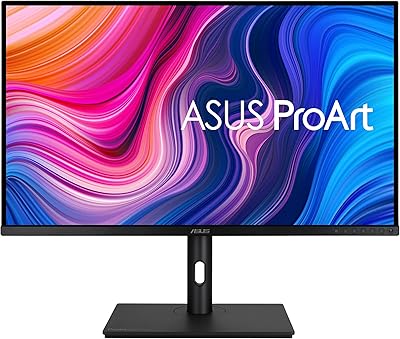
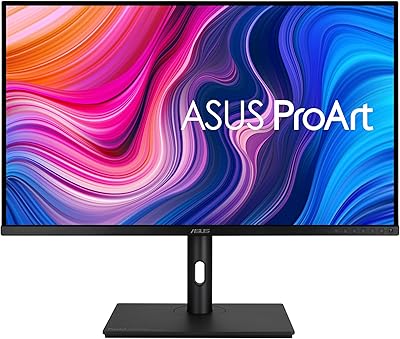
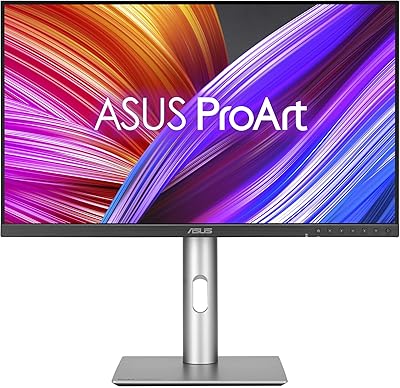
The ASUS ProArt PA247CV 23.8-inch Monitor sits in an interesting spot — professional enough to satisfy color-critical work, yet priced accessibly enough that it doesn't demand a major budget commitment. ASUS built the ProArt line specifically for designers and photographers who need trustworthy color reproduction, and this display backs that up with Calman Verified calibration performed at the factory — not a claim you have to take on faith. The compact footprint fits comfortably on most desks without dominating the workspace. One thing worth stating plainly upfront: at this screen size, Full HD resolution is a real trade-off. Pixel density isn't exceptional, and anyone coming from a high-DPI display will notice the difference fairly quickly.
Features & Benefits

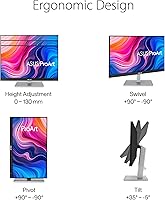
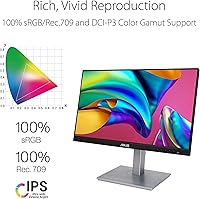
The IPS panel is one of this ProArt display's most practical strengths. With a 178-degree viewing angle, colors stay consistent whether you're sitting squarely in front or glancing from the side — which matters more than people realize during long editing sessions where body position shifts constantly. Coverage of 100% sRGB and 100% Rec. 709 means colors translate reliably across photo editing, web design, and video work. The Delta E under 2 rating, achieved before the box is even opened, means skipping the manual calibration ritual entirely. USB-C with 65W Power Delivery lets MacBook and laptop users run a single cable for both display and charging. The stand covers tilt, swivel, pivot, and height adjustment — genuinely appreciated over a full workday.

Best For

This ASUS monitor makes the most sense for freelance graphic designers, photographers, and video editors who need dependable color without spending on a high-end prosumer panel. If you work from a MacBook or laptop, the single-cable USB-C setup is a genuine convenience — power and video through one port keeps your desk tidy and your workflow uncluttered. Students in design or media programs who need a calibrated screen on a realistic budget will also find it a solid fit. Compact dimensions suit smaller home office setups well. One group that should look elsewhere: gamers. The 75Hz refresh rate and lack of adaptive sync make this a poor match for anything beyond casual play. It's strictly a creative workstation display.

User Feedback

With a 4.3-star average across nearly 1,000 ratings, the PA247CV has earned a dependable reputation among buyers who've actually put it to daily use. Color accuracy straight out of the box gets mentioned repeatedly — people are consistently pleased the display performs as advertised without extra tinkering. Build quality and the sturdy stand also draw praise regularly. The most recurring criticism centers on resolution: 1080p on a nearly 24-inch screen leaves some users wanting more sharpness, particularly those upgrading from smaller high-density displays. The glossy screen surface is another real-world sticking point — in bright rooms or near windows, reflections can become genuinely distracting. Cable management and stand stability, on the other hand, rarely generate complaints, which quietly speaks well of the overall construction.

Pros

  • Factory Calman Verified calibration means reliable color accuracy right out of the box, no tweaking required.
  • Full 100% sRGB and 100% Rec. 709 coverage makes this ProArt display a solid fit for photo, web, and video work.
  • USB-C with 65W Power Delivery lets laptop users power their machine and drive the display through a single cable.
  • The IPS panel holds color consistency at wide angles, so colors do not shift when you lean or reposition during long sessions.
  • A well-built ergonomic stand with tilt, swivel, pivot, and height adjustment supports comfortable all-day use.
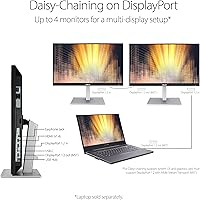
  • Connectivity is genuinely versatile, with DisplayPort, HDMI, USB-C, and a two-port USB 3.1 hub all on one panel.
  • The compact 23.8-inch footprint fits neatly into home office and studio setups without overwhelming the desk.
  • Nearly 1,000 user ratings averaging 4.3 stars reflect consistent, real-world satisfaction across a broad buyer base.
  • Build quality is frequently praised by buyers, with the stand feeling sturdy rather than plasticky or wobbly.

Cons

  • Full HD resolution on a 23.8-inch screen produces noticeably lower pixel density compared to QHD or 4K alternatives.
  • The glossy screen surface causes distracting reflections in bright rooms or near windows, limiting placement flexibility.
  • At 75Hz with no adaptive sync, the PA247CV is a poor choice for anyone who also wants to game on their monitor.
  • Users upgrading from high-DPI laptop screens may find the sharpness step-down jarring at first.
  • The glossy coating, while vibrant indoors, can make extended sessions uncomfortable in uncontrolled lighting environments.
  • No HDR support means this display cannot serve workflows that require high dynamic range preview or output.
  • At nearly 14 pounds, it is not particularly light for users who need to reposition or transport their monitor occasionally.
  • The 16:9 aspect ratio gives a relatively contained workspace for complex multi-window or multi-panel creative layouts.

Ratings

The scores below reflect an AI-driven analysis of verified global buyer reviews for the ASUS ProArt PA247CV 23.8-inch Monitor, with spam, bot-submitted, and incentivized feedback actively filtered out to preserve signal quality. Ratings are drawn from real-world usage patterns across designers, photographers, home office workers, and students — not controlled lab conditions. Both the genuine strengths and the recurring frustrations are reflected honestly, so you can make a confident, eyes-open decision.

Color Accuracy
93%
This is the PA247CV's undisputed centerpiece, and buyers consistently confirm it earns that reputation. Designers working on client deliverables and photographers preparing images for print report that colors are dependably true straight out of the box, without any manual profiling required. The Calman Verified factory calibration is not just a label — users actually notice the difference compared to uncalibrated panels they have owned before.
A small subset of professional users — particularly those doing critical print prepress work — feel the Delta E under 2 guarantee is not tight enough to fully replace a hardware-calibrated workflow. Unit-to-unit consistency, while generally good, occasionally produces slightly varying results that perfectionist buyers flag in longer-form reviews.
Value for Money
88%
Buyers repeatedly express surprise at how much professional-grade capability this ProArt display delivers relative to its asking price. Factory calibration, broad color space coverage, and a genuinely ergonomic stand are features that typically cost considerably more in competing monitors, making this ASUS monitor feel like a smart allocation of budget for creative professionals just starting out.
Users who eventually step up to a QHD or 4K panel in the same price bracket sometimes feel the resolution trade-off makes the value equation less clear-cut. For buyers whose work is resolution-sensitive, the cost-per-pixel comparison with competing options can erode the sense of strong value.
Out-of-Box Setup
86%
Assembly is quick and tool-free, with the stand clicking into the panel securely in minutes. USB-C users in particular appreciate being able to connect a single cable and immediately have a working display with charging — no driver installation or calibration ritual needed before getting to work.
A handful of buyers note that the on-screen display menu takes some time to navigate intuitively, particularly for input switching between multiple connected devices. The physical button layout on the rear edge of the panel can feel fiddly until you memorize which button does what without looking.
USB-C Connectivity
91%
The 65W Power Delivery over USB-C is one of the most praised real-world features this monitor offers, especially among MacBook and ultrabook users who want a clutter-free single-cable desk setup. Buyers working from small apartments or minimalist home offices specifically call out how much cleaner their desk looks after switching to this monitor.
The 65W output is sufficient for most ultrabooks and 13-inch to 15-inch laptops but may not fully charge higher-wattage models like a 16-inch MacBook Pro under heavy load. Users running demanding applications while connected have noted that some larger laptops charge slowly or maintain rather than replenish battery during intensive tasks.
Build Quality
84%
The PA247CV presents well physically — the matte-finish chassis feels solid, and the stand mechanism holds adjusted positions firmly without creeping over time. Multiple buyers specifically note that the monitor does not feel cheap or lightweight in the way some monitors at this price tier can, which builds confidence in its long-term durability.
The plastic used on the rear housing, while sturdy, does not have the premium feel of the aluminum chassis found on more expensive ProArt models. A few buyers mention visible seam lines around the panel edges that, while structurally harmless, suggest cost savings in the finish quality.
Ergonomics & Adjustability
89%
Full tilt, swivel, height adjustment, and portrait pivot give this display one of the more complete ergonomic packages in its class. Buyers who work long hours report that being able to precisely dial in monitor height and angle reduces neck and shoulder strain over a full workday in a way that fixed-stand monitors simply cannot match.
Height adjustment requires moderate force and is not the smoothest mechanism — it can feel slightly stiff compared to premium monitor arms or higher-end stand systems. Users who frequently reposition their monitor throughout the day may find the process less effortless than expected.
Screen Resolution
61%
39%
For users coming from older 1080p monitors or standard office displays, the image quality is perfectly acceptable for daily creative work, spreadsheets, and video calls. Text rendering is clean at a comfortable viewing distance, and most web and video content looks as intended at Full HD.
This is the most consistent frustration across buyer reviews, and it is hard to argue with. At 23.8 inches, 1080p produces a noticeably lower pixel density than the QHD or 4K panels many creative professionals now consider standard. Users switching from high-DPI laptop screens find the step down in sharpness jarring, particularly when working with fine typography or detailed photography.
Screen Surface & Glare
67%
33%
In a well-controlled lighting environment — a windowless studio or a room with indirect ambient light — the glossy surface produces noticeably richer, more saturated colors than a matte-coated panel would. Buyers in these conditions consistently report the screen looks vibrant and engaging for extended creative sessions.
Buyers in bright home offices, rooms with windows, or under overhead lighting frequently flag reflections as a genuine daily annoyance. This is not a minor quibble — some users have rearranged their entire desk setup or added window treatments specifically to manage glare from this ProArt display, which signals the coating is a real limitation in typical home environments.
Viewing Angles
87%
The IPS panel delivers on its wide-angle promise in practice. Buyers who work collaboratively — showing work to clients or colleagues seated beside them — report that colors and brightness hold up well without the noticeable shift that TN panels produce. This makes the monitor useful in shared workspace or presentation scenarios.
At extreme angles, very slight brightness and color temperature shifts do occur, as they do with virtually all IPS panels. This is unlikely to affect solo users but can be noticeable if multiple people are viewing the screen simultaneously from significantly different positions.
Connectivity Range
83%
Having USB-C, DisplayPort, HDMI, and a two-port USB 3.1 hub on a single panel at this price is a legitimate differentiator. Users who switch between a work laptop and a personal machine throughout the day appreciate being able to keep both connected and toggle between them without unplugging cables.
There is no dedicated KVM switch functionality, so while two devices can remain physically connected, switching between them means manually navigating the on-screen display menu. Users who switch sources frequently find this process repetitive enough that a few have added an external KVM switch to their setup.
Color Gamut Coverage
92%
Full coverage of both sRGB and Rec. 709 means this ASUS monitor serves web designers, photographers, and video content creators with a single panel rather than requiring workflow compromises. Buyers producing content for YouTube or social media platforms specifically praise how predictably their final exports match what they saw during editing.
The PA247CV does not cover DCI-P3 or Rec. 2020, which limits its usefulness for cinema-grade color grading or HDR production work. Buyers who eventually move into professional video production or wider-gamut print workflows will likely outgrow this aspect of the display's capability.
Refresh Rate & Gaming
41%
59%
For its intended audience — creative professionals and productivity users — 75Hz is entirely adequate. Everyday desktop use, scrolling through documents, and video playback all feel smooth at this refresh rate without any perceptible stutter.
Anyone hoping to use this display for gaming alongside creative work will find 75Hz and the absence of adaptive sync technology a significant limitation. Fast-paced games exhibit visible motion blur and screen tearing that makes competitive or action gaming genuinely uncomfortable, which is a recurring complaint from buyers who did not fully research this trade-off before purchasing.
Stand Stability
81%
19%
The stand holds its position reliably under normal desk conditions, and buyers note it does not wobble or drift after being adjusted — a quality that cheaper stands in this price range often fail to deliver. The base footprint is also well-proportioned, sitting securely without needing excessive desk depth.
Typing with a heavy mechanical keyboard on the same desk surface can introduce minor vibration that some users find distracting. The stand lacks a cable management channel, which means wires routed behind the monitor can look untidy without additional management accessories.
Brightness & Contrast
74%
26%
Peak brightness is sufficient for typical indoor office and studio environments, and the IPS panel maintains consistent luminance across the screen surface without significant hotspots or backlight bleed in most units. Buyers using the monitor in moderately lit rooms find it comfortable for all-day use.
In brighter environments or when used near windows, maximum brightness can feel underpowered — particularly combined with the glossy coating. Static contrast ratio is average for an IPS panel, and buyers accustomed to VA panels will notice that dark scenes in video content lack the depth they expect.

Suitable for:

The ASUS ProArt PA247CV 23.8-inch Monitor is built for people whose work lives or dies by color accuracy — freelance graphic designers, photographers, and video editors who need a display they can actually trust rather than one they have to constantly second-guess. Because it arrives factory-calibrated with a Delta E under 2, it removes the guesswork that plagues cheaper IPS panels, making it a practical choice for anyone producing work that will be judged on how colors look in print or on screen. MacBook and laptop users in particular will appreciate the USB-C port that handles both video signal and 65W charging through a single cable, turning this monitor into a low-clutter docking hub. Design students or early-career creatives working within a tight equipment budget will find it covers the professional color standards their coursework demands without requiring a major financial stretch. Its compact footprint also makes it a comfortable fit for smaller home office or studio setups where desk real estate is genuinely limited.

Not suitable for:

Anyone who spends serious time in high-resolution image editing or retouching at close range will likely find the Full HD resolution underwhelming on a nearly 24-inch screen — pixel density at this size is noticeably softer than on a QHD or 4K panel, and that gap becomes hard to ignore once you have experienced sharper alternatives. The glossy screen coating, while punchy in controlled lighting, becomes a liability in bright rooms or near windows where glare and reflections can genuinely interfere with work. Gamers should pass on this ProArt display entirely: the 75Hz refresh rate and the absence of any adaptive sync technology make it a poor performer for fast-paced titles, regardless of how good the color coverage is. The ASUS ProArt PA247CV 23.8-inch Monitor is also not the right call for users who need a wide-format or ultra-large canvas, since the 16:9 aspect ratio and screen size offer a relatively contained workspace for complex multi-panel workflows. If your primary concern is raw brightness, contrast depth, or HDR performance, this panel will not satisfy those priorities either.
Specifications

  • Panel Type: The display uses an IPS (In-Plane Switching) panel, which delivers consistent color reproduction and wide viewing angles compared to TN or VA alternatives.
  • Screen Size: The active display area measures 23.8 inches diagonally, offering a compact but workable canvas for creative and productivity tasks.
  • Resolution: Native resolution is 1920 x 1080 pixels (Full HD), producing a pixel density that is adequate for general use but less sharp than QHD or 4K panels at this screen size.
  • Color Gamut: The panel covers 100% of the sRGB color space and 100% of the Rec. 709 standard, meeting the requirements of most web, print, and broadcast creative workflows.
  • Color Accuracy: Factory calibration achieves a Delta E of less than 2, meaning color deviations are below the threshold that the human eye can reliably detect under normal viewing conditions.
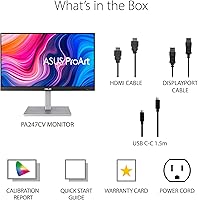
  • Calibration: Each unit is Calman Verified and ships with a factory calibration report, removing the need for third-party calibration equipment straight out of the box.
  • Viewing Angle: The IPS panel supports a 178-degree horizontal and vertical viewing angle, ensuring colors remain stable when viewed from wide off-axis positions.
  • Refresh Rate: The display operates at a maximum refresh rate of 75Hz, which is suited to productivity and creative work but insufficient for competitive gaming.
  • Connectivity: Input options include one USB-C port with DisplayPort signal and 65W Power Delivery, one DisplayPort, and one HDMI port, covering a broad range of source devices.
  • USB Hub: A built-in USB 3.1 hub provides two downstream Type-A ports, allowing peripheral devices such as mice, keyboards, and drives to connect through the monitor.
  • Power Delivery: The USB-C port delivers up to 65W of power to a connected laptop or device simultaneously with video signal, enabling a single-cable desk setup.
  • Screen Surface: The panel uses a glossy screen coating, which enhances color vibrancy in controlled lighting but can produce noticeable reflections in bright or sunlit environments.
  • Ergonomics: The included stand supports tilt, swivel, pivot (portrait mode rotation), and height adjustment, providing a wide range of positioning options for different users and setups.
  • Aspect Ratio: The display uses a standard 16:9 widescreen aspect ratio, consistent with most modern content formats and operating system desktop layouts.
  • Dimensions: With the stand attached, the monitor measures 21.25 x 13.46 x 8.32 inches (W x H x D), fitting comfortably on most standard desks without requiring a wide footprint.
  • Weight: The assembled unit with stand weighs 13.86 pounds, making it stable on a desk surface while still manageable for a single person to position and adjust.
  • Backlight: The panel uses an LED backlight system, which contributes to energy efficiency and consistent brightness distribution across the screen surface.
  • Warranty: ASUS covers this ProArt monitor with a standard limited warranty; buyers should verify regional warranty terms directly with ASUS at the time of purchase.

Related Reviews

ASUS VG249Q1A 23.8-inch Gaming Monitor
71%
88%
Refresh Rate Performance
83%
Image & Color Quality
79%
Motion Clarity
76%
Connectivity
84%
Adaptive Sync (FreeSync / G-Sync)
More
ASUS BE24EQK 23.8-inch Business Monitor
76%
83%
Built-in Webcam Convenience
76%
Microphone Quality
78%
Display Image Quality
88%
Eye Comfort
81%
Value for Money
More
Dell S2425HS 23.8-inch FHD Monitor
84%
88%
Image & Color Accuracy
83%
Refresh Rate & Motion Smoothness
91%
Eye Comfort & Blue Light Reduction
93%
Ergonomics & Stand Adjustability
87%
Build Quality & Materials
More
ASUS ProArt PA328CGV 32-inch Monitor
75%
91%
Color Accuracy
88%
Color Gamut Coverage
83%
Panel & Image Quality
71%
Build Quality
74%
Ergonomics & Stand
More
HP V241ib 23.8″ FHD Monitor
77%
81%
Image Quality
78%
Color Accuracy
84%
Eye Comfort
52%
Ergonomics
74%
Build Quality
More
HP 24mh 23.8-inch IPS Monitor
79%
83%
Image Clarity
81%
Color Accuracy
88%
Ergonomics & Stand
71%
Refresh Rate & Motion
63%
Brightness & Glare Handling
More
VisionOwl V-Y23QH 23.8-Inch Portable Monitor
76%
88%
Image Quality
86%
Build Quality
83%
Gaming Performance
62%
Portability
58%
Brightness
More
Redalf 23.8-inch 2K 180Hz Portable Monitor
86%
88%
Display Quality
92%
Portability
90%
Gaming Performance
85%
Compatibility
91%
Ease of Setup
More
HP Series 5 524sw 23.8-inch FHD Monitor
76%
88%
Image Clarity
91%
Eye Comfort
79%
Color Accuracy
67%
Brightness & Visibility
83%
Refresh Rate & Motion
More
Dell SE2425H 24-Inch Full HD Monitor
77%
91%
Value for Money
93%
Eye Comfort
84%
Image Quality
47%
Ergonomics
83%
Build Quality
More

FAQ

Yes, and this is one of the more practical things about it. The USB-C port carries both the video signal and up to 65W of power delivery simultaneously, so you plug in one cable and your MacBook charges while the display runs. You do not need a separate power adapter on the desk. Just confirm your MacBook model supports DisplayPort over USB-C, which all recent Apple Silicon models do.

For most creative workflows, the factory calibration holds up well without any additional work. The Calman Verified process means each individual unit is tested and ships with a Delta E under 2, which is below the threshold where color errors become visible to the naked eye. Professional photographers or print production specialists who need absolute precision might still want to run their own calibration, but for the vast majority of users, it is genuinely ready to use from day one.

It depends heavily on what you are coming from. If you have been working on a high-DPI laptop screen, the step down in sharpness will be apparent, particularly with fine text and detailed images. If you are upgrading from an older 1080p monitor of similar size, the difference is minimal. The panel is not soft by 1080p standards, but it does not compete with the crispness of a QHD or 4K display at this screen size.

It can be. Glossy coatings tend to look punchy and vibrant in controlled lighting, but they reflect light sources and windows more aggressively than matte panels. If your desk faces a window or sits in a bright room, you may find reflections distracting during the day. Positioning the monitor so no light source is directly behind you helps considerably, but it is a real trade-off worth thinking about before buying.

Yes. The stand supports a full 90-degree pivot rotation, so you can flip the ASUS ProArt PA247CV 23.8-inch Monitor into portrait orientation without needing a third-party VESA mount. Portrait mode works well for long-form document editing, coding, or reading. Just make sure to enable display rotation in your operating system settings after pivoting the panel physically.

Yes, it is VESA compatible with a 100 x 100mm pattern, which is the standard size supported by the vast majority of monitor arms and wall mounts on the market. If you prefer an arm over the included stand, removing the stand is straightforward and the VESA holes are accessible underneath a small cover on the rear of the panel.

It is a strong match for that workflow. The 100% Rec. 709 coverage is exactly the color standard used by YouTube and most broadcast platforms, so what you see during editing is a reliable preview of how your footage will look to viewers. The factory calibration reinforces that reliability. Where it falls short is in HDR preview capability, so if your pipeline involves HDR grading, this display is not equipped for that.

The stand is generally well-regarded for its solidity. User feedback consistently describes it as sturdy rather than wobbly, and it holds its adjusted position reliably. Minor vibration from heavy keyboard use is possible on any monitor stand, but nothing unusual or problematic has been flagged as a recurring issue for this ASUS monitor.

You can connect two source devices simultaneously using different input ports — for example, a laptop via USB-C and a desktop via HDMI or DisplayPort. Switching between them requires using the monitor's on-screen display menu to manually select the active input. There is no dedicated KVM switch functionality built in, so peripheral switching between computers is not automated through the monitor itself.

For casual viewing it works fine. The IPS panel produces good color and the wide viewing angle makes it comfortable even from slightly off-axis positions on a couch or side chair. The glossy screen actually helps in a dimmed room by boosting perceived contrast and vibrancy. The 1080p resolution is perfectly standard for streaming at Full HD quality, and the speakers, if using HDMI audio pass-through, handle basic sound adequately for a desk setup.

Where to Buy