Overview

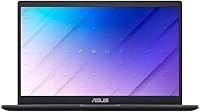
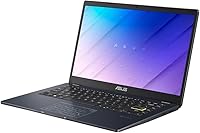
The ASUS E410KA 14″ Celeron N4500 Laptop is exactly what it looks like: a no-frills machine built for people who need reliable basics without spending much. At under three pounds, it slides into a bag without complaint, and that portability is one of its strongest genuine selling points. The 14-inch FHD display is a real surprise for this tier — text is sharp and colors are decent enough for documents, streaming, and casual browsing. One thing to know upfront: it ships with Windows 11 S mode, which locks you to Microsoft Store apps only. You can switch out of S mode for free, but it is a step many buyers do not expect.

Features & Benefits

The 14-inch 1920x1080 screen holds up well for its class, making reading long documents or watching a video a comfortable experience. The Intel Celeron N4500 chip is not built for speed — think of it as a reliable workhorse for email, video calls, and light web browsing, not for editing photos or running multiple demanding apps at once. The 4GB of soldered RAM is adequate for focused single-tasking, but open eight browser tabs and you will feel it slow down. Storage is 64GB eMMC — quicker to boot than an old spinning hard drive, but not as roomy as a true SSD, so cloud or external storage is practically essential for most users.

Best For

This budget ASUS laptop genuinely shines when matched with the right user. A student who needs to take notes in class, draft essays online, and jump on a video call has everything they need here — nothing more, nothing less. It also works well for older or casual users who primarily check email, browse news, and stream shows, as they are unlikely to push its limits. Parents hunting for a first laptop for a younger child will appreciate the lightweight build and clean design. The one common thread: this entry-level notebook rewards people who live in cloud apps and do not expect to store large media libraries or install software from outside the Microsoft Store.

User Feedback

Buyers consistently praise the E410KA for how light and portable it feels — easy to carry all day without noticing the weight. The display also earns repeated positive mentions for being clearer than anticipated at this price point. On the flip side, complaints cluster around two areas: the RAM ceiling becomes obvious when multitasking, and the keyboard feels a bit shallow for heavy typists. Battery life reactions are mixed — some users report a solid six to seven hours of light use, while others find it drains faster during streaming. The S mode situation catches people off guard too, with several buyers needing to look up how to disable it before getting started.

Pros

  • The 14-inch FHD display is genuinely sharp and comfortable for reading, writing, and streaming at this price level.
  • Weighing under three pounds, the E410KA is one of the easier laptops to carry around all day without fatigue.
  • Boot times are snappy thanks to the eMMC storage, so getting started each morning feels quick and painless.
  • The inclusion of two USB 3.0 ports and a media card reader is a practical bonus rarely seen at this price tier.
  • Wi-Fi and Bluetooth are both included, covering all standard wireless needs without any add-ons required.
  • The numeric keypad is a genuinely useful touch for students or users who work with numbers regularly.
  • For basic web browsing, email, and video calls, the Celeron N4500 handles the job without constant lag or overheating.
  • The clean, understated design holds up well in professional or classroom settings without looking cheap.
  • Cloud-first users will find the modest storage limitation barely matters when working primarily in browser-based apps.

Cons

  • 4GB of soldered RAM cannot be upgraded later, which limits the machine as software demands grow over time.
  • Windows 11 S mode blocks installation of standard apps like Chrome or VLC out of the box, catching many buyers off guard.
  • Multitasking with more than four or five browser tabs open causes noticeable slowdowns that disrupt workflow.
  • 64GB of onboard storage fills up surprisingly fast once the OS, updates, and a handful of apps are installed.
  • Battery life is inconsistent, with some users reporting strong results and others finding it drains faster than expected during video playback.
  • The keyboard has a shallow key travel that can feel tiring during extended typing sessions for users accustomed to better boards.
  • The trackpad, while functional, lacks the precision and responsiveness found on slightly pricier competitors.
  • No upgrade path exists for memory or storage, so what you buy today is exactly what you will have in three years.
  • The eMMC storage, while faster than old hard drives, is still noticeably slower than a proper SSD under sustained read and write loads.

Ratings

The scores below for the ASUS E410KA 14″ Celeron N4500 Laptop were generated by our AI system after analyzing thousands of verified global user reviews, with spam, bot-submitted, and incentivized feedback actively filtered out. Each category reflects the honest distribution of real buyer experiences — strengths and frustrations weighted equally — so you can make a clear-eyed decision before purchasing. Where this entry-level notebook genuinely delivers, the scores show it; where it falls short of expectations, that is reflected too.

Portability
88%
Buyers repeatedly call out how easy this machine is to carry around daily. At under three pounds, it fits comfortably in a school backpack or tote without adding noticeable weight, and its slim 0.71-inch profile means it slides in alongside textbooks or folders without a fight.
The compact chassis does mean the battery capacity is limited, so the lightweight advantage comes with a trade-off in raw endurance. A few users also noted that the lid feels slightly flex-prone when carried by one corner, which is a minor but real durability concern over time.
Display Quality
79%
21%
For a machine at this price point, the 14-inch 1920x1080 screen earns consistent praise. Text is sharp enough for long reading sessions, and colors are pleasant enough for casual streaming — several buyers mentioned being genuinely surprised by how clear YouTube and Netflix looked on it.
The display brightness caps out at a level that makes outdoor or bright-window use uncomfortable, with glare being a recurring complaint. Color accuracy is also limited compared to even mid-range laptops, making it unsuitable for anyone who edits photos or needs true-to-life color representation.
Everyday Performance
61%
39%
For its intended tasks — loading web pages, typing documents, joining a video call — the E410KA gets the job done without constant frustration. Users who treat it as a dedicated single-task machine report a mostly smooth experience for light daily computing needs throughout the day.
Open more than four or five browser tabs simultaneously and the cracks start showing. The 4GB of non-upgradeable RAM creates a hard ceiling that real users hit regularly, with noticeable lag and occasional unresponsiveness being the most common performance complaints across review platforms.
Storage Capacity
47%
53%
The eMMC storage provides faster boot times than an old spinning hard drive, which users appreciate when starting up the machine each morning. For someone who stores nothing locally and works entirely through a browser or cloud apps, the 64GB technically covers the basics.
After Windows 11 and its updates claim their share, usable free space drops to around 40GB or less — and that disappears faster than most buyers anticipate. Multiple users reported running out of storage within weeks of purchase, making an external drive or cloud subscription practically a required additional expense.
Build Quality
71%
29%
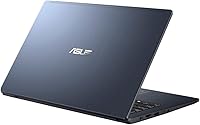
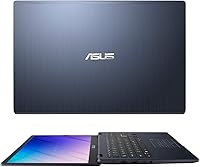
The overall fit and finish is better than many rival machines in this price bracket, with a clean aesthetic that does not look obviously cheap. The Quiet Blue color scheme gives it a subtle, professional look that works equally well in a classroom or a coffee shop.
The plastic chassis, while adequately assembled, does flex noticeably under pressure, and the lid hinge feels only moderately firm. A handful of users reported minor creaking sounds when opening and closing the lid after several months of regular use.
Keyboard Experience
63%
37%
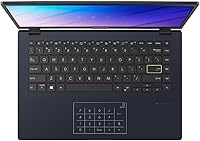
The full keyboard layout with a numeric keypad is a legitimately useful feature that most competing budget laptops omit entirely. Students and anyone who works with numbers regularly find the numpad a meaningful daily convenience that saves time compared to using the number row.
Key travel is shallow, which makes extended typing sessions feel fatiguing for users accustomed to better keyboards. Several reviewers described the typing feel as mushy and imprecise, noting that fast typists experience more accidental key presses than they would on a more premium keyboard.
Trackpad Feel
58%
42%
The trackpad is large enough for comfortable navigation and handles basic gestures like two-finger scrolling without much trouble. For casual browsing and light document work, most users find it functional and adequately responsive during normal day-to-day use.
Precision drops off noticeably during faster or more deliberate cursor movements, and the click mechanism feels stiffer than ideal. A recurring complaint is that the trackpad surface can feel slightly sticky or resistant after extended use, prompting several buyers to pair it with a small USB mouse instead.
Connectivity
76%
24%
Having two USB 3.0 ports alongside one USB 2.0 port and a built-in media card reader is a genuinely practical setup that covers most common accessory and file-transfer needs. Users appreciate not having to carry a hub just to connect a flash drive and a mouse simultaneously.
The absence of an HDMI port is a real omission that catches buyers off guard, requiring an additional adapter for connecting to external monitors or TVs. Wi-Fi 5 (802.11ac) coverage is solid at home but a few users noted inconsistent signal strength in larger or more congested wireless environments.
Software & OS
52%
48%
Windows 11 S mode does provide a cleaner, more controlled environment by default, which some parents and first-time users appreciate for its simplicity and reduced risk of accidental software installs. The Microsoft Store does cover the basics for users who stick to Edge, streaming apps, and Office online.
The S mode restriction blindsides a large share of buyers who discover they cannot install Chrome, VLC, or any standard app without manually switching out of S mode first. The process itself is free and reversible, but the lack of clear upfront communication about this limitation generates consistent frustration across user reviews.
Battery Life
64%
36%
Under light conditions — primarily document editing and occasional browsing at moderate brightness — the battery comfortably covers a school day or a short work session, with most users landing in the five to six hour range. That is a reasonable result for a machine this size and price.
Battery life degrades noticeably under sustained video streaming or when Wi-Fi is constantly active, pushing real-world usage closer to four hours in those scenarios. A number of users also reported that battery capacity appeared to decline faster than expected after six to twelve months of regular daily use.
Webcam Quality
53%
47%
The built-in webcam covers the baseline requirement of being recognizable on a video call, which is genuinely all that most students and casual users need for Zoom or Teams meetings. In good lighting conditions, it produces an adequate image for routine communication.
In anything other than bright, direct light, the webcam produces grainy, washed-out footage that looks noticeably poor compared to even budget standalone webcams. Users who attend frequent video calls in offices or dimly lit rooms report that the image quality is a source of mild embarrassment.
Audio Output
57%
43%
The built-in speakers are clear enough for listening to a video lecture or a casual YouTube session at low to moderate volume. For a compact budget laptop, they avoid the tinny hollow sound that plagues many competitors in the same tier.
Volume ceiling is low, and bass is essentially absent, making music or movie audio feel flat and unsatisfying. Most users who care about audio quality end up plugging in headphones or a Bluetooth speaker almost immediately, treating the built-in speakers as a last resort rather than a genuine feature.
Setup & Ease of Use
74%
26%
Out of the box, setup is straightforward for most users — the initial Windows 11 configuration is guided and the hardware works immediately without driver issues. Seniors and first-time laptop owners in particular praised how uncomplicated the initial experience felt.
The S mode discovery during setup trips up a meaningful portion of buyers who attempt to install a standard browser or app and hit an unexpected wall. While switching out of S mode is simple once you know how, the friction it creates during first-day setup generates a disproportionate share of negative early reviews.
Value for Money
82%
18%
Matched to the right buyer, the E410KA delivers genuine value — a sharp FHD screen, a clean build, and dependable light-use performance at a price that undercuts most name-brand alternatives. For students, seniors, or parents buying a first laptop for a child, the proposition holds up well.
For anyone who stretches beyond basic tasks, the value equation weakens quickly as the hardware limitations become daily frustrations rather than acceptable trade-offs. The inability to upgrade RAM or storage means buyers are locked into the entry-level experience permanently, which is a harder sell as their needs evolve.

Suitable for:

The ASUS E410KA 14″ Celeron N4500 Laptop was clearly designed with a specific kind of user in mind, and for that user, it hits the mark well. Students who primarily need to write papers, attend virtual classes, and browse research materials will find it more than capable for a daily school bag companion. It works equally well for seniors or retired users who spend their computer time on email, video calls with family, and light streaming — tasks that never stress its hardware. Parents shopping for a child's first laptop will appreciate the clean, simple setup and the fact that Windows 11 S mode actually provides a somewhat controlled app environment by default. Remote workers who already rely on web-based tools like Google Docs, Microsoft 365 online, or similar cloud platforms will feel right at home, since the machine handles those workflows without friction. Portability is a genuine advantage here — under three pounds means it genuinely disappears in a bag for commuters or frequent travelers who just need a secondary device on the road.

Not suitable for:

The ASUS E410KA 14″ Celeron N4500 Laptop is not the right tool for anyone expecting to run demanding software or juggle heavy workloads throughout the day. If you regularly work with video editing, photo processing, local gaming, or software development, the Celeron N4500 and 4GB of non-upgradeable RAM will frustrate you within hours. The 64GB eMMC storage fills up fast once Windows updates and a few apps are installed, making it a poor fit for anyone who stores media, large project files, or multiple software suites locally. Power users who rely on specific third-party applications — whether that is a creative suite, a communication tool outside the Microsoft Store, or industry software — need to know that switching out of Windows 11 S mode is required and not always obvious. Anyone who multitasks heavily, keeping a dozen browser tabs open alongside productivity apps simultaneously, will find performance noticeably choppy. This is fundamentally a light-use machine, and pushing it beyond that role leads to a disappointing experience.

Specifications

  • Display: The laptop features a 14-inch FHD panel with a 1920x1080 pixel resolution, offering clear and sharp visuals suitable for everyday tasks.
  • Processor: It is powered by an Intel Celeron N4500 dual-core processor running at a base clock of 1.1 GHz, designed for light computing workloads.
  • RAM: The system includes 4GB of DDR4 SDRAM running at 3200MHz, soldered directly to the motherboard with no option for user upgrades.
  • Storage: Onboard storage is 64GB eMMC, which provides faster boot times than a traditional hard drive but is more limited in capacity and speed than a full SSD.
  • Operating System: The E410KA ships with Windows 11 in S mode, which restricts app installations to the Microsoft Store unless the user manually switches out of S mode.
  • Graphics: Graphics are handled by Intel integrated graphics built into the Celeron N4500 processor, sufficient for video playback and standard web content.
  • Wireless: Wi-Fi connectivity is provided via 802.11ac (Wi-Fi 5), supporting standard dual-band wireless networks commonly found in homes and schools.
  • Bluetooth: Bluetooth is included, allowing wireless pairing with peripherals such as mice, keyboards, and headphones without requiring a USB dongle.
  • USB Ports: The laptop includes two USB 3.0 ports and one USB 2.0 port, providing practical connectivity for external drives, accessories, and peripherals.
  • Card Reader: A built-in media card reader allows direct transfer of photos or files from SD cards without needing an external adapter.
  • Dimensions: The chassis measures 12.8 x 8.54 x 0.71 inches, keeping the overall footprint compact and easy to fit in standard laptop bags and backpacks.
  • Weight: At 2.86 lbs, the E410KA is light enough for comfortable all-day carrying without adding noticeable strain to a bag.
  • Keyboard: The keyboard includes a numeric keypad on the right side, which is a practical addition for users who frequently enter numbers or work with spreadsheets.
  • Optical Drive: There is no optical drive included, which is standard for thin and lightweight laptops in this category.
  • Power: The laptop is battery-powered with no built-in optical drive, keeping the design slim and the overall weight low.
  • Color: The unit is available in a Quiet Blue finish, giving it a clean and understated look suitable for school or office environments.
  • Chipset: The Intel chipset supports the integrated graphics and memory controller functions, working in tandem with the Celeron N4500 processor.
  • Memory Type: The installed memory uses DDR4 SDRAM technology at 3200MHz, which is the current standard for efficient low-power laptop memory.

Related Reviews
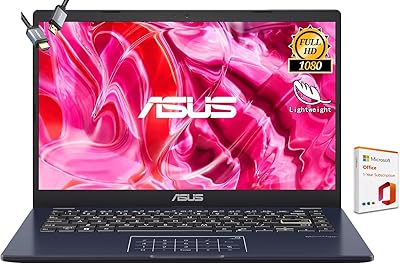
ASUS Vivobook Go 14-inch Laptop

67%
81%
Value for Money
47%
Performance
74%
Battery Life
88%
Portability
69%
Display Quality
More
HP 14 Celeron 14-inch Touchscreen Laptop
68%
74%
Value for Money
52%
Performance
43%
Storage Adequacy
91%
Portability
61%
Display Quality
More
ASUS E410MA 14-Inch Celeron Laptop
63%
78%
Value for Money
47%
Performance
83%
Battery Life
89%
Portability
53%
Display Quality
More
ASUS Vivobook Go L210KA 11.6″
73%
88%
Value for Money
93%
Portability
84%
Battery Life
58%
Performance
61%
Display Quality
More
ASUS Chromebook CM14 (CM1402CM2A-DS44)
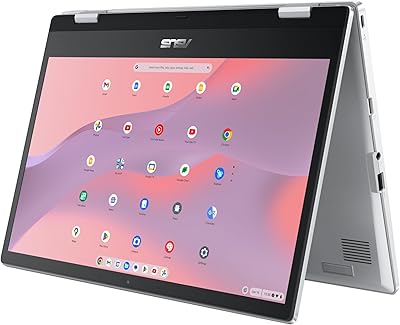
72%
83%
Value for Money
88%
Build Quality & Durability
74%
Performance & Speed
58%
Display Quality
84%
Battery Life
More
ASUS Vivobook S 14 OLED M5406WA
76%
94%
Display Quality
88%
Portability & Build
86%
CPU Performance
61%
Thermal Management & Fan Noise
67%
Battery Life
More
ASUS Chromebook Flip CX1 14″ 8GB/128GB
73%
84%
Value for Money
78%
Build Quality & Durability
71%
Display Quality
67%
Performance & Everyday Speed
54%
Storage & Local Capacity
More
ASUS ZenBook 14 Pro OLED Laptop
76%
93%
Display Quality
81%
Performance
47%
RAM & Upgradability
88%
Build Quality
62%
Battery Life
More
ASUS Vivobook 14 i3-1215U 16GB/512GB
75%
88%
Value for Money
82%
Performance & Speed
91%
RAM & Multitasking
61%
Display Quality
87%
Storage Capacity & Speed
More
HP G9 15.6-inch Laptop
72%
83%
Value for Money
54%
Performance
78%
RAM & Multitasking
67%
Display Quality
49%
Battery Life
More

FAQ

Not right away. The laptop ships with Windows 11 in S mode, which only allows apps from the Microsoft Store, and Chrome is not available there. You will need to switch out of S mode first, which is free and takes just a few minutes through Windows Settings. Once you do that, you can install Chrome or any other standard Windows application without any issues.

Unfortunately, no. The 4GB of RAM is soldered directly onto the motherboard, meaning it cannot be removed or replaced. What you get out of the box is what you will have for the life of the machine. If you think you will need more than 4GB regularly, it is worth considering a different laptop from the start.

Windows 11 and its initial updates take up a significant portion of the 64GB eMMC, so you can realistically expect somewhere around 40 to 45GB of free space after a fresh setup. That fills up faster than most people expect once you add a few apps and files. Using cloud storage like OneDrive or an external USB drive is strongly recommended for anything beyond basic documents.

Think of eMMC as a middle ground between an old spinning hard drive and a modern solid-state drive. It is faster than a traditional hard drive for everyday tasks like booting up or opening apps, but it is noticeably slower than a proper SSD when copying large files or running multiple applications at the same time. For light use, you will rarely notice the difference, but for heavier tasks it becomes more apparent.

Yes, for standard one-on-one or small group video calls it handles Zoom and Teams without much trouble. Where it starts to struggle is when you have a video call running in the background while also juggling multiple browser tabs or other applications at the same time. Keep things focused and it performs fine for remote learning or casual work calls.

Battery life varies depending on what you are doing, but most users report around five to seven hours of light use — think web browsing, document editing, or streaming video at moderate screen brightness. If you push it harder with sustained video playback or have Wi-Fi constantly active, expect the lower end of that range. It is not an all-day battery champion, so keeping a charger nearby for longer sessions is a smart habit.

It comes with a trial or limited version of Microsoft 365 through Windows, but not a full perpetual license. For ongoing use, you would need to subscribe to Microsoft 365 or use the free web-based versions of Word, Excel, and PowerPoint through a browser, which actually work well on this machine since they are cloud-based.

It is a solid fit for younger students. The lightweight build means kids can carry it easily, and Windows 11 S mode actually provides a slightly more controlled environment by limiting app installations to the Microsoft Store by default. It handles typing assignments, basic research, and educational web tools without any issues. Just keep in mind that if their school requires specific software not available in the Store, you may need to switch out of S mode.

The E410KA does not include an HDMI port, which is a notable omission. To connect to an external display, you would need a USB-C to HDMI adapter or a compatible USB hub with display output. It is worth planning for that extra accessory if you intend to use it with a larger screen regularly.

The keyboard is functional and the key layout is well-organized, and the addition of a numeric keypad is a nice bonus. That said, the key travel is on the shallower side, which some users find tiring during long writing sessions. It is perfectly fine for taking notes or typing shorter documents, but if you are someone who writes for hours at a stretch, you may find it less comfortable than keyboards on pricier machines.