Overview

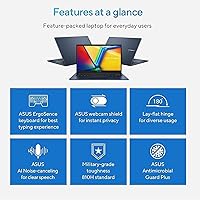
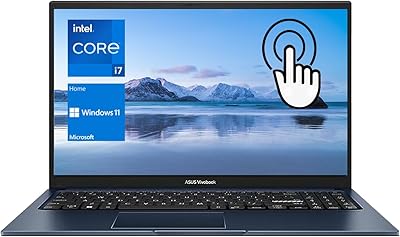
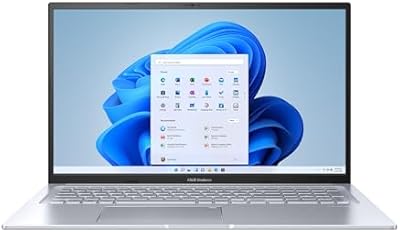
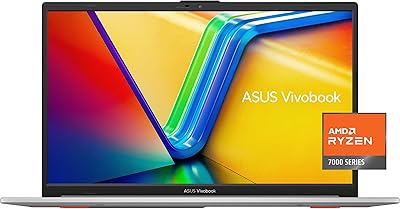
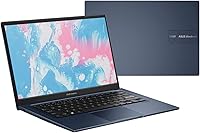
The ASUS Vivobook 14 i3-1215U 16GB/512GB sits in a crowded budget Windows 11 segment, but it earns attention for one reason most rivals can't match at this price: 16GB of RAM. That alone separates it from the sea of 8GB machines competing for the same wallet. The Vivobook line has been around long enough to build genuine trust among students and everyday users, and this version carries that reputation forward in a compact, travel-friendly 14-inch chassis weighing under four pounds. The Blue colorway is a small but welcome touch of personality in a category that usually defaults to plain silver or black.
Features & Benefits

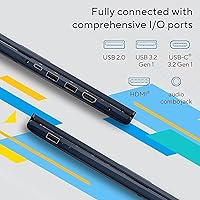
The Intel i3-1215U is a 6-core hybrid processor that handles everyday computing more capably than its i3 label might suggest. Paired with 16GB of DDR4 at 3200MHz, this ASUS budget laptop manages browser-heavy sessions, video calls, and multiple open apps without the sluggishness you would expect at this price tier. The 512GB PCIe NVMe SSD keeps boot times short and file transfers quick. On the display side, the 14-inch FHD IPS-level panel delivers decent color accuracy for indoor work, though its 250-nit brightness is a real ceiling. Wi-Fi 6 is a thoughtful inclusion, and the port layout — three USB 3.2 ports, HDMI 1.4, and an audio jack — covers most daily needs without dongles.

Best For

This Vivobook hits its stride as a student daily driver — light enough to carry between classes, capable enough for research, writing, and video calls, and with enough storage that managing space rarely becomes a chore. Remote workers running Google Workspace or Microsoft 365 in a browser will feel right at home. It also makes strong sense for anyone upgrading from an older, RAM-starved machine, where the jump in responsiveness will be immediately noticeable. That said, if photo editing, video rendering, or gaming is part of your regular routine, the integrated graphics will be a bottleneck. Everyday productivity is genuinely where this machine excels.

User Feedback

Buyers consistently highlight the RAM and SSD combination as the deciding factor over competing models, and most report that real-world performance matches expectations. The keyboard draws mixed reactions — some find the key travel comfortable for long typing sessions, while others feel it runs a bit shallow. The touchpad is generally praised for accuracy. Where criticism gets pointed is the screen: the 250-nit brightness genuinely struggles in well-lit rooms, and several users note that color output is average at best. Battery life tends to fall in the five-to-seven-hour range under typical use, which is workable but likely requires a charger for anyone away from a desk all day. Tempered expectations go a long way here.

Pros

  • 16GB of RAM at this price tier is uncommon and makes a real, day-to-day multitasking difference.
  • The PCIe NVMe SSD keeps boot times and app launches quick and responsive.
  • Wi-Fi 6 support is a forward-thinking inclusion that most rivals skip at this price.
  • At under four pounds, the Vivobook 14 is easy to carry through a full day without fatigue.
  • The port selection covers most daily needs without requiring a separate hub or adapter.
  • FHD anti-glare display works well for indoor work and reduces eye strain during long sessions.
  • The i3-1215U handles everyday productivity tasks without slowdowns or hesitation.
  • 512GB of storage gives students and home users comfortable room without constant file management.
  • The Blue finish stands out in a category dominated by generic silver and black plastic.
  • Windows 11 Home runs cleanly on this hardware without the sluggishness seen on underpowered rivals.

Cons

  • The 250-nit display becomes genuinely difficult to use in bright rooms or near windows.
  • Battery life in real-world use often falls short of a full workday, making the charger a mandatory carry.
  • Integrated graphics completely rule out gaming, video editing, and GPU-reliant creative work.
  • The plastic chassis flexes under pressure and feels less confidence-inspiring over extended daily use.
  • RAM is soldered, removing any upgrade path as your workloads grow over time.
  • Speaker volume and audio quality are weak enough that headphones quickly become the default.
  • The webcam degrades noticeably in low-light conditions, hurting the impression on professional calls.
  • Key travel is shallow, which fatigues heavy typists during long writing sessions.
  • The included power adapter is bulky and undermines the otherwise portable form factor.
  • HDMI 1.4 limits external display output, making a high-resolution monitor setup impractical.

Ratings

The ASUS Vivobook 14 i3-1215U 16GB/512GB scores below are generated by AI after analyzing thousands of verified global user reviews, with spam, bot activity, and incentivized feedback actively filtered out. Ratings reflect the honest distribution of buyer experiences — strengths and frustrations alike — so you get a clear picture of where this budget laptop genuinely delivers and where it falls short.
Value for Money
88%
Buyers repeatedly call out the 16GB RAM as something they could not find elsewhere at this price bracket, and that perception drives strong satisfaction scores. For students and home users, the combination of fast storage and capable multitasking feels like getting more than you paid for.
A handful of users feel the display quality and speaker output do not quite match the otherwise strong internals, leaving the overall package feeling slightly uneven for the asking price. Those who expected a more premium build finish were occasionally disappointed.
Performance & Speed
82%
18%
The i3-1215U hybrid core design handles browser tabs, Office apps, video calls, and light file management without hesitation. Paired with the PCIe NVMe SSD, startup and wake times are quick enough that most users never feel like they are waiting for the machine.
Push it toward video editing, any GPU-dependent workload, or sustained multitasking with resource-heavy apps and the limitations surface quickly. The processor throttles noticeably under extended loads, and integrated graphics rule out anything beyond casual media consumption.
RAM & Multitasking
91%
16GB at this price tier is genuinely uncommon, and users running multiple Chrome windows alongside communication apps and a streaming tab notice the difference immediately compared to 8GB alternatives. This is where the Vivobook 14 earns its most consistent positive feedback.
The RAM is soldered on most configurations, meaning there is no upgrade path if your needs grow. A small number of technically minded buyers flagged this as a long-term flexibility concern worth knowing before purchasing.
Display Quality
61%
39%
Indoors in a controlled lighting environment, the FHD IPS-level panel holds up reasonably well for everyday tasks — colors are acceptable for document work, spreadsheets, and video calls, and the anti-glare coating helps in office settings.
At 250 nits, the screen struggles badly in bright rooms and becomes nearly unusable near a window or outdoors. Several users working in well-lit home offices noted they had to angle the lid frequently, and color reproduction is average at best for anything creative.
Storage Capacity & Speed
87%
The 512GB PCIe NVMe SSD is fast enough for quick file transfers and snappy app launches, and 512GB gives students and everyday users comfortable breathing room without constant management. Most buyers found this a genuine day-to-day improvement over older HDD-based machines.
Power users storing large media libraries or game installs will feel the ceiling sooner than expected. There is no secondary drive bay reported in most configurations, so expansion requires an external drive.
Build Quality & Durability
68%
32%
The chassis is lightweight and slim at under four pounds, making it genuinely easy to carry in a backpack daily. The matte Blue finish stands out aesthetically and resists minor fingerprints better than glossy alternatives in this segment.
The plastic construction flexes noticeably around the display bezel and keyboard deck under pressure. Several users noted creaking sounds developing over time, and a few reported the lid hinge feeling loose after months of regular use.
Keyboard & Typing Experience
72%
28%
For everyday writing, note-taking, and email, the keyboard is functional and adequately spaced for a 14-inch form factor. Touch typists working through long documents generally found it acceptable for the price tier.
Key travel is on the shallow side, which frustrates users who type heavily or have come from thicker laptops. A subset of buyers also reported inconsistent key feedback across the board, with some keys feeling mushier than others.
Trackpad Responsiveness
74%
26%
The trackpad earns above-average marks for a budget laptop, with smooth cursor tracking and reliable multi-finger gesture recognition for scrolling and zooming. Most users were pleasantly surprised by the accuracy relative to what they expected at this price.
The click mechanism can feel stiff toward the upper portion of the pad, and palm rejection is imperfect during extended typing sessions. Users who rely heavily on precise trackpad control occasionally found themselves reaching for a mouse.
Portability & Weight
86%
At 3.75 pounds and under 0.7 inches thin, this Vivobook genuinely earns its keep as a daily carry. Students hauling it between lectures and remote workers packing it for coffee shop sessions consistently praised how unobtrusive it is in a bag.
The power adapter adds bulk and is not particularly compact, which slightly undermines the otherwise portable package. A few users also noted the chassis does not feel confidence-inspiring when carried by the lid alone.
Battery Life
63%
37%
Under light workloads — documents, casual browsing, and video calls — most users report getting into the five-to-six-hour range, which is workable for a half-day away from an outlet. The fast SSD and efficient RAM help keep idle drain reasonable.
Real-world battery life drops sharply with video streaming or more active use, often landing closer to four hours. Many users flagged that the charger becomes a mandatory carry item for anyone expecting a full workday away from a desk.
Connectivity & Ports
83%
Three USB 3.2 ports, an HDMI 1.4 output, and a combo audio jack cover most daily connection needs without requiring a hub. Wi-Fi 6 is a standout inclusion for this price tier, delivering noticeably faster and more stable wireless on compatible networks.
The single USB 2.0 port feels out of place given the otherwise modern port layout, and HDMI 1.4 limits external display output to 1080p at 60Hz. Users looking to drive a 4K monitor or connect multiple peripherals simultaneously will hit walls quickly.
Audio & Speakers
54%
46%
Speakers are serviceable for casual video calls and background music at a desk, and the placement avoids the downward-firing design that plagues many budget laptops in muffled-sound complaints.
Volume ceiling is low and bass is essentially absent, making movie watching or any immersive media experience underwhelming. Several users noted audio distortion at higher volume levels, which pushed them toward headphones as the default.
Webcam Quality
57%
43%
The built-in webcam is adequate for standard video calls on Zoom or Teams in good lighting, and its presence saves students and remote workers from needing a separate accessory for basic communication.
Image quality degrades quickly in lower light conditions, producing noisy, washed-out video that makes a poor impression on professional calls. There is no IR or Windows Hello facial recognition support, which some buyers noticed as a missing convenience.
Software & OS Experience
78%
22%
Windows 11 Home ships clean enough on this machine, and the i3-1215U handles the OS comfortably without the sluggishness you sometimes see on underpowered budget hardware. Snap layouts and virtual desktops are functional additions for multitaskers.
Some users encountered pre-installed bloatware that required cleanup out of the box, which is a minor but recurring complaint. A small number also reported driver update prompts causing occasional instability in the first few weeks of use.

Suitable for:

The ASUS Vivobook 14 i3-1215U 16GB/512GB is a strong match for college students who need a dependable, carry-everywhere machine for writing papers, attending online classes, and staying organized without spending a fortune. It handles the kind of browser-heavy, multi-tab workloads that define student and remote work life far better than most laptops competing at the same price, largely because 16GB of RAM is genuinely rare in this segment. Freelancers managing spreadsheets, documents, and video calls will find it responsive and capable day-to-day. It also makes good sense for anyone coming from an aging laptop with 4GB or 8GB of RAM who wants an immediate, noticeable jump in responsiveness. Light home users who simply want a modern Windows 11 experience for streaming, email, and casual browsing will get more than enough from this Vivobook without feeling like they compromised.

Not suitable for:

The ASUS Vivobook 14 i3-1215U 16GB/512GB is the wrong tool for anyone whose workflow regularly involves video editing, photo grading, 3D rendering, or gaming — the Intel UHD integrated graphics and i3 processor will frustrate rather than support those tasks. Content creators who rely on apps like Premiere Pro, DaVinci Resolve, or even mid-tier creative software will hit a performance wall quickly and likely regret the purchase within weeks. If you work primarily in bright environments — sunny offices, outdoor cafes, or near large windows — the 250-nit display will be a persistent source of irritation rather than a minor inconvenience. Users who need all-day battery life away from an outlet should also think carefully, since real-world use typically lands well below what an average workday demands. And if long-term hardware flexibility matters to you, the soldered RAM means there is no upgrade path when your needs eventually outgrow the configuration.
Specifications

  • Processor: Intel Core i3-1215U with 6 cores and 8 threads, a base frequency of 0.9 GHz, and a max turbo frequency of 4.4 GHz.
  • RAM: 16GB DDR4 SDRAM running at 3200 MHz, soldered to the motherboard with no user-upgradeable slots.
  • Storage: 512GB PCIe NVMe M.2 SSD offering fast sequential read and write speeds for quick boot times and file transfers.
  • Display Size: 14-inch FHD IPS-level anti-glare panel with a 1920x1080 resolution and a 16:9 aspect ratio.
  • Brightness: Maximum display brightness is rated at 250 nits, best suited for indoor or low-ambient-light environments.
  • Graphics: Intel UHD integrated graphics are built into the i3-1215U processor, with no dedicated GPU.
  • Wireless: Wi-Fi 6 (802.11ax) is supported for faster and more reliable wireless connectivity on compatible routers.
  • Ports: Connectivity includes 1x USB 2.0 Type-A, 2x USB 3.2 Gen1 Type-A, 1x USB 3.2 Gen1 Type-C, 1x HDMI 1.4, and 1x 3.5mm combo audio jack.
  • Operating System: Windows 11 Home comes pre-installed, with support for Snap Layouts, virtual desktops, and Android app compatibility.
  • Weight: The laptop weighs 3.75 pounds, making it practical for daily carry in a backpack or tote.
  • Dimensions: The chassis measures 12.79 x 8.42 x 0.7 inches, fitting comfortably in standard laptop sleeves and bags.
  • Color: Available in Blue, a distinctive finish that sets it apart from the typical silver and black options in the budget segment.
  • Webcam: A built-in webcam is included for video calls and online meetings, without IR or Windows Hello facial recognition support.
  • Audio Jack: A single 3.5mm combo audio jack supports both headphones and headsets with a single connector.
  • Power Source: The laptop runs on AC power via an included adapter and an internal rechargeable battery for portable use.
  • Chipset: Intel integrated chipset supports the i3-1215U processor and manages system-level connectivity functions.
  • Memory Type: DDR4 SDRAM is used for system memory, operating at a memory speed of 3200 MHz.
  • USB Standard: Three of the four USB ports operate at USB 3.2 Gen1 speeds, supporting faster data transfers with compatible devices.

Related Reviews
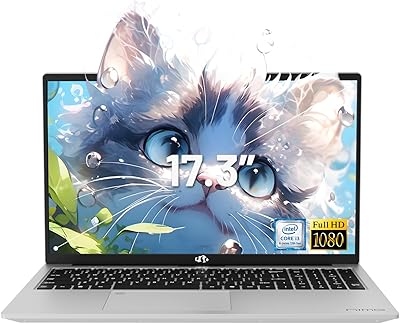
NIMO N171S 17.3″ Laptop, Intel Core i3-1215U, 16GB RAM, 512GB SSD
81%
85%
Performance
90%
Display Quality
65%
Battery Life
92%
Value for Money
80%
Build Quality
More
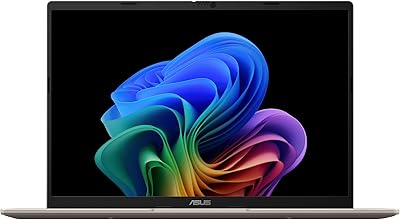
ASUS Vivobook 16 Laptop, AMD Ryzen AI 5 3400U, 16GB RAM, 512GB SSD
79%
88%
Performance
90%
Display Quality
82%
Battery Life
75%
Build Quality
72%
Portability
More
Lenovo IdeaPad 1 15IAU7 Laptop, 15.6″ FHD Touchscreen, Intel Core i3-1215U, 16GB RAM, 512GB SSD
79%
84%
Performance
92%
Value for Money
89%
Portability/Weight
86%
Display Quality
75%
Battery Life
More
ASUS Vivobook 14 M1407KA-PS74
86%
93%
Performance
88%
Display Quality
85%
Battery Life
91%
Portability
82%
Build Quality
More
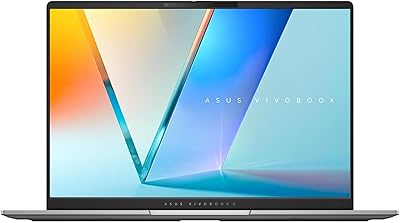
ASUS Vivobook S 14 OLED M5406WA
76%
94%
Display Quality
88%
Portability & Build
86%
CPU Performance
61%
Thermal Management & Fan Noise
67%
Battery Life
More
ASUS Vivobook Go 15 E1504FA
72%
88%
Value for Money
83%
Build Quality
74%
Performance
61%
Display Quality
69%
Battery Life
More
ASUS Vivobook 16 M1607KA (Ryzen AI 7 350, 16GB, 1TB)
74%
83%
Performance & Speed
76%
Display Quality
68%
Battery Life
61%
AI Features (Copilot+)
72%
Build Quality & Design
More
HP 14-dq5009nr Laptop, Intel Core i3-1215U, 8GB RAM, 256GB SSD
82%
85%
Performance
93%
Portability
88%
Battery Life
70%
Display Quality
92%
Value for Money
More
Acer Swift Go 14 – Intel Core i7-1355U, 16GB RAM, 512GB SSD
84%
91%
Portability
88%
Display Quality
89%
Battery Life
84%
Build Quality
85%
Performance (General Use)
More
ASUS Vivobook 17X 2023, Intel Core i9-13900H, 16GB RAM, 1TB SSD
84%
91%
Performance
87%
Display Quality
72%
Portability
88%
Value for Money
89%
Build Quality
More

FAQ

For the vast majority of college tasks — writing papers, running browser tabs, joining video calls, using Office apps — 16GB is genuinely comfortable and well above what most laptops in this price range offer. Where you might eventually feel the limits is with very large datasets, professional-grade creative software, or running virtual machines. For typical student workloads, it holds up well.

The RAM in this Vivobook is soldered to the motherboard, so it cannot be upgraded after purchase. The SSD may be replaceable depending on the specific configuration, but this should be verified before buying if expandability matters to you. Plan around the 16GB and 512GB specs as permanent for most users.

Honestly, this is one of the weaker points of the Vivobook 14. At 250 nits, the screen works fine in a dimmer room or a shaded workspace, but bright sunlight or a desk near a large window will wash it out significantly. If most of your work happens in a brightly lit environment, this is worth factoring into your decision.

It can open and process photos in Lightroom, but do not expect a smooth experience with large RAW files or complex local adjustment work. The integrated graphics and i3 processor handle basic tasks, but export times will be slow and the display's color accuracy and brightness are not really calibrated for serious editing work. It is workable for occasional casual edits, not for professional use.

Under typical use — a mix of browsing, documents, and video calls — most users get somewhere between five and seven hours. Push it harder with streaming or more active multitasking and that drops toward four hours. It is not a machine you would confidently leave the house with for a full eight-hour day without packing the charger.

Yes, it has an HDMI 1.4 port that supports an external display at up to 1080p at 60Hz. If you were hoping to drive a 4K monitor or a high-refresh-rate display, HDMI 1.4 will be a limitation. For a standard 1080p secondary screen, it works without issues.

For standard remote work — video calls on Zoom or Teams, working in a browser, managing emails and documents — this ASUS budget laptop handles things comfortably. The 16GB RAM means you can keep multiple apps and tabs open without slowdowns. The webcam is adequate in good lighting, though it degrades in darker rooms.

They are serviceable for quick video calls or background music, but do not expect much in terms of volume or audio depth. At higher volume levels some users notice distortion, and bass is essentially absent. For anything beyond casual listening, a pair of headphones or a Bluetooth speaker will make a significant difference.

Not really. The Intel UHD integrated graphics can handle very light or older titles, but anything modern or graphically demanding will struggle with low frame rates or refuse to run acceptably. If gaming is even a secondary use case for you, this Vivobook is not the right fit — you would want a dedicated GPU at minimum.

It is functional but not exceptional. The key spacing is reasonable for a 14-inch layout and everyday typing is fine, but the key travel is on the shallower side, which some touch typists find tiring over extended sessions. The trackpad, on the other hand, is one of the better-regarded aspects of the machine among buyers, with accurate tracking and reliable gesture support.