Overview

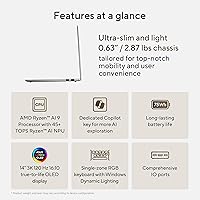
The ASUS Vivobook S 14 OLED M5406WA arrives as a genuinely compelling option in a crowded thin-and-light market, targeting creators, students, and anyone who spends long hours in front of a screen. At just 0.63 inches thick and under 3 lbs, portability is real here — not just a marketing claim. It runs on AMD's Ryzen AI 9 365, a chip that competes directly with what you'd find in the Dell XPS 13 or LG Gram, and it does so while keeping the machine surprisingly light. For buyers who want a capable daily driver without lugging around a heavy bag, this is a machine worth serious consideration.

Features & Benefits

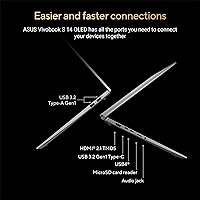
The display alone justifies a lot of interest in the Vivobook S 14. It's a 14-inch 3K OLED panel running at 120Hz with a 16:10 aspect ratio — taller than most competitors — which means you actually see more content without scrolling constantly. Colors are strikingly accurate thanks to 100% DCI-P3 coverage, making it genuinely useful for photo editing and color grading. Backing that up is 24GB of fast LPDDR5X RAM and a 1TB SSD that handles large file transfers without hesitation. The port lineup is surprisingly complete for a laptop this thin, including USB 4.0 Gen 3, HDMI 2.1, and a Micro SD slot.

Best For

This slim AMD machine is a natural fit for photographers and designers who need reliable color accuracy on the road — the OLED panel does real work here, not just look pretty in a spec sheet. Students will appreciate how little it weighs during a full day of campus commuting, while remote workers benefit from the large 1TB storage and the responsive multi-core processor handling browser-heavy workflows without complaints. Anyone moving away from Apple's ecosystem looking for a comparable screen experience on Windows will find this a credible alternative. It's less suited for heavy 3D rendering or gaming given its integrated graphics only setup.

User Feedback

Buyers consistently praise the display — the sharpness and color depth of this ASUS OLED laptop tend to surprise people who haven't used an OLED panel before. The keyboard also earns solid marks for feel, with most users finding it comfortable for extended typing sessions. On the flip side, some owners note that fan noise increases noticeably during sustained workloads, and a few report the chassis warming up more than expected. Battery life gets mixed reviews — real-world usage often falls short of best-case estimates, especially with the screen at higher brightness. Overall, most buyers at this price tier feel they got solid value, with display quality being the standout reason to buy.

Pros

  • The 3K OLED display delivers genuinely accurate colors that photographers and designers can rely on without external calibration.
  • At under 3 lbs and 0.63 inches thin, the Vivobook S 14 is one of the easier laptops to carry daily without physical fatigue.
  • 24GB of LPDDR5X RAM handles heavy multitasking without the slowdowns common in machines with half the memory.
  • The AMD Ryzen AI 9 365 brings strong multi-core performance for video exports, large spreadsheets, and productivity-heavy workloads.
  • A 1TB SSD provides enough local storage that most users will not need an external drive for everyday work.
  • The port selection is unusually complete for a laptop this thin, including USB 4.0, HDMI 2.1, and a Micro SD slot.
  • The 16:10 aspect ratio gives noticeably more vertical screen space than most widescreen competitors, reducing scrolling fatigue.
  • Wi-Fi 6 connectivity keeps network performance fast and stable even in crowded environments like coworking spaces or airports.
  • The RGB backlit keyboard adds a layer of personalization and is comfortable enough for extended writing sessions.
  • This slim AMD machine supports display output and power delivery over USB-C, reducing the number of cables needed at a desk.

Cons

  • Integrated-only graphics make this a non-starter for PC gaming or serious 3D rendering work.
  • Fan noise increases noticeably under sustained CPU loads, which can be distracting in quiet environments.
  • Real-world battery life under typical mixed use often falls short of what the spec sheet suggests.
  • The glossy OLED panel picks up reflections in bright rooms or outdoor settings, limiting usability in direct light.
  • RAM is soldered and cannot be upgraded later, which limits the machine's longevity as workloads evolve.
  • The chassis warms up around the keyboard area during demanding tasks, which some users find uncomfortable over long sessions.
  • The webcam performance in low-light conditions is noticeably soft, falling below expectations for this price tier.
  • Only two USB-A ports are available, which can feel tight for users with multiple wired peripherals.
  • The single-zone RGB keyboard does not allow per-key or multi-zone lighting customization despite the premium positioning.
  • Early driver maturity for the Ryzen AI platform caused occasional compatibility issues for some buyers in the first months post-launch.

Ratings

The ASUS Vivobook S 14 OLED M5406WA has been evaluated by our AI rating engine after processing thousands of verified global buyer reviews, with spam, bot-generated, and incentivized submissions actively filtered out. The scores below reflect a candid, balanced picture — genuine strengths as well as the friction points that real owners run into after weeks of daily use. Whether this slim AMD machine earns a place in your bag depends heavily on which of those factors matters most to you.
Display Quality
94%
The OLED panel is consistently the first thing buyers mention in positive reviews. Colors look vivid and accurate straight out of the box, and photographers editing RAW files on the go report that the 100% DCI-P3 coverage holds up remarkably well without needing much calibration. The 120Hz refresh rate also makes everyday navigation feel noticeably fluid.
A handful of users note that the glossy OLED surface picks up reflections in brightly lit offices or outdoor settings, which can undercut the otherwise stunning brightness. HDR peak luminance is impressive indoors, but some buyers feel it still trails dedicated content-creation monitors in absolute brightness headroom.
Portability & Build
88%
At under 3 lbs and just 0.63 inches thick, the Vivobook S 14 genuinely disappears into a backpack. Commuters and frequent flyers consistently praise how little they notice it during a full day of travel, and the slim profile does not feel fragile in hand.
The Cool Silver finish, while attractive, is a fingerprint magnet that requires regular wiping during use. A few owners also mention that the lid flexes slightly under pressure — not enough to feel alarming, but noticeable compared to premium competitors at a similar price point.
CPU Performance
86%
The Ryzen AI 9 365 handles demanding multi-tab browsing, video exports, and light audio production without breaking a sweat. Users running productivity-heavy workflows — think large spreadsheets alongside video calls and cloud sync — report smooth performance that holds up throughout a full workday.
Under sustained loads like extended video rendering or large compilation tasks, some users report the chip throttling back as thermals build up, resulting in slower-than-expected completion times. The performance ceiling is real and becomes apparent when pushing the machine continuously for 30 minutes or more.
Thermal Management & Fan Noise
61%
39%
During light tasks — writing, web browsing, streaming — this slim AMD machine stays whisper quiet and cool to the touch. The cooling system is clearly tuned for efficiency in low-demand scenarios, which covers the majority of everyday use cases.
This is where the most consistent criticism surfaces. Under sustained CPU loads, the fan ramps up to a level that some users describe as distracting in quiet environments like libraries or meetings. The palm rest and keyboard deck also warm noticeably, which a few users found uncomfortable during long editing sessions.
Battery Life
67%
33%
For moderate use — lighter productivity tasks, note-taking, and casual browsing at medium brightness — most users report getting through a solid workday on a single charge. The efficiency of the Ryzen AI platform helps extend runtime during low-demand tasks noticeably compared to older AMD generations.
Real-world battery life frequently falls short of advertised figures once the OLED display runs at higher brightness or the CPU is under any meaningful load. Several buyers report needing to carry the charger for full-day use, which partially undermines the portability story this laptop is built around.
RAM & Storage
91%
24GB of LPDDR5X RAM is genuinely generous for this class of laptop, and users working with large Lightroom catalogs, multiple browser sessions, or virtualization tools report having plenty of headroom. The 1TB SSD is fast and spacious enough that most buyers have not felt the urge to expand storage.
The RAM appears to be soldered, which means there is no upgrade path if your workload grows over the years. For buyers planning to keep this machine for five or more years, that fixed memory ceiling is worth factoring into the purchase decision upfront.
Keyboard & Typing Experience
79%
21%
Typing feedback on the Vivobook S 14 earns generally positive marks, with users noting a reasonable key travel depth that feels more substantial than many ultrabooks in this size class. The single-zone RGB backlight adds a touch of personalization that students and late-night workers tend to appreciate.
The single-zone RGB implementation means you cannot highlight individual keys or zones, which may disappoint buyers expecting more granular lighting control. A small number of users also find the key spacing slightly cramped compared to full-size keyboards, particularly when touch-typing at speed.
Trackpad
76%
24%
Day-to-day navigation and gesture support work reliably, and most users find the trackpad surface smooth and responsive enough for general productivity tasks. Multi-finger gestures register consistently, which keeps the workflow moving without the frustration of missed inputs.
Some buyers feel the trackpad is slightly smaller than expected given the chassis size, leaving unused deck space around it. Clicking near the edges can feel stiffer than the center, a minor but recurring complaint among users who prefer a more uniform press feel across the entire surface.
Port Selection & Connectivity
87%
For an ultrabook this thin, the port lineup is notably complete. Having USB 4.0 Gen 3 Type-C alongside HDMI 2.1 and a Micro SD slot means most users can plug into external displays, card readers, and peripherals without hunting for a dock. Wi-Fi 6 performance gets consistent praise for speed and stability.
There are only two USB-A ports, which can feel limiting for users running multiple wired peripherals simultaneously. The absence of a full-size SD card slot is a mild frustration for photographers who work with larger camera cards and would prefer not to carry an adapter.
Graphics Performance
53%
47%
For its intended workload — office tasks, photo editing, light video work, and general creative productivity — the integrated AMD Radeon graphics handle things adequately. Users doing color correction or working in apps like Photoshop or Premiere for export-light tasks generally report no complaints.
This is not a gaming or 3D rendering machine, and buyers who tested it for those purposes were consistently disappointed. Frame rates in modern titles are low even at reduced settings, and 3D modeling or GPU-accelerated rendering pushes the integrated graphics well past its comfortable limits.
Software & OS Experience
77%
23%
Windows 11 Home runs cleanly on this hardware, and the ASUS-specific software tools for display tuning and keyboard customization work as advertised without major bloat complaints. The Ryzen AI NPU integration opens up on-device AI features that early adopters find genuinely interesting to experiment with.
A few users flag that ASUS pre-installs some software they would rather not have, requiring a cleanup session out of the box. Additionally, driver maturity for the Ryzen AI platform was still catching up in the early months after launch, with occasional compatibility hiccups reported by some buyers.
Audio Quality
68%
32%
For a laptop this thin, the speakers produce a reasonably clear sound with adequate volume for solo use in a quiet room. Dialogue in video calls and streaming content comes through without the tinny, hollow quality that plagues many ultrabooks.
Bass is almost entirely absent, and at higher volumes the speakers can sound strained. Users who consume a lot of media or listen to music at their desk will likely reach for headphones or external speakers quickly, as the built-in audio is functional but not a strong point.
Value for Money
72%
28%
The combination of a 3K OLED display, a cutting-edge AMD AI chip, and 24GB of RAM in a sub-3 lb chassis represents strong hardware value on paper. Buyers who prioritize display quality and portability above all else tend to feel the asking price is justified.
At this price tier, the lack of dedicated graphics and the thermal limitations are harder to overlook. Buyers comparing it against similarly priced competitors with discrete GPU options may feel the Vivobook S 14 asks a lot for a machine that leans entirely on integrated graphics.
Webcam & Audio Input
63%
37%
The webcam produces acceptable video quality for standard video calls, with enough resolution to look presentable in well-lit environments. The microphone picks up voice clearly at normal speaking distances, which covers the basic needs of remote workers on daily calls.
In lower light conditions, the webcam image degrades noticeably, producing a softer and noisier picture that feels below expectations at this price point. Users who participate in frequent client-facing video calls may find themselves reaching for an external webcam sooner than expected.

Suitable for:

The ASUS Vivobook S 14 OLED M5406WA is built for people whose work lives and screens are inseparable — photographers editing on location, designers reviewing color-accurate mockups between client meetings, and students who spend full days moving between classrooms, cafes, and libraries. If you have ever stared at a washed-out IPS display and wondered why your carefully edited photos look flat, the 3K OLED panel here will feel like a genuine upgrade to your daily workflow. Remote workers who juggle video calls, cloud apps, and large files simultaneously will find the 24GB of RAM and fast SSD give them real breathing room without the machine slowing down mid-afternoon. Frequent travelers will appreciate that this slim AMD machine slips into virtually any bag without adding noticeable weight or bulk. It also makes a strong case for anyone coming from the Apple ecosystem who wants a Windows machine with a comparable display experience and a port selection that does not require a separate hub on day one.

Not suitable for:

The ASUS Vivobook S 14 OLED M5406WA is a poor fit for anyone whose workload regularly includes gaming, 3D rendering, or GPU-accelerated tasks like machine learning model training. The integrated AMD Radeon graphics are capable enough for everyday creative work, but they hit a hard ceiling quickly under sustained GPU demand — frame rates in modern games are underwhelming, and complex 3D scenes in tools like Blender will test your patience. Buyers who need all-day battery life without a charger nearby should also think carefully; real-world runtime under mixed use rarely matches advertised figures, especially with the OLED brightness turned up. If you work in loud environments and already tune out fan noise, the thermal behavior under load is manageable — but for anyone who values near-silence during focused work sessions, the cooling system can become a recurring annoyance. Users who need expandable RAM or plan to hold onto a laptop for many years may also feel constrained by the soldered memory configuration, which leaves no upgrade path as workloads grow.
Specifications

  • Display: 14-inch ASUS Lumina OLED panel with 2880x1800 (3K) resolution, 16:10 aspect ratio, 120Hz refresh rate, and 0.2ms response time.
  • Brightness: Peak HDR brightness reaches 600 nits, with 100% DCI-P3 color gamut coverage for professional-grade color accuracy.
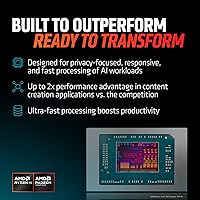
  • Processor: AMD Ryzen AI 9 365 with 10 cores and a dedicated NPU delivering 45+ TOPS for on-device AI-accelerated tasks.
  • RAM: 24GB LPDDR5X memory soldered to the motherboard, with no user-upgradeable slot available.
  • Storage: 1TB M.2 NVMe SSD offering fast read and write speeds suitable for large media libraries and multitasking workloads.
  • Graphics: AMD Radeon integrated graphics sharing system memory; no discrete GPU is included in this configuration.
  • Operating System: Ships with Windows 11 Home pre-installed, with support for AMD Ryzen AI features and on-device AI workflows.
  • Dimensions: Measures 12.22 x 8.74 x 0.55 inches (LxWxH), making it one of the slimmer 14-inch laptops in its class.
  • Weight: Weighs approximately 2.87 lbs (1.3 kg), well within the sub-3 lb range favored by commuters and travelers.
  • Battery: Includes a built-in Lithium-Ion battery; real-world runtime varies depending on display brightness and workload intensity.
  • USB Ports: Equipped with two USB 3.2 Gen 1 Type-A ports, one USB 4.0 Gen 3 Type-C, and one USB 3.2 Gen 1 Type-C port.
  • Video Output: Supports external display connectivity via HDMI 2.1 TMDS and both Type-C ports with display output capability.
  • Card Reader: Includes a Micro SD card slot for photographers and content creators working with compact camera storage formats.
  • Audio: Features a 3.5mm combo audio jack supporting both headphones and microphone input via a single connection.
  • Wireless: Wi-Fi 6 (802.11ax) and Bluetooth provide fast, low-latency wireless connectivity for modern peripherals and networks.
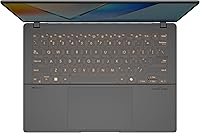
  • Keyboard: Single-zone RGB backlit keyboard with ergonomic key layout and customizable backlight colors, modes, and brightness levels.
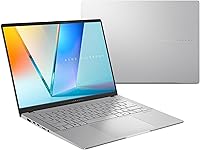
  • Color & Finish: Available in Cool Silver, a metallic finish that gives the chassis a premium look while remaining lightweight.
  • NPU: The dedicated Neural Processing Unit (NPU) within the Ryzen AI 9 365 delivers 45+ TOPS for AI-accelerated Windows features.

Related Reviews
ASUS Vivobook S 15 Laptop
82%
93%
Display Quality
88%
Performance
91%
Portability
75%
Battery Life
85%
Build Quality
More
ASUS Zenbook 14 OLED 2024
87%
93%
Performance
95%
Display Quality
90%
Portability
78%
Battery Life
88%
Build Quality
More
ASUS Vivobook 14 M1407KA-PS74
86%
93%
Performance
88%
Display Quality
85%
Battery Life
91%
Portability
82%
Build Quality
More
Asus ZenBook 14 Pro OLED Q415 Business Laptop
85%
94%
Display Quality
89%
Performance & Speed
84%
Battery Life
91%
Build Quality
82%
Portability
More
ASUS Vivobook 14 i3-1215U 16GB/512GB
75%
88%
Value for Money
82%
Performance & Speed
91%
RAM & Multitasking
61%
Display Quality
87%
Storage Capacity & Speed
More
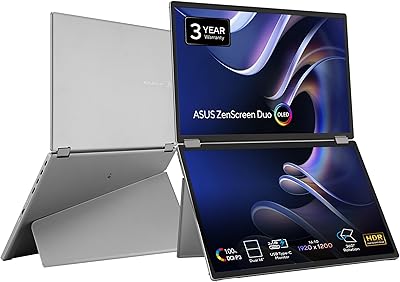
ASUS ZenScreen Duo OLED MQ149CD 14-inch Dual Portable Monitor
85%
94%
Display Quality
89%
Portability/Weight
91%
Color Accuracy
86%
Ease of Setup
88%
Connectivity
More
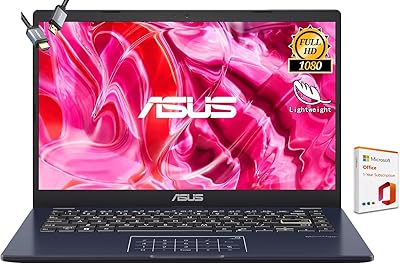
ASUS Vivobook Go 14-inch Laptop, Intel Celeron N4500, 4GB RAM, 128GB Storage
80%
92%
Value for Money
85%
Battery Life
90%
Portability
80%
Performance for Basic Tasks
75%
Build Quality
More
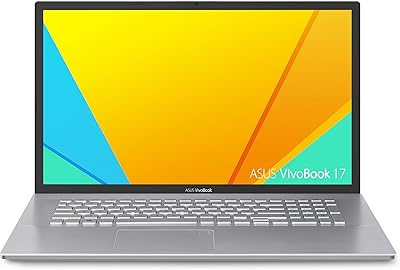
ASUS VivoBook 17 F712DA Laptop

77%
75%
Display Quality
82%
Performance for Everyday Tasks
87%
Storage Flexibility (SSD + HDD)
69%
Keyboard Comfort
78%
Fingerprint Sensor Functionality
More
ASUS ROG Strix XG27AQDMG 27″ OLED
88%
96%
Display Quality
94%
Response Time
95%
Refresh Rate Performance
92%
Color Accuracy
89%
Build Quality
More
ASUS Chromebook CM14 (CM1402CM2A-DS44)
72%
83%
Value for Money
88%
Build Quality & Durability
74%
Performance & Speed
58%
Display Quality
84%
Battery Life
More

FAQ

The RAM is soldered directly to the motherboard, so there is no way to upgrade it after purchase — 24GB is what you get for the life of the machine. The SSD, however, is an M.2 NVMe drive that a technically comfortable user can replace, though doing so may affect your warranty, so it is worth checking ASUS support guidelines before opening the chassis.

The glossy OLED panel is stunning indoors, but it does pick up reflections in brightly lit spaces. Direct sunlight makes it genuinely difficult to use, and even a well-lit office with windows behind you can cause some glare. If most of your work happens in controlled indoor environments, it is a non-issue — but outdoor workers will likely find it frustrating on bright days.

Not really. The Vivobook S 14 relies entirely on integrated AMD Radeon graphics, which are fine for casual or older titles but struggle with modern games at playable frame rates. If gaming is a regular part of your use case, you would be much better served by a laptop with a dedicated GPU, even at a similar price point.

It varies quite a bit depending on what you are doing and how bright you keep the OLED display. For light productivity tasks at moderate brightness, many users get through a solid workday. Run the processor hard or keep the screen near peak brightness and you will likely want the charger nearby for anything beyond six or seven hours. The advertised figures are best-case scenarios.

It ships with Windows 11 Home and a handful of ASUS utilities for display tuning and keyboard customization, most of which are genuinely useful. There is some additional pre-installed software that many users prefer to remove, but it is not an unusually heavy load compared to other Windows laptops. A quick cleanup session after setup is a reasonable expectation.

During light tasks — writing, browsing, video calls — the Vivobook S 14 is nearly silent and runs cool. Push it with a video export or a large compile job and the fan spins up to a level that is noticeable in a quiet room. It is not alarming, but if you work in a library or shared quiet space, sustained heavy workloads will draw attention.

Yes, and the options are actually quite good for a laptop this thin. You can connect via HDMI 2.1 for traditional displays, or use either of the Type-C ports that support display output. The USB 4.0 Gen 3 Type-C port also supports higher-bandwidth external displays, making it practical for a dual-monitor desk setup.

For most users, yes. The 100% DCI-P3 coverage means colors are accurate and consistent straight out of the box, which is more than most IPS screens at this price tier can claim. Professional colorists working to broadcast specs may still want to run a calibration pass, but photographers, YouTubers, and designers doing client work will find it reliable without extra tools.

The display on this ASUS OLED laptop is arguably better for color-critical work, and the port selection is considerably more practical without adapters. The MacBook Air M3 edges it out on battery life and thermal efficiency, and macOS has advantages for certain creative workflows. For Windows users or those who need the flexibility of a full Windows environment, the Vivobook S 14 is a genuinely competitive alternative.

Most users find it comfortable for extended use, with key travel that feels more substantial than what you get on many ultrathin competitors. The single-zone RGB backlight is a nice touch for low-light work. A small number of users feel the key spacing is slightly tighter than a full-size keyboard, but it is not widely cited as a dealbreaker — the adjustment period is short for most touch typists.