Overview

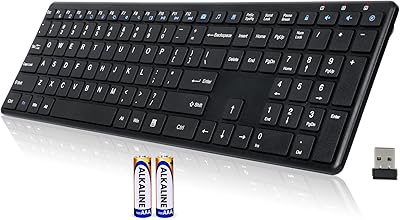
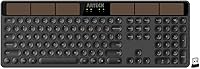
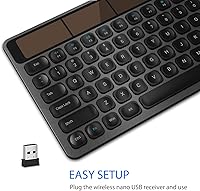
The Arteck HW126 Wireless Solar Keyboard is a practical, cable-free peripheral built around one genuinely useful idea: let light handle the charging so you never have to think about batteries again. It sits comfortably in the mid-range — not a budget throwaway, not a premium enthusiast board — and that positioning makes sense given what it offers. The full-size layout with a numpad is a real differentiator; a lot of wireless keyboards sacrifice that to stay compact. Setup is as simple as it gets: plug the nano USB receiver into any available port and you are typing instantly. No drivers, no pairing ritual. Just a reliable daily driver for Windows users who want less desk clutter.
Features & Benefits

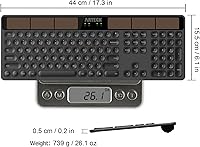
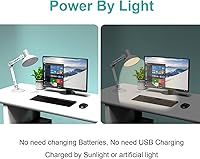
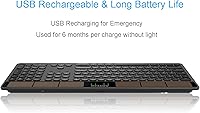
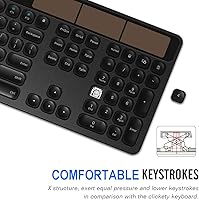
The headline feature on this solar keyboard is its solar recharging system — it draws power from natural and artificial light alike, keeping the built-in battery topped up through a normal workday. Arteck claims up to six months of use in complete darkness, though that figure assumes roughly two hours of daily use, so heavy typists should temper expectations slightly. The keys are low-profile scissor-style: quiet, with a short travel that suits long writing sessions without fatiguing your fingers. Build quality punches above its price — the stainless metal front panel feels solid and resists flex noticeably. At just 0.2 inches thick across a 17.32 x 6.1-inch footprint, the board stays impressively slim without dropping the number pad.

Best For

This solar-powered board is an obvious fit for office workers and home users tired of hunting for AAA batteries or remembering to plug in a charging cable. If your desk is already crowded, the nano USB dongle approach creates far less friction than Bluetooth pairing, which can be finicky with older machines or Smart TVs. The quiet keystrokes also make it considerate in open-plan or shared spaces — neighbors will not notice it. One honest caveat: the Arteck wireless keyboard is optimized for Windows, covering everything from XP through Windows 10. Mac users may find key labeling and some function shortcuts do not map cleanly, so this is genuinely a Windows-first choice.

User Feedback

Among verified buyers, the solar charging earns consistent praise — most report that normal office lighting keeps the battery healthy without any active management on their part. The typing feel draws positive comments too, especially from people switching away from noisier membrane boards. That said, a handful of users have noted occasional connectivity drops, particularly when the keyboard sits farther from the USB receiver. These appear to be edge cases rather than a widespread issue, but worth knowing if your setup involves distance. Long-term owners past the one-year mark generally report solid durability, though a few mention the charge indicator strip can be difficult to read under strong ambient light.

Pros

  • Solar charging works reliably under normal indoor lighting — no battery swaps, ever.
  • The full-size layout with numpad is genuinely rare among wireless keyboards at this price.
  • Low-profile keys are quiet enough for open offices and shared living spaces.
  • Stainless metal front panel feels solid and resists the flex common in similarly priced boards.
  • Plug-and-play nano receiver works instantly across Windows XP through Windows 10.
  • Setup takes under 30 seconds — no drivers, no app, no pairing process.
  • At 1.85 pounds and 0.2 inches thick, this solar-powered board sits flat and unobtrusive on any desk.
  • A 24-month warranty provides meaningful coverage beyond the typical one-year standard.
  • Long-term owners report the build holds up well after a year or more of daily use.

Cons

  • Wireless range in real-world use falls short for Smart TV setups or desktop towers with recessed USB ports.
  • The six-month battery claim assumes only about two hours of daily use — heavy typists should expect less.
  • Mac compatibility is poor; key mapping and function shortcuts do not align with macOS at all.
  • No Bluetooth support means you cannot switch between devices without physically moving the USB receiver.
  • Key legends on high-use keys can fade noticeably after 18 or more months of heavy use.
  • The charge indicator strip is difficult to read accurately under bright ambient light.
  • No software, no key remapping, and no macro support — what you see is exactly what you get.
  • The plastic base undercuts the premium impression created by the metal top panel.

Ratings

The Arteck HW126 Wireless Solar Keyboard scores here reflect AI-driven analysis of verified global buyer reviews, with spam, bot activity, and incentivized feedback actively filtered out before scoring. This solar-powered board earns strong marks in several key areas but also shows real weaknesses that honest buyers deserve to know about. Both the standout strengths and the genuine frustrations are factored into every score below.
Solar Charging Reliability
83%
Most office users report that the solar strip keeps the board powered without any active effort on their part — normal desk lighting, even from overhead fluorescents, is enough to maintain charge through a full workday. Buyers who previously dealt with dead wireless keyboards mid-meeting find this aspect genuinely stress-relieving.
The six-month darkness claim comes with a meaningful asterisk: it assumes only about two hours of daily use, so heavy typists working long shifts may drain the battery faster than expected. A small number of users also note the charge indicator strip is hard to read in bright ambient light.
Typing Comfort
88%
The low-profile scissor-style keys draw consistent praise from people who spend hours writing documents or entering data. The short travel and quiet actuation make sustained sessions comfortable without the finger fatigue that deeper-travel membrane boards can cause.
Typists who prefer tactile feedback or the click of a mechanical board will find these keys feel flat and undifferentiated. A few users note that the key resistance is slightly lighter than expected, which leads to accidental keystrokes during fast typing until muscle memory adjusts.
Build Quality
81%
19%
The stainless steel front panel is a genuine surprise at this price tier — the board resists flex and feels solid on the desk, which is not a given among similarly priced wireless keyboards. Long-term owners frequently comment that the finish holds up well after a year or more of daily use.
The metal feel is mostly cosmetic: the base and underside are still plastic, which some buyers find inconsistent with the premium top panel impression. A couple of reviewers noted paint chipping around high-use keys after extended months of heavy typing.
Wireless Connectivity
74%
26%
For typical desk setups — receiver plugged into a PC or laptop within a few feet — the 2.4GHz connection is stable and lag-free. The plug-and-play nano receiver is especially convenient for users who switch between machines occasionally without wanting to re-pair via Bluetooth.
Users who place the receiver farther away, such as behind a desktop tower or across a TV stand, report intermittent dropouts and occasional input lag. The effective range in real-world conditions appears shorter than advertised, which frustrates Smart TV users in particular.
Value for Money
86%
Relative to what this solar keyboard delivers — metal build, full-size layout, no-battery-replacement operation — the mid-range price feels justified for most buyers. Office workers consistently rate it as one of the more practical wireless keyboard purchases they have made.
Buyers expecting a premium typing experience to match the premium-looking panel may feel slightly let down. At this price, competitors offer Bluetooth multi-device support that this board lacks, which matters more to some users than the solar charging benefit.
Noise Level
91%
This is one of the quietest keyboards in its class, and open-plan office users specifically call this out as a deciding factor. Colleagues and family members in shared spaces rarely notice it during use, which is a real day-to-day quality-of-life benefit.
The quietness is partly a byproduct of the shallow key travel, so users who need auditory or tactile confirmation of keypresses may feel slightly uncertain about whether a key registered. This is a minor point but comes up in reviews from fast typists.
Setup & Ease of Use
93%
The nano receiver requires zero installation — plug it in, and the board is recognized immediately across all supported Windows versions. For less tech-savvy users or anyone setting up a new PC quickly, this is a significant practical advantage over Bluetooth-dependent alternatives.
The simplicity is also a limitation: there are no advanced configuration options, no software, and no way to remap keys. Power users who want macro support or custom layouts will need to look elsewhere.
Mac Compatibility
39%
61%
Technically, the hardware will function when connected to a Mac via the USB receiver — basic typing works without issue in a pinch. Some users have used it as a temporary workaround keyboard on macOS without major disruption.
The board is Windows-optimized and makes no bones about it. Key labeling does not align with macOS conventions, modifier keys behave unexpectedly, and several function shortcuts simply do not work as intended. Mac users should treat this as a hard limitation, not a workaround.
Full-Size Layout
89%
Having a dedicated number pad, a full function row, and proper arrow keys in a wireless solar board is genuinely uncommon at this size and weight. Accountants, data entry professionals, and anyone who regularly works with spreadsheets particularly appreciate not having to compromise on layout.
The full-size format does mean this is a desk-only keyboard — it is not practical for lap use or travel. Users who occasionally need portability may find the 17.32-inch width slightly unwieldy compared to tenkeyless alternatives.
Battery Life (Practical)
77%
23%
Under typical office conditions with regular light exposure, most users report never needing to think about charging at all. Several long-term reviewers confirm the board stayed powered continuously across many months of daily use without intervention.
The advertised six-month figure applies to total darkness at two hours per day — a narrow scenario that does not reflect all real-world users. Heavy users in dimly lit spaces have reported the battery depleting within weeks, which creates confusion when expectations are set by the headline claim.
Weight & Portability
66%
34%
At 1.85 pounds, the board is light enough to reposition on a desk easily and does not feel anchored in place. The slim 0.2-inch profile keeps it from taking up significant vertical space, which is nice for monitor-close desk setups.
Compared to compact wireless keyboards designed for portability, this one is not a realistic travel companion. The combination of full-size width and the lack of a carrying case or folding design limits it firmly to stationary use.
Smart TV Usability
61%
39%
The plug-and-play USB receiver works on Smart TVs that support standard USB HID input, making it a functional option for living room media control or text entry on streaming services. No pairing or setup is required beyond inserting the dongle.
Wireless range issues become more pronounced in living room setups where the TV's USB port may be far from the seating position. Several Smart TV users report connectivity inconsistencies that do not appear in closer desktop setups, making this a secondary rather than primary use case.
Warranty & Support
72%
28%
A 24-month warranty is notably longer than the standard one-year coverage offered by many keyboard competitors at this tier. Buyers who have needed to contact Arteck support describe the process as responsive and reasonably straightforward.
Some users report the claims process requires back-and-forth communication and photo documentation, which feels cumbersome for a keyboard issue. A few international buyers note that warranty fulfillment outside the US involves longer wait times.
Key Labeling & Legends
78%
22%
The key legends are clean, well-sized, and easy to read under most lighting conditions. New users and those who occasionally glance at the keyboard while typing appreciate the clear, uncluttered font choices on the keycaps.
Over extended use — typically beyond 18 months — a handful of reviewers note that legends on the most-used keys begin to fade. This is a known limitation of pad-printed keycaps and is not unique to this board, but it is worth noting for longevity-focused buyers.

Suitable for:

The Arteck HW126 Wireless Solar Keyboard is a strong match for Windows-based home office and workplace users who are simply tired of managing batteries or charging cables on their desk. If your setup involves a PC or laptop sitting under reasonable lighting — even standard office fluorescents — this solar-powered board will likely stay charged without you ever thinking about it. Data entry workers and spreadsheet-heavy users in particular benefit from the full-size layout with its dedicated numpad, something many wireless keyboards sacrifice for compactness. It also suits anyone in a shared or open-plan space who needs quiet keystrokes that will not disturb colleagues. The plug-and-play nano receiver makes it a practical choice for less tech-savvy users or anyone who just wants hardware that works the moment it is plugged in, without software installs or pairing steps.
Not suitable for:

Mac users should approach the Arteck HW126 Wireless Solar Keyboard with real caution — while it will physically function, the key labeling, modifier key behavior, and function shortcuts are built around Windows conventions, and the mismatch becomes genuinely frustrating in daily use. Gamers and enthusiasts looking for tactile or clicky mechanical feedback will also find the low-profile scissor keys too flat and undifferentiated for their needs. If you regularly work in a dimly lit environment and type for more than two to three hours a day, the solar charging may not keep pace — the often-cited battery longevity figures assume limited daily use with adequate light exposure. Bluetooth multi-device users who need to switch between a laptop, tablet, and phone throughout the day will find the single USB dongle approach limiting. Finally, anyone planning to use this as a portable or travel keyboard should note that the full-size 17.32-inch width makes it a desk-only proposition.
Specifications

  • Model Number: The model identifier for this keyboard is HW126, manufactured by Arteck.
  • Connectivity: The keyboard connects via a 2.4GHz wireless signal using a nano USB receiver that plugs into any standard USB port.
  • Layout: Full-size layout includes a dedicated number pad, a complete function row, arrow keys, and standard alphanumeric keys.
  • Dimensions: The keyboard measures 17.32″ in length, 6.1″ in width, and 0.2″ in height.
  • Weight: The keyboard weighs 1.85 pounds, making it a stable desktop peripheral rather than a portable travel board.
  • Charging Method: Power is supplied by a built-in rechargeable battery that recharges passively via any light source, including indoor artificial lighting.
  • Battery Life: In complete darkness with no light exposure, the internal battery supports up to 6 months of use based on approximately 2 hours of daily operation.
  • Key Type: The keyboard uses low-profile scissor-switch keys designed for quiet actuation and comfortable extended typing sessions.
  • Front Panel Material: The top surface features a stainless steel panel with a painted finish, providing structural rigidity and a solid feel underhand.
  • Base Material: The underside and structural base of the keyboard are constructed from plastic, standard for this product category and price tier.
  • OS Compatibility: Fully supported operating systems include Windows 10, Windows 8, Windows 7, Windows Vista, and Windows XP.
  • Device Compatibility: The keyboard is compatible with desktop PCs, laptops, and Smart TVs that support standard USB HID input.
  • Setup Requirement: No drivers or software installation are required; the keyboard is recognized automatically upon inserting the nano USB receiver.
  • Wireless Range: The 2.4GHz connection is rated for standard desktop distances, with real-world performance best maintained within approximately 10 feet of the receiver.
  • Warranty: Arteck provides a 24-month limited warranty, along with customer support assistance for defects and operational issues.
  • Package Contents: Each unit ships with the wireless solar keyboard, a nano USB receiver, and a printed welcome guide.
  • Charge Indicator: A solar charge status strip is integrated into the keyboard surface to provide a visual reference for current battery level.
  • Receiver Type: The included nano USB receiver is small enough to remain plugged into a laptop port without protruding significantly or risking damage during normal use.

Related Reviews

Arteck HW192 Wireless Keyboard and Mouse Combo
78%
78%
Build Quality
72%
Typing Experience
63%
Mouse Comfort & Ergonomics
81%
Battery Life
69%
Wireless Connectivity
More
Arteck HW305 Wireless Keyboard
79%
91%
Value for Money
94%
Ease of Setup
74%
Typing Experience
63%
Build Quality
69%
Battery Life
More
Logitech K750 Wireless Solar Keyboard
84%
94%
Solar Charging Performance
88%
Typing Comfort
85%
Build Quality
78%
Wireless Connectivity
91%
Eco-Friendly Design
More
Arteck Bluetooth Keyboard HB086
86%
93%
Portability & Size
94%
Battery Life
83%
Ergonomics & Comfort
90%
Ease of Use & Setup
88%
Multi-Device Compatibility
More
Cherry Stream Wireless Keyboard
88%
88%
Typing Comfort
92%
Wireless Performance
78%
Build Quality
85%
Ergonomics
95%
Setup and Installation
More
Arteck HB193 Bluetooth Keyboard
81%
88%
Multi-Device Switching
84%
Build Quality
71%
Typing Experience
86%
Battery Life
91%
Layout & Key Coverage
More
Logitech Wireless Keyboard K360
87%
95%
Battery Life
92%
Ease of Setup
83%
Typing Comfort
90%
Wireless Connectivity
85%
Build Quality
More
Redragon BK7114 Wireless Keyboard
85%
91%
Typing Experience
89%
Connectivity Options
85%
Design and Build Quality
93%
Quietness of Keypress
88%
Compatibility with Multiple Devices
More
Arteck HW315
Arteck HW315
74%
83%
Ergonomic Comfort
74%
Wrist Rest Quality
61%
Typing Feel & Key Travel
92%
Battery Life
81%
Wireless Connectivity
More
TECKNET TK-EKB01040BS01 Wireless Keyboard
76%
83%
Ergonomic Comfort
86%
Typing Noise Level
79%
Wireless Reliability
62%
Build Quality
88%
Value for Money
More

FAQ

It works well under typical indoor lighting, including overhead fluorescents and LED desk lamps. You do not need a window or direct sunlight. Most office users report the battery stays consistently topped up without any deliberate effort to position the keyboard near a light source.

The Arteck HW126 Wireless Solar Keyboard rates its battery life at up to 6 months in complete darkness, but that figure assumes roughly 2 hours of daily use. If you type for 6 to 8 hours a day and work in a dimly lit room, you can expect the battery to deplete considerably faster. Under normal office lighting with heavy use, the solar strip should offset much of the drain, but it is not a guarantee in very dark environments.
It will technically function — basic key input works — but this board is designed around Windows conventions. Modifier keys behave unexpectedly on macOS, several function shortcuts do not map correctly, and the key labels do not match Mac terminology. If you are primarily a Mac user, this solar-powered board will likely frustrate you enough that a different keyboard is worth considering.

No, nothing at all. Just plug the nano USB receiver into an available USB port and the keyboard is recognized immediately. Windows handles it natively, which makes setup genuinely instant regardless of which supported version you are running.

No, it is not. The Arteck wireless keyboard uses low-profile scissor-switch keys, which are quiet and have a short travel distance. They feel smooth and comfortable for typing documents or data entry, but there is no tactile bump or audible click like you get from mechanical switches. If you prefer mechanical feel, this board is not the right match.

For most desk setups — receiver plugged directly into a PC or laptop nearby — the connection is stable and responsive. Problems tend to appear when the receiver is blocked by a desktop tower, tucked behind furniture, or placed farther than about 10 feet away. Smart TV users in living room setups have reported the most connectivity issues due to distance and obstructions.

Yes, as long as your Smart TV has a standard USB port that supports keyboard input, the nano receiver will work. That said, wireless range can be a real issue in living room setups where the TV is across the room. If you plan to use it primarily with a TV, make sure the USB port is accessible and not tucked behind the panel in a signal-blocking position.

Unfortunately, the receiver is paired to the specific keyboard unit, so a generic replacement will not work. You would need to contact Arteck support directly to ask about a replacement receiver, and results vary. This is a known limitation of 2.4GHz dongle-based keyboards in general, so it is worth keeping the receiver in a safe place.

The metal front panel holds up well and most owners report the board looking and functioning fine after a year or more of daily use. The main wear concern is key legend fading — the printed characters on frequently used keys can start to wear after 18 months or so with heavy use, which is common for pad-printed keycaps at this price point. The overall structure remains solid longer than the legends in most cases.

Yes, this solar-powered board includes an on/off switch so you can power it down when not in use for extended periods. It also has an automatic sleep function that kicks in after a period of inactivity, which helps conserve the built-in battery charge when the keyboard is sitting idle in a dark environment.