Overview

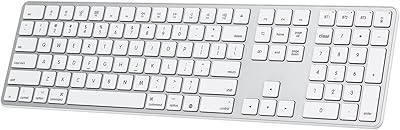
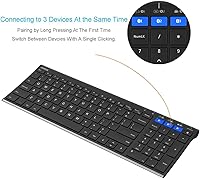
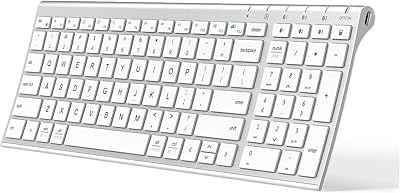
The Arteck HB193 Bluetooth Keyboard is a full-size wireless keyboard built for people who work across multiple devices without wanting to spend a lot. It pairs with up to three gadgets at once — a laptop, tablet, and phone, for instance — and lets you hop between them with a single keypress. The stainless steel top gives it a noticeably solid feel for the price. It runs on a built-in rechargeable battery that Arteck claims will last around six months of typical daily use, and it works across Windows, macOS, iOS, and Android without issue.

Features & Benefits

What stands out most about the HB193 is that it includes a full number pad — something most wireless keyboards at this price quietly drop. The low-profile keys stay quiet enough for an office or shared space, and the stainless steel surface holds up better than the plastic decks you typically find here. Switching between paired devices is genuinely fast: one dedicated key per device slot, no menus involved. A USB charging cable is included in the box, and the built-in lithium battery reportedly handles months of daily use before needing a top-up, cutting out the hassle of disposable batteries entirely.

Best For

This multi-device keyboard is a natural fit for home office setups where you move constantly between a desktop, an iPad, and a phone. It suits tablet users especially well — anyone who wants a full-size typing layout without buying into a proprietary dock or ecosystem. If you are tired of swapping AA batteries every few weeks, the rechargeable design is a genuine convenience upgrade. Light to moderate typists in quiet shared spaces will appreciate the subdued key noise. It is less ideal for heavy coders or gamers who need deep key travel or programmable macros.

User Feedback

Across more than a thousand ratings, this Arteck keyboard holds a strong 4.4-star average, and the reviews are fairly consistent. Buyers often highlight the build quality — the metal top feels more substantial than you would expect at this price point. Device switching speed gets praised repeatedly, with most users finding it quick and reliable. On the downside, a handful of reviewers mention the keyboard occasionally needs re-pairing after sitting idle, which can be a minor frustration. A few also feel the shallow key travel makes it less satisfying for touch typists who prefer noticeable tactile feedback.

Pros

  • Pairs with three devices simultaneously and switches between them with a single keypress — no re-pairing needed.
  • The full-size layout includes a number pad, which is rare and genuinely useful at this price tier.
  • Stainless steel top surface feels noticeably more durable and premium than all-plastic budget keyboards.
  • Built-in rechargeable battery lasts several months of typical daily use before needing a charge.
  • Works cleanly across Windows, macOS, iOS, and Android without drivers or software installs.
  • Low-profile keys are quiet enough for open offices and shared spaces without drawing attention.
  • The HB193 includes a USB charging cable and a 24-month warranty in the box — solid coverage at this price.
  • Hotkeys and media shortcut keys function correctly across most supported platforms out of the box.
  • Initial Bluetooth pairing is quick and straightforward, even for less tech-savvy buyers.

Cons

  • Key travel is shallow enough to disappoint touch typists who prefer noticeable tactile feedback.
  • The keyboard occasionally requires manual re-pairing after sitting idle, which disrupts fast-paced workflows.
  • No battery level indicator means the first sign of a dying charge is often a sudden disconnection.
  • The micro-USB charging port feels outdated for buyers whose other devices have all moved to USB-C.
  • Backlight brightness is fixed and dim — not practical for typing in a fully darkened room.
  • The bottom half and keycaps are standard plastic, which clashes a little with the premium metal top panel.
  • No included case or sleeve means the keyboard has no protection during transport.
  • macOS users may find a handful of function-layer shortcuts map to Windows-centric behaviors by default.

Ratings

The Arteck HB193 Bluetooth Keyboard earns a strong overall standing among budget wireless keyboards, based on AI analysis of verified global buyer reviews with spam, bot, and incentivized feedback actively filtered out. Scores reflect the real-world highs and frustrations that genuine users report after weeks and months of daily use. Both the clear strengths and the recurring pain points are represented honestly below.

Multi-Device Switching
88%
Users who juggle a laptop, tablet, and phone throughout the day consistently call out how fast and friction-free the device-switching is. One keypress per slot — no holding combinations, no re-pairing ritual — makes the workflow feel genuinely practical for a busy desk setup.
A recurring complaint is that the keyboard occasionally drops its paired connection after sitting idle, forcing a manual re-pair. It does not happen to everyone, but for users who step away frequently it can disrupt the otherwise smooth switching experience.
Build Quality
84%
The stainless steel top panel is the first thing buyers notice out of the box — it feels noticeably more solid and premium than the all-plastic decks common at this price. Long-term reviewers report that the surface resists scratching and holds up well after months of regular use.
The underside and key caps are standard plastic, which creates a slight mismatch with the metal top. A few users note that the overall construction still feels lightweight when lifted, which undercuts the premium impression the steel surface initially creates.
Typing Experience
71%
29%
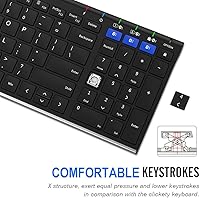
The low-profile keys are quiet enough for open-plan offices and shared spaces, which buyers who type near others genuinely appreciate. For light to moderate daily typing — emails, notes, browsing — the keys feel responsive and comfortable over extended sessions.
Touch typists who prefer noticeable tactile feedback tend to find the shallow key travel underwhelming. Several reviewers coming from mechanical or even mid-range membrane keyboards describe the keystrokes as feeling slightly mushy or unsatisfying during longer writing sessions.
Battery Life
86%
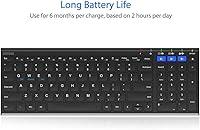
The six-month battery claim holds up surprisingly well in verified long-term reviews. Users who type two to three hours daily often report going several months between charges, making the built-in lithium battery a genuine upgrade over keyboards that chew through disposable AAs.
Heavy users who type four or more hours daily find that the real-world battery life falls noticeably short of the advertised estimate. There is also no battery percentage indicator, so the first sign of a low charge is often an abrupt disconnection.
Layout & Key Coverage
91%
Having a full number pad at this price point is a real differentiator. Accountants, spreadsheet workers, and data entry users specifically call this out as the reason they chose the HB193 over slimmer wireless alternatives that sacrifice the numpad to cut costs.
The full-size layout is wide enough that it can feel crowded on a small desk alongside a mouse. Users with compact workstations occasionally note that the keyboard takes up more horizontal space than they anticipated before it arrived.
Bluetooth Connectivity Stability
67%
33%
Initial pairing across Windows, macOS, iOS, and Android is straightforward and generally works on the first attempt. Most users in stable desktop setups report consistent connections with no dropout issues during normal workday sessions.
Idle-timeout reconnection is the most cited complaint across negative reviews. After the keyboard goes to sleep, some users experience a delay or failed reconnect that requires manually pressing a device key or cycling Bluetooth. It is minor but genuinely irritating in fast-paced workflows.
Cross-Platform Compatibility
83%
The broad OS support is a practical strength — buyers routinely confirm it works cleanly across iPads, Android tablets, Windows desktops, and MacBooks without needing drivers or software. Hotkeys and media controls function correctly on most supported platforms out of the box.
A small number of macOS users note that a few function-layer shortcuts behave differently than expected or map to Windows-centric functions. Nothing is broken, but power users on Apple devices may need a brief adjustment period to remap muscle memory.
Value for Money
89%
At its price point, the combination of a full-size layout, stainless steel build, three-device Bluetooth, and a rechargeable battery is difficult to match. Buyers consistently express genuine surprise at how capable the HB193 feels relative to what they paid.
Buyers stepping up from a truly cheap single-device keyboard will find it excellent value, but those comparing it to mid-range options around double the price will notice the gap in key feel and connection reliability. The value proposition is strongest for buyers with modest expectations.
Setup & Ease of Use
85%
Pairing is handled through three clearly labeled Bluetooth keys at the top of the keyboard, and the process is quick enough that most users are up and running within a few minutes. No software installation or account creation is required on any supported platform.
The included welcome guide is brief and skips over some nuances of multi-device pairing. A handful of users who are less familiar with Bluetooth keyboards found the initial three-device setup slightly confusing until they experimented with the key combinations themselves.
Noise Level
82%
18%
The low-profile key design keeps the acoustics noticeably subdued. Office workers in open or shared environments specifically cite the quiet keystrokes as a reason they chose this keyboard over louder budget alternatives, and it rarely draws attention from nearby colleagues.
It is not completely silent — the bottom-out sound is still audible in very quiet rooms like libraries or late-night home setups. Users expecting near-silent typing similar to scissor-switch laptop keyboards may find the noise level slightly higher than anticipated.
Portability
74%
26%
At just over a pound and roughly 14.5 inches wide, the HB193 is light enough to slide into a bag for café or co-working use. The slim 0.6-inch profile keeps it from adding much bulk to a laptop bag, which occasional mobile workers appreciate.
The full-size layout means it is wider than compact travel keyboards, and it lacks a protective sleeve or case in the box. Frequent travelers who want a truly compact option will likely find the size a compromise, even if the weight is acceptable.
Charging Convenience
78%
22%
The USB charging cable included in the box means buyers do not need to source a replacement. Charging while continuing to use the keyboard is possible, which long-term users appreciate when they finally do run the battery down after several months.
The keyboard uses a micro-USB port rather than the USB-C standard now found on most modern devices. Users who have transitioned their entire setup to USB-C cables find this mildly inconvenient, since it means keeping a separate cable in the mix specifically for this keyboard.
Aesthetics
79%
21%
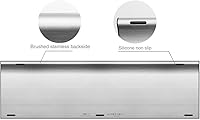
The brushed stainless steel top with black keycaps is a clean, understated combination that looks more expensive than the price suggests. It blends naturally into both home office and professional desk setups without drawing attention for the wrong reasons.
The single-color backlight is subtle to the point that some buyers wish it were brighter or adjustable. Users who work in fully darkened rooms note that the backlight provides minimal practical illumination compared to keyboards with multi-level brightness controls.
Warranty & Support
76%
24%
The included 24-month warranty is longer than most competitors at this price tier offer, and buyers who have needed to use it generally report that Arteck responds to support requests without excessive friction. The warranty coverage adds a real layer of purchase confidence.
Customer service response times reportedly vary, with some users waiting several days for a reply during busy periods. The warranty process itself is handled via email rather than an automated portal, which can feel slow for buyers accustomed to instant online claims.

Suitable for:

The Arteck HB193 Bluetooth Keyboard is built for people who genuinely work across multiple devices every day and want a single keyboard to handle all of them without drama. It is a strong match for home office setups where a Windows PC, an iPad, and a smartphone all share the same desk — the three-device pairing and one-key switching make that kind of multi-screen workflow feel organized rather than chaotic. Tablet users who find on-screen keyboards frustrating will appreciate getting a full-size layout with a number pad, something most wireless keyboards at this price quietly omit. It also suits anyone tired of buying disposable batteries, since the built-in rechargeable cell handles months of typical daily use on a single charge. Quiet typists in shared spaces — open-plan offices, libraries, shared apartments — will find the low-profile keys unobtrusive enough to use without self-consciousness. If your priority is broad compatibility, solid construction, and genuine multi-device utility without stretching your budget, this multi-device keyboard delivers a surprisingly complete package.

Not suitable for:

The Arteck HB193 Bluetooth Keyboard is likely to disappoint buyers who demand a premium typing feel, since the shallow key travel leaves touch typists and fast writers wanting more tactile feedback than the low-profile keys provide. Serious coders or writers who spend four or more hours a day at the keyboard will probably find it a compromise — not painful, but not satisfying either. If Bluetooth connection reliability is non-negotiable for your workflow, the occasional idle-timeout re-pairing issue reported by a portion of users is worth weighing seriously before committing. The full-size layout is genuinely wide, so anyone with a compact or cluttered desk may find the footprint more inconvenient in practice than it looks in product photos. Gamers should look elsewhere entirely — there are no programmable macros, no polling rate controls, and the key response is not built with fast-action inputs in mind. Finally, buyers who have moved their entire setup to USB-C will find the micro-USB charging port a persistent minor inconvenience that does not go away.

Specifications

  • Brand: Manufactured by Arteck, a brand focused on affordable wireless input devices.
  • Model: The model designation is HB193, a full-size multi-device Bluetooth keyboard.
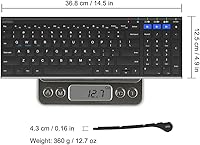
  • Dimensions: The keyboard measures 14.5″ long by 4.9″ wide by 0.6″ tall.
  • Weight: The unit weighs 1.06 pounds, making it light enough to move around a desk or slip into a bag.
  • Top Material: The top surface is constructed from brushed stainless steel, providing durability beyond standard plastic keyboards.
  • Key Type: Low-profile membrane keys are used throughout, designed for quiet and comfortable extended typing.
  • Layout: Full-size layout includes a dedicated number pad, function row, and standard navigation cluster.
  • Connectivity: Connects via Bluetooth to up to three devices simultaneously, with one dedicated key per paired device slot.
  • OS Compatibility: Compatible with Windows, macOS, iOS, and Android without requiring additional drivers or software.
  • Special Keys: Includes hotkeys and media control keys for quick access to playback, volume, and system shortcuts.
  • Battery Type: Built-in non-removable rechargeable lithium battery — no disposable AA or AAA batteries required.
  • Battery Life: Arteck rates the battery at approximately six months based on two hours of daily use.
  • Charging Port: Charges via micro-USB cable, which is included in the box.
  • Backlight: Features a single-color backlight with fixed brightness; no multi-level adjustment is available.
  • Color: Available in black with a stainless steel top panel and dark-colored keycaps.
  • Package Contents: Box includes the keyboard, a micro-USB charging cable, and a printed welcome guide.
  • Warranty: Covered by a 24-month manufacturer warranty backed by Arteck customer support.
  • Release Date: First made available for purchase in March 2020.

Related Reviews
Arteck Bluetooth Keyboard HB086
86%
93%
Portability & Size
94%
Battery Life
83%
Ergonomics & Comfort
90%
Ease of Use & Setup
88%
Multi-Device Compatibility
More
Arteck Bluetooth Keyboard and Mouse Combo
84%
89%
Battery Life
92%
Ergonomics and Comfort
67%
Bluetooth Connectivity
83%
Build Quality
90%
Portability and Design
More
Arteck Universal Wave Bluetooth Keyboard
75%
78%
Typing Comfort
83%
Multi-Device Switching
63%
Bluetooth Connection Stability
67%
Palm Rest Quality
81%
Key Feel & Travel
More
Arteck HB305-2 Bluetooth Keyboard
81%
88%
Multi-Device Switching
83%
Typing Experience
79%
Battery Life
61%
Build Quality
72%
Bluetooth Connectivity Stability
More
Arteck HB305-3 Bluetooth Keyboard and Mouse Combo
78%
86%
Multi-Device Switching
82%
Keyboard Typing Experience
63%
Mouse Comfort & Ergonomics
88%
Battery Life
61%
Build Quality & Materials
More
Links9+ Wireless Bluetooth Keyboard
86%
89%
Typing Comfort
85%
Build Quality
78%
Connectivity Stability
90%
Battery Life
91%
Design & Aesthetics
More
Arteck HW305 Wireless Keyboard
79%
91%
Value for Money
94%
Ease of Setup
74%
Typing Experience
63%
Build Quality
69%
Battery Life
More
iClever BK10 Bluetooth Keyboard
79%
83%
Typing Feel
78%
Multi-Device Switching
61%
Battery Life
71%
Build Quality
67%
Key Stability & Longevity
More
iClever BK20 Bluetooth Keyboard
80%
83%
Bluetooth Connectivity
78%
Typing Experience
62%
Build Quality
81%
Battery Life
86%
Numeric Keypad Usability
More
ProtoArc K90-A Bluetooth Keyboard
85%
88%
Typing Experience
91%
Multi-device Connectivity
94%
Portability & Size
87%
Battery Life & Efficiency
85%
Backlighting Functionality
More

FAQ

Each of the three Bluetooth slots has a dedicated key along the top of the keyboard. To pair a new device, hold the corresponding slot key for a few seconds until the pairing indicator flashes, then connect from your device's Bluetooth settings as you normally would. Once all three slots are paired, switching between them is just a single keypress — no need to re-enter pairing mode each time.

Yes, it pairs with iPads running iPadOS without any extra apps or adapters. The keyboard is recognized as a standard Bluetooth input device, and most media and shortcut keys work as expected. It is a popular choice specifically for iPad users who want a full-size layout without buying a proprietary keyboard case.

Most long-term users confirm the battery holds up for several months of regular daily typing before needing a charge. The six-month estimate assumes roughly two hours of use per day, so heavier users will naturally see shorter intervals between charges. There is no battery percentage display, so it is worth building a charging habit every few months rather than waiting for the keyboard to stop working.

This is a known behavior that a portion of users experience — the keyboard enters a sleep mode after a period of inactivity to conserve battery. Pressing any key usually wakes it back up, but some users find they occasionally need to press the device slot key once to re-establish the connection. It is a minor inconvenience rather than a defect, and it does not affect all setups equally.

Yes, you can plug in the micro-USB cable and continue typing while the battery charges. This is handy if you have run the battery low and cannot afford to wait for a full charge before getting back to work.

Absolutely — Android devices pair with the HB193 just as smoothly as iOS ones do. Samsung Galaxy tablets, standard Android smartphones, and other Bluetooth-enabled Android devices are all supported without any additional setup steps.

The backlight provides a soft glow that can help in dim conditions, but it is not particularly bright and does not have adjustable levels. Users who regularly type in fully darkened environments — late at night with all lights off, for example — tend to find it insufficient. For moderate ambient lighting, it works fine.

The stainless steel top panel resists surface scratches much better than plastic-top keyboards, and long-term reviewers note that it still looks clean after many months of daily use. The underside and keycaps are standard plastic, so the overall keyboard is not indestructible, but the metal surface is a genuine durability advantage for the top face where hands rest.

Most media and function keys work out of the box on macOS, but a handful of shortcuts are mapped with Windows conventions in mind. Mac users generally adapt quickly, though anyone who relies heavily on Mac-specific function key behaviors may need a short adjustment period or a trip into the macOS keyboard settings to reassign a couple of keys.

The warranty covers manufacturing defects under normal use conditions. To make a claim, you typically contact Arteck directly via email with your purchase details — there is no automated online portal. Response times vary, but most users report that the support team is reachable and willing to help within a few business days.

Where to Buy