

Overview

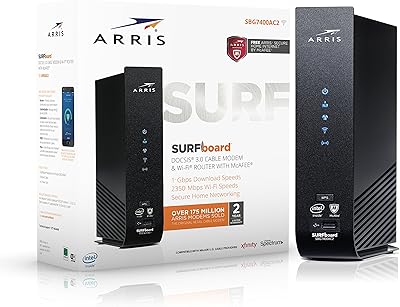
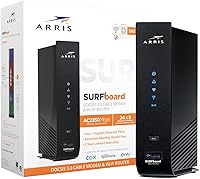
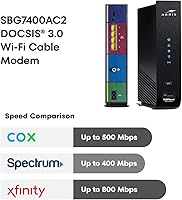
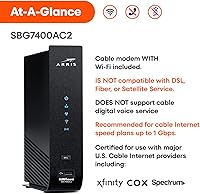
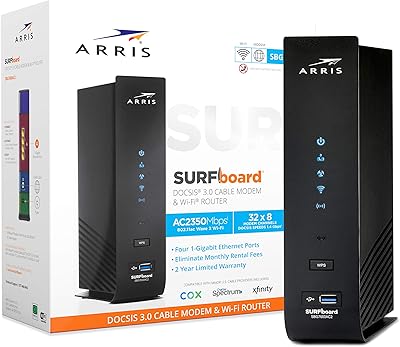
The ARRIS SBG7400AC2 Modem Router Combo has been a steady fixture in the mid-range cable internet market since its launch in 2017 — and that staying power says something. Built on DOCSIS 3.0, it handles the speeds most U.S. households actually subscribe to, covering plans up to 600–800 Mbps without breaking a sweat. One thing to flag upfront: this ARRIS combo unit works with Xfinity and Cox, but it is not compatible with Spectrum — a point that causes real frustration among buyers who skip the fine print. It is not a DOCSIS 3.1 device, so if you are planning to future-proof for multi-gig plans, look elsewhere. For everyone else on a standard cable plan, it remains a capable and honest option.

Features & Benefits

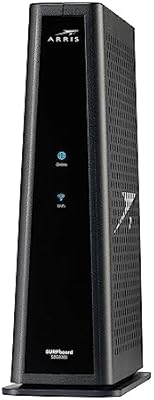
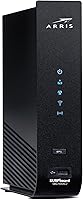
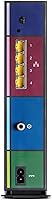
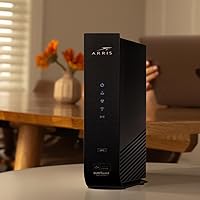
The SURFboard SBG7400AC2 packs a solid feature set into one relatively compact box. Its AC2350 dual-band Wi-Fi runs on both 2.4 GHz and 5 GHz bands using Wave 2 technology, which handles multiple devices streaming or browsing simultaneously better than older hardware. Four Gigabit Ethernet ports are genuinely useful — plug in a gaming console, a desktop, and a smart TV without any adapters. The 24x8 channel bonding keeps throughput consistent during peak hours. The SURFboard Central app makes initial activation straightforward, and its parental controls let you pause internet access or set time limits per device without needing separate router firmware. Physically, it is slim and vertical — easy to tuck onto a shelf.

Best For

This modem-router combo is a practical fit for Xfinity or Cox subscribers on plans up to around 600 Mbps who want to stop paying monthly equipment rental fees. At typical rental rates of ten to fifteen dollars per month, this ARRIS combo unit can pay for itself within a year — real savings, not hypothetical ones. Families who want built-in parental controls without purchasing a separate router will find the feature set sufficient for basic oversight. Light-to-moderate gamers who prefer a wired Ethernet connection alongside household Wi-Fi will appreciate having four ports available. It is best suited for medium-sized homes; those with sprawling floor plans may find wireless coverage a bit thin at the edges.

User Feedback

Across thousands of reviews, a clear pattern emerges: buyers who purchase this modem-router combo for a compatible ISP tend to be satisfied, often citing how easy activation was and how quickly they recouped the cost. The main recurring complaint is Wi-Fi range — users in larger or multi-floor homes occasionally find the signal dropping off in distant rooms. A smaller but consistent group mentions having to reboot the unit after extended periods of uptime, which is worth knowing before you buy. On the other hand, long-term reliability is frequently praised by owners who have run the SURFboard SBG7400AC2 for two or more years without hardware issues. The negative outliers largely trace back to ISP incompatibility — particularly Spectrum or fiber customers who did not check before purchasing.

Pros

  • Eliminates monthly ISP rental fees, typically paying for itself within 12 months of ownership.
  • Compatible with Xfinity and Cox, the two most widely used U.S. cable internet providers.
  • Four Gigabit Ethernet ports give wired devices a reliable, low-latency connection.
  • AC2350 dual-band Wi-Fi with Wave 2 handles multiple devices streaming at once without significant slowdown.
  • The SURFboard Central app makes activation and ongoing network management genuinely straightforward.
  • Built-in parental controls let families pause Wi-Fi or set time limits per device from a phone.
  • DOCSIS 3.0 with 24x8 channel bonding keeps speeds consistent even during peak usage hours.
  • Slim vertical design takes up minimal shelf or desk space compared to separate modem-plus-router setups.
  • Long market track record since 2017 means firmware is mature and widely documented online.
  • Thousands of long-term owners report consistent, stable performance over multiple years of use.

Cons

  • Completely incompatible with Spectrum, despite similar cable infrastructure — a costly mistake if overlooked.
  • Not suitable for fiber, DSL, or satellite internet services of any kind.
  • DOCSIS 3.0 technology has a hard ceiling; this modem-router combo will not support future multi-gig cable plans.
  • Wi-Fi range can feel limited in larger homes, especially across multiple floors or thick walls.
  • Some users report needing to reboot the unit periodically after extended periods of continuous uptime.
  • No support for cable digital voice service, which is a dealbreaker for bundled phone plan users.
  • A single combined unit means if the Wi-Fi radio underperforms, you cannot simply swap in a better router.
  • No multi-gig Ethernet ports, which may feel limiting as wired device speeds continue to increase.

Ratings

The scores below for the ARRIS SBG7400AC2 Modem Router Combo were generated by our AI system after analyzing thousands of verified buyer reviews from global sources, with spam, bot-submitted, and incentivized feedback actively filtered out. The results reflect a honest composite of real ownership experiences — covering everything buyers consistently praise and the friction points that show up repeatedly across long-term users. Both sides of the picture are represented so you can make a genuinely informed call.

Value for Money
91%
Owners who switch from paying ISP rental fees consistently describe this modem-router combo as one of the smarter purchases they have made for their home network. At typical rental rates, most users report breaking even within ten to twelve months — after that, every month is pure savings that compounds quietly over years of ownership.
The upfront cost can feel steep compared to continuing to rent, especially for users on short-term living arrangements who may not stay long enough to recoup the investment. Those who later discover an ISP incompatibility — particularly Spectrum customers — end up with a device that offers zero value for their specific situation.
Setup & Activation
88%
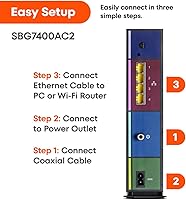
The SURFboard Central app-guided setup is one of the most frequently praised aspects across buyer reviews, with many users describing activation as faster and less stressful than they expected. Xfinity customers in particular note that the self-activation flow pairs cleanly with ARRIS hardware, often getting online in under 20 minutes from unboxing.
A smaller group of users — typically those on less common cable providers or older account types — report hitting snags during the ISP activation call that extend setup time. The app experience also assumes a working smartphone and data connection, which can be a minor obstacle if your previous modem is already offline.
Wi-Fi Performance
72%
28%
For single-floor homes and medium-sized apartments, the dual-band AC2350 Wi-Fi covers everyday streaming, video calls, and casual gaming without any noticeable dead zones. The Wave 2 implementation handles several simultaneous connected devices reasonably well, which matters for households with a mix of phones, tablets, and smart home gadgets.
Multi-story homes and larger open-plan layouts expose the range limitations of this built-in router fairly quickly, with users reporting weak signal in bedrooms and corners beyond roughly 1,500 to 2,000 square feet. Because the modem and router are combined, you cannot simply swap in a better wireless radio without replacing the entire unit.
Wired Connectivity
93%
Four Gigabit Ethernet ports is a genuinely useful feature that separates this unit from cheaper combo devices offering only one or two wired connections. Gamers, home office setups, and living rooms with multiple wired devices — smart TVs, consoles, desktop PCs — can all run simultaneously without any port compromise.
There are no multi-gigabit Ethernet ports, which is a minor limitation for users with 2.5GbE-capable devices who want to future-proof their wired setup. The USB port, while present, is not broadly supported for functional use cases like network-attached storage on this model.
Long-Term Reliability
86%
Owners who have run the SURFboard SBG7400AC2 for two or more years frequently describe it as a set-and-forget device that simply stays online without demanding attention. The hardware maturity that comes from being on the market since 2017 means firmware is stable and documented, which reduces the chances of encountering unresolved software bugs.
A consistent minority of reviewers report needing to reboot the unit every few weeks to clear connectivity slowdowns after extended uptime — not a dealbreaker, but an ongoing minor inconvenience. For users who need zero-intervention uptime, this behavior is worth factoring into the decision.
ISP Compatibility
63%
37%
For Xfinity and Cox subscribers — which together represent a large share of the U.S. cable internet market — compatibility is solid and well-documented, with ARRIS appearing on both ISPs official approved device lists. Most users on these providers report no compatibility friction at any point during ownership.
The Spectrum exclusion is a significant and recurring source of buyer frustration, with a notable volume of negative reviews tracing directly back to customers who did not verify compatibility before purchasing. The device is also completely unusable on fiber, DSL, or satellite networks, which narrows its eligible audience more than some buyers realize upfront.
Parental Controls
74%
26%
The SURFboard Central app offers a functional baseline of parental controls — pausing internet per device, setting daily time limits, and monitoring connected devices — that genuinely covers what most families need for managing screen time. Parents who previously had no controls at all describe this as a meaningful upgrade without any additional hardware cost.
Power users accustomed to advanced router firmware will find the parental control feature set fairly shallow, with limited options for content filtering or per-app restrictions. The controls are app-dependent, meaning any management requires a working smartphone and the ARRIS app installed, which is not ideal for every household.
Build Quality
81%
19%
The physical construction of this ARRIS combo unit feels solid and purposeful — it does not flex, creak, or feel hollow the way some budget networking hardware does. The vertical form factor stays stable without a stand, and the matte black finish hides dust reasonably well on a shelf or entertainment console.
Some users note that the unit runs noticeably warm during extended use, which is not unusual for combo devices but worth monitoring in enclosed cabinet installations. There is no external antenna, which contributes to the clean aesthetic but also means no option to swap or upgrade antenna hardware.
App Experience
78%
22%
The SURFboard Central app receives consistent praise for its clean layout and the ease with which new users can navigate initial setup and day-to-day monitoring. Device management features — seeing what is connected, pausing access, checking signal levels — are accessible without any technical background.
A recurring complaint involves app stability on certain Android versions, with some users reporting crashes or login issues that require reinstalling the app to resolve. The app is also a hard dependency for some features, meaning users without a compatible smartphone have a degraded management experience.
Speed Consistency
83%
During typical usage — streaming video on multiple devices, working from home, or running a gaming session alongside household browsing — the SURFboard SBG7400AC2 holds its rated speeds reliably on compatible cable plans. The 24x8 channel bonding design helps buffer against congestion during peak evening hours in most residential neighborhoods.
Users on plans above 600 Mbps occasionally report not reaching their full plan speeds over Wi-Fi, though this is partly attributable to the inherent limits of the 2.4 GHz band and wireless interference rather than the modem hardware itself. Wired connections consistently perform better than wireless in speed tests.
Device Capacity
76%
24%
For a typical household with ten to fifteen connected devices — phones, laptops, a smart TV, a few smart home gadgets — this modem-router combo manages the load without obvious degradation during normal use. Wave 2 MU-MIMO support helps serve multiple devices simultaneously rather than cycling through them sequentially.
Households with a high density of devices — think 25 or more simultaneous connections in a busy smart home — may start noticing slowdowns or dropped connections that a more capable standalone router would handle better. The combined architecture again limits the ability to address this without replacing the entire unit.
Physical Footprint
87%
The slim vertical profile genuinely saves space compared to running a separate modem and router side by side, which typically doubles the shelf real estate and cable clutter involved. At under 2.5 inches wide, it fits neatly in most entertainment unit shelves or on a narrow desk ledge.
The vertical-only design means it cannot be laid flat without blocking ventilation, which limits placement options in tight cabinet configurations. The power adapter cable is not particularly long, which can occasionally restrict where you position the unit relative to your wall outlet or power strip.
Documentation & Support
69%
31%
Because this model has been on the market since 2017, there is a substantial body of third-party guides, forum threads, and community troubleshooting resources available online for common issues. ARRIS as a brand has broad consumer recognition, and most ISP customer service agents are familiar with the hardware.
ARRIS official support documentation can feel dated in places, and some users report difficulty reaching responsive customer service when issues fall outside the FAQ scope. Firmware update communication is also not proactive — users often only discover available updates by checking manually.

Suitable for:

The ARRIS SBG7400AC2 Modem Router Combo is a strong match for Xfinity or Cox subscribers on plans up to 600 Mbps who are tired of paying monthly rental fees for ISP-provided equipment. At typical rental rates of ten to fifteen dollars a month, owning this modem-router combo means it can realistically pay for itself within about a year, making it a financially sensible choice for anyone planning to stay with their cable provider long-term. Families who want basic but functional parental controls — the ability to pause Wi-Fi or set time limits per device — will find the SURFboard Central app handles that without requiring a separate router purchase. It also works well for households with a mix of wired and wireless needs, since four Gigabit Ethernet ports cover gaming consoles, smart TVs, and desktop PCs simultaneously. Anyone living in a small-to-medium-sized home and running a straightforward cable internet setup will find this ARRIS combo unit covers day-to-day demands reliably.

Not suitable for:

The ARRIS SBG7400AC2 Modem Router Combo is the wrong choice for anyone on Spectrum, and that point cannot be overstated — it is one of the most common sources of buyer frustration in the reviews. It is equally unsuitable for customers on fiber, DSL, or satellite services from providers like AT&T, Verizon, or Frontier, as DOCSIS technology simply does not apply to those network types. Power users who anticipate upgrading to multi-gigabit internet plans in the near future should also look elsewhere, since this is a DOCSIS 3.0 device with no path to the higher ceiling that DOCSIS 3.1 hardware offers. Those living in large homes, multi-story houses, or open-plan spaces may find the built-in Wi-Fi coverage falls short at the edges, and would be better served by pairing a standalone modem with a mesh Wi-Fi system. Finally, anyone who needs cable voice service will need to keep looking, as this unit does not support digital voice.

Specifications

  • Modem Standard: This unit uses DOCSIS 3.0 technology, which is the widely deployed cable internet standard supporting the majority of U.S. residential broadband plans.
  • Channel Bonding: The modem supports 24 downstream and 8 upstream channel bonding, enabling consistent throughput even during network congestion periods.
  • Max Internet Speed: Approved for cable internet speed plans up to 800 Mbps, making it a practical fit for most mid-tier residential cable subscriptions.
  • Wi-Fi Standard: Wireless networking runs on 802.11ac (Wi-Fi 5) Wave 2, which improves throughput and multi-device handling compared to earlier 802.11ac implementations.
  • Wi-Fi Configuration: The unit operates as an AC2350 dual-band concurrent router, broadcasting simultaneously on both 2.4 GHz and 5 GHz frequency bands.
  • Frequency Bands: Both the 2.4 GHz band (for range and compatibility) and the 5 GHz band (for speed at closer distances) are active at the same time.
  • Ethernet Ports: Four Gigabit Ethernet ports (1 Gbps each) are available on the rear panel for wired device connections.
  • Connectivity: In addition to Ethernet, the device includes a USB port for supplementary connectivity options.
  • Dimensions: The unit measures 7.69 x 2.25 x 9.5 inches in its upright vertical orientation, fitting neatly on a shelf or desk.
  • Weight: The device weighs 2.57 pounds, making it light enough to reposition or mount without difficulty.
  • Special Features: Built-in features include WPS for quick wireless device pairing and parental controls accessible through the companion mobile app.
  • Companion App: The SURFboard Central app, available for iOS and Android, handles initial activation, parental controls, device monitoring, and Wi-Fi scheduling.
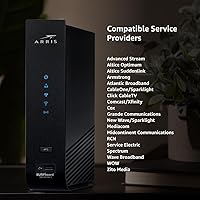
  • Compatible ISPs: Approved for use with Xfinity, Cox, and several other U.S. cable internet providers; always verify current approval status on your ISP website before purchasing.
  • Incompatible Services: This unit does not work with AT&T, Verizon, Frontier, CenturyLink, or any fiber optic, DSL, or satellite internet service.
  • Voice Support: The device does not support cable digital voice service and cannot be used as a replacement for ISP-provided voice-enabled gateways.
  • Color: Available in black with a matte finish that resists visible dust and fingerprints under normal conditions.
  • Manufacturer: Designed and sold under the ARRIS SURFboard brand, manufactured by CommScope, a global network infrastructure company.
  • Market Launch: This model was first made available in October 2017 and has not been discontinued as of the latest available product data.
  • Certifications: The device carries standard FCC certification required for U.S. cable network equipment and meets ISP approval requirements for compatible providers.
  • Best Sellers Rank: Ranked among the top 10 modem-router combos in the Amazon Electronics category, reflecting sustained consumer demand over several years.

Related Reviews
ARRIS G20 Cable Modem Router Combo
85%
89%
Performance
83%
Wi-Fi Coverage
91%
Ease of Setup
85%
Speed Consistency
93%
Compatibility with ISPs
More
ARRIS SBG10 Cable Modem Router Combo
76%
91%
Value for Money
86%
Setup & Activation
83%
Connection Stability
61%
Wi-Fi Coverage & Range
88%
Modem Performance
More
ARRIS SURFboard SBG7600AC2 Cable Modem Router Combo
86%
89%
Performance
92%
Setup Ease
91%
Value for Money
86%
Wi-Fi Range & Speed
82%
Parental Controls
More
ARRIS SBG7400AC2 Cable Modem Wi-Fi Router
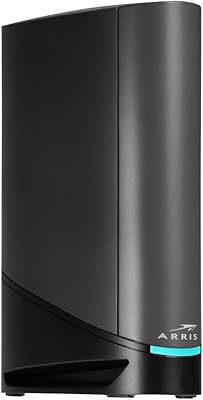
74%
83%
Value for Money
88%
Setup & Activation
86%
Connection Stability
61%
Wi-Fi Range & Coverage
67%
Wi-Fi Speed Performance
More
ARRIS SURFboard SBG8300 DOCSIS 3.1 Cable Modem Router Combo
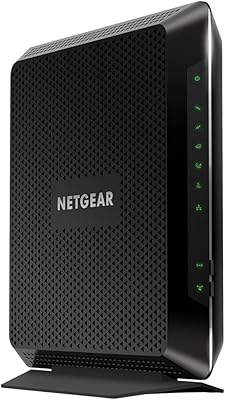
84%
91%
Performance & Speed
88%
Wi-Fi Coverage & Stability
80%
Ease of Setup
84%
Compatibility with ISPs
92%
Value for Money
More
ARRIS SURFboard G36
ARRIS SURFboard G36
72%
83%
Setup & Activation
76%
Wi-Fi Speed & Throughput
61%
Wi-Fi Range & Coverage
58%
Connection Stability
88%
DOCSIS 3.1 Modem Performance
More
NETGEAR Nighthawk C7000 AC1900 Modem Router Combo
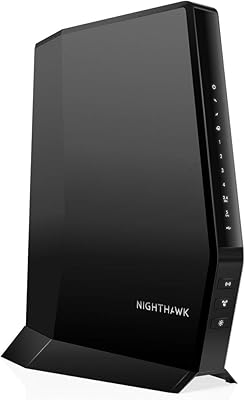
75%
91%
Ease of Setup
78%
Wi-Fi Speed & Performance
71%
Modem Speed & DOCSIS Performance
74%
Wi-Fi Coverage & Range
76%
Build Quality & Design
More
NETGEAR Nighthawk CAX30
79%
88%
Setup & Installation
83%
WiFi Speed & Performance
71%
WiFi Coverage & Range
91%
Modem Reliability & Uptime
78%
Value for Money
More
ARRIS TG862G-CT Cable Modem Router
85%
91%
Value for Money
89%
Performance & Speed
93%
Ease of Setup
85%
Voice Service Quality
72%
Wi-Fi Range
More
NETGEAR C6300 Cable Modem Router Combo
69%
83%
Value for Money
88%
Setup & Installation
71%
WiFi Performance
91%
Wired Connectivity
62%
Long-Term Reliability
More
ARRIS SBG6580 DOCSIS 3.0 Cable Modem Router
76%
83%
Connection Stability
61%
Wi-Fi Coverage & Range
58%
Wi-Fi Speed Performance
84%
Ease of Setup
81%
Modem Performance
More

FAQ

No, and this is probably the single most important thing to check before buying. The SURFboard SBG7400AC2 is not approved for use on Spectrum's network. If you are a Spectrum customer, you will need to find a different device — many negative reviews for this unit come from buyers who missed this detail.

The activation process is handled through the SURFboard Central app, which walks you through each step after you plug in the unit. You will typically need your account number and service address handy. Most users report the whole process takes under 20 minutes, and Xfinity in particular has a well-documented self-activation flow that pairs nicely with this hardware.

Yes, comfortably. The ARRIS SBG7400AC2 Modem Router Combo is rated for plans up to 800 Mbps, so a 400 or 500 Mbps plan sits well within its capability. Real-world throughput will depend on your ISP infrastructure and in-home Wi-Fi conditions, but the modem hardware itself will not be the bottleneck.

It depends on the layout and construction of your home. In a typical two-story house of moderate size — say under 2,000 square feet — most users get adequate coverage. In larger homes, homes with thick concrete or brick walls, or sprawling single-story layouts, you may notice the signal thinning out in distant rooms. For those situations, a mesh Wi-Fi system paired with a standalone modem might serve you better.

No. This modem-router combo uses DOCSIS 3.0 technology, which is specific to coaxial cable internet networks. Fiber services like Verizon Fios and AT&T Fiber use completely different infrastructure and require their own equipment. It will not work with those services regardless of how it is configured.

Most cable ISPs charge somewhere between ten and fifteen dollars per month to rent their equipment. At that rate, owning this ARRIS combo unit instead typically means it pays for itself within around ten to twelve months. After that, every month you use it is money you are keeping rather than handing to your ISP.

No. This unit does not support cable digital voice. If your internet plan is bundled with a home phone service, you will need to keep your ISP-provided modem or find a voice-capable device, as this one cannot handle VoIP through the cable line.

If you are on a cable plan up to 600 or even 800 Mbps, DOCSIS 3.0 hardware like this one handles it without issue and costs less than DOCSIS 3.1 devices. DOCSIS 3.1 becomes relevant if you are planning to upgrade to a multi-gigabit plan in the near future, or if your ISP is already pushing past 1 Gbps in your area. For most households right now, the added cost of DOCSIS 3.1 is hard to justify.

Most users do not experience issues, but a subset of reviewers do mention needing to reboot the unit after extended periods of uptime — sometimes every few weeks. This is not unusual for consumer networking gear in general. Setting up a simple scheduled reboot via a smart outlet, or just manually cycling power occasionally, tends to resolve it for those who encounter it.

The SURFboard Central app lets you pause internet access for specific devices, set daily time limits, and monitor which devices are connected to your network. It is a solid basic toolkit for households that need to manage screen time or restrict access during homework hours. It is not as granular as dedicated router firmware like those found on higher-end standalone routers, but for most families it covers the essentials without requiring any technical setup.

Where to Buy