Overview

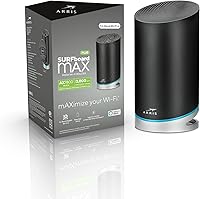
The ARRIS SURFboard mAX W30 Wi-Fi 6 Router sits in a competitive middle ground — not a budget throwaway, but not a flagship performer either. Built around a tri-band AX7800 design, this ARRIS mesh router targets households that need reliable coverage across a medium-sized home without the complexity of enterprise-grade hardware. A single unit claims up to 3,000 square feet of coverage, which is respectable but roughly on par with rivals like the TP-Link Deco XE75. What makes it worth a closer look is its ability to expand into a full mesh system by adding compatible ARRIS nodes. The 3.6-star average rating signals a divided user base — reason enough to read past the marketing copy.
Features & Benefits

Under the hood, the SURFboard mAX W30 runs three separate radio bands: one 2.4 GHz band for legacy devices and two 5 GHz bands, with the second dedicated entirely to backhaul traffic at up to 4.8 Gbps. That dedicated backhaul matters — it keeps device traffic from competing with the inter-node connection when you add more units to the mesh. Each router packs four Ethernet ports, giving you solid wired options for consoles or desktop PCs. The SURFboard Central app handles setup and ongoing management, covering guest networks, QoS prioritization, and parental controls. Alexa support adds hands-free convenience, and a 2-year warranty with live phone and chat support rounds out a reasonably complete package.

Best For

This Wi-Fi 6 router is a natural fit for families in apartments or mid-sized homes who want straightforward mesh coverage without piecing together a complex system. Parents will appreciate the built-in parental controls, which go beyond simple blocking by letting you set reward-based screen time — a genuinely useful touch. Gamers and 4K streamers benefit from the dedicated backhaul keeping latency low during heavy use. If you already own another device in the ARRIS mAX lineup, this is an easy way to extend your existing setup. Where it struggles is against households above 3,000 square feet or power users wanting advanced routing controls that typically live behind a web interface.

User Feedback

Buyer sentiment around the SURFboard mAX W30 splits pretty cleanly. Those who love it point to fast initial speeds and an onboarding process that genuinely takes minutes. Critics, however, report frustrating experiences with firmware updates that occasionally cause unexpected connection drops — a recurring theme in negative reviews. A meaningful portion of power users feel the app-only management approach is too limiting, particularly since there is no web-based dashboard to fall back on. Customer support gets mixed marks too; some buyers describe quick, helpful responses while others report long waits. It is not a deal-breaker router, but it rewards patient, casual users more than it does tinkerers who want full control.

Pros

  • Wi-Fi 6 support delivers noticeably faster, more efficient connections for modern devices throughout the home.
  • The dedicated backhaul band keeps inter-node traffic separate, reducing congestion during heavy streaming or gaming sessions.
  • Four Ethernet ports per unit offer solid wired connectivity for desktops, consoles, or smart home hubs.
  • Parental controls include reward-based screen time features that go beyond basic blocking — genuinely useful for families.
  • Expanding into a full mesh system with additional ARRIS mAX nodes is straightforward and affordable.
  • Initial setup through the SURFboard Central app is quick and well-guided, even for non-technical users.
  • Alexa compatibility lets you check network status or control basic functions hands-free.
  • The 2-year limited warranty and live support availability provide a reasonable safety net for buyers.
  • Single-router coverage up to 3,000 sq ft is competitive for a mid-range device in this class.

Cons

  • No web-based management interface means you are entirely dependent on the SURFboard Central app to control your network.
  • Firmware updates have caused connection drops for a notable portion of users, based on recurring complaints in reviews.
  • App reliability issues have been flagged by multiple buyers, which is a real risk if uptime is critical.
  • Customer support response times are inconsistent — some users report fast help, others describe frustrating delays.
  • Power users will find the feature set shallow compared to similarly priced competitors with more advanced routing options.
  • The 3.6-star average rating reflects a divided user base; this is not a universally praised device.
  • Adding nodes to cover larger homes increases total cost, potentially making it less competitive against all-in-one mesh systems.
  • No web dashboard means IT-savvy households or home office users may feel unnecessarily constrained.
  • Device prioritization controls through QoS are functional but lack the depth that serious gamers or remote workers may expect.

Ratings

The ARRIS SURFboard mAX W30 Wi-Fi 6 Router scores reflect a comprehensive AI analysis of verified global user reviews, with spam, bot-generated feedback, and incentivized posts actively filtered out before scoring. This router has a genuinely divided user base, and the scores below are designed to reflect that honestly — capturing both the real strengths that earn loyal fans and the friction points that frustrate others. No category has been softened or inflated to flatter the product.

Wi-Fi Speed & Throughput
78%
22%
Users with Wi-Fi 6 compatible phones, laptops, and streaming devices consistently report noticeably faster download speeds compared to their old Wi-Fi 5 routers. In households running 4K video, video calls, and gaming simultaneously, the tri-band design keeps things moving without obvious slowdowns.
Real-world speeds rarely approach the theoretical AX7800 ceiling, and users in dense apartment buildings with lots of competing networks see more variance than the spec sheet suggests. A handful of reviewers found mid-range competitors delivering comparable throughput at a lower total cost.
Coverage & Range
74%
26%
For straightforward single-floor layouts or open-plan homes under 3,000 square feet, most buyers are satisfied with the signal reach from a single unit. Placing the router centrally tends to yield consistent coverage with minimal dead zones reported in typical setups.
Homes with multiple floors, thick walls, or irregular shapes regularly push the limits of a single unit, and buyers in those situations often discover the coverage gaps only after setup. Investing in an additional node becomes necessary sooner than some buyers anticipate.
Mesh Performance
76%
24%
The dedicated backhaul band is a genuine advantage when running two or three units — device traffic and node-to-node communication stay separated, which keeps the network noticeably stable during heavy usage. Users who expanded their system gradually report a smooth process with consistent roaming between nodes.
Expanding the system means purchasing additional hardware at extra cost, which adds up quickly and makes the total investment less competitive against all-in-one mesh systems. Some users also noted that roaming handoff between nodes could occasionally feel sluggish compared to rivals like Eero.
App Experience
53%
47%
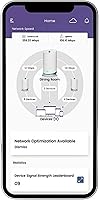
The initial onboarding flow in the SURFboard Central app is genuinely well-designed — most users are up and running in under ten minutes without needing to consult a manual. The interface is clean enough for non-technical family members to manage basic tasks like pausing internet access or setting up a guest network.
Over time, the app experience deteriorates for a meaningful segment of users, with crashes, slow loading, and post-firmware-update connectivity drops cited repeatedly in reviews. The complete absence of a browser-based fallback makes these app failures particularly painful, leaving some users unable to manage their network without a workaround.
Parental Controls
82%
18%
The reward-based screen time feature is a genuine standout — parents can tie internet access to completed tasks or homework, which is a level of depth rarely seen in a router app at this price point. Time scheduling, per-device pausing, and content filtering all work reliably for most families in everyday use.
The controls are entirely app-dependent, so if the SURFboard Central app is misbehaving, parental control enforcement can become unreliable at the worst possible moment. A small number of parents also found the content filtering categories less granular than dedicated parental control solutions.
Setup & Installation
83%
The guided setup process is one of the most consistently praised aspects of this router across user reviews — the app walks through each step clearly, and most households report being fully connected within fifteen minutes of opening the box. Even users with no networking background describe the process as straightforward.
Users who encounter issues during setup — particularly those with non-standard modem configurations or ISP-specific requirements — find that troubleshooting through the app alone is frustrating. Customer support quality at that stage is inconsistent, which compounds the problem for less experienced buyers.
Build Quality & Design
71%
29%
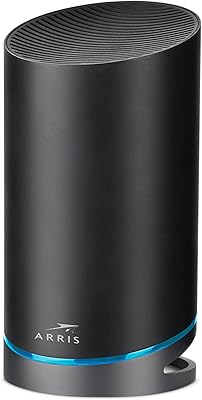
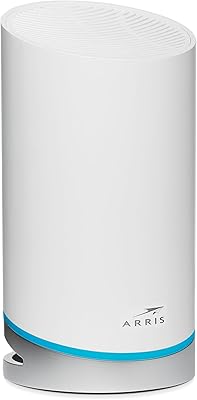
The compact cylindrical form factor fits naturally on a bookshelf or TV console without looking out of place, and the build feels solid enough to inspire confidence in its longevity. Several buyers specifically mentioned preferring its understated design over bulkier antenna-covered competitors.
At 4.49 pounds, the unit is on the heavier side for its footprint, and the lack of any ventilation indicators or LED status granularity makes it harder to diagnose hardware issues at a glance. A few long-term users also noted the finish attracts dust more than expected.
Wired Connectivity
81%
19%
Four Gigabit Ethernet ports per unit is a genuinely useful allocation — enough to wire a smart TV, desktop PC, gaming console, and a network switch without immediately running out of ports. Buyers who prefer wired connections for latency-sensitive devices consistently praised this aspect.
The ports are all standard Gigabit rather than multi-gigabit, which means the wired side will bottleneck anyone with an internet plan exceeding 1 Gbps. That is a growing concern as more ISPs roll out 2 Gbps and faster residential tiers.
Gaming Performance
73%
27%
The QoS feature allows gamers to prioritize their console or PC on the network, and users report noticeably reduced ping spikes during peak household usage after enabling it. The dedicated backhaul band also helps in mesh configurations by keeping game traffic from competing with inter-node communication.
Hardcore competitive gamers who scrutinize latency data closely tend to find the QoS controls less precise than what dedicated gaming routers offer. The app-only interface also means adjusting game prioritization settings mid-session is less immediate than a browser dashboard would allow.
Smart Home Integration
69%
31%
Alexa compatibility and IFTTT support make this router a reasonable hub for smart home households already invested in the Amazon ecosystem. Connecting Ring doorbells, Philips Hue lights, or Fitbit devices through IFTTT works reliably for users who take the time to configure it.
The IFTTT integration requires setup time that casual users often skip, and the ecosystem support feels narrower than what some competing routers offer natively. Buyers with heavily Google Home-centric setups found the integration less intuitive than expected.
Firmware & Software Stability
49%
51%
When the firmware is stable, the router runs quietly in the background without requiring attention, and the automatic update system means most users stay protected without manual intervention. Some buyers report months of flawless operation between any noticeable issues.
Firmware updates have been the single most cited source of frustration in negative reviews — connection drops, reboots, and temporary loss of app control after updates are documented consistently enough to be a credible concern. This instability undermines confidence in a device that should be a set-and-forget appliance.
Value for Money
67%
33%
For buyers who primarily need reliable Wi-Fi 6 coverage in a mid-sized home with family-friendly controls, the SURFboard mAX W30 delivers a reasonable return on investment without requiring a premium price commitment. The 2-year warranty adds tangible value to the purchase.
At this price tier, competitors like the TP-Link Deco XE75 offer comparable or superior performance with more polished software, making it harder to justify this router purely on value grounds. Users who end up purchasing additional nodes to fill coverage gaps can find the total cost climbing past more competitive all-in-one mesh alternatives.
Customer Support
58%
42%
Live phone and chat support available until 1am EST is a practical differentiator — network issues do not follow business hours, and having late-night support access has resolved urgent problems for a subset of buyers who praised the availability specifically.
Responsiveness and resolution quality vary significantly depending on when and how you contact support, with a notable share of negative reviews citing long wait times or unhelpful first-line responses. This inconsistency makes it difficult to rely on support as a safety net when things go wrong.
Compatibility
84%
Broad modem compatibility is one of this router's quieter strengths — it connects cleanly to cable, fiber, satellite, and cellular gateways without requiring any ISP-specific configuration in most cases. Buyers switching from a variety of internet providers rarely report compatibility friction during setup.
Older legacy devices connecting on the 2.4 GHz band occasionally experience priority issues when the network is under load, and a small number of users with very old smart home hardware reported intermittent drop-offs that required manual reconnection.

Suitable for:

The ARRIS SURFboard mAX W30 Wi-Fi 6 Router is a solid pick for families and renters living in homes up to around 3,000 square feet who want reliable Wi-Fi 6 performance without overcomplicating their setup. It works especially well for households juggling a dozen or more connected devices at once — think smart TVs, phones, tablets, and laptops all running simultaneously without noticeable slowdowns. Parents will find real value in the built-in parental controls, which go beyond simple content filtering to include reward-based screen time management, making it one of the more family-friendly options in this price range. Casual gamers and 4K streamers also benefit from the dedicated backhaul band, which keeps latency low even when the network is busy. If you are already using another ARRIS mAX device, adding this unit to extend your mesh coverage is a natural, low-friction upgrade path.
Not suitable for:

The ARRIS SURFboard mAX W30 Wi-Fi 6 Router is likely to frustrate buyers who want granular control over their network configuration, since all management runs through the SURFboard Central app with no web-based dashboard available. Power users accustomed to tweaking advanced routing settings, custom DNS, or detailed traffic logs will find the app limiting by comparison to competitors like the Asus ZenWiFi or TP-Link Deco XE75 Pro. Larger homes above 3,000 square feet will also need to budget for additional mesh nodes, which adds to the overall cost and may push this setup into a less competitive price tier. Buyers who have experienced inconsistent firmware update behavior in past routers should weigh the documented complaints around connection drops carefully before committing. And if app reliability is a dealbreaker for you — particularly if your household depends on rock-solid uptime — the mixed feedback on the SURFboard Central app warrants serious consideration.

Specifications

  • Wi-Fi Standard: This router uses the 802.11ax (Wi-Fi 6) standard, which improves throughput efficiency and handles more simultaneous device connections compared to the previous Wi-Fi 5 generation.
  • Speed Class: Rated at AX7800, the combined theoretical maximum across all three bands reaches up to 7.8 Gbps under ideal conditions.
  • Frequency Bands: Operates across three bands: one 2.4 GHz band for broader range and legacy device support, plus two 5 GHz bands for higher-throughput connections.
  • Antenna Config: Each band uses a 4x4 MIMO antenna configuration, supporting up to four simultaneous data streams per band for improved multi-device performance.
  • Backhaul Band: The second 5 GHz band is dedicated to mesh backhaul traffic, providing up to 4.8 Gbps of inter-node bandwidth when used in a multi-unit mesh setup.
  • Coverage Area: A single unit is rated to cover up to 3,000 square feet, making it suitable for medium-sized homes and apartments.
  • Ethernet Ports: Each router unit includes four Gigabit Ethernet ports, providing up to eight wired connections in a two-unit mesh system.
  • Mesh Support: The system supports up to three ARRIS mAX nodes (including W30 and W130 units) to extend coverage across larger spaces.
  • Companion App: Network management is handled exclusively through the SURFboard Central app, available for both iOS and Android devices.
  • Voice Assistant: The router supports Alexa integration, allowing basic network status checks and control through Amazon Echo devices.
  • Security Features: Built-in security tools include a guest network, Quality of Service (QoS) prioritization, parental controls, and IFTTT-based third-party integrations.
  • Parental Controls: The SURFboard Central app offers time-limit scheduling, internet pausing, content filtering, and a reward-based screen time system for children.
  • Dimensions: Each router unit measures approximately 5 x 9.65 inches, with a compact cylindrical form factor designed to sit on a shelf or flat surface.
  • Weight: Each unit weighs 4.49 pounds, which is moderate for a tri-band mesh router in this performance class.
  • Power Input: The router operates on 120 Volts AC and ships with an AC power adapter included in the box.
  • In the Box: Each unit comes with one AC power adapter and one Ethernet cable; no additional nodes are included unless purchased as part of a bundle.
  • Warranty: ARRIS provides a 2-year limited warranty on this product, backed by live phone and chat support available from 8am to 1am EST.
  • Manufacturer: The SURFboard mAX W30 is manufactured by CommScope, the parent company of the ARRIS brand, headquartered in the United States.
  • Compatibility: Works with any standard internet modem, including DOCSIS cable, fiber, satellite, and 5G or cellular gateway modems.
  • First Available: This router was first listed for sale in June 2019, meaning it is a proven product with an established user base and documented real-world feedback.

Related Reviews

ARRIS SURFboard mAX Pro W133 Mesh Router
71%
83%
Wi-Fi Coverage
71%
Wi-Fi Speed Performance
52%
App & Software Experience
58%
Network Reliability & Stability
91%
Wired Port Availability
More
ARRIS SBG6580 DOCSIS 3.0 Cable Modem Router
76%
83%
Connection Stability
61%
Wi-Fi Coverage & Range
58%
Wi-Fi Speed Performance
84%
Ease of Setup
81%
Modem Performance
More
ARRIS SURFboard SBG7580AC Cable Modem Router
75%
88%
Connection Stability
72%
Wi-Fi Coverage
91%
Setup Experience
84%
Value for Money
86%
Wired Performance
More
ARRIS SBG7400AC2 Cable Modem Wi-Fi Router
74%
83%
Value for Money
88%
Setup & Activation
86%
Connection Stability
61%
Wi-Fi Range & Coverage
67%
Wi-Fi Speed Performance
More
ARRIS SBG6900AC Cable Modem Wi-Fi Router
72%
88%
Ease of Setup
74%
Wi-Fi Range & Coverage
91%
Value for Money
71%
Wi-Fi Speed & Throughput
63%
Build Quality & Durability
More
ARRIS SURFboard mAX W21 WiFi 6 Router
71%
76%
Wireless Performance
67%
Coverage & Range
84%
Setup & Onboarding
61%
App Experience
82%
Parental Controls
More
ARRIS SURFboard SVG2482AC Cable Modem Router Combo
74%
72%
ISP Compatibility
81%
Internet Performance
63%
Wi-Fi Coverage
79%
Setup Experience
76%
Build Quality
More
LNN 788 Wi-Fi 6 Router
74%
91%
Ease of Setup
78%
Wi-Fi Speed Performance
67%
Coverage & Range
82%
Multi-Device Handling
79%
Gaming & Streaming Quality
More
Synology WRX560 Dual-Band Wi-Fi 6 Router
77%
91%
Network Security
88%
Software & Firmware
86%
VLAN & Network Segmentation
83%
Wired Connectivity
71%
Wireless Performance
More
ExpressVPN Aircove Wi-Fi 6 VPN Router
75%
91%
Ease of Setup
78%
VPN Performance
93%
Device Grouping
69%
Wi-Fi Coverage
54%
Value for Money
More

FAQ

Yes, the SURFboard mAX W30 is compatible with virtually any modem type, including DOCSIS cable, fiber, satellite, and 5G cellular gateways. You just connect it to your existing modem with an Ethernet cable and follow the app setup. No ISP-specific hardware is required.

Unfortunately, management is entirely app-based through SURFboard Central — there is no web-based dashboard available. If you prefer logging into a browser interface to configure your router, this setup will feel limiting. It is one of the more frequently cited frustrations among technically experienced users.

The ARRIS SURFboard mAX W30 Wi-Fi 6 Router is designed to support households with ten or more connected devices simultaneously. Wi-Fi 6 uses OFDMA technology to serve multiple devices more efficiently at the same time, which reduces congestion compared to older Wi-Fi 5 routers, especially during peak usage hours.

Yes, and it is pretty straightforward. You can add up to two more compatible ARRIS mAX nodes — such as the W130 — to build a mesh system covering up to three units total. The second 5 GHz band handles backhaul traffic between nodes, so your main band stays dedicated to your devices.

Most users find the initial setup genuinely quick — typically under ten minutes using the SURFboard Central app. The app walks you through each step clearly, and you do not need any networking knowledge to get up and running. Where some users run into trouble is after firmware updates, which have occasionally caused reconnection issues.

The SURFboard mAX W30 holds its own on raw speed and the dedicated backhaul band is a genuine advantage for mesh setups. However, competitors like the TP-Link Deco XE75 tend to offer more polished app experiences and broader third-party integration support. If app reliability and feature depth matter most to you, it is worth comparing both side by side before deciding.

They are more useful than most. Beyond just blocking sites, the SURFboard Central app lets you set time limits, pause internet access per device, and set up a reward system where kids earn screen time by completing tasks. It is a thoughtful feature that stands out compared to simpler routers in this range.

It depends on the layout, but a single unit is rated up to 3,000 square feet, which covers many two-story homes — particularly if the router is placed centrally. Homes with thick concrete or brick walls, or sprawling floor plans, may see dead spots and would benefit from adding a second node.

ARRIS has pushed firmware updates since the original complaints surfaced, and some users report improvement. That said, scattered reports of post-update instability still appear in recent reviews. It is worth checking the current firmware version after setup and monitoring the connection for the first few days.

Each unit ships with one AC power adapter and one Ethernet cable — that is it. There are no extra nodes bundled in the single-unit purchase, so if you need mesh coverage from day one, you will need to buy additional nodes separately or look for a multi-unit bundle.