Overview

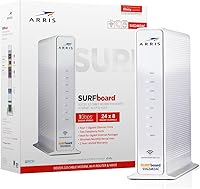
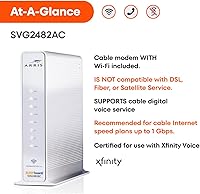
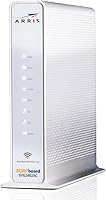
The ARRIS SURFboard SVG2482AC Cable Modem Router Combo is a two-in-one device built exclusively for Xfinity Internet and Voice subscribers — if you are on any other ISP, it simply will not work for you. For Xfinity customers still paying the monthly modem rental fee, the math on owning this hardware makes practical sense over even a single year. It has been on the market since 2017 and has accumulated nearly five thousand ratings, so there is real depth of long-term user experience to draw from. Think of it as a solid everyday workhorse — not cutting-edge technology, but genuinely capable for the typical household's daily internet routine.
Features & Benefits

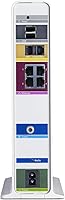
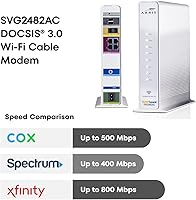
Running on DOCSIS 3.0 with 24x8 channel bonding, this modem-router combo handles Xfinity plans up to 800 Mbps — solid coverage for most current subscriber tiers. The dual-band AC2350 Wi-Fi is competent for everyday tasks: HD streaming, video calls, and browsing across several devices at once, though it is not going to rival a modern Wi-Fi 6 router in a sprawling home. Four Gigabit Ethernet ports cover wired connections for gaming consoles, smart TVs, or desktops. The two built-in telephony ports let Xfinity Voice customers keep their home phone line without adding another piece of hardware. A companion app handles device monitoring and basic parental controls.

Best For

This Xfinity-compatible gateway is the right call for a fairly specific buyer: Xfinity subscribers on plans at or below 800 Mbps who are ready to stop paying the monthly modem rental fee. Anyone also carrying Xfinity Voice service will find the two built-in telephony ports especially convenient — one device handles both internet and home phone with no extra adapter required. Moderate-usage households — think HD streaming, remote work, and general browsing — will have no complaints. The app-guided setup also makes this approachable for people who do not want to touch a router settings page. Skip it if you have a large home with persistent Wi-Fi dead spots.

User Feedback

With a 4.2-star rating from nearly five thousand buyers, the SURFboard SVG2482AC lands in solidly positive territory — though reading through the reviews reveals a more textured story. Happy users consistently mention better performance compared to the rented equipment they replaced, and many report years of stable, uneventful service. The complaints worth paying attention to include Wi-Fi range that falls short in larger homes and occasional reboots following firmware updates. It is also worth separating hardware frustrations from ISP ones: a notable portion of negative reviews stem from Xfinity activation issues, not the device itself. That said, some long-term owners do report a gradual performance dip after three or four years of continuous use.

Pros

  • Eliminates the monthly modem rental fee, putting real money back in your pocket each year.
  • Handles Xfinity Internet and Voice in a single device, reducing cable clutter significantly.
  • DOCSIS 3.0 with 24x8 channel bonding covers Xfinity plans up to 800 Mbps without issue.
  • Four Gigabit Ethernet ports give you reliable wired options for consoles, smart TVs, or work computers.
  • The SURFboard Central app makes initial setup straightforward, even for non-technical users.
  • Dual-band AC2350 Wi-Fi holds up well for typical multi-device streaming and browsing households.
  • Nearly five thousand real-world reviews provide an unusually reliable picture of long-term performance.
  • Compact form factor fits neatly on a shelf without dominating the space around your entertainment setup.
  • Parental controls via the app — including pause and time limits — are a practical bonus for family households.

Cons

  • Strictly locked to Xfinity — switching ISPs means this hardware becomes completely useless.
  • DOCSIS 3.0 is aging technology with a hard ceiling that newer multi-gig plans will quickly expose.
  • Wi-Fi coverage can fall short in larger homes, multi-story layouts, or apartments with dense walls.
  • Some users report the device needs a manual reboot after firmware updates to restore normal performance.
  • Long-term owners note gradual performance degradation after roughly three to four years of continuous use.
  • No Wi-Fi 6 support means households adding more smart devices over time may feel the bottleneck sooner.
  • Activation hiccups through Xfinity provisioning can add frustrating setup delays unrelated to the hardware itself.
  • Only one USB port is practically useful for most setups, limiting expandability options.
  • Not a strong fit for power users or heavy-bandwidth households running ten or more simultaneous connections.

Ratings

The scores below reflect an AI-driven analysis of thousands of verified purchase reviews for the ARRIS SURFboard SVG2482AC Cable Modem Router Combo, with spam, incentivized feedback, and bot-generated reviews actively filtered out before scoring. Each category is evaluated on real-world buyer experiences — not spec sheets — so both the genuine strengths and the frustrating pain points are represented honestly. Whether this modem-router combo earns a spot in your home or gets passed over depends heavily on your ISP, your plan speed, and your household size, and these scores are designed to make that call clearer.

ISP Compatibility
72%
28%
For Xfinity subscribers, compatibility is a non-issue — this gateway is fully certified and consistently approved across Xfinity internet and voice tiers up to 800 Mbps. Buyers who confirmed their plan compatibility before purchasing report zero activation headaches on the hardware side.
The hard lock to Xfinity is a dealbreaker for anyone on a different provider, and users who discovered this after purchase were understandably frustrated. A meaningful portion of low ratings come from buyers who simply did not realize compatibility was this restrictive before opening the box.
Internet Performance
81%
19%
Most users on Xfinity plans between 200 and 600 Mbps report consistently hitting their provisioned speeds, especially on wired connections. The 24x8 channel bonding keeps throughput stable during peak evening hours when neighborhood network congestion typically causes problems with weaker hardware.
Users on plans approaching 800 Mbps occasionally report not reaching their full provisioned speed, particularly over Wi-Fi. The DOCSIS 3.0 ceiling is real, and a handful of reviewers noted they upgraded to a DOCSIS 3.1 device after their ISP bumped them to a gigabit tier.
Wi-Fi Coverage
63%
37%
In apartments and smaller single-floor homes under 1,200 square feet, the dual-band AC2350 radio performs reliably for everyday tasks — HD streaming, video calls, and multi-device browsing without dropped connections. The 5 GHz band handles close-range high-bandwidth use well.
Coverage complaints spike sharply for two-story homes, larger floor plans, and units with thick concrete or brick walls. Multiple reviewers noted persistent dead zones in bedrooms and home offices located more than 40 to 50 feet from the unit, even with no obstructions in between.
Setup Experience
79%
21%
The SURFboard Central app genuinely simplifies what is usually a tedious process — most users report completing full activation and Wi-Fi configuration in under 20 minutes without ever opening a browser-based admin panel. Non-technical users in particular appreciate the step-by-step guidance.
A recurring frustration involves the Xfinity provisioning step, which occasionally stalls and requires a call to Xfinity customer support to manually push the modem onto the account. This is an ISP process issue rather than a hardware flaw, but it still creates a negative first impression for affected buyers.
Build Quality
76%
24%
The chassis feels solid and does not flex or creak, and the compact vertical design stays cool during continuous operation — even after days of uninterrupted uptime. Reviewers who have owned the unit for two-plus years consistently describe the physical hardware as holding up without any signs of degradation.
The all-white plastic exterior shows dust and scuffs more visibly than darker finishes, which bothers some users who keep their equipment in visible living spaces. A few long-term owners also noted the indicator LEDs becoming dimmer over time, which is a minor but real cosmetic wear issue.
Long-Term Reliability
67%
33%
For the first two to three years of ownership, the vast majority of users report stable, consistent performance with minimal intervention required — no unexpected reboots, no unexplained slowdowns, and no hardware failures outside of normal use conditions.
Beyond the three-year mark, a noticeable segment of reviewers begin reporting increased reboot frequency and gradual speed degradation that cannot be explained by ISP changes alone. This pattern is common enough across reviews to suggest the hardware has a realistic useful life of around three to four years under continuous use.
Value for Money
83%
Xfinity charges a recurring monthly modem rental fee, and this modem-router combo pays for itself within a reasonable number of months for most subscribers — after that, the savings are pure. For buyers who stay on Xfinity and keep the unit running reliably, the long-term financial case is straightforward.
The value equation deteriorates if the device underperforms at the three-year mark or if Xfinity upgrades your plan to a tier that exceeds DOCSIS 3.0 capability, forcing an early replacement. Buyers on higher-tier plans or those who move frequently may find the return on investment less compelling.
Xfinity Voice Support
84%
For households still using a traditional home phone line through Xfinity Voice, having both ports built directly into this gateway is genuinely convenient — no separate eMTA adapter, no extra power brick, and no extra coax splitter required. Call quality through the telephony ports is consistently rated as clear and stable.
Users who do not subscribe to Xfinity Voice gain no benefit from these ports whatsoever, and they add to the device footprint without contributing anything to internet or Wi-Fi performance. There is no way to repurpose the telephony ports for non-Xfinity Voice use cases.
Wired Connectivity
88%
Having four independent Gigabit Ethernet ports on a combo unit is a genuine practical strength — users routinely wire up a gaming console, a desktop PC, a smart TV, and a network switch simultaneously without any throughput competition between them. Wired speeds consistently match provisioned plan speeds for most users.
Power users with more than four wired devices will need to add a separate network switch, which is a minor inconvenience but worth noting. There is no 2.5G or multi-gig Ethernet option, which limits maximum wired throughput on faster plans.
Parental Controls
61%
39%
The SURFboard Central app gives parents a simple, accessible way to pause internet access for specific devices or apply time-based limits — all from a phone without logging into a web interface. For households that just need basic controls without complex filtering, it covers the essentials.
The controls are relatively shallow compared to dedicated router platforms or third-party parental control services. There is no content filtering, no per-device bandwidth throttling, and no detailed usage reporting — families with older kids who need more nuanced restrictions will likely find this insufficient.
App Experience
69%
31%
The SURFboard Central app works reliably for its core tasks — initial setup, connected device visibility, and basic network controls — and the interface is clean enough that less technical users rarely get confused. Automatic firmware notifications through the app are a useful touch.
The app has received mixed reviews on both iOS and Android for occasional bugs, session timeouts, and a feature set that has not expanded much since the product launched. Power users who want granular traffic management, detailed logs, or advanced QoS controls will hit a wall quickly.
Activation Process
58%
42%
When the Xfinity self-activation process works as intended, most buyers complete the transition from rented modem to owned hardware in under half an hour. The app guides users through each step clearly, and the majority of activations go through without any manual intervention.
When activation stalls — which happens to a notable minority of buyers — resolving it typically requires a call to Xfinity support, and wait times can stretch the process from 20 minutes to over two hours. This friction is almost entirely an ISP provisioning issue, but it lands squarely in the purchase experience regardless.
Heat Management
74%
26%
Under normal operating conditions the unit stays comfortably warm rather than hot, and reviewers in typical home environments rarely report heat as a concern even after weeks of uninterrupted uptime. The vertical form factor helps with passive airflow.
A smaller subset of users in poorly ventilated spaces or warmer climates report the unit running quite warm to the touch during summer months, with occasional slowdowns they attribute to thermal throttling. Placing it on a shelf with limited airflow around the vents seems to worsen this noticeably.
Physical Footprint
86%
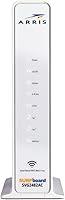
At under a pound and roughly the size of a thick paperback book stood upright, this modem-router combo fits neatly on a shelf, behind a TV stand, or on a desk edge without demanding dedicated real estate. Users replacing a separate modem and router consistently note the reduction in cable and power adapter clutter.
The vertical-only orientation means it tips over if nudged without a proper surface, and there is no wall-mount option or horizontal stand included. Buyers who want to tuck it behind other equipment or mount it discreetly will need a third-party solution.

Suitable for:

The ARRIS SURFboard SVG2482AC Cable Modem Router Combo is a well-matched choice for Xfinity subscribers who are tired of paying a recurring modem rental fee and want to own their equipment outright. The savings add up meaningfully over a year or two, making it a practical financial decision for anyone planning to stay on Xfinity long-term. Households with moderate internet demands — HD streaming on a few TVs, video calls, and everyday browsing — will find the performance more than adequate. It is especially useful for Xfinity Voice customers, since the two built-in telephony ports eliminate the need for a separate phone adapter entirely. Less tech-savvy users will appreciate the SURFboard Central app, which walks through activation and network setup without requiring any manual router configuration. If your Xfinity plan sits at or below 800 Mbps, this modem-router combo covers everything you actually need.
Not suitable for:

Anyone on an ISP other than Xfinity should stop reading here — this Xfinity-compatible gateway simply will not activate on any other cable provider, full stop. Subscribers on Xfinity's faster tiers approaching or exceeding 1 Gbps will hit the ceiling of what DOCSIS 3.0 hardware can reliably deliver. Renters or owners of larger homes with multiple floors or thick walls may find the AC2350 Wi-Fi coverage underwhelming, particularly in dead zones that a Wi-Fi 6 mesh system would handle far better. Power users, remote workers who depend on rock-solid uptime, or households with ten or more simultaneously active devices will likely outgrow this hardware faster than they expect. If you have already moved to a multi-gig or future-proofed internet plan, investing in newer DOCSIS 3.1 equipment makes more sense from the start.

Specifications

  • Modem Standard: Uses DOCSIS 3.0 technology, which supports cable internet plans up to 800 Mbps on compatible Xfinity tiers.
  • Channel Bonding: Supports 24 downstream and 8 upstream channel bonding for stable, high-throughput cable connections.
  • Max Speed: Certified for Xfinity internet speed plans up to 800 Mbps under real-world conditions.
  • Wi-Fi Standard: Dual-band 802.11ac (Wi-Fi 5) with a combined maximum throughput rating of up to 1750 Mbps across both bands.
  • Wi-Fi Bands: Broadcasts on both the 2.4 GHz and 5 GHz bands simultaneously for flexible device connectivity.
  • Ethernet Ports: Includes four Gigabit Ethernet ports, each capable of wired throughput up to 1 Gbps.
  • Telephony Ports: Equipped with two RJ-11 telephony ports for connecting standard home phones via Xfinity Voice service.
  • USB Ports: Provides two USB ports for peripheral connectivity, though primary use cases are limited on this device type.
  • Dimensions: Measures 2.25″ wide by 8″ deep by 9.4″ tall in its upright vertical orientation.
  • Weight: Weighs approximately 1 pound, making it lightweight and easy to position on a shelf or desk.
  • Firmware: Runs a Linux-based firmware platform managed and updated remotely by ARRIS and Xfinity.
  • Companion App: Compatible with the SURFboard Central app on both iOS and Android for setup, device monitoring, and parental controls.
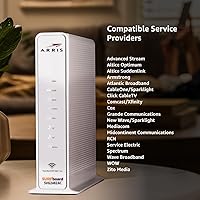
  • ISP Compatibility: Exclusively compatible with Xfinity Internet and Xfinity Voice service; it will not function on any other cable provider.
  • Manufacturer: Designed and manufactured by CommScope under the ARRIS SURFboard product line.
  • Color: Ships in a single white finish with a compact, unobtrusive vertical chassis design.
  • Voltage: Operates on standard North American 120V AC power and includes an AC power adapter.
  • First Available: This model was first made available for purchase in March 2017 and remains in active production.

Related Reviews

ARRIS SURFboard SBG7600AC2 Cable Modem Router Combo
86%
89%
Performance
92%
Setup Ease
91%
Value for Money
86%
Wi-Fi Range & Speed
82%
Parental Controls
More
ARRIS SURFboard G36
ARRIS SURFboard G36
72%
83%
Setup & Activation
76%
Wi-Fi Speed & Throughput
61%
Wi-Fi Range & Coverage
58%
Connection Stability
88%
DOCSIS 3.1 Modem Performance
More
ARRIS SURFboard SBG8300 DOCSIS 3.1 Cable Modem Router Combo
84%
91%
Performance & Speed
88%
Wi-Fi Coverage & Stability
80%
Ease of Setup
84%
Compatibility with ISPs
92%
Value for Money
More
ARRIS SBG10 Cable Modem Router Combo
76%
91%
Value for Money
86%
Setup & Activation
83%
Connection Stability
61%
Wi-Fi Coverage & Range
88%
Modem Performance
More
ARRIS G20 Cable Modem Router Combo
85%
89%
Performance
83%
Wi-Fi Coverage
91%
Ease of Setup
85%
Speed Consistency
93%
Compatibility with ISPs
More
ARRIS SURFboard SBG7580AC Cable Modem Router
75%
88%
Connection Stability
72%
Wi-Fi Coverage
91%
Setup Experience
84%
Value for Money
86%
Wired Performance
More
ARRIS SBG6580 DOCSIS 3.0 Cable Modem Router
76%
83%
Connection Stability
61%
Wi-Fi Coverage & Range
58%
Wi-Fi Speed Performance
84%
Ease of Setup
81%
Modem Performance
More
ARRIS SBG6900AC Cable Modem Wi-Fi Router
72%
88%
Ease of Setup
74%
Wi-Fi Range & Coverage
91%
Value for Money
71%
Wi-Fi Speed & Throughput
63%
Build Quality & Durability
More
ARRIS SBG7400AC2 Cable Modem Wi-Fi Router
74%
83%
Value for Money
88%
Setup & Activation
86%
Connection Stability
61%
Wi-Fi Range & Coverage
67%
Wi-Fi Speed Performance
More
ARRIS SBG6782 DOCSIS 3.0 Cable Modem Router
78%
88%
Value for Money
91%
Setup & Installation
86%
Connection Stability
69%
Wi-Fi Performance
63%
Wi-Fi Range
More

FAQ

No — the ARRIS SURFboard SVG2482AC Cable Modem Router Combo is built and certified exclusively for Xfinity Internet and Voice service. It will not activate or function on Spectrum, Cox, Optimum, or any other cable ISP. This is the single most important thing to confirm before purchasing.
Unfortunately, no. DOCSIS 3.0 hardware has a practical ceiling, and this modem-router combo is certified for Xfinity plans up to 800 Mbps. If you are on a gigabit or multi-gig Xfinity tier, you will want to look at a DOCSIS 3.1 device instead to avoid leaving speed on the table.

Not at all — those telephony ports are completely optional. If you only use this gateway for internet, you can simply ignore them. The phone ports do not affect Wi-Fi or internet performance in any way.

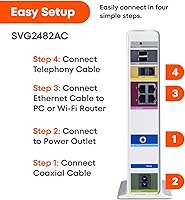
Most users find it straightforward. You connect the coax cable and power it up, then use the SURFboard Central app on your phone to walk through activation and Wi-Fi configuration step by step. The trickier part is occasionally the Xfinity provisioning side, which can require a call to Xfinity customer support if the online activation stalls.

Yes, you can connect a third-party router to one of the Gigabit Ethernet ports and put the SURFboard SVG2482AC into bridge mode to disable its built-in Wi-Fi. This is a common setup for users who already own a preferred router or need broader coverage than the built-in AC2350 radio provides.

Honestly, coverage can be hit or miss in larger spaces. The AC2350 dual-band radio performs well in apartments and smaller homes, but users in two-story houses or spaces over roughly 1,500 square feet often report dead zones. If coverage is a concern, pairing it with a wired access point or mesh extender is a smart move.

Three to four years of solid performance is a reasonable expectation based on long-term user reports, after which some owners notice gradual slowdowns or increased reboot frequency. It is not a device you will likely need to replace after one year, but planning ahead if you hit the three-year mark is not a bad idea.

It covers the basics: you can pause internet access for specific devices and set daily time limits without logging into a web admin panel. It is not as granular as a dedicated parental control platform, but for households that just want simple on/off controls for kids' devices, it does the job reliably.

In most cases, no. A notable share of the frustration in negative reviews traces back to Xfinity's provisioning process, not a defect in the device itself. Xfinity occasionally needs to manually add a self-owned modem to your account on their end, which can require a support call. Once activated, the hardware itself is generally stable.

Absolutely — that is one of the practical strengths of this modem-router combo. All four Ethernet ports run at full Gigabit speeds, so a wired connection to a console, desktop, or smart TV will be noticeably more stable and lower-latency than Wi-Fi for bandwidth-intensive use.