

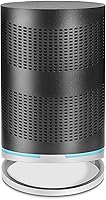

Overview

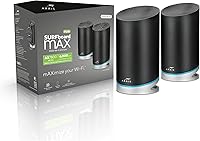
The ARRIS SURFboard mAX W130 Mesh WiFi System is built by CommScope, a company with deep roots in cable and networking infrastructure well before consumer Wi-Fi went mainstream. What you’re actually buying is a two-node bundle — two separate router units that work together to blanket up to 6,000 square feet, which covers most medium to large homes without issue. Setup and ongoing management both run through the SURFboard Central app. At its price point, this Wi-Fi 6 mesh kit is one of the more accessible entry points into modern mesh networking — though accessible doesn’t always mean trouble-free.

Features & Benefits

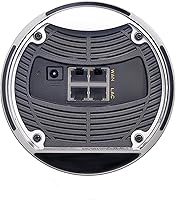
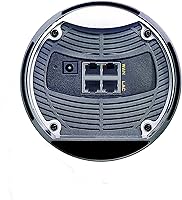
The tri-band setup is the most important architectural choice here. Instead of letting all three bands compete for your devices, one of the two 5 GHz bands is reserved exclusively as a dedicated backhaul between the two nodes — so the routers maintain a clean, fast link without cannibalizing your device bandwidth. Each band runs Wi-Fi 6 with 4x4 MIMO, and each node ships with four Gigabit Ethernet ports, which is a solid wired option count for this tier. The parental controls are notably fleshed out: beyond simple time limits, you can build a screen-time rewards system for kids, plus IFTTT hooks for smart home platforms.

Best For

This mesh system makes the most sense for homeowners battling dead zones — multi-floor houses, long ranch-style layouts, or homes with thick walls where a single router simply can’t do the job. Families will find the parental controls genuinely useful; the ability to tie screen time to completed activities is a step above the basic pause-and-block approach most routers default to. Gamers and streamers benefit from the dedicated backhaul keeping node-to-node throughput consistently high. It’s also a practical fit for anyone running a stack of smart home devices — Sonos, Ring, Philips Hue — where whole-home coverage matters far more than theoretical peak speed.

User Feedback

With 204 ratings sitting at a 3.7 out of 5 average, the SURFboard mAX W130 lands in genuinely mixed territory. Satisfied buyers tend to call out easy setup and solid coverage in homes where a single router always fell short. The recurring complaints are harder to ignore: app reliability issues, firmware updates that occasionally knock connections offline, and questions about durability beyond the first year or two. Compared to premium mesh brands, the software polish gap is real and noticeable. Buyers who go in with calibrated expectations — solid hardware at a value price, not a premium experience — tend to come away more satisfied.

Pros

  • Two-node bundle covers up to 6,000 sq ft, making dead zones in large or multi-floor homes a non-issue.
  • Dedicated backhaul band keeps node-to-node traffic separate, so your devices get the full benefit of both nodes.
  • Eight Gigabit Ethernet ports across the system is a strong wired option count at this price tier.
  • Wi-Fi 6 support future-proofs the network for newer devices without requiring a costly system upgrade.
  • Parental controls include a rewards-based screen time system that goes well beyond what most routers offer.
  • Setup through the SURFboard Central app is consistently praised as straightforward, even for non-technical users.
  • IFTTT integration allows real smart home automation, not just basic device connectivity.
  • The system can expand to a third node if coverage needs to grow, protecting your initial investment.
  • Alexa support lets you manage basic network functions without opening an app.

Cons

  • The companion app has a documented history of bugs and inconsistent behavior across iOS and Android.
  • Firmware updates have caused dropped connections for some users, sometimes requiring a full reboot or reset.
  • Long-term reliability is a concern; several reviewers report performance degrading noticeably after the first year.
  • Real-world throughput falls well short of the headline 7.8 Gbps figure, which is a theoretical combined maximum.
  • Customer support response quality has drawn criticism, which matters if something goes wrong post-purchase.
  • No advanced network management tools for power users who want VLAN support or detailed traffic controls.
  • The 3.7-star average suggests a higher-than-expected rate of buyer disappointment compared to rival mesh systems.
  • App-dependent management means if the app breaks or loses support, day-to-day control becomes genuinely difficult.

Ratings

The ARRIS SURFboard mAX W130 Mesh WiFi System has been scored by our AI engine after analyzing verified buyer reviews from multiple global markets, with spam, bot-generated, and incentivized submissions actively filtered out. The result is a balanced picture that reflects both where this Wi-Fi 6 mesh kit genuinely delivers and where real users have run into frustration. Scores below represent the honest range of experiences — not a marketing summary.

Coverage & Range
81%
19%
Buyers in large single-story homes and two-floor houses consistently report that the two-node setup eliminates the dead zones that plagued their previous single-router arrangements. Backyards, garages, and far-end bedrooms all come up as specific wins in user feedback.
Homes with thick concrete or brick walls, or awkward layouts with many partitions, see noticeably reduced effective range. A few users with homes just under 6,000 sq ft still found weak spots that required careful node repositioning to resolve.
Wi-Fi Speed Performance
69%
31%
For everyday tasks — streaming 4K on multiple TVs, video calls, casual gaming — the SURFboard mAX W130 handles simultaneous demand without obvious slowdowns. The dedicated backhaul band helps maintain throughput to client devices even when the nodes are working hard.
The 7.8 Gbps headline figure is a theoretical combined maximum that no single device will approach in practice. Several users on high-speed gigabit plans report that real-world speeds, particularly over Wi-Fi at range, fall well short of what they expected based on the spec sheet.
Setup Experience
78%
22%
The SURFboard Central app walks users through the initial setup in a step-by-step flow that most non-technical buyers find manageable. First-time mesh adopters in particular highlight how painless the process is compared to traditional router configuration.
A segment of users — particularly those on older Android versions or less common ISP configurations — report the app stalling or failing to detect nodes during setup. When that happens, troubleshooting options within the app are limited.
App Reliability
53%
47%
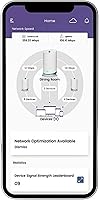
When the SURFboard Central app is working correctly, it gives a clean overview of connected devices, lets you pause internet access quickly, and surfaces parental control options without requiring any technical knowledge. The UI layout is intuitive enough for casual users.
App stability is one of the most consistently criticized aspects across user reviews. Bugs, login issues, and features that simply stop working after firmware updates are recurring complaints. For a system that is entirely app-dependent, this is a meaningful reliability gap.
Parental Controls
74%
26%
The rewards-based screen time system stands out — parents can link internet access to completed homework or chores, which is a more practical approach than a simple block schedule. Internet pause by device and time-limit scheduling are both well-implemented when the app cooperates.
The parental controls are only as reliable as the app itself, and users report that scheduled rules occasionally fail to activate after an app or firmware update. Compared to dedicated parental control platforms, the filtering depth and reporting granularity are also fairly basic.
Firmware & Updates
44%
56%
ARRIS has pushed firmware updates to the W130 since its launch, which at least signals some level of ongoing support for the platform. A subset of users report that certain updates did improve stability and address earlier connectivity issues.
Firmware updates have caused outright connectivity drops for a notable portion of users, sometimes requiring a full factory reset to recover normal operation. The update process is automatic and not easily controlled by the user, which compounds the frustration when something goes wrong.
Long-Term Reliability
57%
43%
Many buyers who stick with the system through early quirks report stable day-to-day operation for the first year. Users who primarily use wired connections through the Ethernet ports tend to report fewer issues over time.
A recurring pattern in longer-term reviews points to degraded performance and increased disconnections after 12 to 18 months of use. Whether this is hardware wear or accumulated firmware issues is hard to distinguish, but it creates legitimate doubt about multi-year durability.
Backhaul Performance
76%
24%
Having a dedicated 5 GHz band for the inter-node link is a real architectural advantage — it means your streaming, gaming, and browsing traffic is not sharing bandwidth with the connection between routers. Users in two-story homes in particular benefit from this design.
The backhaul link performs best when the two nodes are placed within a reasonable range of each other. Push them too far apart and the dedicated backhaul band does not fully compensate, resulting in throughput that disappoints buyers expecting consistent gigabit speeds throughout.
Wired Connectivity
83%
Eight Gigabit Ethernet ports across two nodes is genuinely generous for a value-tier mesh system. Home office users, gamers who prefer wired connections, and households with wired smart TVs or NAS drives all find the port count practically useful.
There is no 2.5G or multi-gig Ethernet option on either node, which limits wired throughput for buyers with multi-gig internet plans. For most users this is irrelevant, but it is a ceiling worth knowing about.
Smart Home Integration
71%
29%
IFTTT support opens up real automation possibilities with platforms like Ring, Philips Hue, and Sonos — not just basic connectivity but actual trigger-and-action workflows. Alexa integration works for users already embedded in the Amazon ecosystem.
IFTTT integration requires its own account and setup outside the main app, which adds friction. Users with Google Home-centric setups or those who have moved away from IFTTT will find the smart home story less compelling than it appears on the spec sheet.
Value for Money
66%
34%
As a two-node Wi-Fi 6 mesh bundle at its price point, the hardware specifications — tri-band, 4x4 MIMO, 8 Ethernet ports, Wi-Fi 6 — represent strong on-paper value. Buyers who need coverage in a large home without a large budget find the proposition attractive.
The software and reliability issues chip away at the value equation over time. When weighed against slightly pricier alternatives with more stable firmware and better app support, the long-term cost of troubleshooting time and potential early replacement makes the gap narrower than it first appears.
Node Design & Footprint
62%
38%
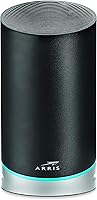
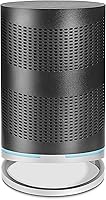
The nodes have a straightforward, unobtrusive black design that blends into most home environments without drawing attention. They do not require a specific orientation and can be placed on shelves or surfaces without issue.
At 5 x 9.65 inches, each node is not particularly compact, and the combined weight of the bundle means they feel substantial. Some users expected a sleeker form factor given the price tier and were mildly disappointed by the utilitarian appearance.
Customer Support
48%
52%
ARRIS does maintain a support channel and product documentation for the W130, and some users report getting useful guidance from the support team on configuration issues. Community forums have also filled in some gaps for technical users.
Support quality is inconsistent based on user reports, with slow response times and generic troubleshooting scripts being common complaints. Given that the app and firmware issues often require real support intervention, this is a meaningful gap in the overall ownership experience.

Suitable for:

The ARRIS SURFboard mAX W130 Mesh WiFi System is a practical fit for homeowners who have outgrown a single router and need reliable coverage across 3,000 to 6,000 square feet without spending heavily. Families with kids will find genuine value in the parental controls, which go beyond a basic pause button and let you tie screen time to completed tasks or chores. If you run a house full of smart home devices — smart bulbs, video doorbells, speakers — the IFTTT and IoT support means this mesh kit can integrate with the broader ecosystem without requiring a separate hub. Gamers and people who stream 4K content in multiple rooms will benefit from the dedicated backhaul band, which keeps inter-node traffic from competing with your devices. First-time mesh buyers stepping up from a basic ISP-supplied router will find the SURFboard Central app approachable enough to handle setup and day-to-day management without much technical know-how.

Not suitable for:

Buyers who prioritize software polish and long-term firmware support should look elsewhere before committing to the ARRIS SURFboard mAX W130 Mesh WiFi System. The 3.7-star average across over 200 reviews is an honest signal that a meaningful portion of users have run into real frustrations — app bugs, connectivity drops after updates, and concerns about how the system performs a year or two down the line. Power users who want granular network controls, detailed traffic analytics, or advanced QoS beyond what an app provides will find this system limiting. If you live in a compact apartment or a home well under 2,000 square feet, the two-node bundle is simply more hardware than the situation calls for, and a single Wi-Fi 6 router would likely serve you better for less. Anyone with a premium mesh system already in place — or a household with demanding, always-on connectivity needs — will probably feel the gap in reliability and ecosystem maturity.

Specifications

  • Wi-Fi Standard: Both nodes operate on Wi-Fi 6 (802.11ax), the current mainstream standard offering improved throughput and better performance in device-dense environments.
  • Frequency Bands: The system uses three bands: one 2.4 GHz band for legacy and low-bandwidth devices, and two 5 GHz bands, one of which is reserved exclusively for node-to-node backhaul.
  • Max Speed: Combined theoretical maximum across all bands is 7.8 Gbps (AX7800); real-world speeds will be significantly lower depending on device capability and network conditions.
  • MIMO Config: Each band on each node uses a 4x4 MIMO antenna configuration, allowing simultaneous communication with multiple devices at higher efficiency.
  • Coverage Area: The two-node bundle is rated for up to 6,000 square feet of combined coverage under typical residential conditions.
  • Ethernet Ports: Each node includes four Gigabit Ethernet ports, giving the full system eight wired connection points total for desktops, smart TVs, or gaming consoles.
  • Backhaul Speed: The dedicated 5 GHz High backhaul link between nodes supports up to 4.8 Gbps, keeping inter-node traffic isolated from client device traffic.
  • Bundle Contents: The W130 bundle includes two W30 router nodes; it is not a single unit, and both nodes must be deployed to achieve the rated coverage and backhaul functionality.
  • Expandability: The system supports up to three SURFboard mAX nodes total, allowing one additional node to be added if coverage needs to grow beyond what two nodes provide.
  • Management App: Network setup, parental controls, and device monitoring are all handled through the SURFboard Central app, available for iOS and Android.
  • Parental Controls: The app supports internet pause, time-based scheduling, and a rewards system that ties screen time to completed activities set by parents.
  • Smart Home: The system supports IFTTT automation, IoT device management, and Alexa voice commands for basic network control.
  • Dimensions: Each node measures 5 x 9.65 inches; the combined weight of both units in the bundle is 8.22 pounds.
  • Compatibility: The system works with any existing broadband internet modem and is not locked to a specific ISP or modem brand.
  • Manufacturer: ARRIS is a networking brand owned by CommScope, a company with a long background in cable, broadband, and enterprise network infrastructure.

Related Reviews
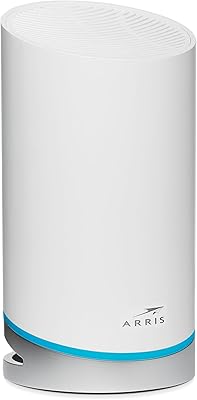
ARRIS SURFboard mAX Pro W133 Mesh Router
71%
83%
Wi-Fi Coverage
71%
Wi-Fi Speed Performance
52%
App & Software Experience
58%
Network Reliability & Stability
91%
Wired Port Availability
More
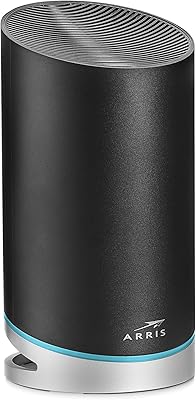
ARRIS SURFboard mAX W21 WiFi 6 Router
71%
76%
Wireless Performance
67%
Coverage & Range
84%
Setup & Onboarding
61%
App Experience
82%
Parental Controls
More
ARRIS SURFboard mAX W30 Wi-Fi 6 Router
71%
78%
Wi-Fi Speed & Throughput
74%
Coverage & Range
76%
Mesh Performance
53%
App Experience
82%
Parental Controls
More
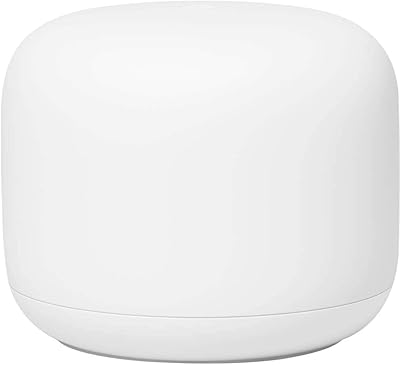
Google Nest Wifi Router 1-Pack
79%
93%
Setup & Onboarding
84%
Signal Consistency & Stability
88%
App & Network Management
79%
Parental Controls
74%
Wireless Performance (Speed)
More
Cudy M3600 1-Pack WiFi 7 Mesh System
77%
91%
Value for Money
78%
Wireless Performance
67%
Coverage & Range
93%
VPN Flexibility
88%
Setup & Installation
More
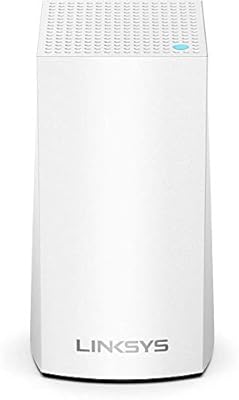
NETGEAR Orbi RBK752P WiFi 6 Mesh System
80%
88%
Coverage & Range
79%
WiFi Speed & Throughput
91%
Ease of Setup
83%
Device Handling
85%
Wired Connectivity
More
NETGEAR Nighthawk MK93S Mesh WiFi 6E System
79%
88%
Wireless Performance
91%
Coverage & Dead Zone Elimination
83%
Setup & Installation Experience
86%
Device Capacity & Network Management
74%
6GHz Band Utility
More
Tenda Nova MX12 2-Pack Mesh WiFi System
75%
91%
Setup & Installation
72%
Coverage & Range
78%
Wi-Fi Speed Performance
88%
Value for Money
67%
App Experience
More
NETGEAR Orbi RBK853 WiFi 6 Mesh System
77%
83%
Signal Coverage
86%
Network Speed
88%
Device Handling
81%
Setup Experience
74%
App & Management
More
NETGEAR Nighthawk MK62 Mesh WiFi 6 System
87%
94%
Setup & Installation
88%
Performance for Streaming & Gaming
83%
WiFi Coverage
90%
App Management Experience
92%
Security Features (NETGEAR Armor)
More

FAQ

It comes with two separate router nodes — that’s what the W130 designation means (W30 + W30). You place one near your modem and the second somewhere in the middle of your home or wherever coverage is weakest. Both need to be set up and powered on to get the full benefit.

Yes, it works with any standard broadband modem regardless of your ISP. You just plug the primary node into your existing modem with an Ethernet cable and follow the app setup. It is not locked to any specific provider or modem brand.

The backhaul is wireless. The system dedicates one of its 5 GHz bands entirely to maintaining the link between the two nodes, so no Ethernet cable is needed between them. That said, if you can run a wired backhaul connection between the nodes, it will generally be more stable.

This is honestly a mixed point. Setup tends to go smoothly for most users, but the app has a track record of occasional bugs, and some firmware updates have caused temporary connectivity drops. It works well enough for routine tasks, but it is not as polished as the apps from premium mesh competitors.

The two-node bundle is rated for up to 6,000 square feet, so 4,500 should be within range under typical conditions. That said, coverage ratings assume open floor plans and minimal interference. Thick concrete walls, multiple floors, or a complex layout can reduce effective range, so node placement matters a lot.

Yes, the system supports up to three nodes total. You can purchase an additional compatible SURFboard mAX node separately and add it through the app if the two-node setup leaves any gaps in your home.

It performs reasonably well for gaming, especially because the dedicated backhaul band means device traffic is not competing with the inter-node link. If you can connect your console or PC via one of the Ethernet ports, that will always give you the lowest and most consistent latency. Wireless gaming performance is decent but not exceptional compared to higher-end mesh systems.

They go a bit further than the typical block-and-pause setup. You can set time-based internet schedules per device, pause a device’s connection instantly, and build a rewards system where kids earn screen time by completing tasks or activities you define in the app. It is not as deep as dedicated parental control software, but for basic household management it covers the essentials.

Some users have reported that performance and stability degrade after extended use, which is a recurring thread in the review feedback. Whether that is hardware degradation or firmware-related is hard to say definitively, but it is a pattern worth knowing about if you are buying with a long time horizon in mind.

The system is designed to be app-managed, and most configuration options live in the SURFboard Central app. There is limited access to traditional web-based router admin controls, so if the app has issues or loses support down the road, your ability to manage the network in depth becomes more constrained. That is worth factoring in if you prefer hands-on router control.