
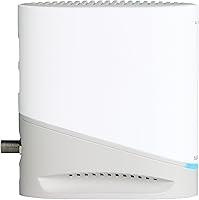
Overview

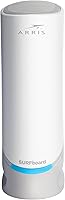
The ARRIS SURFboard S33 is a DOCSIS 3.1 cable modem built for households running high-speed internet plans who are tired of paying monthly rental fees to their ISP. DOCSIS 3.1 is the current cable internet standard, capable of handling real-world speeds that older modems simply can't keep up with — and it leaves room to grow as providers continue raising their plan tiers. One thing to know upfront: this ARRIS modem has no built-in Wi-Fi. You'll need a separate router for wireless coverage. It works with Xfinity, Cox, Spectrum, and Charter, making it a practical choice for most US cable subscribers.

Features & Benefits

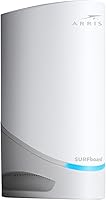
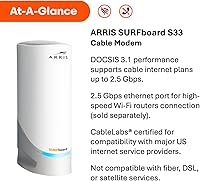
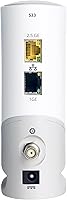
The S33 runs DOCSIS 3.1, supporting cable plans up to 2.5Gbps — though your actual speeds depend on your ISP plan and the router you pair it with. What separates this cable modem from older models is its dual Ethernet setup: the primary port runs at 2.5Gbps, so it won't bottleneck a high-end Wi-Fi 6 router, while a secondary 1Gbps port can handle a wired device or backup handoff, depending on ISP configuration. The unit itself is slim and unobtrusive — easy to tuck on any shelf. LED status indicators for power, upstream/downstream, and online status make quick troubleshooting straightforward, even for less technical users.

Best For

This ARRIS modem makes the most sense for households on 1Gbps or faster cable plans who want to stop handing their ISP a monthly equipment fee. Over two to three years, the modem typically pays for itself. It's also a strong pick for remote workers and gamers who rely on consistent, low-latency wired throughput — stability matters more than headline speed numbers for those use cases. If you're upgrading from a DOCSIS 3.0 modem, the headroom difference is real. Pair the S33 with a capable mesh system or Wi-Fi 6 router and it won't be the bottleneck. Not suited for fiber, DSL, or satellite customers.

User Feedback

With roughly 3,900 ratings and a 4.1-star average, the S33 lands in broadly positive territory — but with some caveats. Most buyers praise how quickly the modem activated and how much faster their connection felt versus old ISP-issued hardware. Long-term owners generally report stable, consistent performance. On the downside, a recurring issue involves provisioning delays with certain ISPs, and the second Ethernet port trips up some users since its behavior depends on provider configuration. A notable slice of negative reviews traces back to buyers who didn't realize a separate router was still needed — a setup misunderstanding more than a product flaw. A few owners mention the unit running warm, though heat failures aren't a widespread concern.

Pros

  • Eliminates monthly ISP modem rental fees, typically paying for itself within two to three years.
  • DOCSIS 3.1 support means the hardware is ready for faster internet plans without needing replacement.
  • The 2.5Gbps primary Ethernet port does not bottleneck high-speed Wi-Fi 6 or mesh router setups.
  • CableLabs certification makes activation on Xfinity, Cox, Spectrum, and Charter generally straightforward.
  • Compact vertical design fits easily on a shelf without consuming meaningful space in your setup.
  • Simple three-LED status panel gives a fast read on modem health without logging into any interface.
  • Most users report stable, consistent uptime once the modem is provisioned correctly by their ISP.
  • The secondary 1Gbps Ethernet port adds useful flexibility for wired devices or backup handoff configurations.
  • Long-term owners on major carriers generally report reliable performance well past the one-year mark.

Cons

  • No built-in Wi-Fi — a separate router purchase is required and adds to the total cost.
  • The second Ethernet port behavior is ISP-dependent and does not function as a standard LAN port for everyone.
  • Some users on Spectrum and smaller regional carriers report multi-day provisioning delays during activation.
  • The unit runs noticeably warm under sustained heavy use, which raises questions about multi-year longevity.
  • ARRIS customer support receives mixed reviews and can be difficult to reach when non-standard issues arise.
  • Buyers on internet plans below 500Mbps will see little real-world benefit from the DOCSIS 3.1 hardware.
  • Not all regional or smaller cable providers have this modem on their approved device lists.
  • The plastic build feels modest relative to the price point, especially compared to competing hardware.
  • No mounting holes or cable management features, which can make for a messier installation near other equipment.

Ratings

The ARRIS SURFboard S33 has been evaluated by our AI rating engine after analyzing thousands of verified buyer reviews from global sources, with spam, bot-generated, and incentivized feedback actively filtered out. The scores below reflect honest consensus from real users — the strengths are genuine, and the frustrations are documented without sugar-coating. Whether this cable modem fits your setup depends heavily on your ISP, your existing gear, and what you expect from a modem-only device.

Connection Stability
88%
The vast majority of long-term owners report rock-solid uptime once the modem is provisioned correctly. Users on Xfinity and Cox gigabit plans in particular describe consistent throughput with no unexplained drops — a meaningful contrast to the erratic behavior many experienced with ISP-supplied equipment.
A portion of users experienced intermittent drops in the first few weeks, often tied to provisioning issues on the ISP side rather than hardware failure. Those on smaller regional cable providers reported slightly more instability, and resolving it sometimes required multiple calls to technical support.
Speed Performance
83%
Users upgrading from DOCSIS 3.0 hardware consistently reported noticeable real-world speed gains, especially on plans above 500Mbps. The 2.5Gbps Ethernet port means the modem itself is not the limiting factor when paired with a capable Wi-Fi 6 router.
Actual throughput is always capped by the ISP plan and the router downstream — a point that surprised some buyers who expected the modem alone to produce faster results. On plans below 500Mbps, the performance headroom goes largely unused.
ISP Compatibility
79%
21%
CableLabs certification and broad support across Xfinity, Cox, Spectrum, Charter, and Comcast means most US cable subscribers can use this modem without issue. Activation on major carriers tends to go smoothly, with many users completing the process in under 15 minutes.
Compatibility is not universal — users on smaller regional cable operators occasionally found the S33 was not on their approved device list. A handful of Spectrum customers also reported provisioning delays that took days to resolve, requiring persistent follow-up with their provider.
Value for Money
91%
For households paying monthly modem rental fees, the math is straightforward: most users recoup the cost within two years, after which ownership becomes pure savings. Buyers consistently cite this as one of the strongest arguments for the purchase, especially on higher-tier internet plans.
The upfront cost is a real barrier compared to budget DOCSIS 3.0 options, and buyers locked into slower or cheaper internet plans will not meaningfully benefit from the DOCSIS 3.1 headroom they are paying for. The value case weakens significantly on plans below 500Mbps.
Setup & Activation
84%
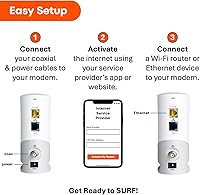
Most users describe a refreshingly simple setup experience: connect the coax, plug in power, call or log in to the ISP portal to activate, then connect a router. For buyers comfortable with basic networking steps, the process rarely takes more than 20 minutes.
Users who expected a fully guided in-box experience were occasionally caught off guard by the activation steps, which vary by ISP. A minority reported that their provider's activation system did not immediately recognize the device, leading to frustrating hold times with customer support.
Build Quality
76%
24%
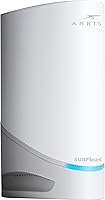
The slim vertical chassis feels solid for a plastic-bodied device, and the compact footprint means it fits neatly on a shelf or tucked behind a router without taking up unnecessary space. The white finish is clean and unobtrusive in most home setups.
The plastic casing, while functional, does not inspire premium confidence given the price point. Some longer-term owners noted the unit runs noticeably warm during sustained high-throughput use, which raised concerns about longevity even if hardware failures have not been widely reported.
Dual Ethernet Port Utility
67%
33%
Having both a 2.5Gbps and a 1Gbps port gives technically minded users useful flexibility — the secondary port can support a directly wired device or act as a backup handoff depending on how the ISP configures the modem.
The second port's behavior is ISP-dependent, which confused a meaningful number of buyers who expected it to work as a straightforward second LAN port out of the box. When it does not function as expected, troubleshooting requires ISP-side intervention, which not all providers readily offer.
Heat Management
63%
37%
Under normal residential use — browsing, streaming, moderate downloads — the unit stays at an acceptable temperature and most users never notice any heat-related issues. Placement in an open, ventilated spot keeps things manageable.
Under sustained high-throughput conditions, several users flagged that the modem gets quite warm to the touch. A smaller subset of long-term owners expressed concern about what this might mean for component longevity over a three-to-five year ownership period.
LED Indicators & Diagnostics
81%
19%
The three-indicator LED layout — power, upstream/downstream activity, and online status — gives users a quick at-a-glance read on modem health without needing to log into any admin interface. For non-technical households, this alone can save a frustrating troubleshooting call.
The indicators are functional but minimal. Users accustomed to more detailed status feedback, such as separate upstream and downstream lights or a dedicated link-speed indicator, may find the simplified approach leaves them guessing during partial connectivity issues.
Router Pairing Experience
73%
27%
When paired with a modern Wi-Fi 6 or mesh router via the 2.5Gbps port, the S33 performs well as a clean bridge between the cable line and the home network. Users running setups like Eero Pro, Netgear Orbi, or ASUS routers reported smooth integration.
Because this is a modem-only device, a notable number of buyers — particularly first-time modem purchasers — were surprised to find they still needed a separate router for any Wi-Fi. This gap in expectations was one of the most common drivers of negative reviews.
Long-Term Reliability
74%
26%
The bulk of owners who have used the S33 for a year or more report it continues to perform consistently without needing reboots or replacement. ARRIS has a long track record with consumer cable modems, and that brand history gives many buyers confidence in the hardware.
There is a less vocal but persistent group of users who experienced hardware failure — typically after 18 to 30 months — outside any standard warranty window. Whether this reflects a durability ceiling or isolated manufacturing variance is difficult to determine from reviews alone.
Physical Footprint
87%
At under five inches square and less than two inches wide, this cable modem is genuinely compact — easy to mount, shelf-place, or tuck into an entertainment console without occupying meaningful real estate. The vertical orientation also helps with passive airflow.
The slim design means there are no mounting holes or integrated cable management features, which some users found mildly inconvenient when trying to keep their setup tidy. The coax and power cables can look a bit awkward extending from the narrow base.
Documentation & Support
58%
42%
ARRIS provides basic setup documentation and an online support portal. For straightforward installations on major ISPs, the included quick-start guide covers the core steps adequately and most buyers do not need to go further.
When issues arise beyond basic setup — such as the second Ethernet port not functioning, or activation failures with a specific ISP — users found ARRIS customer support difficult to reach and inconsistent in helpfulness. Many ended up resolving issues through community forums rather than official channels.

Suitable for:

The ARRIS SURFboard S33 is a strong fit for households running cable internet plans at 1Gbps or faster who are ready to stop paying their ISP a monthly equipment rental fee. If you already own or plan to buy a capable Wi-Fi 6 or mesh router, this cable modem slots in cleanly as the front-end piece of that setup without becoming a bottleneck. Remote workers and gamers who depend on wired connections will appreciate the consistent throughput and the 2.5Gbps Ethernet port that keeps pace with high-end routers. It also makes sense for anyone currently on a DOCSIS 3.0 modem who wants to future-proof their setup before upgrading to a faster internet plan — the headroom is genuinely useful if your ISP is already offering multi-gig tiers in your area. Technically comfortable buyers on Xfinity, Cox, Spectrum, or Charter who are willing to handle their own activation call will find the payback period reasonable within two to three years of ownership.

Not suitable for:

The ARRIS SURFboard S33 is the wrong choice if you are expecting a complete home networking solution out of the box — there is no Wi-Fi built in, and buyers who miss that detail tend to be the most disappointed. It is also incompatible with fiber, DSL, and satellite services, so if your internet does not come through a coaxial cable line, this modem simply will not work in your home. Customers on small or regional cable providers should verify device approval with their ISP before purchasing, since the approved modem list varies and an unlisted device can mean weeks of provisioning headaches. If your current plan runs below 500Mbps, the DOCSIS 3.1 capability goes largely untapped and a less expensive DOCSIS 3.0 modem would serve you just as well for considerably less money. Finally, buyers who want a set-it-and-forget-it experience with minimal ISP interaction may find the activation process and occasional support challenges more friction than they are prepared for.

Specifications

  • DOCSIS Version: The modem uses DOCSIS 3.1, the current cable internet standard, supporting downstream speeds up to 2.5Gbps on compatible ISP plans.
  • Primary Ethernet: A single 2.5Gbps Ethernet port serves as the main connection point for a router or directly wired device.
  • Secondary Ethernet: A secondary 1Gbps Ethernet port supports an additional wired device or backup handoff, subject to ISP provisioning configuration.
  • Wi-Fi: This modem does not include any built-in Wi-Fi; a separate router or mesh system is required for wireless home networking.
  • Dimensions: The unit measures 4.74″ long by 1.8″ wide by 5.14″ high, designed for a slim vertical footprint.
  • Weight: The modem weighs 14.4 ounces, making it lightweight enough to shelf-mount or position in tight spaces without structural concern.
  • Color: The exterior finish is white, consistent with a neutral aesthetic that blends into most home or office setups.
  • LED Indicators: Three LED indicators display power status, upstream and downstream activity, and online connection status for quick at-a-glance diagnostics.
  • Certification: The S33 is CableLabs certified, confirming compliance with the technical standards required by major US cable internet providers.
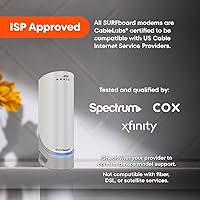
  • Compatible ISPs: Tested and qualified for use with Xfinity, Cox, Spectrum, Charter, and Comcast cable internet services.
  • Incompatible Services: This modem is not compatible with fiber optic, DSL, or satellite internet services and will not function on those network types.
  • Max Speed Support: The hardware supports cable internet plans delivering up to 2.5Gbps, though real-world throughput depends on the subscribed plan and connected router.
  • Manufacturer: The S33 is manufactured by Vantiva, the parent company operating under the ARRIS brand for consumer networking equipment.
  • Release Date: The modem was first made available in October 2020 and remains an actively sold and supported product.
  • Amazon Rating: The modem holds a 4.1 out of 5 star average rating based on approximately 3,905 verified ratings on Amazon.

Related Reviews
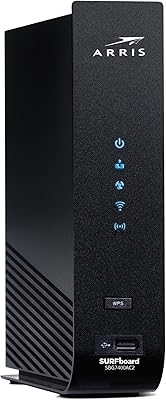
ARRIS SURFboard SBG7400AC2
85%
88%
Wi-Fi Performance
93%
Ease of Setup
75%
Compatibility with ISPs
87%
Value for Money
91%
App Experience
More
ARRIS SURFboard SB8200
79%
88%
Connection Speed & Throughput
74%
Connection Stability & Reliability
83%
Value for Money
79%
Setup & Activation
91%
Dual Ethernet Port Utility
More
ARRIS SURFboard SBV3202 Cable Modem
85%
93%
Value for Money
89%
Setup and Installation
91%
Performance for Streaming & Gaming
85%
Voice Service Compatibility
78%
Connectivity and Stability
More
ARRIS Motorola SurfBoard SB6141 Cable Modem
84%
88%
Performance
92%
Ease of Setup
80%
ISP Compatibility
90%
Build Quality
85%
Reliability
More
ARRIS SURFboard SBG7600AC2 Cable Modem Router Combo
86%
89%
Performance
92%
Setup Ease
91%
Value for Money
86%
Wi-Fi Range & Speed
82%
Parental Controls
More
ARRIS SURFboard SBG6580 Cable Modem/ Wi-Fi Router
84%
85%
Performance (Speed and Connectivity)
92%
Setup and Installation
78%
Wi-Fi Range and Signal Strength
88%
Ethernet Port Performance
90%
ISP Compatibility
More
ARRIS SURFboard SBG7580AC Cable Modem / Wi-Fi Router
83%
94%
Ease of Setup
88%
Wi-Fi Performance
92%
Value for Money
83%
Build Quality
89%
Reliability
More
ARRIS SURFboard SBG6900AC Cable Modem/ Wi-Fi AC1900 Router
83%
85%
Performance
92%
Setup/Installation
88%
Wi-Fi Range & Coverage
80%
Reliability
83%
Build Quality
More
ARRIS SURFboard mAX TM822R DOCSIS 3.0 Cable Modem
82%
87%
Performance
92%
Setup & Installation
75%
Voice Support (Xfinity Voice)
90%
Download Speed (Up to 343 Mbps)
88%
Compatibility with Xfinity Services
More
ARRIS Surfboard SBG7400AC2 Cable Modem/Wi-Fi Router with McAfee
83%
93%
Setup and Installation
88%
Wi-Fi Performance
91%
Security Features (McAfee)
90%
Compatibility with ISPs
86%
Value for Money
More

FAQ

Yes, absolutely. The ARRIS SURFboard S33 is a modem only — it connects your home to the cable internet signal, but it has no Wi-Fi or routing capability built in. You will need a separate router or mesh system to create a wireless network in your home. This is probably the most common source of confusion among new buyers.

In most cases, yes. The S33 is on Xfinity's approved modem list and handles plans well above the 1Gbps tier. Just confirm your specific plan tier is supported before purchasing, as Xfinity's approved device list can change over time.

The secondary 1Gbps port is designed for either a directly wired device or a backup connection handoff — but whether and how it functions depends entirely on how your cable provider configures the modem during provisioning. Some ISPs activate it without issue; others do not support it at all. If that second port is important to your setup, check with your provider before assuming it will work as a standard LAN port.

The process is straightforward: connect the coaxial cable from your wall to the modem, power it on, then either call your ISP or visit their activation website to register the new device using its MAC address and serial number, both printed on the bottom label. Most major providers complete activation within 15 to 30 minutes. Have your account information ready before you start.

Yes, this cable modem is on Spectrum's approved device list for cable internet plans. That said, some Spectrum customers have reported provisioning delays during activation — if yours takes longer than expected, calling Spectrum directly rather than using the online portal tends to resolve it faster.

If your internet plan is already at 500Mbps or above — or you plan to upgrade to a faster tier soon — then yes, the investment makes sense. On plans below 500Mbps, the performance difference in daily use is minimal and a DOCSIS 3.0 modem would serve you equally well for less money. The main value of DOCSIS 3.1 is headroom: you will not need to replace the modem when your ISP bumps your plan speed.

Only if your internet plan delivers speeds above 1Gbps and your router also supports a 2.5Gbps WAN port — otherwise the extra capacity goes unused. For most households on standard gigabit plans, a 1Gbps port would be sufficient. The 2.5Gbps port is genuinely useful when pairing with a high-end Wi-Fi 6E router on a multi-gig cable plan.

It runs warm, which is normal for any cable modem under sustained load, but most users do not experience problematic heat levels in everyday residential use. Keeping it in an open, ventilated spot — rather than inside a closed cabinet — helps. A small number of longer-term owners have raised concerns about heat during extended heavy use, so avoid stacking other equipment directly on top of it.

Most ISPs charge somewhere between eight and fifteen dollars per month for modem rental. At that rate, the S33 typically breaks even somewhere between 18 and 30 months of ownership, after which you are saving that rental fee every month going forward. The higher your ISP's rental fee, the faster the payback.

Yes, and it pairs well. Connect the mesh system's primary node to the 2.5Gbps Ethernet port on the modem, and the mesh handles all the Wi-Fi distribution from there. Users running Eero Pro, Netgear Orbi, and similar systems report clean integration with no special configuration needed beyond standard ISP activation.