Overview

The AOPEN 32HC1QUR 31.5″ Curved WQHD Gaming Monitor sits squarely in the mid-range — above the crowded field of budget 1080p panels, but well clear of flagship 4K pricing. Built under Acer's value-focused AOPEN sub-brand, it sets honest expectations: solid construction, no frills. The real pitch is the pairing of 1800R curvature with WQHD resolution on a 31.5″ screen, which together deliver genuine immersion and noticeably sharper detail without asking for premium-tier money. It's the kind of monitor aimed at buyers who've outgrown 1080p but have no need to push all the way to 4K just yet.
Features & Benefits

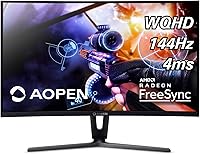
At 31.5 inches with a gentle 1800R curve, this curved gaming monitor wraps the image around your field of view without the distortion tighter curves can produce. The step up to 2560x1440 resolution is immediately obvious — text sharpens up, game environments gain real depth, and desktop work feels less cramped. The 144Hz refresh rate keeps motion smooth, though you need DisplayPort to reach it rather than HDMI. AMD FreeSync trims screen tearing nicely, but only if you're running a compatible AMD GPU — Nvidia users won't see the benefit. The 4ms response time is fine for most genres; don't expect it to satisfy serious competitive FPS players, though.

Best For

This AOPEN display suits PC gamers on AMD graphics cards who want meaningfully better image quality than 1080p without the GPU horsepower demands that 4K requires. The extra resolution also pulls its weight for productivity — multi-window workflows, photo editing, and spreadsheet work all feel less cramped on a 31.5-inch QHD panel. Sitting at normal desk distance is where the 1800R curve earns its place. If sub-1ms response times are non-negotiable for competitive shooters, this isn't the right pick. But for open-world titles, RPGs, sim games, or anyone mixing work and play on one screen, the 32HC1QUR hits a strong value point without obvious compromises.

User Feedback

Owners of this curved gaming monitor tend to highlight color depth and punch as standout strengths — both typical advantages of VA panels — and the curve is frequently praised for adding immersion in large open environments. Recurring criticism focuses on the stand design: no height adjustment, which limits ergonomic flexibility for taller setups. Some buyers mention colors running slightly warm straight out of the box and recommend a quick calibration pass. There are scattered reports of units arriving with minor cosmetic damage, pointing to packaging that could be sturdier. On balance, most buyers consider it good value when stacking its specs against similarly priced offerings from larger, more established monitor brands.

Pros

  • QHD resolution at 31.5 inches delivers a real, visible sharpness upgrade over 1080p panels.
  • The 1800R curve adds immersion in gaming without distorting the image the way tighter curves can.
  • 144Hz refresh rate keeps gameplay smooth for most mid-range gaming rigs.
  • AMD FreeSync effectively reduces screen tearing for users on compatible AMD graphics cards.
  • VA panel produces rich, punchy colors and strong contrast — particularly pleasing in dark game environments.
  • Blue light filter and flicker-free technology make long sessions noticeably easier on the eyes.
  • DisplayPort cable is included in the box, so you can hit 144Hz without hunting for accessories.
  • At this price tier, the combination of QHD, 144Hz, and a curved 31.5-inch panel is hard to match.
  • Works well as a dual-purpose screen for both gaming and everyday productivity tasks.

Cons

  • The stand has no height adjustment, making ergonomic positioning difficult for many desk setups.
  • 4ms response time lags behind IPS and TN competitors favored by competitive or esports players.
  • FreeSync is useless without a compatible AMD GPU — Nvidia users get no benefit from it.
  • Colors run warm out of the box and typically need manual calibration to look accurate.
  • VA panel black smear can appear during fast dark scenes, a limitation inherent to the panel type.
  • Some buyers have reported cosmetic damage on arrival, suggesting the packaging could be more protective.
  • No VESA mount information is confirmed, limiting options for arm or wall mounting.
  • Viewing angles are narrower than IPS panels — color and contrast shift when viewed off-axis.

Ratings

The scores below for the AOPEN 32HC1QUR 31.5″ Curved WQHD Gaming Monitor were generated by our AI system after analyzing verified buyer reviews from multiple global markets, with spam, bot-submitted, and incentivized feedback actively filtered out. Every category reflects the full picture — where this curved gaming monitor genuinely impresses and where real users have run into frustrations. Nothing has been smoothed over to protect the rating.
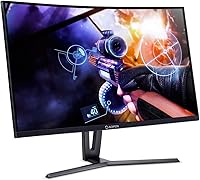
Image Quality
83%
At 31.5 inches, the WQHD resolution produces noticeably crisp detail — users consistently mention how much sharper game environments and desktop text look compared to their previous 1080p setups. The VA panel's contrast performance adds real depth to dark scenes, which RPG and open-world players especially appreciate.
Out-of-the-box color accuracy leans warm, and buyers doing color-critical work report needing a calibration pass before the image looks balanced. Viewing angles are narrower than IPS alternatives, with color and contrast shifting visibly when viewing off-center.
Refresh Rate & Smoothness
81%
19%
The 144Hz panel delivers genuinely smooth motion in gaming, and users transitioning from 60Hz panels describe the difference as immediately obvious. For open-world, strategy, and RPG titles, the fluidity at this refresh rate significantly improves the overall feel of play.
Reaching 144Hz requires a DisplayPort connection specifically — HDMI will not get you there, which catches some buyers off guard. Users on mid-range GPUs may also find that driving 1440p at sustained high framerates demands more headroom than they initially expected.
Response Time
61%
39%
For casual and mid-paced gaming genres — RPGs, simulators, strategy titles — the 4ms response time is functional and rarely noticeable as a limitation. Most general users report no distracting ghosting during typical play sessions.
Competitive FPS and esports players will find 4ms falls short of the sub-1ms or 1ms panels available at similar price points on TN or fast IPS monitors. VA black smear — a ghosting-like artifact in fast dark scenes — is a recurring complaint that is directly tied to this panel type and response characteristic.
Color Vibrancy
79%
21%
The VA panel produces punchy, saturated colors that users find particularly satisfying in visually rich game environments and media consumption. Dark tones are rendered with strong depth, giving the overall image a more cinematic character than typical TN panels at this price.
Colors require manual tuning to reach accuracy, and the default profile's warm cast is a consistent theme in buyer feedback. For graphic design or photo editing use, the panel's color space coverage and accuracy do not reach professional-grade IPS monitor standards.
Immersion & Curvature
86%
The 1800R curve is repeatedly praised for adding genuine peripheral immersion in large open environments without the distortion that tighter 1500R or 1000R curves can introduce. Buyers using this as a primary single-monitor setup find the curve adds to the sense of being inside the game world rather than watching it.
Users with very wide desks who sit further back may find the curve's effect diminished at greater viewing distances. The curvature also makes the monitor less ideal for multi-monitor configurations, where edge alignment with flat adjacent screens creates visible inconsistencies.
Stand & Ergonomics
44%
56%
The stand keeps the monitor stable during normal use, and taller users have noted the fixed height is acceptable if it happens to align with their natural eye level. Assembly is straightforward and does not require tools.
The complete absence of height adjustment is the single most cited complaint across buyer reviews — it is a real daily frustration for anyone whose desk or chair height does not happen to match the fixed stand position. There is no pivot or swivel either, leaving third-party monitor arms as the only practical solution for ergonomic flexibility.
Build Quality
67%
33%
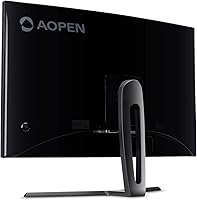
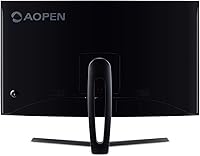
The overall construction feels solid enough for everyday desk use, and the matte black finish resists fingerprints and blends into most setups without drawing attention. For a value-tier sub-brand offering, buyers generally report the physical build meets expectations.
Scattered reports of cosmetic damage on arrival suggest the packaging does not adequately protect the unit during transit. The plastic construction, while acceptable at this price tier, does not carry the premium feel of more expensive branded alternatives.
Connectivity
73%
27%
Three available ports — DisplayPort, HDMI, and DVI — cover a wide range of PC configurations, and having all three means most buyers can connect without hunting for adapters. The included DisplayPort cable is a practical inclusion that removes one immediate out-of-box barrier.
The absence of USB ports or a built-in hub is a minor but noticeable gap for users who want to centralize peripheral connections through their monitor. There is also no USB-C input, which limits forward compatibility for newer laptop users.
AMD FreeSync Performance
76%
24%
Users running compatible AMD GPUs report that FreeSync visibly reduces screen tearing in demanding titles, making the gameplay experience feel more polished without requiring a premium G-Sync monitor. Within the supported range, the effect is smooth and consistent.
FreeSync is entirely non-functional for Nvidia GPU users, which is a significant caveat given how widely Nvidia cards are used in the mid-range gaming market. Buyers who did not check compatibility before purchasing express clear frustration at discovering the feature is irrelevant to their setup.
Eye Comfort
77%
23%
The blue light filter and flicker-free backlight are genuinely appreciated by users who spend extended hours at their desk — several buyers specifically mention reduced eye fatigue during long work or gaming sessions compared to previous monitors. These features add everyday practical value beyond gaming.
The blue light filter noticeably warms the color temperature, which conflicts with accurate color work if left enabled. Users who toggle it off for gaming and back on for general use find the manual adjustment process slightly cumbersome through the OSD.
Value for Money
84%
The combination of WQHD resolution, a 144Hz refresh rate, and a 31.5-inch curved VA panel at this price tier is a package that buyers consistently rate as competitive against larger-brand alternatives. For the target audience of casual-to-mid-level gamers upgrading from 1080p, the price-to-specification ratio holds up well.
Buyers who factor in the non-adjustable stand and the need for calibration feel the value proposition slightly erodes compared to competitors that include better ergonomic hardware at similar prices. If you need a monitor that works perfectly straight out of the box with no additional investment, the value calculus becomes less clear-cut.
Setup & Installation
78%
22%
Most buyers report completing assembly in under ten minutes with no tools required, and the included DisplayPort cable means the initial connection to a PC is ready to go immediately. The OSD menu is navigable without referring to a manual for basic settings.
The OSD controls are button-based and positioned on the back of the panel, which several users find awkward to reach and operate without looking. First-time monitor buyers have noted the calibration adjustment process is not particularly guided or intuitive.
Gaming Performance
78%
22%
For the genres this monitor is suited to — open-world games, RPGs, simulation titles, and single-player action games — the combination of 144Hz and WQHD resolution provides a noticeably improved experience over entry-level 1080p 60Hz panels. Buyers in these categories consistently rate in-game performance positively.
Fast-twitch competitive gaming reveals the panel's limitations more clearly, with black smear and the 4ms response time drawing criticism from users who also play FPS titles seriously. The monitor performs best when matched to the right genre expectations.

Suitable for:

The AOPEN 32HC1QUR 31.5″ Curved WQHD Gaming Monitor is a strong fit for PC gamers running AMD graphics cards who have decided 1080p no longer cuts it but aren't ready to chase 4K. The jump to 2560x1440 on a 31.5-inch panel is genuinely noticeable — environments in open-world and RPG titles gain real depth, and text sharpens up considerably for desktop work. The 1800R curve is well-suited to single-monitor desk setups where you sit within arm's reach, adding peripheral immersion without the visual weirdness of tighter curves. It also appeals to users who split their screen time between gaming and productivity tasks like photo editing or multi-window work, where the extra resolution earns its keep throughout the day. If your priority is a large, immersive QHD display with a smooth 144Hz refresh at a value-conscious price, this curved gaming monitor delivers a compelling package.
Not suitable for:

The AOPEN 32HC1QUR 31.5″ Curved WQHD Gaming Monitor is not the right choice for competitive FPS or esports-focused players who depend on sub-4ms response times and ultra-fast pixel transitions — the 4ms VA panel simply won't satisfy at that level. Nvidia GPU users should also pause before buying: FreeSync is AMD-specific, so you would be paying for a sync feature you cannot use. The stand offers no height or pivot adjustment, which is a genuine limitation for anyone with an ergonomic desk setup or who shares the monitor between users of different heights. VA panels can also exhibit black smear — a ghosting-like artifact in dark, fast-moving scenes — which is a known trade-off of the technology and worth researching before committing. Buyers who want a true plug-and-play experience straight out of the box may also want to factor in time for color calibration, as the default profile runs on the warmer side.

Specifications

  • Screen Size: The display measures 31.5″ diagonally, providing ample screen real estate for both gaming and productivity use.
  • Resolution: Native resolution is 2560x1440 (WQHD), delivering noticeably sharper detail than standard 1080p at this screen size.
  • Panel Type: Uses a VA (Vertical Alignment) panel, which offers strong contrast ratios and rich color depth compared to TN alternatives.
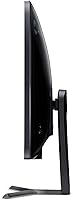
  • Curvature: The screen features a 1800R curve radius, designed to match the natural field of human vision at typical desk distances.
  • Refresh Rate: Supports up to 144Hz refresh rate, achievable via DisplayPort connection for smooth motion in fast-paced content.
  • Response Time: Rated at 4ms response time, suitable for general and casual gaming but not optimized for competitive esports play.
  • Sync Technology: AMD Radeon FreeSync support reduces screen tearing and stuttering when paired with a compatible AMD graphics card.
  • Connectivity: Includes one DisplayPort, one HDMI, and one DVI port, covering a broad range of PC and device connections.
  • Included Cable: A DisplayPort cable is included in the box, enabling full 144Hz functionality without requiring a separate purchase.
  • Eye Care: Equipped with a blue light filter and flicker-free backlight technology to reduce eye fatigue during extended use.
  • Contrast Ratio: Rated at 100,000,000:1 dynamic contrast ratio, reflecting the VA panel's ability to render deep blacks.
  • Dimensions: The monitor measures 28 x 8.2 x 20.7 inches (L x W x H) with the stand attached.
  • Weight: Total unit weight with stand is 17.47 lbs, which is typical for a 31.5-inch curved display of this class.
  • Color: Available in a matte black finish that suits most desk setups and minimizes distracting reflections.
  • Brand: Manufactured by AOPEN, a sub-brand of Acer focused on value-oriented display and computing products.
  • Release Date: This monitor was first made available in December 2018, making it a well-established model in its segment.

Related Reviews
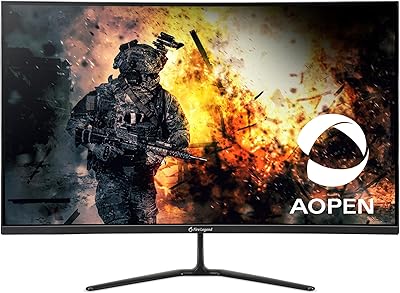
AOPEN 32HC5QR 31.5″ Curved Gaming Monitor
78%
91%
Value for Money
74%
Image Quality
88%
Refresh Rate Performance
86%
Screen Tearing & Sync
69%
Build Quality
More
Acer Nitro EDA323QU 31.5-inch Curved Gaming Monitor
74%
89%
Value for Money
87%
Image Sharpness
84%
Refresh Rate Performance
82%
AMD FreeSync
41%
Stand Ergonomics
More
Acer Nitro EDA320Q 31.5″ Curved Gaming Monitor
71%
91%
Value for Money
74%
Image Quality
78%
Gaming Performance
84%
Curvature & Immersion
43%
Ergonomics & Adjustability
More
ASUS VG32WQ3B 32-inch Curved Gaming Monitor
79%
88%
Image Clarity
91%
Refresh Rate Performance
86%
Color Accuracy
89%
Motion Blur & Ghosting
74%
Shadow Boost Effectiveness
More
Acer SB322QU 31.5″ WQHD IPS Monitor
74%
91%
Image Sharpness
74%
Color Accuracy
67%
Gaming Performance
43%
Ergonomics
86%
Value for Money
More
GIGABYTE GS32Q 32″ 1440p Gaming Monitor
76%
86%
Panel & Image Quality
91%
Refresh Rate Performance
74%
Response Time & Motion Clarity
52%
HDR Performance
88%
FreeSync & Sync Technology
More
AOPEN 27HC5R 27-inch Curved Gaming Monitor

76%
88%
Value for Money
91%
Refresh Rate Performance
74%
Picture Quality
86%
Adaptive Sync
69%
Build Quality
More
Gawfolk GF245A 24.5-Inch Curved Gaming Monitor
72%
88%
Value for Money
79%
Image Quality
83%
Refresh Rate Performance
81%
Response Time
63%
Build Quality
More
Acer Nitro EDA270U 27″ Curved Gaming Monitor
75%
91%
Image Clarity & Resolution
88%
Refresh Rate & Motion Performance
86%
AMD FreeSync Premium
58%
HDR Performance
63%
Color Accuracy & Out-of-Box Calibration
More
Acer Predator XB323QK 31.5″ 4K Gaming Monitor
73%
91%
Image Quality
88%
Color Accuracy
84%
Refresh Rate & Smoothness
76%
Response Time
52%
HDR Performance
More

FAQ

Yes, AMD Radeon FreeSync only works with compatible AMD graphics cards. If you are running an Nvidia GPU, the monitor will still function normally but the FreeSync feature will have no effect on your experience.

No — to get the full 144Hz refresh rate, you need to use the DisplayPort connection. The good news is that a DisplayPort cable is included in the box, so you are ready to go straight away.

The stand supports basic tilt adjustment but does not offer height, swivel, or pivot movement. If ergonomic flexibility matters to you, a third-party monitor arm would be worth considering.

Quite well, honestly. The WQHD resolution means text is sharp and you have enough screen space to comfortably run two windows side by side. It is a solid dual-purpose setup if you game in the evenings and work during the day.

Not really. The 1800R curve is relatively gentle and most users adapt within a day or two. It is only ultra-tight curves that tend to distort flat content noticeably.

Potentially, yes. VA panels can exhibit a phenomenon called black smear, where dark objects in fast motion leave a subtle trailing effect. It is more visible in certain games than others, and some users never find it bothersome, but it is worth being aware of before purchasing.

A number of buyers report that the default color profile runs slightly warm. It is perfectly usable as-is, but if color accuracy matters to you — for photo editing, for example — a quick manual calibration will get you much better results.

At 2560x1440 on a 31.5-inch panel, pixel density comes in around 93 PPI. Sitting at a typical desk distance of 24 to 30 inches, text looks noticeably sharper than on a 1080p screen of the same size.

A portion of buyer reviews mention minor cosmetic damage on arrival, suggesting the packaging could be more protective for shipping. It is worth inspecting the unit carefully upon delivery and documenting any damage promptly in case you need to make a claim.

It is a very natural upgrade path. You gain both a larger screen and a resolution bump in one move, and the curved format adds immersion that a flat 24-inch panel simply cannot offer. Just make sure your GPU can push 1440p at a framerate that makes the 144Hz worthwhile.