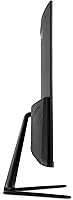
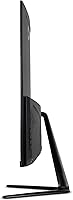
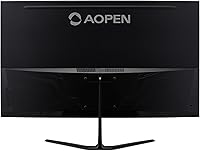
Overview

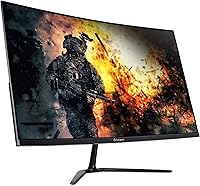
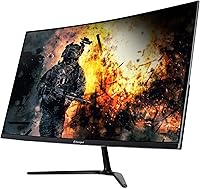
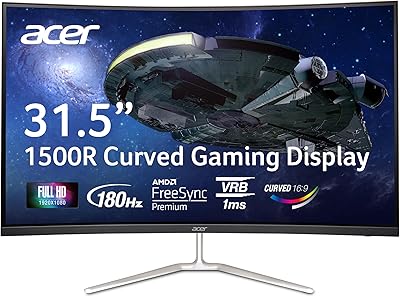
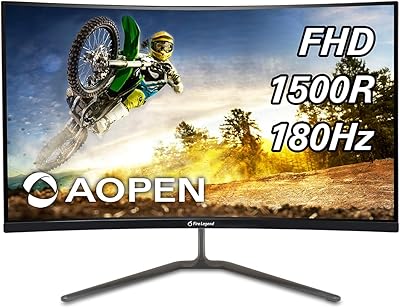
The AOPEN 32HC5QR 31.5″ Curved Gaming Monitor is Acer's value-focused answer to buyers who want a genuinely large curved screen without paying a premium price. Launched in early 2024 under Acer's AOPEN sub-brand, it sits in a practical middle ground between bare-bones budget displays and pricier mid-range options. The 31.5-inch 1500R curved panel is the real draw here — that's meaningfully bigger than most monitors at this price point. One honest caveat worth knowing upfront: Full HD resolution across 31.5 inches means pixel density is lower than on smaller screens, so if you sit close, you may notice the difference.
Features & Benefits

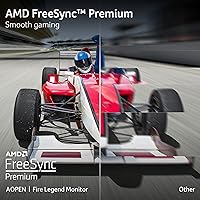
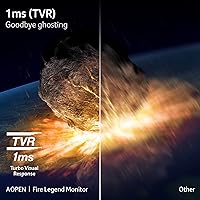
Running at 180Hz with FreeSync Premium, this curved gaming monitor handles fast-paced games without the screen tearing that ruins competitive moments. The 1ms response time is listed as TVR — short for Total Visual Response — which reflects how motion appears to the human eye rather than raw pixel transition speed. It's a softer metric than GtG, so avoid treating it as a direct apples-to-apples comparison. The 1500R curvature feels natural at typical desk distances, gently wrapping your peripheral vision without feeling exaggerated. Two HDMI ports plus a DisplayPort cover most multi-source setups, and the built-in BlueLight filter is a quiet but practical addition for longer sessions.

Best For

This 31.5-inch AOPEN display makes the most sense for console and PC gamers who want a large curved screen without stretching their budget significantly. It's also a solid pick for anyone upgrading from a smaller flat monitor — the size and curve combination delivers a genuinely noticeable change in how immersive games feel. Gamers who prioritize smooth, high-refresh gameplay over pixel-perfect sharpness will find the FHD resolution easy to accept. It also works reasonably well as a dual-purpose setup, since Full HD handles typical productivity tasks just fine at this screen size, making it a practical work-and-game monitor for everyday use.

User Feedback

Across more than 440 verified ratings, the AOPEN 32HC5QR holds a strong 4.6 out of 5 — and at that review volume, the score carries genuine weight. Buyers consistently highlight the size-to-value ratio as a standout, noting that image quality feels well above what the price suggests. On the critical side, the glossy screen surface draws recurring complaints from users in bright rooms, where reflections become a real distraction. The tilt-only stand also gets flagged for limiting ergonomic flexibility — no height or swivel adjustment is a meaningful trade-off for anyone with a specific desk setup. Those upgrading from sharper, higher-density panels may also take some time adjusting to the softer FHD image at this size.

Pros

  • The 31.5-inch curved screen is noticeably larger than what most monitors at this price tier offer.
  • A 180Hz refresh rate keeps fast-paced games smooth and responsive without demanding a high-end PC.
  • AMD FreeSync Premium support eliminates screen tearing across a wide range of hardware setups.
  • Two HDMI ports make switching between a console and a PC genuinely convenient.
  • The 1500R curvature wraps peripheral vision naturally without feeling overdone at normal desk distances.
  • Built-in BlueLight filter and Flickerless technology reduce eye strain during long gaming or work sessions.
  • VESA mount compatibility gives users the flexibility to use a third-party arm for better positioning.
  • An HDMI cable is included in the box, so setup can begin right away.
  • Strong verified rating across a substantial number of reviews suggests consistent real-world satisfaction.
  • The size-to-value ratio stands out as one of the clearest strengths buyers repeatedly highlight.

Cons

  • Full HD resolution across 31.5 inches results in lower pixel density — text and fine details can look soft up close.
  • The glossy screen surface causes distracting reflections in any room with significant ambient light.
  • The stand only tilts; there is no height adjustment, swivel, or pivot, which limits ergonomic flexibility.
  • TVR response time is a marketing-friendly metric that does not map directly to the GtG spec most monitors use for comparison.
  • At this screen size, Full HD can feel limiting for users who multitask with multiple windows open side by side.
  • No built-in speakers means you will need external audio even for casual use.
  • The display lacks HDR support, which is increasingly common on competing monitors in a similar price range.
  • Buyers sensitive to color accuracy will find the panel falls short of IPS-grade vibrancy and viewing angles.

Ratings

The scores below are generated by AI after analyzing verified global user reviews for the AOPEN 32HC5QR 31.5″ Curved Gaming Monitor, with automated filtering applied to remove incentivized, bot-generated, and outlier feedback. Each category reflects the honest consensus of real buyers — strengths and frustrations alike — so you get a clear, unvarnished picture before committing to a purchase.

Value for Money
91%
This is consistently the category buyers rave about most. Getting a 31.5-inch curved panel with a 180Hz refresh rate at this price point genuinely surprised a large portion of reviewers, many of whom compared it favorably against monitors they had previously paid significantly more for. The included HDMI cable is a small but appreciated touch.
A handful of buyers who upgraded from cheaper 1080p monitors felt satisfied, but those coming from premium 1440p displays found the value proposition shakier — the resolution trade-off felt harder to justify once they saw both side by side.
Image Quality
74%
26%
For gaming and casual media consumption, colors look vibrant and the curved panel adds a sense of depth that flat monitors at this size rarely match. Buyers watching movies or playing visually rich open-world games reported the experience felt immersive and engaging for the price.
Full HD spread across 31.5 inches means pixel density sits noticeably lower than a 24-inch 1080p panel, and text can appear soft when doing close-up reading or working with fine detail. Users who do any photo editing or work with small UI elements flagged this as a real limitation.
Refresh Rate Performance
88%
Running at 180Hz makes a tangible difference in fast shooters and racing games — motion feels fluid and tracking moving targets becomes markedly easier compared to standard 60Hz or 75Hz displays. Buyers upgrading from entry-level monitors were particularly vocal about how immediately noticeable the improvement was.
Reaching the full 180Hz requires a DisplayPort 1.4 connection and a capable GPU, which not every buyer has on hand. Those connecting via HDMI from a console are capped lower, and a few users were disappointed to discover that limitation only after unboxing.
Screen Tearing & Sync
86%
AMD FreeSync Premium works reliably across a wide hardware range, and several NVIDIA GPU users confirmed G-Sync Compatible mode functioned without issue after a quick settings adjustment. Day-to-day gaming felt consistently smooth for buyers across both AMD and NVIDIA systems.
A small number of users reported that enabling FreeSync required manual configuration in their GPU control panel, which was not immediately obvious. Buyers less comfortable with display settings occasionally left the feature disabled without realizing it.
Build Quality
69%
31%
The monitor feels appropriately solid for its price tier — the panel itself has no obvious flex, and the overall fit and finish looks clean and professional on a desk. Most buyers noted it did not feel cheap or flimsy when handling it during setup.
The plastic stand draws the most criticism in this category, with some users describing it as lightweight and slightly wobbly once the monitor is positioned. For a screen this wide, a sturdier base would have been reassuring, especially for users who frequently adjust their setup.
Ergonomics & Adjustability
53%
47%
The tilt range of -5° to 20° covers the basics and is enough for most seated positions at a standard desk height. VESA compatibility means buyers who invest in a third-party monitor arm can unlock full adjustability, which partially redeems the limited stock stand.
The lack of height adjustment, swivel, and pivot is a genuine pain point that multiple reviewers flagged as a daily frustration. Taller users or those with non-standard desk setups often resorted to stacking books under the stand — not an ideal solution for a monitor of this size.
Screen Curvature & Immersion
83%
The 1500R curve hits a comfortable middle ground — immersive enough to draw you into games without the distortion that tighter curvatures can produce. First-time curved monitor buyers consistently described the transition as a pleasant surprise, especially when gaming or watching widescreen content.
A small minority of users, particularly those who also use the monitor for spreadsheets or multi-column work, found the curvature subtly warped straight horizontal lines in ways that matte flat panels do not. It's a minor complaint, but worth noting for productivity-heavy users.
Reflection & Glare Control
58%
42%
In darker gaming setups or rooms with controlled lighting, the glossy panel actually works in the monitor's favor — colors pop more and blacks look deeper than on comparable matte panels. Buyers who game at night or in dim rooms specifically praised the visual output.
Users in bright home offices or rooms with windows nearby consistently flagged the glossy surface as a significant drawback, describing reflections as distracting and persistent. This is one of the most polarizing aspects of the AOPEN 32HC5QR, and room lighting should be a decisive factor before buying.
Eye Comfort
79%
21%
The BlueLight filter and Flickerless technology genuinely registered with buyers who use this display for extended sessions — several noted reduced headaches and less eye strain compared to older monitors they had used previously. These features work quietly in the background without requiring constant management.
The BlueLight filter introduces a subtle warm color shift at higher intensity settings, which some users found acceptable but others felt distorted their color perception enough to leave it at lower levels or off entirely during gaming.
Connectivity & Ports
82%
18%
Two HDMI 2.0 inputs and a DisplayPort 1.4 give this curved gaming monitor genuine flexibility for multi-source setups — keeping a PC and a console simultaneously connected without unplugging anything is a practical convenience that buyers regularly called out as a plus.
The absence of USB ports or a built-in hub is a mild inconvenience for users who wanted a more unified desk cable solution. There is also no USB-C input, which limits compatibility with newer laptops that rely on that connection for video output.
Setup & Out-of-Box Experience
84%
Assembly is quick and tool-free, and the included HDMI cable means most buyers were displaying content within ten minutes of opening the box. The on-screen menu is intuitive enough that casual users rarely needed to consult a manual.
The instruction documentation is minimal, and buyers who wanted to configure FreeSync or fine-tune color settings through the OSD (on-screen display) found the menu navigation a bit sluggish and less responsive than they expected.
Response Time & Motion Clarity
76%
24%
In practice, fast-moving scenes in competitive shooters and racing titles looked clean and controlled, with motion blur remaining at acceptable levels for a monitor in this category. Casual and mid-level competitive gamers found performance more than adequate for their needs.
The TVR rating used here is a marketing-friendly measure that reads better on paper than GtG, so buyers who looked up direct comparisons to GtG-rated monitors sometimes felt misled. In very demanding, high-frame-rate competitive scenarios, experienced players may notice the difference.
Size & Desk Presence
87%
At 31.5 inches, this display commands a desk in the best way — it feels genuinely substantial compared to the 24-inch and 27-inch monitors most buyers were upgrading from, and the size-to-footprint ratio is reasonable given the curvature pulling the screen edges slightly inward.
The monitor's physical footprint is wide, and buyers with smaller desks occasionally noted that fitting a keyboard, mouse, and the stand base left little room to spare. Those with compact workspaces should measure carefully before ordering.

Suitable for:

The AOPEN 32HC5QR 31.5″ Curved Gaming Monitor is a strong fit for entry-level to mid-tier gamers who want a noticeably large curved screen without committing to a high-end budget. If you're coming from a smaller flat display — say, a 24-inch or 27-inch — the jump in size and curvature will feel like a meaningful upgrade. Console gamers connecting via HDMI will appreciate having two ports available, making it easy to switch between a PC and a PlayStation or Xbox without fussing with cables. Casual and competitive PC gamers who prioritize smooth, fluid motion over pinpoint pixel sharpness will also find the 180Hz refresh rate rewarding. It doubles reasonably well as a home office monitor, since Full HD is entirely practical for spreadsheets, documents, and video calls at this screen size.

Not suitable for:

The AOPEN 32HC5QR 31.5″ Curved Gaming Monitor is not the right call for buyers who have been using a high-resolution 1440p or 4K display and are sensitive to image sharpness — the step down to Full HD across 31.5 inches is noticeable, especially in detailed scenes or text-heavy applications. Users who work in bright, naturally lit rooms should also think twice, since the glossy panel surface picks up reflections in a way that matte screens simply do not. Anyone with specific ergonomic requirements — such as needing to raise, lower, or pivot their monitor — will find the tilt-only stand limiting, and a separate VESA arm would be an added expense to factor in. Graphic designers, video editors, or anyone doing color-critical work should look elsewhere, as this monitor is optimized for gaming performance rather than color accuracy.
Specifications

  • Screen Size: The panel measures 31.5 inches diagonally, making it larger than most monitors at this price tier.
  • Resolution: Native resolution is 1920x1080 Full HD, delivering standard 1080p output across the 16:9 aspect ratio panel.
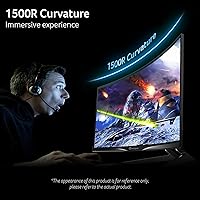
  • Panel Curvature: The 1500R curvature radius gently bends the screen to better match the natural arc of human peripheral vision at typical desk distances.
  • Refresh Rate: The panel runs at up to 180Hz, meaning it can display up to 180 frames per second for noticeably smoother motion in fast-paced content.
  • Response Time: Response time is rated at 1ms TVR (Total Visual Response), which reflects perceived motion clarity rather than raw pixel transition speed.
  • Sync Technology: AMD FreeSync Premium support dynamically matches the monitor's refresh rate to the GPU output, reducing screen tearing and stuttering during gameplay.
  • Screen Surface: The panel uses a glossy screen surface, which can enhance color vibrancy but is more prone to reflections in bright environments.
  • Connectivity: The monitor includes one DisplayPort 1.4, two HDMI 2.0 inputs, and one 3.5mm audio output jack for headphones or external speakers.
  • Included Cables: One HDMI cable is included in the box, allowing immediate setup without requiring an additional purchase.
  • Stand Adjustment: The included stand supports tilt adjustment from -5° forward to 20° backward; height, swivel, and pivot adjustments are not available.
  • VESA Support: The monitor is VESA mount compatible, allowing users to replace the default stand with a third-party monitor arm or wall mount.
  • Eye Protection: AOPEN includes a BlueLight filter and Flickerless (DC dimming) technology to reduce eye fatigue during extended viewing sessions.
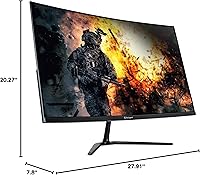
  • Dimensions: Assembled with the stand, the monitor measures approximately 27.91 inches wide, 20.27 inches tall, and 7.8 inches deep.
  • Weight: The full unit with stand weighs 13.87 pounds, which is typical for a curved display of this size.
  • Brand: Manufactured by Acer under its AOPEN sub-brand, which targets value-focused gaming and productivity monitor buyers.
  • Aspect Ratio: The panel uses a standard 16:9 widescreen aspect ratio, compatible with all modern content formats and gaming resolutions.

Related Reviews

AOPEN 32HC1QUR 31.5″ Curved WQHD Gaming Monitor
74%
83%
Image Quality
81%
Refresh Rate & Smoothness
61%
Response Time
79%
Color Vibrancy
86%
Immersion & Curvature
More
Acer Nitro EDA323QU 31.5-inch Curved Gaming Monitor
74%
89%
Value for Money
87%
Image Sharpness
84%
Refresh Rate Performance
82%
AMD FreeSync
41%
Stand Ergonomics
More
ASUS VG32WQ3B 32-inch Curved Gaming Monitor
79%
88%
Image Clarity
91%
Refresh Rate Performance
86%
Color Accuracy
89%
Motion Blur & Ghosting
74%
Shadow Boost Effectiveness
More
Acer Nitro EDA320Q 31.5″ Curved Gaming Monitor
71%
91%
Value for Money
74%
Image Quality
78%
Gaming Performance
84%
Curvature & Immersion
43%
Ergonomics & Adjustability
More
AOPEN 27HC5R 27-inch Curved Gaming Monitor
76%
88%
Value for Money
91%
Refresh Rate Performance
74%
Picture Quality
86%
Adaptive Sync
69%
Build Quality
More
GIGABYTE GS32Q 32″ 1440p Gaming Monitor
76%
86%
Panel & Image Quality
91%
Refresh Rate Performance
74%
Response Time & Motion Clarity
52%
HDR Performance
88%
FreeSync & Sync Technology
More
Gawfolk GF245A 24.5-Inch Curved Gaming Monitor
72%
88%
Value for Money
79%
Image Quality
83%
Refresh Rate Performance
81%
Response Time
63%
Build Quality
More
AOPEN 22SA2Q 21.5″ Full HD Monitor
76%
88%
Value for Money
83%
Image Quality
84%
Refresh Rate Performance
67%
Response Time
86%
Design & Aesthetics
More
Acer Predator XB323QK 31.5″ 4K Gaming Monitor
73%
91%
Image Quality
88%
Color Accuracy
84%
Refresh Rate & Smoothness
76%
Response Time
52%
HDR Performance
More
Acer Predator X32 31.5-inch 4K UHD OLED Gaming Monitor
85%
94%
Display Quality
91%
Gaming Performance (Response Time & Refresh Rate)
93%
Color Accuracy & Vibrancy
88%
Ergonomics & Adjustability
89%
Build Quality
More

FAQ

Yes, it connects via HDMI 2.0, which both consoles support. You can run games at 1080p and up to 120Hz on compatible titles, though the monitor's full 180Hz is only accessible through DisplayPort on a PC. Having two HDMI ports is handy if you want to keep both a console and a PC plugged in at the same time.

It depends on how close you sit and what you're used to. At a typical desk distance of around two to three feet, most casual and gaming use looks perfectly fine. That said, if you're coming from a 1440p or 4K display, the lower pixel density will be noticeable — text can appear slightly softer and fine details less crisp. For gaming and everyday productivity, most users find it acceptable; for photo editing or detailed creative work, it may feel limiting.

No, they measure different things. GtG (gray-to-gray) measures how fast a single pixel changes between two specific shades, while TVR (Total Visual Response) attempts to capture how motion blur looks to the human eye overall. TVR tends to produce more favorable numbers, so it's worth knowing the distinction when comparing this monitor to others that advertise GtG specs.

Yes. While the monitor carries AMD FreeSync Premium branding, NVIDIA GPUs from the GTX 10 series onward support FreeSync monitors through NVIDIA's G-Sync Compatible program. You may need to enable it manually in the NVIDIA Control Panel, but it works reliably on most systems.

Yes, the AOPEN 32HC5QR 31.5″ Curved Gaming Monitor is VESA compatible, so swapping out the stock stand for a third-party arm is straightforward. This is actually a practical upgrade if you need height adjustment or want to reclaim desk space, since the included stand only tilts and offers no height or swivel control.

It really depends on your room setup. In a darker gaming environment or a room with controlled lighting, the glossy surface is not a problem and can actually make colors look punchier. In a bright room with windows behind or beside you, reflections become noticeable and distracting. If your workspace is well-lit, a matte-screen monitor would serve you better.

At 31.5 inches and a normal desk depth, 1500R is actually a comfortable curvature for most people — it's curved enough to feel immersive without the exaggerated fish-eye effect you sometimes get on ultrawide panels. If you've never used a curved monitor before, it typically takes a day or two to stop noticing it, and most users find it natural after that adjustment period.

No, there are no built-in speakers. The monitor has a 3.5mm audio output jack, so you can connect headphones or external speakers directly to it, which is useful when audio is passing through HDMI from a source device.

Setup is pretty simple. The stand attaches without tools in most cases, an HDMI cable is included so you can get connected immediately, and the on-screen menu for adjusting brightness, contrast, and the BlueLight filter is straightforward. Most buyers report being up and running within ten to fifteen minutes.

It handles both reasonably well. Full HD at 31.5 inches is perfectly comfortable for email, documents, spreadsheets, and video calls, and the large screen real estate feels generous during a workday. The tilt-only stand may be frustrating if you need to fine-tune the height for ergonomic comfort, but pairing it with a monitor arm solves that. It's a practical dual-purpose display as long as you don't need precise color accuracy for creative work.

Where to Buy