



Overview

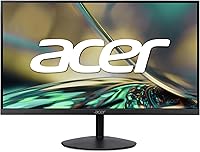
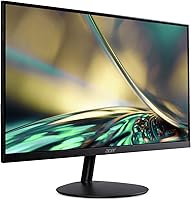
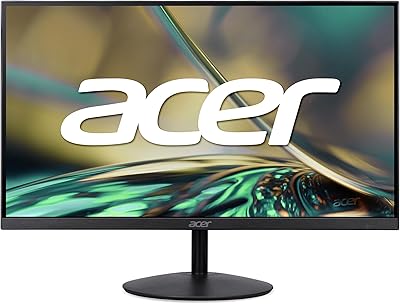
The Acer SB322QU 31.5″ WQHD IPS Monitor sits in an interesting spot — large enough to make a real difference on your desk, sharp enough to justify the upgrade from a standard 1080p screen, and priced where most people can actually justify the purchase. At 1440p on a 31.5-inch panel, text is noticeably crisper and images carry more detail than you would see on a comparable full HD display at the same size. The IPS panel also means colors stay consistent whether you are looking straight on or from a slight angle — a genuine advantage over cheaper TN alternatives. Just keep in mind this is a 75Hz display; it handles everyday tasks and casual gaming well, but it is not built for competitive shooters where every frame counts.

Features & Benefits

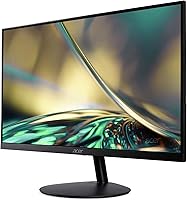
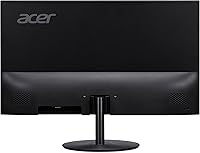
The slim, borderless frame is more than just aesthetics — if you are running dual monitors, the nearly invisible bezel makes the two screens feel genuinely continuous. AMD FreeSync handles adaptive sync duties and does a solid job reducing tearing in supported titles, which matters even at 75Hz when frame rates dip. One spec worth clarifying: the advertised 1ms response time uses VRB, a backlight strobing technique that reduces perceived blur but behaves differently from a true native pixel response — not a flaw, just important context. The port layout is practical, with two HDMI inputs and a DisplayPort, so keeping a desktop and a laptop plugged in simultaneously is simple. Rounding it out, the built-in Low Blue Light filter is a genuine comfort feature for anyone who logs long hours at the desk.

Best For

This is a strong match for people who spend most of their time in documents, spreadsheets, or on video calls and want a bigger, sharper view without overspending. The extra screen real estate at 1440p makes side-by-side windows actually usable — something a 24-inch 1080p screen simply cannot offer at the same comfort level. Photo and video editors doing casual work will appreciate the IPS color accuracy, even if it does not replace a properly calibrated professional display. Students stepping up from a laptop will find the multiple inputs practical. For anyone building a multi-monitor setup, the near-invisible borders keep things looking cohesive rather than disjointed. Competitive gamers chasing 144Hz or higher should look elsewhere — but this 31.5″ QHD monitor was never aimed at that crowd.

User Feedback

Buyers consistently highlight how much sharper everything looks compared to their previous 1080p setup — text in particular benefits noticeably, making long reading and writing sessions less tiring. The most common frustration is the included stand: it only tilts, with no height adjustment or swivel, which becomes apparent quickly when setting up an ergonomic workspace. Many owners solve this by mounting the Acer SB322QU on a VESA arm, which is straightforward given the 75x75mm mount compatibility. Out-of-box color accuracy is respectable, but a quick manual calibration pass tends to bring out noticeably richer results. The built-in speakers are largely ignored — or outright mocked — in user reviews; plan on using external audio. Overall, value perception is high for office use, though gaming-focused buyers tend to have more mixed feelings.

Pros

  • Sharp 1440p resolution makes text and fine detail noticeably cleaner than a comparable 1080p screen.
  • The IPS panel delivers consistent colors and wide viewing angles that hold up well at this price tier.
  • AMD FreeSync reduces screen tearing in supported games, a practical perk for casual PC gamers.
  • Slim zero-frame bezels make this 31.5″ QHD monitor a natural fit for clean dual-screen setups.
  • Two HDMI ports plus a DisplayPort let you keep multiple devices connected and switch without unplugging.
  • An HDMI cable is included in the box — a small but genuinely appreciated addition.
  • VESA 75x75mm compatibility makes it easy to swap out the stand for an aftermarket monitor arm.
  • The built-in Low Blue Light filter provides real comfort during long daily work or study sessions.
  • Matte anti-glare coating keeps reflections manageable in most typical indoor lighting conditions.
  • Buyers consistently report that the size-to-sharpness ratio feels like strong value for productivity and office work.

Cons

  • The stand only tilts — no height adjustment, swivel, or pivot means a VESA arm is almost a required extra.
  • At 75Hz, this IPS display will disappoint anyone accustomed to the fluid motion of a 144Hz panel.
  • Out-of-box color accuracy is acceptable but typically benefits from manual calibration to get the most from it.
  • Built-in speakers are widely criticized in user reviews and should not be considered a usable audio option.
  • The advertised 1ms response time is VRB-based backlight strobing, not a native pixel speed — an important distinction.
  • No USB hub or passthrough ports limits desk cable management for multi-device setups.
  • Color output falls short for professional photo or video work that demands calibrated, accurate results.
  • At over 12 pounds, the monitor is heavier than it looks, making repositioning on a desk more cumbersome than expected.

Ratings

The Acer SB322QU 31.5″ WQHD IPS Monitor was rated across fifteen distinct performance categories by our AI system after processing hundreds of verified purchase reviews sourced from global markets, with spam, bot-generated responses, and incentivized feedback actively filtered out to ensure scores reflect authentic buyer experience. Each category is scored to honestly represent both where this display genuinely delivers and where real users have encountered consistent frustrations. Nothing has been softened or inflated — the strengths and pain points you see below are drawn directly from verified owner feedback.

Image Sharpness
91%
Buyers consistently describe moving to 1440p on a 31.5-inch panel as one of the most impactful upgrades they have made to their workspace. Text in documents and spreadsheets is noticeably crisper than on a comparable 1080p screen, and fine web content no longer requires leaning in to read comfortably.
The sharpness improvement is less dramatic for users upgrading from a high-quality 27-inch 1080p panel where pixel density was already reasonable. A handful of users also note that 1440p demands slightly more GPU power, which can affect frame rates in games if your hardware is on the older side.
Color Accuracy
74%
26%
The IPS panel handles color noticeably better than TN alternatives at this price point, making it a practical choice for anyone editing photos casually or working with color-coded spreadsheets and design files. Colors look balanced and natural for everyday work without requiring any initial adjustment for most users.
The monitor is not factory calibrated, and buyers who need reliable color accuracy for professional creative work often find they need to invest time in manual calibration. Some users report that skin tones and subtle gradients feel slightly flat straight out of the box until settings are properly dialed in.
Gaming Performance
67%
33%
Casual gamers report a smooth and enjoyable experience in slower-paced titles — the combination of 1440p resolution and AMD FreeSync keeps things visually clean without tearing. For RPGs, strategy games, and indie titles, the screen size and resolution together create a noticeably more immersive experience than a typical 24-inch 1080p monitor.
Competitive gamers coming from 144Hz displays will feel the 75Hz ceiling immediately — tracking fast-moving targets in shooters feels less responsive and measurably affects aim and reaction time. The VRB-based response time also means this display does not match the pixel-level motion clarity of purpose-built gaming panels during rapid on-screen movement.
Ergonomics
43%
57%
The VESA 75x75mm compatibility provides a practical path to full ergonomic freedom — buyers who pair this monitor with an aftermarket arm report a significantly improved setup in terms of height, reach, and angle adjustment. For users already planning to use a monitor arm from the start, the limited stock stand simply becomes a non-issue.
The included stand is one of the most consistent sources of buyer frustration — it only tilts forward and back, with no height adjustment, swivel, or portrait mode, making proper ergonomic positioning genuinely difficult without additional hardware. Users who rely entirely on the stock stand often end up improvising with books or desk risers just to reach a comfortable eye level.
Value for Money
86%
The general sentiment from buyers is that this 31.5″ QHD monitor delivers more screen and more sharpness per dollar than almost anything else in its category, especially for home office and productivity use. The combination of IPS panel quality, resolution, and screen real estate at this price point is consistently described as hard to match.
The value proposition weakens for gaming-focused buyers, who often feel they paid for resolution they cannot fully exploit at 75Hz. If you factor in the likely cost of a monitor arm to compensate for the stand's limitations, the real out-of-pocket total creeps noticeably higher than the display's list price alone would suggest.
Build Quality
78%
22%
The chassis feels solid for the price range, with a stable base that does not wobble during normal use. Several buyers comment that the overall fit and finish looks more polished than expected at this tier, with the slim bezel design giving the monitor a cleaner, more modern appearance than typical budget displays offer.
The plastic construction, while acceptable for the price, lacks the premium feel of higher-end displays, and some buyers note minor flex in the panel surround when adjusting the tilt angle. The stand base in particular feels lighter and less substantial than users accustomed to more expensive monitors might expect.
Connectivity
84%
Having two HDMI ports and a DisplayPort means this IPS display can stay physically connected to a desktop, a laptop, and a games console simultaneously — switching between them requires only a quick input menu selection. The inclusion of an HDMI cable in the box is a small detail that most buyers genuinely appreciate, particularly students and first-time desktop users.
There are no USB hub ports on this monitor, which is a notable omission for a home office display where desk cable management matters. Users who want to charge devices or connect USB peripherals directly through the monitor will need to route everything through their PC or invest separately in a USB hub.
Eye Comfort
81%
19%
Users who spend six or more hours a day at their desk report that the Low Blue Light filter and flicker-free backlight make a real difference in reducing end-of-day eye fatigue compared to their previous monitors. The matte anti-glare coating adds another layer of comfort by softening the harsh reflections that glossy screens produce under overhead office lighting.
A subset of users note that enabling VRB — the backlight strobe mode used for motion blur reduction — can introduce a subtle flicker that some people find uncomfortable during extended sessions. Those who are particularly sensitive to screen flicker may want to leave VRB switched off and rely on the standard backlight mode instead.
Design & Aesthetics
83%
The zero-frame construction and slim profile genuinely stand out on a desk — multiple buyers mention being pleasantly surprised by how modern and intentional the monitor looks compared to older displays with thick borders. The matte panel finish also avoids the fingerprint-magnet problem that glossy-screened alternatives suffer from during daily handling.
The stand design lags behind the otherwise clean look of the panel — the base is functional but unremarkable, and a few buyers feel it does not complement the modern aesthetic of the screen above it. Cable management is also minimal, with no built-in routing channels or clips to keep the rear of the monitor tidy.
Multi-Monitor Use
87%
The slim, near-borderless bezels are among the most praised features from users running two or three screens side by side — the gap between panels is minimal enough that content feels visually continuous across the full setup rather than noticeably divided. Buyers building home office multi-screen rigs specifically cite the bezel design as a key factor in their purchase decision.
Without height or swivel adjustment on the stock stand, aligning multiple monitors at the same eye level can be surprisingly tricky without matching arms or risers. Users pairing this display with a monitor of a different size or stand design often find that getting consistent height alignment requires additional hardware they had not planned to purchase.
Motion Handling
62%
38%
In real-world casual gaming and video playback, the display handles motion well enough that most non-competitive users won't notice any issue — scrolling through documents and watching films feels smooth and natural during everyday tasks. For the vast majority of buyers who are not chasing high-frame-rate gaming, motion performance is simply not a concern worth losing sleep over.
The 1ms VRB rating is tied to backlight strobing rather than actual pixel transition speed, and in fast game sequences, ghost trails and subtle blurring are visible on dark backgrounds during rapid on-screen movement. Users coming from fast TN or OLED gaming panels will find the motion handling noticeably inferior in direct comparison.
Viewing Angles
82%
18%
The IPS panel maintains consistent color and brightness when viewed from wide horizontal and vertical angles, which is a practical benefit in shared workspaces or when a colleague briefly looks at your screen. TN monitors in this price range shift and wash out noticeably off-axis; this display simply does not have that problem.
Viewing angles are solid but not class-leading — at extreme off-axis positions there is a slight loss of color vibrancy compared to more premium IPS or nano-IPS panels. For a single-user desk setup this is rarely a real concern, but it is worth noting for anyone using the display in a presentation or collaborative environment.
Built-in Audio
31%
69%
The built-in speakers do technically function and can produce audible sound for basic system alert tones or very quiet background audio in a pinch. For users in a near-silent room who only need the bare minimum of system sound, they serve that narrow purpose without requiring any additional setup.
Across user reviews, the speakers are among the most consistently criticized aspects of this display — thin sound, minimal volume, and negligible bass make them unsuitable for music, video calls, or gaming. The overwhelming consensus from real buyers is that these speakers are effectively unusable for anyone who cares even modestly about audio quality.
Setup Experience
88%
Buyers consistently describe the unboxing and initial setup as quick and intuitive — the stand attaches tool-free, an HDMI cable is included, and most operating systems detect the display immediately without driver installation. Students and first-time external monitor users in particular appreciate being up and running within minutes of opening the box.
A minority of users find that the default out-of-box color temperature and brightness feel noticeably cool-toned or muted, requiring a few minutes of manual adjustment to look their best. Connecting a MacBook also requires a separate USB-C adapter not included in the packaging, which occasionally catches first-time buyers off guard.
Brightness & Contrast
71%
29%
For typical indoor office and home use the brightness output is adequate — working in a normally lit room or with window blinds partially drawn presents no real issues, and the matte coating further softens the impact of ambient light. Buyers doing document work, web browsing, and everyday video streaming are broadly satisfied with the brightness level.
Users in bright rooms or near sun-facing windows note that the panel struggles to stay punchy against direct natural light, and the contrast ratio — typical of IPS technology — lacks the deep blacks that VA or OLED alternatives produce. HDR content in particular can look noticeably flat, as this display does not support true hardware-level HDR processing.

Suitable for:

The Acer SB322QU 31.5″ WQHD IPS Monitor is a well-suited choice for remote workers, students, and home office users who spend the bulk of their day reading documents, managing spreadsheets, or sitting through back-to-back video calls — the jump to 1440p resolution on a 31.5-inch screen makes text meaningfully sharper and reduces the eye strain that comes with squinting at dense content on a smaller 1080p display. People doing casual photo editing or light creative work will also find the IPS panel color reproduction a noticeable step up from TN-based monitors in the same price range, without needing to invest in a professional-grade display. It works equally well for casual and indie gamers who care more about visual clarity and screen real estate than raw frame rate performance. Anyone building a dual- or multi-monitor workstation will appreciate the slim, near-invisible bezels, which make side-by-side screens look intentional rather than cobbled together. Students upgrading from a laptop display will find the flexible port selection — two HDMI inputs plus a DisplayPort — genuinely useful for switching between devices without fuss.

Not suitable for:

The Acer SB322QU 31.5″ WQHD IPS Monitor is not the right call for competitive PC gamers — if your library leans heavily toward fast-paced shooters or esports titles where reaction time is everything, the 75Hz refresh rate will feel like a ceiling you bump into quickly, and no amount of FreeSync will substitute for the smoother motion a 144Hz or higher panel delivers. Photographers and videographers working to a professional standard will find the out-of-box color calibration adequate but not sufficient — this display is not factory calibrated and will not satisfy anyone who needs print-matched or broadcast-accurate color without significant manual adjustment or colorimeter use. The included stand is a genuine limitation: tilt is its only adjustment, so anyone who needs to fine-tune monitor height, add a swivel, or flip to portrait orientation will need to budget for a separate VESA arm from the start. Users who expect functional built-in audio will be let down — the speakers are widely panned in real-world reviews and should not factor into your buying decision at all. Anyone working in a consistently bright or sun-facing room should also be aware that glare control, while adequate, is not among this monitor's stronger suits.

Specifications

  • Panel Type: Uses an IPS (In-Plane Switching) panel, which delivers wider viewing angles and more consistent color reproduction than TN-based monitors at this price tier.
  • Screen Size: 31.5-inch diagonal display area, providing a noticeably larger workspace than the 24-inch and 27-inch panels common in most home and office setups.
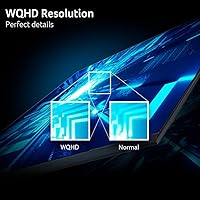
  • Resolution: Native resolution of 2560x1440 (WQHD / 1440p), delivering sharper text, finer image detail, and more usable screen space than a full HD 1080p panel at the same physical size.
  • Refresh Rate: Operates at 75Hz, which is adequate for everyday productivity and casual gaming but does not meet the demands of competitive or esports gaming that benefits from 144Hz or higher.
  • Response Time: Rated at 1ms using VRB (Visual Response Boost), a backlight strobing method that reduces perceived motion blur — this is not the same as a native gray-to-gray pixel response measurement.
  • Aspect Ratio: Standard 16:9 widescreen ratio, fully compatible with modern video content, desktop productivity layouts, and all common gaming resolutions without distortion or letterboxing.
  • Screen Surface: Matte anti-glare coating diffuses ambient light reflections, making the display more comfortable to work with under typical indoor overhead lighting conditions.
  • Adaptive Sync: Supports AMD FreeSync, synchronizing the monitor refresh rate to the graphics card output to reduce screen tearing and stuttering in compatible titles.
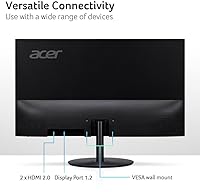
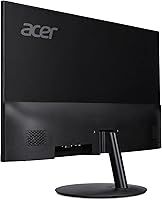
  • Connectivity: Equipped with one DisplayPort 1.2 and two HDMI 2.0 inputs, allowing up to three source devices to remain physically connected at the same time.
  • VESA Mount: Built-in VESA 75x75mm mounting pattern allows the monitor to be used with most standard aftermarket monitor arms or wall-mount brackets.
  • Tilt Range: The included stand supports tilt from -5° forward to +15° backward but offers no height adjustment, left-right swivel, or portrait pivot functionality.
  • Eye Care: Includes a built-in Low Blue Light filter and flicker-reduction technology designed to reduce eye fatigue during extended work or study sessions.
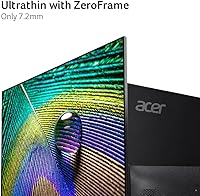
  • Frame Design: Zero-frame (borderless) construction features very slim bezels on all sides, making it particularly well suited for side-by-side dual-monitor arrangements.
  • Weight: Weighs 12.26 pounds with the stand attached, which falls within the normal range for a 31.5-inch IPS panel display.
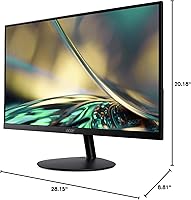
  • Dimensions: Assembled dimensions measure approximately 28.15 inches wide by 20.18 inches tall by 8.81 inches deep with the stand in place.
  • Box Contents: Package includes the monitor, stand, power cable, and one HDMI cable, enabling a direct connection to a compatible source immediately out of the box.

Related Reviews
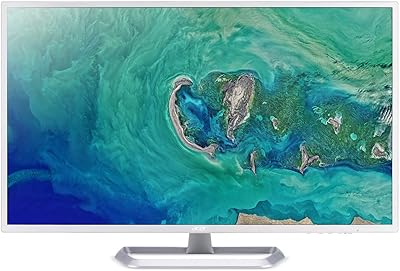
Acer EZ321Q wi 31.5″ IPS Monitor
75%
93%
Screen Size Value
81%
Image & Color Accuracy
61%
Pixel Sharpness & Clarity
54%
Ergonomics & Stand Adjustability
88%
Design & Aesthetics
More
Acer Predator XB323U 32-inch Gaming Monitor
77%
83%
Image Quality
61%
HDR Performance
89%
Refresh Rate & Smoothness
78%
Response Time
81%
Color Accuracy
More
Acer SB322QK 31.5″ 4K UHD Monitor
75%
91%
Image Sharpness
83%
Contrast & Color Vibrancy
89%
Value for Money
44%
Ergonomics & Adjustability
62%
Gaming Performance
More
Acer XV272U 27″ WQHD 240Hz Gaming Monitor
78%
88%
Image Clarity & Resolution
91%
Refresh Rate & Motion Smoothness
86%
Response Time & Input Lag
84%
AMD FreeSync Premium Performance
89%
Ergonomics & Stand Adjustability
More
AOPEN 32HC1QUR 31.5″ Curved WQHD Gaming Monitor
74%
83%
Image Quality
81%
Refresh Rate & Smoothness
61%
Response Time
79%
Color Vibrancy
86%
Immersion & Curvature
More
Acer Nitro EDA323QU 31.5-inch Curved Gaming Monitor
74%
89%
Value for Money
87%
Image Sharpness
84%
Refresh Rate Performance
82%
AMD FreeSync
41%
Stand Ergonomics
More
Acer Nitro EDA320Q 31.5″ Curved Gaming Monitor
71%
91%
Value for Money
74%
Image Quality
78%
Gaming Performance
84%
Curvature & Immersion
43%
Ergonomics & Adjustability
More
Acer Predator XB323QK 31.5″ 4K Gaming Monitor
73%
91%
Image Quality
88%
Color Accuracy
84%
Refresh Rate & Smoothness
76%
Response Time
52%
HDR Performance
More
Acer SB220Q 21.5-inch IPS Monitor
72%
84%
Image & Color Quality
88%
Value for Money
83%
Viewing Angles
74%
Refresh Rate & Smoothness
67%
Response Time
More
Acer Nitro KG271U 27-inch IPS Gaming Monitor
74%
88%
Image Quality
91%
Refresh Rate Performance
83%
Response Time
82%
Color Accuracy
86%
Adaptive Sync
More

FAQ

For most casual gaming — RPGs, open-world titles, indie games, strategy — 75Hz is perfectly fine and you are unlikely to feel limited by it. Where it shows its ceiling is in fast-paced competitive shooters and esports titles where quick target tracking is critical; players coming from 144Hz panels will notice the difference right away. If your gaming skews more relaxed than competitive, the refresh rate is not a meaningful drawback.

Not exactly. The 1ms figure on the Acer SB322QU 31.5″ WQHD IPS Monitor refers to VRB — Visual Response Boost — which is a backlight strobing technique that reduces the appearance of motion blur rather than a direct measurement of how fast pixels physically change color. Native gray-to-gray response, the number most dedicated gaming monitors use for comparison, is a different measurement entirely. The display performs well for everyday use and casual gaming, but that 1ms spec does not mean the same thing as it does on a fast TN panel.

The included stand only supports tilt — you can lean the screen forward or back, but there is no height adjustment, swivel, or portrait rotation available. This is the most frequently raised complaint from buyers. The practical fix is a third-party VESA monitor arm, since the display has a standard 75x75mm VESA mount built in, and most affordable arms give you full ergonomic flexibility without much hassle.

Both consoles connect via HDMI 2.0, which this monitor supports across two of its inputs, so the physical connection is straightforward. At 1440p and 60fps the image will be sharp and clean. Keep in mind the display tops out at 75Hz, so console modes targeting 120fps will not run at that frame rate on this screen — but for standard 60fps gameplay at 1440p, it is a solid and visually pleasing option.

For hobbyist and casual creative work, the IPS panel provides good color consistency and is a noticeable step up from TN alternatives at a similar price. It is not factory color-calibrated and does not cover a wide professional color gamut, so work intended for commercial print or broadcast delivery would require a more specialized display. With a bit of manual calibration, it handles personal projects and general creative tasks well.

Yes, it works with MacBooks without any driver installation. If your MacBook has a USB-C or Thunderbolt port, you will need a USB-C to HDMI or USB-C to DisplayPort adapter, neither of which is included in the box. MacBooks with a full-size HDMI port connect directly using the included cable and are ready to go immediately.

The HDMI cable included in the box fully supports the native 2560x1440 resolution at 75Hz, so you can be up and running at full quality straight out of the box. If you prefer to use the DisplayPort input instead, you will need to supply your own cable, but either connection delivers the complete spec without any compromise.

Most buyers end up ignoring the built-in speakers entirely, and honestly that is the right call. They work in the most basic sense but produce thin, low-volume audio that does not hold up well for music, video calls, or anything where sound quality matters. Plan on a separate desktop speaker or headphone solution from the start rather than hoping the onboard audio will cover your needs.

On a 31.5-inch panel, the difference is genuinely visible and most people notice it immediately. At 1080p, text and fine interface elements can look slightly soft at this screen size; at 1440p they are crisp and well-defined. The improvement shows up most in text-heavy work, detailed spreadsheets, and fine image detail — buyers who make the switch consistently describe it as one of the more impactful upgrades they have made to their desk setup.

This display uses a 75x75mm VESA pattern, which is a widely supported standard found on most consumer monitor arms. Just confirm that the arm you choose is rated to handle a monitor in the 12 to 15 pound range and lists 75x75mm as a compatible mounting size, and you should have no compatibility issues. The swap from the stock stand to an arm is straightforward and a popular upgrade among buyers who want better height and angle control.