Overview

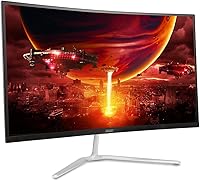
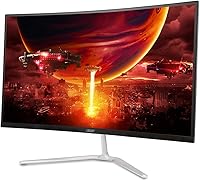
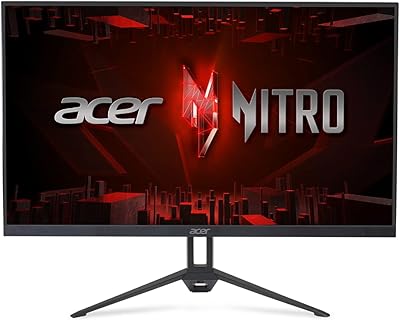
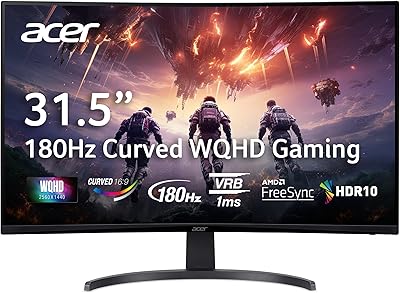
The Acer Nitro EDA270U 27″ Curved Gaming Monitor sits squarely in the budget-to-mid gaming display segment, targeting players who want a meaningful visual upgrade without committing to flagship pricing. The 1500R curved panel and WQHD 2560x1440 resolution are the headline draws here — a combination that makes a real difference at 27 inches, where 1080p starts to look noticeably soft. Acer's Nitro line has built a reputation for packing competitive specs into accessible price points, and this curved gaming monitor fits that pattern well. It is not trying to compete with premium IPS or OLED displays; it is aiming at the practical middle ground where most PC gamers actually shop.
Features & Benefits

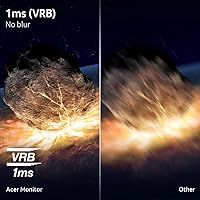
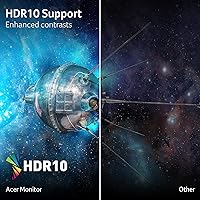
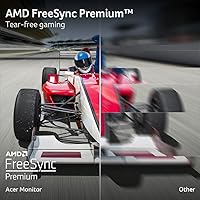
At 180Hz with 1ms VRB, this 27-inch 1440p panel keeps fast-moving scenes sharp and fluid — in competitive shooters or racing titles, that translates directly into fewer ghosting artifacts and a more responsive feel. AMD FreeSync Premium handles adaptive sync duties, which means AMD GPU owners get tear-free performance without compatibility hoops. The WQHD resolution adds genuine sharpness over 1080p; fine text, distant foliage in open-world games, and UI elements all look noticeably cleaner. HDR10 is included, though at this price tier it delivers modest contrast uplift rather than a dramatic transformation. Connectivity is practical: one DisplayPort 1.2 and two HDMI 2.0 ports cover most setups, and Acer bundles both cable types in the box.

Best For

This curved gaming monitor makes the most sense for PC gamers making the jump from 1080p — the resolution bump to 1440p at 27 inches is substantial enough to feel immediately worthwhile, without the GPU demands of 4K. AMD Radeon users are particularly well-positioned here, since FreeSync Premium works natively and delivers consistent frame pacing. Fast-paced games are where the 180Hz refresh really earns its keep; if your library leans toward tactical shooters, battle royale, or sim racing, you will notice the difference over a 60Hz or even 144Hz panel. The 1500R curve also helps at compact desk depths where a flat 27-inch display can feel awkward at the edges. A solid pick for value-focused gamers who want a feature-complete 1440p setup.

User Feedback

Across well over a thousand verified ratings, the Nitro EDA270U earns strong marks overall, with the most consistent praise landing on image clarity and how noticeably smooth gameplay feels at high refresh rates. Most buyers report that setup is straightforward and appreciate the included cables from the start. That said, the feedback is not uniformly glowing. A recurring thread in critical reviews touches on color accuracy straight out of the box — some users find the default calibration warmer or less vivid than expected and spend time adjusting settings. The tilt-only stand also draws regular mentions; without height or swivel adjustment, longer sessions can become uncomfortable for taller users. Build quality is generally described as acceptable for the price, though the stand feels less substantial than the panel itself.

Pros

  • WQHD 1440p resolution makes a visible sharpness difference over 1080p at 27 inches, especially in fine in-game detail.
  • 180Hz refresh rate keeps fast gameplay fluid and reduces motion blur in competitive titles.
  • AMD FreeSync Premium delivers reliable, tear-free performance for Radeon GPU owners without extra configuration.
  • Both a DisplayPort and HDMI cable are included, so you can plug in and play immediately.
  • The 1500R curve adds genuine immersion at standard desk distances without distorting straight-line content badly.
  • VESA 75x75mm compatibility means upgrading to a monitor arm is straightforward if the stock stand frustrates you.
  • Zero-frame panel design keeps the visual footprint clean, especially useful in dual-monitor arrangements.
  • Setup is fast and tool-free, with most buyers reporting the whole process takes under ten minutes.
  • Dual HDMI 2.0 ports let you connect a PC and a secondary device simultaneously without swapping cables.
  • At its price point, the combination of resolution, refresh rate, and curve is genuinely hard to match in this segment.

Cons

  • Color temperature runs noticeably warm out of the box, requiring manual calibration before colors look natural.
  • The tilt-only stand offers no height or swivel adjustment, which becomes uncomfortable during longer daily sessions.
  • HDR10 support is present but delivers minimal real-world impact due to limited peak brightness and no local dimming.
  • The stand wobbles after desk bumps or tilt adjustments, which is a persistent irritant for detail-focused users.
  • No USB hub of any kind is included, a feature increasingly common on monitors in this category.
  • HDMI 2.0 limits newer console users to 60Hz at 1440p, reducing long-term flexibility for cross-platform setups.
  • Built-in speakers are barely functional at 2 watts each — plan on using a headset or external audio from day one.
  • OSD menu navigation is sluggish and the rear button placement is awkward to use without looking.
  • Nvidia GPU owners may experience occasional flickering in G-Sync Compatible mode at lower frame rates.
  • Shadow detail in dark game scenes can look slightly crushed, a characteristic trade-off of the panel type at this brightness.

Ratings

The scores below for the Acer Nitro EDA270U 27″ Curved Gaming Monitor were generated by our AI engine after systematically analyzing thousands of verified global buyer reviews, with spam, bot-submitted, and incentivized feedback actively filtered out before any scoring was applied. Every category reflects the real distribution of user sentiment — not just the highlights — so both the genuine strengths and the recurring frustrations are weighted into each number. If buyers broadly agreed on a pain point, that friction shows up in the score, and the same applies to the areas where this curved gaming monitor consistently impressed.
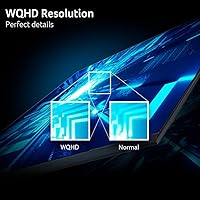
Image Clarity & Resolution
91%
Upgrading from a 1080p screen to this 27-inch 1440p panel is a shift buyers consistently describe as immediately noticeable. Fine details in game environments — distant textures, small HUD elements, foliage edges — resolve with a crispness that 1080p at this screen size simply cannot match. Reviewers frequently single out how sharp the image looks during everyday desktop use, not just gaming.
A handful of users with very high-end GPU setups feel the VA-adjacent color volume leaves some richness on the table compared to IPS panels in a similar price range. The pixel pitch, while solid, means some viewers who sit very close notice slight pixelation in static UI scenarios.
Refresh Rate & Motion Performance
88%
At 180Hz, fast-paced games feel noticeably more fluid, and players of competitive shooters and racing titles report that tracking moving targets becomes more natural and less fatiguing over long sessions. The 1ms VRB response time keeps ghosting well-controlled during quick camera sweeps, which is exactly where cheaper panels tend to smear.
Some users note that pushing the full 180Hz requires a capable GPU, and those running mid-range cards may spend time toggling between 144Hz and 180Hz depending on the game. A small number of buyers reported needing to manually set the refresh rate in their display settings after initial setup, as it did not default to 180Hz automatically.
AMD FreeSync Premium
86%
AMD Radeon GPU users report a clean, tear-free experience once FreeSync Premium is enabled, with frame pacing feeling consistent even during frame rate dips in demanding open-world titles. The adaptive sync range covers practical gaming frame rates well, and buyers appreciate that no additional software configuration was needed beyond enabling it in the monitor's OSD.
Nvidia GPU owners using G-Sync Compatible mode report a less reliable experience, with occasional flickering at the lower end of the dynamic range. This is not a flaw unique to this monitor, but it is worth flagging for buyers coming from a GeForce setup.
HDR Performance
58%
42%
HDR10 support means the Nitro EDA270U is at least technically compatible with HDR content on consoles and PC, and some buyers notice a modest improvement in bright highlights when watching HDR-tagged video content on streaming platforms. Enabling HDR in Windows does produce a visible shift in the look of compatible games.
The real-world HDR impact is modest at best. The panel lacks the peak brightness and local dimming needed to make HDR genuinely impactful, and several buyers describe the HDR mode as somewhat washed out compared to a well-calibrated SDR image. At this price tier that is expected, but buyers hoping for a dramatic HDR experience will be disappointed.
Color Accuracy & Out-of-Box Calibration
63%
37%
For gaming purposes, the out-of-box color presentation is lively and punchy enough that many buyers simply leave it as-is and enjoy it from day one. Saturation levels feel appropriate for fast-paced gaming content, and the curved panel adds to the sense of visual depth that makes colors feel more immersive.
A recurring thread in critical reviews involves the default color temperature running noticeably warm, with skin tones and whites taking on an orange-ish cast straight out of the box. Users with any eye for accuracy will likely spend 20 to 30 minutes dialing in the color temperature and RGB balance before feeling satisfied. It is not a dealbreaker, but it is an extra step.
Ergonomics & Adjustability
54%
46%
The tilt range of -5° to 20° covers the basics, and for a desk at standard height with the monitor positioned at arm's length, many buyers find a comfortable angle without too much fuss. The stand footprint is modest, which helps on smaller desks.
The tilt-only stand is the most consistent ergonomic complaint across buyer reviews. No height adjustment and no swivel means taller users or those with multi-monitor arrangements often find themselves ordering a third-party VESA arm fairly quickly. The VESA 75x75mm mounting compatibility helps, but the bundled stand alone is limiting for extended daily use.
Build Quality & Stand Stability
67%
33%
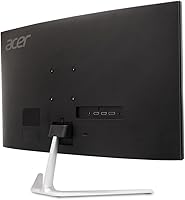
The zero-frame panel design looks clean and modern, and the bezel is thin enough that buyers using it in a dual-monitor setup report minimal visual gap between screens. The back panel has a purposeful matte finish that does not attract fingerprints the way glossy plastics do.
The stand draws mixed impressions — several buyers describe it as noticeably flex-prone when adjusting tilt or accidentally bumping the desk, with the panel wobbling for a second or two after contact. For a stationary desk setup this is manageable, but it is clearly an area where cost savings were made compared to more expensive competitors.
Setup & Out-of-Box Experience
84%
Assembly is quick and tool-free, with the panel clicking onto the stand in a matter of minutes. Acer bundles both a DisplayPort and an HDMI cable in the box, which buyers consistently call out as a practical touch that removes the need for an immediate accessory order. First-boot auto-detection worked reliably for most reviewers.
A small but vocal group of buyers noted that the OSD menu navigation feels sluggish and the button layout on the back of the panel is not intuitive to find by feel in the dark. Getting into HDR or FreeSync settings for the first time required a few extra minutes of menu exploration.
Connectivity & Port Selection
79%
21%
Two HDMI 2.0 ports plus a DisplayPort 1.2 input give this 27-inch 1440p panel enough flexibility to handle a PC and a console simultaneously without swapping cables. The audio output port is a useful addition for users routing audio through a headphone amp or external speaker.
There is no USB hub of any kind, which some buyers in this segment have come to expect. The absence of HDMI 2.1 limits the monitor's long-term appeal for newer console users who want to run 1440p at higher frame rates on a PlayStation 5 or Xbox Series X, as HDMI 2.0 caps out at 1440p 60Hz on those platforms.
Curvature & Immersion
82%
18%
The 1500R curve strikes a reasonable balance at 27 inches — noticeable enough to feel genuinely immersive in racing sims and atmospheric single-player games, but not so extreme that it distorts straight lines in productivity tasks or browsing. Buyers who primarily game in a centered seating position get the most from it.
Users who share the monitor between gaming and professional work — particularly those handling spreadsheets or precise graphic design — occasionally mention that straight horizontal lines at the screen edges look subtly bent, which takes some adjustment to ignore. At wider viewing angles, the curve can also introduce uneven brightness across the panel.
Speaker Quality
41%
59%
The two built-in speakers mean there is technically audio output without needing external hardware, which covers bare minimum needs like hearing game audio while setting up or in a pinch.
At 2 watts per speaker, the audio is thin, quiet, and lacking in any bass response — most buyers treat the built-in speakers as an afterthought and pair the monitor with a headset or external speakers from day one. Few reviewers had anything genuinely positive to say about the audio quality beyond acknowledging that it exists.
Value for Money
89%
The overall value equation is where the Nitro EDA270U earns some of its strongest user sentiment. Getting a 27-inch 1440p curved panel with 180Hz, FreeSync Premium, and a bundled cable set at this price tier is genuinely competitive, and buyers repeatedly note that the package feels like more than the price suggests.
Buyers who push the panel harder — running HDR content regularly, needing precise ergonomic positioning, or expecting professional color accuracy — may find the value perception slips once those limitations surface. The monitor is priced right for its target audience, but it is not a universal bargain for every use case.
Gaming Performance (Overall)
87%
In practice, playing fast-paced titles on this curved gaming monitor at 1440p and 180Hz represents a meaningful step up from a typical 1080p 60Hz or 144Hz setup. Response and fluidity hold up well across a range of game genres, and the combination of resolution and refresh rate is well-matched to what mid-range gaming PCs can actually drive.
Buyers who came from high-end IPS panels note that the color depth and viewing-angle consistency in games do not quite match the richer look of more expensive displays. In darker game scenes, some shadow detail can look slightly crushed, which is a characteristic of VA-type panels at this brightness level.

Suitable for:

The Acer Nitro EDA270U 27″ Curved Gaming Monitor is built for PC gamers who are done with 1080p but not ready to spend flagship money on a 4K setup. If you're running an AMD Radeon GPU and want adaptive sync that actually works reliably without compatibility workarounds, this panel is designed with you in mind. Players who spend most of their time in fast-paced genres — competitive shooters, battle royale titles, sim racing — will get tangible benefit from the 180Hz refresh rate and low VRB response, where the difference over a 144Hz or 60Hz screen is something you feel immediately rather than just read about in specs. The 1500R curvature earns its place on a 27-inch screen for anyone sitting at a typical desk distance, adding a sense of depth that flat panels at this size don't quite replicate. Budget-focused buyers who want a complete, cable-included setup without hunting for accessories will also appreciate how plug-and-play the whole package is.
Not suitable for:

Buyers who need accurate color out of the box — graphic designers, photo editors, or anyone doing color-graded video work — will find the Acer Nitro EDA270U 27″ Curved Gaming Monitor a poor fit, since the default calibration runs warm and the panel lacks the Delta E accuracy that professional workflows demand. If you're coming from a high-quality IPS display and expect the same color richness and wide viewing angles, the experience here will feel like a step sideways or backwards in certain lighting conditions. Nvidia GPU users who rely on G-Sync are also not the primary audience; while the monitor can run in G-Sync Compatible mode, it is not as stable or consistent as a native G-Sync panel. Taller users or anyone who has grown accustomed to height-adjustable stands will likely find the tilt-only base frustrating within a few weeks, especially during long daily sessions. And if your gaming setup includes a PlayStation 5 or Xbox Series X and you want to push higher frame rates over HDMI, the HDMI 2.0 ports limit what those consoles can actually deliver at 1440p.

Specifications

  • Screen Size: The panel measures 27 inches diagonally, offering enough screen real estate to make 1440p resolution feel genuinely sharp without requiring you to sit unusually close.
  • Resolution: Native resolution is 2560x1440 (WQHD), delivering roughly 77% more pixels than a standard 1080p display at the same screen size.
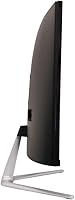
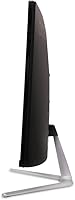
  • Panel Curve: The screen uses a 1500R curvature radius, which is noticeable and immersive at typical desk distances without producing strong geometric distortion on straight-line content.
  • Refresh Rate: Maximum refresh rate is 180Hz, allowing up to 180 frames per second to be displayed for smoother motion in fast-paced games.
  • Response Time: Rated at 1ms VRB (Visual Response Boost), which reduces perceived motion blur during fast camera movements and high-speed gameplay sequences.
  • Adaptive Sync: AMD FreeSync Premium is supported, providing adaptive sync within the monitor's dynamic refresh range to eliminate screen tearing for AMD Radeon GPU users.
  • HDR Support: HDR10 is supported, offering basic high dynamic range compatibility with HDR-tagged content on PC and select consoles, though peak brightness limits real-world HDR impact.
  • Ports: Connectivity includes one DisplayPort 1.2, two HDMI 2.0 inputs, and one 3.5mm audio output jack for headphones or external speakers.
  • Included Cables: One DisplayPort cable and one HDMI cable are included in the box, allowing immediate connection without purchasing accessories separately.
  • VESA Mounting: The monitor is VESA-compatible at a 75x75mm pattern, making it straightforward to mount on most third-party monitor arms or wall brackets.
  • Ergonomics: Stand adjustment is limited to tilt only, ranging from -5° to +20°, with no height, swivel, or pivot adjustment available on the stock stand.
  • Built-in Speakers: Two integrated speakers are included, each rated at 2 watts, providing basic audio output for casual use without an external sound device.
  • Pixel Pitch: Pixel pitch is 0.233mm, which contributes to a pixel density of approximately 109 PPI — fine enough for sharp text and detailed imagery at normal viewing distances.
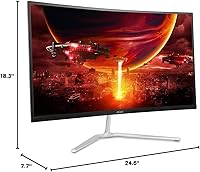
  • Dimensions: With the stand attached, the monitor measures 7.7 inches deep, 24.6 inches wide, and 18.3 inches tall.
  • Weight: The complete unit including stand weighs 8.6 pounds, making it manageable to reposition on a desk or mount on a VESA arm without assistance.
  • Panel Design: The Nitro EDA270U uses a zero-frame (borderless) design on three sides, minimizing visual interruption and making it cleaner for side-by-side dual-monitor configurations.
  • Aspect Ratio: The display uses a standard 16:9 widescreen aspect ratio, which is compatible with virtually all modern games, streaming content, and productivity software without letterboxing.
  • Screen Surface: The screen surface is glossy, which can enhance color vibrancy and contrast perception but may produce reflections in brightly lit rooms.
  • Model Number: The official model identifier is UM.HE0AA.P09, which can be used to verify compatibility with replacement parts, firmware, or manufacturer support documentation.
  • Release Date: This monitor was first made available in October 2023, placing it in the current generation of mid-range 1440p gaming displays.

Related Reviews

Acer Nitro ED270R 27″ Curved Gaming Monitor
73%
91%
Value for Money
88%
Immersion & Curvature
79%
Picture Quality
89%
Refresh Rate & Smoothness
84%
Adaptive Sync (FreeSync)
More
Acer Nitro XZ270 Xbmiipx 27-inch Curved Gaming Monitor
84%
92%
Gaming Performance
89%
Display Quality
86%
Ergonomics
93%
Response Time
85%
Value for Money
More
Acer Nitro VG271U 27-inch Gaming Monitor
75%
91%
Image Clarity
83%
Color Accuracy
88%
Gaming Performance
86%
FreeSync Implementation
58%
HDR Quality
More
Acer Nitro EDA343CUR 34″ Curved Gaming Monitor
83%
94%
Display Quality
91%
Gaming Performance
72%
Build Quality
85%
Ease of Setup
80%
Ergonomics & Adjustability
More
Acer Nitro KG273 27-inch Gaming Monitor
85%
88%
Display Quality
91%
Performance in Fast-Paced Games
85%
Ergonomics and Adjustability
83%
Build Quality
92%
Value for Money
More
Acer Nitro XZ342CU 34-inch Curved Gaming Monitor
84%
92%
Gaming Performance
90%
Display Quality
88%
Build Quality
85%
Ergonomics and Adjustability
80%
Connectivity Options
More
Acer Nitro VG270K 27-inch 4K Gaming Monitor
76%
91%
Image Clarity
88%
Color Accuracy
86%
Motion Performance
83%
Refresh Rate Flexibility
61%
HDR Performance
More
Acer Nitro EDA323QU 31.5-inch Curved Gaming Monitor
74%
89%
Value for Money
87%
Image Sharpness
84%
Refresh Rate Performance
82%
AMD FreeSync
41%
Stand Ergonomics
More
Acer Nitro EDA320Q 31.5″ Curved Gaming Monitor
71%
91%
Value for Money
74%
Image Quality
78%
Gaming Performance
84%
Curvature & Immersion
43%
Ergonomics & Adjustability
More
Acer Nitro ED240Q Sbiip 23.6″ Curved Gaming Monitor
80%
88%
Display Quality
91%
Performance in Fast-Paced Games
70%
Build Quality
80%
Ease of Setup
94%
Price-to-Performance Ratio
More

FAQ

It will work fine as a display with any GPU, Nvidia included. The FreeSync Premium adaptive sync is what requires an AMD Radeon card for full functionality. If you have an Nvidia GPU, you can try G-Sync Compatible mode — many users report it works, but some experience occasional flickering at low frame rates, so it is less consistent than running it with a Radeon card.

The dual HDMI 2.0 ports are the limiting factor here. HDMI 2.0 can handle 1440p, but only up to 60Hz from a console. The PS5 also does not natively output 1440p without a workaround, so in practice console users are likely looking at 1080p at higher frame rates or 1440p at 60Hz depending on the platform and game.

You are ready to go immediately — Acer includes both a DisplayPort 1.2 cable and an HDMI cable in the box. Most buyers report being up and running in under ten minutes without ordering anything extra.

At 27 inches, the 1500R curve is noticeable but not extreme. Sitting at a normal arm's-length desk distance, it adds a sense of wrap and depth that works well for gaming. For everyday desktop use like browsing or spreadsheets, it takes a day or two to adjust, but most users stop noticing it quickly. Straight horizontal lines at the very edges of the screen do have a slight visible bend, which can bother some users during heavy productivity tasks.

Yes, and honestly a lot of users end up doing exactly that. The VESA mounting pattern is 75x75mm, which is compatible with the majority of aftermarket monitor arms. Given that the included stand offers tilt-only adjustment with no height or swivel range, an arm is a smart upgrade if you plan to use this panel for long daily sessions.

If you are coming from a 60Hz monitor, the jump is immediately and obviously noticeable — mouse cursor movement, menu scrolling, and in-game camera movement all look dramatically smoother. Coming from a 144Hz panel, the difference to 180Hz is more subtle but still detectable in fast-paced games. To take full advantage of 180Hz, your GPU needs to consistently push frame rates into that range in the games you play, so pairing it with a capable card matters.

You do not need a colorimeter unless you are doing professional color work — which this panel is not really designed for. The main issue most users notice is a warm color temperature, meaning whites and skin tones can look slightly orange-ish by default. Spending 15 to 30 minutes in the OSD adjusting the color temperature and RGB sliders gets you to a much more neutral result. It is a mild inconvenience, not a fundamental flaw.

Honest answer: the HDR experience on this curved gaming monitor is modest. HDR10 support is there, and enabling it does produce a shift in contrast and highlight rendering in compatible content. But without high peak brightness or local dimming, it does not deliver the dramatic HDR impact you might see on a premium display. Some users prefer a well-tuned SDR image over the HDR mode. It is worth trying, but do not buy this panel specifically for its HDR performance.

The stand is functional but not a strong point. Several users report that the panel wobbles noticeably after bumping the desk or adjusting the tilt, taking a second or two to settle. For a stationary setup where you set it once and leave it, this is manageable. If you frequently adjust your setup or have a desk that gets knocked around, a VESA arm will eliminate the wobble entirely and give you more positioning freedom.

It handles general productivity work — browsing, documents, video calls — without any real issues. The WQHD resolution is actually quite good for desktop productivity, giving you noticeably more screen space than 1080p. The trade-offs for work use are the warm default color calibration, the glossy screen surface that can pick up reflections in bright offices, and the tilt-only stand that may not get you to the ideal ergonomic position for all-day sitting. It is a reasonable dual-purpose monitor, but its design priorities are clearly aimed at gaming.