Overview

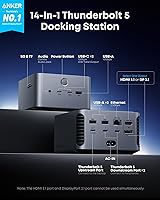
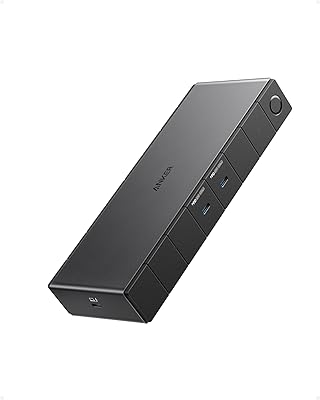
The Anker Prime TB5 Thunderbolt 5 Docking Station sits at the top end of the docking market, built for power users who genuinely need what Thunderbolt 5 delivers — not just a few extra ports. With 14 connections packed into a compact square chassis, it replaces a desktop's worth of adapters through a single cable. Unlike most docks, it includes an active cooling system and subtle ambient lighting — physical hardware choices, not cosmetic afterthoughts. Compatible with M4 MacBooks, M1/M2/M3 Pro and Max variants, and Thunderbolt 5 or 4 Windows laptops, it covers a specific but serious audience. If you fall outside that group, the premium price tier simply won't justify itself.

Features & Benefits

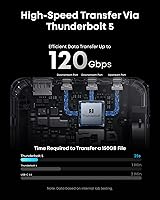
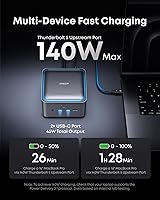
The 120Gbps upstream bandwidth is the headline spec, but what it means in practice is tangible: you can shift a massive video project to an external NVMe drive in roughly the time it takes to refill your coffee. Two TB5 downstream ports combined with an HDMI 2.1 or DisplayPort 2.1 output let compatible Windows machines drive three displays at once. Charging reaches 140W through the upstream port — enough to keep a demanding 16-inch laptop fully powered under load. Front-facing USB-C ports handle daily device charging without reaching around the back, while 2.5Gbps Ethernet and built-in SD and microSD readers make this a genuinely complete workstation hub rather than just a glorified display adapter.

Best For

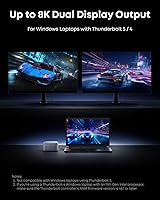
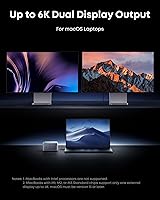
This docking station was designed with a specific user in mind: the video editor or photographer who needs fast card reads, high-bandwidth external storage, and clean multi-monitor output from a single cable. MacBook Pro users on M4, M3 Pro, or M3 Max chips get the full picture — charging, dual displays, and fast data all over one connection. Windows users on Thunderbolt 5 machines, like newer Intel Core Ultra laptops, can push dual 8K output simultaneously. That said, base-chip M1, M2, or M3 MacBook owners should know upfront: Apple's display limit applies regardless of which dock you use, so this hardware cannot unlock a second external monitor for those machines.

User Feedback

Sitting at 4.4 stars across roughly 192 ratings, early buyers are broadly satisfied — but the reviews tell a nuanced story. Build quality and the one-cable desk setup earn consistent praise, and multiple users specifically note the cooling fan runs quietly while keeping performance stable during sustained transfers. On the downside, several standard-chip MacBook owners were caught off guard by the single-display ceiling, pointing to a compatibility footnote that deserves far more attention before purchasing. Some Windows buyers also flagged the need to confirm genuine TB5 support on their laptop, not just TB4. The ambient lighting divides people cleanly — appreciated as a design detail by some, considered entirely unnecessary by others.

Pros

  • Handles sustained full-load operation without throttling, thanks to a real active cooling system inside the chassis.
  • 140W upstream charging keeps even power-hungry 16-inch laptops fully powered without a separate adapter.
  • Thunderbolt 5 bandwidth makes transferring massive video files to external NVMe drives noticeably faster than a TB4 dock.
  • Built-in SD and microSD card readers remove the need for a separate dongle on a photographer's desk.
  • Windows TB5 users can drive three displays simultaneously from a single cable connection.
  • 2.5Gbps Ethernet provides a real speed upgrade for anyone with a compatible router or network switch.
  • The included Thunderbolt 5 cable saves a meaningful separate purchase right out of the box.
  • Front-facing USB-C ports make connecting phones or headsets quick without reaching around the back.
  • Compact square footprint keeps desk clutter minimal despite offering 14 total connections.
  • 24-month warranty and Anker's established support reputation reduce the risk on a premium purchase.

Cons

  • Standard M1, M2, and M3 MacBook users are locked to one external display — a limitation the dock cannot change.
  • TB4-only Windows laptops cannot access the full bandwidth tier that makes this docking station worth its price.
  • Front USB-C ports share 45W total, meaning two connected devices will each charge slower than expected.
  • Three USB-A ports fill up quickly in a professional setup with a keyboard, mouse, audio interface, and drives.
  • The ambient lighting strip has no on/off toggle, which feels like an oversight for a productivity-focused device.
  • The included Thunderbolt 5 cable is only 3.3 feet — tight for setups where the laptop sits away from the dock.
  • A small number of Windows users encountered display handshake issues that required a reboot or cable re-seat to fix.
  • The glossy surface picks up fingerprints and dust more visibly than expected at this price point.
  • Buyers unfamiliar with TB5 ecosystem requirements may discover compatibility limits only after purchase.
  • Support documentation for TB5-specific edge cases is still thin, leaving early adopters to troubleshoot on their own.

Ratings

The scores below reflect an AI-driven analysis of verified buyer reviews for the Anker Prime TB5 Thunderbolt 5 Docking Station, sourced globally and filtered to remove incentivized, bot-generated, and duplicate submissions. Each category is scored on real-world user sentiment, not spec sheets, so both the genuine strengths and the frustrations buyers actually ran into are represented honestly.

Bandwidth & Transfer Speed
93%
Users moving large video projects to external NVMe drives consistently report transfer times that feel genuinely different from what a TB4 dock delivers. Creative professionals working with RAW footage or multi-gigabyte project libraries describe it as the dock finally keeping pace with their storage hardware rather than bottlenecking it.
The full bandwidth ceiling only matters if your laptop actually ships with a TB5 controller, and a meaningful slice of buyers discovered their machine tops out at TB4 speeds after purchase. The dock itself performs as advertised, but the real-world gain depends entirely on the host device.
Multi-Display Support
78%
22%
Windows users on Thunderbolt 5 laptops get a genuinely impressive triple-display setup from one dock, with dual 8K outputs available simultaneously through the downstream TB5 ports alongside the HDMI or DisplayPort output. For studio and trading desk setups, that kind of output flexibility from a single connection is difficult to find elsewhere at any price.
The display story falls apart for standard M1, M2, and M3 MacBook owners due to Apple-imposed limits that have nothing to do with the dock itself. Several buyers expecting dual-monitor support on their base-chip MacBook were caught off guard, and this compatibility gap is the single most common source of negative reviews.
Laptop Charging Power
91%
At 140W upstream charging via PD 3.1, this docking station handles power-hungry laptops that cheaper docks simply cannot sustain under load. MacBook Pro 16-inch users and Windows gaming or workstation laptops that previously required a separate brick alongside their dock finally get a clean one-cable desk setup.
The front USB-C ports share a combined 45W, which means if you have two devices plugged in simultaneously, neither charges at full speed. Users running a phone and a tablet off the front ports during heavy work sessions noticed slower-than-expected charging on at least one device.
Build Quality & Materials
88%
Reviewers across multiple markets consistently describe the chassis as feeling substantial and well-finished, with no flex, rattling, or cheap plastic evident at the connection points. The compact square footprint is appreciated on crowded desks, and the weight gives a sense of solidity that cheaper docks lack.
A handful of users noted that the surface shows fingerprints and dust more readily than expected for a product at this price point. There are also occasional reports of the ambient lighting strip looking slightly uneven from certain angles, which feels out of place on an otherwise premium unit.
Thermal Management & Cooling
89%
The active cooling fan is one of the more practical differentiators here — users running the dock at full load for hours, with multiple displays, high-speed storage, and charging all active simultaneously, report stable performance without any throttling. The fan noise is consistently described as a low hum rather than anything intrusive.
In very quiet home office environments, a few users found even the low fan noise noticeable during pauses in work. It is not loud by any measure, but buyers expecting completely silent operation like a passive dock may need to adjust their expectations slightly.
Port Selection & Layout
86%
Having SD and microSD card readers built in alongside 2.5Gbps Ethernet and a 3.5mm audio jack means photographers and hybrid workers rarely need to reach for a secondary adapter. The front-facing USB-C ports are a thoughtful placement for daily device connections like phones and headsets.
Three USB-A ports feels like the minimum for a professional dock at this tier — power users with keyboards, mice, audio interfaces, and USB drives can fill those slots quickly. A fourth USB-A port would have made this a more complete solution without meaningfully changing the footprint.
Ethernet Performance
82%
18%
The 2.5Gbps Ethernet port is a meaningful step above the standard gigabit found on most docks, and users on 2.5G home or office networks notice the difference when moving large files across a NAS or local server. It works reliably across both macOS and Windows without any driver headaches.
For users on standard gigabit infrastructure, the 2.5G port provides no practical advantage over a cheaper dock, making it a feature that only pays off if your router or switch also supports the faster standard. It is a nice future-proofing addition but does not justify the price difference on its own.
Compatibility & Device Support
71%
29%
The dock works reliably across a wide range of M-series MacBook Pro and Max configurations, and Windows users on certified TB5 or TB4 platforms report a plug-and-play experience with no additional driver installation required. Anker's compatibility documentation is more detailed than most competitors.
The compatibility ceiling creates a tiered experience that not all buyers fully understood before purchasing. Standard M-chip MacBook users, TB4-only Windows laptops, and USB4-only machines all get a reduced feature set, and the marketing around these limitations is not always as prominent as it should be.
Card Reader Speed
83%
Photographers offloading large bursts from high-speed SD cards find the reader notably quicker than what is built into most competing docks. Having both SD and microSD slots available simultaneously is a practical touch for creators who juggle multiple camera formats.
The card reader speeds, while good, do not fully saturate what the fastest UHS-II cards can theoretically deliver. Users with the highest-end camera storage may still find a dedicated USB card reader marginally faster for bulk offloads, though the difference is minor for most workflows.
Cable & Accessories Included
79%
21%
Including a 3.3-foot Thunderbolt 5 cable in the box is a genuinely appreciated touch — TB5 cables are not inexpensive individually, and not bundling one would have drawn sharp criticism at this price point. The cable feels well-constructed with no slack connector fit.
3.3 feet is workable but tight for setups where the laptop sits at some distance from the dock. Users with under-desk cable management or laptop stands positioned away from the dock have flagged the length as just barely sufficient, and a 6-foot option would have been more universally useful.
Ambient Lighting
61%
39%
The lighting strip is a real physical feature rather than a software simulation, and users who appreciate desk aesthetics or work in dim studio environments find it adds a clean accent without being distracting. It is subtle enough that it does not intrude on focus-heavy work sessions.
A significant portion of buyers consider it a completely unnecessary addition on a productivity tool at this price, and there is no way to disable it without unplugging the dock entirely. For a professional workspace audience, the absence of a simple on/off toggle feels like an oversight.
Setup & Plug-and-Play Experience
84%
Most users across both macOS and Windows report a fully functional setup within seconds of connecting the TB5 cable — displays activate, charging starts, and peripherals respond without needing to touch any settings. This kind of zero-friction onboarding is something buyers at this price tier rightly expect.
A small but vocal group of Windows users encountered initial display handshake issues that required a reboot or cable re-seat to resolve. The problem appears linked to specific laptop firmware versions rather than the dock itself, but it is present enough in reviews to mention.
Value for Money
74%
26%
For a TB5 laptop owner who genuinely needs the full feature set — triple displays, 140W charging, fast card reads, and high-bandwidth storage — the price is defensible when compared against building an equivalent setup from individual components. The active cooling and included cable add tangible value to the package.
For anyone running a TB4 laptop or a standard-chip MacBook, a meaningful portion of what drives the premium price is simply unavailable to them. Buyers in those categories are effectively paying for headroom they cannot access, making the value calculus considerably less favorable.
Warranty & Brand Support
81%
19%
A 24-month warranty is above average for the category, and Anker's customer service reputation across its broader product line carries over here — buyers report responsive handling of the occasional unit issue without being pushed toward lengthy return processes.
Some users noted that troubleshooting resources specific to TB5 edge cases are still limited, reflecting how new the TB5 ecosystem is overall. Community documentation and official support guides lag slightly behind the product itself, which can leave early adopters solving unusual compatibility issues on their own.

Suitable for:

The Anker Prime TB5 Thunderbolt 5 Docking Station was built for a specific kind of professional, and it earns its price tag for exactly that audience. Video editors and motion graphics artists who regularly push large project files to external NVMe drives will feel an immediate, tangible difference compared to a TB4 dock — the bandwidth headroom is real and the active cooling means it holds that performance for hours without complaint. Photographers benefit from the built-in SD and microSD card readers plus 2.5Gbps Ethernet, turning the dock into a genuine studio hub rather than a collection of dangling adapters. MacBook Pro users on M4, M3 Pro, or M3 Max chips get the full one-cable promise: charging powerful enough to keep a 16-inch machine topped up under heavy load, dual external displays, and fast peripheral connectivity all through a single TB5 connection. Windows users on certified Thunderbolt 5 laptops — particularly newer Intel Core Ultra machines — are arguably the biggest winners, since they can drive three displays simultaneously. If your desk setup currently involves four or five separate adapters and cables, this docking station consolidates all of it cleanly.
Not suitable for:

The Anker Prime TB5 Thunderbolt 5 Docking Station is a poor fit for anyone whose laptop does not genuinely support Thunderbolt 5, and that group is larger than many buyers realize. Standard M1, M2, and M3 MacBook Air and base MacBook Pro owners will hit Apple's own single-external-display ceiling regardless of what dock they use — the dock cannot override that hardware limitation, and paying a premium price for a feature that is architecturally unavailable to you is a bad deal. TB4-only Windows laptop users will also find that the most compelling bandwidth advantages are simply off the table; the dock works, but you are not unlocking the performance tier that justifies the cost over a well-made TB4 alternative. Budget-conscious buyers looking for a solid everyday dock for standard office tasks — video calls, a single external monitor, basic USB peripherals — will find the premium hard to rationalize when capable TB4 docks handle those workflows perfectly well at a lower price. Anyone who requires a completely silent desk environment should also be aware that the cooling fan, while quiet, is audible.
Specifications

  • Total Ports: The dock provides 14 total connections, covering a full range of video, data, charging, networking, and audio needs from a single desktop unit.
  • Upstream Port: One Thunderbolt 5 upstream port connects the dock to a host laptop, supporting up to 120Gbps maximum bandwidth.
  • Downstream TB5: Two Thunderbolt 5 downstream ports support high-bandwidth peripherals, external displays, and fast NVMe storage enclosures simultaneously.
  • Video Outputs: Video output options include one HDMI 2.1 or DisplayPort 2.1 port alongside the two TB5 downstream ports, enabling up to three displays on compatible Windows laptops.
  • Max Resolution: Single-display output reaches 8K at 60Hz, while Thunderbolt 5 Windows laptops can run dual 8K at 60Hz across two TB5 downstream connections.
  • Upstream Charging: The TB5 upstream port delivers up to 140W of laptop charging power using the PD 3.1 protocol, sufficient for high-performance 16-inch laptops under full load.
  • Front USB-C: Two front-facing USB-C ports share a combined 45W output for charging phones, tablets, and accessories without reaching to the rear of the unit.
  • USB-A Ports: Three USB-A ports are included for connecting standard peripherals such as keyboards, mice, USB drives, and audio interfaces.
  • Ethernet: A 2.5Gbps Ethernet port provides wired network connectivity at speeds above standard gigabit for users with compatible network infrastructure.
  • Card Readers: Dedicated SD and TF (microSD) card reader slots are built into the unit for direct media offloading from cameras and mobile devices.
  • Audio: A 3.5mm combo audio jack supports both headphone output and microphone input through a single port.
  • Cooling System: An internal active fan-based cooling system manages thermal output during sustained high-load operation, preventing performance throttling.
  • Dimensions: The dock measures 4.56″ long by 4.56″ wide by 2.95″ tall, fitting a compact square footprint suited for most desk setups.
  • Weight: The unit weighs 3.41 pounds, reflecting the solid build and integrated power circuitry contained within the chassis.
  • Included Cable: A 3.3-foot Thunderbolt 5 cable is included in the box, ready to connect the dock to a compatible host laptop immediately.
  • Ambient Lighting: A built-in ambient lighting strip is integrated into the chassis as a fixed hardware feature with no software or physical toggle to disable it.
  • Compatibility: Supported host devices include MacBooks with M4 Standard, Pro, or Max chips; M1, M2, or M3 Pro or Max MacBooks; and Thunderbolt 5 or Thunderbolt 4 Windows laptops.
  • Power Input: The dock connects to mains power via an AC input using the included 6-foot AC power cable.
  • Warranty: Anker provides a 24-month warranty covering manufacturing defects, supported by direct customer service access.
  • Model Number: The official Anker model number for this unit is A83B5, released to market in April 2025.

Related Reviews
Anker 778 Thunderbolt Docking Station
85%
89%
Display Performance
92%
Data Transfer Speed
90%
Charging Power
87%
Build Quality
81%
Compatibility
More
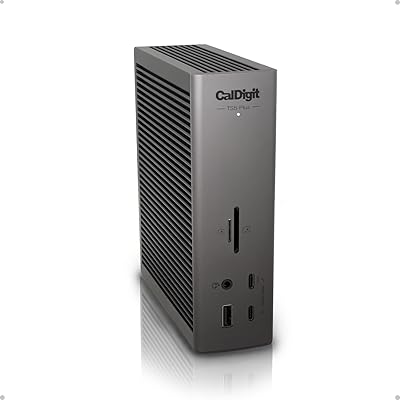
CalDigit TS5 Plus Thunderbolt 5 Dock
80%
93%
Port Density & Layout
91%
Thunderbolt 5 Performance
88%
Dual USB Controller Design
89%
Host Charging Power
86%
10 Gigabit Ethernet
More
Kensington SD5800T Thunderbolt 4 Docking Station
86%
92%
Performance
90%
Display Support
88%
Charging Power
85%
Build Quality
91%
Connectivity
More
Dell WD22TB4 Thunderbolt 4 Docking Station
85%
88%
Performance
90%
Build Quality
92%
Power Delivery
85%
Display Support
89%
Connectivity Options
More
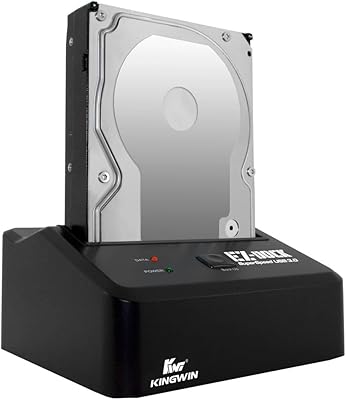
Kingwin EZD-2535U3 Hard Drive Docking Station
80%
93%
Ease of Setup
88%
Drive Compatibility
76%
Transfer Speed
81%
Build Quality
84%
Hot-Swap Functionality
More
JCYMELE Thunderbolt 4 Docking Station 19-in-1
86%
90%
Performance
92%
Connectivity & Versatility
87%
Value for Money
89%
Build Quality & Durability
85%
Ease of Setup & Installation
More
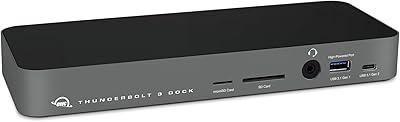
OWC 14-Port Thunderbolt Dock
85%
93%
Port Selection & Density
88%
Thunderbolt Bandwidth & Data Speed
91%
Display Output Performance
86%
Charging Passthrough
89%
Card Reader Speed
More
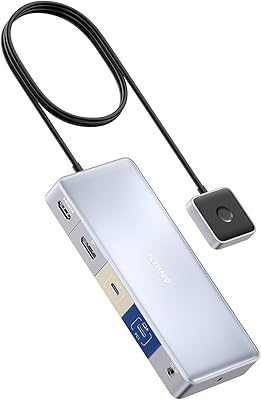
Anker 554 USB-C KVM Docking Station
77%
83%
KVM Switching Reliability
79%
Dual Monitor Performance
71%
Power Delivery
86%
Build Quality
77%
Port Selection & Variety
More
SABRENT DS-SC5B 5-Bay Hard Drive Docking Station
76%
88%
Build Quality
83%
Cooling Performance
61%
Noise Level
84%
Hot-Swap Usability
74%
Transfer Speed
More
Sabrent DS-4SSD 4-Bay 2.5” SATA SSD/HDD Docking Station
88%
91%
Value for Money
96%
Ease of Setup
85%
Cooling Performance
77%
Drive Compatibility
89%
Build Quality
More

FAQ

Unfortunately, no. The single-display restriction on standard M1, M2, and M3 MacBooks is an Apple hardware limitation, not something a dock can work around. No matter how capable the dock is, those machines are capped at one external display. If dual-monitor support is a priority, you would need a MacBook Pro with an M-series Pro or Max chip, or a Thunderbolt 5 Windows laptop.

It will work, but you will not get the full bandwidth that makes this docking station stand out from less expensive options. TB4 is capped at 40Gbps, so the 120Gbps headroom the dock offers simply goes unused on a TB4 host. For most everyday tasks the experience will be fine, but paying a premium for TB5 capabilities you cannot access is hard to justify unless you plan to upgrade your laptop soon.

Yes, but only if your laptop genuinely supports Thunderbolt 5. With a TB5 Windows machine you can run one display through the HDMI 2.1 or DisplayPort 2.1 output and two more through the downstream TB5 ports simultaneously. If your laptop is TB4 or USB4 only, you are looking at a reduced display count depending on the specific device.

Most users describe it as a low background hum rather than anything intrusive — comparable to a quiet desktop PC at idle. That said, in a very silent environment you may notice it, especially during prolonged transfers or when multiple high-demand peripherals are active. It is not the kind of fan noise that will distract you during video calls or focused work, but it is not completely silent either.

Yes. The 140W upstream charging via PD 3.1 covers the full charging rate for a MacBook Pro 16-inch, even under heavy CPU and GPU load. You will not see the battery draining while working, which is not always guaranteed with lower-wattage docks.

There is no toggle, software setting, or button to disable the ambient lighting strip. It is on whenever the dock is powered. If a fully dark desk setup matters to you, this is worth factoring into your decision before purchasing.

With a TB5 laptop and a fast NVMe enclosure connected to one of the downstream TB5 ports, transfer speeds are significantly faster than what TB4 allows. In practical terms, moving a 150GB file takes roughly 25 seconds at peak throughput. The active cooling helps sustain those speeds over longer transfers rather than letting the dock throttle after a few minutes.

For most users on both macOS and recent versions of Windows 11, it is plug-and-play. Connect the TB5 cable and everything — displays, charging, Ethernet, peripherals — activates automatically. A small number of Windows users have reported needing a reboot or cable re-seat to resolve initial display handshake issues, which appears to be firmware-related on specific laptop models rather than a dock defect.

For most people, yes — but it can be tight depending on your desk layout. If your laptop sits in a stand or arm mount positioned away from the dock, or if you route cables under the desk, 3.3 feet leaves little slack. A longer TB5 cable is available separately, though certified TB5 cables are not cheap. It is worth measuring your intended setup before assuming the included cable will reach comfortably.

The active cooling system is one of the more practical reasons to choose this dock over a passively cooled competitor. Users running it at full load for extended sessions — multiple displays, high-speed storage transfers, and charging all simultaneously — report consistent performance without the throttling you sometimes see from docks that rely on the chassis alone to dissipate heat. The exterior does get warm, but not hot to the touch.

Where to Buy