
Overview

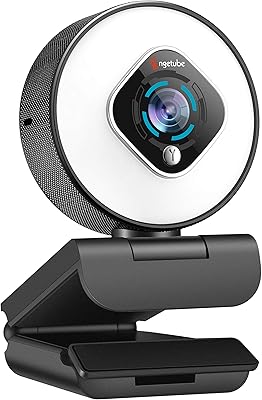
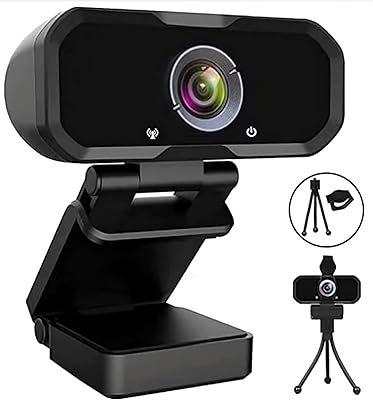
The Angetube 967Pro 1080p Webcam sits in an interesting middle ground — capable enough to satisfy streamers and remote workers, yet priced accessibly enough that it doesn't feel like a commitment. What sets it apart from most webcams at this tier is the built-in ring light, which remains relatively uncommon outside of creator-focused products. You also get the choice between HDR at 30fps or standard 60fps — a genuinely useful option depending on whether your priority is image richness or smooth motion. The privacy shutter and toggleable autofocus round out a package that feels more considered than its price suggests.

Features & Benefits

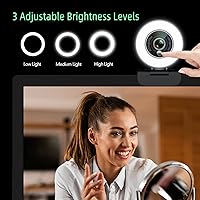
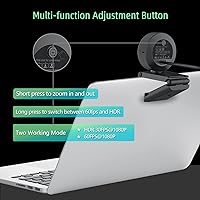
The ring light is the headline feature here, and it earns its place. Three brightness levels are controlled by a single touch button, which works well enough in a dim home office or bedroom setup — though it won't replace a proper key light for serious production work. The HDR and 60fps modes are mutually exclusive, so pick based on your use case: HDR suits tricky mixed lighting, while 60fps works better for fast-paced streams. The dual stereo microphones handle casual calls capably, and the physical controls on the back let you zoom or switch modes without leaving your video app.

Best For

This streaming webcam makes most sense for people who are done with their laptop's built-in camera but aren't ready to invest in a full lighting and camera rig. Remote workers in dim offices, students hopping between video platforms, and casual streamers wanting a cleaner image without a separate ring light will all find solid value here. The broad OS compatibility — Mac, Windows, Linux, Chrome OS — combined with plug-and-play setup means there's no configuration headache. If you need true optical zoom or broadcast-grade output, though, this isn't aimed at you.

User Feedback

Buyers consistently praise how much the ring light improves call quality in low-light rooms — it's a feature mentioned repeatedly as justifying the purchase on its own, and setup earns similar appreciation for being genuinely quick. On the critical side, some users note that the 5x digital zoom softens the image at higher magnifications, which is an inherent limitation of digital zoom but worth knowing upfront. Microphone quality gets mixed marks — workable for calls, but not a substitute for a dedicated mic when audio clarity matters. A handful of buyers also flagged the USB-C adapter as a minor durability concern over extended use.

Pros

  • The built-in ring light meaningfully improves on-camera appearance in dim rooms without any extra gear.
  • Switching between HDR and 60fps modes gives users practical flexibility based on their lighting and content needs.
  • Plug-and-play setup works reliably across Mac, Windows, Linux, and Chrome OS with zero driver installation.
  • Physical button controls let you adjust zoom and switch modes mid-call without touching any software.
  • Toggleable autofocus lets you lock your focal point manually — a useful option fixed-focus cameras lack entirely.
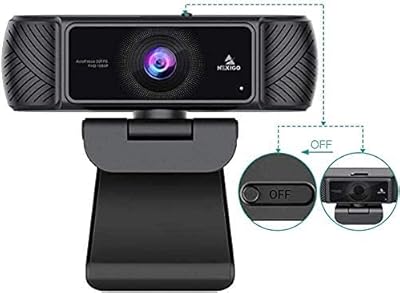
  • The included privacy shutter offers genuine peace of mind for users who keep the webcam connected permanently.
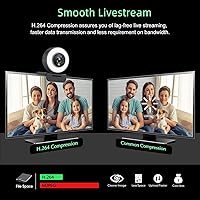
  • H.264 compression keeps video calls smooth even on slower upload connections without visible quality loss.
  • USB-A and USB-C compatibility via the included adapter makes it usable on virtually any laptop or desktop.
  • A noticeable step up from built-in laptop cameras, especially in color accuracy and sharpness during well-lit calls.

Cons

  • Digital zoom degrades image quality visibly at higher magnifications — there is no optical zoom option.
  • HDR and 60fps cannot be used at the same time, which forces a compromise depending on your use case.
  • The ring light has only three brightness levels, with no fine-grained control for users who want precise output.
  • Several buyers received units with the privacy cover missing, pointing to inconsistent quality control at the factory.
  • The USB-C adapter feels less durable than the main cable and may wear out with frequent connect-disconnect use.
  • Built-in microphones fall short for streaming or recording where audio clarity genuinely matters.
  • The mount clip has been reported to loosen over time, which can be frustrating in daily dock-and-undock workflows.
  • Ring light reach is limited — users in larger rooms or seated farther from the camera may see minimal benefit.

Ratings

Our AI rating system analyzed verified global buyer reviews for the Angetube 967Pro 1080p Webcam, actively filtering out incentivized, bot-generated, and low-signal feedback to surface what real users genuinely experienced. The scores below reflect both the strengths that consistently earned praise and the friction points that repeatedly surfaced across different use cases and setups. Nothing has been smoothed over — where buyers ran into limitations, the scores show it.

Video Quality
78%
22%
For everyday calls and casual streams, most users found the 1080p output noticeably cleaner and sharper than their previous laptop cameras. The CMOS sensor handles well-lit environments well, producing accurate skin tones that hold up on Zoom and Teams calls without heavy post-processing.
In lower-light situations without the ring light engaged, some users reported a softer, slightly noisy image that the HDR mode only partially corrects. Compared to higher-end webcams with larger sensors, fine detail in background elements tends to wash out.
Ring Light Performance
86%
The three-level ring light is the feature buyers mention most positively, and for good reason — it genuinely flatters the subject in a dim home office without requiring a separate lamp or ring light stand. The soft, diffused tone avoids harsh shadows on the face during evening calls.
It is not a substitute for proper lighting at a distance, and users working in larger rooms found the light fell short of filling the space adequately. The three preset levels also leave some buyers wishing for finer incremental control.
HDR Mode
71%
29%
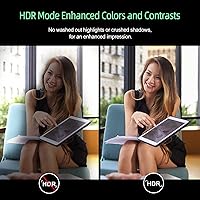
In backlit scenarios — like sitting in front of a window — HDR mode made a real difference for buyers who had previously been silhouetted during video calls. The dynamic range improvement is visible and was called out repeatedly as a practical, day-to-day benefit.
HDR and 60fps cannot run simultaneously, which catches some buyers off guard after purchase. Satisfaction with HDR mode also varied noticeably depending on room setup, with buyers in already well-lit rooms seeing little perceptible benefit.
Frame Rate (60fps)
81%
19%
Streamers and gamers appreciated having a genuine 60fps option at 1080p, which delivers noticeably smoother motion during fast-paced content compared to the standard 30fps webcams dominant at this price range. Reaction streamers and tutorial creators in particular called it out as a differentiator.
The 60fps mode comes at the cost of HDR, so buyers have to choose based on their primary use case. In bandwidth-constrained environments, the higher frame rate occasionally caused compression artifacts on slower upload connections.
Microphone Quality
62%
38%
For standard video calls and casual content, the dual stereo microphones capture voice clearly enough that buyers didn't feel an urgent need for an external mic right away. Noise cancellation handled keyboard clicks and mild ambient noise reasonably well in quieter spaces.
Users who care about audio quality for streaming or recording found the microphones underwhelming past a basic standard, with a slightly thin, mid-heavy character that becomes apparent when compared to even budget standalone USB mics. In louder home environments, background bleed was a recurring complaint.
Ease of Setup
93%
Plug-and-play worked exactly as advertised across all tested platforms — Mac, Windows, and Chrome OS — with no driver installation required. Buyers who had struggled with finicky webcam software in the past appreciated being able to just plug it in and have it recognized immediately.
A small number of Linux users reported that while the device was recognized, some button-mapped functions required manual configuration. The USB-C adapter, while a welcome inclusion, added a minor step for users on newer laptops.
Build Quality
67%
33%
The unit feels reasonably solid for its weight class, and the compact footprint sits stably on most monitor tops without wobbling during normal use. The matte plastic finish resists smudges better than glossy alternatives common at this price point.
Several buyers flagged the plastic construction as feeling slightly hollow, particularly around the button area on the back. Over extended use, a handful of reviewers noted the mount clip loosened, which is a minor but real concern for daily dock-and-undock routines.
Autofocus
76%
24%
The autofocus tracked subjects reliably during standard use, with minimal hunting or refocusing delays during calls. The option to toggle autofocus off and lock focus manually is a genuinely useful addition for users who want consistent framing during streams.
In low-light conditions, particularly with only the ring light on its lowest setting, autofocus occasionally hunted before locking. Users sitting farther than average from the camera also noted that the camera sometimes struggled to maintain sharp focus without manual override.
Digital Zoom
54%
46%
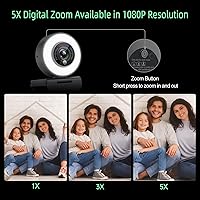
The 5x zoom works adequately for minor framing adjustments — nudging in slightly to cut out a cluttered background edge is a realistic and practical use case that buyers found functional. It works best at lower magnifications where quality loss is minimal.
Digital zoom is digital zoom, and buyers who expected optical-quality results at higher magnification were consistently disappointed. Image softness and pixelation become clearly visible past 2x, which limits the feature's practical utility for anyone who cares about output quality.
Adjustable FOV
74%
26%
Being able to zoom out to show more of a desk setup or zoom in to keep framing tight on just the face gave users a practical level of flexibility that static-FOV webcams lack. Tutorial creators and teachers found this especially useful for showing physical materials during sessions.
The FOV adjustment is handled via the same physical button as the zoom function, which some users found unintuitive at first. There is no software control panel to set a precise angle, so fine-tuning relies entirely on short button presses and visual judgment.
Privacy Cover
88%
The physical privacy shutter is a small but appreciated detail — it provides genuine peace of mind for users who keep the webcam plugged in permanently. Several buyers specifically mentioned it as a deciding factor over competing models that lacked one.
A notable number of buyers in verified reviews reported receiving units with the privacy cover missing out of the box, which is a quality control inconsistency. Angetube does offer to send a replacement, but having to contact support for a basic included accessory is a friction point.
Compatibility
91%
The breadth of OS support — including older Windows versions, Mac OS, Linux, Chrome OS, and Android — was praised by users in education and enterprise settings where device standardization is inconsistent. It reliably worked on every mainstream platform without special configuration.
Android compatibility, while listed, was described as inconsistent by a small subset of users depending on their device manufacturer and USB implementation. A few users also noted that some advanced features like HDR switching are not exposed through third-party software like OBS without manual workarounds.
USB-C Adapter Reliability
61%
39%
Including the USB-C adapter in the box was widely appreciated as a thoughtful addition, making the webcam immediately usable on modern laptops without hunting for a separate dongle. For buyers with mixed USB port configurations, it added genuine out-of-box flexibility.
The adapter was a recurring topic in critical reviews, with buyers noting it felt less robust than the main cable and showing signs of wear after regular connect-and-disconnect cycles. Users who primarily use USB-C ports would benefit from a native USB-C cable rather than relying on the adapter long-term.
Value for Money
83%
For buyers coming from a built-in laptop camera, the combination of 1080p output, ring light, HDR capability, and plug-and-play setup represents strong value at the mid-range price point. It delivers a visually meaningful upgrade without requiring additional accessories to get started.
Buyers who compared it directly against competing webcams with optical zoom or better low-light sensors found the value proposition softer. The price is justified for the ring-light convenience, but pure image quality per dollar faces stiffer competition from options that forgo the light.

Suitable for:

The Angetube 967Pro 1080p Webcam is a strong fit for remote workers and hybrid employees who want to look significantly better on camera without building a dedicated home studio. If your current setup is a dim room and a mediocre laptop webcam, this camera solves two problems at once — the ring light handles lighting, and the 1080p output handles clarity. Students and educators who jump between multiple video platforms daily will appreciate how instantly it works across Mac, Windows, Chrome OS, and Linux without any driver installation or configuration. Hobbyist streamers who want the option to push to 60fps for smoother motion, or switch to HDR when the lighting in their room is unpredictable, will find those modes genuinely useful rather than just marketing checkboxes. It also makes practical sense for anyone who values privacy features and wants a physical shutter rather than relying on software controls alone.

Not suitable for:

The Angetube 967Pro 1080p Webcam is not the right tool for buyers who need broadcast-quality output or who are already working with a proper lighting rig. If you have a ring light stand, a key light, or any dedicated lighting setup, the built-in ring light offers you nothing extra — and you would be better served by putting that budget toward sensor quality or optical zoom instead. Content creators who rely heavily on zoomed-in framing will find the 5x digital zoom disappointing at higher magnifications, where image softness becomes clearly visible; this camera has no optical zoom, and that is a hard limitation. Buyers who prioritize audio and plan to record podcasts, voiceovers, or any content where audio quality matters should budget for a separate microphone, as the built-in mics are functional for calls but not for serious audio work. And if you primarily use USB-C ports, know that you will be relying on the included adapter rather than a native cable, which is a minor but real durability consideration over time.

Specifications

  • Resolution: Captures video at up to 1080p Full HD, with 720p also supported for lower-bandwidth environments.
  • Frame Rate: Operates at either 60fps or 30fps depending on mode selected; HDR mode locks to 30fps while standard mode runs at 60fps.
  • HDR: HDR mode is available at 30fps, dynamically balancing highlights and shadows for mixed or backlit lighting conditions.
  • Sensor: Uses a CMOS image sensor to capture video and deliver color-accurate footage in standard and low-light conditions.
  • Ring Light: Built-in ring light offers three brightness levels adjusted via touch button, designed for soft, diffused facial illumination.
  • Autofocus: Autofocus is enabled by default and can be toggled off via the physical button to manually lock the focal point.
  • Microphone: Dual stereo microphones with built-in noise cancellation are integrated directly into the unit for hands-free audio capture.
  • Zoom: Supports up to 5x digital zoom, adjustable via short press of the rear button during live use.
  • Compression: Uses H.264 video compression encoding to reduce file size and bandwidth usage without significant loss of visual clarity.
  • Connectivity: Connects via USB-A 2.0; a USB-C adapter is included in the box for compatibility with modern laptops and desktops.
  • Video Formats: Supports JPEG, YUY2, and H.264 video capture formats depending on the application and platform in use.
  • Audio Formats: Compatible with AAC and MP3 audio formats for broad software and platform support.
  • Privacy Cover: A physical sliding privacy shutter is included to block the lens when the camera is not in use.
  • Compatibility: Works with Windows XP through 11, Mac OS 10.6 and higher, Chrome OS, Linux, Ubuntu, and Android 5.0 and above.
  • Plug and Play: Requires no additional driver installation and is recognized automatically on all listed operating systems upon connection.
  • Dimensions: The unit measures 2.13 x 2.48 x 2.91 inches, making it compact enough for most standard monitor clip mounts.
  • Weight: Weighs 8.1 ounces, which is light enough for stable monitor-top mounting without stressing the display bezel.
  • Colors: Available in both Black and White colorways to suit different desk aesthetics and monitor finishes.
  • Model: The product is part of the Angetube 967Pro series, first made available in October 2022.
  • FOV: Field of view is adjustable, allowing users to zoom out for a wider environmental shot or zoom in for a tighter frame.

Related Reviews
Angetube 962 1080P Webcam
85%
94%
Video Quality
88%
Audio Capture
90%
Autofocus Performance
86%
Low-Light Functionality
92%
Ease of Setup
More
Angetube PC 1080P Webcam
85%
88%
Video Quality
90%
Audio Quality
95%
Ease of Setup
84%
Low Light Performance
87%
Wide-Angle Lens
More
HuddleCamHD HC-WEBCAM-94
77%
83%
Video Quality (Daylight)
51%
Low-Light Performance
91%
Field of View
94%
Ease of Setup
57%
Audio Quality
More
Akyta 1080P Webcam
Akyta 1080P Webcam
82%
88%
Video Quality
85%
Audio Quality
94%
Ease of Setup
82%
Field of View
80%
Noise Reduction
More
ZIQIAN 1080P Webcam
ZIQIAN 1080P Webcam
83%
88%
Video Quality
76%
Audio Performance
91%
Ease of Setup
85%
Wide-Angle Lens
78%
Microphone Quality
More
NexiGo N60 1080P Webcam
74%
78%
Image Quality
93%
Setup & Ease of Use
67%
Microphone Performance
91%
Value for Money
88%
Privacy Cover
More
Maciebelle CP008
Maciebelle CP008
79%
71%
Video Quality
83%
Microphone Performance
74%
Built-in Speaker
94%
Ease of Setup
88%
Privacy Controls
More
Svcouok pT011 1080p Webcam
75%
74%
Image Clarity
63%
Low-Light Performance
58%
Microphone Quality
93%
Ease of Setup
77%
Wide-Angle Coverage
More
Angetube 863Plus
Angetube 863Plus
74%
83%
Image Quality
78%
Built-in Ring Light
71%
Remote Control Usability
62%
Microphone Quality
58%
Zoom Performance
More
MTORED 1080p USB Webcam
84%
89%
Video Quality
94%
Ease of Setup
78%
Microphone Quality
85%
Wide-Angle Lens
82%
Build Quality
More

FAQ

No, the Angetube 967Pro 1080p Webcam is fully plug-and-play. Just connect it via USB and your operating system — whether that is Windows, Mac, Chrome OS, or Linux — will recognize it automatically without any driver download or software installation required.

No, these are two separate modes and you have to choose one or the other. HDR mode runs at 30fps, while the standard mode gives you 60fps without HDR. You switch between them using a long press of the button on the back of the camera.

Honestly, if your room is already well-lit, the ring light will not make a dramatic difference. It is most useful in dim environments — a bedroom with overhead lighting off, or an evening home office setup. Think of it as a convenient fill light rather than a primary light source.

The USB-C adapter is included in the box, so you can use the webcam on USB-C laptops right out of the gate. That said, it is an adapter on the existing USB-A cable, not a native USB-C cable, so users who connect and disconnect frequently may want to keep an eye on its condition over time.

Yes, autofocus can be toggled off using the physical button on the back of the unit. This is useful if you want to lock focus at a specific distance — for example, keeping your face in sharp focus during a stream regardless of any movement in the background.

For video calls and casual use, the dual stereo mics are solid — they handle voice clearly and the noise cancellation does a reasonable job of filtering out keyboard clicks and mild ambient sounds. If audio quality is a priority for streaming or recording, a dedicated USB microphone will sound noticeably better. The built-in mics are a convenience, not a professional solution.

Yes, the camera is compatible with OBS, XSplit, Streamlabs, and all the major streaming platforms. Since it is a standard UVC device, any software that recognizes a webcam will pick it up without special configuration. Some advanced feature toggling, like HDR switching within OBS, may require manual setup.

This is a known inconsistency that a number of buyers have flagged. The manufacturer has stated that if the privacy cover is missing from your order, you can contact them directly and they will send a replacement at no cost. It is a bit inconvenient, but the resolution process appears to be straightforward.

At lower zoom levels — say 2x or so — the image holds up reasonably well and can be useful for tightening your framing. At the full 5x, image softness and some pixelation become visible, especially in motion. This is an inherent limitation of digital zoom, and buyers expecting optical-quality results at higher magnification will be disappointed.

Yes, the 967Pro is compatible with Chrome OS 29.0.1547 and above, and it works plug-and-play on Chromebooks without any additional setup. It is a practical choice for students and educators who rely on Chromebook hardware for daily video calls and classroom sessions.