Overview

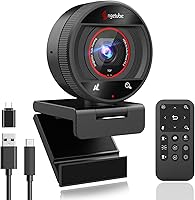
The Angetube 873AI Webcam arrived in mid-2024 as a genuinely interesting option in a crowded mid-range market — one that punches above its price bracket by bundling AI auto-framing and host tracking into a plug-and-play USB package. Most webcams at this tier offer a decent sensor and call it a day. This one adds a magnetic privacy cover, a physical remote control, and broad compatibility across both Windows and Mac without requiring any driver installation. For a relatively new brand entry, it has built real traction quickly, which suggests buyers are finding it delivers on its core promises.
Features & Benefits

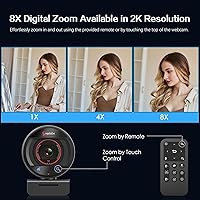
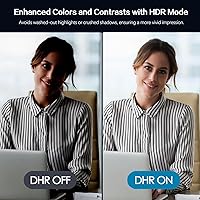
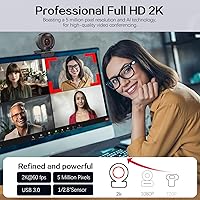
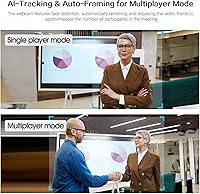
The 2K sensor running at 60 frames per second makes a noticeable difference during fast movement — video stays sharp rather than turning into a smeared blur. The TOF autofocus is genuinely quicker than older contrast-detection systems, which matters if you lean toward the camera or move around mid-call. AI auto-framing automatically widens or tightens the frame depending on how many faces it detects, which is a useful feature for anyone who occasionally pulls a colleague into a shared screen. The 8x digital zoom is convenient via the remote, but worth noting: software-based zoom at higher magnification does soften the image noticeably. HDR handles backlit windows better than most in this range.

Best For

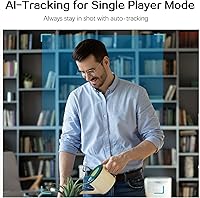
This webcam makes most sense for remote professionals who bounce between solo calls and small team huddles — the AI framing handles both without manual fiddling. Online tutors and teachers who move around during sessions will appreciate the host tracking that keeps them centered without being tethered to their desk. Streamers or creators who want intelligent framing but aren't ready to invest in a PTZ camera will find this a practical middle ground. It also suits anyone whose home office lighting is inconsistent, since the HDR handling reduces the need to fuss with ring lights or repositioning constantly.

User Feedback

Buyers consistently praise how quickly this webcam gets up and running — plug-and-play simplicity is mentioned repeatedly, and the AI tracking responsiveness earns genuine enthusiasm. The magnetic privacy cover is well-received as a thoughtful, physical solution rather than a software toggle. On the critical side, users note the digital zoom quality drop at higher levels, which is expected for software zoom but still worth knowing upfront. The dual mics are appreciated as a convenient built-in option, though reviewers are clear they won't replace a dedicated microphone. A recurring usability complaint: after adjusting zoom manually, AI auto-scaling must be manually reactivated, which catches people off guard mid-call.

Pros

  • AI auto-framing adjusts the field of view automatically, handling solo and group calls without any manual input.
  • TOF autofocus locks on quickly, making it noticeably more responsive than older contrast-based webcam systems.
  • Plug-and-play setup works immediately on Windows and Mac with no driver installation required.
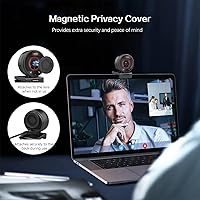
  • The magnetic privacy cover is a practical, physical solution that does not rely on software or settings menus.
  • HDR support manages backlit and mixed-lighting environments better than most webcams in this price range.
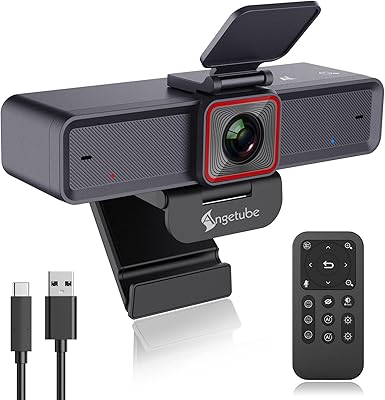
  • The included remote lets you control zoom, mute, and AI features from across the room without touching your computer.
  • 60FPS video produces visibly smoother motion during presentations, gestures, and fast movement on calls.
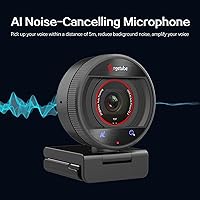
  • Dual AI noise-reduction mics reduce background interference enough to handle typical home office meeting conditions.
  • This webcam bundles AI tracking, a remote, and a privacy cover into a single mid-range purchase — strong overall value.
  • Broad OS compatibility covers Windows 7 through 11 and Mac OS X 10.7 and above without configuration.

Cons

  • Digital zoom degrades image quality noticeably above 3x to 4x magnification despite the 8x headline figure.
  • AI auto-scaling must be manually reactivated after every manual zoom adjustment, which interrupts call flow.
  • The remote control requires a CR2 battery — less common than AA or AAA and easy to overlook when it runs out.
  • Built-in microphone audio has a clear ceiling; it will disappoint anyone comparing it to a standalone USB mic.
  • The plastic build feels functional rather than solid, with minor wobble in the clip mount when bumped.
  • AI framing transitions can feel abrupt when switching from a wide group shot back to a single-person frame.
  • Achieving full 2K at 60FPS requires a USB 3.0 port — performance drops noticeably when connected through a hub or USB 2.0.
  • The magnetic privacy cover is small and detachable, making it easy to misplace if not stored deliberately.

Ratings

The Angetube 873AI Webcam scores here are generated by AI after analyzing verified global user reviews, with automated filtering applied to remove incentivized, bot-generated, and suspicious submissions. What remains reflects real buyer experiences — the genuine praise and the frustrations alike. The breakdown below covers everything from image quality and AI performance to the smaller details that tend to make or break daily usability.
Video Quality
83%
Users consistently report that 2K resolution at 60 frames per second produces noticeably smoother, crisper video compared to the standard 30FPS webcams they replaced. During Zoom and Teams calls, colleagues frequently commented on the improved clarity, especially when sharing screens or presenting.
A few users noted that the 2K output is most impressive under good lighting conditions; in dim environments without HDR engaged, some softness crept in at the edges of the frame. The improvement over 1080p is real but not dramatic enough to impress anyone expecting DSLR-level output.
AI Auto-Framing
88%
The auto-framing feature drew strong praise from teachers and remote workers who regularly switch between sitting alone and having a second person join the call. The camera adjusts its field of view fluidly, and most users found it responsive enough that they forgot it was running.
The transition speed when switching from a wide shot back to a single-person frame can feel slightly abrupt rather than smooth. A small number of users also reported that the AI occasionally struggled to distinguish a person sitting very far back from background objects in cluttered rooms.
TOF Autofocus
86%
TOF-based focusing earned specific praise from users who had dealt with slow, hunting autofocus on previous webcams. People who move around their desk — leaning in to show documents or stepping back to write on a whiteboard — found the lock-on speed genuinely satisfying in daily use.
In very low light, the TOF system occasionally takes a fraction longer to acquire focus than it does in well-lit conditions. It is still faster than contrast-based alternatives, but users expecting instant response in dark rooms may notice a brief lag.
HDR Performance
77%
23%
Users working near windows or in rooms with mixed lighting reported that HDR meaningfully reduced the washed-out or shadowy look that plagued their previous webcams. For home office setups where repositioning a desk is not practical, this feature handled the problem passably well.
The HDR processing, while helpful, can occasionally introduce a slightly artificial look — skin tones sometimes appear a touch over-processed compared to a well-exposed camera with no HDR. It works best as a compensation tool rather than a quality enhancer.
AI Noise Reduction (Microphone)
71%
29%
The dual mics with AI noise processing are widely appreciated as a convenient built-in solution, particularly for users in open-plan homes or shared offices. Keyboard clatter and ambient room noise were noticeably reduced in call recordings, which buyers found genuinely useful for day-to-day meetings.
Users with higher audio expectations — podcasters, educators recording course content — found the mics fall short compared to even a modest dedicated USB microphone. The noise reduction can thin out voices slightly, and in louder environments the processing struggles to keep up.
Remote Control Usability
79%
21%
Having physical control over zoom, mute, and AI features without touching the computer was cited as a genuine convenience, especially by users who run calls from a standing desk or move around their workspace. The remote works at a reasonable distance and buttons are tactile enough to press without looking.
The remote requires a CR2 battery, which is less common than AA or AAA, so having a spare on hand is wise. A handful of users also noted that the remote feels lightweight to the point of feeling fragile, and the button feedback is softer than expected.
Digital Zoom Quality
58%
42%
For casual use cases — pulling in tighter on a document briefly or adjusting framing during a call — the 8x digital zoom is genuinely convenient and having remote access to it sets this webcam apart from competitors at a similar price point.
This is strictly software-based zoom, and image quality degrades noticeably past 3x or 4x magnification. Users expecting usable detail at maximum zoom were disappointed; the 8x figure is technically accurate but practically limited for anything other than a quick frame adjustment.
Privacy Cover
84%
The magnetic privacy cover earned consistently warm feedback for being a physical, no-software-required solution to camera privacy. Users appreciated being able to block the lens with a simple snap during breaks, and the magnetic attachment means it is easy to remove and replace without fuss.
The magnetic cover is small enough that it can be misplaced, and a few users reported the magnet holding strength felt weaker over time. It is not integrated into the body of the webcam, so treating it like an accessory rather than a permanent feature is the safer expectation.
Setup & Compatibility
93%
Plug-and-play performance was one of the most universally praised aspects across all user feedback. The webcam was recognized immediately by Windows 10, Windows 11, and recent macOS versions without any driver installation, which buyers found refreshingly straightforward compared to some competitors.
A very small number of users on older operating systems — Windows 7 and early Mac OS X builds — reported minor compatibility hiccups, though these cases were rare. USB 2.0 backward compatibility works, but the full 2K at 60FPS experience requires a USB 3.0 port.
AI Re-Activation After Zoom
52%
48%
The ability to manually override the zoom and then return to AI-managed framing is a thoughtful design choice in theory, giving users control over both automated and manual modes during a call without disconnecting.
In practice, the requirement to manually reactivate AI auto-scaling after using manual zoom is a persistent usability complaint. Users regularly forgot to re-enable it mid-call, resulting in a locked frame that confused them until they realized what had happened — a friction point that feels like it could be solved with a simple timeout or auto-restore option.
Build Quality & Design
74%
26%
The compact form factor and clean black finish suit most desk setups without drawing attention. Users found the clip mount stable on a range of monitor thicknesses, and the overall aesthetic is professional enough for on-camera work without looking cheap on a video call background.
The plastic construction feels adequate rather than reassuring, and a few users noted minor wobble in the clip when bumped. At this price tier the build is acceptable, but anyone expecting metal accents or premium tactile materials will need to look at a higher category.
Value for Money
87%
The combination of AI tracking, 2K resolution, 60FPS, a remote control, and a privacy cover at a single mid-range price struck most buyers as genuinely strong value. Users who compared it against basic competitors found this webcam offered substantially more capability for the money.
The value equation holds up well only if buyers use the AI features actively — users who just want a static 2K webcam pointed at their desk can find comparable image quality for less. The premium here is for the AI and accessories, not the raw sensor alone.
Microphone vs. Dedicated Mic
63%
37%
For users who previously relied on laptop microphones or a headset boom mic, the built-in dual mics represent an upgrade in audio presence and background rejection. Colleagues on calls noted the improvement in clarity for typical meeting environments.
Anyone comparing this webcam's mic against a standalone USB condenser microphone will hear a clear gap in warmth, presence, and dynamic range. The AI noise reduction does useful work, but the mic capsules themselves have a ceiling that dedicated audio hardware easily surpasses.
Frame Rate Consistency
81%
19%
Users who switched from 30FPS webcams mentioned that 60FPS made a visible difference during gestures, fast movement, and presentation pointer work. The smoothness adds a sense of professionalism to calls that is difficult to articulate but easy to notice.
Achieving the full 60FPS at 2K requires a capable USB 3.0 port and enough system resources. A few users on older laptops reported the frame rate dropping under load, and those connecting via a USB hub occasionally saw performance inconsistencies.

Suitable for:

The Angetube 873AI Webcam is a strong fit for remote professionals whose daily routine involves a mix of solo video calls and small group meetings — the AI auto-framing handles both without any manual adjustment between them. Online teachers and tutors who move around their workspace during sessions will find the host tracking genuinely useful, keeping them centered on screen without being anchored to their desk. Content creators and streamers who want intelligent camera movement but aren't ready to spend on a dedicated PTZ setup will get most of that functionality here at a fraction of the cost. Home office users dealing with inconsistent lighting — a window behind them, a dim corner setup — will appreciate the HDR handling that removes the need to constantly reposition or invest in extra lighting gear. Anyone who values physical control over their camera during a call, rather than tabbing out of their meeting window to adjust settings, will find the included remote a surprisingly practical addition.
Not suitable for:

Buyers primarily interested in high-quality audio should know upfront that this webcam's built-in mics, while convenient and AI-assisted, are not a substitute for a dedicated USB microphone — podcasters, course creators, or anyone recording content for an audience will likely find the audio ceiling limiting. The 8x digital zoom figure sounds impressive but is software-based, meaning image quality softens noticeably at higher magnification levels, so anyone needing genuine optical zoom for detailed close-up work should look elsewhere. Users who want a set-and-forget experience with the zoom controls should be aware that manually adjusting zoom disables the AI auto-scaling, which then requires manual reactivation — a recurring friction point that some users find disruptive mid-call. The Angetube 873AI Webcam also relies on a CR2 battery for its remote, which is less convenient to replace than common battery types, and users who lose the remote lose a key part of the product's value proposition. Finally, buyers expecting premium build materials or a heavy, solid feel will find the plastic construction adequate but unremarkable — this is a feature-first device, not a premium hardware experience.
Specifications

  • Model Number: The unit is identified as model 873AI, manufactured by Angetube.
  • Resolution: Captures video at up to 2K (5 megapixels) and also supports 1080p output depending on system and application settings.
  • Frame Rate: Delivers up to 60 frames per second at 2K resolution when connected via a USB 3.0 port.
  • Sensor Type: Uses a CMOS image sensor for light capture and image processing.
  • Autofocus System: Equipped with TOF (Time of Flight) autofocus, which measures depth using infrared light for faster subject acquisition than contrast-detection systems.
  • HDR: HDR (High Dynamic Range) is supported, helping to balance exposure in high-contrast lighting conditions such as backlit environments.
  • Digital Zoom: Offers up to 8x digital zoom, controllable via the included remote; image quality softens at higher magnification levels as this is software-based zoom.
  • Microphone: Features dual built-in microphones with AI-powered noise reduction to minimize background interference during calls and recordings.
  • Connectivity: Connects via USB 3.0 for full 2K at 60FPS performance; backward compatible with USB 2.0, though at reduced throughput.
  • Plug-and-Play: No driver installation is required; the webcam is recognized automatically by compatible operating systems upon connection.
  • AI Features: Includes AI auto-framing (adjusts field of view based on participant count), host tracking (follows movement), and AI noise reduction for audio.
  • Privacy Cover: Ships with a magnetic, removable privacy cover that physically blocks the lens when attached.
  • Remote Control: Includes a physical remote control for managing zoom, AI features, video mute, and microphone mute; requires one CR2 battery.
  • Video Formats: Supports JPEG, YUY2, and H.264 video capture formats.
  • Audio Formats: Compatible with AAC, MP3, and PCM audio formats.
  • OS Compatibility: Works with Windows 7, 8, 10, and 11, as well as Mac OS X 10.7 and later versions.
  • App Compatibility: Compatible with Zoom, Skype, Microsoft Teams, Google Meet, OBS, Twitch, Facebook Live, and most other major video and streaming platforms.
  • Weight: The unit weighs 6.3 ounces, making it lightweight enough for standard monitor clip mounting without strain.
  • Package Dimensions: Packaged dimensions measure 5.12 x 5.04 x 3.11 inches, accommodating the webcam, remote, privacy cover, and accessories.
  • Power: Powered entirely through the USB connection; no external power supply or additional cables are required.

Related Reviews

Angetube 863Plus
Angetube 863Plus
74%
83%
Image Quality
78%
Built-in Ring Light
71%
Remote Control Usability
62%
Microphone Quality
58%
Zoom Performance
More
Angetube PC 1080P Webcam
85%
88%
Video Quality
90%
Audio Quality
95%
Ease of Setup
84%
Low Light Performance
87%
Wide-Angle Lens
More
Angetube 962 1080P Webcam
85%
94%
Video Quality
88%
Audio Capture
90%
Autofocus Performance
86%
Low-Light Functionality
92%
Ease of Setup
More
Angetube 913AI 4K AI Webcam
86%
91%
Video Quality (4K)
84%
AI Tracking & Auto-Framing
96%
Ease of Setup
85%
Audio Quality (Noise-Canceling Mics)
88%
Build Quality & Design
More
Angetube 967Pro 1080p Webcam
76%
78%
Video Quality
86%
Ring Light Performance
71%
HDR Mode
81%
Frame Rate (60fps)
62%
Microphone Quality
More
HuddleCamHD HC-WEBCAM-94
77%
83%
Video Quality (Daylight)
51%
Low-Light Performance
91%
Field of View
94%
Ease of Setup
57%
Audio Quality
More
NexiGo N930AF Webcam
81%
88%
Autofocus Performance
82%
Video Quality
61%
Low-Light Performance
71%
Built-in Microphone
96%
Ease of Setup
More
Diccik 4K Webcam
Diccik 4K Webcam
85%
91%
Video Quality
75%
Microphone Performance
94%
Ease of Setup
88%
Light Adjustment
89%
Compatibility
More
MOERTEK 4K Webcam
MOERTEK 4K Webcam
87%
91%
Video Quality
89%
Noise Reduction
85%
Auto Framing
94%
Ease of Setup
88%
Privacy Features
More
XOCLON 2K Webcam
XOCLON 2K Webcam
86%
89%
Video Quality
91%
Audio Performance
96%
Ease of Setup
85%
Low-Light Performance
87%
Field of View
More

FAQ

No, nothing to install. The Angetube 873AI Webcam is fully plug-and-play — just connect it to a USB port and your operating system picks it up automatically. It works on Windows 7 through 11 and Mac OS X 10.7 and above without any setup steps.

For most users, it works genuinely well in normal lighting with a reasonably uncluttered background. It keeps you centered as you move around and widens the frame when a second person enters. It can occasionally misfire in very cluttered or dimly lit environments, but for everyday calls and online teaching it performs as advertised.

This is an important one to know before you buy: manually adjusting the zoom disables AI auto-scaling. Once you finish zooming, you need to reactivate the AI feature manually via the remote or the touch switch. It does not resume automatically, which catches some users off guard mid-call.

The zoom works fine for quick framing adjustments, but be realistic about expectations. Since it is digital zoom rather than optical, image quality softens noticeably as you push past around 3x to 4x magnification. At full 8x, sharpness drops significantly. It is useful as a convenience tool, not a precision zoom feature.

They are a solid upgrade over laptop microphones and handle typical home office background noise reasonably well. For standard video calls and online meetings, most colleagues will notice an improvement. That said, if you are recording podcasts, online courses, or any content where audio quality matters, a dedicated USB microphone will sound noticeably better.

Yes, it is compatible with all three, as well as Skype, OBS, Twitch, and most other mainstream video and streaming platforms. Because it is plug-and-play, it shows up as an available camera and microphone source in any application that supports external webcams.

The remote uses a CR2 battery. It is worth checking whether one is included in your specific package, as some users reported needing to source one separately. CR2 batteries are available at most electronics retailers but are less commonly stocked than AA or AAA, so having a spare handy is a good idea.

It is a small physical cover that snaps magnetically over the lens when you want to block the camera. There is no software toggle involved — it is a purely mechanical solution. It works well, though it is small enough to misplace if you are not careful about where you put it when it is not in use.

It depends on two things: your USB port type and your system resources. You need a USB 3.0 port to get the full 2K at 60FPS output — connecting through a USB hub or a USB 2.0 port will limit performance. Older or lower-powered laptops may also see frame rate drops under heavy system load.

Yes, it works well for streaming purposes. OBS and most streaming software recognize it without any configuration, and the AI auto-framing is a genuinely useful feature for solo streamers who move around. Just keep in mind that the built-in microphone is adequate for casual streaming but not ideal for professional-quality audio — a separate mic will make a clear difference if your audience cares about sound quality.