Overview

The Amzfast AMZG49C7U 49-inch Curved Ultrawide Gaming Monitor enters a competitive space where most buyers have traditionally had to spend significantly more to get a 32:9 panel this large. Built around a VA panel with 1500R curvature, this ultrawide curved monitor wraps your field of view in a way flat displays simply cannot replicate. Amzfast isn't a household name — the monitor is manufactured by Express Luck Industrial out of Zhongshan, China — so some healthy skepticism is fair. That said, the specs are genuinely competitive for the price tier. The real question isn't whether the numbers look good on paper; it's whether the actual experience holds up under daily use.
Features & Benefits

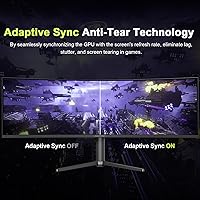
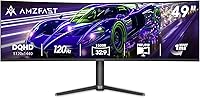
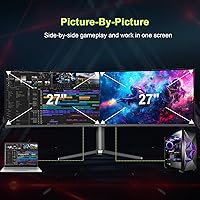
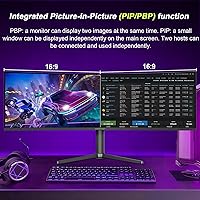
The DQHD 5120x1440 resolution spread across 49 inches means genuinely sharp detail without the scaling headaches that plague lower-res superwides — text stays crisp whether you're coding, watching video, or tracking enemies across a wide map. Hitting 120Hz requires a DisplayPort 1.4 connection; plug in via HDMI 2.0 and you'll be capped lower, so plan your cable setup accordingly. Adaptive Sync handles screen tearing across compatible AMD and Nvidia GPUs without needing a premium certification. The PIP/PBP split-screen mode is particularly useful for dual-PC workflows, effectively dividing the panel into two independent 1440p displays. Color coverage is solid, though HDR10 at 350 nits is entry-level — fine for gaming ambiance, not professional color grading. The stand covers height, tilt, and swivel, which is more than many competitors at this price offer.

Best For

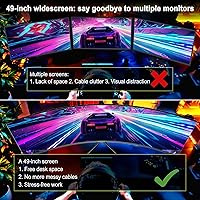
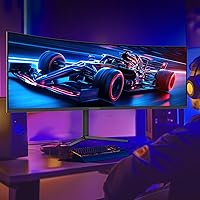
This super-ultrawide display is a natural fit for sim racing and strategy games where peripheral vision matters — the deep curve pulls the edges into your sightline in a way that genuinely changes how you play. Streamers running dual-PC setups will appreciate the PBP mode, keeping both machines visible on one screen without extra hardware. For home office workers, replacing two separate monitors with one coherent display reduces cable clutter and desk strain considerably. Budget-conscious buyers will find the Amzfast 49-inch panel sits at an accessible entry point for the superwide category. Where it falls short: there is no USB-C input, and 120Hz is the ceiling — anyone chasing higher refresh rates or Thunderbolt connectivity should look elsewhere.

User Feedback

Early buyers seem genuinely pleased with the out-of-box color accuracy and overall build quality relative to what they paid — comments frequently note that the display looks far more expensive than it is. The stand draws some praise for its adjustment range, though a handful of users mention it feels slightly less rigid at full height extension. The recurring complaint worth flagging is the HDMI bandwidth limitation: buyers who assumed 120Hz would work over any cable were caught off guard. The OSD is functional but not the most intuitive to navigate. Given the panel only launched in mid-2025, long-term reliability data is still limited — overall sentiment leans positive, but this remains a new product from a brand without a deep track record.

Pros

  • Sharp dual QHD resolution keeps text and detail crisp across the full 49-inch width without scaling headaches.
  • The 1500R curve genuinely improves peripheral immersion in racing and open-world games.
  • PBP mode works well for dual-PC setups, splitting the panel into two usable 1440p displays.
  • Adaptive Sync compatibility covers both AMD and Nvidia GPUs without a premium certification fee.
  • Out-of-box color accuracy draws consistent praise from early buyers who expected worse at this price.
  • The stand's height, tilt, and swivel range is more generous than many competitors in the same tier.
  • Matte anti-glare coating reduces reflections reliably in bright room environments.
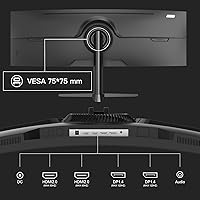
  • Multiple input ports, including two HDMI and two DisplayPort connections, support flexible multi-device setups.
  • VESA 75x75 compatibility means wall-mounting or aftermarket arm upgrades are straightforward.

Cons

  • 120Hz refresh rate is only achievable over DisplayPort 1.4; HDMI 2.0 users will hit a lower cap and may not realize it until after setup.
  • No USB-C or Thunderbolt port limits compatibility with modern laptops that depend on single-cable connectivity.
  • HDR performance is entry-level at best — the brightness ceiling is too modest to deliver a meaningful HDR experience.
  • The OSD navigation is functional but not intuitive, and adjusting settings mid-session can be frustrating.
  • Stand stability receives occasional criticism at full height extension, with some flex under minor desk vibration.
  • Brand is new to the market with limited long-term reliability data, making warranty and support an open question.
  • At 24 pounds, repositioning or mounting the panel solo is awkward and best done with a second person.
  • No built-in speakers or USB hub, so desk cable management still requires external solutions.

Ratings

The scores below reflect an AI-driven analysis of verified global user reviews for the Amzfast AMZG49C7U 49-inch Curved Ultrawide Gaming Monitor, with spam, bot activity, and incentivized feedback actively filtered out before scoring. Each category is weighted against real-world usage patterns reported by actual buyers, not marketing claims. Both the strengths that earned genuine praise and the recurring frustrations that surfaced across multiple reviewers are transparently represented in every score.

Image Clarity
88%
The dual QHD resolution across a 49-inch canvas consistently impresses buyers coming from standard 1080p or even single 1440p setups. Text in productivity apps reads crisply without scaling tricks, and fine map details in strategy games are distinguishable at a glance across the full width.
A small number of users note that the pixel density, while good, is not quite as sharp as a 4K display at typical viewing distances. Those upgrading from a high-DPI panel may need an adjustment period before the resolution feels fully satisfying.
Refresh Rate Performance
81%
19%
At 120Hz over DisplayPort, motion in fast-paced shooters and racing titles feels noticeably smoother compared to a 60Hz panel. Combined with the fast VA panel's improved response characteristics, most users report a clean, fluid experience during gaming sessions.
The critical caveat is that 120Hz is locked to DisplayPort 1.4 only — buyers who connected via HDMI and expected full refresh rate were caught off guard. This is a spec-sheet detail that causes real frustration post-purchase, and it recurs frequently in negative reviews.
Color Accuracy
84%
Out-of-box color calibration draws consistent praise, particularly given the price point. Users describe the panel as looking vibrant and well-balanced right away, with the wide sRGB coverage making games and streaming content appear rich without appearing oversaturated.
Professional creative users note that the color performance, while strong for gaming and media, is not a substitute for a factory-calibrated wide-gamut display. Minor inconsistencies appear toward the far edges of the panel, which is typical of VA panels at this size.
HDR Quality
53%
47%
HDR10 support means compatible games and video content will at least attempt to leverage a wider tonal range, and some users report that dark scenes in games look visibly deeper than in SDR mode. For casual HDR gaming, the effect is a modest step up.
At 350 nits of peak brightness, the HDR experience on this ultrawide curved monitor is underwhelming compared to any true HDR-certified display. Bright highlights lack punch, and in a well-lit room the HDR mode produces little visible difference over a well-calibrated SDR preset.
Curvature & Immersion
91%
The 1500R curve is the feature buyers mention most enthusiastically in positive reviews. Sim racers in particular describe the peripheral wrap as genuinely immersive, with the far edges of the screen staying within comfortable focus rather than feeling like they are off to the side.
A minority of users — particularly those switching from flat ultrawides — find the curve slightly disorienting for productivity tasks like spreadsheets or text documents during the first week of use. This adapts with time but is worth noting for primarily office-focused buyers.
Adaptive Sync
79%
21%
Buyers using compatible AMD GPUs report clean, tear-free gameplay with no significant setup required. The feature activates reliably within the DisplayPort refresh rate range, and most users find the experience comparable to formally certified FreeSync monitors.
Nvidia users on G-Sync Compatible mode report slightly more variable results, with occasional micro-stutter at the lower end of the sync range. It works for most, but those running older Nvidia cards should check compatibility before assuming a perfect experience.
Build Quality
76%
24%
The overall construction feels more substantial than the price suggests, and buyers consistently note the panel housing and back panel finish look presentable on a desk. The matte bezel and understated design avoid the garish aesthetic common to budget gaming monitors.
The stand plastic feels noticeably lighter than the panel it supports, and at full height extension there is minor flex that some users find distracting. Long-term hinge durability remains an open question given the brand's short market history.
Stand Ergonomics
74%
26%
The range of height, tilt, and swivel adjustments is genuinely more generous than what competing budget superwides typically offer. Users who work both sitting and standing appreciate being able to reposition the screen without reaching for tools or aftermarket hardware.
While the adjustment range is good, the physical feel of the adjustments is less refined than on premium stands — height changes require a firm push or pull rather than a smooth glide. Stand rigidity at the top of the height range remains the most cited ergonomic complaint.
Connectivity
72%
28%
Four video inputs — two HDMI and two DisplayPort — give users genuine flexibility for connecting a gaming PC, a work laptop, and a console simultaneously without unplugging cables. PBP mode lets two of those sources run side by side at full 1440p each.
The absence of USB-C is a meaningful gap for modern laptop users who expect single-cable convenience. There is also no USB hub, so peripheral management still requires a separate solution, adding to desk cable complexity that the monitor itself does nothing to reduce.
PIP and PBP Usability
77%
23%
For dual-PC users and streamers, PBP mode is a standout feature that works reliably in practice. Splitting the panel into two independent 1440p sources removes the need for a second monitor entirely, and input switching is fast enough for active workflows.
The PIP overlay mode is less refined — window sizing options are limited and the OSD controls required to adjust it are not intuitive. Users who rely on PIP rather than PBP as their primary multi-source workflow tend to find it more effort than it is worth.
OSD and Menu Navigation
58%
42%
The OSD covers all expected functions including color presets, refresh rate confirmation, and input switching. Scene modes for FPS, cinema, and office use are present and accessible without diving deep into submenus for basic adjustments.
The menu navigation itself draws consistent criticism for being slow to respond and logically inconsistent in its layout. Several users note they had to consult the manual just to confirm the DisplayPort refresh rate setting, which should not require documentation to locate.
Eye Comfort
82%
18%
Flicker-free backlight and the low blue light mode are appreciated by users who spend long hours at the screen for both work and gaming. The matte anti-glare coating does its job effectively in moderately lit rooms, reducing eye strain from ambient reflections.
The blue light filter mode shifts colors noticeably warm, which some users find too aggressive for color-sensitive work. There is no granular adjustment for blue light intensity, so buyers must choose between full filter on or off rather than a comfortable middle setting.
Value for Money
86%
Buyers repeatedly describe this as the most monitor they could get for the money in the 49-inch superwide category. The combination of resolution, refresh rate, curve, and ergonomic stand at this price tier is difficult to replicate from established brands without spending significantly more.
Value perception drops for buyers who discover the HDMI refresh rate limitation after purchase, as they may need to upgrade cables or GPU outputs to get the experience they paid for. Warranty uncertainty also tempers long-term value confidence for some buyers.
Setup Experience
71%
29%
Assembly is straightforward and most users report getting from box to desktop in under 20 minutes without tools. The panel arrives adequately packaged, and early buyers report no significant dead-pixel or shipping damage complaints at a meaningful rate.
The instruction manual is sparse, and the DisplayPort-only 120Hz requirement is not called out prominently during setup, which is the source of much early frustration. A clearer quick-start guide or on-screen prompt during first boot would reduce setup confusion considerably.
Long-Term Reliability
61%
39%
Within the short window since its mid-2025 launch, the panel has not generated significant reports of early failures or image quality degradation. Early adopters appear to be holding stable units, which is an encouraging baseline signal for a new brand.
The brand has no established multi-year reliability track record to draw on, and the manufacturer's support responsiveness remains largely untested at scale. Buyers who prioritize long-term peace of mind will find this an unavoidable uncertainty that established monitor brands simply do not carry.

Suitable for:

The Amzfast AMZG49C7U 49-inch Curved Ultrawide Gaming Monitor is a strong match for anyone who has wanted a superwide display but couldn't justify flagship pricing. Sim racers and strategy gamers will get the most out of the deep 1500R curve, which pulls the far edges of the screen into natural sightlines rather than leaving them feeling like peripheral afterthoughts. Dual-PC streamers and content creators have a particularly compelling use case here: the PBP mode effectively turns one physical screen into two independent 1440p displays, cutting desk clutter without sacrificing screen real estate. Home office workers tired of managing cables, bezels, and mismatched brightness levels between two separate monitors will find this ultrawide curved monitor a genuinely practical consolidation. Color accuracy out of the box is solid enough for media consumption and general creative work, and the adjustable stand means most people can dial in a comfortable viewing position without immediately reaching for a VESA arm.
Not suitable for:

The Amzfast AMZG49C7U 49-inch Curved Ultrawide Gaming Monitor has some real limitations that certain buyers shouldn't overlook. There is no USB-C or Thunderbolt input, which rules it out for laptop users who rely on single-cable docking. The 120Hz ceiling may also disappoint competitive gamers who have already moved to 165Hz or 240Hz panels and aren't willing to step back. HDR support exists on paper, but with brightness topping out at a modest level, the HDR effect is subtle at best — professional photographers, video editors, or anyone doing color-critical work should look at a proper wide-gamut display instead. The brand itself is new to most buyers, and with the panel having only launched in mid-2025, there simply isn't enough long-term data to assess durability or post-purchase support with confidence. If brand reputation and proven reliability matter as much as specs to you, this super-ultrawide display asks for a degree of trust that more established manufacturers don't require.
Specifications

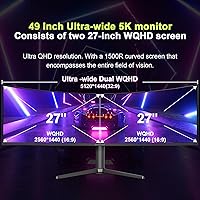
  • Screen Size: The panel measures 49 inches diagonally, using a 32:9 aspect ratio that approximates two 27-inch widescreen monitors placed side by side.
  • Panel Type: Uses a Fast VA (Vertical Alignment) panel, which delivers deeper blacks and higher contrast than IPS while offering improved response times compared to standard VA technology.
  • Resolution: Native resolution is 5120x1440 (Dual QHD), providing a pixel density that keeps text and fine detail sharp across the full width of the screen.
  • Refresh Rate: Supports up to 120Hz, but this maximum rate is only accessible when connected via DisplayPort 1.4; HDMI 2.0 connections run at a lower refresh rate due to bandwidth limitations.
  • Response Time: Rated at 1ms MPRT (Moving Picture Response Time), which reduces motion blur during fast-paced content, though this is a motion-blur reduction metric rather than a traditional gray-to-gray measurement.
  • Curvature: Features a 1500R curvature radius, meaning the screen curves to match the arc of a circle with a 1500mm radius, designed to keep all edges within a comfortable focal distance.
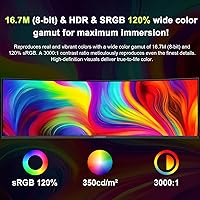
  • Color Gamut: Covers 120% of the sRGB color space, which translates to vivid, saturated colors suitable for gaming and general media consumption.
  • Brightness: Peak brightness is rated at 350 nits, which is adequate for standard indoor environments but limits the effectiveness of HDR content in bright rooms.
  • Contrast Ratio: Specified contrast ratio is 3000:1, a figure typical of VA panels that produces noticeably richer blacks compared to most IPS alternatives at this size.
  • HDR Support: Supports HDR10, an entry-level HDR standard that enables compatible content to display a wider tonal range, though the brightness ceiling constrains the overall HDR impact.
  • Adaptive Sync: Compatible with Adaptive Sync technology, which reduces screen tearing and stutter on both AMD FreeSync-capable and select Nvidia GPUs without requiring a proprietary certification.
  • Connectivity: Equipped with two HDMI 2.0 ports and two DisplayPort 1.4 ports, supporting connection of up to four devices simultaneously for flexible switching or split-screen use.
  • PIP and PBP: Includes Picture-in-Picture and Picture-by-Picture modes, allowing two separate video sources to be displayed simultaneously — either overlaid or split into two equal 1440p halves.
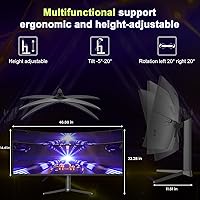
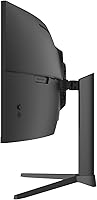
  • Ergonomics: The included stand supports height adjustment from 0 to 110mm, tilt from -5° to +20°, and left-right swivel up to 20° in each direction.
  • VESA Compatibility: Compatible with the 75x75mm VESA mounting standard, allowing the monitor to be mounted on most third-party monitor arms or wall brackets.
  • Surface Finish: The screen uses a matte anti-glare coating that diffuses reflections, making it more comfortable to use in rooms with ambient lighting or windows nearby.
  • Dimensions: Assembled with the stand, the monitor measures approximately 46.69 inches wide, 22.28 inches tall, and 11.61 inches deep.
  • Weight: Complete unit with stand weighs 24.2 pounds, which is typical for a 49-inch panel but worth accounting for when planning desk load capacity or arm ratings.
  • Eye Care: Incorporates flicker-free backlight technology and a low blue light mode to reduce eye strain during extended viewing sessions.
  • Manufacturer: Produced by Express Luck Industrial (Zhongshan) Limited, a Chinese electronics manufacturer operating under the Amzfast brand name.

Related Reviews

Deco Gear VIEW490 49-inch Curved Ultrawide Monitor
74%
91%
Immersion & Display Experience
83%
Gaming Performance
88%
Contrast & Black Levels
89%
Connectivity & Hub Features
86%
Value for Money
More
Westinghouse 34-Inch Curved Ultrawide Gaming Monitor
72%
84%
Value for Money
78%
Image Quality
81%
Refresh Rate & Motion
82%
Adaptive Sync
83%
Curve & Immersion
More
Raywego Q34DB45-1 34-inch Curved Gaming Monitor
72%
88%
Value for Money
84%
Gaming Performance
74%
Image Quality
51%
HDR Performance
67%
Build Quality
More
INNOCN 49C1R 49″ Curved Ultrawide Monitor

74%
88%
Display Immersion
84%
Contrast & Black Levels
76%
Color Accuracy
81%
Refresh Rate & Motion Handling
54%
HDR Performance
More
Deco Gear DGVIEW495K 49″ Curved Ultrawide Monitor
74%
93%
Immersion & Screen Real Estate
88%
Color Accuracy
79%
Refresh Rate & Gaming Smoothness
67%
Response Time
84%
Value for Money
More
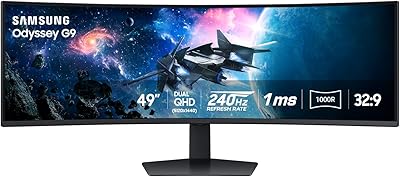
Samsung Odyssey G9 49-inch Curved Gaming Monitor
82%
93%
Visual Clarity
90%
Immersion & Curvature
94%
Gaming Performance (FPS)
60%
Ease of Setup
88%
Build Quality
More
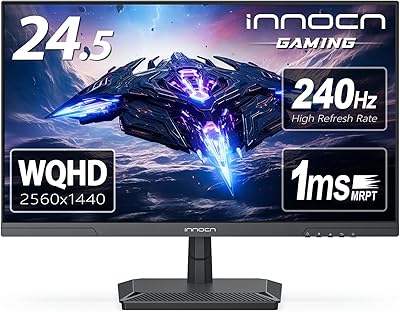
INNOCN 25G2S 24.5″ Gaming Monitor
76%
91%
Image Clarity
88%
Refresh Rate Performance
86%
Color Accuracy
84%
Gaming Responsiveness
89%
Console Compatibility
More
Acer EI491CUR 49-inch Curved DQHD Gaming Monitor
87%
91%
Display Quality
88%
Immersion and Screen Size
90%
Performance for Gaming
84%
Color Accuracy
92%
Refresh Rate and Response Time
More
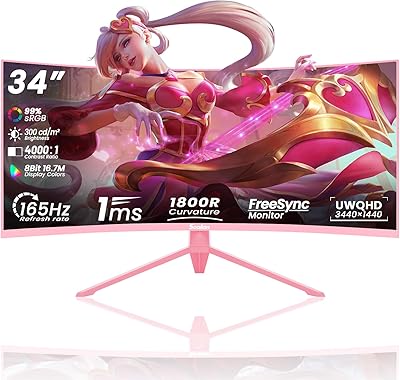
Z-Edge UG49W 49-inch Curved Gaming Monitor
73%
88%
Value for Money
81%
Image Quality
78%
Gaming Performance
86%
Productivity Use
74%
Build Quality
More
Sealan Q34P4D-1 34-inch Ultrawide Curved Gaming Monitor
69%
83%
Value for Money
79%
Gaming Performance
71%
Picture Quality
58%
Build Quality
72%
Color Accuracy
More

FAQ

You need DisplayPort 1.4 to hit 120Hz on this monitor. HDMI 2.0, which is what both HDMI ports use, does not have enough bandwidth to push 5120x1440 at 120Hz. If you plug in via HDMI expecting the full refresh rate, you will be disappointed. Make sure your GPU has a free DisplayPort 1.4 output before buying.

Adaptive Sync on this panel works with compatible AMD GPUs natively. It will also function with Nvidia cards that support G-Sync Compatible mode, which most modern Nvidia GPUs do — though performance may vary slightly compared to a monitor with official G-Sync or FreeSync Premium certification.

Honestly, it is closer to a checkbox at this brightness level. HDR10 support is present, but the panel tops out at 350 nits, which is not bright enough to produce the punchy highlights that make HDR content look dramatically different. It is fine for casual HDR gaming but do not expect the kind of impact you would get from a high-brightness OLED or a proper HDR600-certified display.

Yes, and this is genuinely one of the more useful features on the Amzfast AMZG49C7U 49-inch Curved Ultrawide Gaming Monitor. The PBP (Picture-by-Picture) mode splits the panel into two equal halves, each running as an independent 1440p display from a separate input source. You can use a keyboard-video-mouse switch alongside it, or simply control each PC separately. It works well for dual-PC streaming setups or keeping a work machine and a personal machine active simultaneously.

The stand is generally solid for everyday use, but a few buyers have noted that it feels slightly less rigid at the top of its height range. At normal desk height it should be fine, but if you work near equipment that vibrates or you tend to tap your desk, you might notice some movement. If stand stability is a priority, the VESA 75x75 compatibility means swapping to a quality monitor arm is straightforward.

In terms of total resolution, yes — the 32:9 panel gives you the same horizontal pixel count as two 27-inch 1440p monitors side by side, without a bezel gap in the middle. The workflow feels more cohesive than a dual-monitor setup for most tasks. The one adjustment is that some apps do not handle ultrawide aspect ratios perfectly, so you may occasionally need to manually resize windows rather than relying on fullscreen mode.

No, there is no built-in USB hub on this panel. You get two HDMI 2.0 and two DisplayPort 1.4 inputs, and that is it for connectivity. If you need to manage multiple USB peripherals, you will want a separate hub or a desk with built-in ports.

Amzfast is a newer brand and their support infrastructure is still developing. Warranty terms should be confirmed directly with the seller at the time of purchase, as they can vary. Given the brand's limited track record, it is worth saving all purchase documentation and checking return window policies before the standard return period closes.

Early users generally report that colors look good straight out of the box, especially for gaming and media. If you are doing color-sensitive design work, running a quick calibration is always worthwhile on any monitor, but for the typical use case this panel targets, most people find the default settings acceptable without immediate adjustment.

It depends heavily on your desk depth and how far back you sit. At nearly 47 inches wide, this super-ultrawide display will dominate most desks and may overhang shallower surfaces. A desk depth of at least 24 to 28 inches is recommended so you can sit far enough back to comfortably take in the full width without constantly moving your head. If space is tight, measure carefully before committing.