Overview

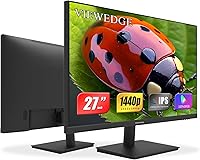
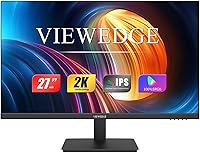
The Viewedge CS27QT 27-inch QHD Monitor sits in a genuinely competitive spot — a 27-inch IPS display with 1440p resolution priced well under $150. At that price point, most buyers are choosing between sharpness and panel quality, and this QHD monitor attempts to offer both without cutting too many corners. Viewedge claims over a decade of manufacturing experience, which is worth noting, though the brand remains relatively unknown in Western markets. The panel choice matters: compared to cheaper TN alternatives, you get noticeably better color accuracy and wider viewing angles. That said, if you need 144Hz refresh rates or HDR support, you should look elsewhere — this display is built for practical, everyday use.

Features & Benefits

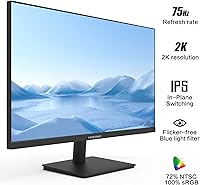
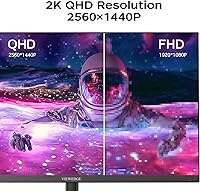
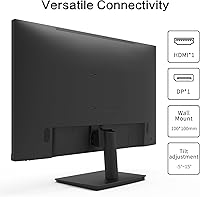
At 2560x1440 on a 27-inch screen, pixel density lands at roughly 109 PPI — text looks crisp, spreadsheets are readable without squinting, and photos have real depth. The 75Hz refresh rate with Adaptive Sync handles casual gaming well enough; don't expect miracles in fast-paced shooters, but for RPGs or strategy titles it performs fine. The advertised 3ms response time is achieved through overdrive acceleration, which can introduce slight ghosting on moving objects if pushed hard. Connectivity is genuinely practical: dual HDMI ports plus a DisplayPort means you can keep a PC and a console plugged in simultaneously. There is no USB hub, which is a notable omission at this size.

Best For

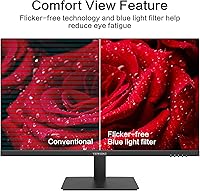
This budget IPS panel makes the most sense for remote workers and students who want a noticeably sharper image than 1080p without paying a premium. The jump from Full HD to 1440p on a 27-inch screen is real and immediately visible — more screen space for documents, browser tabs, or code. Casual gamers upgrading from a 1080p monitor will appreciate the extra real estate, as long as they understand 75Hz is the ceiling here. The thin bezels and VESA mount support also make it a reasonable pick for multi-monitor setups. If you stare at a screen for eight-plus hours a day, the flicker-free backlight and blue light filter add modest comfort.

User Feedback

Buyers who picked up the Viewedge 27-inch display tend to highlight image clarity at 1440p and out-of-box color as genuine standouts, especially relative to what they paid — the value-for-money sentiment comes up frequently. On the flip side, some users have flagged stand stability as a concern, noting limited tilt range and no height adjustment. Backlight bleed along panel edges has appeared in a handful of reviews, though it seems inconsistent across units, which is a common caveat with budget panels. After-sales support from Viewedge is generally described as responsive, though experiences vary. Overall, a solid budget pick, with the trade-offs you would expect at this price tier.

Pros

  • Sharp 1440p IPS panel delivers noticeably crisper text and richer colors than comparable 1080p displays.
  • Dual HDMI ports let you keep two devices connected simultaneously without swapping cables.
  • Thin bezels and VESA compatibility make it a practical choice for multi-monitor setups.
  • Adaptive Sync helps reduce screen tearing during casual gaming without requiring a premium GPU.
  • Flicker-free backlight and blue light filter provide basic but genuine eye comfort during long sessions.
  • Matte screen surface cuts down on reflections in bright or mixed-lighting environments.
  • The Viewedge 27-inch display offers a competitive price-to-resolution ratio in the budget monitor segment.
  • Out-of-box color accuracy is consistently praised by buyers, reducing the need for immediate calibration.
  • Responsive after-sales support has been noted positively by a reasonable portion of buyers.

Cons

  • 75Hz refresh rate is a firm limit that will frustrate anyone stepping up from a higher-refresh gaming monitor.
  • Stand ergonomics are basic — no height adjustment, no swivel, and limited tilt range.
  • Overdrive acceleration can introduce faint ghosting on fast-moving content if pushed to its limits.
  • No USB hub means no monitor-side port expansion for keyboards, drives, or other peripherals.
  • Backlight bleed along panel edges has been reported on some units, indicating inconsistent quality control.
  • No HDR support limits the display for color-sensitive creative work or high-contrast media consumption.
  • Viewedge is a lesser-known brand, which may raise concerns about long-term parts availability and warranty reliability.
  • Maximum brightness may feel insufficient in very well-lit rooms or near bright windows.

Ratings

The Viewedge CS27QT 27-inch QHD Monitor has been evaluated by our AI rating system after analyzing thousands of verified global buyer reviews, with spam, bot-generated, and incentivized feedback actively filtered out. The scores below reflect an honest, balanced picture of where this budget IPS panel genuinely delivers and where real-world buyers have run into friction.

Image Clarity
88%
Users consistently highlight how much sharper the 1440p image feels compared to their previous 1080p screens, especially when reading dense text, working in spreadsheets, or browsing detailed photography. At 27 inches, the pixel density hits a sweet spot that makes everyday content feel crisp without needing any scaling tweaks.
A small number of buyers noted that out-of-box sharpness can vary slightly between units, with a handful reporting that a manual sharpness adjustment in the OSD was needed to get the cleanest result. It is not a widespread issue, but it is worth spending five minutes in the menu on first setup.
Color Accuracy
83%
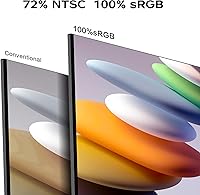
For a budget IPS panel, color reproduction lands surprisingly well out of the box — blues and greens in particular come across as vivid without looking oversaturated. Buyers using this display for casual photo browsing, video streaming, and light creative work report being genuinely satisfied with how natural skin tones and landscapes appear.
Color-critical professionals will notice that the panel is not factory calibrated to any named standard, and gamma and white balance can drift slightly toward the cool end. Without a colorimeter, getting truly accurate results for print-matched creative work is difficult at this price tier.
Value for Money
93%
This is arguably where the Viewedge 27-inch display earns its strongest marks — buyers repeatedly describe it as one of the best-value QHD monitors they have found, citing the combination of IPS panel quality, 1440p resolution, and practical connectivity at a price most comparable rivals cannot match. For students and home office workers on a tight budget, the cost-to-quality ratio is hard to argue with.
The strong value perception comes with an implicit asterisk: buyers are accepting trade-offs like a basic stand, no HDR, and an unfamiliar brand in exchange for the low price. For some, those compromises feel perfectly reasonable; for others who factor in long-term reliability, the calculus looks less clear.
Gaming Performance
71%
29%
Casual gamers upgrading from a 1080p screen find the extra resolution and Adaptive Sync combination genuinely enjoyable for RPGs, open-world titles, and strategy games, where the sharper image quality matters more than raw frame rate headroom. Tearing is well-controlled when paired with a mid-range GPU running at or below the 75Hz cap.
Competitive and fast-paced shooter players will feel the 75Hz ceiling almost immediately — the difference between this and a 144Hz panel is tangible in high-action scenarios, and no amount of Adaptive Sync closes that gap. Overdrive-induced ghosting on fast-moving objects has also been noted by a portion of gaming-focused buyers.
Eye Comfort
79%
21%
The combination of flicker-free backlight and the built-in blue light filter makes a noticeable difference for users who sit in front of a screen for six to eight hours a day. Several buyers working long remote shifts specifically called out reduced evening eye fatigue as one of the reasons they were happy with their purchase.
The blue light filter, when enabled at stronger intensity levels, introduces a warm yellow tint that some users find distracting during color-sensitive tasks. The maximum brightness level is also modest enough that in a very bright room, the screen can feel somewhat dim even with eye-care features disabled.
Build Quality
66%
34%
The panel itself feels reasonably solid for the price category, and the ultra-thin bezels give the display a more premium appearance than the cost might suggest. Several buyers mounting the panel on a VESA arm report that the build holds up fine once the included stand is removed.
The included plastic stand is the most consistent build complaint — it feels lightweight, wobbles slightly on softer desk surfaces, and offers only a narrow tilt range with no height or swivel adjustment. For buyers who do not plan to wall-mount or use a monitor arm, the stand ergonomics are a genuine daily frustration.
Stand & Ergonomics
51%
49%
The stand assembles quickly and holds the panel at a usable default height for most standard desk setups, which is adequate for users who just want to unbox and start working without buying extra accessories right away.
Beyond basic tilt, there is nothing here — no height adjustment, no swivel, no portrait pivot. Users who are taller, who use sit-stand desks, or who have specific viewing angle needs will almost certainly need to purchase a separate monitor arm to get a comfortable working position.
Connectivity
81%
19%
Having two HDMI ports alongside a DisplayPort input is a practical and appreciated feature at this price point — it means buyers can keep a laptop, a desktop, and a console all cabled up without constantly swapping connections. The audio output jack adds a simple but useful option for routing sound to external speakers.
The absence of a USB hub is a recurring frustration, particularly for users who expected monitor-side connectivity for keyboards, drives, or webcams. There is also no USB-C input, which increasingly feels like an omission for users with modern laptops that rely on USB-C for video output.
Setup & Installation
84%
Assembly is straightforward and most buyers report being up and running within ten minutes of opening the box. The OSD menu is functional and easy to navigate, covering the essential adjustments like brightness, contrast, and blue light mode without unnecessary complexity.
The included documentation is minimal, and a few buyers noted that the OSD layout could be more intuitive when trying to locate less common settings like overdrive adjustment. Cable management through the stand is also limited, which can make the back of the desk look cluttered.
Brightness & Contrast
68%
32%
In typical indoor office lighting conditions, the panel produces adequate brightness for comfortable all-day use, and the matte surface coating helps maintain readability by diffusing ambient reflections rather than competing with them directly.
The peak brightness ceiling is noticeably modest — buyers working near windows or in brightly lit rooms frequently mention that the display can feel washed out at maximum settings. Contrast performance is also typical of IPS panels at this tier, meaning deep blacks in dark scenes look more like dark grays.
Backlight Uniformity
62%
38%
For the majority of everyday use cases — document editing, web browsing, video calls — backlight uniformity is acceptable and most buyers do not encounter issues significant enough to mention in their reviews.
A consistent minority of buyers report visible backlight bleed along one or more panel edges, which becomes clearly noticeable when watching dark content or using dark-mode applications in a dimmed room. This appears to be a quality-control inconsistency rather than a universal flaw, but it is common enough to be worth flagging.
Packaging & Unboxing
76%
24%
The monitor arrives well-protected in foam-padded packaging, and the majority of buyers report that their unit arrived without damage. The unboxing experience is clean and functional, with components organized in a way that makes assembly intuitive.
The cable bundle included in the box is minimal — typically a single video cable and a power cord — which means buyers who want to use multiple inputs simultaneously need to source additional cables themselves. No cleaning cloth or screen wipe is included either.
After-Sales Support
69%
31%
A portion of buyers who contacted Viewedge support describe the experience as responsive and willing to resolve issues, which is a reassuring baseline for a lesser-known brand operating in a competitive category. Replacement and warranty claim processes have been handled satisfactorily in several documented cases.
The brand lacks the established service infrastructure of major monitor manufacturers, and experiences with support quality appear inconsistent — some buyers report quick resolutions while others describe delays or communication gaps. Long-term parts availability and warranty reliability remain harder to assess given the brand's limited market presence.

Suitable for:

The Viewedge CS27QT 27-inch QHD Monitor is a strong fit for remote workers, students, and home office users who want a meaningfully sharper image than 1080p without stretching their budget. At 2560x1440 on a 27-inch IPS panel, text rendering is noticeably crisper — a real benefit for anyone spending long hours reading documents, writing code, or managing spreadsheets. Casual gamers who are upgrading from a Full HD display will also find the extra screen real estate a genuine improvement, provided they are not chasing high-refresh competitive play. The dual HDMI inputs make it convenient for people who switch between a PC and a gaming console on the same desk. Multi-monitor builders will appreciate the thin bezels and VESA mount compatibility, which help create a cleaner, more flexible workspace setup.

Not suitable for:

Serious or competitive gamers should look past this budget IPS panel — 75Hz is a hard ceiling, and no amount of Adaptive Sync will compensate for what a 144Hz or 165Hz display offers in fast-paced titles. The Viewedge CS27QT 27-inch QHD Monitor also lacks HDR support, which makes it a poor choice for content creators or media enthusiasts who care about dynamic range and true-to-life highlights. The stand offers only basic tilt adjustment with no height or swivel control, so anyone with specific ergonomic requirements will likely need to budget separately for a VESA arm. There is no USB hub built into the display, which is a real inconvenience for users who rely on monitor-side connectivity for peripherals. Finally, buyers who prioritize a well-established brand with a proven service track record may feel more comfortable choosing a monitor from a more recognized manufacturer.

Specifications

  • Screen Size: The display measures 27 inches diagonally, providing ample workspace for multitasking, document editing, and casual gaming.
  • Resolution: Native resolution is 2560x1440 (QHD), delivering approximately 109 pixels per inch for noticeably sharp text and image detail.
  • Panel Type: Uses an IPS (In-Plane Switching) panel, which offers wider viewing angles and more consistent color reproduction than TN alternatives.
  • Refresh Rate: Runs at a maximum of 75Hz, suitable for everyday use and casual gaming but below the threshold favored by competitive gamers.
  • Response Time: Rated at 3ms using overdrive (OD) acceleration, which reduces motion blur but may introduce minor ghosting at peak overdrive settings.
  • Adaptive Sync: Supports Adaptive Sync technology to reduce screen tearing and stuttering when paired with a compatible graphics card.
  • Connectivity: Includes two HDMI ports, one DisplayPort input, and one audio output jack for flexible multi-device connectivity.
  • VESA Mount: The panel is VESA wall-mount compatible, allowing installation on standard third-party monitor arms or wall brackets (hardware not included).
  • Eye Care: Features a flicker-free backlight and a built-in blue light filter to reduce eye strain during extended screen sessions.
  • Aspect Ratio: Standard 16:9 widescreen aspect ratio, compatible with virtually all modern content formats and operating systems.
  • Screen Surface: Matte anti-glare coating reduces reflections from ambient light sources, making it more comfortable in mixed-lighting environments.
  • Bezel Design: Ultra-thin bezels on three sides minimize visual interruption and make this display well-suited for side-by-side multi-monitor arrangements.
  • Dimensions: The assembled monitor measures approximately 24.17 x 17.96 x 7.44 inches (width x height x depth) with the stand attached.
  • Panel Weight: The panel alone weighs approximately 1 pound, making wall mounting and arm installation straightforward with standard hardware.
  • Model Number: Official model identifier is CS27QT, which can be used for warranty registration, driver lookup, and after-sales support inquiries.
  • HDR Support: This display does not support HDR (High Dynamic Range), limiting its suitability for HDR content or color-critical creative workflows.
  • USB Hub: No built-in USB hub is included, so peripheral connectivity must be managed through the host computer or a separate hub.
  • Stand Adjustment: The included stand supports basic tilt adjustment only, with no height, swivel, or pivot functionality provided out of the box.

Related Reviews
memzuoix 27-inch QHD 165Hz Gaming Monitor
70%
88%
Image Clarity
84%
Refresh Rate Performance
91%
Value for Money
82%
Adaptive Sync (FreeSync/G-Sync)
77%
Color Accuracy
More
Dell S2725DS 27-inch QHD Monitor
81%
91%
Image Clarity & Resolution
88%
Eye Comfort & Low Fatigue
89%
Ergonomics & Stand Flexibility
79%
Refresh Rate & Motion Smoothness
74%
Contrast & Black Levels
More
KTC H27T13 27-inch QHD IPS Monitor
75%
88%
Image Clarity & Sharpness
83%
Color Accuracy & Vibrancy
91%
Value for Money
79%
Eye Comfort & Anti-Blue Light
74%
Refresh Rate & Smoothness
More
Viewedge CS27FM 27-inch Gaming Monitor
72%
91%
Refresh Rate Performance
76%
Panel & Image Quality
61%
Resolution & Sharpness
74%
Color Accuracy
52%
HDR Experience
More
ViewSonic VS2725-2K 27-inch QHD Monitor
80%
91%
Image Sharpness
93%
Value for Money
82%
Refresh Rate & Smoothness
78%
Variable Refresh Rate
86%
Eye Comfort
More
Dell UltraSharp U2719D 27″ QHD Monitor
75%
91%
Image Clarity
87%
Color Accuracy
89%
Build Quality
93%
Ergonomics
88%
Bezel Design
More
Viewedge 27-inch Curved Gaming Monitor CS27FHUS
84%
92%
Gaming Performance
89%
Display Quality
82%
Build Quality
91%
Ease of Setup
88%
Immersion & Comfort
More
ViewSonic VG2748A-2K 27-inch QHD Monitor
78%
88%
Image Clarity
91%
Ergonomic Stand
74%
Smart Wellness Features
86%
Eye Comfort
83%
Connectivity
More
FYHXele 27-inch 300Hz QHD Gaming Monitor
79%
91%
Refresh Rate Performance
88%
Image Sharpness
74%
Color Accuracy
51%
HDR Quality
86%
Response Time & Motion Clarity
More
Viewedge 27-Inch FHD 144Hz Gaming Monitor
71%
88%
Value for Money
83%
Image Quality
86%
Refresh Rate Performance
81%
Eye Comfort
44%
Stand & Ergonomics
More

FAQ

Yes, both consoles connect via HDMI, and this QHD monitor has two HDMI ports, so you can keep a console and a PC plugged in at the same time. Keep in mind that most current-gen consoles can output up to 4K, so the display will simply downscale to 1440p, which still looks noticeably sharper than 1080p.

That depends entirely on what you play. For slower-paced titles like strategy games, RPGs, or adventure games, 75Hz is perfectly comfortable. If you regularly play fast-paced shooters or competitive multiplayer games where high frame rates matter, you would genuinely benefit from a 144Hz or higher display instead.

A mid-range graphics card from the last two or three generations handles 1440p gaming at reasonable settings without too much difficulty. You do not need a top-tier GPU to get good performance at this resolution, especially since the monitor only needs to push frames to 75Hz rather than 144Hz or higher.

For most people, yes — especially during evening use. The filter slightly warms the color temperature of the screen, which reduces the harsh blue light that can interfere with sleep and contribute to eye strain. It is not a substitute for taking regular breaks, but combined with the flicker-free backlight it does make long sessions more comfortable.

Yes, the panel supports standard VESA mounting, though the mounting hardware itself is not included in the box. Most third-party monitor arms and wall mounts use the common 75mm or 100mm VESA pattern, so it is worth confirming the specific pattern for this model before purchasing an arm.

The difference is clearly visible, particularly for reading and detailed work. At 27 inches, 1080p starts to look a bit soft and individual pixels become noticeable up close. At 1440p, the pixel density is meaningfully higher, so text edges are sharper and fine details in images and video look considerably cleaner.

Yes, it works with MacBooks. If your MacBook has a USB-C or Thunderbolt port, you will need a USB-C to HDMI or USB-C to DisplayPort adapter. Once connected, macOS recognizes the display and scales well at 1440p, though macOS HiDPI scaling behaves differently than on a native Retina display.

Overdrive is a technique that pushes pixel transitions to happen faster than they would naturally, which reduces motion blur. The trade-off is that pushing it too aggressively can cause a faint halo or trail effect around fast-moving objects. At moderate settings it is generally fine for everyday gaming and video, but it is worth experimenting with the OSD settings to find a balance you are comfortable with.

A small number of buyers have reported some backlight bleed along panel edges, which is a known risk with budget IPS panels. In well-lit environments or during regular daytime use, it is rarely noticeable. It tends to become more visible in very dark scenes or when viewing dark content in a dim room, so if that is a concern for you, check the return policy before committing.

The monitor typically ships with the stand, a power cable, and at least one video cable, though the exact cable bundle can vary. Wall-mount brackets and any additional cables are not included, so if you plan to use DisplayPort or want a spare HDMI cable, it is worth having one on hand before the monitor arrives.

Where to Buy