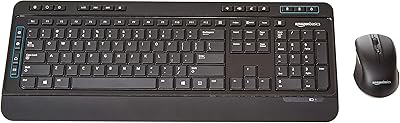
Overview

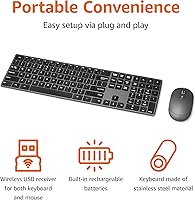
The Amazon Basics HKM8983US Wireless Keyboard Mouse Combo arrived on the market in early 2024 as a straightforward, no-drama option for anyone who wants to cut the cord without spending much. The design is notably slim, with a stainless steel housing that gives it a cleaner look than most plastic combos in this price range. The USB nano-receiver tucks neatly into the keyboard base, so you won't lose it between desk sessions. Wireless performance reaches up to 33 feet over a 2.4G connection, which covers any reasonable home or office setup. With over 3,000 ratings already logged, it has enough real-world feedback to draw meaningful conclusions.
Features & Benefits

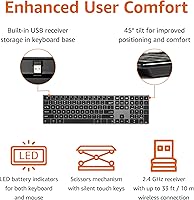
What stands out most about this wireless combo is that both the keyboard and mouse are rechargeable via USB, which means no scrambling for AA batteries mid-workday. The full-size layout includes a dedicated number pad, a feature that data entry users and spreadsheet workers will genuinely appreciate. Typing feel is quiet and low-profile — noticeable enough that coworkers in an open office won't glare at you. Setup is instant: plug in the receiver and both devices connect without any driver installation. The stainless steel housing does add a touch more rigidity than all-plastic alternatives common at this price, though it's still a budget-tier build overall.

Best For

This rechargeable desk combo is best suited to Windows PC users who want something clean, quiet, and cable-free without putting much thought into it. It's a natural fit for home office setups where desk space is at a premium and a slim, uncluttered layout matters. Students working in dorms, libraries, or shared apartments will appreciate the muted key noise. That said, Mac users should look elsewhere — this is officially a Windows-only device, supporting Windows 7 through 10 and later. Anyone who dreads replacing batteries will find the built-in recharging genuinely convenient, though the charging cable setup might not appeal to everyone equally.

User Feedback

Across more than 3,000 reviews, the Amazon Basics keyboard and mouse set holds a solid 4.0-star average — respectable for a budget combo but not without its caveats. Most buyers praise the clean, slim aesthetic and how quickly everything works straight out of the box. Quiet key feel comes up repeatedly as a genuine plus. On the flip side, a number of users flag mouse ergonomics as a weak point, citing its flat shape as uncomfortable during longer sessions. A few reviewers also find the charging process mildly awkward. Long-term connection stability seems solid for most, though occasional dropout complaints do surface in the lower-star reviews.

Pros

  • Both keyboard and mouse are rechargeable, eliminating the hassle of buying replacement batteries.
  • The full-size layout includes a number pad — a rare inclusion at this price point.
  • Quiet, low-profile keys are noticeably unobtrusive in shared offices or late-night home sessions.
  • Plug-and-play setup works instantly with no drivers, software, or account required.
  • The stainless steel keyboard housing feels more solid than the all-plastic competitors it sits alongside.
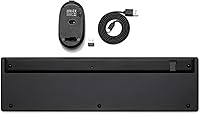
  • Nano-receiver stores inside the keyboard base, so it stays with the combo and never gets lost.
  • The 2.4G wireless connection handles typical desk distances reliably without noticeable lag.
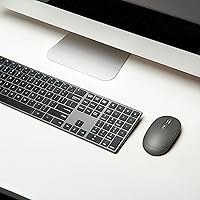
  • The slim, all-black design looks noticeably cleaner on a desk than most budget combos.
  • Over 3,000 real-world ratings provide strong confidence that performance is consistent across units.

Cons

  • The mouse is uncomfortable during long sessions due to its flat, low-profile shape with minimal palm support.
  • No backlighting makes typing in dim or dark environments needlessly difficult.
  • Mac, ChromeOS, and Linux users are entirely unsupported — compatibility is Windows-only.
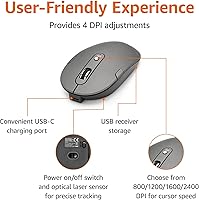
  • Mouse tracking performance is unreliable on reflective or glossy surfaces.
  • Charging both devices simultaneously is awkward, with cable placement drawing repeated criticism.
  • Key legends and surface finishes show wear within 12 to 18 months of regular daily use.
  • Mouse build quality feels noticeably cheaper than the keyboard, creating an uneven experience.
  • Wireless performance at the edges of the claimed 33-foot range is inconsistent in congested environments.
  • Only one color option available, limiting appeal for users with lighter or colorful desk aesthetics.

Ratings

The Amazon Basics HKM8983US Wireless Keyboard Mouse Combo has been scored below using AI-assisted analysis of thousands of verified global buyer reviews, with spam, bot activity, and incentivized feedback actively filtered out. Ratings reflect the honest distribution of real user experiences — strengths and frustrations alike — so you get a clear picture before committing to a purchase.
Value for Money
88%
Most buyers feel they got more than they paid for at this price point. The rechargeable batteries alone remove a recurring cost that plagues similarly priced competitors, and the stainless steel finish makes it look like it belongs on a more expensive desk.
A handful of users who compared it directly against slightly pricier options felt the mouse underdelivered relative to the keyboard's quality, creating a slight imbalance in overall value perception.
Typing Experience
79%
21%
The low-profile keys have a satisfying, muted click that works well in shared spaces like home offices or open-plan environments. Light typists and casual users consistently praise the comfortable key travel for extended sessions.
Heavy typists or those coming from mechanical keyboards often find the feedback too shallow and lacking tactile resistance. A few users noted some key wobble after several months of daily use.
Mouse Ergonomics
58%
42%
For short tasks — browsing, casual clicking, or light document work — the mouse gets the job done without complaint. Its slim profile keeps the desk footprint minimal, which some users with small workspaces specifically appreciated.
This is the combo's most consistent pain point. Users with larger hands or those working long hours report noticeable fatigue, as the flat, compact shape offers little palm support. It is clearly designed for occasional rather than intensive use.
Wireless Connectivity
83%
Day-to-day connectivity is reliably stable across normal desk distances. Users working in typical home or office setups rarely report dropouts, and the plug-and-play nano-receiver means everything just works the moment it is plugged in.
A smaller but vocal group of reviewers noted intermittent lag or disconnection issues, particularly in environments with significant wireless interference. Performance at the far end of the 33-foot range claim is inconsistent.
Build Quality
71%
29%
The stainless steel keyboard housing genuinely sets this apart from all-plastic budget combos. It resists flex under pressure and feels noticeably more solid when picked up, which contributes to a more premium first impression than the price suggests.
The mouse does not share the same material quality and feels hollow by comparison. Long-term reviews flag concerns about key legends fading and some surface wear appearing within six to twelve months of regular use.
Setup & Installation
93%
Virtually every reviewer agrees setup takes under a minute. Plug the nano-receiver into any USB port and both devices respond immediately — no drivers, no software, no account creation. The receiver stored in the keyboard base is a practical touch that frequent travelers appreciate.
The only real friction some users encounter is locating the receiver storage slot initially, as it is not immediately obvious. Windows-only compatibility also means Mac or ChromeOS users are turned away before they even start.
Battery & Charging
76%
24%
Having rechargeable lithium-ion batteries in both the keyboard and mouse is a genuine differentiator at this price. Users who have burned through AA batteries in previous combos specifically call this out as a reason they chose this set.
The charging cable arrangement draws criticism — some users find it inconvenient to charge both devices simultaneously during a workday, and the cable type or port placement on the mouse has frustrated a subset of reviewers.
Keyboard Layout & Key Coverage
84%
The full-size layout with a dedicated number pad is a genuine plus for anyone doing data entry, accounting work, or spreadsheet-heavy tasks. Function keys and standard navigation keys are all present with no compromises.
Some users noted the key spacing feels slightly tighter than expected for a full-size board, which occasionally causes mistyping during the adjustment period. There is no backlighting, which limits usability in dim environments.
Mouse Tracking & Precision
67%
33%
For general office work — emails, web browsing, document editing — the mouse tracks accurately enough that most users never think twice about it. Cursor movement is smooth on standard desk surfaces and mouse pads.
Users doing any graphic work, photo editing, or tasks requiring fine cursor control report that the tracking resolution feels inadequate. On reflective or glossy surfaces, tracking becomes noticeably inconsistent.
Noise Level
86%
Quiet key operation is one of the most frequently praised aspects in positive reviews. Users working in bedrooms, libraries, or alongside sleeping family members specifically recommend this set for its unobtrusive sound profile.
A few reviewers noted the mouse clicks are louder than expected given the quiet keyboard, creating a slight mismatch. Those with heightened sensitivity to noise may still find the mouse audible in very quiet settings.
Portability & Storage
77%
23%
The slim keyboard profile and lightweight build make it reasonably easy to pack into a bag for coworking spaces or travel. The built-in receiver storage is especially practical — losing a nano-receiver is a common frustration this design sidesteps.
At over 17 inches long, the keyboard is not particularly compact compared to tenkeyless alternatives. Users who wanted a travel-friendly option sometimes found it bulkier than anticipated once packaged with the mouse.
OS & Device Compatibility
54%
46%
Within its supported environment, the combo works reliably across Windows 7 through Windows 10 and later with no configuration needed. Users on older business machines running legacy Windows versions report no issues.
The Windows-only limitation is a hard wall for a meaningful portion of potential buyers. Mac users, Chromebook users, and Linux users are entirely unsupported, and several reviewers left low ratings specifically after discovering this post-purchase.
Aesthetic & Desk Presence
81%
19%
The all-black colorway with stainless steel keyboard surface looks noticeably cleaner than competing plastic combos in photos and in person. Several buyers mentioned it complemented minimalist or dark-themed desk setups well.
There is only one color option, which limits appeal for buyers with lighter or more colorful workspace aesthetics. The mouse's glossy surface also tends to show fingerprints and smudges more readily than a matte finish would.
Long-Term Durability
63%
37%
Users within the first year of ownership generally report no major durability issues. The stainless steel keyboard frame holds up well to daily handling, and the rechargeable battery holds its charge adequately within normal usage cycles.
Reviews from longer-term users paint a less optimistic picture — key legends wearing off, mouse scroll wheel degrading, and battery capacity declining after 12 to 18 months of heavy use are patterns that appear with some regularity.

Suitable for:

The Amazon Basics HKM8983US Wireless Keyboard Mouse Combo is a strong pick for Windows PC users who want a clean, cable-free desk without any setup headaches or ongoing battery costs. Home office workers who type moderately throughout the day will appreciate the quiet keys and slim profile, particularly in shared spaces where loud clacking would be disruptive. Students setting up a dorm or apartment workstation get a full-size layout with a number pad — something many budget combos quietly omit — which makes it genuinely useful for spreadsheets, coursework, and number-heavy tasks. First-time wireless keyboard buyers will find the plug-and-play experience refreshingly simple; there is nothing to configure, no software to install, and the nano-receiver stores right in the keyboard base so it never goes missing. If your priority is a tidy, low-maintenance desk setup at a reasonable price, this rechargeable desk combo punches above its weight class.
Not suitable for:

The Amazon Basics HKM8983US Wireless Keyboard Mouse Combo is a firm pass for anyone outside the Windows ecosystem — it officially supports Windows 7, 8, 10, and later only, leaving Mac, ChromeOS, and Linux users with no reliable compatibility path. People who spend six or more hours a day on a computer should also think carefully before buying: the flat, compact mouse provides minimal palm support, and extended daily use has generated a consistent thread of ergonomic complaints from power users. Graphic designers, photo editors, or anyone who needs precise cursor control for detailed work will find the mouse tracking resolution inadequate for that kind of task. Those who expect durability beyond 18 months of heavy use should be aware that longer-term reviews flag issues with key legend wear and mouse scroll degradation. Finally, if you prefer a backlit keyboard for low-light environments or work frequently in dim rooms, this combo has no lighting whatsoever.
Specifications

  • Model Number: This combo is identified by model number HKM8983US, manufactured by Amazon Basics.
  • Connectivity: Both devices connect via a single 2.4G wireless USB nano-receiver, requiring no Bluetooth pairing or software installation.
  • Wireless Range: The wireless connection supports stable operation at distances of up to 33 feet from the receiver under typical conditions.
  • Receiver Storage: The nano-receiver stores inside a dedicated slot in the keyboard base, keeping it protected and travel-ready when not in use.
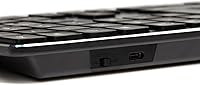
  • Power Source: Both the keyboard and mouse are powered by built-in rechargeable lithium-ion batteries, charged via included USB cables.
  • Keyboard Layout: The keyboard is full-size with a dedicated number pad, standard function row, and a complete set of navigation keys.
  • Key Profile: Keys are low-profile and designed for quiet actuation, reducing audible noise compared to standard membrane or mechanical keyboards.
  • Housing Material: The keyboard chassis features a stainless steel housing, offering more rigidity than the all-plastic builds common in this price tier.
  • Dimensions: The keyboard measures 17.32 x 5.12 x 1.97 inches, making it a standard full-size footprint suitable for most desk setups.
  • Weight: The combined package weighs 15.4 ounces, keeping the overall setup lightweight and easy to reposition or pack away.
  • Color: Available exclusively in Black, with a matte and stainless steel finish across the keyboard and mouse surfaces.
  • OS Compatibility: Officially compatible with Windows 7, Windows 8, Windows 10, and later versions only; Mac, ChromeOS, and Linux are not supported.
  • Amazon Rating: The combo holds a 4.0 out of 5-star average based on over 3,020 verified ratings on Amazon as of 2024.
  • Sales Rank: It ranks #32 in the Computer Keyboard and Mouse Combos category on Amazon, reflecting strong sustained sales volume.
  • Release Date: This product was first made available on Amazon on March 17, 2024, and was manufactured by Amazon Basics.
  • ASIN: The Amazon Standard Identification Number for this product is B0CJFB8J7B, used for direct lookup on Amazon.

Related Reviews

Amazon Basics Wireless Keyboard and Mouse Combo
74%
94%
Ease of Setup
88%
Value for Money
63%
Typing Experience
61%
Mouse Comfort & Usability
57%
Build Quality
More
Arteck HW192 Wireless Keyboard and Mouse Combo
78%
78%
Build Quality
72%
Typing Experience
63%
Mouse Comfort & Ergonomics
81%
Battery Life
69%
Wireless Connectivity
More
Hayyiesh KG659-01 Wireless Keyboard and Mouse Combo
75%
88%
Value for Money
79%
Keyboard Comfort & Ergonomics
74%
Key Feel & Typing Experience
58%
Mouse Build Quality
86%
Noise Level
More
Links9+ Wireless Keyboard and Mouse Combo
85%
89%
Ergonomics and Comfort
92%
Wireless Performance and Connectivity
85%
Build Quality
94%
Ease of Use and Setup
80%
Battery Life
More
MOWUX Wireless Keyboard and Mouse Combo
88%
91%
Typing Comfort
89%
Mouse Responsiveness
94%
Wireless Connectivity
85%
Build Quality
88%
Keycap Durability
More
Atelus Wireless Keyboard and Mouse Combo
83%
94%
Ease of Setup
88%
Ergonomics & Comfort
90%
Design & Aesthetics
80%
Mouse Performance
86%
Keyboard Performance
More
VEILZOR UK418 Wireless Keyboard and Mouse Combo
81%
91%
Value for Money
84%
Typing Comfort
89%
Noise Level
82%
Wireless Reliability
76%
Mouse Ergonomics
More
TopMate Wireless Keyboard and Mouse Combo
77%
91%
Value for Money
78%
Typing Experience
68%
Mouse Performance
63%
Build Quality
83%
Wireless Reliability
More
Arcwares Wireless Keyboard and Mouse Combo
78%
88%
Value for Money
91%
Aesthetic Design
76%
Keyboard Typing Experience
67%
Mouse Performance
84%
Wireless Connectivity
More
RECCAZR Wave Keys Ergonomic Wireless Keyboard Mouse Combo
78%
83%
Typing Comfort
67%
Mouse Feel & Handling
91%
Noise Level
86%
Wireless Connectivity
88%
Value for Money
More

FAQ

Unfortunately, no. The Amazon Basics HKM8983US Wireless Keyboard Mouse Combo is officially compatible with Windows 7, 8, 10, and later only. Mac, ChromeOS, and Linux users are not supported, so if you are outside the Windows ecosystem, you will want to look for a combo that explicitly lists your OS as compatible.
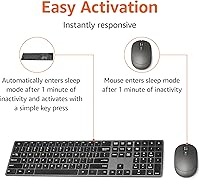
Not at all. Just plug the nano-receiver into any available USB port on your Windows PC and both the keyboard and mouse connect automatically. There are no drivers to download, no app to set up, and no account to create — it is genuinely plug-and-play.

Both devices have built-in lithium-ion batteries that charge via USB cable. The charging ports are built into each device, so you connect them similarly to how you would charge a phone or earbuds. You can still use the keyboard while it charges, though the mouse will need to be stationary during charging.

There is a small storage slot built into the underside of the keyboard base that holds the nano-receiver securely. This is a genuinely useful design choice — tiny USB receivers are notoriously easy to lose, and having a dedicated home for it removes that problem entirely.

This is the combo's most common complaint, so it is worth being upfront about it. The mouse has a flat, compact shape that works fine for short tasks but tends to cause fatigue during extended sessions. If you spend many hours a day at a computer, you may want a more ergonomic mouse option.

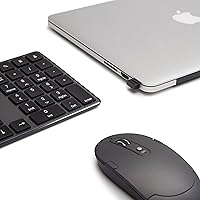
Yes, that is exactly how it works. A single nano-receiver handles both the keyboard and the mouse simultaneously, so you only occupy one USB port on your laptop or desktop. This is particularly convenient for laptops with limited USB availability.

Amazon Basics does not publish an official battery life figure for this combo in hours. Based on typical usage patterns reported by buyers, most users charge the devices every few weeks under moderate daily use. Heavy users may find themselves charging more frequently, especially the mouse.

For most standard home and office setups, yes. The 2.4G wireless connection is rated up to 33 feet, and the majority of users report stable, lag-free performance at typical desk distances. That said, if your environment has heavy wireless interference from other devices, performance at longer distances can occasionally degrade.

No, there is no backlighting on this keyboard. If you frequently work in dim rooms or prefer to type in the dark, this is a meaningful limitation to factor into your decision. Backlit options exist but typically come at a higher price point.

It holds up reasonably well within the first year for most users, and the stainless steel keyboard frame is a genuine durability advantage over all-plastic alternatives. That said, longer-term reviews do flag issues like key legends fading and mouse components wearing down after 12 to 18 months of heavy daily use, which is fairly typical for a budget-tier peripheral combo.

Where to Buy