Overview

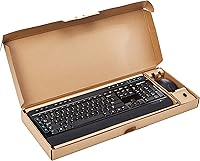
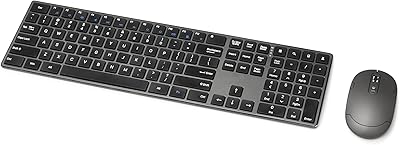
The Amazon Basics Wireless Keyboard and Mouse Combo is a no-fuss, budget-conscious peripheral set designed for everyday computing at home or in the office. This wireless combo covers the basics without pretense — full-size layout, a dedicated numeric keypad, and a single USB nano receiver that handles both devices. Plug it in and you are ready; no drivers, no setup headaches. The batteries come included, so there is genuinely nothing extra to buy on day one. Aesthetically, it is a clean, flat black that will not clash with most desks. It is not trying to impress anyone — it just works.
Features & Benefits

The 2.4 GHz wireless connection keeps inputs responsive without noticeable lag during regular typing or mouse movement. One USB nano receiver handles both devices, saving a port and keeping the desk tidy — a small but practical perk. The keyboard includes 20 shortcut keys for common actions like adjusting volume or skipping media tracks, covering the functions most people actually reach for. That full numeric keypad on the right side is legitimately useful if you regularly work with spreadsheets or handle data entry. Everything runs on the included batteries, and the layout is standard enough that any Windows user can pick it up immediately without any configuration.

Best For

This budget peripheral bundle makes most sense for home office workers who want to cut the cables without spending much. Students putting together a basic workstation, remote workers setting up a secondary desk, or anyone who just needs a reliable spare set will find it fits the bill. It is also a solid pick for older users or people who are not particularly tech-savvy, since the plug-and-play setup removes friction entirely. That said, if you are a heavy typist or someone who spends hours at a time mousing around, you will likely want something with better ergonomics. This one is built for light to moderate daily use, full stop.

User Feedback

Most buyers come away satisfied, and the setup experience gets consistent praise — people mention the combo working within moments of plugging in the receiver. Battery life also comes up favorably, with many reporting they rarely need to swap out cells. On the flip side, the keyboard draws honest criticism for feeling hollow and light, which is noticeable if you are used to anything sturdier. The mouse is described as adequate but basic — fine for browsing and light tasks, less comfortable during long sessions. A few buyers also note the Windows-only compatibility. All in all, the keyboard-and-mouse set earns its four-star average by delivering reliable, no-drama daily performance at a price most people can live with.

Pros

  • Plug-and-play setup works within seconds — no drivers, no configuration, no hassle.
  • Batteries are included for both devices, so you are ready to go straight out of the box.
  • The full numeric keypad makes data entry and spreadsheet work noticeably more convenient.
  • A single nano receiver handles both devices, keeping your USB ports free for other things.
  • Wireless connection stays stable and responsive for everyday typing and browsing tasks.
  • Battery life is genuinely solid — most users go months before needing a replacement.
  • The clean black design fits virtually any desk setup without looking out of place.
  • 20 shortcut keys cover the media and browser controls most people actually use daily.
  • At its price point, getting a full-size keyboard and mouse together with batteries included is hard to beat.

Cons

  • The keyboard feels hollow and light — tapping on it makes the budget construction obvious.
  • No battery indicator on either device means you get no warning before one cuts out mid-task.
  • Mouse lacks any ergonomic shaping, which causes discomfort during longer work sessions.
  • Shortcut keys are fixed and cannot be remapped, limiting usefulness for custom workflows.
  • Mac and Linux compatibility is unreliable — this is effectively a Windows-only peripheral.
  • The keyboard can shift on the desk during fast typing due to its light overall weight.
  • Mouse tracking fails on glossy or reflective surfaces without a dedicated mouse pad underneath.
  • No backlight on the keyboard, making it awkward to use in dim or low-light environments.
  • Only available in black — no color or finish options for buyers who care about desk aesthetics.

Ratings

The Amazon Basics Wireless Keyboard and Mouse Combo has been scored by our AI system after parsing thousands of verified global buyer reviews, with spam, incentivized, and bot-flagged submissions actively filtered out before any analysis. The scores you see below reflect the honest consensus of real users across a wide range of everyday computing scenarios — from home office setups to student desks. Both genuine strengths and recurring pain points are weighted into every number, so nothing here is sugar-coated.
Ease of Setup
94%
Buyers consistently describe this as one of the easiest peripherals they have ever set up — plug the nano receiver in, insert the batteries, and both devices are live within seconds. For non-technical users or anyone setting up a spare workstation quickly, that zero-configuration experience genuinely removes friction.
A small number of users on older or less common hardware reported the receiver not being recognized immediately, requiring a USB port switch. This is rare, but worth noting for anyone running older Windows machines or budget mini-PCs.
Value for Money
88%
For the asking price, getting a full-size keyboard with a numeric keypad and a wireless mouse with batteries included is a hard deal to beat. Most buyers explicitly say they expected less and were pleasantly surprised by how functional the set feels in daily use.
The value perception drops a little for anyone who compares the build materials closely to mid-range competitors. The savings are real, but so is the quality gap — buyers with prior experience on better peripherals tend to notice it.
Typing Experience
63%
37%
For casual everyday typing — emails, browsing, light document work — the keyboard performs adequately. Key travel is decent, and the layout is standard enough that most users adapt to it immediately without any adjustment period.
Heavy typists and anyone who types for extended periods find the keys feel shallow and the overall feedback underwhelming. The keyboard sits light on the desk and can shift slightly during fast typing sessions, which frustrates users who prefer a more planted, tactile feel.
Mouse Comfort & Usability
61%
39%
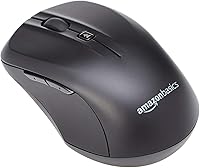
The included mouse works reliably for basic navigation, web browsing, and light office tasks. Its tracking is consistent on most desk surfaces, and smaller-handed users tend to find the size reasonably comfortable for shorter sessions.
Users with larger hands or those who work for several hours at a stretch report noticeable discomfort. The mouse offers no ergonomic contouring, and the click resistance feels a bit stiff to some — it is clearly a functional inclusion rather than a considered ergonomic design.
Build Quality
57%
43%
The keyboard and mouse are solidly enough assembled that they hold up fine under daily light use. Key caps feel stable, there is no obvious wobble in the frame straight out of the box, and the general construction is consistent with what the price implies.
The plastic feels noticeably hollow when you knock on the keyboard body, and the overall lightness makes the set feel less substantial than buyers sometimes expect. Long-term durability under heavy use is a legitimate question — this is not a peripheral built to last five years of abuse.
Wireless Connectivity Stability
82%
18%
The 2.4 GHz connection holds up well in typical home and office environments. Most users report zero dropped inputs or perceptible lag during normal typing and mouse use, even when the receiver is positioned at a slight distance or behind a monitor.
In environments with a lot of wireless interference — busy open offices or apartments with many competing devices — a handful of users noted occasional micro-stutters with the mouse. It is not a widespread complaint, but it exists in denser wireless environments.
Battery Life
83%
Battery longevity is one of the more pleasant surprises buyers mention. Many report going several months before needing to replace cells in either device under normal daily use, and the included batteries are enough to get started without any waiting.
There is no battery level indicator on either device, so users have no warning before a device cuts out. A few buyers mentioned being caught off guard mid-task when the mouse died unexpectedly — a low-battery LED or even a software indicator would help.
Keyboard Layout & Shortcut Keys
78%
22%
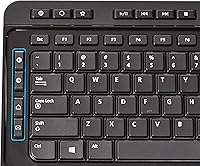
The full QWERTY layout with a dedicated numeric pad on the right is a practical choice for anyone doing data entry, working with spreadsheets, or simply preferring the familiar full-size format. The 20 shortcut keys cover media, volume, and browser functions that most users reach for regularly.
The shortcut keys are not customizable, which limits their usefulness for power users with specific workflow needs. A few buyers also noted that some shortcuts behave inconsistently depending on the Windows version in use.
Noise Level
72%
28%
The keyboard is not aggressively loud, and in a home office or shared household setting it does not draw complaints the way a mechanical keyboard might. For video calls and shared spaces, the typing noise sits at an acceptable level for most users.
It is not a quiet keyboard by any stretch — the keys have a slightly clicky, plasticky sound that carries in silent rooms. Users in library-style office environments or those who type late at night while others sleep will notice it.
Mouse Tracking Accuracy
74%
26%
On standard desk surfaces and most mouse pads, tracking is accurate enough for everyday tasks. Cursor movement feels smooth during browsing and document navigation, and most buyers do not raise any complaints about pointer precision in normal use.
On glossy or reflective surfaces, tracking becomes inconsistent and requires a mouse pad to function reliably. Users doing any precision creative work — photo editing, detailed design — will find the tracking resolution insufficient for that level of accuracy.
Portability & Storage
69%
31%
The nano receiver tucks neatly into a USB port and stays there permanently if needed, which makes packing up the setup reasonably tidy. The keyboard and mouse are light enough to move between rooms or pack for a temporary remote setup without hassle.
The keyboard is full-size, so it is not a compact travel option by any definition. Anyone wanting a portable wireless setup for a laptop bag or travel kit should look elsewhere — this is desk-bound equipment in practice.
Compatibility
71%
29%
For Windows users, setup is truly instant — no driver downloads, no compatibility checks needed. It covers the vast majority of the target audience well and works across a wide range of Windows versions without any configuration.
Mac and Linux users are officially unsupported, and while some report basic functionality on macOS, the shortcut keys do not map correctly and certain keys behave unexpectedly. This is a Windows-centric peripheral and should be treated as such.
Aesthetic & Desk Fit
76%
24%
The flat matte black finish is inoffensive and blends into virtually any desk setup without demanding attention. For buyers who want functional peripherals that do not clash with their monitor or desk decor, it is an easy fit.
There is only one color option, and the design is purely utilitarian — no RGB, no textured finish, nothing that would appeal to anyone who cares about desk aesthetics beyond basic tidiness. It looks like exactly what it costs.

Suitable for:

The Amazon Basics Wireless Keyboard and Mouse Combo is a practical fit for anyone who needs a reliable, no-fuss peripheral setup without paying a premium for features they will rarely use. Home office workers who want a cleaner desk free of cables — but are not willing to spend on high-end wireless gear — will find this set covers everyday tasks without complaint. Students furnishing a basic study workstation, remote workers equipping a secondary desk, or households setting up a shared family computer will all get solid mileage out of it. It is particularly well-suited for older users or anyone who finds technology intimidating, since there is genuinely nothing to configure — plug in the receiver and both devices work immediately. If you regularly handle spreadsheets or accounting work, the full numeric keypad is a real convenience that many budget combos skip entirely.
Not suitable for:

The Amazon Basics Wireless Keyboard and Mouse Combo is not the right call for buyers who spend long hours at the keyboard or demand a satisfying, tactile typing experience. The keyboard's lightweight plastic construction and shallow key feedback will frustrate touch typists and anyone accustomed to mid-range or mechanical boards — it is noticeable within the first extended session. The mouse, while functional, offers no ergonomic shaping, which becomes a genuine issue for users who rely on their setup for hours of continuous work, creative tasks, or precision-heavy applications like photo editing. Mac and Linux users should also look elsewhere, as the set is built around Windows compatibility and the shortcut keys do not translate cleanly to other operating systems. Anyone hoping for a peripheral setup that will hold up under heavy daily use for years is likely to be disappointed by the materials — this is built to a price, and it shows over time.
Specifications

  • Brand: Manufactured and sold under the Amazon Basics in-house brand, model number KBLGOD-US.
  • Connectivity: Both devices connect wirelessly via a shared 2.4 GHz USB nano receiver with no Bluetooth support.
  • USB Receiver: A single nano USB receiver handles both the keyboard and mouse simultaneously, using one port for the entire combo.
  • Keyboard Layout: Full-size QWERTY layout with a dedicated numeric keypad on the right side and 20 pre-assigned shortcut keys.
  • Keyboard Dimensions: The keyboard measures 21.97 x 8.71 x 1.77 inches, consistent with a standard full-size desktop keyboard footprint.
  • Combined Weight: The total weight of both devices together is 2.33 pounds, making the set lightweight but not particularly substantial.
  • Power Source: Both the keyboard and mouse are battery-powered; four AA batteries are included in the box and pre-assigned between both devices.
  • Batteries Included: The package ships with batteries for both devices, allowing immediate use without any additional purchase.
  • Operating System: Officially compatible with Windows operating systems only; Mac and Linux are not supported by the manufacturer.
  • Driver Requirement: No driver installation or software download is required — the combo functions as a plug-and-play HID device on Windows.
  • Shortcut Keys: The keyboard includes 20 dedicated shortcut keys covering common functions such as volume control, media playback, and browser navigation.
  • Color: Available exclusively in a flat matte black finish for both the keyboard and mouse.
  • Wireless Range: The 2.4 GHz connection supports a practical operating range suitable for standard desk use, typically up to approximately 30 feet in open conditions.
  • Mouse Type: The included mouse is a standard optical wireless mouse designed for basic navigation and light daily use.
  • Numeric Keypad: A full numeric keypad is integrated on the right side of the keyboard, supporting data entry, accounting, and spreadsheet workflows.
  • Date Available: This product was first made available on Amazon on February 6, 2019, and has accumulated over 1,650 verified ratings.
  • Package Contents: The box includes one full-size wireless keyboard, one wireless mouse, one USB nano receiver, and batteries for both devices.

Related Reviews

Amazon Basics Ultra Premium Wireless Keyboard and Mouse Combo
87%
91%
Overall Value
88%
Typing Experience
94%
Ease of Setup
90%
Design & Aesthetics
85%
Battery Life
More
Arteck HW192 Wireless Keyboard and Mouse Combo
78%
78%
Build Quality
72%
Typing Experience
63%
Mouse Comfort & Ergonomics
81%
Battery Life
69%
Wireless Connectivity
More
TopMate Wireless Keyboard and Mouse Combo
77%
91%
Value for Money
78%
Typing Experience
68%
Mouse Performance
63%
Build Quality
83%
Wireless Reliability
More
SABLUTE Wireless Keyboard and Mouse Combo
84%
88%
Typing Comfort
92%
Battery Life
85%
Ergonomics
73%
Connectivity Stability
80%
Backlighting Performance
More
EDJO Wireless Keyboard and Mouse Combo
76%
88%
Value for Money
94%
Ease of Setup
71%
Keyboard Typing Feel
63%
Mouse Performance
86%
Wireless Connectivity & Range
More
QUASIO Wireless Keyboard and Mouse Combo
77%
88%
Value for Money
93%
Setup & Ease of Use
79%
Typing Comfort
84%
Wireless Connectivity & Range
72%
Mouse Performance
More
Atelus Wireless Keyboard and Mouse Combo
83%
94%
Ease of Setup
88%
Ergonomics & Comfort
90%
Design & Aesthetics
80%
Mouse Performance
86%
Keyboard Performance
More
Links9+ Wireless Keyboard and Mouse Combo
85%
89%
Ergonomics and Comfort
92%
Wireless Performance and Connectivity
85%
Build Quality
94%
Ease of Use and Setup
80%
Battery Life
More
Letton Wireless Keyboard and Mouse Combo
83%
89%
Design & Aesthetics
81%
Ergonomics & Comfort
75%
Wireless Connectivity
90%
Battery Life
92%
Value for Money
More
MARVO Wireless Keyboard and Mouse Combo
76%
91%
Value for Money
88%
Wireless Connectivity
79%
Mouse Performance
63%
Keyboard Typing Feel
67%
Ergonomics & Comfort
More

FAQ

Yes, it does. The box includes the keyboard, the mouse, the USB nano receiver, and batteries for both devices. You can have it running within a minute of opening the package — no trips to the store needed.

Not at all. Just plug the nano receiver into a USB port on your Windows PC and both devices will be recognized automatically. There is no software to download and no setup screens to navigate through.

Officially, the Amazon Basics Wireless Keyboard and Mouse Combo is designed for Windows only. Some users have reported basic mouse and keyboard functionality on macOS, but the shortcut keys do not map correctly and certain functions behave unexpectedly. If you are on a Mac or Chromebook, you would be better served by a combo built with cross-platform support.
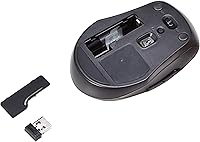
Battery life tends to be one of the stronger points of this set. Most users report several months of regular daily use before either device needs fresh batteries. Keep in mind there is no battery level indicator, so you will not get a warning — the device will simply stop responding when they run out.

They share a single nano USB receiver, which handles both devices at the same time. That means you are only using one USB port for the entire wireless combo, which is a practical convenience if your ports are limited.

It is acceptable for casual use — emails, web browsing, light document work — but it is not going to satisfy anyone who types heavily throughout the day. The keys feel somewhat shallow and the keyboard sits light on the desk, which some users find underwhelming compared to sturdier options. If you are a touch typist who values key feedback, you may want to try something with a bit more resistance.

It is not ideal. The optical tracking on the mouse tends to struggle on glossy or reflective surfaces, leading to erratic cursor movement. A basic mouse pad will solve this immediately and is worth having on hand if your desk surface is smooth or shiny.

For most home and office environments it holds up well — no noticeable lag or drops during normal typing and mouse movement. In spaces with a lot of wireless interference, like a busy open office or an apartment building with many competing networks, a small number of users have noted occasional mouse stutter. It is not common, but dense wireless environments can occasionally affect the signal.

In practice, the 2.4 GHz connection works reliably across a standard desk setup and a reasonable distance beyond it — roughly up to about 30 feet in open conditions. For typical seated desk use, you will never run into range issues.

The safest approach is to turn the keyboard upside down and gently shake out debris first, then use a can of compressed air to clear anything between the keys. For the surface, a lightly dampened cloth with water or a mild screen-safe cleaner works fine. Avoid spraying anything directly onto the keyboard and make sure it is powered off before cleaning.