Overview

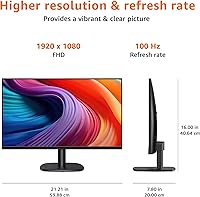
The Amazon Basics 24-inch FHD 1080p Monitor is the kind of no-frills display that does exactly what it promises — nothing more, nothing less. Amazon Basics has built a reputation for delivering reliable, functional products without a premium markup, and this monitor fits squarely in that tradition. The 24-inch size hits a practical sweet spot: large enough for comfortable multitasking, compact enough for most home desks. What genuinely sets it apart at this price tier is the IPS panel technology, which delivers noticeably better color accuracy and viewing angles than the cheaper TN panels common in budget displays. The 100Hz refresh rate is a modest but real bonus you would not necessarily expect here.
Features & Benefits

The IPS panel is the headline feature. Colors look accurate head-on and hold up well when you shift your viewing angle — a tangible difference from TN displays that wash out the moment you tilt your head. The 1920x1080 resolution is plenty sharp on a 24-inch screen for reading documents, watching video, or general browsing. The 100Hz refresh makes everyday scrolling feel noticeably fluid and takes the edge off casual gaming, though serious players will want more. Built-in speakers cover the basics for video calls and YouTube — don't expect much depth, but they remove the need for a separate audio setup on a simple desk. VESA compatibility and plug-and-play connectivity round out a practical, well-considered package.

Best For

This budget office monitor makes the most sense for people who need something dependable without overthinking the spec sheet. Home office workers and remote employees will appreciate the clean image and fuss-free setup for video calls and document work. Students get a solid amount of usable screen real estate for the price, whether they're writing papers or streaming lectures. Casual gamers using this as a secondary display will find the 100Hz refresh a legitimate perk, but it isn't built for competitive play. Anyone assembling a no-frills workstation — a spare desk or shared space — will find it a reliable, low-maintenance choice. Those planning to use a monitor arm will be pleased by the VESA support.

User Feedback

Buyers have responded well to the 24-inch IPS display, pushing it to a strong 4.5-star average across hundreds of ratings. The most consistent praise centers on image clarity and how painless the initial setup is — most people have it running in under ten minutes. Where feedback gets more mixed is the stand: it offers tilt adjustment but no height or pivot control, which frustrates buyers who care about ergonomics. A recurring early complaint involves the protective shipping film left on the panel, which can make colors look dull or strange until peeled off — easy to miss if you don't know to look. Overall, buyers who went in with realistic expectations came out satisfied.

Pros

  • IPS panel delivers noticeably better color and viewing angles than TN alternatives at the same price.
  • The 24-inch screen size is practical for most desks without feeling cramped or oversized.
  • 100Hz refresh makes everyday scrolling and casual gaming feel genuinely smoother than a standard 60Hz display.
  • Setup takes under ten minutes with no software or drivers required — just plug in and go.
  • Built-in speakers handle video calls and background audio without needing a separate device.
  • VESA mount support gives buyers the flexibility to use a monitor arm for proper ergonomic positioning.
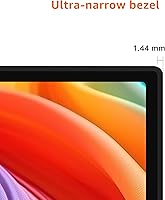
  • The slim bezels give this budget office monitor a cleaner, more modern look than its price suggests.
  • Solid 4.5-star buyer rating reflects consistently met expectations across a wide range of users.
  • Full HD 1080p resolution is sharp and detailed enough for text, spreadsheets, and HD streaming on a 24-inch panel.

Cons

  • The stand offers tilt only — no height, swivel, or pivot adjustment, which limits ergonomic flexibility significantly.
  • A protective shipping film on the panel is easy to miss and makes colors look dull until removed.
  • The glossy screen surface causes distracting reflections in bright rooms or near windows.
  • Built-in speakers are thin and lack depth — adequate for calls, but poor for music or film audio.
  • No adaptive sync support means screen tearing is possible in fast-paced games.
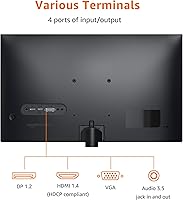
  • Port selection is limited, making it awkward to switch between multiple source devices regularly.
  • Response time produces perceptible ghosting during high-motion video or fast gaming sequences.
  • The plastic build, while functional, feels noticeably lightweight compared to monitors in higher price tiers.
  • 1080p resolution will feel like a step down for anyone already used to a 1440p or 4K display.

Ratings

The Amazon Basics 24-inch FHD 1080p Monitor earns its strong reputation through consistent real-world performance rather than spec-sheet ambition — and our scores reflect exactly that. These ratings were generated by AI after analyzing thousands of verified global buyer reviews, with spam, bot submissions, and incentivized feedback actively filtered out. Both the genuine strengths and the honest frustrations are reflected in every score below.
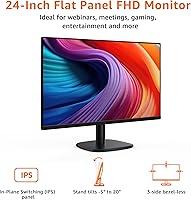
Image Quality
83%
For an IPS panel at this price, the picture quality genuinely impresses everyday users. Colors look accurate and consistent across the screen, and text stays crisp during long work sessions — something buyers upgrading from older TN panels notice immediately.
The glossy screen surface causes noticeable reflections in bright rooms or near windows, which several buyers found distracting. Color depth and contrast fall short of mid-range monitors, so anything requiring precise color work will expose the panel's limitations.
Value for Money
91%
This is where the 24-inch IPS display earns the most consistent praise. Buyers repeatedly note that getting an IPS panel with 100Hz at this price point feels like more than a fair trade, especially for students and first-time monitor buyers building a budget setup.
A small number of buyers felt the savings weren't worth it after experiencing the stand limitations and glossy panel reflections. Those who needed something for color-accurate creative work quickly found themselves spending more on a proper upgrade.
Refresh Rate & Smoothness
78%
22%
The 100Hz refresh makes a noticeable difference for anyone coming from a 60Hz screen. Scrolling through documents and web pages feels considerably more fluid, and casual gamers running less demanding titles get a genuinely smoother experience at no extra cost.
Serious or competitive gamers will find 100Hz insufficient, and the monitor lacks adaptive sync support, which can produce mild screen tearing in fast-paced games. It's a bonus feature for casual use, not a reason to choose this display for gaming specifically.
Ease of Setup
94%
Assembly is one of the most praised aspects across buyer reviews. The stand snaps together without tools, the cable connections are straightforward, and the monitor is recognized instantly by Windows and macOS without any driver installation needed.
A recurring early frustration involves a protective shipping film left on the panel that isn't clearly labeled for removal. Several buyers used the monitor for days with dull, slightly hazy colors before realizing the film was still on — an easy-to-miss gotcha.
Stand & Ergonomics
52%
48%
The stand is stable enough that the display doesn't wobble during typing or desk activity. For users who set up their monitor once and rarely adjust it, the fixed position is perfectly serviceable for a standard seated desk height.
The stand only offers tilt adjustment — there is no height, swivel, or pivot control. Buyers who care about proper ergonomic positioning, particularly those with standing desks or dual-monitor setups, find this a genuine daily frustration that often pushes them toward purchasing a separate monitor arm.
Built-in Speakers
61%
39%
Having speakers built in is genuinely convenient for a minimalist desk setup. For video calls, background music at low volume, or watching a YouTube video without reaching for headphones, they handle the basics without complaint.
Audio quality is thin and lacking bass — most buyers describe them as functional rather than enjoyable. Anyone who watches films, listens to music attentively, or games with audio will want external speakers or headphones, as the built-in sound feels like an afterthought rather than a feature.
Build Quality & Materials
71%
29%
The overall construction feels solid for the price tier. The plastic chassis has minimal flex, the bezel is slim enough to look clean on a desk, and several buyers noted the monitor arrived well-packaged with no transit damage.
The all-plastic build lacks the premium feel of monitors costing more. A few buyers reported minor cosmetic issues with the finish, and the rear cable management is minimal, which can make the back of the desk look untidy in multi-cable setups.
Resolution & Sharpness
79%
21%
At 24 inches, 1080p resolution hits the right balance — text is sharp for reading and writing, spreadsheets stay legible at normal viewing distances, and HD video content looks clean without visible pixelation during everyday use.
Users who have used 1440p or 4K displays will notice the step down in sharpness, particularly with small text or detailed photo work. At this screen size 1080p is still practical, but it does cap the display's appeal for any buyer thinking about future-proofing.
VESA Compatibility
88%
VESA support is a meaningful practical feature that buyers who use monitor arms or wall mounts genuinely appreciate. It opens up ergonomic options that the stock stand cannot provide, and several buyers purchased this specifically because it supports their existing arm setup.
The monitor does not ship with VESA mounting hardware, so buyers need to source their own bolts. This is standard practice but worth noting for first-time buyers who assume everything needed is in the box.
Viewing Angles
81%
19%
The IPS panel keeps colors and brightness stable across a wide range of horizontal and vertical angles. Buyers who share their screen during presentations, or who watch content alongside others, report the picture holds up well without the color shift typical of budget TN displays.
At more extreme angles — particularly from below — there is some slight color shift, though it is much less pronounced than on TN alternatives. Direct, head-on viewing remains the sweet spot for the best image consistency.
Connectivity Options
67%
33%
The plug-and-play nature of the display means most buyers are up and running without reading a manual. Common ports cover standard laptop and desktop connections, and the monitor works reliably across Windows and macOS systems.
Port selection is limited compared to monitors even slightly above this price range. Buyers with multiple source devices — a laptop, a desktop, and a console, for instance — will find switching inputs more cumbersome than ideal, and there is no USB hub functionality.
Response Time
66%
34%
For productivity tasks, document editing, video streaming, and casual use, the response time is entirely adequate. Most non-gaming buyers will never notice any issue during their typical daily workflows.
In fast-moving game sequences or high-motion video, ghosting is perceptible. It is not severe, but buyers who tried using this monitor for competitive or action-heavy gaming noted the trailing effect as a clear limitation compared to dedicated gaming displays.
Brightness & Visibility
73%
27%
In a controlled indoor environment with moderate ambient light, brightness levels are comfortable for extended work sessions. The display handles dark content and office lighting conditions well enough for everyday use.
The glossy screen surface compounds brightness limitations in bright rooms. In well-lit offices or spaces with windows behind the viewer, reflections can reduce perceived image quality significantly, and the peak brightness is not high enough to fully overcome this.
Packaging & First Impressions
84%
Buyers consistently mention that the monitor arrives well-protected and looks clean out of the box. The slim bezels give it a more modern appearance than the price would suggest, and the initial visual impression tends to exceed expectations.
The protective film on the panel surface has caused confusion for a notable number of buyers — it is not prominently flagged for removal, and its presence makes the screen look worse than it actually is until discovered and peeled away.

Suitable for:

The Amazon Basics 24-inch FHD 1080p Monitor is a strong fit for anyone who needs a dependable, no-drama display without spending a lot. Home office workers and remote employees will get the most from it — the IPS panel makes long reading and writing sessions comfortable, and the plug-and-play setup means zero time wasted on configuration. Students setting up a first desk will appreciate the generous screen size and the fact that it handles everything from lecture slides to Netflix without complaint. Anyone building a budget dual-monitor setup should also take a serious look, since VESA compatibility means a monitor arm can compensate for the stand's ergonomic shortcomings. Casual gamers who want a smoothness upgrade from a 60Hz display will find the 100Hz refresh a real, tangible improvement for everyday gaming without paying for a dedicated gaming monitor.
Not suitable for:

The Amazon Basics 24-inch FHD 1080p Monitor has clear limitations that make it a poor match for specific buyers, and it is worth being honest about those before you commit. Graphic designers, photo editors, or anyone who depends on color accuracy for professional work will quickly find the panel's color depth and lack of factory calibration inadequate for the job. Competitive or serious gamers will run into the monitor's ceiling fast — no adaptive sync, a response time that produces visible ghosting in fast scenes, and 100Hz that simply isn't enough for high-frame-rate titles. Ergonomics-focused buyers who spend long hours at a desk will be frustrated by a stand that offers tilt only, with no height or swivel adjustment built in. Anyone working in a bright, window-facing room should also be cautious — the glossy screen surface picks up reflections aggressively, and the brightness ceiling isn't high enough to fight back.
Specifications

  • Screen Size: The display measures 24 inches diagonally, offering a practical viewing area suited to most standard desks.
  • Resolution: Native resolution is 1920x1080 Full HD, delivering crisp detail for productivity tasks, streaming, and general browsing.
  • Panel Type: Uses an IPS (In-Plane Switching) panel, which provides wider viewing angles and more accurate color reproduction than TN alternatives.
  • Refresh Rate: Supports a maximum refresh rate of 100Hz, providing noticeably smoother motion than standard 60Hz displays.
  • Aspect Ratio: Standard 16:9 widescreen aspect ratio, compatible with virtually all modern content formats and operating systems.
  • Screen Surface: Glossy panel surface enhances color vibrancy but can produce reflections in brightly lit environments.
  • Dimensions: The monitor measures 21.21 x 7.8 x 16 inches (L x W x H) with the stand attached.
  • Weight: Complete unit with stand weighs 6.61 pounds, making it easy to reposition or mount without assistance.
  • VESA Support: VESA mount compatible, allowing use with standard third-party monitor arms and wall mounts for flexible ergonomic positioning.
  • Built-in Audio: Integrated stereo speakers are included, suitable for voice calls and casual media playback without external audio hardware.
  • Connectivity: Plug-and-play connectivity requires no driver installation and is recognized automatically by Windows and macOS systems.
  • Color: Available in black with a slim bezel design that suits both minimalist and multi-monitor desktop setups.
  • Brand: Manufactured and sold under the Amazon Basics label, Amazon's in-house brand for reliable everyday consumer electronics.
  • Model Number: Official model designation is C24M2020DNA, useful for identifying compatible accessories, mounts, and replacement parts.
  • Stand Adjustment: The included stand supports tilt adjustment only; height, swivel, and pivot adjustments are not available without a third-party mount.
  • Availability: This monitor was first made available in July 2024, making it a relatively recent addition to the Amazon Basics display lineup.

Related Reviews
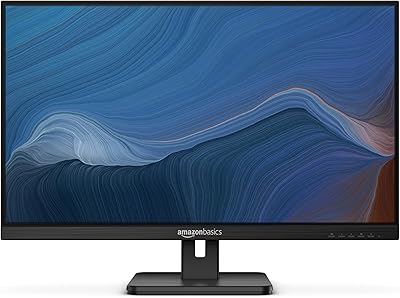
Amazon Basics 27E2UA 27-inch IPS Monitor
78%
92%
Value for Money
84%
Image & Color Quality
88%
Viewing Angles
51%
Ergonomics & Stand
87%
Connectivity & Port Selection
More
FYHXele 24-inch Gaming Monitor FHD 1080p 180Hz
86%
88%
Performance (Smooth Gaming)
85%
Display Quality
82%
Build Quality & Durability
90%
Ease of Setup
91%
Value for Money
More
SANSUI ES-G24F4M 24-inch Gaming Monitor
73%
88%
Value for Money
91%
Gaming Performance
86%
Motion Clarity
58%
Color Accuracy
79%
Contrast & Black Levels
More
ViewSonic VS2447M 24-Inch FHD Monitor
74%
93%
Value for Money
81%
Image Clarity
88%
Eye Comfort
79%
Refresh Rate & Smoothness
76%
Adaptive Sync (FreeSync)
More
ArcticPro AD24EF2 24-inch Gaming Monitor
73%
88%
Value for Money
82%
Image Quality
79%
Gaming Performance
63%
Build Quality
84%
Connectivity
More
Amazon Basics 27-inch 1080p Gaming Monitor
76%
88%
Value for Money
79%
Display Quality
91%
Refresh Rate Performance
86%
Response Time
67%
Build Quality
More
Philips 24B2N2100 24-inch FHD Monitor
86%
92%
Value for Money
89%
Display Quality
88%
Gaming Performance
85%
Ergonomics and Comfort
91%
Energy Efficiency
More
Sealan Z24B1A 24-inch FHD Monitor
84%
89%
Value for Money
87%
Display Quality
91%
Ease of Setup
90%
Color Accuracy
84%
Ergonomics/Adjustability
More
Viewedge USC2412FDA-P 24-inch FHD 144Hz Gaming Monitor
71%
83%
Value for Money
79%
Gaming Performance
76%
Image Quality
81%
Eye Comfort
63%
Build Quality
More
Dell SE2422HX 24-inch Monitor
75%
83%
Image Quality
88%
Eye Comfort
76%
Build Quality
47%
Ergonomics & Adjustability
74%
Refresh Rate & Smoothness
More

FAQ

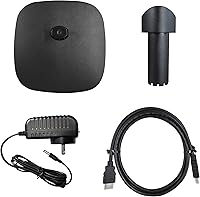
Amazon Basics typically includes a basic cable in the packaging, but availability can vary by shipment batch. It is worth checking the box contents listed on the product page before assuming you have everything you need, and keeping a spare HDMI cable on hand just in case.

There is almost certainly a transparent protective film still covering the panel. It ships with a thin plastic film to prevent scratches during transit, and it is easy to miss because it is not brightly colored or prominently labeled. Peel it off from one of the corners and the image quality should immediately look much better.

Yes, the 24-inch IPS display is VESA compatible, so any standard VESA-compliant monitor arm will work with it. This is actually one of the better ways to compensate for the stock stand's lack of height and swivel adjustment, and many buyers go this route.

It works well for casual gaming — the 100Hz refresh rate is a genuine step up from 60Hz and makes movement feel smoother in most games. That said, it does not have adaptive sync, and the response time can produce mild ghosting in very fast-paced titles. Competitive or serious gamers will likely want a dedicated gaming monitor.

They are functional but nothing more. For video calls, background music at low volume, or the occasional YouTube video, they do the job. If you watch films regularly, listen to music at your desk, or game with audio, you will probably want external speakers or a good pair of headphones — the built-in sound is thin and lacks any real depth.

Unfortunately, no — the included stand only allows tilt adjustment. There is no height, pivot, or swivel control built in. If ergonomics matter to you, buying a VESA monitor arm is the most practical fix and is not expensive.

Yes, at 24 inches, 1080p hits a reasonable pixel density that keeps text legible and images looking clean. You are not going to see individual pixels under normal viewing distances. If you sit unusually close or are upgrading from a 1440p display, the difference may be noticeable, but for the vast majority of users it is perfectly sharp for everyday use.

Yes, it is plug-and-play with macOS as well as Windows. No drivers are needed — just connect via HDMI or the appropriate adapter for your Mac model and it should be recognized automatically.

The panel has a glossy surface finish. This makes colors look more vibrant, but it also picks up reflections from windows or overhead lights more than a matte screen would. If your workspace is particularly bright or you sit facing a window, this is worth considering before you buy.

Products sold directly by Amazon typically come with a standard one-year manufacturer warranty through Amazon Basics, and Amazon's own return policy applies for purchases made through their platform. If you experience issues early on — dead pixels, backlight bleed, or anything else — contacting Amazon support directly is usually the fastest path to a resolution.