Overview

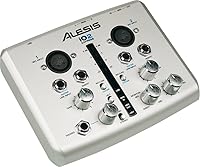
The Alesis IO2 Express USB Audio Interface is one of those rare starter tools that just makes sense for someone taking their first real steps into home recording. It's compact, straightforward, and — crucially — USB bus-powered, meaning you plug it in and you're ready to go without hunting for a wall adapter. It ships with Steinberg Cubase LE, which gives complete beginners a functional DAW to record into from day one. Cross-platform support across Windows, macOS, and Linux is a genuine plus. Just keep expectations grounded: this is a beginner's interface, not a professional-grade studio tool.

Features & Benefits

The IO2 Express packs two combo inputs that handle XLR microphones, line-level sources, and instrument-level signals like guitar — all from a box barely larger than a paperback. 48V phantom power is built in, so you can run a condenser microphone without any extra gear in the chain. Recording resolution tops out at 24-bit / 48 kHz, which is plenty clean for vocals, acoustic guitar, and voiceover work. The discrete-design preamps outperform a laptop's built-in soundcard noticeably, though don't expect them to compete with mid-range studio interfaces. Cubase LE is included to get you tracking immediately, even if its feature set is limited.

Best For

This compact USB interface is a strong fit for bedroom producers and singer-songwriters cutting their first demos, as well as podcasters and voiceover artists who need a clean, reliable mic signal without a complex setup. Guitar players who want to record direct-in will find the instrument input genuinely handy. Students or hobbyists upgrading from their laptop's built-in audio will notice a real improvement in recording quality. It's also one of the few interfaces confirmed to work across Windows, macOS, and Linux without driver headaches, which matters more than people expect when you're just trying to start recording.

User Feedback

Sitting at a 4.1-star average across 136 ratings, the IO2 Express earns consistent praise for plug-and-play simplicity and how quickly buyers get up and running. Most users highlight ease of setup as the standout quality. On the critical side, some report the preamps run short on headroom when pushing high-sensitivity condenser mics, producing noticeable noise at higher gain settings. A handful of reviews flag compatibility quirks on newer operating system versions, so checking for updated drivers before buying is wise. The plastic chassis also draws comments — functional and portable, but it feels noticeably less solid than pricier rivals.

Pros

  • Plug-and-play USB setup gets most users recording within minutes of unboxing.
  • Bus-powered operation means no wall adapter cluttering your desk or bag.
  • Built-in 48V phantom power lets you run condenser mics without any extra gear.
  • 24-bit / 48 kHz resolution delivers noticeably cleaner audio than a laptop's built-in soundcard.
  • Two combo inputs handle mics, line-level sources, and guitars from a single compact box.
  • Confirmed to work on Windows, macOS, and Linux, which is rare at this price tier.
  • Bundled Cubase LE gives true beginners a functional DAW to start with immediately.
  • Lightweight and small enough to fit in a backpack for mobile recording sessions.

Cons

  • Preamps run low on headroom with high-sensitivity condenser mics, adding noise at higher gain levels.
  • Limited to two input channels, which rules out any multi-source or band recording scenarios.
  • The plastic chassis feels noticeably cheaper than competing interfaces in a similar price bracket.
  • Cubase LE is quite restricted in features and will likely need upgrading as skills grow.
  • Some users have reported compatibility friction on newer Windows and macOS versions.
  • No direct monitoring mix control, which can make latency management trickier for some workflows.
  • The IO2 Express is an older design, and newer budget rivals now offer tighter specs at comparable prices.
  • No headphone output volume knob on some configurations limits quick monitoring adjustments.

Ratings

Our scores for the Alesis IO2 Express USB Audio Interface were generated by AI after analyzing verified purchaser reviews from worldwide markets, with spam, bot activity, and incentivized feedback actively filtered out. The ratings reflect an honest synthesis of what real buyers praised and where they ran into genuine frustration — nothing is smoothed over to look more favorable than the evidence supports. Both the strengths that keep this interface relevant and the pain points that have pushed some buyers toward newer alternatives are transparently reflected below.

Ease of Setup
91%
Getting up and running is where the IO2 Express genuinely shines. The vast majority of users report that plugging it into a USB port on Windows, macOS, or Linux just works — no driver installation ritual, no manual hunting. For a first-time recorder who just wants to capture a song idea, that friction-free start is hard to overstate.
A smaller subset of buyers on very recent OS versions — particularly newer Windows builds and the latest macOS releases — have reported that the plug-and-play experience broke down and required manual driver troubleshooting. It is not widespread, but it is worth checking compatibility before buying if you are on a bleeding-edge system.
Audio Quality
74%
26%
At 24-bit / 48 kHz, this starter recording interface captures vocals, acoustic guitar, and direct-in instruments with noticeably more clarity and lower noise than a built-in laptop soundcard. For home demos, podcasting, and voiceover work, the recordings come out clean enough that most listeners would never guess the source hardware.
Push the gain higher — particularly with sensitive condenser microphones in quiet rooms — and the preamp noise floor becomes audible. It is not a dealbreaker for casual use, but anyone who records a lot of hushed acoustic material or needs pristine takes for professional delivery will find the limitations frustrating fairly quickly.
Preamp Performance
62%
38%
The discrete-design preamps are a genuine step up from consumer-grade integrated audio. For podcasting, basic vocal tracking, or recording an electric guitar direct-in, they handle the job cleanly without introducing obvious coloration or distortion at moderate gain settings.
Headroom is the real limiting factor here. Users recording with high-sensitivity condenser mics consistently report that pushing the gain to capture quieter sources introduces background noise that is hard to clean up in post. Competing interfaces at a similar price point from newer brands have started to offer measurably better preamp specs.
Build Quality
58%
42%
The IO2 Express is compact and light — easy to tuck on a corner of a desk or slide into a bag. For home studio use where it mostly sits in one place, the size and footprint work in its favor, and the knobs and inputs feel functional under normal desktop conditions.
The plastic-heavy chassis is a recurring complaint among buyers who expected something more solid. Compared to metal-bodied rivals at similar price points, it feels noticeably less premium — and a few users who traveled with it reported cosmetic wear or connector looseness after regular handling. It is not built for life on the road.
Value for Money
78%
22%
For a complete beginner who needs to get from zero to recording without spending a lot, the package makes sense. Two inputs, 48V phantom power, USB bus power, and a bundled DAW cover all the fundamentals of a starter setup in one box. The value proposition is clearest for buyers who genuinely need nothing more.
The market has moved since this design was introduced. Several newer budget interfaces now offer better preamps, sturdier builds, and improved driver support at comparable prices. Buyers who do even a little comparison shopping may find that the IO2 Express no longer represents the obvious best deal it once did.
Portability
83%
At just 12.8 oz and with no need for an external power supply, this compact USB interface is easy to throw in a bag and use anywhere there is a laptop. Musicians who want to capture ideas at a friend's place or record voiceover while traveling find the form factor genuinely practical.
The plastic body means portability comes with a durability trade-off. It is light enough to carry easily but not rugged enough to handle the bumps of regular travel without some care. Users who move it around frequently have noted that it feels more fragile than its small size implies.
Cross-Platform Compatibility
79%
21%
Working reliably across Windows, macOS, and Linux is something a lot of entry-level interfaces cannot honestly claim. Linux users in particular highlight this as a meaningful differentiator — the interface tends to work without needing to source and install platform-specific drivers.
Compatibility on the most recent versions of Windows and macOS is where some users hit friction. Alesis driver support for aging hardware on modern OS releases is inconsistent, and a handful of buyers on newer systems have had to troubleshoot or ultimately give up on getting full functionality.
Phantom Power Reliability
81%
19%
Having 48V phantom power built into a bus-powered interface at this size is practical and removes a common pain point for beginner recordists who want to use condenser microphones. Most users confirm it activates cleanly and keeps their mics running stably during recording sessions.
The preamp pairing limits the full benefit of the phantom power supply. You can power a condenser mic reliably, but the gain stage behind it is the weak link — meaning you are essentially adding a capable power source to a preamp that may not fully exploit what the microphone can deliver.
Bundled Software
66%
34%
Steinberg Cubase LE is a real DAW with a genuine workflow — not just a barebones trial. For someone who has never used audio software before, it offers enough features to learn the basics of recording, editing, and mixing without feeling immediately overwhelmed.
Cubase LE is significantly limited compared to the full Cubase version, and buyers who progress quickly will bump into its track count and feature ceiling faster than expected. It also requires a Steinberg account and registration to activate, which some users found more cumbersome than anticipated.
Input Versatility
77%
23%
Handling XLR microphones, line-level sources, and instrument-level signals like guitar from two combo inputs is flexible enough to cover most single-person home recording scenarios. Podcasters, singer-songwriters, and voiceover artists rarely need more than this to get their work done.
Two channels is a hard ceiling, and it becomes a real constraint the moment a recording session grows beyond one person or one source. There is no workaround — if you need to record more than two simultaneous signals, you need a different interface entirely.
Driver Stability
61%
39%
On stable, mid-cycle versions of major operating systems, most users report the IO2 Express runs without dropout or crashing issues during normal recording sessions. For buyers on well-established OS versions, day-to-day reliability is generally solid.
Driver support for this aging hardware has not kept up consistently with rapid OS update cycles. Users on the newest releases of Windows and macOS have encountered recognition failures, audio dropouts, and error states that required workarounds or reverting OS settings. Alesis support documentation for this model is sparse.
Monitoring & Latency
59%
41%
For basic recording where real-time monitoring is not critical — capturing takes in a DAW and playing back — latency is manageable at the standard USB audio buffer settings available in most software. Occasional users doing non-live recording rarely flag this as a dealbreaker.
There is no dedicated direct monitoring control to route the input signal to the headphone output with zero latency. Singers and guitarists who need to hear themselves in real time while recording typically find software monitoring introduces enough delay to be distracting, and the hardware gives them no way around it.
Product Longevity
55%
45%
For home studio users who keep it on a desk and use it consistently without heavy physical stress, the IO2 Express tends to remain functional over several years. The core audio circuitry does not degrade with age under normal static use conditions.
The product design is long in the tooth, and Alesis has not refreshed it to match modern expectations around driver support, preamp quality, or build materials. Buyers thinking long-term may find they outgrow or encounter OS compatibility issues before the hardware physically fails.

Suitable for:

The Alesis IO2 Express USB Audio Interface is purpose-built for beginners who want to start recording without navigating a complicated setup or spending a lot of money upfront. Singer-songwriters cutting home demos, podcasters who need a clean microphone signal into their computer, and voiceover artists who want to step up from built-in laptop audio will all find this compact USB interface covers their bases reliably. Guitar players looking to record direct-in will appreciate having a dedicated instrument input ready to go. Students on a tight budget get a particularly good deal, since the bundled Cubase LE DAW means they can start tracking the same day the box arrives. Linux users will also find this one of the easier interfaces to get working across multiple operating systems without driver headaches.

Not suitable for:

The Alesis IO2 Express USB Audio Interface is not the right choice for anyone who has moved past the beginner stage and needs serious preamp performance. Musicians recording with high-sensitivity condenser microphones in quieter environments are likely to hit the preamp's headroom ceiling, resulting in audible noise at higher gain settings. Producers who need more than two simultaneous inputs — say, for recording a full band or a drum kit — will quickly outgrow this interface. The plastic build quality may also frustrate buyers who want something that feels durable enough to travel with regularly or withstand years of heavy use. Anyone running the latest operating system versions should research driver compatibility before purchasing, as some users have reported friction on newer OS releases.

Specifications

  • Brand: Manufactured by Alesis, a brand with a long history in affordable audio hardware for musicians and home studio users.
  • Model: The model designation is IO2 EXPRESS, Alesis's entry-level two-channel USB recording interface.
  • Input Channels: Provides two combo input channels that accept XLR microphone connections, line-level sources, and instrument-level signals such as guitar.
  • Recording Resolution: Supports audio recording at up to 24-bit depth and 48 kHz sample rate for clean, low-noise digital captures.
  • Phantom Power: Supplies 48V phantom power to support condenser microphones that require external voltage to operate.
  • Connectivity: Connects to a host computer via USB and draws all required power directly from that USB connection.
  • Power Source: Fully USB bus-powered, meaning no external power adapter or wall outlet is required during normal operation.
  • OS Compatibility: Compatible with Windows, macOS, and Linux operating systems, making it one of the few interfaces confirmed to work across all three platforms.
  • Bundled Software: Ships with a licensed copy of Steinberg Cubase LE, a stripped-down but functional digital audio workstation for beginners.
  • Compatible Devices: Designed for use with personal computers running supported operating systems via a standard USB port.
  • Hardware Interface: Uses a USB hardware interface for both audio data transfer and device power delivery.
  • Dimensions: The unit measures 5 x 6.2 x 2 inches, making it compact enough to fit on a cluttered desk or inside a laptop bag.
  • Weight: Weighs 12.8 oz, light enough to carry comfortably for mobile recording sessions.
  • Color: Available in a silver finish that gives it a clean, understated appearance on a desktop.
  • Preamp Design: Uses discrete-design preamps intended to provide a cleaner signal path than the integrated audio found in consumer laptops and desktop PCs.

Related Reviews

Black Lion Audio Revolution 2x2 Audio Interface

75%
88%
Preamp Quality
91%
Audio Transparency
86%
Clocking Performance
87%
Build Quality
73%
Value for Money
More
M-Audio M-Track Duo
M-Audio M-Track Duo
83%
88%
Preamp Clarity
93%
Value for Money
62%
Build Quality
91%
Ease of Installation
87%
Portability
More
M-Audio M-Track 2X2 USB Audio Interface

76%
84%
Build Quality
76%
Preamp Performance
82%
Ease of Setup
58%
Driver Stability
79%
Value for Money
More
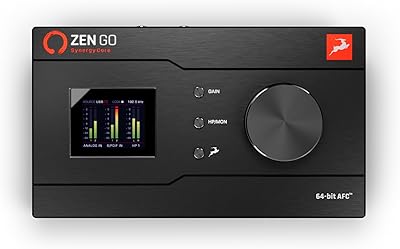
Antelope Audio Zen Go Synergy Core Interface
76%
93%
Preamp Quality
88%
Onboard Effects
54%
Software Experience
57%
Windows Stability
91%
Portability
More
MOTU 8pre USB Audio Interface
80%
86%
Preamp Quality
91%
Build Quality
88%
Channel Count & I/O
79%
Value for Money
61%
CueMix DSP Software
More
Roland Rubix22 USB Audio Interface
81%
93%
Build Quality
84%
Preamp Performance
81%
Noise Floor
88%
MIDI Functionality
91%
Ease of Setup
More
Roland Rubix44 4-In/4-Out USB Audio Interface
80%
91%
Preamp Quality
94%
Build Quality
88%
Noise Performance
58%
Windows Driver Experience
74%
Value for Money
More
Audient iD4 USB Audio Interface
80%
93%
Preamp Quality
88%
Build Quality
71%
Value for Money
91%
Ease of Setup
84%
Headphone Performance
More
Steinberg UR12
Steinberg UR12
86%
94%
Build Quality
91%
Preamplifier Transparency
88%
Portability
87%
Value for Money
82%
iPad Integration
More
MOTU 4pre USB Audio Interface
68%
81%
Preamp Quality
63%
Driver Stability
58%
Connectivity Options
66%
Value for Money
77%
Build Quality
More

FAQ

No, the IO2 Express draws all the power it needs directly from your computer's USB port. There is no wall adapter required, which keeps your desk tidy and makes it easy to pack up and record somewhere else.

Yes, the built-in 48V phantom power means you can plug in most standard condenser microphones without any extra hardware in the chain. That said, keep in mind the preamps have limited headroom, so very high-sensitivity condensers may introduce some noise at higher gain settings.

Yes, the combo inputs accept instrument-level signals, so you can go straight from your guitar to the interface without needing a direct box or additional preamp. It works well for recording dry guitar tracks that you can then process in your DAW.

It should work on most modern operating systems, but some users have reported occasional compatibility hiccups on newer OS releases. It is worth checking the Alesis support site for the latest driver information before buying if you are on a very recent version of Windows or macOS.

Yes, and this is actually one of its quiet strengths. Most users report it works on Linux without needing to hunt down separate drivers, which is not something you can say about every entry-level interface on the market.

It sits somewhere in the middle. Cubase LE is a real, functional DAW and perfectly adequate for recording, basic editing, and mixing simple projects. It does have meaningful limitations in track count and features compared to the full version, so if you start taking production seriously you will likely want to upgrade eventually. For a complete beginner, though, it is a solid starting point.

Yes, you can record two separate audio sources simultaneously since the interface has two independent input channels. That covers most basic recording scenarios like mic plus guitar, or two vocalists at once.

Honestly, the chassis is on the lighter and more plastic-heavy side compared to some competing interfaces in a similar price range. It feels sturdy enough for desk use but is not the kind of thing you would want to drop repeatedly or toss around in a touring bag. For home studio use, it should last fine with reasonable care.

For casual home recording, podcasting, and demo-level vocal work, yes. The preamps are a clear step up from a built-in laptop soundcard. Where they start to struggle is when you push the gain high with sensitive condenser mics — at that point some background noise becomes audible. If pristine vocal recordings are your priority, you may eventually want to look at a higher-tier interface.

It is a fair question given how long this design has been around. The core functionality — two inputs, phantom power, USB bus power — still covers what most beginners need. Newer budget interfaces from competitors have caught up and in some cases offer tighter specs or better preamps at a similar price point. If you find this compact USB interface at a notably low price, it remains a reasonable choice for a first interface; just shop around and compare before committing.

Where to Buy