Overview

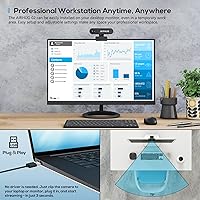
The AIRHUG 02 2K Webcam takes an unusual stance in a crowded market: it deliberately ships without a microphone, and that is entirely the point. For anyone who has ever worried about audio being picked up even when a camera lens is covered, removing the mic hardware altogether eliminates that risk at the source. The design is compact and foldable, making it easy to toss in a bag for hybrid work days. Setup takes seconds — plug in via USB and your OS recognizes it immediately, no driver downloads required. This is a solid mid-range option, not a studio-grade tool, but it performs reasonably well for daily video calls and light remote work needs. Ranked #106 in Webcams on Amazon, it clearly resonates with a specific, privacy-aware audience.

Features & Benefits

The sensor inside this mic-free webcam captures at 2K QHD resolution — that is 1440p — which is a genuine step up from standard 1080p when your platform supports it, though real-world sharpness still depends on lighting conditions. The 78-degree wide angle covers enough of a typical home office background without the barrel distortion you sometimes get from overly wide lenses. Auto-focus works quietly in the background, and the built-in low-light compensation does a reasonable job of reducing grain in dim environments, though it is not magic in complete darkness. The rotating clip gives you solid flexibility for monitor or laptop mounting, and a tripod socket means you can go hands-free if your setup calls for it.

Best For

This privacy webcam is a particularly strong fit for remote workers and students who already own a USB microphone or wear a headset during calls — the missing mic is simply not missed. It also makes genuine sense for anyone working in fields where audio confidentiality matters, such as healthcare consultations, legal intake calls, or financial advising from home. The lightweight build and foldable design appeal to minimalists who dislike bulky peripherals cluttering their desk. Budget-conscious buyers also have reason to consider it: you are not paying a premium for audio hardware you would disable anyway. If you need 60fps for gaming or content creation, look elsewhere — but for everyday video conferencing, this covers the basics reliably.

User Feedback

Buyers consistently mention easy plug-and-play setup as a highlight — no fumbling with drivers, no configuration headaches. Image quality in well-lit conditions draws positive remarks, though several users note color accuracy softens noticeably in low light compared to the marketing impression. The no-mic design clearly divides opinion: privacy-focused buyers appreciate it as a deliberate choice, while others who did not read the listing carefully feel caught off guard. The 5-foot cable length gets mixed signals — adequate for most desk setups, slightly short for others. A few reviews raise concerns about clip durability over time. Warranty and customer support experiences appear infrequently in feedback, suggesting neither notably positive nor negative patterns on that front.

Pros

  • Physical lens cover provides hardware-level privacy reassurance that no software setting can replicate.
  • Plug-and-play setup works instantly across Windows and macOS with zero driver installation required.
  • 2K QHD resolution delivers noticeably sharper video than standard 1080p webcams in well-lit conditions.
  • At just 3 ounces, this mic-free webcam is easy to carry daily between a home office and coworking space.
  • 78-degree wide-angle framing suits most desk distances without introducing distracting edge distortion.
  • Auto-focus handles typical single-person video calls quietly and without constant hunting or pulsing.
  • Broad compatibility with Zoom, Teams, Google Meet, and Skype means no platform-specific headaches.
  • Tripod socket and 360-degree rotating clip allow flexible positioning beyond standard monitor mounting.
  • For buyers with a separate microphone, the price point reflects good value for the resolution on offer.

Cons

  • Color accuracy softens noticeably in dim or backlit environments, falling short of the marketing impression.
  • The 5-foot cable is too short for desktop towers positioned on the floor or complex routed setups.
  • Mounting clip hinge has shown durability concerns for users who reposition the camera frequently over months.
  • No manual focus override exists, which frustrates users in high-contrast background environments.
  • Chromebook and Linux compatibility is undocumented and inconsistent based on user reports.
  • The lens cover sliding mechanism feels stiff on some units and shows cosmetic wear with repeated use.
  • Buyers who do not read the listing carefully may be caught off guard by the missing microphone after purchase.
  • No carry case or protective pouch is included despite the portability-focused positioning of the product.

Ratings

The AIRHUG 02 2K Webcam has been evaluated by our AI rating system after processing verified buyer reviews from multiple global markets, with spam, bot-generated, and incentivized submissions actively filtered out. Scores reflect the honest consensus of real users — privacy-focused professionals, remote workers, and students — who put this mic-free webcam through daily use. Both the areas where it genuinely delivers and the friction points that frustrated buyers are transparently captured below.

Image Quality
74%
26%
In a well-lit room, this privacy webcam produces noticeably sharper video than most 1080p alternatives at a similar price. Remote workers on Zoom calls frequently noted that faces and backgrounds rendered with solid detail during daytime hours, making it a reliable choice for professional video meetings.
Color accuracy drops off in dim or backlit conditions, and the 2K label can feel optimistic when the output is compared side-by-side with premium webcams at the same resolution. Low-light performance is acceptable but not impressive — grain suppression helps, yet a heavily shadowed home office will still show it.
Privacy Design
93%
The deliberate absence of a microphone is the single most praised feature among target buyers. Users in healthcare, legal, and financial sectors specifically called out the peace of mind it brings — no audio hardware means no passive audio capture risk, even if the lens cover is forgotten.
A small but vocal group of buyers discovered the no-mic design only after purchase, having missed the product description. For anyone who expects a webcam to handle audio as well, this is a dealbreaker — the design choice is intentional but requires buyers to read carefully before purchasing.
Ease of Setup
91%
Plug-and-play functionality works exactly as described across Windows and macOS. Multiple buyers mentioned that it was recognized instantly by Zoom, Teams, and Google Meet with zero driver installation, which is especially valued in workplace environments where IT restrictions limit software installs.
A handful of users on older Windows 7 machines or certain Linux distributions reported the camera not being recognized immediately, requiring a USB port swap or system restart. These cases appear to be edge scenarios rather than a widespread issue, but they do exist.
Value for Money
82%
18%
For buyers who already own a dedicated USB microphone or headset, paying for integrated audio they would never use makes little sense. This mic-free webcam prices out notably lower than comparable 2K options with built-in mics, making it a genuinely smart spend for the right type of user.
Buyers comparing it purely on image quality against similarly priced webcams with microphones may feel the value proposition is thinner. If you do not specifically need the no-mic privacy angle, there are competing options at the same price bracket that offer slightly better low-light output.
Build Quality
67%
33%
The compact, foldable housing feels reasonably solid for its weight class at 3 ounces. Most users found the clip sturdy enough for monitor mounting and reported no wobble during typical typing or desk movement, which is important when you want your framing to stay consistent during calls.
Long-term clip durability is a recurring concern in reviews, with some users noting that the mounting hinge loosened after several months of daily folding and repositioning. The plastic housing, while lightweight, does not inspire premium confidence, and a few buyers reported minor flex when applying moderate pressure.
Low-Light Performance
61%
39%
The built-in noise suppression algorithm does make a noticeable effort to reduce grain in dim rooms, and for users with modest ambient lighting — a desk lamp or a window nearby — the compensation works well enough for video calls without needing a dedicated ring light.
In genuinely dark conditions, the smart light adjustment reaches its limit and image quality degrades meaningfully. Buyers expecting usable video in a dark room without supplementary lighting were consistently disappointed, and this is one of the clearest gaps between the marketing impression and real-world performance.
Wide-Angle Coverage
79%
21%
The 78-degree field of view is well-matched to standard home office desk distances. Users sitting roughly an arm's length from their monitor found the framing natural — enough background context without making the speaker look disproportionately small or the room uncomfortably exposed.
At very close distances, some users noticed mild edge softness, though not the heavy barrel distortion common on wider lenses. Those using it for group shots — a small team huddled around a single screen — occasionally found the angle slightly too narrow to comfortably include everyone.
Auto-Focus Accuracy
76%
24%
Auto-focus handles the typical use case — one person sitting at a fixed distance from the camera — with quiet competence. Most buyers reported no hunting or pulsing during video calls, and transitions when leaning forward or back resolved quickly without the jarring refocusing some cheaper webcams exhibit.
In mixed-lighting environments or when the background has strong contrasting elements, auto-focus occasionally locked onto the background rather than the subject. It is not a frequent occurrence, but it happens enough that a few users specifically requested a manual focus override that does not currently exist.
Cable Length & Management
63%
37%
The 5-foot USB cable covers the majority of standard desk setups, particularly where the tower or laptop sits within arm's reach. Users with a clean desk aesthetic appreciated that the cable is not so long it creates clutter or tangles around other peripherals on a tidy workstation.
For users with a desktop PC positioned on the floor, or anyone routing the cable through a monitor arm setup, 5 feet falls short. This is one of the more common complaints in one-star and two-star reviews, suggesting it is a real friction point rather than an isolated gripe.
Compatibility
88%
Broad OS support from Windows 7 through 11 and macOS means this mic-free webcam works across nearly every setup without needing to check system requirements. It also plays well with every major conferencing platform — Zoom, Teams, Google Meet, Skype — which matters when you are switching between clients or employers.
Chromebook and Linux compatibility is not officially listed, and while some users have reported success, others have not. Anyone relying on a non-Windows or non-Mac environment should confirm compatibility before committing, as the support documentation does not clearly address these platforms.
Portability
86%
At 3 ounces with a foldable body, this privacy webcam is one of the lighter options in its resolution class. Hybrid workers who carry it between a home office and a coworking space mentioned it barely registers in a laptop bag, which is a genuine convenience for anyone tired of lugging equipment.
The foldable design, while compact, is not particularly pocket-friendly in a traditional sense — it still requires a small pouch or a dedicated compartment in a bag to avoid scratching the lens cover. A carry case or pouch is not included, which feels like an oversight at this portability-focused positioning.
Privacy Cover Usability
84%
The physical lens cover is a small but meaningful addition for users who want a hardware-level guarantee that the camera is off — no software trust required. Several buyers specifically mentioned using it as a secondary reassurance alongside disabling the camera in their OS settings during sensitive home conversations.
The sliding mechanism on the cover feels slightly stiff on some units, and a few users noted that repeated sliding caused minor cosmetic wear on the cover track over time. It functions correctly, but the tactile quality does not match the confidence the feature itself is designed to provide.
Mounting Flexibility
77%
23%
The 360-degree rotating clip handles most standard monitor thicknesses and laptop lids without slipping, and the tripod socket adds meaningful flexibility for users who want a more cinematic or elevated camera angle. Content creators doing light recording found the multi-position mounting genuinely useful for experimenting with shot composition.
The clip's grip can feel inconsistent on very thin or very thick monitor bezels — modern borderless monitors in particular can cause the camera to tilt slightly under its own weight without careful positioning. A more adjustable tension mechanism would have made this a stronger all-around mounting solution.

Suitable for:

The AIRHUG 02 2K Webcam is built for a specific type of buyer, and for that buyer it makes a lot of sense. If you already own a USB microphone or use a headset for calls, the missing mic is simply a non-issue — you are not losing anything you were going to use. Remote professionals in fields where audio confidentiality genuinely matters, such as telehealth consultations, legal intake interviews, or financial advising from a home office, will find the hardware-level audio removal a meaningful reassurance rather than a gimmick. Students on a tighter budget who want sharper video than a built-in laptop camera delivers, without paying a premium for audio hardware bundled into competing models, are also well-served here. The compact, foldable build and instant plug-and-play recognition make it a practical choice for hybrid workers who carry equipment between locations and cannot afford setup friction when hopping between different machines.

Not suitable for:

If you are shopping for an all-in-one solution that handles both video and audio out of the box, the AIRHUG 02 2K Webcam will leave you short — this is not a limitation to work around, it is the core design, and no adapter or software fix will add a microphone that was never there. Live streamers and content creators who need 60 frames per second for smooth gameplay capture or fast-moving subject recording will find the 30fps ceiling a hard constraint. Anyone relying solely on ambient lighting in a dark room should also temper expectations, because while the low-light compensation helps at the margins, it does not perform like a webcam with a larger sensor or wider aperture in genuinely dim conditions. Users with desktop towers positioned on the floor or complex cable routing setups may find the 5-foot USB cable consistently falls short. Finally, buyers on Linux or ChromeOS should verify compatibility independently before purchasing, as official support documentation does not clearly cover those environments.

Specifications

  • Resolution: Captures video at 2K QHD (1440p), one step above standard 1080p, using a 5-megapixel CMOS image sensor.
  • Frame Rate: Records and streams at a fixed 30 frames per second across all supported resolutions.
  • Sensor: Uses a 1/4-inch CMOS sensor with a 5-megapixel output for balanced color and detail in typical lighting.
  • Field of View: 78-degree wide-angle lens covers a broad desk-distance frame without significant barrel distortion at the edges.
  • Focus System: Auto-focus adjusts continuously to maintain sharpness as the subject moves closer or further from the lens.
  • Low-Light Mode: Built-in smart light adjustment algorithm actively suppresses image noise in dim or backlit environments.
  • Microphone: No microphone is included; this is an intentional hardware decision to eliminate passive audio capture risk.
  • Privacy Cover: A physical sliding lens cover is built into the housing, providing a hardware-level block when the camera is not in use.
  • Connectivity: Connects via USB and is compatible with both USB 2.0 and USB 3.0 ports.
  • Setup: Fully plug-and-play with no drivers or software installation required on any supported operating system.
  • OS Support: Compatible with Windows 7, 8, 10, and 11, as well as macOS; Linux and ChromeOS are not officially listed.
  • Cable Length: Comes with a permanently attached 5-foot (approximately 1.5-meter) USB cable.
  • Mounting: Includes a universal clip with a 360-degree rotating axis that fits monitor bezels, laptop lids, and flat surfaces.
  • Tripod Mount: Features a standard tripod socket, allowing use with any compatible camera tripod or flexible arm mount.
  • Dimensions: Measures 7.11 x 4.83 x 3.81 inches in its unfolded, mounted configuration.
  • Weight: Weighs 3 ounces, making it one of the lighter options available in the 2K webcam category.
  • Build: Constructed from lightweight plastic with a foldable hinge design intended for portability and compact storage.
  • Platform Support: Works with Zoom, Microsoft Teams, Google Meet, Skype, OBS, and most other major conferencing and streaming platforms.
  • Model Number: Official model identifier is AIRHUG 02, released under the AIRHUG brand in March 2022.

Related Reviews
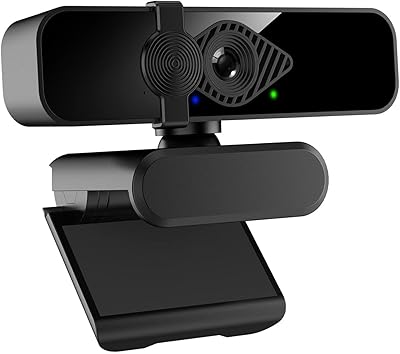
Dobuhont D90-2K Webcam
75%
83%
Image Clarity
61%
Low-Light Performance
68%
Microphone Quality
59%
Build Quality
78%
Privacy Cover
More
PixelForge 2K Webcam
76%
83%
Image Quality
88%
Built-In Ring Light
71%
Autofocus Performance
67%
Microphone Quality
91%
Privacy Cover
More
XOCLON 2K Webcam
XOCLON 2K Webcam
86%
89%
Video Quality
91%
Audio Performance
96%
Ease of Setup
85%
Low-Light Performance
87%
Field of View
More
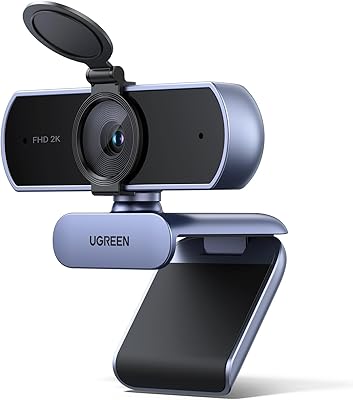
UGREEN 2K Webcam
UGREEN 2K Webcam
86%
91%
Video Clarity
85%
Autofocus Accuracy
88%
Audio Quality
84%
Build Quality
93%
Ease of Setup
More
VIZOLINK 2K Webcam W4DS
84%
88%
Video Quality
85%
Audio Performance (Microphone)
91%
Ease of Setup
75%
Field of View
80%
Low-Light Performance
More
NearStream V02AF
NearStream V02AF
80%
83%
Image Clarity
81%
Autofocus Performance
67%
Microphone Quality
88%
Adjustable Field of View
71%
NearSync Software Usability
More
Hrayzan 2K Webcam W4LS
85%
92%
Video Quality
89%
Ease of Setup
86%
Lighting Performance
78%
Microphone Quality
84%
Build Quality
More
ToLuLu 2K Streaming Webcam
83%
89%
Video Quality
84%
Microphone Performance
93%
Ease of Setup
85%
Lighting Functionality
78%
Build Quality
More
NUROUM V11 2K Webcam
88%
92%
Video Quality
89%
Audio Quality
94%
Ease of Use
96%
Setup & Installation
78%
Low-Light Performance
More
Angetube 863Plus
Angetube 863Plus
74%
83%
Image Quality
78%
Built-in Ring Light
71%
Remote Control Usability
62%
Microphone Quality
58%
Zoom Performance
More

FAQ

Correct — there is no microphone of any kind in the hardware. This is a deliberate design choice, not an oversight. If you need audio for your calls, you will need a separate USB microphone or a headset with its own mic.

Yes, it connects as a standard USB video device. Both Zoom and Teams detect it automatically as soon as you plug it in, with no drivers to install beforehand. Just select it as your camera source in the video settings of whichever app you are using.

The sensor supports 2K QHD output at 1440p, which is a genuine resolution above 1080p. That said, how sharp the image looks in practice depends on your lighting setup and whether your conferencing platform streams at full resolution — many platforms cap or compress video on their end regardless of your camera's capability.

It is a small physical slider built into the front of the camera housing. You slide it across to cover the lens completely when you are not using it. No software is involved — the lens is physically blocked, which is the point for privacy-conscious users.

Many users do exactly that with standard USB 2.0 or 3.0 extension cables and report no issues with image quality or recognition. Just make sure you use an active extension cable if you are going beyond about 10 feet total, as passive cables can cause signal degradation at longer runs.

It manages moderate low-light conditions reasonably well thanks to its noise-suppression processing, but it is not a low-light specialist. If your room has no natural light and only weak overhead lighting, you will likely see some softness and grain. A small desk lamp or ring light makes a noticeable difference.

It fits most modern monitors, but very thin bezels can cause a slight tilt under the camera's weight. If your monitor has an unusually slim frame, it is worth checking user photos in reviews before purchasing. The tripod socket is a solid alternative if the clip does not grip well on your specific screen.

Yes, macOS is officially supported and the camera is recognized as a plug-and-play device without any additional software. It works with FaceTime, Zoom, and most other Mac-compatible video applications out of the box.

It works for light streaming through OBS or similar software, but the 30fps cap is worth knowing about upfront. If your content involves fast motion or gaming, 30fps may look less fluid than you want. For talking-head streams, podcasts, or low-motion content, it performs reliably at its price point.

The AIRHUG 02 launched in March 2022 and has accumulated enough verified buyer reviews to reach the top 150 in the Amazon Webcams category, which suggests consistent sales over time rather than a single spike. The brand is a smaller manufacturer but has a visible customer support presence based on review response patterns.