Adesso Cybertrack H5 1080p Autofocus Webcam
Adesso Cybertrack H5 1080p Autofocus Webcam — image 1
Adesso Cybertrack H5 1080p Autofocus Webcam — image 2
Adesso Cybertrack H5 1080p Autofocus Webcam — image 3
Adesso Cybertrack H5 1080p Autofocus Webcam — image 4
Adesso Cybertrack H5 1080p Autofocus Webcam — image 5
Adesso Cybertrack H5 1080p Autofocus Webcam — image 6
Adesso Cybertrack H5 1080p Autofocus Webcam — image 7
Adesso Cybertrack H5 1080p Autofocus Webcam — image 8
Adesso Cybertrack H5 1080p Autofocus Webcam — image 9
77%
23%

Overview

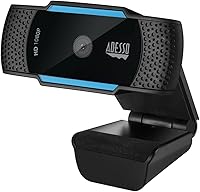
The Adesso Cybertrack H5 1080p Autofocus Webcam is Adesso's answer to a crowded budget webcam market, and it holds its own better than you might expect from a brand that rarely tops anyone's shopping list. Adesso is not a household name in peripherals, but that anonymity often means you get more hardware for your money. This USB webcam connects instantly — no driver installation, no fuss — and works across both Windows and Mac. What makes it stand out at this price point is the inclusion of a physical privacy shutter and a tripod-ready clip, two features that many similarly priced competitors quietly omit. Think of it as a dependable daily driver, not a studio tool.

Features & Benefits

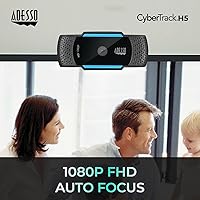
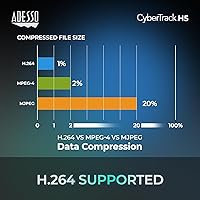
The autofocus capability on the Cybertrack H5 is one of the reasons it earns a real look. Fixed-focus webcams are fine when you sit perfectly still, but lean forward to adjust your screen or gesture mid-conversation and the image blurs. The autofocus here adjusts quickly and stays sharp without any manual intervention. The H.264 video compression also keeps file sizes and bandwidth demands manageable, which matters on slower connections. The dual built-in microphones pick up your voice clearly in a quiet room. They won't replace a dedicated USB microphone, but for calls and online classes, they get the job done without adding more cables to your desk.

Best For

This autofocus webcam makes the most sense for people who spend a chunk of their workday on video calls and are tired of the washed-out, blurry image their laptop's built-in camera produces. Students taking online classes get a meaningful quality upgrade without spending a lot. If your home office lighting isn't consistent — a window behind you in the morning, a lamp shift at night — the autofocus helps compensate for those changes. Privacy-minded users will appreciate the physical lens shutter over software workarounds. And because the whole unit weighs just 3.5 ounces, it slips into a bag easily for anyone working across multiple spaces or traveling frequently.

User Feedback

Buyers who've used this USB webcam consistently land around 4.3 stars, and the pattern in their feedback is pretty telling. The most common thread is straightforward: people plug it in, it works, and their video calls look noticeably better than before. That's enough for most. Where the mood shifts slightly is around the built-in microphone quality — users who expected crisp, broadcast-worthy audio came away underwhelmed. It's functional, not impressive. Low-light performance also draws some criticism; the image holds up reasonably well in average indoor conditions but gets grainy in dim rooms. A few buyers noted the build feels lightweight, which may concern those expecting a heavier, sturdier feel for long-term use.

Pros

  • Plug-and-play USB setup works instantly on both Windows and Mac without driver installation.
  • Autofocus keeps the image sharp even when you shift or lean forward during calls.
  • 1080p resolution is a noticeable step up from most built-in laptop cameras.
  • The physical privacy shutter closes the lens mechanically, with no software dependency.
  • At 3.5 ounces, the Cybertrack H5 is light enough to pack and travel with easily.
  • H.264 compression keeps video quality solid without putting heavy strain on your internet connection.
  • Tripod-ready clip offers mounting flexibility beyond just balancing on a monitor edge.
  • Dual built-in microphones handle everyday call audio without requiring extra hardware or cables.
  • Broad platform compatibility makes it a reliable choice across most standard home and office setups.

Cons

  • Built-in microphone audio is adequate for calls but underwhelming for recording or content creation.
  • Low-light performance drops off noticeably in dim rooms or poorly lit home workspaces.
  • Adesso's brand support and long-term firmware reliability are less proven than major-brand rivals.
  • The lightweight plastic construction may feel less durable to buyers used to sturdier peripherals.
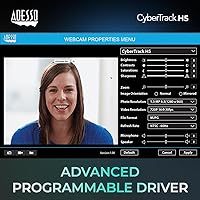
  • No companion software or manual controls for users who want to fine-tune autofocus behavior.
  • Field of view can feel narrow in larger rooms or for users who move around frequently.
  • Microphone picks up background noise more readily in open-plan or shared living environments.
  • The monitor clip can feel less secure on thicker bezels or non-standard screen edges.

Ratings

Our AI-generated scores for the Adesso Cybertrack H5 1080p Autofocus Webcam reflect an analysis of verified buyer reviews worldwide, with spam, bot activity, and incentivized feedback actively filtered out before any score was assigned. The ratings below capture both the genuine strengths that make this USB webcam a popular choice for home office and remote work setups, and the real shortcomings that a meaningful share of buyers flagged. Every category is scored honestly — no inflated numbers, no glossed-over pain points.

Image Quality
79%
21%
Compared to a typical built-in laptop camera, the step up to 1080p is immediately visible — faces are sharper, text in the background reads more clearly, and overall color looks more accurate. Remote workers consistently reported that colleagues noticed and commented positively on their video quality after switching.
The image can look flat or overexposed under strong direct light, and color reproduction is decent rather than accurate — saturated reds and shadows in particular tend to wash out. Users doing product demos or anything visually detail-oriented found these limitations apparent fairly quickly.
Autofocus Performance
74%
26%
For everyday call use, the autofocus handles natural movement reliably — leaning toward your screen to check a document or gesturing during a presentation triggers a smooth refocus rather than a prolonged blur. Most remote workers found it managed their typical desk movements without notable frustration.
Autofocus hunting — where the camera briefly cycles in and out of focus searching for a lock — annoyed some users, particularly in low-contrast or dim environments. It is not as quick or confident as autofocus systems on higher-priced webcams, and a few users noted it struggled when they moved suddenly.
Audio Quality
57%
43%
In a quiet home office with minimal ambient noise, the dual microphones make your voice intelligible enough for a standard call. For quick meetings where you have no other audio option available, they function as a reasonable fallback that spares you from digging out a headset.
Buyers who switched from a headset or a dedicated USB microphone found the audio sounded thin, distant, and prone to catching keyboard clicks, fan hum, and room echo. In open-plan or shared living environments, voice clarity degraded noticeably, and multiple users identified the microphone as their single biggest disappointment.
Low-Light Performance
48%
52%
In a well-lit room with overhead lighting or a desk lamp pointed at the subject, the Cybertrack H5 produces a reasonably clean image without obvious grain or color cast. Under controlled lighting conditions, most buyers found the output entirely acceptable for calls and basic video use.
In dim rooms, evening settings, or any situation with a backlit window, image quality degraded sharply into grainy, muddy output that multiple buyers described as nearly unusable. This is one of the most consistent criticisms across the review pool, and no software adjustment was found to fully compensate for the sensor's limited light sensitivity.
Value for Money
81%
19%
At this price tier, bundling autofocus, a physical privacy shutter, and a tripod-ready clip into a single package represents solid value relative to what comparably priced competitors typically offer. Students and budget-conscious remote workers in particular found the feature-to-cost ratio genuinely hard to beat in this segment.
The value calculation does shift when buyers factor in the underwhelming microphone performance, which can push users toward purchasing a separate audio solution and quietly eroding the initial cost advantage. If audio quality beyond basic call use matters to you, the total spend can climb higher than expected.
Ease of Setup
93%
Plug-and-play functionality worked without exception for the vast majority of buyers across both Windows and Mac setups. Users configuring a home office workstation or setting up a second desk for travel appreciated that there was no driver download, no installation wizard, and no compatibility issues to navigate.
A small number of users on older systems or less common operating environments reported the camera was not recognized immediately. There is also no dedicated companion app for adjusting exposure or white balance manually, which frustrated users who wanted finer control than their OS-level camera settings provided.
Build Quality
62%
38%
The lightweight plastic housing makes the webcam easy to reposition and carry between desks without adding bulk to a bag. For users who clip it to a fixed monitor and leave it there, the construction holds up adequately under normal everyday desk conditions.
The all-plastic build feels noticeably insubstantial compared to webcams at higher price points, and several buyers expressed uncertainty about how it would hold up after repeated travel or frequent handling. The monitor clip can also shift on thicker bezels, gradually tilting the camera angle downward mid-call.
Privacy Features
88%
The physical privacy shutter was a standout for buyers who wanted a definitive, hardware-level way to block camera access without relying on any software toggle. Several users mentioned it was the deciding factor over comparable webcams that only offered software-based camera disabling.
A handful of buyers noted the shutter mechanism felt slightly loose after extended use, raising minor concerns about whether it would maintain a fully opaque seal over time. There is no LED activity indicator light to complement the shutter, leaving users without a secondary visual confirmation that the camera is inactive.
Compatibility
91%
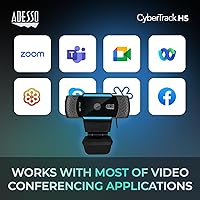
The USB plug-and-play setup worked reliably across a wide range of Windows and Mac configurations, including older OS versions and both desktop and laptop environments. Zoom, Teams, Google Meet, and OBS all recognized the webcam automatically without any manual configuration required.
Official platform support is limited to Windows and Mac, leaving Linux and Chromebook users without any guarantee of a smooth experience or vendor support. A small share of buyers also reported intermittent connection drops when using older USB 2.0 ports during extended sessions.
Mounting Versatility
77%
23%
The tripod-ready clip gave buyers meaningfully more positioning flexibility than a standard monitor-clip-only webcam. Users with standing desks or unconventional monitor setups particularly appreciated the ability to mount it on a desk stand and control the camera height and angle independently.
The clip was reported as unreliable on monitors with thick or rounded bezels, with several buyers noting the camera gradually drifted downward during longer sessions. Without a more adjustable mounting mechanism or a wider clip range, the positioning options feel functional but limited compared to more purpose-built alternatives.
Portability
86%
At 3.5 oz, the webcam slips into a laptop bag without any meaningful weight or space penalty, making it a practical choice for hybrid workers who move between a home setup and a co-working space or office. The small footprint also means it does not crowd a compact desk.
The USB cable is fixed and non-detachable, meaning any cable damage requires replacing the entire unit rather than just swapping out a cable. Buyers who travel frequently noted the hardwired cable adds minor but recurring cable management friction when packing and unpacking on the go.
Bandwidth Efficiency
83%
The H.264 compression noticeably reduced bandwidth load for buyers on slower home internet connections, letting them maintain stable 1080p output without the choppy frames that higher-bitrate cameras caused on the same connection. Users in shared-bandwidth apartment setups found this particularly valuable during peak hours.
At maximum resolution, the webcam occasionally dropped to a lower frame rate during sustained recording sessions, suggesting on-camera processing is not fully consistent under prolonged load. This was rarely an issue during live calls but became apparent to users who played back their recorded footage afterward.

Suitable for:

The Adesso Cybertrack H5 1080p Autofocus Webcam is a strong fit for remote workers and students who want a meaningful upgrade from their laptop's built-in camera without committing to a high-end setup. If your days are filled with video calls and meetings, the autofocus alone makes a real difference — you stop looking blurry every time you lean in to check your notes or shift in your chair. Home office users who deal with changing natural light throughout the day will find it adjusts far better than a fixed-focus alternative would. Students on a tight budget get solid 1080p clarity that makes them look polished in class presentations without a steep investment. The physical privacy shutter is a genuine plus for anyone who values tangible security over trusting a software toggle. And at just 3.5 ounces, it is portable enough for anyone juggling multiple workspaces or working on the move.

Not suitable for:

The Adesso Cybertrack H5 1080p Autofocus Webcam is not the right choice for content creators, streamers, or anyone for whom audio quality is non-negotiable. The built-in microphones handle standard call conversations adequately but will disappoint anyone recording voiceovers, producing video content, or running a podcast — a dedicated USB microphone produces a noticeably better result. Low-light performance is also a real limitation; if your workspace lacks proper lighting, the image degrades and no amount of software adjustment will fully compensate. Professional streamers and videographers will quickly find the color accuracy and image depth insufficient for anything broadcast-facing. Anyone expecting the level of sharpness, dynamic range, or control that prosumer webcams offer at a higher price point will find this USB webcam falls short of those standards.

Specifications

  • Video Resolution: Captures video at full HD 1080p (1920 x 1080 pixels) for clear, detailed image output during calls and recordings.
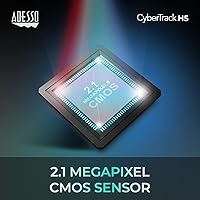
  • Image Sensor: Uses a 2.1 MP CMOS sensor to capture and convert light into digital video and image data.
  • Focus Type: Features continuous autofocus that automatically adjusts as subjects move closer to or farther from the lens.
  • Video Compression: Encodes video using H.264 compression, which reduces bandwidth consumption while maintaining acceptable streaming quality.
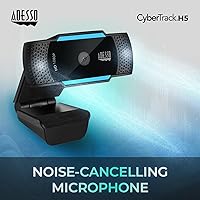
  • Microphone: Includes dual built-in noise-cancelling microphones intended to reduce ambient background noise during voice calls.
  • Connectivity: Connects to a host computer via a standard USB cable and draws power directly from the USB port.
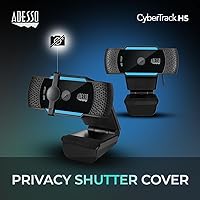
  • Privacy Shutter: Fitted with a physical slide-to-close lens cover that mechanically blocks the sensor when the camera is not in use.
  • Tripod Mount: The monitor clip is tripod-ready, allowing the webcam to be mounted on a standard tripod or desk stand as an alternative to screen mounting.
  • Item Weight: Weighs 3.5 oz, making it light enough for portable use and easy repositioning between different workspaces.
  • Video Format: Supports MP4 and MJPG video capture formats for broad compatibility with recording and conferencing software.
  • Max Aperture: Has a maximum aperture of f/2, permitting a moderate amount of light to reach the sensor under standard indoor conditions.
  • Platform Support: Compatible with Windows PCs and Mac computers using built-in USB webcam drivers without requiring additional software installation.
  • Color: Available in a matte black finish suited to most monitor and desk environments.
  • Brand: Manufactured by Adesso, a peripheral accessories company known for keyboards, mice, and input devices.
  • Model: Sold under the designation Cybertrack H5, part of Adesso's tiered Cybertrack webcam product line.

Related Reviews
Adesso CyberTrack H3

73%
76%
Video Clarity (Daytime)
51%
Low-Light Performance
54%
Built-in Microphone
72%
Manual Focus Control
88%
Setup & Ease of Use
More
HuddleCamHD HC-WEBCAM-94
77%
83%
Video Quality (Daylight)
51%
Low-Light Performance
91%
Field of View
94%
Ease of Setup
57%
Audio Quality
More
Akyta 1080P Webcam
Akyta 1080P Webcam
82%
88%
Video Quality
85%
Audio Quality
94%
Ease of Setup
82%
Field of View
80%
Noise Reduction
More
ZIQIAN 1080P USB-C Webcam
74%
78%
Daytime Image Quality
54%
Low-Light Performance
94%
Plug-and-Play Setup
61%
Microphone Quality
76%
Wide-Angle Lens Coverage
More
JETAKu XZC-920phro Webcam 1080P 60FPS
71%
83%
Video Smoothness at 60fps
71%
Image Clarity & Resolution
54%
Low-Light Performance
58%
Autofocus Reliability
66%
Microphone Quality
More
EMEET Nova 1080p Autofocus Webcam with Microphone
77%
78%
Image Quality
82%
Autofocus Performance
67%
Low-Light Performance
71%
Microphone Quality
93%
Ease of Setup
More
MTORED TWC-25 1080p Webcam
74%
74%
Video Quality
51%
Low-Light Performance
61%
Microphone Quality
93%
Ease of Setup
88%
Value for Money
More
NexiGo N60 1080P Webcam
74%
78%
Image Quality
93%
Setup & Ease of Use
67%
Microphone Performance
91%
Value for Money
88%
Privacy Cover
More
TOUCAN 1080P Webcam with Microphone
88%
89%
Video Quality
91%
Microphone Performance
95%
Ease of Use
88%
Field of View
93%
Privacy Protection
More
ISKOVI C28 1080P Webcam
79%
83%
Video Clarity
76%
Low-Light Performance
68%
Microphone Quality
94%
Ease of Setup
91%
Privacy Cover
More

FAQ

No driver installation is needed for most users. On both Windows and Mac, the system recognizes it automatically as a standard USB webcam the moment you plug it in. Just open your video app, select it as your camera, and you are ready to go within seconds.

For typical call use it handles movement well enough. Leaning forward, shifting in your seat, or gesturing naturally will trigger a refocus, and it catches up without much lag. It is not as instantaneous as a high-end camera, but it is a clear step above sitting blurry in a fixed-focus webcam all day.

For everyday video calls in a reasonably quiet room, the dual microphones get the job done. That said, if you are recording content, doing podcasts, or your workspace has meaningful background noise, a dedicated USB microphone will sound considerably better. Think of the built-in mics as a convenience rather than a core feature to depend on.

It is a physical cover that slides over the lens completely, not a software toggle. When it is closed, no app or background process can access the camera. For users who feel uneasy about webcams sitting uncovered on their desks, this is one of the more genuinely reassuring features on this webcam.

Yes, the clip is tripod-ready, so mounting it on a standard tripod or desktop stand is straightforward. This gives you more control over camera angle and height, which is handy if your monitor position is not ideal or you prefer the camera at a different eye level.

Honestly, not particularly well — though that is true of most webcams at this price range. In average indoor lighting it performs fine, but a dim room or strong backlight from a window will introduce noticeable grain. A simple desk lamp pointed at your face will improve the image more than any camera setting will.

Yes, it is compatible with all three, along with most other video conferencing platforms that support standard USB webcams. No special configuration is needed — once your operating system detects it, your call apps will list it as an available camera option automatically.

For most users the upgrade is quite noticeable. Built-in laptop cameras are often 720p at best with fixed focus and no noise reduction. The Adesso Cybertrack H5 1080p Autofocus Webcam delivers sharper resolution, active focus correction, and a cleaner overall image that colleagues and classmates on the other end will pick up on.

It can work for casual or entry-level streaming where image quality is not the primary concern. The 1080p output is decent for the price, but serious streamers who require accurate color reproduction, a wide field of view, or rock-solid frame consistency will want to budget for a webcam built specifically with streaming in mind.

It does feel light in hand, which some buyers initially read as fragile. In practice, most users report it holds up well with normal everyday desk use. As long as you are not being rough with it, there is no particular reason it should fail prematurely — just do not expect the reassuring heft of a premium peripheral.

Where to Buy