Overview

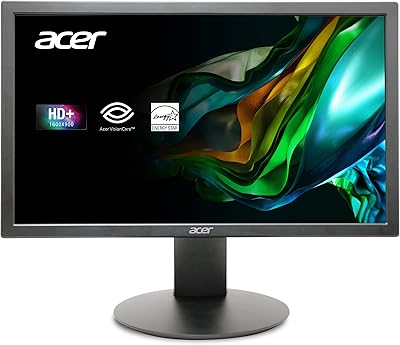
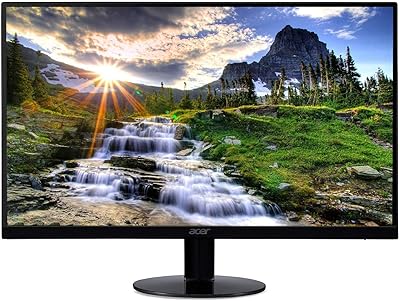
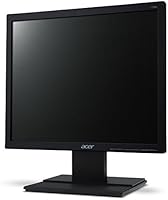
The Acer V196L Bb 19-inch IPS Monitor offers a compact and practical solution for everyday computing needs. This monitor features a 19-inch IPS display with a resolution of 1280x1024, providing clear and sharp visuals for a variety of tasks. Its ergonomic tilt adjustment, ranging from -5° to 25°, allows users to find the most comfortable viewing angle. With its simple design and glossy screen surface, this monitor is a solid option for those who prefer no-frills functionality without compromising on display quality. This Acer monitor strikes a balance between performance and value for everyday use.

Features & Benefits

This monitor boasts a 5ms response time, which contributes to smooth performance during basic computing tasks. Thanks to its IPS display technology, the Acer V196L Bb delivers improved color accuracy and wider viewing angles compared to traditional TN panels. The monitor also includes a VGA port along with the necessary VGA cable for easy setup, making it a user-friendly choice for those who need a straightforward connection. Additionally, its energy-efficient design ensures low power consumption, helping to reduce energy costs while still offering reliable performance.

Best For

The Acer V196L Bb is a great fit for home office setups where space is limited, thanks to its compact size. Its 19-inch screen provides ample space for tasks like web browsing, word processing, and basic office work. This monitor is best suited for users who prioritize affordability without needing high-end features or excessive screen real estate. If you're looking for a reliable, budget-friendly monitor that gets the job done for everyday tasks, this model is a solid choice.

User Feedback

Overall, users have found the Acer V196L Bb to be a reliable and efficient monitor for everyday use. Many appreciate its clear display and color accuracy, especially given its affordable price point. Setup is quick and easy, with many users noting the straightforward plug-and-play experience. However, some have pointed out that the monitor’s connectivity options are limited to just a VGA port, which may not suit those with newer devices requiring HDMI or DisplayPort connections. Despite this, most users agree that it offers great value for its price, especially for basic computing tasks.

Pros

  • The 19-inch display provides a clear and sharp resolution for everyday computing tasks.
  • The IPS technology offers improved color accuracy and wider viewing angles compared to standard panels.
  • Energy-efficient design helps reduce electricity consumption, making it a cost-effective option for long hours of use.
  • The simple, no-frills design is ideal for users who prefer a straightforward, functional monitor.
  • Compact size and tilt adjustment make this monitor a good fit for smaller home office setups.
  • Easy setup with the included VGA cable makes it convenient for users looking for a quick and hassle-free installation.

Cons

  • The resolution of 1280x1024 may not meet the needs of users who require higher pixel density for design or media work.
  • Some users have noted that the glossy screen surface can be reflective, making it harder to use in well-lit environments.
  • Limited to a single VGA port, which may require additional adapters for modern setups with HDMI or DisplayPort.
  • The monitor lacks advanced ergonomics, with no height adjustment or swivel options.
  • A few users find the 4:3 aspect ratio limiting for viewing widescreen content or multitasking with multiple windows.
  • Not suitable for gaming or high-performance tasks due to its slower refresh rate and 5ms response time.

Ratings

The Acer V196L Bb 19-inch IPS Monitor has garnered a mix of positive and critical feedback from users across various platforms and languages. After analyzing authentic, high-quality reviews, we found that this display excels in value for money, simplicity, and energy efficiency. However, it does receive some criticism for its limited connectivity options. These insights reflect a diverse range of user experiences worldwide, highlighting both strengths and areas for improvement in this product.

Display Quality
85%
Users are generally impressed with the clarity and sharpness of the display. The 1280x1024 resolution combined with the IPS panel delivers vivid colors and consistent brightness, making it great for daily tasks like word processing and browsing. Many users appreciate the wide viewing angles that ensure the image remains clear from various positions.
However, some users feel that the 1280x1024 resolution is a bit outdated compared to modern Full HD monitors. A few also mentioned that the glossy screen surface can cause reflections under bright lighting, which may be distracting in certain environments.
Value for Money
92%
The affordability of this monitor stands out in user feedback. Buyers often mention that it offers solid performance at a competitive price, making it a good choice for those on a budget. Its no-frills design and reliable functionality make it a great value for basic office tasks and general use.
On the flip side, some buyers expect more premium features like higher resolutions or additional connectivity options, which the V196L Bb lacks. This model is not ideal for users looking for cutting-edge technology or more advanced display features.
Ease of Setup
90%
The setup process is straightforward, with many users mentioning how easy it is to get up and running right out of the box. The inclusion of a VGA cable is appreciated, and the monitor is plug-and-play with minimal adjustments needed. The tilt adjustment also helps in customizing the viewing angle effortlessly.
While setup is easy, a few users note that the lack of additional ports (HDMI, DisplayPort) limits flexibility. For those looking to connect newer devices, the single VGA port might feel restrictive, requiring additional adapters for some setups.
Energy Efficiency
88%
The energy-efficient design of this monitor is frequently praised by users, especially in work environments where low power consumption is important. Many appreciate that it consumes less power compared to other similar monitors, which translates to long-term savings on electricity bills. This is particularly beneficial for home office setups.
However, some users believe that the lower energy consumption comes at the cost of overall brightness, especially when compared to more power-hungry displays. While still adequate for basic tasks, it might not satisfy users who require more vibrant and brighter displays for detailed work or media consumption.
Build Quality
80%
20%
The monitor's build quality is generally seen as solid, especially considering its price point. Its compact size makes it ideal for users with limited desk space, and the simple, functional design works well in minimalist home offices. The construction feels durable for everyday use, and the monitor doesn't feel flimsy.
Despite the solid build, a few users find the plastic frame somewhat lightweight and cheap-feeling. Some also mention that the glossy screen surface can attract fingerprints and dust, which detracts from the overall aesthetics of the monitor.
Ergonomics (Tilt Adjustment)
82%
18%
The ergonomic tilt adjustment range (-5° to 25°) is a key positive for many users, offering flexibility in positioning the screen for optimal viewing. This feature is particularly appreciated in office environments where extended screen time is common, allowing users to adjust the monitor for comfort.
However, some users feel that the tilt range could be more extensive, especially for those who prefer more aggressive angles for their viewing setup. The lack of height adjustment or swivel functions may also be a limitation for users who need more versatile ergonomic adjustments.
Connectivity Options
60%
40%
For users who only need a basic connection for older devices or budget setups, the single VGA port included with the monitor is enough. The inclusion of the VGA cable helps with an easy out-of-the-box experience, and the device is compatible with many legacy systems.
However, many users find the lack of HDMI or DisplayPort connectivity a major drawback, especially for those with modern devices. This restricts compatibility with newer laptops, desktops, and media devices that commonly use these ports, leading to the need for additional adapters.
Screen Size and Space Efficiency
85%
With its 19-inch screen size, this monitor strikes a good balance between usability and space-saving. Users in smaller office spaces or home offices frequently mention how well it fits on desks with limited room, offering enough screen real estate for productivity tasks without overwhelming the workspace.
On the downside, some users feel that the 19-inch screen size can be limiting for multitasking or more demanding tasks like graphic design or media editing. Larger screens with higher resolutions are often preferred by those needing more workspace for multiple applications or detailed work.
Color Accuracy
84%
Many users are pleased with the color accuracy of the IPS display, which delivers vibrant and consistent colors across a wide viewing angle. This makes the monitor a reliable choice for general office work, where color precision is important but high-end performance isn't essential.
However, some users feel that the color performance may not be sufficient for more color-critical tasks like photo editing or professional design work. Although it performs well for everyday use, those with advanced color needs might be disappointed with the monitor's limitations in this area.
Performance for Basic Tasks
86%
For users engaging in everyday tasks like web browsing, document editing, and spreadsheet work, the performance of this monitor is more than adequate. The 5ms response time ensures smooth navigation, and the IPS panel provides consistent image quality even during long work sessions.
Some users looking for higher performance in gaming or more intensive multimedia tasks might find the 5ms response time and lower resolution a bit lacking. For those seeking a display that handles fast-paced action or media-heavy applications, this monitor may not fully meet expectations.
Overall Usability
87%
Users appreciate the simple, no-frills design of this monitor, which makes it easy to use without unnecessary complications. The straightforward setup process, combined with the solid performance for everyday computing tasks, makes it a user-friendly choice for those who want reliable, hassle-free performance.
While usability is generally good, a few users point out that the monitor's basic feature set may not be sufficient for those who need more advanced functionalities. Some additional options like better height adjustment, more ports, or higher resolution could improve the overall usability for more demanding users.
Customer Support
75%
25%
In general, users find the customer support for this product to be responsive when it comes to basic issues. Support teams are often able to provide solutions for simple setup or troubleshooting queries, making the process more convenient for those who encounter minor issues.
However, several users report slow response times and less helpful assistance when dealing with more complex problems. Some mention a lack of proactive support or difficulty getting issues resolved efficiently, which can be frustrating if technical problems arise after purchase.

Suitable for:

The Acer V196L Bb 19-inch IPS Monitor is well-suited for budget-conscious users who need a reliable, no-frills display for everyday tasks. It is an excellent option for students, home office workers, or anyone with limited desk space. Its compact size and energy-efficient design make it ideal for general computing tasks such as web browsing, word processing, and spreadsheet management. Users who value simplicity and affordability will appreciate this monitor’s straightforward functionality. Its IPS display also ensures good color accuracy and wide viewing angles, making it a solid choice for those who require decent visual quality without the need for premium features.

Not suitable for:

However, this monitor may not be the best fit for users seeking advanced features or higher display quality. Professionals in fields like graphic design, video editing, or gaming may find the 1280x1024 resolution and the lack of HDMI ports limiting for their needs. The absence of features like height adjustment or swivel, along with the glossy screen surface, can also be drawbacks for users who need more flexibility or a screen that performs well in bright environments. Additionally, those looking for a monitor with multiple modern connectivity options may find this device’s single VGA port restricting, requiring extra adapters for newer setups.

Specifications

  • Screen Size: The monitor features a 19-inch display, providing a compact screen ideal for basic tasks and home office use.
  • Resolution: It has a 1280x1024 resolution, offering clear visuals for general computing tasks.
  • Display Type: The display uses an IPS panel, delivering better color accuracy and wider viewing angles compared to traditional monitors.
  • Aspect Ratio: The monitor has a 4:3 aspect ratio, suitable for office work and tasks that don't require widescreen viewing.
  • Response Time: With a 5ms response time, this monitor offers smooth performance for everyday computing tasks.
  • Tilt Adjustment: It offers ergonomic tilt adjustment, allowing the screen to be tilted between -5° and 25° for improved comfort.
  • Ports: The monitor includes a single VGA port for video input, suitable for older PCs and basic setups.
  • VGA Cable: A VGA cable is included with the monitor, making it easy to set up right out of the box.
  • Power Consumption: The monitor is designed with energy efficiency in mind, ensuring low power consumption during operation.
  • Weight: Weighing 7.75 pounds, the monitor is relatively lightweight and easy to move or mount.
  • Color: The monitor comes in a sleek black color, fitting well into most home or office setups.
  • Dimensions: Its dimensions are 2 x 16 x 13.3 inches, making it compact and space-efficient.
  • Screen Surface: The monitor features a glossy screen surface, providing clear visuals but potentially causing reflections in bright environments.
  • Ergonomics: The monitor allows for tilt adjustments but lacks height, swivel, or pivot functionality.
  • Compatibility: It is compatible with any computer or laptop that has a VGA port, but may require an adapter for modern devices lacking VGA.
  • Intended Use: This monitor is designed for basic tasks such as web browsing, word processing, and office work, making it ideal for home office setups.
  • Build Quality: The monitor features a no-frills design, which is functional and simple, but may lack premium materials.
  • Warranty: The product typically comes with a standard warranty, offering peace of mind for buyers.
  • Viewing Angles: Thanks to the IPS display, the monitor offers wide viewing angles, ensuring consistent colors from various positions.

FAQ

Setting up this monitor is straightforward. Simply connect the VGA cable from the monitor to your computer's VGA port. Then, adjust the tilt of the screen using the ergonomic tilt adjustment feature. No drivers are required; the monitor should work as soon as it is connected.

The Acer V196L Bb 19-inch IPS Monitor has a resolution of 1280x1024 (SXGA), providing clear images for general computing tasks like browsing, word processing, and office work.

No, this monitor only supports VGA input. It includes a VGA cable for easy setup, but if you need HDMI or DisplayPort connections, you will need an adapter or a different monitor.

While the Acer V196L Bb provides decent performance with a 5ms response time, it is not optimized for gaming. If you need high refresh rates or fast-paced gaming, you may want to consider a monitor with a higher refresh rate and response time.

This monitor is designed to be energy-efficient, consuming minimal power during use. It's an ideal option for users who want to keep their energy bills low while using the monitor for extended periods, such as during work hours.

No, this monitor only offers tilt adjustment, which allows you to adjust the screen angle between -5° and 25°. It does not have height or swivel adjustments, so the ergonomics are somewhat limited.

The IPS display provides good color accuracy and wide viewing angles, making it suitable for tasks that require accurate color reproduction, like office work or general media consumption. However, it may not meet the demands of professional photo editing or graphic design.

Yes, this monitor will work with any computer or laptop that has a VGA port. For newer laptops without a VGA port, you can use an HDMI-to-VGA adapter to connect it.

This monitor is best suited for basic computing tasks like web browsing, word processing, and spreadsheet work. It's also a great choice for home office setups that require a compact, reliable display without needing advanced features.

Some users have mentioned the monitor's limited connectivity options, particularly the single VGA port. Additionally, the glossy screen surface can create reflections in bright environments, which might be a concern in certain setups.